

Looking for strong wireless router at lowyat now.....any recommendation. ASUSmy
Budget rm250+-
Home Networking ASUS Malaysia Networking User & Technical Support, Managed by ASUS Malaysia Representative
Home Networking ASUS Malaysia Networking User & Technical Support, Managed by ASUS Malaysia Representative
|
|
 Jul 24 2013, 11:34 AM Jul 24 2013, 11:34 AM
Return to original view | Post
#1
|
 
Senior Member
5,697 posts Joined: Nov 2007 From: A Place Where God And Master Of TroubleMaker Exist   
|
Looking for strong wireless router at lowyat now.....any recommendation. ASUSmy
Budget rm250+- |
|
|
|
|
|
Jul 24 2013, 11:39 AM
Return to original view | Post
#2
|
|
Senior Member
5,697 posts Joined: Nov 2007 From: A Place Where God And Master Of TroubleMaker Exist
|
QUOTE(ASUSmy @ Jul 24 2013, 11:36 AM) If you are looking for better coverage area router you and have a look at RT-N12HP. Unifi supported? Thank you  I have a dsl-n12u just dead.....and the signal isn't good enough. |
|
|
Jul 24 2013, 11:57 AM
Return to original view | Post
#3
|
|
Senior Member
5,697 posts Joined: Nov 2007 From: A Place Where God And Master Of TroubleMaker Exist
|
QUOTE(ASUSmy @ Jul 24 2013, 11:54 AM) Hi herojack41, Ya, UNIFI supported. Thank you  so long the antenna zzzz...... so long the antenna zzzz...... |
|
|
Jan 24 2015, 12:47 PM
Return to original view | Post
#4
|
|
Senior Member
5,697 posts Joined: Nov 2007 From: A Place Where God And Master Of TroubleMaker Exist
|
asus still got sell the RP-n53?
|
|
|
Oct 11 2015, 12:39 AM
Return to original view | Post
#5
|
|
Senior Member
5,697 posts Joined: Nov 2007 From: A Place Where God And Master Of TroubleMaker Exist
|
wonder did asus malaysia bring in RT-AC1200
|
|
|
Oct 11 2015, 03:56 PM
Return to original view | Post
#6
|
|
Senior Member
5,697 posts Joined: Nov 2007 From: A Place Where God And Master Of TroubleMaker Exist
|
QUOTE(Khalid21 @ Oct 11 2015, 03:27 PM) the 1 im looking is RT-AC1200not RTAC1200HP the RT-AC1200 does not have that huge antenna and it got 4 antenna 2 for 2.4ghz and 2 for 5ghz |
|
|
|
|
|
Oct 11 2015, 06:00 PM
Return to original view | Post
#7
|
|
Senior Member
5,697 posts Joined: Nov 2007 From: A Place Where God And Master Of TroubleMaker Exist
|
QUOTE(voncrane @ Oct 11 2015, 05:56 PM) At least visit the link first.. The model displayed on Asus's website sports internal antennas. Im not looking for internal antenna at all.I have several tab on going replying about asus router. This post has been edited by herojack41: Oct 11 2015, 06:01 PM |
|
|
Oct 12 2015, 12:03 PM
Return to original view | Post
#8
|
|
Senior Member
5,697 posts Joined: Nov 2007 From: A Place Where God And Master Of TroubleMaker Exist
|
QUOTE(Crusnik04 @ Oct 12 2015, 11:46 AM) Hi i will get my asus rt-ac3200 later for my unifi with hypptv..what i need to do beside the unifi id and password for that router?thank  where u getting it? where u getting it? |
|
|
Oct 12 2015, 01:54 PM
Return to original view | Post
#9
|
|
Senior Member
5,697 posts Joined: Nov 2007 From: A Place Where God And Master Of TroubleMaker Exist
|
QUOTE(Crusnik04 @ Oct 12 2015, 01:39 PM) get from edisonewd..seller at this forum Berapa dia charge your wallet |
|
|
Oct 15 2015, 09:21 PM
Return to original view | Post
#10
|
|
Senior Member
5,697 posts Joined: Nov 2007 From: A Place Where God And Master Of TroubleMaker Exist
|
Bought the rt1200hp and in the menu saw the load balancing feature, wonder how is the ratio works becoz it automatically choose 3:1
Anybody use the load balancing feature be4? |
|
|
Oct 16 2015, 04:36 PM
Return to original view | Post
#11
|
|
Senior Member
5,697 posts Joined: Nov 2007 From: A Place Where God And Master Of TroubleMaker Exist
|
QUOTE(ASUSmy @ Oct 16 2015, 10:18 AM) Hi herojack41, If downloading file from web It is same as the ratio in mathematics, 3 will be the primary WAN and the router will use more bandwidth from it. 1 will be for the secondary WAN, it will use less bandwidth. Thank you Lets say 100mb....i assume from secondary wan will be around 20-20mb?  |
|
|
Oct 16 2015, 11:00 PM
Return to original view | Post
#12
|
|
Senior Member
5,697 posts Joined: Nov 2007 From: A Place Where God And Master Of TroubleMaker Exist
|
just did the ipv6 setting
in ipv6 testing it still got problem 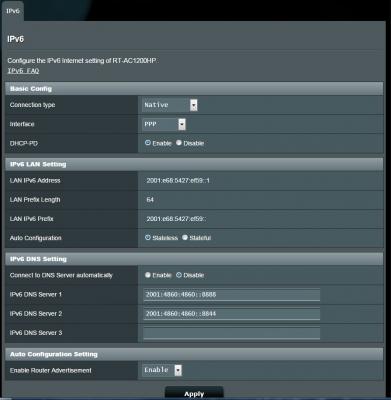
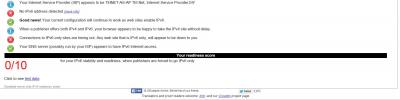
|
|
|
Oct 17 2015, 02:08 AM
Return to original view | Post
#13
|
|
Senior Member
5,697 posts Joined: Nov 2007 From: A Place Where God And Master Of TroubleMaker Exist
|
QUOTE(raynman @ Oct 17 2015, 01:23 AM) Here is my working IPv6 settings for my RT-N12D1. the LAN ipv6 can change? I noticed your assigned LAN IPv6 Address is not correct.  it auto generate for me...even i reboot still same result |
|
|
|
|
|
Oct 19 2015, 11:29 PM
Return to original view | Post
#14
|
|
Senior Member
5,697 posts Joined: Nov 2007 From: A Place Where God And Master Of TroubleMaker Exist
|
QUOTE(ASUSmy @ Oct 19 2015, 04:53 PM) Hi herojack41, IPv6 Connection Type: Native with DHCP-PDDo you mind, have a look at the System Log->IPv6. Is there any WAN IPv6 assign to your router? Thank you WAN IPv6 Address: 2001:e68:5067:3acb:6d1a:d01d:9a86:3583/64 WAN IPv6 Gateway: fe80::2a6e:d4ff:fe4d:dd96 LAN IPv6 Address: 2001:e68:5427:fb39::1/64 LAN IPv6 Link-Local Address: fe80::1eb7:2cff:fed7:b3a4/64 DHCP-PD: Enabled LAN IPv6 Prefix: 2001:e68:5427:fb39::/64 DNS Address: 2001:4860:4860::8888 2001:4860:4860::8844 IPv6 LAN Devices List ------------------------------------------------------------------- Hostname MAC Address IPv6 Address PC-PC c8:60:00:d4:66:42 2001:e68:5427:fb39:2d51:2337:95c0:9f46 QUOTE(GuyM @ Oct 19 2015, 07:19 PM) I recently invested on an RTN12HD router using 30 Mbps Unifi, replacing the stock 4 yrs old router. This is the result from my crib 24x80 with 2600++ built up 2 storey house. Router placed upstairs. damn good for that pricing.Upstairs near the router  Living hall downstairs  Kitchen  Outside of the house on the road side  Looks good? |
|
|
Jan 5 2016, 01:27 AM
Return to original view | Post
#15
|
|
Senior Member
5,697 posts Joined: Nov 2007 From: A Place Where God And Master Of TroubleMaker Exist
|
is there any guide for doing QoS on RT-AC1200HP ?
intend to do it for dota 2 ASUSmy |
|
|
Feb 13 2017, 12:09 PM
Return to original view | Post
#16
|
|
Senior Member
5,697 posts Joined: Nov 2007 From: A Place Where God And Master Of TroubleMaker Exist
|
100mbps unifi user should use which model ?
|
|
|
Feb 13 2017, 01:16 PM
Return to original view | Post
#17
|
|
Senior Member
5,697 posts Joined: Nov 2007 From: A Place Where God And Master Of TroubleMaker Exist
|
QUOTE(ASUSmy @ Feb 13 2017, 12:20 PM) Hi herojack41, asus website is kinda confusingFor 100Mbps, I would suggest you to go for AC models. 5GHz will have faster transfer speed in WiFi. Thank you the AC model as in which exact 1? |
|
|
Jun 4 2017, 11:41 AM
Return to original view | Post
#18
|
|
Senior Member
5,697 posts Joined: Nov 2007 From: A Place Where God And Master Of TroubleMaker Exist
|
interesting for this RT-AC1200G+
is it officially supporting unifi now? i cant seems to find any support things in SUPPORT section of asus malaysia |
|
|
Mar 6 2018, 08:56 PM
Return to original view | Post
#19
|
|
Senior Member
5,697 posts Joined: Nov 2007 From: A Place Where God And Master Of TroubleMaker Exist
|
QUOTE(blacktubi @ Mar 6 2018, 01:17 PM) You get 3 years one to one warranty in Malaysia and the quality after sales support. Hmm......so far if got proper cooling it shouldn't be a problem.Buying one local unit. Can get two unit in oversea if there is way to ship it back. I'll dig that.  |
|
|
Apr 12 2018, 11:17 PM
Return to original view | Post
#20
|
|
Senior Member
5,697 posts Joined: Nov 2007 From: A Place Where God And Master Of TroubleMaker Exist
|
QUOTE(azmanshah89 @ Apr 12 2018, 03:01 AM) Hello ASUSmy, woah.....100 wifi client. I'm not sure if there is enough bandwidth for it, although it had x2 5ghz bandI'm using RT-AC3200 with 100 wifi client, i have connection problem once (1-5 minutes) every 1-2 hours. The wifi is connected but limited (no internet). I already update latest firmare. Please suggest some solution since I'm planning to change the router. Thanks  why not go for commercial grade? since u need to handle over 100wifi client. It could be thats the reason u getting limited ( no internet ) as the client is fighting for wireless bandwidth |
| Change to: |  0.0367sec 0.0367sec
 0.36 0.36
 7 queries 7 queries
 GZIP Disabled GZIP Disabled
Time is now: 2nd December 2025 - 09:34 AM |
 Quote
Quote