Outline ·
[ Standard ] ·
Linear+
Home Networking ASUS Malaysia Networking User & Technical Support, Managed by ASUS Malaysia Representative
|
mostwanted82
|
 Jul 15 2016, 03:14 PM Jul 15 2016, 03:14 PM
|

|
QUOTE(extercy @ Jul 14 2016, 04:45 PM) Yup.. it is the same problem since a few firmwares ago.. you can never VPN but sometimes it will work if the router has been rebooted. But a few hours or a day later, after disconnect, VPN cannot be connect again. Hi Extercy, forget about the PPTP. I was having the same problem on AC68U, no fix yet. But i'm using OpenVPN on AC68u now, so far no problem. I can connect from my android and pc. You may try if u have the OpenVPN option in ur asus router |
|
|
|
|
|
mostwanted82
|
Aug 1 2016, 05:36 PM
|
|
|
Hi Asusmy, please refer to the attached screen can you advise what does it mean? Is this normal? FYI, that is a IP CAM.  |
|
|
|
|
|
mostwanted82
|
Aug 1 2016, 09:07 PM
|
|
|
QUOTE(ASUSmy @ Aug 1 2016, 06:56 PM) Hi mostwanted82, May I what is the model of the IP CAM? Thank you It is xiaomi xiaoyi smart ip camera |
|
|
|
|
|
mostwanted82
|
Aug 2 2016, 09:35 PM
|
|
|
QUOTE(ASUSmy @ Aug 2 2016, 05:52 PM) Hi mostwanted82, Do you mind help capture some image from your router and from command prompt? On the router, place capture the DHCP Lease from the System Log->DHCP Lease. On PC command prompt, can you type "arp -a" and capture the image. Thank you Hi ASUSmy, I can see the xiaomi yi camera at DHCP lease, but i can't see the xiaomi yi camera at "arp -a" (it's IP/MAC address totally not there). Based on this, could you explain further more? |
|
|
|
|
|
mostwanted82
|
Aug 3 2016, 04:46 PM
|
|
|
QUOTE(ASUSmy @ Aug 3 2016, 04:23 PM) Hi mostwanted82, The reason there is a number 2 at the client icon mean the device occupied 2 IP address. And my RD said there is some post saying this IP CAM has 2 IP address, not sure why. The reason you unable to retrieve the arp list is because the arp is not updated. And in the DHCP Lease, do you saw same MAC address with 2 IP address? Thank you Hi ASUSmy, In DHCP lease, i only saw one IP (x.x.x.135) and one MAC address for that IP CAM. But i did noticed that the IP of the IP CAM sometime will change when i check at Network Map -> View List (either x.x.x.135 or x.x.x.128). Ok if that is because the device occupied 2 IP address, then I should not worry. Thank You for the explanation. |
|
|
|
|
|
mostwanted82
|
Apr 8 2017, 05:03 PM
|
|
|
ASUSmy
can you advise below USB harddisk error is due to what problem?
Apr 8 16:15:10 miniupnpd[27514]: Listening for NAT-PMP/PCP traffic on port 5351
Apr 8 16:53:53 kernel: end_request: I/O error, dev sda, sector 6291527
Apr 8 16:53:53 kernel: __ntfs_error: 50 callbacks suppressed
Apr 8 16:53:53 kernel: tntfs error (device sda1, pid 9): ntfs_end_buffer_async_read(): Buffer I/O error, logical block 0x300004.
Apr 8 16:53:53 kernel: tntfs error (device sda1, pid 9): ntfs_end_buffer_async_read(): Buffer I/O error, logical block 0x300005.
Apr 8 16:53:53 kernel: tntfs error (device sda1, pid 9): ntfs_end_buffer_async_read(): Buffer I/O error, logical block 0x300006.
Apr 8 16:53:53 kernel: tntfs error (device sda1, pid 9): ntfs_end_buffer_async_read(): Buffer I/O error, logical block 0x300007.
Apr 8 16:53:53 kernel: tntfs error (device sda1, pid 483): ntfs_end_buffer_async_read(): Buffer I/O error, logical block 0x300004.
Apr 8 16:53:53 kernel: tntfs error (device sda1, pid 483): ntfs_end_buffer_async_read(): Buffer I/O error, logical block 0x300005.
Apr 8 16:53:53 kernel: tntfs error (device sda1, pid 483): ntfs_end_buffer_async_read(): Buffer I/O error, logical block 0x300006.
Apr 8 16:53:53 kernel: tntfs error (device sda1, pid 483): ntfs_end_buffer_async_read(): Buffer I/O error, logical block 0x300007.
Apr 8 16:53:53 kernel: tntfs error (device sda1, pid 483): ntfs_mft_record_map(): Failed to map page containing mft record 0x5 (error 5).
Apr 8 16:53:53 kernel: tntfs error (device sda1, pid 483): ntfs_mft_record_map(): Failed with error code 5.
Apr 8 16:53:53 rc_service: hotplug 29950:notify_rc restart_nasapps
Apr 8 16:53:54 hotplug[29949]: USB partition unmounted from /tmp/mnt/LENOVO_USB_HDD
Apr 8 16:53:54 rc_service: hotplug 29949:notify_rc restart_nasapps
Apr 8 16:53:54 rc_service: waitting "restart_nasapps" via ...
Apr 8 16:53:55 iTunes: daemon is stoped
Apr 8 16:53:55 FTP Server: daemon is stoped
Apr 8 16:53:57 Samba Server: smb daemon is stoped
Apr 8 16:53:57 kernel: gro disabled
Apr 8 16:53:58 Timemachine: daemon is stoped
Apr 8 16:53:58 miniupnpd[27514]: shutting down MiniUPnPd
Apr 8 16:53:58 NAT Tunnel: AAE Service is stopped
Apr 8 16:53:58 WEBDAV server: daemon is started
Apr 8 16:53:58 miniupnpd[29978]: version 1.9 started
Apr 8 16:53:58 miniupnpd[29978]: HTTP listening on port 33563
Apr 8 16:53:58 miniupnpd[29978]: Listening for NAT-PMP/PCP traffic on port 5351
Apr 8 16:53:59 iTunes: daemon is stoped
Apr 8 16:53:59 FTP Server: daemon is stoped
Apr 8 16:53:59 Samba Server: smb daemon is stoped
Apr 8 16:53:59 kernel: gro disabled
Apr 8 16:54:00 Timemachine: daemon is stoped
Apr 8 16:54:00 miniupnpd[29978]: shutting down MiniUPnPd
|
|
|
|
|
|
mostwanted82
|
Apr 8 2017, 07:39 PM
|
|
|
QUOTE(jusbella @ Apr 8 2017, 06:05 PM) Try use good quality cable. These show HDD got bad sector. Or not enough power supplies for current HDD. Thanks for the reply, i will try with other cable |
|
|
|
|
|
mostwanted82
|
Apr 14 2018, 01:18 PM
|
|
|
Need help, Asus ac68u firewall - general when entering IPv4 address is keep throw error "not a valid IP address". i do not enable IPV6, IPV6 Firewall setting is "No". It cant support IPV4 address?
|
|
|
|
|
|
mostwanted82
|
May 11 2020, 12:52 PM
|
|
|
Hi Asusmy, beside the WiFi issue reported. Today i noticed when I running 5 bittorents files simultaneously then router seems hang or disconnect - all my wifi devices unable to connect and my pc with wired connection also no internet access. It back to normal in 2 to 5 minutes.
What could be the issue? I'm running rt-ac68u with latest firmware.
|
|
|
|
|
|
mostwanted82
|
Sep 4 2020, 12:44 PM
|
|
|
QUOTE(mostwanted82 @ May 11 2020, 12:52 PM) Hi Asusmy, beside the WiFi issue reported. Today i noticed when I running 5 bittorents files simultaneously then router seems hang or disconnect - all my wifi devices unable to connect and my pc with wired connection also no internet access. It back to normal in 2 to 5 minutes. What could be the issue? I'm running rt-ac68u with latest firmware. Hi ASUSmy, the special firmware from you does not works for me as i still encounter above issue. I already tried download latest firmware for AC68U and still the same. Obviously when running BT then the router will suddenly unstable - WIFI down (cant detect), wired connection appear no internet, then it will back to normal around 5 minutes. FYI, I have more than 10 devices sometimes 17 connected (mostly thru WIFI 2.4 Ghz), could this be the issue? out of memory? This post has been edited by mostwanted82: Sep 5 2020, 10:22 AM |
|
|
|
|
|
mostwanted82
|
Sep 10 2020, 06:37 PM
|
|
|
QUOTE(mostwanted82 @ Sep 4 2020, 12:44 PM) Hi ASUSmy, the special firmware from you does not works for me as i still encounter above issue. I already tried download latest firmware for AC68U and still the same. Obviously when running BT then the router will suddenly unstable - WIFI down (cant detect), wired connection appear no internet, then it will back to normal around 5 minutes. FYI, I have more than 10 devices sometimes 17 connected (mostly thru WIFI 2.4 Ghz), could this be the issue? out of memory? , please help |
|
|
|
|
|
mostwanted82
|
Sep 16 2020, 03:33 PM
|
|
|
QUOTE(ASUSmy @ Sep 14 2020, 10:33 AM) Hi mostwanted82, You can send a feedback using the router GUI and PM me your email address, will request RD to have a look at the log. Thank you Feeback sent and PMed you my email, kindly check and advise |
|
|
|
|
|
mostwanted82
|
Sep 16 2020, 03:40 PM
|
|
|
QUOTE(blacktubi @ Sep 10 2020, 07:02 PM) Reduce the amount of connections per torrent file on your torrent client. Ideally limit them to 20 per torrent. Limit to 20 may solve the problem but I do not have this issue previously (been using this router for 5 years +), why do i need to set a limit in BT now? Before that only few devices connected wired and wireless, but now added many devices (smart home sensors, tablets, laptops, robot vacuums), I need to understand is it Asus AC68u already can't support my usage? Out of memory due to many devices connected? Or the firmware getting bigger and bigger and using more resources? |
|
|
|
|
|
mostwanted82
|
Sep 26 2020, 01:08 PM
|
|
|
QUOTE(ASUSmy @ Sep 25 2020, 02:42 PM) Hi mostwanted82, RD are trying to come out a beta firmware for you to test but it will take around 2 weeks come out the firmware. Will update you again once it is available. Thank you Ok noted |
|
|
|
|
|
mostwanted82
|
Oct 19 2020, 11:00 AM
|
|
|
QUOTE(ASUSmy @ Sep 25 2020, 02:42 PM) Hi mostwanted82, RD are trying to come out a beta firmware for you to test but it will take around 2 weeks come out the firmware. Will update you again once it is available. Thank you Hi ASUSmy, any update? |
|
|
|
|
|
mostwanted82
|
Oct 24 2020, 11:08 AM
|
|
|
QUOTE(ASUSmy @ Sep 25 2020, 02:42 PM) Hi mostwanted82, RD are trying to come out a beta firmware for you to test but it will take around 2 weeks come out the firmware. Will update you again once it is available. Thank you any update on the firmware? |
|
|
|
|
|
mostwanted82
|
Nov 6 2020, 08:03 PM
|
|
|
QUOTE(ASUSmy @ Sep 25 2020, 02:42 PM) Hi mostwanted82, RD are trying to come out a beta firmware for you to test but it will take around 2 weeks come out the firmware. Will update you again once it is available. Thank you Hi ASUSmy, any update on this? The problem really drive me crazy. Anyone encountered this problem? When you have more than 15 devices connected to 2.4g WiFi and you running bit torrent on a wired connection then the router will just died and restart itself within 5 minutes. So this is Asus quality? Any other brand of WiFi router better than Asus? |
|
|
|
|
|
mostwanted82
|
Sep 16 2021, 02:39 PM
|
|
|
Hi ASUSmy
Please help as my OpenVPN server in RT-AC68u suddenly not working and I found it failed to start with below errors:
Sep 16 14:29:46 vpnserver1[4035]: Multiple --up scripts defined. The previously configured script is overridden.
Sep 16 14:29:46 vpnserver1[4035]: OpenVPN 2.4.7 arm-unknown-linux-gnu [SSL (OpenSSL)] [LZO] [LZ4] [EPOLL] [MH/PKTINFO] [AEAD] built on May 8 2021
Sep 16 14:29:46 vpnserver1[4035]: library versions: OpenSSL 1.1.1k 25 Mar 2021, LZO 2.03
Sep 16 14:29:46 vpnserver1[4036]: NOTE: the current --script-security setting may allow this configuration to call user-defined scripts
Sep 16 14:29:46 vpnserver1[4036]: PLUGIN_INIT: POST /usr/lib/openvpn-plugin-auth-pam.so '[/usr/lib/openvpn-plugin-auth-pam.so] [openvpn]' intercepted=PLUGIN_AUTH_USER_PASS_
Sep 16 14:29:46 vpnserver1[4036]: Diffie-Hellman initialized with 2048 bit key
Sep 16 14:29:46 vpnserver1[4036]: TUN/TAP device tun21 opened
Sep 16 14:29:46 vpnserver1[4036]: TUN/TAP TX queue length set to 100
Sep 16 14:29:46 vpnserver1[4036]: /sbin/ifconfig tun21 10.8.0.1 pointopoint 10.8.0.2 mtu 1500
Sep 16 14:29:46 vpnserver1[4036]: /bin/sh /jffs/etc/profile tun21 1500 1621 10.8.0.1 10.8.0.2 init
Sep 16 14:29:46 vpnserver1[4036]: WARNING: Failed running command (--up/--down): external program exited with error status: 2
Sep 16 14:29:46 vpnserver1[4036]: Exiting due to fatal error
Hard reset 2 times still failed, fyi I imported my configuration setting each time of hard reset.
|
|
|
|
|
|
mostwanted82
|
Mar 28 2022, 09:29 AM
|
|
|
Hi ASUSmyMy RT-AC68U keep disconnected from the main RT-AX86U. 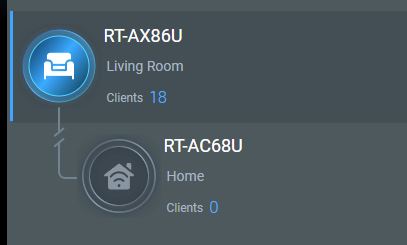 2 behaviors were observed, first time disconnected i see both 2.4ghz and 5ghz wifi lights were on on AC68U. But today, I noticed 5ghz wifi light is off on AC68U. Kindly advise what could be the problem and how do i resolve this? |
|
|
|
|
|
mostwanted82
|
Mar 28 2022, 03:47 PM
|
|
|
QUOTE(ASUSmy @ Mar 28 2022, 03:26 PM) Hi mostwanted82, Try make sure the firmware is the latest. If the 5GHz LED is off then it is possible that the 5GHz is not working. Will the LED turn on after you reboot the AC68U? Thank you Both routers already running latest firmware. After I reboot the secondary node, both wifie 2.4 and 5GHZ LED are on and get connected to main node. I removed the AC68U again and re-added to Aimesh, will monitor how it goes. Btw, I just encountered 2 times randomly reboot of the AX86U router. what could be the problem? this is a new router i just bought last week. |
|
|
|
|



 Quote
Quote
 0.0450sec
 0.33
0.33
 7 queries
 GZIP Disabled