Outline ·
[ Standard ] ·
Linear+
Home Networking ASUS Malaysia Networking User & Technical Support, Managed by ASUS Malaysia Representative
|
jimhorn
|
 Mar 26 2018, 03:31 PM Mar 26 2018, 03:31 PM
|

|
What's the difference between the AC1300-UHP, AC58u and AC66u routers? I tried using the comparison feature on Asus website but the specs don't really help much.
|
|
|
|
|
|
firdausbhari
|
Mar 26 2018, 03:49 PM
|
|
|
QUOTE(jimhorn @ Mar 26 2018, 03:31 PM) What's the difference between the AC1300-UHP, AC58u and AC66u routers? I tried using the comparison feature on Asus website but the specs don't really help much. spec, features and most important, price hehehe |
|
|
|
|
|
verykiasu
|
Mar 26 2018, 07:51 PM
|
New Member

|
On my admin page my router shows internet connected but I still can't connect. Any advice?
Using ASUS RT-N12
|
|
|
|
|
|
voncrane
|
Mar 26 2018, 09:00 PM
|
|
|
QUOTE(verykiasu @ Mar 26 2018, 07:51 PM) On my admin page my router shows internet connected but I still can't connect. Any advice? Using ASUS RT-N12  most likely it's incorrect TM account login details. Try confirming from TM. |
|
|
|
|
|
verykiasu
|
Mar 26 2018, 10:24 PM
|
New Member
|
QUOTE(voncrane @ Mar 26 2018, 09:00 PM) most likely it's incorrect TM account login details. Try confirming from TM. Thanks! Will try |
|
|
|
|
|
miseralim
|
Mar 28 2018, 02:43 AM
|
Getting Started
|
I've a question here, I recently bought Asus RT-AC1300UHP router. The performance is amazing, its an instant upgrade for my dlink dir-615 router. The reason i changed the router is that during gaming, there are moments of lag that is very annoying. So I ping the router and found out that there are spikes of up to 1300 ms now and then. So i changed the router, bought a new PCIE wifi card - TP-Link T9E AC1900. The problem still persists. I've changed between 2.4ghz to 5ghz without any satisfactory result. 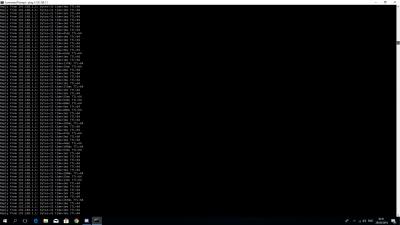
As you can see above, even though the ping time has reduced significantly, at 200ms -300ms, but its still very annoying. Can anyone please advise? |
|
|
|
|
TSASUSmy
|
Mar 28 2018, 09:59 AM
|
|
|
QUOTE(miseralim @ Mar 28 2018, 02:43 AM) I've a question here, I recently bought Asus RT-AC1300UHP router. The performance is amazing, its an instant upgrade for my dlink dir-615 router. The reason i changed the router is that during gaming, there are moments of lag that is very annoying. So I ping the router and found out that there are spikes of up to 1300 ms now and then. So i changed the router, bought a new PCIE wifi card - TP-Link T9E AC1900. The problem still persists. I've changed between 2.4ghz to 5ghz without any satisfactory result.
As you can see above, even though the ping time has reduced significantly, at 200ms -300ms, but its still very annoying. Can anyone please advise? Hi miseralim, If possible, can you test it with LAN cable too? To see whether is the WiFi interference problem or there is something wrong with the line. Thank you |
|
|
|
|
|
lotus_man
|
Mar 29 2018, 01:42 AM
|
|
|
QUOTE(ASUSmy @ Mar 26 2018, 09:01 AM) Hi lotus_man, Our router unable to support Maxis IPTV, it only able to support the Internet and the VOIP(together with Maxis router). Thank you oh no  wat can be done then? |
|
|
|
|
|
iEnzo
|
Mar 29 2018, 02:19 AM
|
New Member
|
ASUSmy
Got a QOS question. I'm using a RT-AC87U.
I've setup "Adaptive QOS". I know I cannot setup "Bandwidth Limiter" at the same time.
I want to know if I'm able to setup "Bandwidth Limiter" via the Asus Android App. I see the feature in there. Do I still get the benefit of Adaptive QOS in the router while using the Bandwidth Limiter feature in the Asus Android App?
As I can see each device connected and there is a feature to limit upload and download via the app.
This post has been edited by iEnzo: Mar 29 2018, 02:22 AM
|
|
|
|
|
|
skywardsword
|
Mar 29 2018, 09:22 AM
|
|
|
Hi Asusmy, can you check for us. Does aiprotection also scan the guest network that I setup?
I am trying to setup a guess network that I hope is not scanned by aiprotection, it runs a VPN to my users external company.(work from home) I prefer to not have it scan as I think it bogs the router then the VPN is running and aiprotection plus QoS is running.
|
|
|
|
|
|
hanaxxaru
|
Mar 29 2018, 09:41 AM
|
Getting Started
|
Hi ASUSmy , I would like to ask about ASUS RT-AC55UHP media bridge mode, is it possible to use that mode and connect with my current router, TP-LINK Archer C7?
I saw a second hand AC55UHP for cheap and I want to use it as a repeater / media bridge mode to extend the wireless coverage in my house.
This post has been edited by hanaxxaru: Mar 29 2018, 09:43 AM
|
|
|
|
|
|
TSASUSmy
|
Mar 29 2018, 10:19 AM
|
|
|
QUOTE(lotus_man @ Mar 29 2018, 01:42 AM) oh no wat can be done then? Hi lotus_man, So far we don't have the solution for this. If you want to use the IPTV, maybe you can set the ASUS router as second router or as access point. Thank you |
|
|
|
|
|
TSASUSmy
|
Mar 29 2018, 10:50 AM
|
|
|
QUOTE(iEnzo @ Mar 29 2018, 02:19 AM) ASUSmyGot a QOS question. I'm using a RT-AC87U. I've setup "Adaptive QOS". I know I cannot setup "Bandwidth Limiter" at the same time. I want to know if I'm able to setup "Bandwidth Limiter" via the Asus Android App. I see the feature in there. Do I still get the benefit of Adaptive QOS in the router while using the Bandwidth Limiter feature in the Asus Android App? As I can see each device connected and there is a feature to limit upload and download via the app. Hi iEnzo, You can only choose one of the QoS mode only. The APP setting are based on the router too. The APP allow you to easily change the setting of the router. Thank you |
|
|
|
|
|
TSASUSmy
|
Mar 29 2018, 01:49 PM
|
|
|
QUOTE(skywardsword @ Mar 29 2018, 09:22 AM) Hi Asusmy, can you check for us. Does aiprotection also scan the guest network that I setup? I am trying to setup a guess network that I hope is not scanned by aiprotection, it runs a VPN to my users external company.(work from home) I prefer to not have it scan as I think it bogs the router then the VPN is running and aiprotection plus QoS is running. Hi skywardsword, Once the AiProtection is on, all the traffic will be scanned, including the client from Guest Network. Thank you |
|
|
|
|
|
TSASUSmy
|
Mar 29 2018, 01:51 PM
|
|
|
QUOTE(hanaxxaru @ Mar 29 2018, 09:41 AM) Hi ASUSmy , I would like to ask about ASUS RT-AC55UHP media bridge mode, is it possible to use that mode and connect with my current router, TP-LINK Archer C7? I saw a second hand AC55UHP for cheap and I want to use it as a repeater / media bridge mode to extend the wireless coverage in my house. Hi hanaxxaru, According to our spec, the RT-AC55UHP don't have repeater mode. The media bridge does not repeat WiFi signal, you can only use LAN. Thank you |
|
|
|
|
|
hanaxxaru
|
Mar 29 2018, 02:30 PM
|
Getting Started
|
QUOTE(ASUSmy @ Mar 29 2018, 01:51 PM) Hi hanaxxaru, According to our spec, the RT-AC55UHP don't have repeater mode. The media bridge does not repeat WiFi signal, you can only use LAN. Thank you How about WDS? Is it possible to work with? |
|
|
|
|
|
TSASUSmy
|
Mar 29 2018, 05:50 PM
|
|
|
QUOTE(hanaxxaru @ Mar 29 2018, 02:30 PM) How about WDS? Is it possible to work with? Hi hanaxxaru, Just double check with the latest firmware, seen like RD has added back the Repeater Mode.  Thank you |
|
|
|
|
|
SpringBiscuit
|
Mar 30 2018, 11:39 PM
|
|
|
Hi Guys, im using AC1200, currently im suspecting my neighbor is stealing my connection, as i saw unknown devices connecting through my wireless internet.
May i know is there a way to block specific IP?
|
|
|
|
|
|
SilentVampire
|
Mar 30 2018, 11:53 PM
|
|
|
QUOTE(SpringBiscuit @ Mar 30 2018, 11:39 PM) Hi Guys, im using AC1200, currently im suspecting my neighbor is stealing my connection, as i saw unknown devices connecting through my wireless internet. May i know is there a way to block specific IP? MAC filter. Search for the manual of your router and see how to do it. But be sure that he is indeed stealing your connection. |
|
|
|
|
|
NecroPhilia
|
Mar 31 2018, 12:16 PM
|
|
|
Hi everybody, I just bought ASUS RT-AC86U but when I setup the internet connection under PPPoe. There is no special requirement from isp box to tick. How can I connect to uniFi if that’s the case?
|
|
|
|
|



 Quote
Quote




 0.0990sec
 0.70
0.70
 6 queries
 GZIP Disabled