Welcome Guest ( Log In | Register )

Outline · [ Standard ] · Linear+

Home Networking ASUS Malaysia Networking User & Technical Support, Managed by ASUS Malaysia Representative

views
     
invisiblelim
post Mar 5 2018, 10:58 AM

Regular
******
Senior Member
1,263 posts

Joined: Aug 2005


QUOTE(ASUSmy @ Feb 14 2018, 03:52 PM)
Hi invisiblelim,

May I know is all the WiFi device also having this problem?

Since you have updated the firmware to the latest already, can you try do a factory reset on the router and try again?

You can also try fix a WiFi channel for the WiFi and see will it become stable.

Thank you
*
I install a XiaoMi USB Fan and cool the beast, then the problem doesn't happen anymore.. is it due to overheat? hmm
TSASUSmy
post Mar 5 2018, 11:51 AM

Look at all my stars!!
*******
Senior Member
2,319 posts

Joined: Mar 2010
QUOTE(hiha123 @ Mar 3 2018, 11:41 AM)
Hi all this is netis by modem TM there call me test,so my problem is comfirm is DSL line got problem right?the SNR dB become negative blush.gif  blush.gif
*
Hi hiha123,

I have googled it and it seen like it is not normal. Got these infor from 2 source.

==============================================================================
Range of Downstream SNR Margin (For reference only)
10dB and below: Bad and difficult to get Synchronization
11dB-30dB: Normal
30dB and above: Outstanding
==============================================================================

SN Margin (AKA Signal to Noise Margin or Signal to Noise Ratio)
Relative strength of the DSL signal to Noise ratio. 6dB is the lowest dB manufactures specify for modem to be able to synch. In some instances interleaving* can help raise the noise margin to an acceptable level. The higher the number the better for this measurement.
> 6dB or below is bad and will experience no synch or intermittent synch problems
> 7dB-10dB is fair but does not leave much room for variances in conditions
> 11dB-20dB is good with no synch problems
> 20dB-28dB is excellent
> 29dB or above is outstanding
==============================================================================

Thank you
hiha123
post Mar 5 2018, 02:56 PM

Getting Started
**
Junior Member
198 posts

Joined: Nov 2017
HI Asus my

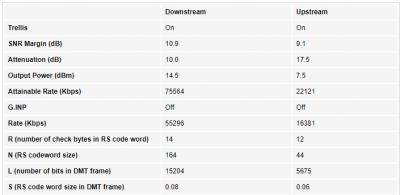
Now Tm change the new port to me ald,last time the Attainable Rate(down=is 100k,now become 75k,up is 55k now become 22k) and last time the SNR Margin(dB) Downstream are very Unstable,now change the new port my SNR Margin Downstram stable at 10.9,if after 1week everthing is ok,i use back my Asus RT-1300UHP to do the PPPOE back,so i thing the modem hangup asus router is say about port problem biggrin.gif biggrin.gif biggrin.gif


Attached thumbnail(s)
Attached Image
pl95077
post Mar 5 2018, 10:16 PM

Getting Started
**
Junior Member
245 posts

Joined: Feb 2010
hahahahahaha......
Been few days never read this thread, interesting saw few posts discussing on TP-Link firmware. Found this very complicated.

I still love ASUS networking products, standard 1 firmware apply globally.
XPS
post Mar 6 2018, 12:07 PM

Casual
***
Junior Member
322 posts

Joined: Jan 2008
QUOTE(pl95077 @ Mar 5 2018, 10:16 PM)
hahahahahaha......
Been few days never read this thread, interesting saw few posts discussing on TP-Link firmware. Found this very complicated.

I still love ASUS networking products, standard 1 firmware apply globally.
*
My experiences differs. Since middle of February been having tons of router instability issues with a new AC86U router running the firmware Version 3.0.0.4.384.20308. Random reboots, 5GHz cannot connect, web browser running sluggish when weird things happen.

Now reverting back one version and things look a lot more stable. Factory reset the router after firmware downgrade. Monitoring for now but this is a bad impression after 3 weeks of endless network instability every few days. Do not look like hardware problem to me or overheating since the router sits on top of the shelf (my previous setup was inside a cabinet and that worked fine all this while).

Even the old TM supplied D-Link DIR615 which ran since the early days of Unifi will run for months at a time without reboot.

This post has been edited by XPS: Mar 13 2018, 07:25 PM
SilentVampire
post Mar 6 2018, 12:18 PM

Networking Enthusiast
*******
Senior Member
5,714 posts

Joined: Mar 2007


QUOTE(XPS @ Mar 6 2018, 12:07 PM)
My experiences differs.  Since middle of February been having tons of router instability issues with a new AC86U router running the firmware Version 3.0.0.4.384.20308.  Random reboots, 5GHz cannot connect, web browser running sluggish when weird things happen.

Now reverting back one version and things look a lot more stable.  Factory reset the router after firmware downgrade.  Monitoring for now but this is a bad impression after 3 weeks of endless network instability every few days.  Do not look like hardware problem to me or overheating since the router sits on top of the shelf (my previous setup was inside a cabinet and that worked fine all this while).

Note this router has the latest hardware revision 1.50

Even the old TM supplied D-Link DIR615 which ran since the early days of Unifi will run for months at a time without reboot.  Full transparency here, using the previous D-Link as a VLAN switch only with AP handled by other wifi routers.

Even my first router, WRT54G (the one with the Cisco Systems name on it) if people can remember how long back that had been, just works for years with no hiccups.
*
Sorry to hear you have such bad experiences with Asus routers. I think they are generally reliable and is much better than most out there. Have you tried Asus WRT-Merlin firmware? Could be a good alternative to your current stock router’s firmware: https://asuswrt.lostrealm.ca/download

This post has been edited by SilentVampire: Mar 6 2018, 12:18 PM
edmund_yung
post Mar 6 2018, 12:25 PM

Regular
******
Senior Member
1,198 posts

Joined: Aug 2009


QUOTE(XPS @ Mar 6 2018, 12:07 PM)
My experiences differs.  Since middle of February been having tons of router instability issues with a new AC86U router running the firmware Version 3.0.0.4.384.20308.  Random reboots, 5GHz cannot connect, web browser running sluggish when weird things happen.
*
I was thinking of getting the new RT-AC86U, seems like getting lots of good review. The price puts me off...
China selling ~RM620 or 999 RMB
Malaysia selling RM1.5k
Makes me wonder where does that extra 60% margin goes to.
AVFAN
post Mar 6 2018, 12:32 PM

20k VIP Club
*********
All Stars
24,456 posts

Joined: Nov 2010
QUOTE(edmund_yung @ Mar 6 2018, 12:25 PM)
I was thinking of getting the new RT-AC86U, seems like getting lots of good review. The price puts me off...
China selling ~RM620 or 999 RMB
Malaysia selling RM1.5k
Makes me wonder where does that extra 60% margin goes to.
*
ya, when i saw that price, i backed off immediately! biggrin.gif

unless u have special requirements, consider cheaper rtac1300uhp... rm5xx - has been excellent for me.

This post has been edited by AVFAN: Mar 6 2018, 01:28 PM
XPS
post Mar 6 2018, 12:36 PM

Casual
***
Junior Member
322 posts

Joined: Jan 2008
QUOTE(SilentVampire @ Mar 6 2018, 12:18 PM)
Sorry to hear you have such bad experiences with Asus routers. I think they are generally reliable and is much better than most out there. Have you tried Asus WRT-Merlin firmware? Could be a good alternative to your current stock router’s firmware: https://asuswrt.lostrealm.ca/download
*
Yes I did. AC86U on paper looks nice, AiProtection, smart QOS etc. Just freaked out.

This post has been edited by XPS: Mar 20 2018, 10:50 PM
XPS
post Mar 6 2018, 12:37 PM

Casual
***
Junior Member
322 posts

Joined: Jan 2008
QUOTE(edmund_yung @ Mar 6 2018, 12:25 PM)
I was thinking of getting the new RT-AC86U, seems like getting lots of good review. The price puts me off...
China selling ~RM620 or 999 RMB
Malaysia selling RM1.5k
Makes me wonder where does that extra 60% margin goes to.
*
I agree.

This post has been edited by XPS: Mar 13 2018, 06:39 PM
XPS
post Mar 6 2018, 12:53 PM

Casual
***
Junior Member
322 posts

Joined: Jan 2008
QUOTE(AVFAN @ Mar 6 2018, 12:32 PM)
ya, when i say that price, i backed off immediately! biggrin.gif

unless u have special requirements, consider cheaper rtac1300uhp... rm5xx - has been excellent for me.
*
The main reason for the AC86U is the Broadcom BCM4366E chip revision with better performance. Most of my devices for many years now run 5GHz since 2.4GHz is pretty much congested.

Get where you are coming from, the 1300uhp is at a good price/performance. Just that have a high expectation of network stability, hence the choice for a faster processor, more memory etc with the AC86U. Networks are meant to be setup and forget, not managed at least for the consumer end biggrin.gif

This post has been edited by XPS: Mar 12 2018, 09:05 PM
blacktubi
post Mar 6 2018, 01:17 PM

-
Group Icon
Elite
8,415 posts

Joined: Jul 2008

QUOTE(edmund_yung @ Mar 6 2018, 12:25 PM)
I was thinking of getting the new RT-AC86U, seems like getting lots of good review. The price puts me off...
China selling ~RM620 or 999 RMB
Malaysia selling RM1.5k
Makes me wonder where does that extra 60% margin goes to.
*
You get 3 years one to one warranty in Malaysia and the quality after sales support.
AVFAN
post Mar 6 2018, 01:42 PM

20k VIP Club
*********
All Stars
24,456 posts

Joined: Nov 2010
QUOTE(XPS @ Mar 6 2018, 12:53 PM)
The main reason for the AC86U is the Broadcom BCM4366E chip revision which fixes the known 5GHz issue.  Most of my devices for many years now run 5GHz since 2.4GHz is pretty much congested.

Get where you are coming from, the 1300uhp is at a good price/performance.  Just that have a high expectation of network stability, hence the choice for a faster processor, more memory etc with the AC86U. Networks are meant to be setup and forget, not managed at least for the consumer end biggrin.gif
*
the bolded has been my experience.

used rtn12hp_b1 for 4 years, all good up to 50mbps, non-gigaport, 2.4ghz.

with 100mbps, i had to change... to rtac1300uhp... using a mix of 2.4 and 5ghz... 14 devices in a typical 2 storey house.

both were bought at a local store, preinstalled, go home, plug n play... both excellent for what they do.

never had to tweak anything. except update firmware.


i hope u will find the root causes to the yr problem soon, cheers.
hackabyte
post Mar 6 2018, 03:57 PM

New Member
*
Newbie
9 posts

Joined: May 2007
I haven't been able to find a way to set the OpenVPN Server password properly since upgrading to this firmware. Would appreciate some help / ideas on what else I can try sad.gif

QUOTE(hackabyte @ Feb 28 2018, 06:04 PM)
Hi @ASUSmy,

I recently updated my RT-N18U router to firmware 3.0.0.4.382_50018 and have since noticed that my username and password combination to the router's OpenVPN Server no longer works. I have tried rebooting, deleting the old username/password and added new ones but none work so far.

I also noticed that when I add a new username/password combination, it will add to the list in plain text but once I click Apply, the password will change to an encrypted hash, I think. This is new and didn't happen in the previous firmware.

I do use the OpenVPN for remote access quite frequently and would appreciate some help on the matter.

Thank you.
Edit:

I have since found that using the hash that replaced my password when I click Apply will allow me to log-in to the OpenVPN Server remotely but it is not possible to remember that hash and not desirable to write it down and carry it with me all the time. Is there a way to disable changing my chosen password with the hash?
*
cannavaro
post Mar 6 2018, 05:36 PM

CATTENACIO
*******
Senior Member
3,008 posts

Joined: Sep 2005
From: T.T.D.I, Bukit Damansara


QUOTE(hackabyte @ Mar 6 2018, 03:57 PM)
I haven't been able to find a way to set the OpenVPN Server password properly since upgrading to this firmware. Would appreciate some help / ideas on what else I can try  sad.gif
*
Have you tried a 30/30/30 reset?
hackabyte
post Mar 6 2018, 06:30 PM

New Member
*
Newbie
9 posts

Joined: May 2007
I have read about that procedure but am afraid to do it because apparently it is not suitable for all routers and there is a risk of bricking. Do you know if it safe for this model?


QUOTE(cannavaro @ Mar 6 2018, 05:36 PM)
Have you tried a 30/30/30 reset?
*
cannavaro
post Mar 6 2018, 06:46 PM

CATTENACIO
*******
Senior Member
3,008 posts

Joined: Sep 2005
From: T.T.D.I, Bukit Damansara


QUOTE(hackabyte @ Mar 6 2018, 06:30 PM)
I have read about that procedure but am afraid to do it because apparently it is not suitable for all routers and there is a risk of bricking. Do you know if it safe for this model?
*
I don't know for certain but I wouldn't hesitate to do it if all else fails since I have yet to brick a router by doing a 30/30/30 reset so far sweat.gif
What about a normal hard reset, have you tried it?
http://setuprouter.com/router/asus/rt-n18u/reset-router.htm

hackabyte
post Mar 6 2018, 08:37 PM

New Member
*
Newbie
9 posts

Joined: May 2007
Since everything else works fine, I am still rather hesitant to risk the 30/30/30 reset.

As for a normal hard reset, I never had to do it on any of the earlier firmware updates because it always worked fine after rebooting.

Thanks for the link, I will copy down the settings first then try it when I have some downtime.

QUOTE(cannavaro @ Mar 6 2018, 06:46 PM)
I don't know for certain but I wouldn't hesitate to do it if all else fails since I have yet to brick a router by doing a 30/30/30 reset so far  sweat.gif
What about a normal hard reset, have you tried it? 
http://setuprouter.com/router/asus/rt-n18u/reset-router.htm
*
711726
post Mar 6 2018, 08:47 PM

Casual
***
Junior Member
449 posts

Joined: Dec 2008


Hi. Any help to source power adapter for AC55UHP is highly appreciated, the 12V 2A.. Mine got struck by lightning and the adpater is dead. Got burn marks on the plastic shell. Now using a 12V 1.5A power adapter in order to stay online...
herojack41
post Mar 6 2018, 08:56 PM

Master Of Trouble Maker
*******
Senior Member
5,697 posts

Joined: Nov 2007
From: A Place Where God And Master Of TroubleMaker Exist


QUOTE(blacktubi @ Mar 6 2018, 01:17 PM)
You get 3 years one to one warranty in Malaysia and the quality after sales support.
*
Hmm......so far if got proper cooling it shouldn't be a problem.

Buying one local unit. Can get two unit in oversea if there is way to ship it back. I'll dig that. biggrin.gif


Change to:
| Lo-Fi Version
0.0282sec    0.35    6 queries    GZIP Disabled
Time is now: 12th December 2025 - 09:17 PM