Welcome Guest ( Log In | Register )

Outline · [ Standard ] · Linear+

Home Networking ASUS Malaysia Networking User & Technical Support, Managed by ASUS Malaysia Representative

views
     
JohnLai
post Mar 3 2018, 11:57 PM

Skeptical Cat
*******
Senior Member
3,669 posts

Joined: Apr 2006
QUOTE(voncrane @ Mar 3 2018, 11:05 PM)
There's a known "fix". I've been using the TM supplied C1200 for over a year and so far it's been okay. I guess I got one of the lucky fuss-free hardware. Mine's V1 and currently running a "stable" non-malaysian firmware. Those air quotes are cuz tplink later pulled that update from their site. Beats me why they did that as it works great so far. Been at least 2 weeks that it's been on 24/7.. Zero random reboots. I know cuz my WAN IP has remained the same all this time. My place isn't that big and just a couple walls and thus fits my needs for now.

*
Wait wait wait.........what update? blink.gif Version?
Alex9182
post Mar 4 2018, 12:29 AM

On my way
****
Senior Member
669 posts

Joined: Sep 2015
QUOTE(JohnLai @ Mar 3 2018, 11:57 PM)
Wait wait wait.........what update?  blink.gif  Version?
*
Yes, i also need to know. smile.gif
voncrane
post Mar 4 2018, 01:08 AM

Noir et fier!
*******
Senior Member
7,120 posts

Joined: Oct 2011
From: Wakanda


QUOTE(JohnLai @ Mar 3 2018, 11:57 PM)
Wait wait wait.........what update?  blink.gif  Version?
*
QUOTE(Alex9182 @ Mar 4 2018, 12:29 AM)
Yes, i also need to know. smile.gif
*
Wrong place to discuss such as off topic. See my previous post in the official TM Unifi thread. Still running the same firmware version.
Alex9182
post Mar 4 2018, 01:40 AM

On my way
****
Senior Member
669 posts

Joined: Sep 2015
QUOTE(voncrane @ Mar 3 2018, 11:05 PM)
There's a known "fix"....
icon_rolleyes.gif
*
This fix already confirmed by tp-link R&D not fixing correctly. smile.gif
voncrane
post Mar 4 2018, 01:48 AM

Noir et fier!
*******
Senior Member
7,120 posts

Joined: Oct 2011
From: Wakanda


QUOTE(Alex9182 @ Mar 4 2018, 01:40 AM)
This fix already confirmed by tp-link R&D not fixing correctly. smile.gif
*
Works fine for me. No forced @unifi suffix or Android issues (got 6 Android OS devices alone) or random reboots. P2P connections are stable and don't overload the router as on previous firmware.
Alex9182
post Mar 4 2018, 02:07 AM

On my way
****
Senior Member
669 posts

Joined: Sep 2015
QUOTE(voncrane @ Mar 4 2018, 01:48 AM)
Works fine for me. No forced @unifi suffix or Android issues (got 6 Android OS devices alone) or random reboots. P2P connections are stable and don't overload the router as on previous firmware.
*
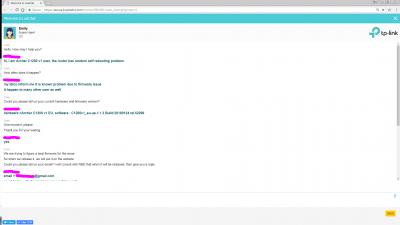
see attached screen capture of my chat with Tp-Link on Random selft reboot with firmware 1.1.3 which is same as what you are using now. smile.gif


Attached thumbnail(s)
Attached Image
voncrane
post Mar 4 2018, 07:48 AM

Noir et fier!
*******
Senior Member
7,120 posts

Joined: Oct 2011
From: Wakanda


QUOTE(Alex9182 @ Mar 4 2018, 02:07 AM)
see attached screen capture of my chat with Tp-Link on Random selft reboot with firmware 1.1.3 which is same as what you are using now. smile.gif
*
Hope you chatted with the right country's customer care. Also Emily says they are working on the fix which is customer care speak 101. She also says when it's ready they'll put it up on their website. I'm running a firmware they leaked?...and isn't even on their website yet. Shouldn't it occur to you that this future firmware that I already have my hands on, has indeed fixed the bugs mentioned as per my reports, only that they are probably trying to make it better in some other aspects and which is why they aren't releasing it on their website for full access to everyone? I'm beginning to regret having responded to your post. I already mentioned that the firmware works for me perfectly. What else do you want, I point my cctv to the router and give you live access to it 24/7 as proof? Worst case scenario, my firmware proves that a fix is doable and a more stable release should hit their public servers soon enough. People want to help you and tell what to do. But like die die you don't want to do what's recommended. So looks like you prefer to continue suffering issues then..

I just checked again and no reboots last night..WAN IPs remain the same..IPv4 & IPv6 works.
Attached Image

Build number is clearly a higher one and still unavailable on the website.
Attached Image


Sorry for derailing he thread.. This will be my last post on this here.. notworthy.gif

This post has been edited by voncrane: Mar 4 2018, 07:49 AM
AVFAN
post Mar 4 2018, 09:05 AM

20k VIP Club
*********
All Stars
24,456 posts

Joined: Nov 2010
QUOTE(voncrane @ Mar 3 2018, 11:05 PM)
TBH, the RT-N12HP is a weak router by today's standards.. To me, it's like buying a 720p dumb TV today when there are far superior smart 1080p TVs and "inexpensive" smart 4K+HDR TVs.
*
this rtn12hp is still relevant; for its price of rm199, can't ask for more.
i used it for 4 years until 2 months ago... all good up to 50mbps; but can't do well with 100mbps.
i don't know why some users have problems with it for even 30, 50 mpbs... maybe becos i don't do gaming or cctv or other stuff.
QUOTE(voncrane @ Mar 4 2018, 01:48 AM)
Works fine for me. No forced @unifi suffix or Android issues (got 6 Android OS devices alone) or random reboots. P2P connections are stable and don't overload the router as on previous firmware.
*
this tplink ac1200... worked ok for me too on 100mbps... didn't notice the infamous rebootings... but then i used it only for a couple of days.
my fren also has no problems with it for some weeks now... he complains the wifi is not so good.
after weeks n months of reading users comments... no one has been able to explain why it works for some, not for others.
hardware or firmware defect(s)?
cannavaro
post Mar 4 2018, 10:38 AM

CATTENACIO
*******
Senior Member
3,008 posts

Joined: Sep 2005
From: T.T.D.I, Bukit Damansara


QUOTE(voncrane @ Mar 4 2018, 07:48 AM)

Build number is clearly a higher one and still unavailable on the website.
Attached Image
Sorry for derailing he thread.. This will be my last post on this here..  notworthy.gif
*

eh, this is for which version? I can see 'US' there
For tplink malaysia the latest firmware for archer C1200(EU) V1 is this:

user posted image
15 Feb 2018 release


This post has been edited by cannavaro: Mar 4 2018, 10:38 AM
voncrane
post Mar 4 2018, 10:46 AM

Noir et fier!
*******
Senior Member
7,120 posts

Joined: Oct 2011
From: Wakanda


QUOTE(AVFAN @ Mar 4 2018, 09:05 AM)
this rtn12hp is still relevant; for its price of rm199, can't ask for more.
i used it for 4 years until 2 months ago... all good up to 50mbps; but can't do well with 100mbps.
i don't know why some users have problems with it for even 30, 50 mpbs... maybe becos i don't do gaming or cctv or other stuff.

this tplink ac1200... worked ok for me too on 100mbps... didn't notice the infamous rebootings... but then i used it only for a couple of days.
my fren also has no problems with it for some weeks now... he complains the wifi is not so good.
after weeks n months of reading users comments... no one has been able to explain why it works for some, not for others.
hardware or firmware defect(s)?
*
Yeah, for more basic needs, it's sufficient..that's why I used the words "weak" and "today's standards".. It's around 6 years old and its replacements, decent high-powered 5Ghz wireless ac routers are affordable. Just as you got it back then and used all this while, so better to get the newer average and use for long till the next average. smile.gif

I'm aware of the mixed results regarding the C1200 router and I'm glad that I received one of the less-problematic ones. It's definitely a mixture of hardware and firmware issues. Cuz, I do remember suffering the random reboots and Android issues until I flashed the recent firmware. There's a V3 hardware refresh of the router too, so TP-LINK is aware.

QUOTE(cannavaro @ Mar 4 2018, 10:38 AM)
eh, this is for which version? I can see 'US' there
For tplink malaysia the latest firmware for archer C1200(EU) V1 is this:

user posted image
15 Feb 2018 release
*
Please check the previous page for the link I posted to a post of mine in the official TM Unifi thread.

Alex9182
post Mar 4 2018, 11:07 AM

On my way
****
Senior Member
669 posts

Joined: Sep 2015
QUOTE(voncrane @ Mar 4 2018, 07:48 AM)
People want to help you and tell what to do. But like die die you don't want to do what's recommended. So looks like you prefer to continue suffering issues then..

Sorry for derailing he thread.. This will be my last post on this here..  notworthy.gif
*
already did try on the recommended setting but still not ok, go read back. Here
what you said is not true mad.gif , don't say like that la.
icon_idea.gif

This post has been edited by Alex9182: Mar 4 2018, 11:34 AM
Alex9182
post Mar 4 2018, 11:12 AM

On my way
****
Senior Member
669 posts

Joined: Sep 2015
QUOTE(voncrane @ Mar 4 2018, 07:48 AM)
I'm running a firmware they leaked?...and isn't even on their website yet.
Build number is clearly a higher one and still unavailable on the website.

Sorry for derailing he thread.. This will be my last post on this here..  notworthy.gif
*
attached is screen capture of your FW you said they leak.
this FW "C1200v1_eu-up-1.1.3 Build 20180124 rel.52299.bin" always and still available on this Tp-Link website , just that you did not know. smile.gif

actually my case aready said thank you and closed Here

hope you honor what you said, that is your last post on this here and don,t derailing any further rclxms.gif

This post has been edited by Alex9182: Mar 4 2018, 11:51 AM


Attached image(s)
Attached Image
Alex9182
post Mar 4 2018, 11:19 AM

On my way
****
Senior Member
669 posts

Joined: Sep 2015
deleted due to double posted

This post has been edited by Alex9182: Mar 4 2018, 11:20 AM
jusbella
post Mar 4 2018, 11:33 AM

Look at all my stars!!
*******
Senior Member
3,037 posts

Joined: Dec 2011


Lol what is this thread? Asus thread become tp link thread?? Funny~~
Alex9182
post Mar 4 2018, 11:39 AM

On my way
****
Senior Member
669 posts

Joined: Sep 2015
QUOTE(jusbella @ Mar 4 2018, 11:33 AM)
Lol what is this thread? Asus thread become tp link thread?? Funny~~
*
ya lo, my Asus case already say "thank you and close" Here but still..... rclxub.gif

still continue and derailed bye.gif

I really hope the case is truly closed and moves on.

This post has been edited by Alex9182: Mar 4 2018, 11:59 AM
squall_12
post Mar 4 2018, 02:45 PM

Regular
******
Senior Member
1,779 posts

Joined: Jan 2003
is this asus dsl-n12u streamyx modern router good enough for streamyx 8mb user? Mainly for download and playing games. Thanks

Remarks: Will it have any problem if on the router everyday without shutdown??
SilentVampire
post Mar 4 2018, 03:14 PM

Networking Enthusiast
*******
Senior Member
5,714 posts

Joined: Mar 2007


QUOTE(squall_12 @ Mar 4 2018, 02:45 PM)
is this asus dsl-n12u streamyx modern router good enough for streamyx 8mb user? Mainly for download and playing games. Thanks

Remarks: Will it have any problem if on the router everyday without shutdown??
*
Yes it’s good enough, and no problems.
soonwai
post Mar 4 2018, 03:18 PM


********
All Stars
11,458 posts

Joined: Oct 2007
From: KL


QUOTE(squall_12 @ Mar 4 2018, 02:45 PM)
is this asus dsl-n12u streamyx modern router good enough for streamyx 8mb user? Mainly for download and playing games. Thanks

Remarks: Will it have any problem if on the router everyday without shutdown??
*
Not quite the same model but my neighbour is using my old RT-N12HP D1. They're using UniFi 50mbps. So far no probs. Their kids play DOTA2 or LOL, I can't remember.
squall_12
post Mar 4 2018, 04:20 PM

Regular
******
Senior Member
1,779 posts

Joined: Jan 2003
QUOTE(SilentVampire @ Mar 4 2018, 03:14 PM)
Yes it’s good enough, and no problems.
*
ok Thanks.
squall_12
post Mar 4 2018, 04:20 PM

Regular
******
Senior Member
1,779 posts

Joined: Jan 2003
QUOTE(soonwai @ Mar 4 2018, 03:18 PM)
Not quite the same model but my neighbour is using my old RT-N12HP D1. They're using UniFi 50mbps. So far no probs. Their kids play DOTA2 or LOL, I can't remember.
*
ok Thanks.


Change to:
| Lo-Fi Version
0.0317sec    0.66    6 queries    GZIP Disabled
Time is now: 12th December 2025 - 04:45 PM