

QUOTE(voncrane @ Mar 3 2018, 11:05 PM)
There's a known "fix"....


This fix already confirmed by tp-link R&D not fixing correctly. 
Home Networking ASUS Malaysia Networking User & Technical Support, Managed by ASUS Malaysia Representative
|
|
 Mar 4 2018, 01:40 AM Mar 4 2018, 01:40 AM
|
 
Senior Member
669 posts Joined: Sep 2015 
|
QUOTE(voncrane @ Mar 3 2018, 11:05 PM) There's a known "fix".... This fix already confirmed by tp-link R&D not fixing correctly. |
|
|
|
|
|
Mar 4 2018, 01:48 AM
|

Senior Member
7,120 posts Joined: Oct 2011 From: Wakanda 
|
QUOTE(Alex9182 @ Mar 4 2018, 01:40 AM) This fix already confirmed by tp-link R&D not fixing correctly. Works fine for me. No forced @unifi suffix or Android issues (got 6 Android OS devices alone) or random reboots. P2P connections are stable and don't overload the router as on previous firmware. |
|
|
Mar 4 2018, 02:07 AM
|
|
Senior Member
669 posts Joined: Sep 2015
|
QUOTE(voncrane @ Mar 4 2018, 01:48 AM) Works fine for me. No forced @unifi suffix or Android issues (got 6 Android OS devices alone) or random reboots. P2P connections are stable and don't overload the router as on previous firmware. see attached screen capture of my chat with Tp-Link on Random selft reboot with firmware 1.1.3 which is same as what you are using now. Attached thumbnail(s) 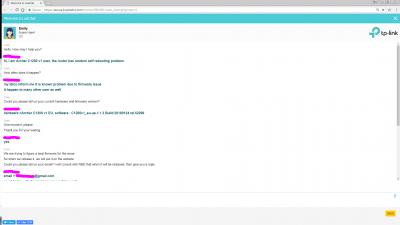
|
|
|
Mar 4 2018, 07:48 AM
Show posts by this member only | IPv6 | Post
#8014
|
|
Senior Member
7,120 posts Joined: Oct 2011 From: Wakanda
|
QUOTE(Alex9182 @ Mar 4 2018, 02:07 AM) see attached screen capture of my chat with Tp-Link on Random selft reboot with firmware 1.1.3 which is same as what you are using now. Hope you chatted with the right country's customer care. Also Emily says they are working on the fix which is customer care speak 101. She also says when it's ready they'll put it up on their website. I'm running a firmware they leaked?...and isn't even on their website yet. Shouldn't it occur to you that this future firmware that I already have my hands on, has indeed fixed the bugs mentioned as per my reports, only that they are probably trying to make it better in some other aspects and which is why they aren't releasing it on their website for full access to everyone? I'm beginning to regret having responded to your post. I already mentioned that the firmware works for me perfectly. What else do you want, I point my cctv to the router and give you live access to it 24/7 as proof? Worst case scenario, my firmware proves that a fix is doable and a more stable release should hit their public servers soon enough. People want to help you and tell what to do. But like die die you don't want to do what's recommended. So looks like you prefer to continue suffering issues then.. I just checked again and no reboots last night..WAN IPs remain the same..IPv4 & IPv6 works. 
Build number is clearly a higher one and still unavailable on the website. 
Sorry for derailing he thread.. This will be my last post on this here..  This post has been edited by voncrane: Mar 4 2018, 07:49 AM |
|
|
Mar 4 2018, 09:05 AM
|

All Stars
24,456 posts Joined: Nov 2010
|
QUOTE(voncrane @ Mar 3 2018, 11:05 PM) TBH, the RT-N12HP is a weak router by today's standards.. To me, it's like buying a 720p dumb TV today when there are far superior smart 1080p TVs and "inexpensive" smart 4K+HDR TVs. this rtn12hp is still relevant; for its price of rm199, can't ask for more.i used it for 4 years until 2 months ago... all good up to 50mbps; but can't do well with 100mbps. i don't know why some users have problems with it for even 30, 50 mpbs... maybe becos i don't do gaming or cctv or other stuff. QUOTE(voncrane @ Mar 4 2018, 01:48 AM) Works fine for me. No forced @unifi suffix or Android issues (got 6 Android OS devices alone) or random reboots. P2P connections are stable and don't overload the router as on previous firmware. this tplink ac1200... worked ok for me too on 100mbps... didn't notice the infamous rebootings... but then i used it only for a couple of days.my fren also has no problems with it for some weeks now... he complains the wifi is not so good. after weeks n months of reading users comments... no one has been able to explain why it works for some, not for others. hardware or firmware defect(s)? |
|
|
Mar 4 2018, 10:38 AM
|

Senior Member
3,008 posts Joined: Sep 2005 From: T.T.D.I, Bukit Damansara
|
QUOTE(voncrane @ Mar 4 2018, 07:48 AM) Build number is clearly a higher one and still unavailable on the website.
Sorry for derailing he thread.. This will be my last post on this here.. eh, this is for which version? I can see 'US' there For tplink malaysia the latest firmware for archer C1200(EU) V1 is this:  15 Feb 2018 release This post has been edited by cannavaro: Mar 4 2018, 10:38 AM |
|
|
|
|
|
Mar 4 2018, 10:46 AM
|
|
Senior Member
7,120 posts Joined: Oct 2011 From: Wakanda
|
QUOTE(AVFAN @ Mar 4 2018, 09:05 AM) this rtn12hp is still relevant; for its price of rm199, can't ask for more. Yeah, for more basic needs, it's sufficient..that's why I used the words "weak" and "today's standards".. It's around 6 years old and its replacements, decent high-powered 5Ghz wireless ac routers are affordable. Just as you got it back then and used all this while, so better to get the newer average and use for long till the next average. i used it for 4 years until 2 months ago... all good up to 50mbps; but can't do well with 100mbps. i don't know why some users have problems with it for even 30, 50 mpbs... maybe becos i don't do gaming or cctv or other stuff. this tplink ac1200... worked ok for me too on 100mbps... didn't notice the infamous rebootings... but then i used it only for a couple of days. my fren also has no problems with it for some weeks now... he complains the wifi is not so good. after weeks n months of reading users comments... no one has been able to explain why it works for some, not for others. hardware or firmware defect(s)? I'm aware of the mixed results regarding the C1200 router and I'm glad that I received one of the less-problematic ones. It's definitely a mixture of hardware and firmware issues. Cuz, I do remember suffering the random reboots and Android issues until I flashed the recent firmware. There's a V3 hardware refresh of the router too, so TP-LINK is aware. QUOTE(cannavaro @ Mar 4 2018, 10:38 AM) eh, this is for which version? I can see 'US' there Please check the previous page for the link I posted to a post of mine in the official TM Unifi thread.For tplink malaysia the latest firmware for archer C1200(EU) V1 is this: 15 Feb 2018 release |
|
|
Mar 4 2018, 11:07 AM
|
|
Senior Member
669 posts Joined: Sep 2015
|
QUOTE(voncrane @ Mar 4 2018, 07:48 AM) People want to help you and tell what to do. But like die die you don't want to do what's recommended. So looks like you prefer to continue suffering issues then.. already did try on the recommended setting but still not ok, go read back. HereSorry for derailing he thread.. This will be my last post on this here.. what you said is not true  , don't say like that la. , don't say like that la. This post has been edited by Alex9182: Mar 4 2018, 11:34 AM |
|
|
Mar 4 2018, 11:12 AM
|
|
Senior Member
669 posts Joined: Sep 2015
|
QUOTE(voncrane @ Mar 4 2018, 07:48 AM) I'm running a firmware they leaked?...and isn't even on their website yet. attached is screen capture of your FW you said they leak.Build number is clearly a higher one and still unavailable on the website. Sorry for derailing he thread.. This will be my last post on this here.. this FW "C1200v1_eu-up-1.1.3 Build 20180124 rel.52299.bin" always and still available on this Tp-Link website , just that you did not know. actually my case aready said thank you and closed Here hope you honor what you said, that is your last post on this here and don,t derailing any further  This post has been edited by Alex9182: Mar 4 2018, 11:51 AM Attached image(s)  |
|
|
Mar 4 2018, 11:19 AM
|
|
Senior Member
669 posts Joined: Sep 2015
|
deleted due to double posted
This post has been edited by Alex9182: Mar 4 2018, 11:20 AM |
|
|
Mar 4 2018, 11:33 AM
|

Senior Member
3,037 posts Joined: Dec 2011
|
Lol what is this thread? Asus thread become tp link thread?? Funny~~
|
|
|
Mar 4 2018, 11:39 AM
|
|
Senior Member
669 posts Joined: Sep 2015
|
QUOTE(jusbella @ Mar 4 2018, 11:33 AM) Lol what is this thread? Asus thread become tp link thread?? Funny~~ ya lo, my Asus case already say "thank you and close" Here but still.....  still continue and derailed  I really hope the case is truly closed and moves on. This post has been edited by Alex9182: Mar 4 2018, 11:59 AM |
|
|
Mar 4 2018, 02:45 PM
|

Senior Member
1,779 posts Joined: Jan 2003
|
is this asus dsl-n12u streamyx modern router good enough for streamyx 8mb user? Mainly for download and playing games. Thanks
Remarks: Will it have any problem if on the router everyday without shutdown?? |
|
|
|
|
|
Mar 4 2018, 03:14 PM
|

Senior Member
5,714 posts Joined: Mar 2007 
|
QUOTE(squall_12 @ Mar 4 2018, 02:45 PM) is this asus dsl-n12u streamyx modern router good enough for streamyx 8mb user? Mainly for download and playing games. Thanks Yes it’s good enough, and no problems.Remarks: Will it have any problem if on the router everyday without shutdown?? |
|
|
Mar 4 2018, 03:18 PM
|

All Stars
11,458 posts Joined: Oct 2007 From: KL
|
QUOTE(squall_12 @ Mar 4 2018, 02:45 PM) is this asus dsl-n12u streamyx modern router good enough for streamyx 8mb user? Mainly for download and playing games. Thanks Not quite the same model but my neighbour is using my old RT-N12HP D1. They're using UniFi 50mbps. So far no probs. Their kids play DOTA2 or LOL, I can't remember.Remarks: Will it have any problem if on the router everyday without shutdown?? |
|
|
Mar 4 2018, 04:20 PM
|
|
Senior Member
1,779 posts Joined: Jan 2003
|
QUOTE(SilentVampire @ Mar 4 2018, 03:14 PM) Yes it’s good enough, and no problems. ok Thanks. |
|
|
Mar 4 2018, 04:20 PM
|
|
Senior Member
1,779 posts Joined: Jan 2003
|
QUOTE(soonwai @ Mar 4 2018, 03:18 PM) Not quite the same model but my neighbour is using my old RT-N12HP D1. They're using UniFi 50mbps. So far no probs. Their kids play DOTA2 or LOL, I can't remember. ok Thanks. |
|
|
Mar 5 2018, 10:58 AM
|

Senior Member
1,263 posts Joined: Aug 2005
|
QUOTE(ASUSmy @ Feb 14 2018, 03:52 PM) Hi invisiblelim, I install a XiaoMi USB Fan and cool the beast, then the problem doesn't happen anymore.. is it due to overheat? hmmMay I know is all the WiFi device also having this problem? Since you have updated the firmware to the latest already, can you try do a factory reset on the router and try again? You can also try fix a WiFi channel for the WiFi and see will it become stable. Thank you |
 |
Mar 5 2018, 11:51 AM
Show posts by this member only | IPv6 | Post
#8029
|

Senior Member
2,319 posts Joined: Mar 2010
|
QUOTE(hiha123 @ Mar 3 2018, 11:41 AM) Hi all this is netis by modem TM there call me test,so my problem is comfirm is DSL line got problem right?the SNR dB become negative Hi hiha123, I have googled it and it seen like it is not normal. Got these infor from 2 source. ============================================================================== Range of Downstream SNR Margin (For reference only) 10dB and below: Bad and difficult to get Synchronization 11dB-30dB: Normal 30dB and above: Outstanding ============================================================================== SN Margin (AKA Signal to Noise Margin or Signal to Noise Ratio) Relative strength of the DSL signal to Noise ratio. 6dB is the lowest dB manufactures specify for modem to be able to synch. In some instances interleaving* can help raise the noise margin to an acceptable level. The higher the number the better for this measurement. > 6dB or below is bad and will experience no synch or intermittent synch problems > 7dB-10dB is fair but does not leave much room for variances in conditions > 11dB-20dB is good with no synch problems > 20dB-28dB is excellent > 29dB or above is outstanding ============================================================================== Thank you |
|
|
Mar 5 2018, 02:56 PM
Show posts by this member only | IPv6 | Post
#8030
|
|
Junior Member
198 posts Joined: Nov 2017
|
HI Asus my
Now Tm change the new port to me ald,last time the Attainable Rate(down=is 100k,now become 75k,up is 55k now become 22k) and last time the SNR Margin(dB) Downstream are very Unstable,now change the new port my SNR Margin Downstram stable at 10.9,if after 1week everthing is ok,i use back my Asus RT-1300UHP to do the PPPOE back,so i thing the modem hangup asus router is say about port problem  Attached thumbnail(s) 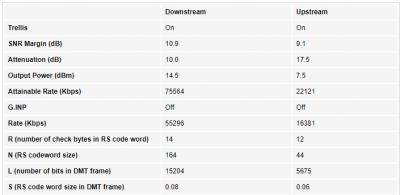
|
| Change to: |  0.0291sec 0.0291sec
 0.98 0.98
 6 queries 6 queries
 GZIP Disabled GZIP Disabled
Time is now: 14th December 2025 - 01:06 AM |
 Quote
Quote