

 Mar 3 2018, 10:04 AM


QUOTE(JohnLai @ Mar 2 2018, 08:43 PM)
Answer is YES.
Enable Wireless Multicast Forwarding. ---> https://routerguide.net/how-to-adjust-optim...-network-speed/
Disable Enable WMM ASPD ---> https://routerguide.net/wmm-apsd-on-or-off/
Disable Enhanced interference management ---> Will force 40Mhz to 20Mhz + channel hopping around in congested environment. ---> Probably this explain your wifi signal gone missing few moments then come back.
Set Tx Power adjustment to 200 mW ---> default 80mw is too low. C1200 for instance transmit at 100mW
It is as advertised, easy and simple setup, no?

Enable Wireless Multicast Forwarding. ---> can not find where to do this settingEnable Wireless Multicast Forwarding. ---> https://routerguide.net/how-to-adjust-optim...-network-speed/
Disable Enable WMM ASPD ---> https://routerguide.net/wmm-apsd-on-or-off/
Disable Enhanced interference management ---> Will force 40Mhz to 20Mhz + channel hopping around in congested environment. ---> Probably this explain your wifi signal gone missing few moments then come back.
Set Tx Power adjustment to 200 mW ---> default 80mw is too low. C1200 for instance transmit at 100mW
It is as advertised, easy and simple setup, no?
Disable Enable WMM ASPD ---> Disabled (default is enable )
Disable Enhanced interference management ---> Disabled (default is enable )
Set Tx Power adjustment to 200 mW ---> default is performance, (power saving, fair, balance, good, performance)
setting done and apply and rebooted then test.
Hyppe working normally
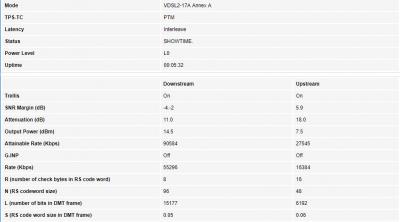
tested using lan connected notebook, speed is normal. (see attached)
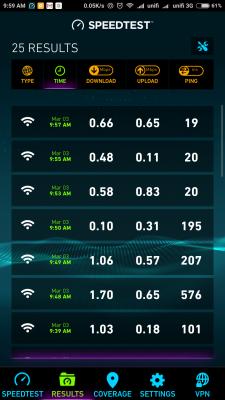
tested with android mobile phone, Ping, UL, DL - all not normal (see attached)
disappointing result. the router WiFi not working normally.
Attached thumbnail(s)

 Quote
Quote


 We tried our best to help.








 0.0204sec
 0.79
0.79
 6 queries
 GZIP Disabled