Welcome Guest ( Log In | Register )

826 Pages « < 396 397 398 399 400 > » Bottom

Outline · [ Standard ] · Linear+

Home Networking ASUS Malaysia Networking User & Technical Support, Managed by ASUS Malaysia Representative

views
     
SilentVampire
post Feb 21 2018, 11:36 PM

Networking Enthusiast
*******
Senior Member
5,714 posts

Joined: Mar 2007


QUOTE(louis89 @ Feb 21 2018, 11:26 PM)
Hi all want to ask I have gt-ac5300 and rt-ac88u which would I use as primary router for Unifi?
*
Doesn't matter bro. Which one would you feel comfortable using? I would use the RT-AC5300, as it is Asus flagship router model, and one of the most powerful on the market.
louis89
post Feb 21 2018, 11:39 PM

New Member
*
Junior Member
32 posts

Joined: May 2009


QUOTE(SilentVampire @ Feb 21 2018, 11:36 PM)
Doesn't matter bro. Which one would you feel comfortable using? I would use the RT-AC5300, as it is Asus flagship router model, and one of the most powerful on the market.
*
my unifi is in G floor as recommended use ac5300 as primary..my gaming console and computer is in 2nd floor which will be connected to ac88u.... should be alright?
SilentVampire
post Feb 21 2018, 11:50 PM

Networking Enthusiast
*******
Senior Member
5,714 posts

Joined: Mar 2007


QUOTE(louis89 @ Feb 21 2018, 11:39 PM)
my unifi is in G floor as recommended use ac5300 as primary..my gaming console and computer is in 2nd floor which will be connected to ac88u.... should be alright?
*
Should be alright if you have the AC88U configured as an AP.
louis89
post Feb 22 2018, 01:35 PM

New Member
*
Junior Member
32 posts

Joined: May 2009


There total of 4 floors in my premise I had set up Ac5300 as primary router (Gfloor) while the AC88u (2nd floor) as the AiMesh node but there is one problem.. I had set up 3 SSID which is 2.4ghz , 5ghz-1 and 5ghz-2... both 2.4 and 5ghz-1 can be used for the Aimesh but when I connect the 5ghz-2 the signal strength is low to 1 bar when I'm at near the node..any ode or where I went wrong...
SilentVampire
post Feb 22 2018, 02:01 PM

Networking Enthusiast
*******
Senior Member
5,714 posts

Joined: Mar 2007


QUOTE(louis89 @ Feb 22 2018, 01:35 PM)
There total of 4 floors in my premise I had set up Ac5300 as primary router (Gfloor) while the AC88u (2nd floor) as the AiMesh node but there is one problem.. I had set up 3 SSID which is 2.4ghz , 5ghz-1 and 5ghz-2... both 2.4 and 5ghz-1 can be used for the Aimesh but when I connect the 5ghz-2 the signal strength is low to 1 bar when I'm at near the node..any ode or where I went wrong...
*
Why do you need two 5GHz SSIDs? One 2.4 and one 5 would have suffice and more than enough for your needs. Having two 5GHz won’t make a difference.
louis89
post Feb 22 2018, 02:17 PM

New Member
*
Junior Member
32 posts

Joined: May 2009


QUOTE(SilentVampire @ Feb 22 2018, 02:01 PM)
Why do you need two 5GHz SSIDs? One 2.4 and one 5 would have suffice and more than enough for your needs. Having two 5GHz won’t make a difference.
*
Haha ya don't need 3 ssid but the default setting ask for 3 SSID..sorry I'm not too familiar with setting up haha how to remove another ssid?
SilentVampire
post Feb 22 2018, 02:39 PM

Networking Enthusiast
*******
Senior Member
5,714 posts

Joined: Mar 2007


QUOTE(louis89 @ Feb 22 2018, 02:17 PM)
Haha ya don't need 3 ssid but the default setting ask for 3 SSID..sorry I'm not too familiar with setting up haha how to remove another ssid?
*
Really bro? I am not too sure myself, just thought having two would be enough. Just follow the instructions. You have to explore bro.
blacktubi
post Feb 22 2018, 02:59 PM

-
Group Icon
Elite
8,409 posts

Joined: Jul 2008

QUOTE(louis89 @ Feb 22 2018, 01:35 PM)
There total of 4 floors in my premise I had set up Ac5300 as primary router (Gfloor) while the AC88u (2nd floor) as the AiMesh node but there is one problem.. I had set up 3 SSID which is 2.4ghz , 5ghz-1 and 5ghz-2... both 2.4 and 5ghz-1 can be used for the Aimesh but when I connect the 5ghz-2 the signal strength is low to 1 bar when I'm at near the node..any ode or where I went wrong...
*
Turn on smart connect for wireless and they all will be combined into one.
louis89
post Feb 22 2018, 05:40 PM

New Member
*
Junior Member
32 posts

Joined: May 2009


QUOTE(blacktubi @ Feb 22 2018, 02:59 PM)
Turn on smart connect for wireless and they all will be combined into one.
*
meaning i turn on smart connect for both the router and the node am i right? now that i on the AiMesh i can only connect to the main router when i log in through 192.168.1.1
blacktubi
post Feb 22 2018, 06:00 PM

-
Group Icon
Elite
8,409 posts

Joined: Jul 2008

QUOTE(louis89 @ Feb 22 2018, 05:40 PM)
meaning i turn on smart connect for both the router and the node am i right? now that i on the AiMesh i can only connect to the main router when i log in through 192.168.1.1
*
You can either turn on Smart Connect or set all wireless to be the same name.
heauew
post Feb 26 2018, 09:25 AM

New Member
*
Newbie
3 posts

Joined: Feb 2018


Hi @ASUSmy,

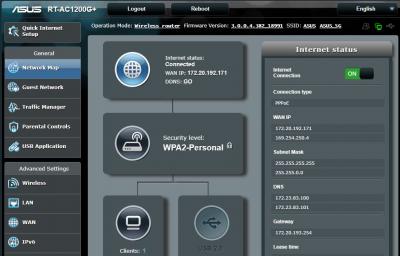
Just bought RT-AC1200G+ and follow the QIS to setup for UNIFI. Router say internet connected (with WAN IP), PC & Android phone also connected to WIFI successfully, but there is no internet access for both PC & Android.

I'm using unifi modem HUAWEI HG655a & Innatech Router RG4332, everything is working fine, just wish to replace with Asus router. When I switch back to previous router, internet can use again.

I had updated AC1200G+ firmware to 3.0.0.4.382_18991. I even initialize the router and redo the setup few time but the result is same.

Please advice how should I do next?

I attached the screenshot and syslog file.

Please let me know if you need more information.


Attached thumbnail(s)
Attached Image

Attached File(s)
Attached File  syslog__1_.txt ( 42.21k ) Number of downloads: 7
voncrane
post Feb 26 2018, 09:46 AM

Noir et fier!
*******
Senior Member
7,120 posts

Joined: Oct 2011
From: Wakanda


QUOTE(heauew @ Feb 26 2018, 09:25 AM)
Hi @ASUSmy,

Just bought RT-AC1200G+ and follow the QIS to setup for UNIFI. Router say internet connected (with WAN IP), PC & Android phone also connected to WIFI successfully, but there is no internet access for both PC & Android.

I'm using unifi modem HUAWEI HG655a & Innatech Router RG4332, everything is working fine, just wish to replace with Asus router. When I switch back to previous router, internet can use again.

I had updated AC1200G+ firmware to 3.0.0.4.382_18991. I even initialize the router and redo the setup few time but the result is same.

Please advice how should I do next?

I attached the screenshot and syslog file.

Please let me know if you need more information.
*
Try reconfirming the password from TM and setup again. Read cases like this before and most times, ended up being incorrect password. But router reported wrongly that internet is connected.
TSASUSmy
post Feb 26 2018, 10:33 AM

Look at all my stars!!
*******
Senior Member
2,319 posts

Joined: Mar 2010
QUOTE(heauew @ Feb 26 2018, 09:25 AM)
Hi @ASUSmy,

Just bought RT-AC1200G+ and follow the QIS to setup for UNIFI. Router say internet connected (with WAN IP), PC & Android phone also connected to WIFI successfully, but there is no internet access for both PC & Android.

I'm using unifi modem HUAWEI HG655a & Innatech Router RG4332, everything is working fine, just wish to replace with Asus router. When I switch back to previous router, internet can use again.

I had updated AC1200G+ firmware to 3.0.0.4.382_18991. I even initialize the router and redo the setup few time but the result is same.

Please advice how should I do next?

I attached the screenshot and syslog file.

Please let me know if you need more information.
*
QUOTE(voncrane @ Feb 26 2018, 09:46 AM)
Try reconfirming the password from TM and setup again. Read cases like this before and most times, ended up being incorrect password. But router reported wrongly that internet is connected.
*
Hi heauew,

Beside double check the UNIFI account username and password as mention by voncrane, try go to WAN->Internet Connection->MAC Address, click on the MAC Clone button and click Apply.

Thank you

This post has been edited by ASUSmy: Feb 26 2018, 10:34 AM
heauew
post Feb 26 2018, 11:24 AM

New Member
*
Newbie
3 posts

Joined: Feb 2018


QUOTE(ASUSmy @ Feb 26 2018, 10:33 AM)
Hi heauew,

Beside double check the UNIFI account username and password as mention by voncrane, try go to WAN->Internet Connection->MAC Address, click on the MAC Clone button and click Apply.

Thank you
*
Thanks for the advise.
One more information. When I setup for first time, there is strange condition that I actually can get a ping 26ms latency, very very low download speed (few hundred k) and about 20Mbps upload speed (using mobile apps for speed test). But I can't get this condition anymore. Not sure is due to firmware update or not. Any insight?

If switch back to old router still can use, can I eliminate the possibility of modem having problem? Any other setting should I confirm? DNS I'm using auto. OK?
AVFAN
post Feb 26 2018, 05:51 PM

20k VIP Club
*********
All Stars
24,454 posts

Joined: Nov 2010
QUOTE(heauew @ Feb 26 2018, 11:24 AM)
Thanks for the advise.
One more information. When I setup for first time, there is strange condition that I actually can get a ping 26ms latency, very very low download speed (few hundred k) and about 20Mbps upload speed (using mobile apps for speed test). But I can't get this condition anymore. Not sure is due to firmware update or not. Any insight?

If switch back to old router still can use, can I eliminate the possibility of modem having problem? Any other setting should I confirm? DNS I'm using auto. OK?
*
can't follow u... bolded part.
latency 26ms, vv low dl speed - that's terrible - why u want to get it again?!

if unifi modem+unifi router = good, and...
unifi modem+ own router = bad...
it means yr router is either not set up properly or it needs a fix.

your router is a decent one, should work fine.

like a couple of others suspect, u may hv used incorrect id/password when changing to another router.
.. id, pw of router is a unique set, u need to call unifi to get; not same as yr wifi id, pw.
.. when u change to non-unifi router, u must change 192.168.0.1 to 192.168.1.1 for IP.

heauew
post Feb 27 2018, 09:00 AM

New Member
*
Newbie
3 posts

Joined: Feb 2018


Thanks for all your advise.
Finally manage to get mt unifi pppoe password through unifi livechat support. This password is unchangeable, but not sure why my own note written with new password. Unifi livechat is quite effective and fast respond in this case. I can manage to get internet access without any problem now.
jayson120
post Feb 27 2018, 04:36 PM

New Member
*
Newbie
27 posts

Joined: Oct 2013


Hi ASUSmy,

I am using RT-AC1300UHP with the latest firmware 3.0.0.4.380_8119 installed, I am able to connect WIFI to all my android devices. However, as for my laptop the WIFI can be only connected sometimes, and most of the time it shows connected but no internet access. I’ve also applied the MAC clone step you mentioned earlier, but still no luck. Or did i missed out anything?


This is my troubleshooting result, not sure will it be useful or not
user posted image


Please advise, many thanks
AVFAN
post Feb 27 2018, 06:30 PM

20k VIP Club
*********
All Stars
24,454 posts

Joined: Nov 2010
QUOTE(jayson120 @ Feb 27 2018, 04:36 PM)
Hi ASUSmy,

I am using RT-AC1300UHP with the latest firmware 3.0.0.4.380_8119 installed, I am able to connect WIFI to all my android devices. However, as for my laptop the WIFI can be only connected sometimes, and most of the time it shows connected but no internet access. I’ve also applied the MAC clone step you mentioned earlier, but still no luck. Or did i missed out anything?
This is my troubleshooting result, not sure will it be useful or not
Please advise, many thanks
*
using same router, same firmware, pc windows 10...

i hv seen this "no internet access" but it only last a few seconds.. it connects eventually.

sometimes, it takes a while to connect - as long as u put under settings-wifi, "connect auto when in range".

and if yr laptop/pc has dual band, best to set one of them to off, on for the other.

of course, 5ghz within range gives much better results.


hackabyte
post Feb 28 2018, 06:04 PM

New Member
*
Newbie
9 posts

Joined: May 2007
Hi @ASUSmy,

I recently updated my RT-N18U router to firmware 3.0.0.4.382_50018 and have since noticed that my username and password combination to the router's OpenVPN Server no longer works. I have tried rebooting, deleting the old username/password and added new ones but none work so far.

I also noticed that when I add a new username/password combination, it will add to the list in plain text but once I click Apply, the password will change to an encrypted hash, I think. This is new and didn't happen in the previous firmware.

I do use the OpenVPN for remote access quite frequently and would appreciate some help on the matter.

Thank you.


Edit:

I have since found that using the hash that replaced my password when I click Apply will allow me to log-in to the OpenVPN Server remotely but it is not possible to remember that hash and not desirable to write it down and carry it with me all the time. Is there a way to disable changing my chosen password with the hash?


This post has been edited by hackabyte: Feb 28 2018, 06:14 PM
jayson120
post Feb 28 2018, 07:17 PM

New Member
*
Newbie
27 posts

Joined: Oct 2013


QUOTE(AVFAN @ Feb 27 2018, 06:30 PM)
using same router, same firmware, pc windows 10...

i hv seen this "no internet access" but it only last a few seconds.. it connects eventually.

sometimes, it takes a while to connect - as long as u put under settings-wifi, "connect auto when in range".

and if yr laptop/pc has dual band, best to set one of them to off, on for the other.

of course, 5ghz within range gives much better results.
*
Noted, thanks.

826 Pages « < 396 397 398 399 400 > » Top
 

Change to:
| Lo-Fi Version
0.0286sec    0.38    6 queries    GZIP Disabled
Time is now: 7th December 2025 - 06:16 PM