Welcome Guest ( Log In | Register )

826 Pages « < 226 227 228 229 230 > » Bottom

Outline · [ Standard ] · Linear+

Home Networking ASUS Malaysia Networking User & Technical Support, Managed by ASUS Malaysia Representative

views
     
kmrdeva
post Mar 11 2016, 06:12 PM

Look at all my stars!!
*******
Senior Member
4,784 posts

Joined: Jan 2003
QUOTE(soonwai @ Mar 11 2016, 06:04 PM)
Thanks, I'll try out AsusWRT-Merlin. There're so many firmwares for the RT-N16, I don't know where to start.
*
I didn't know that the AsusWRT-Merlin f/w was available for the RT-N16..

http://asuswrt.lostrealm.ca/download

{edit} Oh, previously supported.. my bad.

This post has been edited by kmrdeva: Mar 11 2016, 06:27 PM
TSASUSmy
post Mar 11 2016, 06:32 PM

Look at all my stars!!
*******
Senior Member
2,319 posts

Joined: Mar 2010
Hi All,

Sorry for not replying these few days, I am doing some testing on field. I will get back to you all once I am back.

You can also call our hotline support at 1300 88 3495.

Thank you
Harddisk
post Mar 11 2016, 09:26 PM

Look at all my stars!!
*******
Senior Member
2,967 posts

Joined: Jan 2003

QUOTE(ASUSmy @ Mar 11 2016, 06:32 PM)
Hi All,

Sorry for not replying these few days, I am doing some testing on field. I will get back to you all once I am back.

You can also call our hotline support at 1300 88 3495.

Thank you
*
ASUSmy is ALIVE! rclxms.gif

Hope you will have time to look at my USB transfer speed query later. laugh.gif
kmrdeva
post Mar 13 2016, 11:17 AM

Look at all my stars!!
*******
Senior Member
4,784 posts

Joined: Jan 2003
Hi all,

I have upgraded from an N66U to an AC68U as the main router for my home 50Mb Time Fibre connection. I've posted the N66U for sale but am now having 2nd thoughts, maybe keep it at home to use it together with the AC68U - both are bloody good routers, IMHO.

Perhaps the network gurus here can share their thoughts. This is what I am thinking to do:

1. Leave the AC68U as the primary router. Disable 2.4GHz wifi, enable 5GHz with 1 main SSID, 1 guest SSID (e.g. home5, guest5). Basically 5GHz AC-Wifi up to 1300Mbps.

2. Install the N66U in AP mode (LAN cable to AC68U). Disable 5GHz and enable 2.4GHz wifi, 1 main SSID, 1 guest SSID (e.g. home2, guest2). Basically 2.4GHz N-Wifi up to 450Mbps.

I have about 10 wireless devices and 2 wired devices at home. Overkill?

This post has been edited by kmrdeva: Mar 13 2016, 11:20 AM
blacktubi
post Mar 13 2016, 12:12 PM

-
Group Icon
Elite
8,415 posts

Joined: Jul 2008

I want to chip for the issues mentioned here. Feel free to correct me. smile.gif

USB storage performance
The router supports the USB 3.0 protocol but that does not mean the CPU is optimised for that. NAS exists for a reason. The recently released RT-AC5300 is hardware accelerated for file transfer and I manage to achieve near to 100MB/s. Check out the test on my site. smile.gif

Check out the Wireless 2.4Ghz professional menu, there is an option for USB 3.0 interference. You can improve performance with that. USB 3.0 interferes with Wireless 2.4Ghz. Always use Ethernet for a proper benchmark.

Wireless Performance
Take the RT-AC55UHP for example. Asus advertise is as AC1200. That is combined throughput of all the bands. AC1200 = 867Mbit on 5Ghz + 300Mbit on 2.4Ghz rounded up.

Want to know the actual wireless throughput? Conduct an iPerf3 test. I get 300+Mbit with the RT-AC55UHP on 5Ghz. That is on the best case with good PCIE wireless card and a close distance. Don't expect to get the full claimed throughput especially on 2.4Ghz. Interference, attenuation and noise exist.

My test on RT-AC55UHP
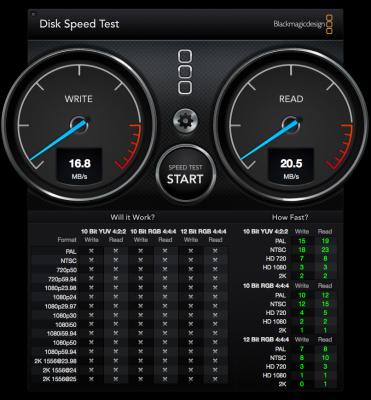
Attached Image
16MB/S write and 20MB/s read on my external HDD. Samba with guest login enabled. Conducted via Ethernet LAN.

20MB = 160Mbit. You need 160Mbit on wireless to achieve this kind of speed. rolleyes.gif

This post has been edited by blacktubi: Mar 13 2016, 12:43 PM

blacktubi
post Mar 13 2016, 12:15 PM

-
Group Icon
Elite
8,415 posts

Joined: Jul 2008

QUOTE(kmrdeva @ Mar 13 2016, 11:17 AM)
Hi all,

I have upgraded from an N66U to an AC68U as the main router for my home 50Mb Time Fibre connection. I've posted the N66U for sale but am now having 2nd thoughts, maybe keep it at home to use it together with the AC68U - both are bloody good routers, IMHO.

Perhaps the network gurus here can share their thoughts. This is what I am thinking to do:

1. Leave the AC68U as the primary router. Disable 2.4GHz wifi, enable 5GHz with 1 main SSID, 1 guest SSID (e.g. home5, guest5). Basically 5GHz AC-Wifi up to 1300Mbps.

2. Install the N66U in AP mode (LAN cable to AC68U). Disable 5GHz and enable 2.4GHz wifi, 1 main SSID, 1 guest SSID (e.g. home2, guest2). Basically 2.4GHz N-Wifi up to 450Mbps.

I have about 10 wireless devices and 2 wired devices at home. Overkill?
*
No point doing that. Asus RT-AC68U alone is good enough.
kmrdeva
post Mar 13 2016, 12:18 PM

Look at all my stars!!
*******
Senior Member
4,784 posts

Joined: Jan 2003
QUOTE(blacktubi @ Mar 13 2016, 12:15 PM)
No point doing that. Asus RT-AC68U alone is good enough.
*
Hmm, thanks buddy. Yeah the AC68U is tremendously powerful.
yongtjunkit
post Mar 13 2016, 08:50 PM

Look at all my stars!!
*******
Senior Member
2,516 posts

Joined: Mar 2016
QUOTE(ASUSmy @ Jan 2 2013, 11:29 AM)

ASUS Networking User and Technical Support by ASUS Malaysia
Greetings to our dear Lowyat.NET Networking User Group. As we are usher in Year 2013, ASUS Malaysia is glad to officially announce the immediate forum support thread for ASUS Networking Products. In order to provide the best support, we have position one dedicated staff to monitor as well as provide support to all existing/new ASUS Networking customer. ASUS Malaysia striving for the best. Cheers.

==========================================================================================

ASUS Networking Hightlights

http://s5.postimg.org/wbdl6845y/0_Uzt_Os0qpnwv_KOd_Tip.jpg 

New Products Details
RT-AC3200
RT-AC87U
EA-AC87
RT-AC55UHP

Learn More about our ASUS router features and our user-friendly interface! thumbup.gif 

Reviews
ASUS RT-AC3200 @ KLseet
ASUS RT-AC87U @ pokde.net, KLseet, Blacktubi
ASUS EA-AC87 @ KLseet
ASUS RT-AC68U @ pokde.net
ASUS RT-N18U @ pokde.net
ASUS RT-AC66U, EA-N66 and PCE-AC66 @ Amil Xtech
ASUS RT-N66U @ Amil Xtech
ASUS RT-AC55UHP @ Blacktubi

Links
ASUS Malaysia @ Facebook
ASUS Republic of Gamers Malaysia @ Facebook
*


Hi asus,
I need help with connecting my asus rtac68u to maxis fiber internet router as router mode. I need the maxis fiber internet router for astro iptv.

tomatoly
post Mar 14 2016, 02:41 PM

New Member
*
Junior Member
21 posts

Joined: Oct 2005


Hi Asus & all,
I am using Asus RT AC68U on Firmware Version:3.0.0.4.378_6975 (on unifi)

1.Please advise if i update to latest firmware, any impact on unifi settings. Advantages of updating?
2.The signal for 5Ghz is very weak. Only get signal sometime even on Iphone, none on my PC which supports AC.

Kindly advise.
Thanks.

This post has been edited by tomatoly: Mar 14 2016, 03:39 PM
dreamthief
post Mar 14 2016, 03:25 PM

Banned
*******
Senior Member
2,657 posts

Joined: Jan 2003
QUOTE(kmrdeva @ Mar 13 2016, 11:17 AM)
Hi all,

I have upgraded from an N66U to an AC68U as the main router for my home 50Mb Time Fibre connection. I've posted the N66U for sale but am now having 2nd thoughts, maybe keep it at home to use it together with the AC68U - both are bloody good routers, IMHO.

Perhaps the network gurus here can share their thoughts. This is what I am thinking to do:

1. Leave the AC68U as the primary router. Disable 2.4GHz wifi, enable 5GHz with 1 main SSID, 1 guest SSID (e.g. home5, guest5). Basically 5GHz AC-Wifi up to 1300Mbps.

2. Install the N66U in AP mode (LAN cable to AC68U). Disable 5GHz and enable 2.4GHz wifi, 1 main SSID, 1 guest SSID (e.g. home2, guest2). Basically 2.4GHz N-Wifi up to 450Mbps.

I have about 10 wireless devices and 2 wired devices at home. Overkill?
*
Definitely overkill. Unless AC68U resource usage is high (CPU, memory) and bandwidth is always maxed out.

AC68U and N66U is designed to cope with both 2.4/5 and multiple clients, disabling one over another doesn't provide any benefit.

There's another to be paranoid and physically also segregating your network. rolleyes.gif notworthy.gif shakehead.gif
kmrdeva
post Mar 14 2016, 04:27 PM

Look at all my stars!!
*******
Senior Member
4,784 posts

Joined: Jan 2003
QUOTE(dreamthief @ Mar 14 2016, 03:25 PM)
Definitely overkill. Unless AC68U resource usage is high (CPU, memory) and bandwidth is always maxed out.

AC68U and N66U is designed to cope with both 2.4/5 and multiple clients, disabling one over another doesn't provide any benefit.

There's another to be paranoid and physically also segregating your network.  rolleyes.gif  notworthy.gif  shakehead.gif
*
Not paranoid about network segregation. Everything's all in the same subnet anyway smile.gif

Was just wondering if having each router dedicated to serving a single wifi frequency band would reap any tangible advantages.

Thanks for your advice, bud biggrin.gif
diablo2
post Mar 15 2016, 01:43 PM

Getting Started
**
Junior Member
76 posts

Joined: Mar 2005
Dear ASUSmy and all,

Have been using Asus RT-N66U since 2012 and very happy with the router performance. However, had problems recently connecting to the wifi signal unless I am next to the router. The SSID can't even be detected from other parts of the home now, when previously there was no problem. The 3 year warranty has already lapsed and I took it back to the vendor who tried sending it back to ASUS for repairs.

Was most disappointed to find out that ASUS does NOT bother with "out-of-warranty" units and is not even interested to provide repair services even though the customer is prepared to pay for it.

Asus is a most reputable brand and probably among the priciest modem/routers in the market but where is the Customer support? You expect us to pay premium prices but with no technical support once the warranty expires?

Is there any solution for my RT-N66U or am i supposed to junk it and rush out to buy the latest ASUS???? I should think not if this is the kind of service provided. shakehead:
SUSXnet
post Mar 15 2016, 02:08 PM

Regular
******
Senior Member
1,862 posts

Joined: May 2013
QUOTE(diablo2 @ Mar 15 2016, 01:43 PM)
Dear ASUSmy and all,
 
Have been using Asus RT-N66U since 2012 and very happy with the router performance. However, had problems recently connecting to the wifi signal unless I am next to the router. The SSID can't even be detected from other parts of the home now, when previously there was no problem. The 3 year warranty has already lapsed and I took it back to the vendor who tried sending it back to ASUS for repairs.

Was most disappointed to find out that ASUS does NOT bother with "out-of-warranty" units and is not even interested to provide repair services even though the customer is prepared to pay for it.

Asus is a most reputable brand and probably among the priciest modem/routers in the market but where is the Customer support? You expect us to pay premium prices  but with no technical support once the warranty expires?

Is there any solution for my RT-N66U or am i supposed to junk it and rush out to buy the latest ASUS???? I should think not if this is the kind of service provided. shakehead:
*
I had the same issue.
My suggestion is to double double factory reset and update firmware to the latest
diablo2
post Mar 15 2016, 02:16 PM

Getting Started
**
Junior Member
76 posts

Joined: Mar 2005
QUOTE(Xnet @ Mar 15 2016, 02:08 PM)
I had the same issue.
My suggestion is to double double factory reset and update firmware to the latest
*
Thanks very much for the suggestion bro, will try it out and let you know the outcome.
But need to go collect it back from Lowyat first.
roxx
post Mar 15 2016, 10:34 PM

T O P K E K
*****
Senior Member
749 posts

Joined: Apr 2008
Guys need help please..

I've been using RT-AC1200HP all these while and no issue.. Suddenly out of nowhere it stop providing wireless internet to all my devices..

Then I checked system log in ASUS IP and detected that the 2.4ghz and 5ghz has been disabled.

Thus I select 'Advanced Settings > Wireless > Professional > Enable radio for both GHZs' and all went back to normal..

My question : How come my router can auto disable my wireless connection? Someone hack my router or hack my wifi signal?

Thanks in advanced in all your feedback.
kmrdeva
post Mar 15 2016, 10:42 PM

Look at all my stars!!
*******
Senior Member
4,784 posts

Joined: Jan 2003
QUOTE(roxx @ Mar 15 2016, 10:34 PM)
My question : How come my router can auto disable my wireless connection? Someone hack my router or hack my wifi signal?
*
Isn't there a WIFI on/off button on the router? If yes, maybe someone pressed it?
TSASUSmy
post Mar 16 2016, 11:37 AM

Look at all my stars!!
*******
Senior Member
2,319 posts

Joined: Mar 2010
QUOTE(roxx @ Mar 15 2016, 10:34 PM)
Guys need help please..

I've been using RT-AC1200HP all these while and no issue.. Suddenly out of nowhere it stop providing wireless internet to all my devices..

Then I checked system log in ASUS IP and detected that the 2.4ghz and 5ghz has been disabled.

Thus I select 'Advanced Settings > Wireless > Professional > Enable radio for both GHZs' and all went back to normal..

My question : How come my router can auto disable my wireless connection? Someone hack my router or hack my wifi signal?

Thanks in advanced in all your feedback.
*
Hi roxx,

May I know what is your current firmware version and where is this router are used? Home, bar, restaurant, etc.

Thank you
TSASUSmy
post Mar 16 2016, 11:43 AM

Look at all my stars!!
*******
Senior Member
2,319 posts

Joined: Mar 2010
QUOTE(diablo2 @ Mar 15 2016, 01:43 PM)
Dear ASUSmy and all,
 
Have been using Asus RT-N66U since 2012 and very happy with the router performance. However, had problems recently connecting to the wifi signal unless I am next to the router. The SSID can't even be detected from other parts of the home now, when previously there was no problem. The 3 year warranty has already lapsed and I took it back to the vendor who tried sending it back to ASUS for repairs.

Was most disappointed to find out that ASUS does NOT bother with "out-of-warranty" units and is not even interested to provide repair services even though the customer is prepared to pay for it.

Asus is a most reputable brand and probably among the priciest modem/routers in the market but where is the Customer support? You expect us to pay premium prices  but with no technical support once the warranty expires?

Is there any solution for my RT-N66U or am i supposed to junk it and rush out to buy the latest ASUS???? I should think not if this is the kind of service provided. shakehead:
*
Hi diablo2,

Try updating the firmware to the latest and do a factory reset. You can also try changing the wireless channel to see the problem still persist or not.

The latest firmware version for this router now is Version 3.0.0.4.378.9529.
https://www.asus.com/Networking/RTN66U/HelpDesk_Download/

Thank you


TSASUSmy
post Mar 16 2016, 11:53 AM

Look at all my stars!!
*******
Senior Member
2,319 posts

Joined: Mar 2010
QUOTE(tomatoly @ Mar 14 2016, 02:41 PM)
Hi Asus & all,
I am using Asus RT AC68U on Firmware Version:3.0.0.4.378_6975 (on unifi)

1.Please advise if i update to latest firmware, any impact on unifi settings. Advantages of updating?
2.The signal for 5Ghz is very weak. Only get signal sometime even on Iphone, none on my PC which supports AC.

Kindly advise.
Thanks.
*
Hi tomatoly,

The current latest firmware version is Version 3.0.0.4.380.1842. You can refer to each description of the firmware version for the bugs fixed and features added.

http://www.asus.com/Networking/RTAC68U/HelpDesk_Download/

And to understand more about 5Ghz, you can visit the link below which I think it will answer most of your questions.

http://www.alternativewireless.com/resourc...reless-lan.html

Thank you
diablo2
post Mar 16 2016, 11:55 AM

Getting Started
**
Junior Member
76 posts

Joined: Mar 2005
QUOTE(ASUSmy @ Mar 16 2016, 11:43 AM)
Hi diablo2,

Try updating the firmware to the latest and do a factory reset. You can also try changing the wireless channel to see the problem still persist or not.

The latest firmware version for this router now is  Version 3.0.0.4.378.9529.
https://www.asus.com/Networking/RTN66U/HelpDesk_Download/

Thank you
*
Thanks for the help, ASUSmy,

Will give it a try after I get the router back.


826 Pages « < 226 227 228 229 230 > » Top
 

Change to:
| Lo-Fi Version
0.0269sec    0.50    6 queries    GZIP Disabled
Time is now: 11th December 2025 - 05:17 PM