Welcome Guest ( Log In | Register )

826 Pages « < 153 154 155 156 157 > » Bottom

Outline · [ Standard ] · Linear+

Home Networking ASUS Malaysia Networking User & Technical Support, Managed by ASUS Malaysia Representative

views
     
cytoh
post Aug 10 2015, 08:30 PM

New Member
*
Junior Member
25 posts

Joined: Jan 2009
From: Kuala Lumpur


Hi Asusmy,

I just bought AC68U and already follows the guide to setup VPN PPTP but i still failed to connect to the VPN server in AC68u. Below was shown in the system log, so what is wrong? I'm using UNIFI

Aug 10 20:28:00 pptp[3013]: pppd 2.4.7 started by XXXXXXXX, uid 0
Aug 10 20:28:00 pptp[3013]: Connect: ppp10 <--> pptp (113.XXX.XXX.XXX)
Aug 10 20:28:30 pptp[3013]: LCP: timeout sending Config-Requests
Aug 10 20:28:30 pptp[3013]: Connection terminated.
Aug 10 20:28:30 pptp[3013]: Modem hangup


VPN Advanced setting:
Attached Image

This post has been edited by cytoh: Aug 10 2015, 08:44 PM
sHawTY
post Aug 11 2015, 09:07 AM

Frequent Reporter
********
All Stars
14,909 posts

Joined: Jul 2005

Just got my repaired ASUS RT-N16 from Alpha Wolf last Saturday.
Sent the router to Alpha Wolf on Friday 7th August & got it back on Saturday 8th August.

He repaired it in only 1 day.
My RT-N16 has been working fine since then.

Previous issue was caused by dead/bulging capacitors.

So if any of you got a dead/faulty ASUS routers where it's no longer under warranty, consider sending it to:
https://forum.lowyat.net/topic/1498281

PS: Nevermind the closed topic, just Whatsapp him & he'll respond to you right away. thumbup.gif
edministrator
post Aug 11 2015, 09:24 AM

Regular
******
Senior Member
1,940 posts

Joined: Nov 2004
From: Soviet Sarawak


QUOTE(sHawTY @ Aug 11 2015, 09:07 AM)
Just got my repaired ASUS RT-N16 from Alpha Wolf last Saturday.
Sent the router to Alpha Wolf on Friday 7th August & got it back on Saturday 8th August.

He repaired it in only 1 day.
My RT-N16 has been working fine since then.

Previous issue was caused by dead/bulging capacitors.

So if any of you got a dead/faulty ASUS routers where it's no longer under warranty, consider sending it to:
https://forum.lowyat.net/topic/1498281

PS: Nevermind the closed topic, just Whatsapp him & he'll respond to you right away. thumbup.gif
*
yes bro, i encountered a number of RTN16 with bulging power capacitors, just need a replacement and it rocks again thumbup.gif

i believe all RTN16 suffers from this issue sweat.gif
Xefron
post Aug 11 2015, 09:36 AM

Look at all my stars!!
*******
Senior Member
2,507 posts

Joined: Jan 2003


QUOTE(edministrator @ Aug 11 2015, 09:24 AM)
yes bro, i encountered a number of RTN16 with bulging power capacitors, just need a replacement and it rocks again  thumbup.gif

i believe all RTN16 suffers from this issue sweat.gif
*
so he's still in business? my rtn66u is having wifi problem.

edministrator
post Aug 11 2015, 09:41 AM

Regular
******
Senior Member
1,940 posts

Joined: Nov 2004
From: Soviet Sarawak


QUOTE(Xefron @ Aug 11 2015, 09:36 AM)
so he's still in business? my rtn66u is having wifi problem.
*
not sure, like shawty says you can whatsapp him. I fixed the caps myself as I have a bit of electronic background. RTN66U is a very good router and does not suffer from caps issue.

what kind of wifi issues are you having? i suggest that you flash the firmware with merlin's fork and reset to factory default settings, and test the router again after that. I own several units of RTN66U as well due to its excellent coverage and stability icon_rolleyes.gif
sHawTY
post Aug 11 2015, 09:52 AM

Frequent Reporter
********
All Stars
14,909 posts

Joined: Jul 2005

QUOTE(Xefron @ Aug 11 2015, 09:36 AM)
so he's still in business? my rtn66u is having wifi problem.
Yes.
But what kind of WiFi problem are you having exactly?
TSASUSmy
post Aug 11 2015, 10:39 AM

Look at all my stars!!
*******
Senior Member
2,319 posts

Joined: Mar 2010
QUOTE(cytoh @ Aug 10 2015, 08:30 PM)
Hi Asusmy,

I just bought AC68U and already follows the guide to setup VPN PPTP but i still failed to connect to the VPN server in AC68u. Below was shown in the system log, so what is wrong? I'm using UNIFI

Aug 10 20:28:00 pptp[3013]: pppd 2.4.7 started by XXXXXXXX, uid 0
Aug 10 20:28:00 pptp[3013]: Connect: ppp10 <--> pptp (113.XXX.XXX.XXX)
Aug 10 20:28:30 pptp[3013]: LCP: timeout sending Config-Requests
Aug 10 20:28:30 pptp[3013]: Connection terminated.
Aug 10 20:28:30 pptp[3013]: Modem hangup
VPN Advanced setting:
Attached Image
*
Hi cytoh,

Can you try updating the firmware to the latest first Beta Version 3.0.0.4.378.4850.

Are you trying to connect to the VPN Server at RT-AC68U using windows?

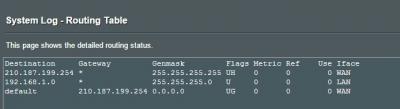
And can you take a image of the Routing Table at General Log->Routing Table.

Thank you
cytoh
post Aug 11 2015, 10:45 AM

New Member
*
Junior Member
25 posts

Joined: Jan 2009
From: Kuala Lumpur


QUOTE(ASUSmy @ Aug 11 2015, 10:39 AM)
Hi cytoh,

Can you try updating the firmware to the latest first Beta Version 3.0.0.4.378.4850.

Are you trying to connect to the VPN Server at RT-AC68U using windows?

And can you take a image of the Routing Table at General Log->Routing Table.

Thank you
*
Hi,
Already updated to latest firmware version 3.0.0.4.378.4850.
I tried to connect to the VPN server at RT-AC68U using both windows 7 pc and android 5 smartphone... both also failed..

Will show you the Routing table tonight.

Xefron
post Aug 11 2015, 11:16 AM

Look at all my stars!!
*******
Senior Member
2,507 posts

Joined: Jan 2003


there's no wifi signal and no dhcp function at all.

already flash to merlin and still the same.
cytoh
post Aug 11 2015, 07:52 PM

New Member
*
Junior Member
25 posts

Joined: Jan 2009
From: Kuala Lumpur


QUOTE(ASUSmy @ Aug 11 2015, 10:39 AM)
Hi cytoh,

Can you try updating the firmware to the latest first Beta Version 3.0.0.4.378.4850.

Are you trying to connect to the VPN Server at RT-AC68U using windows?

And can you take a image of the Routing Table at General Log->Routing Table.

Thank you
*
Hi,

please find the routing table

Attached Image
nicklasccs
post Aug 12 2015, 07:11 AM

New Member
*
Newbie
2 posts

Joined: May 2013
Hi asusmy,

I just bought a wifi model rt-n12d1 and would like to setup n replace the current Unifi wifi device. Reason because of the weak signal, would u possible to share the step to setup the unifi wifi?

Thanks

Nicklas
TSASUSmy
post Aug 12 2015, 09:52 AM

Look at all my stars!!
*******
Senior Member
2,319 posts

Joined: Mar 2010
QUOTE(nicklasccs @ Aug 12 2015, 07:11 AM)
Hi asusmy,

I just bought a wifi model rt-n12d1 and would like to setup n replace the current Unifi wifi device. Reason because of the weak signal, would u possible to share the step to setup the unifi wifi?

Thanks

Nicklas
*
Hi nicklasccs,

You can try follow the step in the video below to do the setup.

https://www.youtube.com/watch?v=ESAPAJqWxH4

Thank you
TSASUSmy
post Aug 12 2015, 10:11 AM

Look at all my stars!!
*******
Senior Member
2,319 posts

Joined: Mar 2010
QUOTE(cytoh @ Aug 11 2015, 07:52 PM)
Hi,

please find the routing table

Attached Image
*
Hi cytoh,

Thank you for the information, will check and get back to ASAP. In the meantime, you can refer to the following step below to make sure the setup is correct.

https://www.youtube.com/watch?v=BtSHVbU-eOo

http://www.asus.com/us/support/FAQ/114892

http://www.asus.com/us/support/FAQ/113806

Thank you
cytoh
post Aug 13 2015, 11:06 AM

New Member
*
Junior Member
25 posts

Joined: Jan 2009
From: Kuala Lumpur


QUOTE(ASUSmy @ Aug 12 2015, 10:11 AM)
Hi cytoh,

Thank you for the information, will check and get back to ASAP. In the meantime, you can refer to the following step below to make sure the setup is correct.

https://www.youtube.com/watch?v=BtSHVbU-eOo

http://www.asus.com/us/support/FAQ/114892

http://www.asus.com/us/support/FAQ/113806

Thank you
*
Hi, any update?
TSASUSmy
post Aug 13 2015, 04:37 PM

Look at all my stars!!
*******
Senior Member
2,319 posts

Joined: Mar 2010
QUOTE(cytoh @ Aug 13 2015, 11:06 AM)
Hi, any update?
*
Hi cytoh,

From the log provided, it seen like VPN server fail to create PPTP tunnel.
One possible is remote server reject the GRE protocol packets and cause VPN server can’t create the connection successfully.

Would like to ask, have you tried to do a factory reset after the newest firmware update? If no, do try to do it, because on firmware Version 3.0.0.4.378.3813 it added some feature that require factory reset.

And are you trying to do the VPN connection within the network or out side the network such as using 3G/4G data from phone.

Thank you
cytoh
post Aug 13 2015, 05:16 PM

New Member
*
Junior Member
25 posts

Joined: Jan 2009
From: Kuala Lumpur


QUOTE(ASUSmy @ Aug 13 2015, 04:37 PM)
Hi cytoh,

From the log provided, it seen like VPN server fail to create PPTP tunnel.
One possible is remote server reject the GRE protocol packets and cause VPN server can’t create the connection successfully.

Would like to ask, have you tried to do a factory reset after the newest firmware update? If no, do try to do it, because on firmware Version 3.0.0.4.378.3813 it added some feature that require factory reset.

And are you trying to do the VPN connection within the network or out side the network such as using 3G/4G data from phone.

Thank you
*
Hi,

I've tried reset the router by pressing reset button at the back of the route, and then i re-config everything again, but result still the same.

I trying to do the VPN connection outside my home network, from 4G phone (wifi hotspot) and from my company network..
ncys1
post Aug 13 2015, 06:19 PM

Getting Started
**
Junior Member
296 posts

Joined: Mar 2010


QUOTE(ASUSmy @ Aug 10 2015, 09:27 AM)
Hi ncys1,

Do try update the firmware to the latest.

Beta Version 3.0.0.4.378.6117

http://www.asus.com/Networking/RTN14UHP/HelpDesk_Download/

Thank you
*
I've upgraded my firmware and have been testing it for a few days. My speeds still drop after uptime goes beyond 2 days. Only downstream bandwidth affected severely, upload speeds are hovering near 5Mbit as per my subscription.

EDIT: Given it some time and did the speed test again, got my 5Mbit back but it seems jittery. Also forgot to add that webpages seem to load slowly, noticeable delay before it begins loading pages.

This post has been edited by ncys1: Aug 13 2015, 06:22 PM
TSASUSmy
post Aug 14 2015, 09:50 AM

Look at all my stars!!
*******
Senior Member
2,319 posts

Joined: Mar 2010
QUOTE(ncys1 @ Aug 13 2015, 06:19 PM)
I've upgraded my firmware and have been testing it for a few days. My speeds still drop after uptime goes beyond 2 days. Only downstream bandwidth affected severely, upload speeds are hovering near 5Mbit as per my subscription.

EDIT: Given it some time and did the speed test again, got my 5Mbit back but it seems jittery. Also forgot to add that webpages seem to load slowly, noticeable delay before it begins loading pages.
*
Hi ncys1,

Can you try on the beta firmware below and see that it help to stabilize the speed.

https://www.asuswebstorage.com/navigate/s/9...EA37860FB5DD07Y

Thank you
TSASUSmy
post Aug 14 2015, 10:04 AM

Look at all my stars!!
*******
Senior Member
2,319 posts

Joined: Mar 2010
QUOTE(cytoh @ Aug 13 2015, 05:16 PM)
Hi,

I've tried reset the router by pressing reset button at the back of the route, and then i re-config everything again, but result still the same.

I trying to do the VPN connection outside my home network, from 4G phone (wifi hotspot) and from my company network..
*
Hi cytoh,

Do you mind letting to remotely log in to your router to help you do the testing for the VPN?

If you are okay, do PM me your DDNS, router user nameand password and select Yes at Administration->System->Enable Web Access from WAN.

Thank you
cytoh
post Aug 14 2015, 10:04 AM

New Member
*
Junior Member
25 posts

Joined: Jan 2009
From: Kuala Lumpur


QUOTE(ASUSmy @ Aug 13 2015, 04:37 PM)
Hi cytoh,

From the log provided, it seen like VPN server fail to create PPTP tunnel.
One possible is remote server reject the GRE protocol packets and cause VPN server can’t create the connection successfully.

Would like to ask, have you tried to do a factory reset after the newest firmware update? If no, do try to do it, because on firmware Version 3.0.0.4.378.3813 it added some feature that require factory reset.

And are you trying to do the VPN connection within the network or out side the network such as using 3G/4G data from phone.

Thank you
*
Hi ASUSmy,

Update on the issue, i mange to connect to VPN on AC68U via 4G phone now, but the problem is i need to click "Apply" at VPN menu, then only able to connect. If i disconnect VPN, then i can't connect again, unless click apply again. I saw this issue reported by other user also, can you please advise?

Log:

Aug 14 09:59:01 pptp[6964]: Connect: ppp10 <--> pptp (113.XXX.XXX.XXX)
Aug 14 09:59:31 pptp[6964]: LCP: timeout sending Config-Requests
Aug 14 09:59:31 pptp[6964]: Connection terminated.
Aug 14 09:59:31 pptp[6964]: Modem hangup
Aug 14 09:59:31 pptpd[6962]: CTRL: EOF or bad error reading ctrl packet length.
Aug 14 09:59:31 pptpd[6962]: CTRL: couldn't read packet header (exit)
Aug 14 09:59:31 pptpd[6962]: CTRL: Fatal error reading control message in disconnect sequence
Aug 14 09:59:41 rc_service: httpd 639:notify_rc restart_vpnd
Aug 14 09:59:44 pptpd[7026]: MGR: Config file not found!
Aug 14 09:59:44 start_nat_rules: apply the nat_rules(/tmp/nat_rules_ppp0_vlan500)!
Aug 14 09:59:45 choenyang: sh /opt/S50asuslighttpd.1 firewall-start
Aug 14 09:59:46 choenyang: sh /opt/S50downloadmaster.1 firewall-start
Aug 14 10:00:05 pptp[7263]: pppd 2.4.7 started by XXXXXXX, uid 0
Aug 14 10:00:05 pptp[7263]: Connect: ppp10 <--> pptp (113.XXX.XXX.XXX)
Aug 14 10:00:10 pptp[7263]: MPPE 128-bit stateless compression enabled
Aug 14 10:00:10 pptp[7263]: Cannot determine ethernet address for proxy ARP
Aug 14 10:00:10 pptp[7263]: local IP address 192.168.1.1
Aug 14 10:00:10 pptp[7263]: remote IP address 192.168.10.2


826 Pages « < 153 154 155 156 157 > » Top
 

Change to:
| Lo-Fi Version
0.0181sec    0.28    6 queries    GZIP Disabled
Time is now: 8th December 2025 - 08:01 AM