Welcome Guest ( Log In | Register )

Outline · [ Standard ] · Linear+

Home Networking ASUS Malaysia Networking User & Technical Support, Managed by ASUS Malaysia Representative

views
     
cytoh
post Aug 10 2015, 08:30 PM

New Member
*
Junior Member
25 posts

Joined: Jan 2009
From: Kuala Lumpur


Hi Asusmy,

I just bought AC68U and already follows the guide to setup VPN PPTP but i still failed to connect to the VPN server in AC68u. Below was shown in the system log, so what is wrong? I'm using UNIFI

Aug 10 20:28:00 pptp[3013]: pppd 2.4.7 started by XXXXXXXX, uid 0
Aug 10 20:28:00 pptp[3013]: Connect: ppp10 <--> pptp (113.XXX.XXX.XXX)
Aug 10 20:28:30 pptp[3013]: LCP: timeout sending Config-Requests
Aug 10 20:28:30 pptp[3013]: Connection terminated.
Aug 10 20:28:30 pptp[3013]: Modem hangup


VPN Advanced setting:
Attached Image

This post has been edited by cytoh: Aug 10 2015, 08:44 PM
cytoh
post Aug 11 2015, 10:45 AM

New Member
*
Junior Member
25 posts

Joined: Jan 2009
From: Kuala Lumpur


QUOTE(ASUSmy @ Aug 11 2015, 10:39 AM)
Hi cytoh,

Can you try updating the firmware to the latest first Beta Version 3.0.0.4.378.4850.

Are you trying to connect to the VPN Server at RT-AC68U using windows?

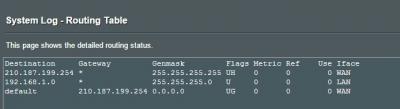
And can you take a image of the Routing Table at General Log->Routing Table.

Thank you
*
Hi,
Already updated to latest firmware version 3.0.0.4.378.4850.
I tried to connect to the VPN server at RT-AC68U using both windows 7 pc and android 5 smartphone... both also failed..

Will show you the Routing table tonight.

cytoh
post Aug 11 2015, 07:52 PM

New Member
*
Junior Member
25 posts

Joined: Jan 2009
From: Kuala Lumpur


QUOTE(ASUSmy @ Aug 11 2015, 10:39 AM)
Hi cytoh,

Can you try updating the firmware to the latest first Beta Version 3.0.0.4.378.4850.

Are you trying to connect to the VPN Server at RT-AC68U using windows?

And can you take a image of the Routing Table at General Log->Routing Table.

Thank you
*
Hi,

please find the routing table

Attached Image
cytoh
post Aug 13 2015, 11:06 AM

New Member
*
Junior Member
25 posts

Joined: Jan 2009
From: Kuala Lumpur


QUOTE(ASUSmy @ Aug 12 2015, 10:11 AM)
Hi cytoh,

Thank you for the information, will check and get back to ASAP. In the meantime, you can refer to the following step below to make sure the setup is correct.

https://www.youtube.com/watch?v=BtSHVbU-eOo

http://www.asus.com/us/support/FAQ/114892

http://www.asus.com/us/support/FAQ/113806

Thank you
*
Hi, any update?
cytoh
post Aug 13 2015, 05:16 PM

New Member
*
Junior Member
25 posts

Joined: Jan 2009
From: Kuala Lumpur


QUOTE(ASUSmy @ Aug 13 2015, 04:37 PM)
Hi cytoh,

From the log provided, it seen like VPN server fail to create PPTP tunnel.
One possible is remote server reject the GRE protocol packets and cause VPN server can’t create the connection successfully.

Would like to ask, have you tried to do a factory reset after the newest firmware update? If no, do try to do it, because on firmware Version 3.0.0.4.378.3813 it added some feature that require factory reset.

And are you trying to do the VPN connection within the network or out side the network such as using 3G/4G data from phone.

Thank you
*
Hi,

I've tried reset the router by pressing reset button at the back of the route, and then i re-config everything again, but result still the same.

I trying to do the VPN connection outside my home network, from 4G phone (wifi hotspot) and from my company network..
cytoh
post Aug 14 2015, 10:04 AM

New Member
*
Junior Member
25 posts

Joined: Jan 2009
From: Kuala Lumpur


QUOTE(ASUSmy @ Aug 13 2015, 04:37 PM)
Hi cytoh,

From the log provided, it seen like VPN server fail to create PPTP tunnel.
One possible is remote server reject the GRE protocol packets and cause VPN server can’t create the connection successfully.

Would like to ask, have you tried to do a factory reset after the newest firmware update? If no, do try to do it, because on firmware Version 3.0.0.4.378.3813 it added some feature that require factory reset.

And are you trying to do the VPN connection within the network or out side the network such as using 3G/4G data from phone.

Thank you
*
Hi ASUSmy,

Update on the issue, i mange to connect to VPN on AC68U via 4G phone now, but the problem is i need to click "Apply" at VPN menu, then only able to connect. If i disconnect VPN, then i can't connect again, unless click apply again. I saw this issue reported by other user also, can you please advise?

Log:

Aug 14 09:59:01 pptp[6964]: Connect: ppp10 <--> pptp (113.XXX.XXX.XXX)
Aug 14 09:59:31 pptp[6964]: LCP: timeout sending Config-Requests
Aug 14 09:59:31 pptp[6964]: Connection terminated.
Aug 14 09:59:31 pptp[6964]: Modem hangup
Aug 14 09:59:31 pptpd[6962]: CTRL: EOF or bad error reading ctrl packet length.
Aug 14 09:59:31 pptpd[6962]: CTRL: couldn't read packet header (exit)
Aug 14 09:59:31 pptpd[6962]: CTRL: Fatal error reading control message in disconnect sequence
Aug 14 09:59:41 rc_service: httpd 639:notify_rc restart_vpnd
Aug 14 09:59:44 pptpd[7026]: MGR: Config file not found!
Aug 14 09:59:44 start_nat_rules: apply the nat_rules(/tmp/nat_rules_ppp0_vlan500)!
Aug 14 09:59:45 choenyang: sh /opt/S50asuslighttpd.1 firewall-start
Aug 14 09:59:46 choenyang: sh /opt/S50downloadmaster.1 firewall-start
Aug 14 10:00:05 pptp[7263]: pppd 2.4.7 started by XXXXXXX, uid 0
Aug 14 10:00:05 pptp[7263]: Connect: ppp10 <--> pptp (113.XXX.XXX.XXX)
Aug 14 10:00:10 pptp[7263]: MPPE 128-bit stateless compression enabled
Aug 14 10:00:10 pptp[7263]: Cannot determine ethernet address for proxy ARP
Aug 14 10:00:10 pptp[7263]: local IP address 192.168.1.1
Aug 14 10:00:10 pptp[7263]: remote IP address 192.168.10.2

cytoh
post Sep 24 2015, 02:30 PM

New Member
*
Junior Member
25 posts

Joined: Jan 2009
From: Kuala Lumpur


Hi AssusMy,

I'm using RT-AC68U for unifi home, i would like to ask how can i make use of LAN port 4 for internet? I'm not using hypptv, and i want to connect one of my pc to LAN port 4. Please advise, thanks.
FYI, i tried set IPTV to manual and tag 500 vlan to both LAN 3 and LAN 4, but unifi could not get connected.
cytoh
post Sep 24 2015, 07:54 PM

New Member
*
Junior Member
25 posts

Joined: Jan 2009
From: Kuala Lumpur


QUOTE(silv3rmoon @ Sep 24 2015, 04:17 PM)
Hi,

I can assist you on this.

Just select unifi biz at special ISP requirement will do
*
Thank you, will try it out.


Change to:
| Lo-Fi Version
0.0380sec    0.52    7 queries    GZIP Disabled
Time is now: 10th December 2025 - 05:38 PM