

QUOTE(3536837 @ Aug 2 2015, 03:23 PM)
hi , may i know asus router support maxis astro iptv ?....

Hi 3536837,Currently our router unable to fully support the Maxis IPTV.
Thank you
Home Networking ASUS Malaysia Networking User & Technical Support, Managed by ASUS Malaysia Representative
 |
 Aug 3 2015, 06:03 PM Aug 3 2015, 06:03 PM
Show posts by this member only | IPv6 | Post
#3041
|
 
Senior Member
2,319 posts Joined: Mar 2010 
|
QUOTE(3536837 @ Aug 2 2015, 03:23 PM) hi , may i know asus router support maxis astro iptv ?.... Hi 3536837,Currently our router unable to fully support the Maxis IPTV. Thank you |
|
|
|
|
|
Aug 3 2015, 06:16 PM
Show posts by this member only | IPv6 | Post
#3042
|
|
Senior Member
2,319 posts Joined: Mar 2010
|
QUOTE(blstz @ Aug 3 2015, 10:11 AM) Hi, after I upgrade my DSL-N12E C1 to the latest firmware 1.0.9.7, I noticed that when I stream videos from PC to PC and PC to Android phone, the video will stop streaming halfway. Wifi for all affected PC/smartphones are still connected to the router. Hi blstz,Other than streaming, surfing is ok. Did not try file transfer. Method I used to upgrade my firmware. Download firmware from internet -> connect laptop to router with LAN cable -> backup settings -> flash new firmware -> press reset button for 8 seconds -> restore settings. Can you try updating it to Version 1.0.9.8? It mention got fixed some WiFi issue. ASUS DSL-N12E_C1 Firmware version 1.0.9.8 (This product supports both Annex A and Annex B) Notice: After upgraded with 1.0.9.8 please press the hardware reset button of DSL-N12E_C1 over 8 seconds to reset the DSL modem router. - Release Note - - Fixed WiFi related issue. http://www.asus.com/Networking/DSLN12E_C1/HelpDesk_Download/ Thank you |
|
|
Aug 3 2015, 06:25 PM
Show posts by this member only | IPv6 | Post
#3043
|
|
Senior Member
2,319 posts Joined: Mar 2010
|
QUOTE(everkids @ Aug 3 2015, 10:41 AM) Hi Asus Support, Hi everkids,I learn from the link below that RT-N16 support YTL Yes Go Wimax donggle. http://www.asus.com/event/networks_3G4G_support/ However i have difficulty trying to connect to YTL Yes Wimax with only input username and password. [attachmentid=4685878] i have verified my username and password is correct. Do i need to provide pincode? where to find the pincode? Try updating the firmware to the latest, 3.0.0.4.378.4850 and try again. No need to put pin code or email. http://www.asus.com/Networking/RTN16/HelpDesk_Download/ Thank you |
|
|
Aug 4 2015, 03:27 PM
|

Newbie
0 posts Joined: Aug 2015 
|
Hi Asus Support Team,
I've been using Asus RT-N14UHP Router for 1year++. Due to bandwidth performance reduced from my original subscription package of 10Mbps to around 1-2Mbps for the past 2days (tested by http://www.speedtest.net/ and http://speedtest2.unifi.my/), I've called TM customer service to lodge a complaint. However, after resetting at their side and further testing, I've been told that my line is not having any problem. To verify whether is the under performance caused by the Asus Router, hence I'm reconnecting the original TM router for testing. The result, it's back to expected bandwidth around 10Mbps. Therefore, I can conclude that the problem arise from the Asus router. So, the next step is I'm resetting the router to factory default by pushing the dedicated button on the router & setup as new by using the Setup Wizard. However, I've been stuck at the process of "Detecting Internet Connection Type"...... it's processing for several minutes and terminated with result "detecting the Internet connection type time out". Upgrading firmware and retried for several times but no luck. I've read through previous users similar experiences of "detecting the Internet connection type time out" and have done the followings before writing to you for help :- 1). upgraded the latest version of firmware by LAN cable "FW_RT_N14UHP_30043786117", 2). factory reset by pressing the dedicated button on the router >8 seconds (until it light blinks), 3). making sure my unifi login username & password is key-in correctly (verifying by using TM original router which can login successfully & called TM Customer Service to re-verify the details), 4). that the type of connection selection is PPPoE in the Setup Wizard, However, I'm dissapointted to say that all the attempts has failed. Kindly study and advise in return of the possible solution. Thanks and best regards. |
|
|
Aug 4 2015, 05:14 PM
|

Newbie
1 posts Joined: Jun 2011 From: Sarawak
|
QUOTE(ASUSmy @ Aug 3 2015, 05:23 PM) Hi launh, How about DSL-N14U ?Nope, we don't have this model in Malaysia. Thank you |
|
|
Aug 4 2015, 05:39 PM
Show posts by this member only | IPv6 | Post
#3046
|
|
Senior Member
2,319 posts Joined: Mar 2010
|
QUOTE(parksonchew @ Aug 4 2015, 03:27 PM) Hi Asus Support Team, Hi parksonchew,I've been using Asus RT-N14UHP Router for 1year++. Due to bandwidth performance reduced from my original subscription package of 10Mbps to around 1-2Mbps for the past 2days (tested by http://www.speedtest.net/ and http://speedtest2.unifi.my/), I've called TM customer service to lodge a complaint. However, after resetting at their side and further testing, I've been told that my line is not having any problem. To verify whether is the under performance caused by the Asus Router, hence I'm reconnecting the original TM router for testing. The result, it's back to expected bandwidth around 10Mbps. Therefore, I can conclude that the problem arise from the Asus router. So, the next step is I'm resetting the router to factory default by pushing the dedicated button on the router & setup as new by using the Setup Wizard. However, I've been stuck at the process of "Detecting Internet Connection Type"...... it's processing for several minutes and terminated with result "detecting the Internet connection type time out". Upgrading firmware and retried for several times but no luck. I've read through previous users similar experiences of "detecting the Internet connection type time out" and have done the followings before writing to you for help :- 1). upgraded the latest version of firmware by LAN cable "FW_RT_N14UHP_30043786117", 2). factory reset by pressing the dedicated button on the router >8 seconds (until it light blinks), 3). making sure my unifi login username & password is key-in correctly (verifying by using TM original router which can login successfully & called TM Customer Service to re-verify the details), 4). that the type of connection selection is PPPoE in the Setup Wizard, However, I'm dissapointted to say that all the attempts has failed. Kindly study and advise in return of the possible solution. Thanks and best regards. After reading your case, it seen like you have miss out one part. When selecting the connection type which is PPPoE, you need to tick the Special requirement from ISP and select UNIFI. You can follow the video below on how to setup the UNIFI setting. https://www.youtube.com/watch?v=ESAPAJqWxH4 Thank you |
|
|
|
|
|
Aug 4 2015, 05:41 PM
Show posts by this member only | IPv6 | Post
#3047
|
|
Senior Member
2,319 posts Joined: Mar 2010
|
QUOTE(launh @ Aug 4 2015, 05:14 PM) How about DSL-N14U ? Hi launh,Sorry we don't have that model either in Malaysia. Below is the available DSL models in Malaysia now. DSL-AC68U DSL-N55U DSL-N12U DSL-N12E Thank you |
|
|
Aug 4 2015, 06:15 PM
Show posts by this member only | IPv6 | Post
#3048
|
|
Senior Member
2,816 posts Joined: Jan 2003 From: kat situ kat sana
|
Anyone face issue with RT-AC68U and Merlin firmware? After few days, the web interface went bonkers. refer screen. I have reverted to using Asus stock firmware 3.0.0.4.378_4585 from Merlin 378.55
Attached thumbnail(s) 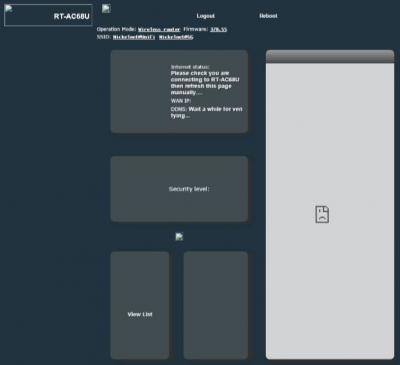
|
|
|
Aug 4 2015, 08:02 PM
|
|
Newbie
0 posts Joined: Aug 2015
|
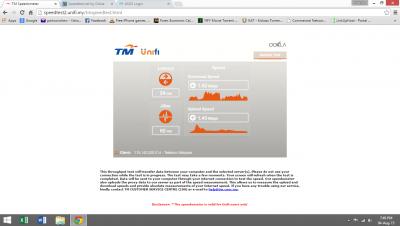
QUOTE(ASUSmy @ Aug 4 2015, 05:39 PM) Hi parksonchew, Thank you so much for your quick response and guidance.After reading your case, it seen like you have miss out one part. When selecting the connection type which is PPPoE, you need to tick the Special requirement from ISP and select UNIFI. You can follow the video below on how to setup the UNIFI setting. https://www.youtube.com/watch?v=ESAPAJqWxH4 Thank you I'm able to connect to unifi after selecting the Special Requirement from ISP and select Unifi. However, the initial problem of poor performance still persist with download & upload speed <2Mbps (my unifi package is 10Mbps) as per my images attached. Basically, I'm using the default configuration of router. Kindly advise again. p.s. once I plugged in the original TM router, the performance is around 9-10Mbps  This post has been edited by parksonchew: Aug 4 2015, 08:44 PM Attached thumbnail(s) 
|
|
|
Aug 5 2015, 01:59 PM
|
|
Senior Member
2,319 posts Joined: Mar 2010
|
QUOTE(parksonchew @ Aug 4 2015, 08:02 PM) Thank you so much for your quick response and guidance. Hi parksonchew,I'm able to connect to unifi after selecting the Special Requirement from ISP and select Unifi. However, the initial problem of poor performance still persist with download & upload speed <2Mbps (my unifi package is 10Mbps) as per my images attached. Basically, I'm using the default configuration of router. Kindly advise again. p.s. once I plugged in the original TM router, the performance is around 9-10Mbps Can you try use LAN cable to test, and see that you will have same problem or not. As for WiFi part, try changing the WiFi channel for the WiFi. Wireless->General->Control Channel. Thank you |
|
|
Aug 5 2015, 02:13 PM
|
|
Newbie
0 posts Joined: Aug 2015
|
QUOTE(ASUSmy @ Aug 5 2015, 01:59 PM) Hi parksonchew, Yes, LAN cable testing has been done before but same result. As for changing Wifi channel, also been tested but no improvement too. Can you try use LAN cable to test, and see that you will have same problem or not. As for WiFi part, try changing the WiFi channel for the WiFi. Wireless->General->Control Channel. Thank you  |
|
|
Aug 5 2015, 02:20 PM
|
|
Senior Member
2,319 posts Joined: Mar 2010
|
QUOTE(parksonchew @ Aug 5 2015, 02:13 PM) Yes, LAN cable testing has been done before but same result. As for changing Wifi channel, also been tested but no improvement too. Hi parksonchew,Providing me your setting file and I will test it on my unit. I will PM you my e-mail address. Thank you |
|
|
Aug 5 2015, 02:55 PM
|
|
Newbie
0 posts Joined: Aug 2015
|
QUOTE(ASUSmy @ Aug 5 2015, 02:20 PM) Hi parksonchew, Hi, your message with email address duly noted.Providing me your setting file and I will test it on my unit. I will PM you my e-mail address. Thank you I've just emailed to your mailbox the Asus router setting file for further testing. Thanks and warmest regards. |
|
|
|
|
|
Aug 5 2015, 04:37 PM
|
|
Senior Member
1,201 posts Joined: Jul 2013
|
...
This post has been edited by xperiaVuser: Sep 9 2015, 01:48 AM |
|
|
Aug 6 2015, 02:02 PM
|

All Stars
10,340 posts Joined: Jan 2003
|
QUOTE(parksonchew @ Aug 5 2015, 02:55 PM) Hi, your message with email address duly noted. Your QOS is turn off or no? Make sure it is off.I've just emailed to your mailbox the Asus router setting file for further testing. Thanks and warmest regards. |
|
|
Aug 6 2015, 10:39 PM
|

Junior Member
235 posts Joined: Feb 2006
|
QUOTE(ASUSmy @ Aug 3 2015, 05:28 PM) Hi modjojojo, When u say that, means Asus router connected straight to astro iptv Decoder?Currently our router unable to fully support the Maxis IPTV. Thank you What about this configuration: TM gateway --> Asus router ---> Thomson router --> astro iptv decoder Can this work with any Asus router model? |
|
|
Aug 7 2015, 09:50 AM
|
|
Senior Member
2,319 posts Joined: Mar 2010
|
QUOTE(modjojojo @ Aug 6 2015, 10:39 PM) When u say that, means Asus router connected straight to astro iptv Decoder? Hi modjojojo,What about this configuration: TM gateway --> Asus router ---> Thomson router --> astro iptv decoder Can this work with any Asus router model? You can try refer to the below setting posted by one of the user. https://forum.lowyat.net/topic/3082846/all Thank you |
|
|
Aug 7 2015, 05:16 PM
|

Junior Member
284 posts Joined: Mar 2009
|
Hey guys, from what I read here, the ASUS router (ASUS RT-N12HP) doesn't support Astro IPTV yet...
So, I thought ok, I'll just connect the Astro to the Maxis router and then connect the Maxis router to the Asus router with the Asus router on AP mode. But how do I set this up? If I just connect Ethernet cable to the WAN port of the Asus router it doesn't work. Or if anyone know how to set it up such that Astro IPTV works and that I can use the Asus router as well, that will be great too. This post has been edited by hahli9: Aug 7 2015, 06:21 PM |
|
|
Aug 8 2015, 02:24 PM
|
|
Junior Member
19 posts Joined: Dec 2008
|
Hi guys,
I have upgrade my unifi from 10mbps to 30mbps, however the speed capped at 10mbps. I tried with the default tm router it stream 30mbps. Is there any issue with the router? Ps: I'm using Asus Rt-N56U Firmware Version:3.0.0.4.376_3879 This post has been edited by acorlus: Aug 8 2015, 02:25 PM |
|
|
Aug 8 2015, 05:16 PM
|

Senior Member
1,916 posts Joined: Mar 2007 From: Petaling Jaya 
|
hi ASUSmy,
i just bought AC68U modem,wanted to know how do i connect my desktop to 5G network?as i only can see 2.5G on my wifi network but my both iPad and Macbook are able to detecg 5G. thanks. This post has been edited by Lynixx: Aug 8 2015, 05:17 PM |
| Change to: |  0.0250sec 0.0250sec
 0.66 0.66
 6 queries 6 queries
 GZIP Disabled GZIP Disabled
Time is now: 10th December 2025 - 12:33 PM |
 Quote
Quote