Welcome Guest ( Log In | Register )

826 Pages « < 150 151 152 153 154 > » Bottom

Outline · [ Standard ] · Linear+

Home Networking ASUS Malaysia Networking User & Technical Support, Managed by ASUS Malaysia Representative

views
     
TSASUSmy
post Jul 28 2015, 11:30 AM

Look at all my stars!!
*******
Senior Member
2,319 posts

Joined: Mar 2010
QUOTE(tomastan4134 @ Jul 27 2015, 03:12 PM)
Hi asusmy,

i would like to setup my 3 story house with wifi ..

what is the best solution.

planning to get AC68U as main router placing at ground floor.

and then get N14UHP as AP mode on second floor.. (can this cover 2nd and 3rd floor with wifi)?

what do think of this solution?
*
Hi tomastan4134,

May I know how many square feet of your second and third floor? How many room is on your second and third floor?

And will the RT-N14UHP put at the middle of the second floor?

Thank you
tomastan4134
post Jul 28 2015, 12:14 PM

Enthusiast
*****
Senior Member
830 posts

Joined: Mar 2014
QUOTE(ASUSmy @ Jul 28 2015, 11:30 AM)
Hi tomastan4134,

May I know how many square feet of your second and third floor? How many room is on your second and third floor?

And will the RT-N14UHP put at the middle of the second floor?

Thank you
*
its about 6,000 sqft with 4 rooms on each floor.

The 14HP will be placed centre of the 2nd floor. Plan to use power line to link main router placed at ground floor to ap on 2nd floor


Or single ac68u can cover the entire house with 3 floors ??

im just worried the wifi coverage is not good enough...

Currently using N66U at my current 2 story bungalow. router placed at upper floor. ground floor suffering from coverage issue at some areas.

what is the best solution for my new 3 story house?

This post has been edited by tomastan4134: Jul 28 2015, 01:21 PM
TSASUSmy
post Jul 28 2015, 02:26 PM

Look at all my stars!!
*******
Senior Member
2,319 posts

Joined: Mar 2010
QUOTE(tomastan4134 @ Jul 28 2015, 12:14 PM)
its about 6,000 sqft with 4 rooms on each floor. 

The 14HP will be placed centre of the 2nd floor.  Plan to use power line to link main router placed at ground floor to ap on 2nd floor
Or single ac68u can cover the entire house with 3 floors ??

im just worried the wifi coverage is not good enough...

Currently using N66U at my current 2 story bungalow.  router placed at upper floor.  ground floor suffering from coverage issue at some areas.

what is the best solution for my new 3 story house?
*
Hi tomastan4134,

For your situation, since you have the RT-N66U, you can try use that router and put at the second of your new house to see it able to cover all the area or not.

This model have almost the same coverage area as the RT-N14UHP.

I not sure how is the structure of your house, but 4 rooms mean there will be a lot of walls.

Thank you
tomastan4134
post Jul 28 2015, 03:32 PM

Enthusiast
*****
Senior Member
830 posts

Joined: Mar 2014
QUOTE(ASUSmy @ Jul 28 2015, 02:26 PM)
Hi tomastan4134,

For your situation, since you have the RT-N66U, you can try use that router and put at the second of your new house to see it able to cover all the area or not.

This model have almost the same coverage area as the RT-N14UHP.

I not sure how is the structure of your house, but 4 rooms mean there will be a lot of walls.

Thank you
*
Yes. But I will be still using the n66u at my existing house. So need to buy new router. Will the ac68u cover the entire house. And assume there is a lot of walls.


What do you think
TSASUSmy
post Jul 28 2015, 03:58 PM

Look at all my stars!!
*******
Senior Member
2,319 posts

Joined: Mar 2010
QUOTE(tomastan4134 @ Jul 28 2015, 03:32 PM)
Yes.  But I will be still using the n66u at my existing house.    So need to buy new router.  Will the ac68u cover the entire house.  And assume there is a lot of walls.
What do you think
*
Hi tomastan4134,

Nope, I don't think the RT-AC68U can cover the whole house.

The RT-N66U just use for testing the signal range only. Once you put it at the place you want to put your future AP, use your phone or notebook to test the signal.

By doing this, you can know whether a RT-N14UHP enough to cover your first and second floor.

Thank you
kmrdeva
post Jul 28 2015, 04:05 PM

Look at all my stars!!
*******
Senior Member
4,783 posts

Joined: Jan 2003
I have a buddy living in a 3+ floor home. '+' meaning he has an open area to hang clothes and also to sit and lounge around at night, on the roof top.

He has an AC68U on the ground floor with his older N66U on the 2nd floor acting as an AP (connected via ethernet cable to the AC68U). Coverage is good everywhere in his home. 1 SSID each per router with an additional guest SSID on the AC68U.
tomastan4134
post Jul 28 2015, 04:12 PM

Enthusiast
*****
Senior Member
830 posts

Joined: Mar 2014
QUOTE(kmrdeva @ Jul 28 2015, 04:05 PM)
I have a buddy living in a 3+ floor home. '+' meaning he has an open area to hang clothes and also to sit and lounge around at night, on the roof top.

He has an AC68U on the ground floor with his older N66U on the 2nd floor acting as an AP (connected via ethernet cable to the AC68U). Coverage is good everywhere in his home. 1 SSID each per router with an additional guest SSID on the AC68U.
*

Thanks for the information buddy.

However. Did your friend said if the ac68u can cover the entire house without any additional access point.

If not then I have to follow your friends setup
kmrdeva
post Jul 28 2015, 04:30 PM

Look at all my stars!!
*******
Senior Member
4,783 posts

Joined: Jan 2003
QUOTE(tomastan4134 @ Jul 28 2015, 04:12 PM)
Thanks for the information buddy.

However. Did your friend said if the ac68u  can cover the entire house without any additional access point.

If not then I have to follow your friends setup
*
I remember he mentioned with just the AC68U, the signal was very poor on the 2nd floor and totally unavailable on the rooftop floor.

BTW, my friend did not use a powerline connection between the AC68U and N66U because he already had gigabit wired networking set up in his home during renovation.
tomastan4134
post Jul 28 2015, 05:07 PM

Enthusiast
*****
Senior Member
830 posts

Joined: Mar 2014
QUOTE(kmrdeva @ Jul 28 2015, 04:30 PM)
I remember he mentioned with just the AC68U, the signal was very poor on the 2nd floor and totally unavailable on the rooftop floor.

BTW, my friend did not use a powerline connection between the AC68U and N66U because he already had gigabit wired networking set up in his home during renovation.
*
I c. I wish I can implement wired network throuhout the house. But. My dad bought the house. Not sure if he wanted to do network wiring

Powerlinw is another option
tomastan4134
post Jul 28 2015, 05:10 PM

Enthusiast
*****
Senior Member
830 posts

Joined: Mar 2014
QUOTE(ASUSmy @ Jul 28 2015, 03:58 PM)
Hi tomastan4134,

Nope, I don't think the RT-AC68U can cover the whole house.

The RT-N66U just use for testing the signal range only. Once you put it at the place you want to put your future AP, use your phone or notebook to test the signal.

By doing this, you can know whether a RT-N14UHP enough to cover your first and second floor.

Thank you
*
Okie thanks for your info.
coolguy_mahen
post Aug 1 2015, 11:12 AM

Getting Started
**
Junior Member
114 posts

Joined: Nov 2004


QUOTE(OKLY @ Jul 27 2015, 12:09 PM)
Speaking of IPv6, the default MTU for IPv6 is 1492 and there is no way to change it from the admin control panel. The only way is by logging in via Telnet and entering the below:

CODE
echo 1420 > /proc/sys/net/ipv6/conf/br0/mtu


The above code will change the MTU for IPv6 to 1420. Can this be feedback to the team to possibly allow MTU configuration for IPv6 in the control panel or at least the default MTU for IPv6 be lower like around 1420?

Reason is that for IPv6, MTU of 1492 is just too high and will cause many weird issues especially with users complaining that after enabling IPv6, their internet seems slower and not so responsive.
*
thanks for the info.

If it's still having issues, then I suppose I will wait awhile before enabling IPv6 on my router. Apart from some geek bragging rights, don't see the immediate need to enable it yet.

Perhaps after Asus looks into the packet size issue you bought up..
launh
post Aug 1 2015, 01:23 PM

New Member
*
Newbie
1 posts

Joined: Jun 2011
From: Sarawak
Hi Asusmy,

Is DSL-N16U available in malaysia?
CyrusWong
post Aug 1 2015, 01:26 PM

Regular
******
Senior Member
1,643 posts

Joined: Apr 2013
this asus support for networking product only or full product support?
modjojojo
post Aug 1 2015, 03:31 PM

Getting Started
**
Junior Member
235 posts

Joined: Feb 2006


Currently is there any Asus router that can support astro iptv via maxis fibre? No need VOIP because I didnt pay for it. Is there any way to-do it without the Thomson router?
3536837
post Aug 2 2015, 03:23 PM

Regular
******
Senior Member
1,602 posts

Joined: Aug 2005


hi , may i know asus router support maxis astro iptv ?....
blstz
post Aug 3 2015, 10:11 AM

Enthusiast
*****
Senior Member
832 posts

Joined: Jan 2003
Hi, after I upgrade my DSL-N12E C1 to the latest firmware 1.0.9.7, I noticed that when I stream videos from PC to PC and PC to Android phone, the video will stop streaming halfway. Wifi for all affected PC/smartphones are still connected to the router.

Other than streaming, surfing is ok. Did not try file transfer.

Method I used to upgrade my firmware. Download firmware from internet -> connect laptop to router with LAN cable -> backup settings -> flash new firmware -> press reset button for 8 seconds -> restore settings.
everkids
post Aug 3 2015, 10:41 AM

Getting Started
**
Junior Member
70 posts

Joined: May 2006
Hi Asus Support,

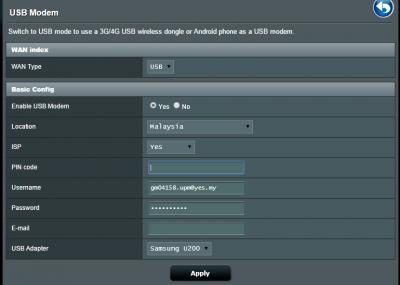
I learn from the link below that RT-N16 support YTL Yes Go Wimax donggle.
http://www.asus.com/event/networks_3G4G_support/

However i have difficulty trying to connect to YTL Yes Wimax with only input username and password.
Attached Image

i have verified my username and password is correct.
Do i need to provide pincode? where to find the pincode?

This post has been edited by everkids: Aug 3 2015, 10:41 AM
TSASUSmy
post Aug 3 2015, 05:23 PM

Look at all my stars!!
*******
Senior Member
2,319 posts

Joined: Mar 2010
QUOTE(launh @ Aug 1 2015, 01:23 PM)
Hi Asusmy,

Is DSL-N16U available in malaysia?
*
Hi launh,

Nope, we don't have this model in Malaysia.

Thank you
TSASUSmy
post Aug 3 2015, 05:24 PM

Look at all my stars!!
*******
Senior Member
2,319 posts

Joined: Mar 2010
QUOTE(CyrusWong @ Aug 1 2015, 01:26 PM)
this asus support for networking product only or full product support?
*
Hi CyrusWong,

Yes, for networking product only. For component you can post at

https://forum.lowyat.net/topic/1813844

Thank you
TSASUSmy
post Aug 3 2015, 05:28 PM

Look at all my stars!!
*******
Senior Member
2,319 posts

Joined: Mar 2010
QUOTE(modjojojo @ Aug 1 2015, 03:31 PM)
Currently is there any Asus router that can support astro iptv via maxis fibre? No need VOIP because I didnt pay for it. Is there any way to-do it without the Thomson router?
*
Hi modjojojo,

Currently our router unable to fully support the Maxis IPTV.

Thank you

826 Pages « < 150 151 152 153 154 > » Top
 

Change to:
| Lo-Fi Version
0.0232sec    0.54    6 queries    GZIP Disabled
Time is now: 10th December 2025 - 01:44 PM