

Today asus royal club Lowyat got Open ?
Home Networking ASUS Malaysia Networking User & Technical Support, Managed by ASUS Malaysia Representative
Home Networking ASUS Malaysia Networking User & Technical Support, Managed by ASUS Malaysia Representative
|
|
 Dec 6 2014, 10:39 AM Dec 6 2014, 10:39 AM
|
 
Junior Member
87 posts Joined: Feb 2009 From: Namo Amitabha 
|
Today asus royal club Lowyat got Open ?
|
|
|
|
|
|
Dec 7 2014, 05:39 AM
Show posts by this member only | IPv6 | Post
#2142
|

Junior Member
143 posts Joined: Mar 2012
|
Hi, anyone buy asus router from lazada before? I am planning to get rt14 uhp from lazada priced as low as rm257. All Asus router come with 3 years warranty right? If anything happens within the 3 years, can I claim warranty directly from asus Malaysia? Thanks !
|
|
|
Dec 8 2014, 09:40 AM
|

Senior Member
7,118 posts Joined: Oct 2011 From: Wakanda 
|
QUOTE(darksin_90 @ Dec 7 2014, 05:39 AM) Hi, anyone buy asus router from lazada before? I am planning to get rt14 uhp from lazada priced as low as rm257. All Asus router come with 3 years warranty right? If anything happens within the 3 years, can I claim warranty directly from asus Malaysia? Thanks ! Read the description & warranty conditions included in the product listing to be sure its just not seller warranty, as opposed to being directly from ASUS. No, never bought from Lazada. |
|
|
Dec 9 2014, 12:53 PM
|

Junior Member
95 posts Joined: Oct 2004
|
Hi AsusMY,
I just upgrade my internet to Unifi 10mb, and which follow asus router will be the best ? I need IPTV but VOIP is optional. RT-N12HP RT-N14U RT-N12 D1 RT-N10U The current setting my router is at second floor and there is a cable connected and pulled from the router to a switch downstairs and from the switch connect to my IPTV or TV. so which above Asus router will be the best for Unifi 10mb This post has been edited by derekang168: Dec 9 2014, 01:08 PM |
 |
Dec 10 2014, 10:09 AM
|

Senior Member
2,319 posts Joined: Mar 2010
|
QUOTE(derekang168 @ Dec 9 2014, 12:53 PM) Hi AsusMY, Hi derekang168,I just upgrade my internet to Unifi 10mb, and which follow asus router will be the best ? I need IPTV but VOIP is optional. RT-N12HP RT-N14U RT-N12 D1 RT-N10U The current setting my router is at second floor and there is a cable connected and pulled from the router to a switch downstairs and from the switch connect to my IPTV or TV. so which above Asus router will be the best for Unifi 10mb From the model written by you, if you didn't use any USB application from the router, i would suggest either RT-N12HP or RT-N12 D1. If you planning to use the USB application such as the print server or download master in the future, then you can go for RT-N14U or our high power model RT-N14UHP. Thank you |
|
|
Dec 10 2014, 02:56 PM
|
|
Senior Member
2,717 posts Joined: Oct 2004
|
Asus Support, what is the latest firmware for RT-AC66U? Mine is 3.0.0.4.376_1123 and I can see there is notification of new firmware. However, when I try to download the new firmware, it cannot connect to Asus Server.
|
|
|
|
|
|
Dec 10 2014, 02:59 PM
|

All Stars
13,470 posts Joined: Jan 2012
|
@AsusMY
Just received 2 unit of RT-N14UHP from Lazada. I'm surprised that now they have antenna holder bracket that were lacking in first batch. Possible to get those? This post has been edited by andrekua2: Dec 10 2014, 03:10 PM Attached thumbnail(s) 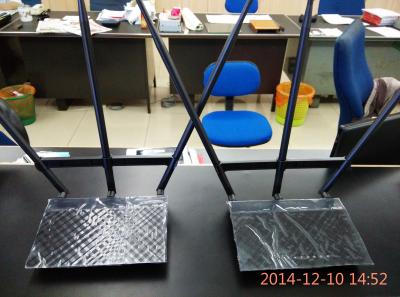
|
|
|
Dec 10 2014, 06:12 PM
|
|
Senior Member
2,319 posts Joined: Mar 2010
|
QUOTE(pokemon @ Dec 10 2014, 02:56 PM) Asus Support, what is the latest firmware for RT-AC66U? Mine is 3.0.0.4.376_1123 and I can see there is notification of new firmware. However, when I try to download the new firmware, it cannot connect to Asus Server. Hi pokemon,The current firmware is Version 3.0.0.4.376.3626, the server might be down. You can download it manually from the link below. http://www.asus.com/Networking/RTAC66U/HelpDesk_Download/ Thank you |
|
|
Dec 10 2014, 06:30 PM
|
|
Senior Member
2,319 posts Joined: Mar 2010
|
QUOTE(andrekua2 @ Dec 10 2014, 02:59 PM) @AsusMY Hi andrekua2,Just received 2 unit of RT-N14UHP from Lazada. I'm surprised that now they have antenna holder bracket that were lacking in first batch. Possible to get those? Sorry because we didn't sell it separately, all the holder are came together with the router. Will try to ask whether we can have it separately. Thank you |
|
|
Dec 10 2014, 09:11 PM
|
|
Senior Member
1,785 posts Joined: Jan 2003
|
QUOTE(ASUSmy @ Dec 5 2014, 12:04 PM) Hi jiant, Can explain more detail?You unable to limit the speed by Quest only. The setting is apply to all, unless you assign an IP or MAC address at the QoS. Thank you Better step by step. |
|
|
Dec 10 2014, 09:35 PM
|
|
All Stars
13,470 posts Joined: Jan 2012
|
Just a little update on using 2 RT-N14UHP to cover two storey house.
I had Unifi setup on my brother upper floor, close to the front of the house. The repeater unit was placed in the middle of the lower floor (after some trials). I tried placing the repeater directly below my brother's unit but it was not satisfactory. Im guessing clients having difficulty choosing which one to connect since signal strength was so-so even for both. Once I moved the repeater to the middle of the house, now clients were able to connect to the repeater which boost much stronger signal and result was pretty good. Speedtest confirmed that I was able to get 12~14Mbps out of my VIP20 even when piercing through few walls on lower floor. |
|
|
Dec 11 2014, 09:14 AM
|
|
Senior Member
2,319 posts Joined: Mar 2010
|
QUOTE(jiant @ Dec 10 2014, 09:11 PM) Can explain more detail? Hi jiant,Better step by step. Below guide and video will show you more details about our QoS setting and how it works. http://www.asus.com/us/support/FAQ/113967 https://www.youtube.com/watch?v=t2rsUDIsx_w Thank you |
|
|
Dec 14 2014, 06:10 PM
|
|
Newbie
2 posts Joined: Jul 2011
|
Hi
I just bought RT-N12 D1 for my unifi the problem is the firmware is 3.0.0.4.376_0-g6721faa should i update router to the latest firmware 3.0.0.4.376.3602 or let it be Thanks |
|
|
|
|
|
Dec 14 2014, 09:25 PM
Show posts by this member only | IPv6 | Post
#2154
|
|
Junior Member
274 posts Joined: Jan 2005
|
Hi,
I would like to set my rt-n66u to allow internet connection to certain device only eg my ipad, my pc, my samsung phone etc. other device outside i dont want them to connect to my network. pls help if i can do this. tq |
|
|
Dec 15 2014, 01:54 AM
|
|
All Stars
13,470 posts Joined: Jan 2012
|
QUOTE(skyfusion @ Dec 14 2014, 09:25 PM) Hi, I believe you can use Wireless MAC Filter to accept only devices listed in your list and reject all others.I would like to set my rt-n66u to allow internet connection to certain device only eg my ipad, my pc, my samsung phone etc. other device outside i dont want them to connect to my network. pls help if i can do this. tq |
|
|
Dec 15 2014, 09:48 AM
|
|
Senior Member
2,319 posts Joined: Mar 2010
|
QUOTE(marslan @ Dec 14 2014, 06:10 PM) Hi Hi marslan,I just bought RT-N12 D1 for my unifi the problem is the firmware is 3.0.0.4.376_0-g6721faa should i update router to the latest firmware 3.0.0.4.376.3602 or let it be Thanks You can update the firmware to the latest as new firmware got add new features and fixed some bug. http://www.asus.com/Networking/RTN12_D1/HelpDesk_Download/ Thank you |
|
|
Dec 15 2014, 08:07 PM
|
|
Junior Member
274 posts Joined: Jan 2005
|
QUOTE(andrekua2 @ Dec 15 2014, 01:54 AM) I believe you can use Wireless MAC Filter to accept only devices listed in your list and reject all others. hi, i can key in the mac address and set it to "Accept" at the Mac Filter Mode. But what do I need key in to reject all others? |
|
|
Dec 15 2014, 08:49 PM
|

Junior Member
238 posts Joined: Dec 2010 From: Kedah
|
QUOTE(skyfusion @ Dec 15 2014, 08:07 PM) hi, Those that are in your "Accept" list will only be allowed for connection, those that are not will not be able to connect... i can key in the mac address and set it to "Accept" at the Mac Filter Mode. But what do I need key in to reject all others?  |
|
|
Dec 16 2014, 01:30 PM
|

Senior Member
4,524 posts Joined: Oct 2007 From: ~Still finding the place~
|
Just received RT-N14UHP today. Was purchased from Lazada last friday due to 12.12 sales with a very good price..
Setup was easy but found out that there is a bug when starting..(not sure whether its known bug or not) For the first time I login to the router page, it prompt me to key in router username and password. After that, I clicked "Next" to key in my Unifi account, and then it takes 60sec to applying settings.. After 60sec it prompt me to relogin the router, so I key in the username and password I set earlier, but it wont let me login, it says its wrong..(I'm sure I was key in the right username and password)..I even reset the router and do it all over again..but still same.. Finally I key in default username and password, and I'm able to login to the router.. Quite funny that first time ask me to set router username and password, but didnt save it.. Besides that, this model come with 300Mbps wireless right? How come when I connect using my phone, my link speed only 26Mbps while my tablet show 104Mbps?  This post has been edited by Lineage: Dec 16 2014, 02:04 PM |
|
|
Dec 16 2014, 10:28 PM
|
|
Senior Member
1,263 posts Joined: Dec 2009
|
Hi Asusmy,
Im using ASUS DSL N12E C1, Firmware 1.0.7.6. I realise that it take about 5-10 minutes during startup for the ADSL light to start to blink and connect. Is this consider normal? Or it is during to some mistake in my configurations? I'm using it for Streamyx. |
| Change to: |  0.0235sec 0.0235sec
 0.80 0.80
 6 queries 6 queries
 GZIP Disabled GZIP Disabled
Time is now: 4th December 2025 - 03:27 PM |
 Quote
Quote