

When will you start selling those Dual Cortex A9 based router like AC56U?
Home Networking ASUS Malaysia Networking User & Technical Support, Managed by ASUS Malaysia Representative
Home Networking ASUS Malaysia Networking User & Technical Support, Managed by ASUS Malaysia Representative
|
|
 Mar 12 2013, 09:21 AM Mar 12 2013, 09:21 AM
Return to original view | Post
#1
|
 
All Stars
13,476 posts Joined: Jan 2012  
|
When will you start selling those Dual Cortex A9 based router like AC56U?
|
|
|
|
|
|
Aug 15 2013, 02:12 PM
Return to original view | Post
#2
|
|
All Stars
13,476 posts Joined: Jan 2012
|
When will you bring in AC56 and AC68 and the pricing?
|
|
|
Jan 13 2014, 10:34 AM
Return to original view | Post
#3
|
|
All Stars
13,476 posts Joined: Jan 2012
|
Do RT-N12HP support Maxis Home Fibre?
|
|
|
Jan 17 2014, 03:31 PM
Return to original view | Post
#4
|
|
All Stars
13,476 posts Joined: Jan 2012
|
Asusmy,
Do RT-N14UHP has 3x3 support? I saw it has 3 antenna vs N12HP which only has 2 antenna. When I google, it stated the chipset only support 2x2 only. Just bought one for quite cheap. I think a lot of resellers jack up the price. Just buy it using Lazada app on your iphone or ipad. RM30 discount for 1st purchase. |
|
|
Jan 19 2014, 05:10 PM
Return to original view | Post
#5
|
|
All Stars
13,476 posts Joined: Jan 2012
|
QUOTE(wengjoe @ Jan 19 2014, 12:12 PM) the reason I choose this router is that I live in a 2 1/2 story home, and all of my notebook/iPhone/iPad are connected via Wifi. I only have a PC that connect using cable but that also hardly been use. Yeah, same problem here. currently the Wifi signal is very weak at back of my home, the kitchen side and the back room. I read quite a number of review regarding this router providing excellent Wifi signal which fit into my scenario. thanks for the confirmation, will go scout around for this model and a few more Asus model.  A few years ago when router is not that common, I have no problem connecting to my only router, the DIR655 which was one of the best router available. Fast forward to today, numbers of routers around me is like 5~6. Even when I add my old Time Capsule to cover the ground floor while the other cover the upstairs, I still get blind spots in certain places. You do still find and get connected but the speed is either very slow or keep timing out. I've just ordered a RT-N14U HP with 3x 9dBi antennas to try to overcome this problem. It's cheap enough to give it a shot. |
|
|
Jan 19 2014, 09:58 PM
Return to original view | Post
#6
|
|
All Stars
13,476 posts Joined: Jan 2012
|
QUOTE(wengjoe @ Jan 19 2014, 08:50 PM) basically I have no issue with D-Link DIR-615 other then the signal is kind of weak at the back room and kitchen. I'm still using that DIR655, and I just blew up my Time Capsule 2weeks ago, doing some modification. Waiting for Lazada to deliver my RT-N14U HPone of the main reason that prompted me to change the router is that whenever my iPhone/iPad connect via Wifi and start surfing or facetime, the whole router will be jam up, the latency will be 2k - 3k++ above, totally unusable. so what Asus router are you using now ? my choice now is either RT-N16 or RT-N12HP. |
|
|
|
|
|
Feb 7 2014, 10:15 AM
Return to original view | Post
#7
|
|
All Stars
13,476 posts Joined: Jan 2012
|
QUOTE(Khalid21 @ Feb 7 2014, 08:48 AM) the most useless network card you have....N 2230... Its the other way around...not to worry about 150mbps... once you set channel band 20/40 mhz..it auto switch 40mhz = 150mbps 20mhz = 300mbps 20MHz limited to 150mbps, 40MHz is 300mbps... and now they are running trial for 80MHz for those AC routers. |
|
|
Feb 7 2014, 10:16 AM
Return to original view | Post
#8
|
|
All Stars
13,476 posts Joined: Jan 2012
|
BTW, AsusMY,
I had both RT-N12HP and RT-N14UHP. I wonder if it is necessary to increase the antenna power gain from the default 80? Does it really increase the range if you increase the power? |
|
|
Feb 7 2014, 01:40 PM
Return to original view | Post
#9
|
|
All Stars
13,476 posts Joined: Jan 2012
|
QUOTE(wengjoe @ Feb 7 2014, 01:11 PM) my scenario is as per below after playing with wireless setting. Don't know what else to set other then update the firmware which I'm kind of reluctant to at this moment. Well, thats where the spatial streams comes into play. The wifi adapter on your pc/netbook plays a part too1) 20Mhz = 72.2mbps. 2) 40Mhz = 150mbps. For better understanding, read this. http://en.wikipedia.org/wiki/IEEE_802.11n-2009 |
|
|
Feb 9 2014, 01:43 PM
Return to original view | Post
#10
|
|
All Stars
13,476 posts Joined: Jan 2012
|
QUOTE(Ahmaz @ Feb 8 2014, 10:05 PM) Use a PC instead of mobile? Regardless of pc or mobile, the browser won't be able to change the webgui in the firmware. The answer is still same. Missing in Chrome. |
|
|
Feb 9 2014, 01:45 PM
Return to original view | Post
#11
|
|
All Stars
13,476 posts Joined: Jan 2012
|
QUOTE(wengjoe @ Feb 7 2014, 01:11 PM) my scenario is as per below after playing with wireless setting. Don't know what else to set other then update the firmware which I'm kind of reluctant to at this moment. Did you set router to N only? I read that 2230 is 2x2 and Intel even listed it for 300mbps. How far are you from the router?1) 20Mhz = 72.2mbps. 2) 40Mhz = 150mbps. |
|
|
Feb 10 2014, 08:21 AM
Return to original view | Post
#12
|
|
All Stars
13,476 posts Joined: Jan 2012
|
QUOTE(jananan @ Feb 9 2014, 07:49 PM) let me try on my laptop. I already tried the latest one and the beta. Both had Yes missing. btw what fw are you running ? do note my router is N14UHP which is Broadcom chip, not N14U which is Mediatek chip. The 14UHP also can flash custom firmware but at the moment, its too new to have one. The 12HP which is based on an earlier version of this chip (5357 vs 5358 for 14UHP) already have custom firmware. RT-N16 maybe a monster when it was launch about 5years (could be wrong), but today its just a very normal router. It is not that much better than RT-N14UHP for sure. Today, what you would call a monster are those dual core ARM Cortex A9 equipped like AC56, AC68 which runs at 800MHz, but monster of all is still the Netgear R7000, the first 1GHz dual core A9 router. |
|
|
Feb 14 2014, 11:09 AM
Return to original view | Post
#13
|
|
All Stars
13,476 posts Joined: Jan 2012
|
QUOTE(lalilulelo @ Feb 14 2014, 08:54 AM) Hi, I just bought an ASUS RT-N12-HP router, to replace my unifi router is there any walkthrough available? I tried to use their Quick Internet Setup but to no avail. Easy.I also bought a Asus RT-N12 to use as an extender, is that possible? Before you start, there is an option to select SPECIFIC ISP REQUIREMENTS. Select Unifi from there then only proceed. |
|
|
|
|
|
Feb 14 2014, 12:05 PM
Return to original view | Post
#14
|
|
All Stars
13,476 posts Joined: Jan 2012
|
QUOTE(lalilulelo @ Feb 14 2014, 11:35 AM) Thanks for the info, where is the option of specific isp requirements located at? When I open the browser it directly when to QIS. Found the manual on Asus website. 
This post has been edited by andrekua2: Feb 14 2014, 12:10 PM |
|
|
Mar 22 2014, 09:23 PM
Return to original view | Post
#15
|
|
All Stars
13,476 posts Joined: Jan 2012
|
QUOTE(Anonymous34 @ Mar 20 2014, 01:00 AM) Have to praise Asus for making exceptional quality routers! And it's cheap! Here's a few screenshots of it! Uptime more than 11 days, 13 clients at the same time not crashing like the ASS DIR-615 [attachmentid=3897276][attachmentid=3897283] 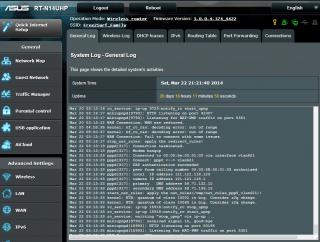
|
|
|
Mar 29 2014, 11:59 AM
Return to original view | Post
#16
|
|
All Stars
13,476 posts Joined: Jan 2012
|
QUOTE(blu3chip @ Mar 27 2014, 07:19 AM) Hi, recently purchased and hooked up a RT-AC56U router. Signal strength is way stronger than the lovely DLINK provided by UNIFI. However, been facing connection drops with my portable devices eg. iPhone, iPad If you have problem with iPad, iPhone, then I suggest you lower it to 20MHz instead of 20/40MHz.The PC on the other hand, operates just fine. Would need to constantly reconnect the Wi-fi (every 2 minutes!) for the portables, have tried running Google searches and testing 'fixes' such as changing the Channel etc. but still facing the same problem. Any advise please? Thanks. You can also try to reserve the IP when the device connected for the first time. This post has been edited by andrekua2: Mar 29 2014, 12:01 PM |
|
|
Mar 29 2014, 12:13 PM
Return to original view | Post
#17
|
|
All Stars
13,476 posts Joined: Jan 2012
|
QUOTE(blu3chip @ Mar 29 2014, 12:09 PM) Thanks for your advice. Was previously on 20MHz and that did not solve the problem. I have just switched it back to 20, lets see how it goes.. What is your setting for Network Key Rotation Interval? |
|
|
Mar 29 2014, 12:22 PM
Return to original view | Post
#18
|
|
All Stars
13,476 posts Joined: Jan 2012
|
QUOTE(blu3chip @ Mar 29 2014, 12:21 PM) 3600 Try 0 and test again. |
|
|
Apr 1 2014, 08:00 AM
Return to original view | Post
#19
|
|
All Stars
13,476 posts Joined: Jan 2012
|
QUOTE(ASUSmy @ Mar 31 2014, 03:11 PM) Hi wan1912, I cant believe this. In this era of IT, you still need to go back to the physical shop for warranty claims. My router is bought from Lazada and I pray for all luck I can get.Sorry to inform you that for networking device you will need to send back to the place you bought for warranty claim. Thank you Probably will be my last router from Asus, given this policy. |
|
|
Sep 19 2014, 12:07 AM
Return to original view | Post
#20
|
|
All Stars
13,476 posts Joined: Jan 2012
|
QUOTE(arslow @ Sep 19 2014, 12:01 AM) Will the RT-N18U be launched in Malaysia? Seems like a good router to replace the 16U.... http://www.lelong.com.my/asus-rt-n18u-2-4-...4-09-Sale-P.htmRM400 for such router. Top up a bit more seem able to buy better router. |
| Change to: |  0.0322sec 0.0322sec
 0.47 0.47
 7 queries 7 queries
 GZIP Disabled GZIP Disabled
Time is now: 10th December 2025 - 08:07 AM |
 Quote
Quote