Outline ·
[ Standard ] ·
Linear+
Home Networking ASUS Malaysia Networking User & Technical Support, Managed by ASUS Malaysia Representative
|
SUSraynman
|
 Nov 29 2014, 12:50 AM Nov 29 2014, 12:50 AM
|

|
QUOTE(pakji @ Nov 29 2014, 12:30 AM) if i do upgrade firmware ASUS Merlin i think Void Warranty ASUS Right Wrong.  The firmware for my RT-N12 D1 is downloaded from the official ASUS Support site and it includes Merlin's patches.  This post has been edited by raynman: Nov 29 2014, 01:01 AM This post has been edited by raynman: Nov 29 2014, 01:01 AM |
|
|
|
|
|
gofey
|
Nov 29 2014, 03:41 PM
|
Getting Started

|
Hi AsusMy, I'm not sure you can help me solve this problem or not, I'm using Asus RT-N14UHP model as so called 9dbi antenna which suppose can cover two storey house meanwhile my setup for WiFi signal is not satisfy as normal each double storey house got 3 room on top floor which i put my unifi and the router on the room of right and when i test downstair at my front door using laptop test Inssider software to capture the RSSI for wifi signal using laptop getting -70+ which proved the signal is not very strong to cover. i have attach a sample of my house design which you can refer Attached thumbnail(s)
|
|
|
|
|
|
frankie_sky
|
Nov 30 2014, 10:30 PM
|
New Member
|
Hi Expert,
May i know is it possible to Bridge the wireless from DSL-N12E_C1 device to RT-N12D1?
thanks
|
|
|
|
|
|
kenzoro
|
Dec 1 2014, 10:59 AM
|
New Member
|
can anyone guide me on setting up ipv6 on asus rt-n14uhp? i've been searching the forum and trying it out myself but have no luck with it. how do i screenshot the ipv6 interface and post it here?
|
|
|
|
|
|
kenzoro
|
Dec 1 2014, 11:19 AM
|
New Member
|
QUOTE(kenzoro @ Dec 1 2014, 10:59 AM) can anyone guide me on setting up ipv6 on asus rt-n14uhp? i've been searching the forum and trying it out myself but have no luck with it. how do i screenshot the ipv6 interface and post it here? erm.. seem working now.. the trick is i have to reboot the router and wait for another 20mins |
|
|
|
|
|
Darren
|
Dec 1 2014, 02:47 PM
|
|
|
What is the rated stream for USB-N14?
2x2?
|
|
|
|
|
TSASUSmy
|
Dec 1 2014, 04:48 PM
|
|
|
QUOTE(mustarr @ Nov 28 2014, 05:44 PM) hi asusmy.. i have been waiting to get the ipv6 for more than 24hrs.. and the status isstill same as may last post.. hhmmm Hi mustarr, You can try let the router to get the DNS automatically. See that it solve your problem or not. I am using RT-AC87U in my office too. It is working without setting the DNS address. And the current firmware I am using is Version 3.0.0.4.376.2769. Thank you |
|
|
|
|
|
TSASUSmy
|
Dec 1 2014, 04:59 PM
|
|
|
QUOTE(gofey @ Nov 29 2014, 03:41 PM) Hi AsusMy, I'm not sure you can help me solve this problem or not, I'm using Asus RT-N14UHP model as so called 9dbi antenna which suppose can cover two storey house meanwhile my setup for WiFi signal is not satisfy as normal each double storey house got 3 room on top floor which i put my unifi and the router on the room of right and when i test downstair at my front door using laptop test Inssider software to capture the RSSI for wifi signal using laptop getting -70+ which proved the signal is not very strong to cover. i have attach a sample of my house design which you can refer Hi gofey, I presume that the pink colour is your front house. Can you try putting the router near to the door as I can see from the picture, the wifi signal will need to pass through the toilet before it go to the master room. Try see whether you have a better signal after you move the router. Thank you |
|
|
|
|
|
kkm
|
Dec 1 2014, 05:56 PM
|
|
|
Hi, just bought the Asus AC68U from a local retailer. I have registered it on my Asus account, but it doesn't say anything about warranty there.
Do I need to do anything else to register the 3 year warranty?
|
|
|
|
|
|
TSASUSmy
|
Dec 1 2014, 05:58 PM
|
|
|
QUOTE(frankie_sky @ Nov 30 2014, 10:30 PM) Hi Expert, May i know is it possible to Bridge the wireless from DSL-N12E_C1 device to RT-N12D1? thanks Hi frankie_sky, Yes, you can turn the DSL-N12U_C1 in to BRIDGE and use it together with RT-N12D1. Thank you |
|
|
|
|
|
andrekua2
|
Dec 1 2014, 06:02 PM
|
|
|
QUOTE(gofey @ Nov 29 2014, 03:41 PM) Hi AsusMy, I'm not sure you can help me solve this problem or not, I'm using Asus RT-N14UHP model as so called 9dbi antenna which suppose can cover two storey house meanwhile my setup for WiFi signal is not satisfy as normal each double storey house got 3 room on top floor which i put my unifi and the router on the room of right and when i test downstair at my front door using laptop test Inssider software to capture the RSSI for wifi signal using laptop getting -70+ which proved the signal is not very strong to cover. i have attach a sample of my house design which you can refer Actually the location of the router matters more. By placing the router at one end of the corner, you risking losing about half of the coverage, even before you minus the wall penetration etc. Just imagine the coverage as a sphere and where is the ideal placement in order to get the best penetration to all the floors. Im using this router too, and were trying them out for my parents' new house which has two separated floors. I cant get the ideal router placement, therefore I was forced to buy another one to extend the coverage. |
|
|
|
|
|
TSASUSmy
|
Dec 1 2014, 06:22 PM
|
|
|
QUOTE(kenzoro @ Dec 1 2014, 10:59 AM) can anyone guide me on setting up ipv6 on asus rt-n14uhp? i've been searching the forum and trying it out myself but have no luck with it. how do i screenshot the ipv6 interface and post it here? Hi kenzoro, You can follow the setting on the image below to do the setting. Thank you Attached thumbnail(s)
|
|
|
|
|
|
TSASUSmy
|
Dec 1 2014, 06:25 PM
|
|
|
QUOTE(Darren @ Dec 1 2014, 02:47 PM) What is the rated stream for USB-N14? 2x2? Hi Darren, Yes, 2x2. Thank you |
|
|
|
|
|
TSASUSmy
|
Dec 1 2014, 06:28 PM
|
|
|
QUOTE(kkm @ Dec 1 2014, 05:56 PM) Hi, just bought the Asus AC68U from a local retailer. I have registered it on my Asus account, but it doesn't say anything about warranty there. Do I need to do anything else to register the 3 year warranty? Hi kkm, All ASUS networking is came with 3 years warranty. Do keep the receipt as the warranty start from the date of purchase. Thank you |
|
|
|
|
|
kenzoro
|
Dec 2 2014, 12:55 AM
|
New Member
|
out of curious, has any asus rt-ac87u users tested its adaptive qos? how well does it perform comparing to the default qos?  |
|
|
|
|
|
oneamen
|
Dec 2 2014, 09:01 AM
|
New Member
|
Hi ASUSmy,
Can ASUS rt-n56u support Yes dongle? If yes, what is the firmware?
Thanks.
|
|
|
|
|
|
SUSpakji
|
Dec 2 2014, 12:57 PM
|
|
|
please help i using ASUS AC68U router my bro still downloading via wifi my internet very slow my streamyx 4mbps u see screenshot that MAC address and highest that is my PC not my bro PC its MY PC LAN RJ45 only but why still very slow my pc internet surfing very slow setting wrong ???? i looking my pc must be internet faster then my bro pc wifi 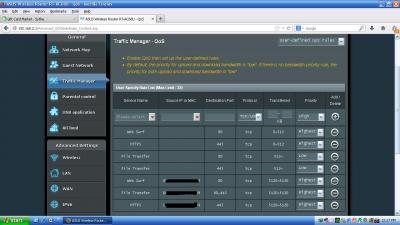
|
|
|
|
|
|
gofey
|
Dec 2 2014, 07:56 PM
|
Getting Started
|
QUOTE(ASUSmy @ Dec 1 2014, 04:59 PM) Hi gofey, I presume that the pink colour is your front house. Can you try putting the router near to the door as I can see from the picture, the wifi signal will need to pass through the toilet before it go to the master room. Try see whether you have a better signal after you move the router. Thank you Hi AsusMy, Thanks for replying, i cant move the device near to the door due to the cabling issue but i do plan to swift it to middle top ceiling area , would that be advisable? to cover whole area of the house? |
|
|
|
|
|
TSASUSmy
|
Dec 3 2014, 10:55 AM
|
|
|
QUOTE(oneamen @ Dec 2 2014, 09:01 AM) Hi ASUSmy, Can ASUS rt-n56u support Yes dongle? If yes, what is the firmware? Thanks. Hi oneamen, This model unable to support the USB YES GO 4G. This is due to the memory size if this router. Thank you |
|
|
|
|
|
oneamen
|
Dec 3 2014, 11:08 AM
|
New Member
|
Hi ASUSmy,
Thank you for your reply.
|
|
|
|
|



 Quote
Quote


 0.0398sec
 0.24
0.24
 6 queries
 GZIP Disabled