

ASUSmy where art thou?
Missing since Saturday. Reply pun tak ada.
Home Networking ASUS Malaysia Networking User & Technical Support, Managed by ASUS Malaysia Representative
Home Networking ASUS Malaysia Networking User & Technical Support, Managed by ASUS Malaysia Representative
|
|
 Sep 17 2014, 12:08 PM Sep 17 2014, 12:08 PM
|
 
Senior Member
2,058 posts Joined: Mar 2011 From: Today: 9:03 AM   
|
ASUSmy where art thou?
Missing since Saturday. Reply pun tak ada. |
|
|
|
|
|
Sep 17 2014, 02:39 PM
|
 
Elite
8,418 posts Joined: Jul 2008 
|
ASUSmy
How can I create a secondary connection to access my ADSL router in PPPOE mode. I need to monitor my ADSL stats Can configure this quite easily on my old TP-LINK  |
|
|
Sep 17 2014, 02:46 PM
|

Junior Member
32 posts Joined: Sep 2006
|
Does this router support Time BB by any chance?
What info do i need from TIME to set up this router? |
 |
Sep 17 2014, 04:41 PM
|

Senior Member
2,319 posts Joined: Mar 2010
|
QUOTE(braddelson @ Sep 17 2014, 02:46 PM) Does this router support Time BB by any chance? Hi braddelson,What info do i need from TIME to set up this router?  Models with RT-N12 and above able to support the TIME. All you need is the TIME user name and password. Connection type will be PPPoE. Thank you |
|
|
Sep 17 2014, 04:44 PM
|
|
Senior Member
2,319 posts Joined: Mar 2010
|
QUOTE(blacktubi @ Sep 17 2014, 02:39 PM) ASUSmy Hi blacktubi,How can I create a secondary connection to access my ADSL router in PPPOE mode. I need to monitor my ADSL stats Can configure this quite easily on my old TP-LINK Mind to elaborate more on the second connection on PPPoE mode? And what model of ADSL router are you are using. Thank you. |
|
|
Sep 17 2014, 04:48 PM
|
|
Senior Member
2,319 posts Joined: Mar 2010
|
QUOTE(patienceGNR @ Sep 17 2014, 12:08 PM) ASUSmy where art thou? Hi patienceGNR, Missing since Saturday. Reply pun tak ada. I was away on leave Monday and didn't work on Saturday and Sunday. And yesterday is public holiday. And I have go through the post regarding your case and will our RD know your founding. As for your current case, I have pm you a question regarding your last warranty claim. Sorry for the delay and inconvenient caused. Thank you |
|
|
|
|
|
Sep 17 2014, 04:58 PM
|
|
Senior Member
2,319 posts Joined: Mar 2010
|
QUOTE(JnkTfk @ Sep 16 2014, 07:22 PM) Hi ASUSmy can N14UHP support Yes GO dongle out of the box ? Hi JnkTfk,Thanks It does support YES GO dongle, but i do recommend you to do a firmware update on the router to fix some bugs and features adding. Thank you |
|
|
Sep 17 2014, 06:42 PM
|
|
Elite
8,418 posts Joined: Jul 2008
|
QUOTE(ASUSmy @ Sep 17 2014, 04:44 PM) Hi blacktubi, My ADSL modem is configured to bridge mode and AC68U is configured to PPPOE mode to connect to the internet. Mind to elaborate more on the second connection on PPPoE mode? And what model of ADSL router are you are using. Thank you. The ADSL modem got a web interface which I can check my ADSL stats. My IP is configured this way. AC68U : 192.168.0.1 ADSL : 192.168.1.1 This is the feature on TP-LINK router which allow me to access my ADSL modem. This post has been edited by blacktubi: Sep 17 2014, 06:43 PM Attached thumbnail(s) 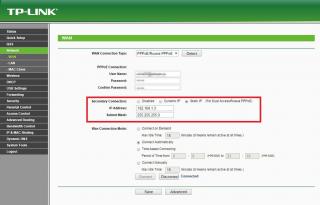
|
|
|
Sep 17 2014, 07:29 PM
|
|
Senior Member
2,058 posts Joined: Mar 2011 From: Today: 9:03 AM
|
QUOTE(ASUSmy @ Sep 17 2014, 04:48 PM) Hi patienceGNR, Hope you had a nice leave. I was away on leave Monday and didn't work on Saturday and Sunday. And yesterday is public holiday. And I have go through the post regarding your case and will our RD know your founding. As for your current case, I have pm you a question regarding your last warranty claim. Sorry for the delay and inconvenient caused. Thank you Anyway, back to our problem, check your PM  Hope you can help to resolve asap. Router is OK at the moment but that is by removing 1 of the antenna. :/ |
|
|
Sep 18 2014, 12:54 AM
|

Senior Member
3,544 posts Joined: Sep 2008
|
QUOTE(patienceGNR @ Sep 17 2014, 07:29 PM) Hope you had a nice leave. Anyway, back to our problem, check your PM Hope you can help to resolve asap. Router is OK at the moment but that is by removing 1 of the antenna. :/ 
for the webpage issue you need to add 192.168.0.1 in protocol filtering too, forgot to tell you yesterday  |
|
|
Sep 18 2014, 01:00 AM
|
|
Senior Member
2,058 posts Joined: Mar 2011 From: Today: 9:03 AM
|
QUOTE(arslow @ Sep 18 2014, 12:54 AM)
for the webpage issue you need to add 192.168.0.1 in protocol filtering too, forgot to tell you yesterday  The CP now loads within 1 sec.  |
|
|
Sep 18 2014, 02:16 AM
|
|
Senior Member
3,544 posts Joined: Sep 2008
|
QUOTE(patienceGNR @ Sep 18 2014, 01:00 AM) You're the boss I just reformatted my laptop today, had to re-input this filter thing, then I remembered that I forgot to tell about this setting The CP now loads within 1 sec.  Good thing I reformatted today haha. But your connection issue  Does your router have this thing called NAT acceleration? Its under LAN>switch control>NAT acceleration. I had to disable it, or else I'll have weird speed issue in multiple websites. |
|
|
Sep 18 2014, 08:55 AM
|
|
Senior Member
2,058 posts Joined: Mar 2011 From: Today: 9:03 AM
|
QUOTE(arslow @ Sep 18 2014, 02:16 AM) I just reformatted my laptop today, had to re-input this filter thing, then I remembered that I forgot to tell about this setting It's okay, at least we learn something here Good thing I reformatted today haha. But your connection issue Does your router have this thing called NAT acceleration? Its under LAN>switch control>NAT acceleration. I had to disable it, or else I'll have weird speed issue in multiple websites.  My router doesn't have that. |
|
|
|
|
|
Sep 18 2014, 05:11 PM
|
|
Senior Member
2,319 posts Joined: Mar 2010
|
QUOTE(blacktubi @ Sep 17 2014, 06:42 PM) My ADSL modem is configured to bridge mode and AC68U is configured to PPPOE mode to connect to the internet. Hi blacktubi,The ADSL modem got a web interface which I can check my ADSL stats. My IP is configured this way. AC68U : 192.168.0.1 ADSL : 192.168.1.1 This is the feature on TP-LINK router which allow me to access my ADSL modem. Thank you for the information, I will ask our RD and get back you regarding this features. Thank you |
|
|
Sep 18 2014, 10:44 PM
|
|
Senior Member
3,544 posts Joined: Sep 2008
|
QUOTE(patienceGNR @ Sep 18 2014, 08:55 AM) It's okay, at least we learn something here :thumbs: Hmm guess the quest to search a solution for your issue continues... Hope asus can help youMy router doesn't have that. :hmm: This post has been edited by arslow: Sep 18 2014, 10:44 PM |
|
|
Sep 18 2014, 11:26 PM
|

Senior Member
1,182 posts Joined: Jan 2003
|
ASUSmy
I am on TM UniFi, using an Asus RT-N12HP_B1 wireless router, however I could not get IPv6 to work. I am using firmware 3.0.0.4.376_2048 Attached here the screenshot of the config page & log. Is there anything I missed out? This post has been edited by jolmy: Sep 18 2014, 11:28 PM Attached thumbnail(s) 

|
|
|
Sep 18 2014, 11:40 PM
Show posts by this member only | IPv6 | Post
#1797
|

Senior Member
4,333 posts Joined: Jan 2003
|
You have to set your interface to PPP instead of Ethernet.
Here is mine.  |
|
|
Sep 18 2014, 11:49 PM
Show posts by this member only | IPv6 | Post
#1798
|
|
Senior Member
4,333 posts Joined: Jan 2003
|
If you ping google.com, you should be getting its IPv6 address.
 |
|
|
Sep 19 2014, 12:01 AM
|
|
Senior Member
3,544 posts Joined: Sep 2008
|
QUOTE(ASUSmy @ Sep 18 2014, 05:11 PM) Hi blacktubi, Will the RT-N18U be launched in Malaysia? Seems like a good router to replace the 16U....Thank you for the information, I will ask our RD and get back you regarding this features. Thank you |
|
|
Sep 19 2014, 12:07 AM
|

All Stars
13,478 posts Joined: Jan 2012
|
QUOTE(arslow @ Sep 19 2014, 12:01 AM) Will the RT-N18U be launched in Malaysia? Seems like a good router to replace the 16U.... http://www.lelong.com.my/asus-rt-n18u-2-4-...4-09-Sale-P.htmRM400 for such router. Top up a bit more seem able to buy better router. |
| Change to: |  0.0204sec 0.0204sec
 0.53 0.53
 6 queries 6 queries
 GZIP Disabled GZIP Disabled
Time is now: 16th December 2025 - 06:09 AM |
 Quote
Quote