Welcome Guest ( Log In | Register )

Bump Topic Topic Closed RSS Feed
124 Pages « < 35 36 37 38 39 > » Bottom

Outline · [ Standard ] · Linear+

Maxis The Official Maxis FTTH Thread | v2, Maxis Home Fibre Internet, from RM138

views
     
Haruji Sora
post Jul 11 2012, 03:37 PM

春治のばか?
******
Senior Member
1,704 posts

Joined: Jan 2003
From: Kuala Lumpur


QUOTE(Haruji Sora @ Jul 11 2012, 02:41 PM)
I just applied yesterday and went through the first page for information and found out about the public IP thing that you need to call up Maxis and ask.

Maxis will convert your private IP to the dynamic IP with no extra charge?

Cause I need dynamic IP to port forward CCTVs and stuffs.

Was thinking of a network setup this way. Any sifu want to clarify that it will be workable?

(PS: Landed Property)

Fiber from outside (to home exterior wall) --> (FTB?) --> To Living Room (BTU?) --> Living Room contains Maxis Router, DECT phone etc...

From Maxis Router/Modem --> LAN Cable --> Linksys WIFI Router (located in 2nd floor back room) --> LAN connection to Desktop PC / CCTV DVR / etc
*
Anybody knows? XD Thanks for any feedback.
Mac Man @ LYF
post Jul 11 2012, 03:38 PM

Casual
***
Junior Member
433 posts

Joined: Apr 2012
Thank you very much for the heads up.

rclxms.gif


QUOTE(jetwash @ Jul 11 2012, 03:00 PM)
DrPitchard

http://forum.lowyat.net/index.php?showuser=104226

he's based in maxis klcc. see what he says on your application and your right to get the 118 price
*
This post has been edited by Mac Man @ LYF: Jul 11 2012, 03:39 PM
gogetter83
post Jul 11 2012, 03:44 PM

New Member
*
Junior Member
32 posts

Joined: Oct 2010
QUOTE(Haruji Sora @ Jul 11 2012, 03:37 PM)
Anybody knows? XD Thanks for any feedback.
*
So, your PCs are getting IP from the thomson? Or Linksys is the one giving IP to the PCs?
Suggest to disable the Thomson WiFi so that only your Linksys wifi is available....
Other than that, looks good, should work

This post has been edited by gogetter83: Jul 11 2012, 03:45 PM
kuntakinte
post Jul 11 2012, 03:47 PM

On my way
****
Senior Member
607 posts

Joined: Mar 2006


Anyone successfully registered for mylaunchpad?

I was registered but never seems to be able to login. Always user ID or password error
danieltay
post Jul 11 2012, 03:53 PM

Getting Started
**
Junior Member
209 posts

Joined: Sep 2009
QUOTE(gogetter83 @ Jul 11 2012, 03:35 PM)
OK, let's see...

1. On your browser, go to 192.168.1.254
2. On the main page, you'll see a section "Broadband Connection"
3. Click on eInternet.
4. Under the Maxis Logo, click "details"

Can you screenshot this page and paste it here? blackout your PPP username (so that no one can misuse it.... smile.gif )
*
Attached Image
jeremy05
post Jul 11 2012, 04:00 PM

software engineer
******
Senior Member
1,851 posts

Joined: Apr 2005
From: kuala lumpur


QUOTE(kuntakinte @ Jul 11 2012, 03:47 PM)
Anyone successfully registered for mylaunchpad?

I was registered but never seems to be able to login.  Always user ID or password error
*
if no wrong, the username allowed digit is 10, if you put abcd1234567890, then your real username is : abcd123456.
jetwash
post Jul 11 2012, 04:13 PM

On high-altitude training
****
Senior Member
623 posts

Joined: Dec 2006
ok. installation completed after 90 minutes. i have to say the installers are professional and very straightforward, kudos to them.

speed is as advertised, ping time over wifi isn't that good though, got around 30ms to maxis, u mobile server. (okla not that bad). will have to find my ethernet cable to test over LAN then.

now, how come my torrent isn't blazing fast?
gogetter83
post Jul 11 2012, 04:21 PM

New Member
*
Junior Member
32 posts

Joined: Oct 2010
QUOTE(danieltay @ Jul 11 2012, 03:53 PM)
Attached Image
*
ok...you notice that "uptime"? I notice that if I disconnect my internet, or pull out the DSL line from tm modem and reconnect after a few minutes, that uptime value resets.In your screenshot , your PPP has been connected for 4hr 51min. So, it's not the DSL line went up and down every few minutes. If it did, that uptime should have reset.

Next...

1. Are you facing a browsing problem? Or you are downloading something and suddenly the download speed become 0?
2. Are you on WiFi? As you know from the thread, a lot of user facing WiFi problem.... if you on WiFi, when you face the problem, did you try to connect using LAN cable and see if it helps?

Based on my setup at home, I suggest you to try this when problem happen.

1. If you are on WiFi, change WiFi channel to 13.
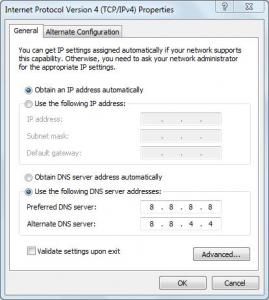
2. Fix the DNS setting on your PC. Try google DNS (8.8.8.8), I notice I have sometimes browsing issue using Maxis DNS.

danieltay
post Jul 11 2012, 04:31 PM

Getting Started
**
Junior Member
209 posts

Joined: Sep 2009
QUOTE(gogetter83 @ Jul 11 2012, 04:21 PM)
ok...you notice that "uptime"? I notice that if I disconnect my internet, or pull out the DSL line from tm modem and reconnect after a few minutes, that uptime value resets.In your screenshot , your PPP has been connected for 4hr 51min. So, it's not the DSL line went up and down every few minutes. If it did, that uptime should have reset.

Next...

1. Are you facing a browsing problem? Or you are downloading something and suddenly the download speed become 0?
2. Are you on WiFi? As you know from the thread, a lot of user facing WiFi problem.... if you on WiFi, when you face the problem, did you try to connect using LAN cable and see if it helps?

Based on my setup at home, I suggest you to try this when problem happen.

1. If you are on WiFi, change WiFi channel to 13.
2. Fix the DNS setting on your PC. Try google DNS (8.8.8.8), I notice I have sometimes browsing issue using Maxis DNS.
*
i am using LAN connection, only browsing for example thestar.com.my also the speed become 0, and the browser hang

do you mean changing the dns to 8.8.8.8?
gogetter83
post Jul 11 2012, 04:38 PM

New Member
*
Junior Member
32 posts

Joined: Oct 2010
QUOTE(danieltay @ Jul 11 2012, 04:31 PM)
i am using LAN connection, only browsing for example thestar.com.my also the speed become 0, and the browser hang

do you mean changing the dns to 8.8.8.8?
*
yeap, dns on your PC to 8.8.8.8. Hopefully, the problem is something like I experienced before, then this change could help.


Attached thumbnail(s)
Attached Image
aeiou228
post Jul 11 2012, 04:40 PM

Look at all my stars!!
*******
Senior Member
5,867 posts

Joined: Feb 2006
To TS and second post poster, please post below Aztech E310-S user manual link to the 1st or 2nd post before it got buried by incoming posts.

ftp://ftp.aztech.com/support/SINGAPORE/DE...nual%20v1.1.pdf
danieltay
post Jul 11 2012, 04:45 PM

Getting Started
**
Junior Member
209 posts

Joined: Sep 2009
QUOTE(gogetter83 @ Jul 11 2012, 04:38 PM)
yeap, dns on your PC to 8.8.8.8. Hopefully, the problem is something like I experienced before, then this change could help.
*
ok, thanks... i'll try later after getting the call from maxis(promise me today)... i want to ask them first what is the actual issue

i'll monitor the connection... currently has not been disconnected for 45 minutes or so

while writing this, it's down again

This post has been edited by danieltay: Jul 11 2012, 04:46 PM
gogetter83
post Jul 11 2012, 04:48 PM

New Member
*
Junior Member
32 posts

Joined: Oct 2010
QUOTE(danieltay @ Jul 11 2012, 04:45 PM)
ok, thanks... i'll try later after getting the call from maxis(promise me today)... i want to ask them first what is the actual issue

i'll monitor the connection... currently has not been disconnected for 45 minutes or so

while writing this, it's down again
*
another thing to try is, when it goes down....try to ping 8.8.8.8 from your PC... if you can't browse, but ping is OK, that is also a good indicator that something wrong with domain name resolution.
pisanq
post Jul 11 2012, 05:00 PM

On my way
****
Senior Member
612 posts

Joined: Feb 2008
QUOTE(jetwash @ Jul 11 2012, 04:13 PM)
ok. installation completed after 90 minutes. i have to say the installers are professional and very straightforward, kudos to them.

speed is as advertised, ping time over wifi isn't that good though, got around 30ms to maxis, u mobile server. (okla not that bad). will have to find my ethernet cable to test over LAN then.

now, how come my torrent isn't blazing fast?
*
Ping to maxis 30ms is quite bad result. I'm still using Unifi VIP5 and here is my speed test result for today:
user posted image

I will migrate to Maxis FTTH 10Mbps this Saturday 2:30pm.
chengsiong80
post Jul 11 2012, 05:03 PM

Getting Started
**
Junior Member
218 posts

Joined: May 2007


QUOTE(gogetter83 @ Jul 11 2012, 12:16 PM)
i don't believe it's relevant, I've been doing continuous streaming if there's disconnection, I would notice. But I don't face it, even though with the message printed.

If there's one thing I learn from experience with TM, P1 customer service is that helpdesk are mostly idiots who go through a standard checklist, half the time they don't know what they are talking about.

So again...what is the error message you faced at the login page?
*
Hi, do u able to watch video from www.bbc.com smoothly?
For me, all the bbc videos will stop halfway.
But no problem on youtube videos.

Thanks.
danieltay
post Jul 11 2012, 05:20 PM

Getting Started
**
Junior Member
209 posts

Joined: Sep 2009
QUOTE(gogetter83 @ Jul 11 2012, 04:48 PM)
another thing to try is, when it goes down....try to ping 8.8.8.8 from your PC... if you can't browse, but ping is OK, that is also a good indicator that something wrong with domain name resolution.
*
i've just change the dns... will report back if it resolved the issue... thanks again
Haruji Sora
post Jul 11 2012, 05:20 PM

春治のばか?
******
Senior Member
1,704 posts

Joined: Jan 2003
From: Kuala Lumpur


QUOTE(gogetter83 @ Jul 11 2012, 03:44 PM)
So, your PCs are getting IP from the thomson? Or Linksys is the one giving IP to the PCs?
Suggest to disable the Thomson WiFi so that only your Linksys wifi is available....
Other than that, looks good, should work
*
Only plan to allow my LinkSys to do all the routing.
jeremy05
post Jul 11 2012, 05:38 PM

software engineer
******
Senior Member
1,851 posts

Joined: Apr 2005
From: kuala lumpur


QUOTE(pisanq @ Jul 11 2012, 05:00 PM)
Ping to maxis 30ms is quite bad result. I'm still using Unifi VIP5 and here is my speed test result for today:
user posted image

I will migrate to Maxis FTTH 10Mbps this Saturday 2:30pm.
*
since your ping is very nice with unifi, why you need stick to maxis ftth?
pisanq
post Jul 11 2012, 05:44 PM

On my way
****
Senior Member
612 posts

Joined: Feb 2008
QUOTE(jeremy05 @ Jul 11 2012, 05:38 PM)
since your ping is very nice with unifi, why you need stick to maxis ftth?
*
because TM didn't offer special price for disabled person
danieltay
post Jul 11 2012, 05:46 PM

Getting Started
**
Junior Member
209 posts

Joined: Sep 2009
QUOTE(gogetter83 @ Jul 11 2012, 04:48 PM)
another thing to try is, when it goes down....try to ping 8.8.8.8 from your PC... if you can't browse, but ping is OK, that is also a good indicator that something wrong with domain name resolution.
*
change dns setting oledi... but after 15 minutes, another message come out in the event log... i read forum this message means ip confilict.. you can view the attached image

is it normal? or something is not right?


Attached Image

124 Pages « < 35 36 37 38 39 > » Top
Topic ClosedOptions
 

Change to:
| Lo-Fi Version
0.0290sec    0.12    6 queries    GZIP Disabled
Time is now: 6th December 2025 - 06:44 PM