
Welcome Guest ( Log In | Register )

Bump Topic Topic Closed RSS Feed
3 Pages  1 2 3 >Bottom

Outline · [ Standard ] · Linear+

Maxis The Official Maxis FTTH Thread | v2, Maxis Home Fibre Internet, from RM138

views
     
gogetter83
post Jul 10 2012, 10:08 AM

New Member
*
Junior Member
32 posts

Joined: Oct 2010
QUOTE(danieltay @ Jul 10 2012, 12:58 AM)
me too, always got the "xDSL linestate down" message.. is it the line down? and then up again down up down up down up... mampui!
*
Don't think it's related. Mine working fine, but still have those logs....maybe the dsl port on the thomson is still active but not used?....i notice that grey port is dsl port


Added on July 10, 2012, 10:15 am
QUOTE(siconsole @ Jul 10 2012, 12:20 AM)
anyone tried to share contents by connecting usb hard disk to the thomson router?
i tried and the router keep on crashing  mad.gif
*
mine doesn't crash, but i can't access the hard disk but there is activity light blinking on the hard disk. Looks like the thomson is reading something?

If i disable upnp av setting, then plug in hard disk then it's ok

This post has been edited by gogetter83: Jul 10 2012, 10:17 AM
gogetter83
post Jul 11 2012, 10:07 AM

New Member
*
Junior Member
32 posts

Joined: Oct 2010
QUOTE(jetwash @ Jul 11 2012, 07:34 AM)
guys, quick question before installation today..

the connection between the huawei ONT and the thomson is just a normal lan connection right?

if so i can always put the ont in one part of the house and...
1. pull a lan cable to the thomson, anywhere in the house?
2. connect them using home plugs?

any confirmation? would the homeplug work?

first time fibre user here. just thinking of ways to save on non-standard installation
*
Yeah, normal lan connection. It should work.
gogetter83
post Jul 11 2012, 11:51 AM

New Member
*
Junior Member
32 posts

Joined: Oct 2010
QUOTE(danieltay @ Jul 11 2012, 11:48 AM)
xDSL linestate down every 5 minutes or so... makehai maxis cibia
*
dude, I don't think that message is relevant. Mine also have the same message, but the internet connection is fine, no disconnection for the past 2 weeks.

what kind of error message you get at the login page when you try to connect? From other member's post, something like "Authentication Failure"?
gogetter83
post Jul 11 2012, 12:16 PM

New Member
*
Junior Member
32 posts

Joined: Oct 2010
QUOTE(danieltay @ Jul 11 2012, 12:07 PM)
that message is relevant... if you're surfing, it'll hang... confirm by the maxis support, router problem... already open a report for me but never come back as promise 

you don't feel it because it's disconnected a few seconds only, then up again... after 5 minutes or so, down and up again

i am retrieving report from overseas,  and the frequent downtime(albeit a few seconds) means failure to retrieve a report due to loss of signal
*
i don't believe it's relevant, I've been doing continuous streaming if there's disconnection, I would notice. But I don't face it, even though with the message printed.

If there's one thing I learn from experience with TM, P1 customer service is that helpdesk are mostly idiots who go through a standard checklist, half the time they don't know what they are talking about.

So again...what is the error message you faced at the login page?

This post has been edited by gogetter83: Jul 11 2012, 12:17 PM
gogetter83
post Jul 11 2012, 12:52 PM

New Member
*
Junior Member
32 posts

Joined: Oct 2010
QUOTE(danieltay @ Jul 11 2012, 12:30 PM)
up to u lah, the maxis support would be happy to get u as customer since probelm u say no probalm

u google n u'll know this is router problem... if u want to be an idiot, go ahead... maxis support is happy with u
*
hmm... smile.gif ... i thought I could help a fellow subscriber, but you not seem interested...no point taking it out on me... like another forumer said, you could get another router and end your misery, but that causes money too...
Or better yet, just cancel subscription and complain to SKMM lor...
gogetter83
post Jul 11 2012, 01:11 PM

New Member
*
Junior Member
32 posts

Joined: Oct 2010
QUOTE(danieltay @ Jul 11 2012, 12:58 PM)
help? how u help? got problem said no problem?

r u teaching me to hypnotised myself?

sorry, not interested to hypnotise myself like u
*
my connection no problem. your connection got problem, i'm not saying you are imagining the problem.
From what you describe, maxis also being incompetent and not getting back on the solution to you as soon as possible.

So, i'm interested to know the detail of the problem, that's why i'm asking you what other error messages you are facing. This is a technical forum, so we discuss on the problem and probably can suggest some solution. If sendiri can solve the problem, at least you don't need to wait for the helpdesk idiots to get back to you right?

that's my intention. I couldn't care less about maxis reputation, I only want to get my money's worth from my service. You want that too, right?

I'm thinking technical here, the xDSL error message, I too have it, but my connection not affected. So, there's must be other error message that I don't have but you have it. That unique error message could indicate what's the problem in your connection and maybe can fix sendiri instead of waiting for the stupid maxis to get back to you on a solution.

I do give hell to Maxis if my router is a problem, I don't want to buy another router to fix the problem. Why should I spend more money to fix a problem that supposedly the responsibility of Maxis? That's why I didn't suggest to replace the router first unless last resort.
gogetter83
post Jul 11 2012, 02:34 PM

New Member
*
Junior Member
32 posts

Joined: Oct 2010
QUOTE(danieltay @ Jul 11 2012, 02:31 PM)
okok, paham... sorry misintepretation... but i do not see any other message on the event log before or after the "xDSL linestate down" message

so how to solve sendiri leh... tan xi wo
*
no problem...ok, you know the Internet connection page? The one you put in dialup username and password? When you fill in the dialup details and connect, do you get any error message?
gogetter83
post Jul 11 2012, 03:35 PM

New Member
*
Junior Member
32 posts

Joined: Oct 2010
QUOTE(danieltay @ Jul 11 2012, 02:54 PM)
dun get you? is it 192.168.1.254?

i do not dialup manually wo... auto dialup mah
*
OK, let's see...

1. On your browser, go to 192.168.1.254
2. On the main page, you'll see a section "Broadband Connection"
3. Click on eInternet.
4. Under the Maxis Logo, click "details"

Can you screenshot this page and paste it here? blackout your PPP username (so that no one can misuse it.... smile.gif )

This post has been edited by gogetter83: Jul 11 2012, 03:37 PM
gogetter83
post Jul 11 2012, 03:44 PM

New Member
*
Junior Member
32 posts

Joined: Oct 2010
QUOTE(Haruji Sora @ Jul 11 2012, 03:37 PM)
Anybody knows? XD Thanks for any feedback.
*
So, your PCs are getting IP from the thomson? Or Linksys is the one giving IP to the PCs?
Suggest to disable the Thomson WiFi so that only your Linksys wifi is available....
Other than that, looks good, should work

This post has been edited by gogetter83: Jul 11 2012, 03:45 PM
gogetter83
post Jul 11 2012, 04:21 PM

New Member
*
Junior Member
32 posts

Joined: Oct 2010
QUOTE(danieltay @ Jul 11 2012, 03:53 PM)
[attachmentid=2941215]
*
ok...you notice that "uptime"? I notice that if I disconnect my internet, or pull out the DSL line from tm modem and reconnect after a few minutes, that uptime value resets.In your screenshot , your PPP has been connected for 4hr 51min. So, it's not the DSL line went up and down every few minutes. If it did, that uptime should have reset.

Next...

1. Are you facing a browsing problem? Or you are downloading something and suddenly the download speed become 0?
2. Are you on WiFi? As you know from the thread, a lot of user facing WiFi problem.... if you on WiFi, when you face the problem, did you try to connect using LAN cable and see if it helps?

Based on my setup at home, I suggest you to try this when problem happen.

1. If you are on WiFi, change WiFi channel to 13.
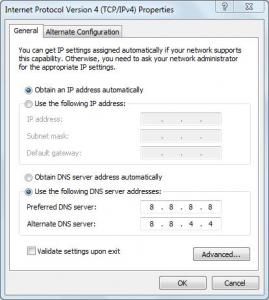
2. Fix the DNS setting on your PC. Try google DNS (8.8.8.8), I notice I have sometimes browsing issue using Maxis DNS.

gogetter83
post Jul 11 2012, 04:38 PM

New Member
*
Junior Member
32 posts

Joined: Oct 2010
QUOTE(danieltay @ Jul 11 2012, 04:31 PM)
i am using LAN connection, only browsing for example thestar.com.my also the speed become 0, and the browser hang

do you mean changing the dns to 8.8.8.8?
*
yeap, dns on your PC to 8.8.8.8. Hopefully, the problem is something like I experienced before, then this change could help.


Attached thumbnail(s)
Attached Image
gogetter83
post Jul 11 2012, 04:48 PM

New Member
*
Junior Member
32 posts

Joined: Oct 2010
QUOTE(danieltay @ Jul 11 2012, 04:45 PM)
ok, thanks... i'll try later after getting the call from maxis(promise me today)... i want to ask them first what is the actual issue

i'll monitor the connection... currently has not been disconnected for 45 minutes or so

while writing this, it's down again
*
another thing to try is, when it goes down....try to ping 8.8.8.8 from your PC... if you can't browse, but ping is OK, that is also a good indicator that something wrong with domain name resolution.
gogetter83
post Jul 11 2012, 05:54 PM

New Member
*
Junior Member
32 posts

Joined: Oct 2010
QUOTE(danieltay @ Jul 11 2012, 05:46 PM)
change dns setting oledi... but after 15 minutes, another message come out in the event log... i read forum this message means ip confilict.. you can view the attached image

is it normal? or something is not right?
[attachmentid=2941427]
*
But your connection is ok? This not ip conflict. that looks like another maxis vlan service for management i think. Not related to ppp.
gogetter83
post Jul 11 2012, 06:24 PM

New Member
*
Junior Member
32 posts

Joined: Oct 2010
QUOTE(danieltay @ Jul 11 2012, 06:01 PM)
not sure bcoz i do not use the internet during that time... but i notice it still hang at times even though it does not show xDSL linestate disconnect


Added on July 11, 2012, 6:08 pm

now i can confirm the problem still exist... instead of saying xDSL linestate down, it change the description after i change my dns to google public dns
*
I think you should still see xDSL error even by changing DNS. Try pisanq's suggestion to confirm
Internet connection
gogetter83
post Jul 11 2012, 06:28 PM

New Member
*
Junior Member
32 posts

Joined: Oct 2010
QUOTE(danieltay @ Jul 11 2012, 06:18 PM)
not enough time to test... the disconnection is at random and it happened for a few seconds
*
Actually you run the test and leave it to run while you continue browsing. The moment it happens, check command window
gogetter83
post Jul 11 2012, 06:56 PM

New Member
*
Junior Member
32 posts

Joined: Oct 2010
QUOTE(danieltay @ Jul 11 2012, 06:29 PM)
confirm lah got request timeout.. and then i check the event log again.... xDSL linestate down appear again

so conclusion is internet really down... and has nothing to do with dns... no more argument nowonwards

i read somewhere in the UK forum it could be the telephone line issue as well... since i am in highrise, that could happen... somewhere along the telephone line, you never know which part is broken

but i see many people complain the maxis forum, so this might not be telephone line, but the router problem

see the attached image

[attachmentid=2941512]
*
mine has exact same log like yours, but i've been doing SLA check between my office connection and my internet connection at home. The line graph is smooth confirming that I do not have disconnection even though with xDSL linestate down error log. The answer I got from customer service because nothing is connected to the thomson DSL port, so thomson prints in event log xDSL linestate down, so they said nothing to worry to me.

Btw, the ones in UK forum is referring to BT internet service (they use thomson there I think), BT DSL connection is to thomson DSL port (not separate modem like Maxis-TM case). I described this situation in modem-help.co.uk and the forumers assured me that the error message is not relevant to the setup we have here in Malaysia.


gogetter83
post Jul 11 2012, 07:01 PM

New Member
*
Junior Member
32 posts

Joined: Oct 2010
QUOTE(danieltay @ Jul 11 2012, 06:57 PM)
maxis support technical dept just called me a few minutes ago... will be sending technician this friday... so u see, response time is 4 days after you make plenty of noise... imagine if you keep quiet, it could be 40 days

ok, for those of you who has this xDSL linestate down issue, the technician told me it's the firmware of the thomson router... need to be upgraded
*
thanks for the info....in case we too faced disconnection issue, then a firmware upgrade is needed.

TS, maybe can update this symptom and info from danieltay on the first post

This post has been edited by gogetter83: Jul 11 2012, 07:02 PM
gogetter83
post Jul 11 2012, 09:49 PM

New Member
*
Junior Member
32 posts

Joined: Oct 2010
QUOTE(barca96 @ Jul 11 2012, 09:13 PM)
Is there no other router that can be used?
Does the majority of the people here face the same problem? DC's...

I don't know. I got accepted under under the RM118 promotion.
Installation later this month.
I still can cancel it.
So for the next few days I'm going to keep a close eye on this thread.

I don't want to have the same problem as DanielTay.
After 4 hours already problem.

Will everything be better if they give us a new improved router?
Because it seems that the only problem is the router.
I think there's a separate thread on replacing the router from Maxis. So far, some forumers have success replacing the router. The only issue is voip since it also comes from the thomson (unlike unifi). A feasible solution to complete remove the Thomson and still have voip is probably to get those VoIP phone adapters like the following:

http://forum.lowyat.net/topic/927334/all

Pretty expensive solution for a good replacement router + VoIP adapter. Additional cost of RM400-RM600 for a good one.

I'm still researching around for a viable option...

gogetter83
post Jul 12 2012, 12:37 AM

New Member
*
Junior Member
32 posts

Joined: Oct 2010
QUOTE(peacelover1990 @ Jul 12 2012, 12:22 AM)
Do anyone experience disconnect problem? PPPoE shows connected, but unable to surf the net, have to reconnect again. It happens occasionally
*
that's what we've been discussing in several post, but the general assumption was router problem. But you are on a custom router right?

i have heard of this from a friend who is subscribing but he's on FTTH, so wasn't too sure it was the same problem as was discussed... what about you?

This post has been edited by gogetter83: Jul 12 2012, 12:43 AM
gogetter83
post Jul 12 2012, 04:16 PM

New Member
*
Junior Member
32 posts

Joined: Oct 2010
QUOTE(danieltay @ Jul 12 2012, 02:33 PM)
how about others having the same issue? everyone on highrise? anyone on landed?

i started to think the telephone line could be the culprit...  or could it be the copper issue?
i have a friend who subscribe to the same service, who mentioned disconnection problem.
But he says, router shows internet is connected but can't browse. Then he need manually disconnect and reconnect on his router to get back the service. But he's landed with FTTH, so I wasn't too sure it's the same problem....

3 Pages  1 2 3 >Top
Topic ClosedOptions
 

Change to:
| Lo-Fi Version
0.0436sec    0.35    7 queries    GZIP Disabled
Time is now: 2nd December 2025 - 06:13 AM