Welcome Guest ( Log In | Register )

3 Pages  1 2 3 >Bottom

Outline · [ Standard ] · Linear+

 RAM Handbook, updating ... zlol 23/12/07

views
     
TSjinaun
post Jan 13 2006, 10:11 PM, updated 5y ago

where are my stars???
Group Icon
Elite
6,139 posts

Joined: Jan 2003
DDR RAM - TSOP Packages DDR-266 (133MHz) - DDR-400 (200MHz) JEDEC Standard, DDR-400+ non JEDEC Standard

Attached Image
BH-5 - The most famous of the Winbond chips, or possibly the most famous ram ever! These chips are known to love voltage, which in turn gets you extremely tight timings and great frequencies. Most BH-5 can do around 250 MHz at cas2-2-2-X. This usually requires around 3.2-3.4 volts. BH-5 has gone as high as 280 MHz or so, but this is very difficult to achieve. This ram can be identified as having the last three characters on the chip as BH-5. It has been out of production for well over a year now, so it is very difficult to find. If your motherboard does not offer above 2.8 volts, this ram is probably not for you. With the use DDR booster, this stuff can really shine. BH-5 can be found most notably in Mushkin Black Level ram, Kingston Hyper X, Corsair XMS, TwinMos, Buffalo and a few Value Ram varieties. The possibility of finding this ram on a store shelve today is almost non-existent.

Attached Image
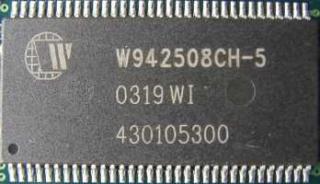
CH-5 - This is a newer ram chip than BH-5 and on average cannot achieve the results BH-5 can. It is known to do around 220-230 MHz at cas2-3-2-X. This ram is a little different than BH-5 as it does not respond as well to voltage. Usually, anything over 3 volts does not yield any better results. This could be due to the manufacturer's PCB design, or simply the ram chips themselves. In some cases, however, this ram can achieve similar results to BH-5, it just does not happen very often. This is still great ram for the money and can most likely achieve cas2-2-2-X at 200 MHz with the right voltage applied. This ram is easier to find than BH-5 and usually costs a fraction of what BH-5 costs. It can be identified by the last 3 characters on the chip reading CH-5. It can be found in Corsair XMS, Kingston Hyper X, and many other offerings.

Attached Image
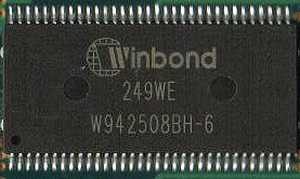
BH-6 - This is the 6ns version of the BH-X series. This ram performs very well, and in some cases, as well as BH-5 ram. Like its 5ns brother, it loves voltage and can achieve high frequency with cas2-2-2-X timings. BH-6 can usually clock to around 240-250 MHz with about 3.2-3.4 volts and still retain the tight timings. This is even harder to find than BH-5 as it is also out of production and was not produced for as long. One thing to note about this ram is that since it is 6ns rather than 5ns, you will mostly find it in PC2700 or DDR333 speeds. This is nothing to be worried about. As I said earlier, it can clock nearly as high as BH-5. Also, if 2.8 volts is your motherboard's limit, you might want to look elsewhere. This ram can be identified by the last three characters being BH-6 on the chips. This is most commonly found in Mushkin Special 2-2-2, Corsair XMS, Kingston Hyper X, and various Value Ram models. It has been known to show up in Kingston Value Ram PC2700.

Attached Image
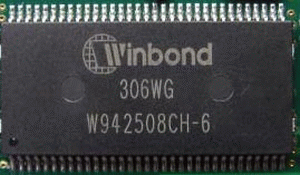
CH-6 - This is the 6ns version of the CH-X series ram. Although the cards are against a good overclock on this ram, it does alright. It performs very similar to CH-5 ram in most respects, despite its greater latency rating. Figure on about 220 MHz at somewhat tight timings such as cas2-3-2-X. This ram offers a great value, as it is usually found in less expensive modules. You can find CH-6 in some Kingston Value Ram, Corsair Value Ram and Mushkin Basic. For these prices, it is a steal.

Attached Image
UTT - This is the newest of the Winbond ram. It is very similar to BH-5, but requires a little more voltage. UTT ram can achieve the clocks that BH-5 can, but also requires more voltage. Most people recommend using around 3.4-3.6 volts for this ram. One thing this has over BH-5 is that its overclock is not hindered by the fact that it is double sided ram rather than single sided. BH-5 did its best when 2x256mb modules were used, and this UTT ram can achieve the same clocks using 2x512mb modules. This is very handy, as 2x256mb ram is considered not enough by most of today's standards. One area where this ram falls short of BH-5 is that it is slightly inconsistent. BH-5 is as close to guaranteed results as you can get, where as this ram is somewhat of a hit or miss. It is also much more complicated to identify. Most people look for two small dimples in the ram chips themselves, as the ram will not say UTT on it. You must look for the winbond characteristics, which can be a real chore. Once you find a set of this, apply the right voltage, you could very well have a 1gb set of ram that will do 275 MHz at cas2-2-2-X. These ram chips are commonly found in OCZ Gold VX series, OCZ Value VX series, TwinMos Speed Premium series, Mushkin Blue and some other various Value Ram selections. This ram is very inexpensive if you can find it in the value series offerings. Figure on about $150 for 1gb of it. If you are not willing to take the risk, I would probably suggest finding some BH-5 on the used market. Update on UTT It seems there are two flavors to not in the UTT. There are the BH type chips and the CH type chips according to a few sources. The only real difference is the BH type requires less voltage at lower speeds such as 200mhz. The CH type requires at least 3 volts usually to boot at 200mhz 2-2-2. In the end, the two tend to overclock the same with the same amount of voltage. If you are on a lower voltage system, try to find the BH type chips.

Attached Image
D43 - This is probably the most common Hynix ram and is easy to find. This ram offers very high frequencies, but at the cost of sacrificing timings. D43 is rated at DDR400, or PC3200. Hynix D43 ram can usually clock up to around 260-270 MHz at latencies of cas3-4-4-8. This ram is often called "Intel ram," as Intel setups benefit from higher memory bandwidth and are less dependent on latencies. This might not be the ideal ram choice for an Athlon XP setup. Unlike Windbond ram, this ram requires relatively low voltages to operate at its best. D43 usually operates at its best at around 2.8 volts. This makes it a great choice for anyone not wishing to mod their motherboard, or get a DDR Booster. This ram can be identified by the last 5 characters of the part number being BT-D43, CT-D43 or DT-D43. There are different revisions of this ram, and usually the later revisions clock higher. In this case, the DT-D43 would be favorable. This ram is found in lots of PC4000 models such as Kingston Hyper X, Corsair XMS, Patriot and many other offerings.

Attached Image
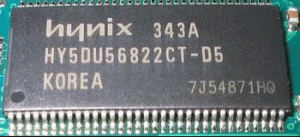
D5 - This ram is similar to the D43, but offers higher clocks and tighter timings. D5 is rated at DDR500, or PC4000. This is not necessarily guaranteed, but on average, D5 seems to clock to around 270-280 MHz, and in some cases can approach the 300 MHz mark. At 250 MHz, the timings are usually around cas2.5-4-4-7, instead of the D43's cas3-4-4-8. This makes it a better choice if you can afford it. Where D43 is usually considered as "Intel ram," the D5 is arguably a great choice for Athlon 64 setups and Intel setups. Once again, for Athlon XP, Winbond offerings might be a better choice. Like its brother D43, this ram does best at 2.8 volts. Another area this ram shines is at lower frequencies, the timings can be tightened almost to the point of being comparable with Winbond chips. This ram is capable of cas2-3-3-X at around 210-220 MHz. Because of this, it is a very versatile ram and would make a good choice for almost any system. D5 can be identified as saying BT-D50, CT-D50 or DT-D50 in the end of the number on the ram chips. The latest revision, DT-D50 has been known to run lower latencies at 200 MHz, making it comparible to TCCD. It will not usually run 2-2-2-x timings, but possibly 2-3-3-x. It also clocks very high, sometimes above 300 MHz. This ram can be found on OCZ PC4000 rev. 2, Corsair XMS and various other offerings. It is not the cheapest ram in the world, but well worth the price for it.

Attached Image
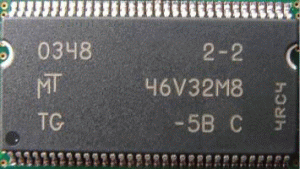
-5B C - I'll start by saying this memory should be much more popular than it is. This memory is knows to clock well with very tight timings. This memory can usually achieve about 230 MHz at cas2.5-2-2-X. The cas latency is not the lowest of the bunch, but the TRD and the TRP latencies are quite good. There have been instances where this ram has clocked higher, much higher, but it is somewhat inconsistent according to other forum members. The nice thing about this ram is the price. It can be found in many value rams with the most notable being Buffalo Technologies. This memory also responds well to voltage. At about 3 volts is where it seems to hit its sweet spot. Much higher does not yield any better results. This ram is pretty easy to idenfify as the part number will say "-5B C" directly on the chips. This ram is found in many flavors of the PC3200 including Buffalo, Crucial, OCZ and a few others.

Attached Image
-5B G - This is a newer revision of the -5B C ram. It is still 5ns ram, but can clock higher than its earlier brother. This is the ram commonly found in Crucial Ballistix that has earned quite a reputation for doing very high clocks with great latencies. It can be considered as somewhat of an "in-between" ram, meaning it does pretty decent timings with pretty decent frequencies. Most revision G ram does about 250-260, but can retain the timings of cas2.5-2-2-X. This is better timings than many of the Hynix offerings, but you will pay a price for it. Currently, 1gb of the Ballistix is around $250 USD. If you can find these chips on any other sort of Value ram, it is QUITE the bargain. It also seems to be less picky of a motherboard than some of its competitors. Identifying this ram is just like the rest...the part number will be -5B G on the ram chips themselves. Like I mentioned earlier, it is found in Ballistix and some, but not many Value ram offerings.

-5B D - This memory IC has replaced the -5B G and is found in Crucial ballistix and other crucial offerings. It has also gone down in price, which everyone will agree, is a good thing. This ram performs very similar to the -5B G in that it will hold very respectable timings up to around 250mhz or DDR500. Users have reported running 240mhz at cas2.5-2-2-x (CCUABIDExORxDIE). Like the G revision, it responds well to voltage and also runs cas2-2-2-x at 200mhz. This ram runs super hot, so active cooling is a must for a decent overclock. This is a pretty good choice for the middle ground between the Samsung based modules and Winbond based modules. It will also run very high frequencies when timings are relaxed to cas3-3-3-x. DDR600 is within reach at these latencies.

Attached Image
BT-5 - This is 5ns ram from Infineon. It is not very popular, as it usually only comes on Corsair XMS3200 rev. 3.1 ram. The native timings at 200 MHz are cas2-3-3-6. This is decent for 200 MHz, but certainly there are faster chips out there. As far as overclocking is concerned, this ram does not exactly impress. Results are very similar to CH-6 Winbond ram, only the CH-6 can usually retain tighter timings across the frequencies. Figure on about 220-230 MHz. This ram responds to voltage, but nothing extreme like Winbond ram. From what I have seen, anything over about 2.9-3.0 volts is somewhat of a waste of time. This ram can also be found in some Value Ram offerings, but not very likely. It can be identified as the last characters on the chip saying B-5.

Attached Image
BT-6 - This is similar to the B-5, but rather it is 6ns. Overclocking results are slightly less favorable than the B-5, as it is rated at 166 MHz. This ram can commonly be found on Value Rams such as Kingston KVR2700. I was able to push this ram to around 215 MHz before I encountered problems. Timings at this overclocked speed were cas2.5-3-3-11. This is as to be expected since these chips are becoming outdated and really only meant to run at 166 MHz. A benefit to the Infineon BT-6 is that most of them have no trouble at all running 200 MHz. So, you are getting PC3200 ram for the price of PC2700. This is not a bad way to go at all. It did, however, need increased voltage and relaxed timings to achieve this speed. Unfortunately, this ram is pretty uncommon, but makes a decent choice if you can get a good deal on it. Usually, KVR2700 is very affordable on the used market. These can be identified by the last three characters on the chip saying BT-6.

Attached Image
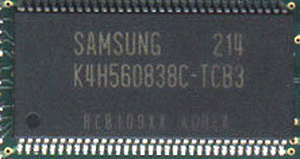
TCB3 - This is 6ns ram from Samsung commonly found on cas2-2-2-X PC2700 modules. It can hold very tight timings, and clock somewhat high. It is found in some PC3200 modules as well, but not rated at cas2-2-2-X. At 200 MHz, latencies are increased to cas2-3-3-6. While this is still respectable, it is nothing out of the ordinary. As far as overclocking goes, this ram can usually clock to around 230 MHz, which is pretty surprising as it is rated at 166 MHz. In fact, this can be found on some OCZ PC3700 modules! This ram would make a great choice if your front side bus frequency is limited to about 180 MHz or less, as the ultra tight timings will give a nice performance boost when compared to regular ram. It would still make great ram for overclocking past 200 MHz, but there are better choices to be had. As far as voltages, it is pretty much standard in that anything past 3.0 volts do not yield any greater results. This ram can be found in Corsair XMS2700, XMS3200, Kingston Hyper X PC2700, Mushkin PC3200, TwinMos and OCZ offerings. As you can see, it is pretty common and easy to find. On the used market, you can probably get a pretty good deal on it. Like other Samsung ram chips, you can identify it by reading "TCB3" on the chips themselves.

Attached Image
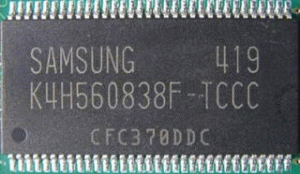
TCCC - TCCC is the revision "C" of the "TCC" line from Samsung. This ram is very versatile, meaning it can achieve pretty high frequency or pretty decent timings. This ram can clock to around 250-260 MHz on average. Timings at these speeds are usually cas3-4-4-8, unfortunately. This ram can be run at 200 MHz, however, and still keep timings such as cas2.5-3-3-6. This makes it a good all around ram that can be had for a relatively low price. You can find TCCC in PC3200 ram up through PC4000 ram. The only draw back to getting this in the PC4000 flavor is that it is very close to the end of its frequency already. The Kingston Hyper X PC4000 module I had containing TCCC only clocked to around 255 MHz before reaching its limit. It is somewhat responsive to voltage, but didn't seem to budge after 2.8 volts or more was applied. You can also find this ram in Corsair XMS3700, Samsung PC3200 and many other Value Ram offerings. Overall, this ram is very similar to the Hynix D43 offerings, but the D43 outclocks this ram more often than not. If you can get this in a PC3200 Value Ram, you will get a great deal. Buying this in the PC4000 speed may not be the best idea.

Attached Image
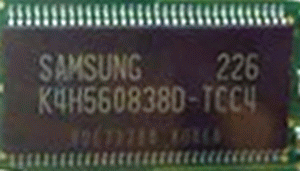
TCC4 - Another offering from Samsung, this ram is pretty unpopular. It can be found on various PC3200 Value rams, as well as some PC2700 offerings. This is not the best overclocking choice, as it usually tops out around 210-220 MHz at cas3-3-3-X and requires added voltage to achieve that speed. Like other Samsung ram, it does not help to give extreme voltages. Since this ram is pretty hard to find anyway, it would be a better choice to go with either the TCCC or the D43 from Hynix, as both offer more flexibility and much more overclocking head room. This ram can had in some PC2700 Value Rams, as well as Samsung PC3200 ram. If you can find it in a Value Ram, it will most likely be a good deal. It is not in production anymore, so you would need to look on the used market. Like I mentioned earlier, some of the newer Samsung and Hynix chips would be a better choice. Identifying these chips is straight forward, as they will say "TCC4" on the modules.

Attached Image
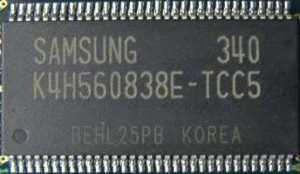
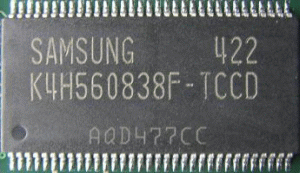
TCC5 - This is a newer revision of the "TCC" series from Samsung. It is superior to the TCC4 in every way. It is commonly found on PC3700 offerings, and offers pretty good overclockability. This ram is rated to run at 233 MHz, so it already starts out higher than the TCC4 can usually clock to. Timings are very respectable at cas2.5-3-3-X depending on the manufacturer. This ram can be overclocked to reach 250 MHz sometimes, if the latencies are increased to cas3-4-4-X. Once again, extreme voltages do not aide in overclocking attempts. This ram is still not as common as the TCCC or the Hynix D43, but can usually found on the used market for a great price. Not a bad choice at all for either Intel or AMD systems, as it can offer good timings at 200 MHz or higher front side bus options. Not the most versatile ram, but certainly better than a lot of other offerings. If you can get your hands on this stuff, it would not make a bad choice, but it is out of production. Update on TCC5 - It looks like some of the newer revision TCC5 is capable of 2-2-2 timings at pc3200. This revision of the TCC5 can be found in Mushkin PC3200 Level 2 V2/V3, as well as OCZ PC3200 Platinum rev. 2. It can clock very high as well. Users of this ram have reported it can run 260mhz at 2.5-3-3 with very little voltage. Not a bad choice at all if you cannot get your hands on TCCD. Also, TCC5 uses the exact same die as TCCD, but it is binned at a lower speed. This doesn't seem to have a negative effect on the newer revision "F" chips.

Attached Image
TCCD - TCCD is another chip that will be remembered for long after its life. This ram has said to be the "BH-5 Replacement." While some agree, some do not. They are VERY different ram chips, and do their own things very well. TCCD is probably the most versatile ram ever made. It can run up to about 220 MHz while holding super tight timings of cas2-2-2-X. It can also be run up near 300 MHz, while holding very respectable timings of cas2.5-4-4-X. Some people have even gotten above 300 MHz with timings of cas2.5-3-3-X. This is one of the highest clocking rams available today, and is relatively inexpensive for what you get. TCCD responds to voltage, but never really needs much of an increase to do its best. People have said that running it at 3.0 volts will help, but I have never achieved higher success going past 2.8 volts. This is especially useful, as 2.8 volts seems to be the maximum offered by most motherboards. The fact that this ram can run at 300 MHz on an UN-modded board is simply amazing. It makes it a great choice for everyone, regardless of what your setup may be. It has been argued that BH-5 is still superior. While that may hold true, the ease of running this ram fast makes up for any edge BH-5 may have on it. One complaint is that this ram is very picky when it comes to motherboard compatibility. I have heard that it has a hard time running well on Intel platforms. This ram really shines on the Athlon 64 platform since it is capable of extreme bandwidth. This ram can be found in almost any manufacturer now a days, including Kingston Hyper X, Corsair XMS, Patriot XBL, Mushkin Level 2, G.Skill, PQI Turbo and even Adata. There are specific part numbers in which you will need to take a look at, so head over to the ram list and check the part number of each manufacturer to be sure you are guaranteed to get TCCD. TCCD can also be identified by saying "TCCD" on the ram chips themselves. Get this stuff while you can folks, it may become a rarity like BH-5 did. Update on TCCD - TCCD is getting harder and harder to find as it is no longer in production. It seems to have been replaced by TCC5, which has proven to clock as high in most situations. The OCZ PC3200 rev. 2 Platinum was once TCCD, and now TCC5. Many other manufacturers are using TCC5 instead now because of the exit of TCCD. The exit of TCCD sort of scared everyone, but it is good to see that something has taken its place.

Attached Image
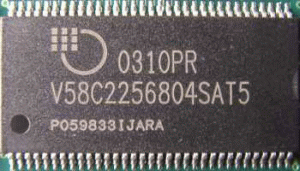
Vitelic 5ns - This is 5ns ram from Mosel. It is commonly found in PC3200 offerings, and at this speed is rated at cas2-3-3-6. This is not bad, but nothing out of the ordinary. It is similar to CH-5 from Winbond. This ram can clock to around 240 MHz and hold decent timings such as cas2.5-3-3-6. If timings are kept at 2-3-2-X, then this ram will typically max out around 220 MHz. This can be found in Corsair XMS3200, Geil Ultra PC3200 and PC3500, OCZ PC3200 and PC3700. This is not a bad choice of ram at all. It offers great overclockability while still holding very respectable timings. Although Mosel is not a well known name in the memory industry, you can see that the top memory manufacturers are using their ram. If you can get these on the used market, they would make a very sweet deal. I have not seen these in Value Ram offerings, but that does not mean they do not exist. Identifying these can be somewhat difficult, as many companies re-label them. Take a look at the ram list to be sure of what modules contain these chips. You can identify these chips by the last 5 characters being SAT5B.

This post has been edited by jinaun: Dec 27 2007, 08:33 AM
TSjinaun
post Jan 13 2006, 10:12 PM

where are my stars???
Group Icon
Elite
6,139 posts

Joined: Jan 2003
trivia

-under construction-
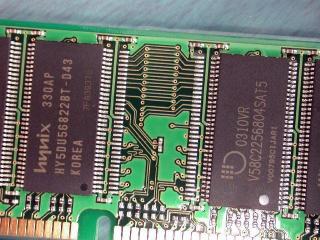
multiple vendors on a stick
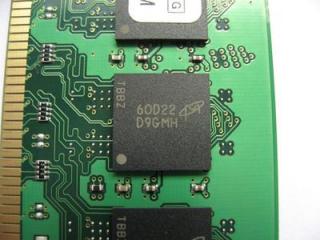
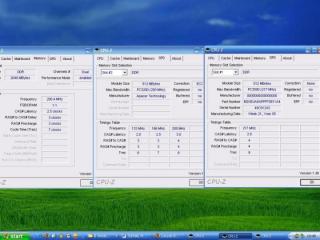
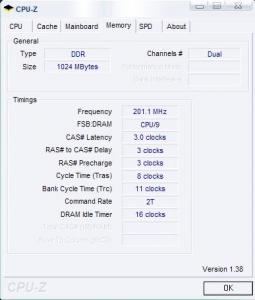
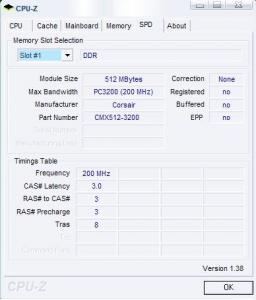
Attached Image
Attached Image


Attached Image
The legendary BH5 reborned???

This post has been edited by jinaun: Dec 23 2007, 09:26 AM
TSjinaun
post Jan 13 2006, 10:12 PM

where are my stars???
Group Icon
Elite
6,139 posts

Joined: Jan 2003
-underconstruction-

This post has been edited by jinaun: Dec 22 2007, 12:48 PM
TSjinaun
post Jan 13 2006, 10:13 PM

where are my stars???
Group Icon
Elite
6,139 posts

Joined: Jan 2003
-under construction-

This post has been edited by jinaun: Dec 22 2007, 09:21 PM
TSjinaun
post Jan 13 2006, 10:13 PM

where are my stars???
Group Icon
Elite
6,139 posts

Joined: Jan 2003
Memory Basics


DRAM Memory Technologies

DRAM is available in several different technology types. At their core, each technology is quite similar to the one that it replaces or the one used on a parallel platform. The differences between the various acronyms of DRAM technologies are primarily a result of how the DRAM inside the module is connected, configured and/or addressed, in addition to any special enhancements added to the technology.

There are three well-known technologies:

Synchronous DRAM (SDRAM)

An older type of memory that quickly replaced earlier types and was able to synchronize with the speed of the system clock. SDRAM started out running at 66 MHz, faster than previous technologies and was able to scale to 133 MHz (PC133) officially and unofficially up to 180 MHz. As processors grew in speed and bandwidth capability, new generations of memory such as DDR and RDRAM were required to get proper performance.


Double Data Rate Synchronous DRAM (DDR SDRAM)

DDR SDRAM is a lot like regular SDRAM (Single Data Rate) but its main difference is its ability to effectively double the clock frequency without increasing the actual frequency, making it substantially faster than regular SDRAM. This is achieved by transferring data not only at the rising edge of the clock cycle but also at the falling edge. A clock cycle can be represented as a square wave, with the rising edge defined as the transition from '0' to '1', and the falling edge as '1' to '0'. In SDRAM, only the rising edge of the wave is used, but DDR SDRAM references both, effectively doubling the rate of data transmission. For example, with DDR SDRAM, a 100 or 133 MHz memory bus clock rate yields an effective data rate of 200 MHz or 266 MHz, respectively. DDR modules utilize a 184-pin DIMM (Dual Inline Memory Module) packaging which, like SDRAM, allows for a 64 bit data path, allowing faster memory access with single modules over previous technologies. Although SDRAM and DDR share the same basic design, DDR is not backward compatible with older SDRAM motherboards and vice-versa.

It is important to understand that while DDR doubles the available bandwidth, it generally does not improve the latency of the memory as compared to an otherwise equivalent SDRAM design. In fact the latency is slightly degraded, as there is no free lunch in the world of electronics or mechanics. So while the performance advantage offered by DDR is substantial, it does not double memory performance, and for some latency-dependant tasks does not improve application performance at all. Most applications will benefit significantly, though.


Rambus DRAM (RDRAM)

Developed by Rambus, Inc., RDRAM, or Rambus DRAM was a totally new DRAM technology that was aimed at processors that needed high bandwidth. RAMBUS, Inc. agreed to a development and license contract with Intel and that lead to Intel's PC chipsets supporting RDRAM. RDRAM comes in PC600, PC700, PC800 and PC1066 speeds. Specific information on this memory technology can be found at the RAMBUS Website.

Unfortunately for Rambus, dual channel DDR memory solutions have proved to be quite efficient at delivering about the same levels of performance as RDRAM at a much lower cost. Intel eventually dropped RDRAM support in their new products and chose to follow the DDR dance, at which point RDRAM almost completely fell off the map. Rambus, SiS, Asus and Samsung have now teamed up and are planning a new RDRAM solution (the SiS 659 chipset) providing 9.6 GB/s of bandwidth for the Pentium 4. It will be an uphill battle to get RDRAM back in the mainstream market without Intel's support.


DDR Memory Speeds

The speed of DDR is usually expressed in terms of its "effective data rate", which is twice its actual clock speed. PC3200 memory, or DDR400, or 400 MHz DDR, is not running at 400 MHz, it is running at 200 MHz. The fact that it accomplishes two data transfers per clock cycle gives it nearly the same bandwidth as SDRAM running at 400 MHz, but DDR400 is indeed still running at 200 MHz.


Actual clock speed/effective transfer rate

100/200 MHz => DDR200 or PC1600
133/266 MHz => DDR266 or PC2100
166/333 MHz => DDR333 or PC2700
185/370 MHz => DDR370 or PC3000
200/400 MHz => DDR400 or PC3200
217/433 MHz => DDR433 or PC3500
233/466 MHz => DDR466 or PC3700
250/500 MHz => DDR500 or PC4000
267/533 MHz => DDR533 or PC4200
283/566 MHz => DDR566 or PC4500


So how do they come about those names? Well, the industry specifications for memory operation, features and packaging are finalized by a standardization body called JEDEC. JEDEC, the acronym, once stood for Joint Electron Device Engineering Council, but now is just called the JEDEC Solid State Technology Association.

The naming convention specified by JEDEC is as follows:
Memory chips are referred to by their native speed. Example, 333 MHz DDR SDRAM memory chips are called DDR333 chips, and 400 MHz DDR SDRAM memory chips are called DDR400.

DDR modules are also referred to by their peak bandwidth, which is the maximum amount of data that can be delivered per second. Example, a 400 MHz DDR DIMM is called a PC3200 DIMM. To illustrate this on a 400 MHz DDR module: Each module is 64 bits wide, or 8 Bytes wide (each byte = 8 bits). To get the transfer rate, multiply the width of the module (8 Bytes) by the rated speed of the memory module (in MHz): (8 Bytes) x (400 MHz/second) = 3,200 Mbytes/second or 3.2 Gbytes/second, hence the name PC3200
To date, the JEDEC consortium is yet to finalize specifications for PC3500 & higher modules. PC2400 was a very short lived label applied to overclocked PC2100 memory. PC3000 was not and will not ever be an official JEDEC standard.


Processors and Bandwidth

The front side bus (FSB) is basically the main highway or channel between all the important functions in the motherboard that surround the processor through which information flows. The faster and wider the FSB, the more information can flow over the channel, much as a higher speed limit or wider lanes can improve the movement of cars on a highway. As with the FSB, a low speed limit or narrower lanes will retard the movement of cars on the highway causing a bottleneck of traffic. Intel has been able to reduce the FSB bottleneck by accomplishing four data transfers per clock cycle. This is known as quad-pumping, and has resulted in an effective FSB frequency of 800 MHz, with an underlying 200 MHz clock. AMD Athlon XPs, on the other hand, must be content with a bus that utilizes different technology, one that utilizes both the rising and falling sides of a signal. This is in essence the same double data rate technology used by memory of the same name (DDR), and results in a doubling of the FSB clock frequency. That is, a 200 MHz clock results in an effective 400 MHz FSB.
Processors have a FSB data width. This data width is much like the "lanes on a highway" that go in and out of the processor. The processor uses this highway to transfer data mainly between itself and system. When the first 8088 processor was released, it had a data bus width of 8 bits and was able to access one character at a time (8 bits = 1 character/byte) every time memory was read or written. The size in bits thus determines how many characters it can transfer at any one time. An 8-bit data bus transfers one character at a time, a 16-bit data bus transfers 2 characters at a time and a 32-bit data bus transfers 4 characters at a time. Modern processors, like the Athlon XP and Pentium 4, have a 64-bit wide data bus enabling them to transfer 8 characters at a time. Although, these processors have 64-bit data bus widths, their internal registers are only 32 bits wide and they're only capable of processing 32 bit commands and instructions while new AMD64 series of processors are capable of processing both 32 bit and 64 bit commands and instructions.
When talking memory, bandwidth refers to how fast data is transferred once it starts and is often expressed in quantities of data per unit time. The peak bandwidth that may be transmitted by an Athlon XP or a Pentium 4 is the product of the width of the FSB and the frequency it runs at. To illustrate:

Athlon XP "Barton" 3200+ -- 400FSB
64(bits) * 400,000,000(Hz) = 25,600,000,000 bits/sec
(25,600,000,000/8) / (1000*1000) = 3200 Mb/sec

Intel Pentium 4 "C" 3.2 GHz -- 800FSB
64(bits) * 800,000,000(Hz) = 51,200,000,000 bits/sec
(51,200,000,000/8) / (1000*1000) = 6400 Mb/sec

These are the bus' theoretical peak bandwidths. There's a difference between peak bus bandwidth and effective memory bandwidth. Where peak bandwidth is just the product of the bus width and bus frequency, effective bandwidth takes into consideration others factors such as addressing and delays that are necessary to perform a memory read or write. The memory could very well be capable of putting out 8 bytes on every single clock pulse for an indefinitely long time, and the CPU could likewise be capable of consuming data at this rate indefinitely. The problem is that there are turnaround times (or delays) in between when the processor places a request for data on the FSB; when the requested data is reproduced by RAM and when this requested data finally arrives for use by the CPU. Luckily, the bandwidth-killing effects of these delays are reduced through various methods; most important being reducing the number of requests the CPU must issue.


DDR Dual Channel

Most of today's mainstream chipsets are using some form of dual channel to supply processors with bandwidth. The nForce and nForce2 are, at this time, the only two chipsets to supply dual-channel goodness for the Athlon XP. The original nForce was not on the same performance and stability level as the competitor VIA's chipset was, but the new and improved dual-channel DDR400 nForce2 has been a smash success -- in fact, is today's de facto choice for performance-minded / overclocker AMD desktop buyers. VIA is now about to release a Dual Channel chipset for the Athlon XP/Duron family called the KT880.

Take note that the memory isn't dual channel, the platform is. In fact there is no such thing as dual channel memory. Rather, it is most often a memory interface composed of two (or more) normal memory modules coordinated by the chipset on the motherboard, or in the case of the AMD64 processors, coordinated by the integrated memory controller. But for the sake of simplicity, we refer to DDR dual channel architecture as dual channel memory.

The nforce2 platform has two 64 bit memory controllers (which are independent of each other) instead of just a single controller like other chipsets. These two controllers are able to access "two channels" of memory simultaneously. The two channels, together, handle memory operations more efficiently than one module by utilizing the bandwidth of two modules (or more) combined. By combining DDR400 (PC3200) with dual memory controllers, the nForce2 could offer up to 6.4 GB/sec of bandwidth in theory.

However, this extra bandwidth produced by dual channel cannot be fully utilitized by the Athlon XP and Duron family (K7) of processors. Data(bandwidth) will reach these processors no sooner than the system bus (FSB) allows them, and the processor therefore cannot derive an advantage from memory operating faster than DDR266 when operating on a 133/266Mhz FSB, DDR333 with a 166/333Mhz FSB or DDR400 at 200/400Mhz FSB even in single channel mode. Visualize a four lane highway, symbolizing your Dual Channel configuration. As you go along the highway you come up to a bridge that is only 2 lanes wide. That bridge is the restriction posed by the dual-pumped AMD FSB. Only two lanes of traffic may pass through the bridge at any one time. That's the way it is, with the K7 processors and Dual Channel chipsets.

In case you're wondering, the K in K7 stands for Kryptonite later changed to Krypton to avoid copyright infringement. Yes, that very same fictional element from comic books that could bring the otherwise all-powerful Superman (Intel ) to his knees. Intel's P4 architecture, in contrast, is designed to exploit the increased bandwidth afforded by dual channel memory architectures. The 64-bit Quad Pumped Bus of the modern Pentium 4 CPU working at 800MHz, in theory, requires 6.4GB/s of bandwidth. This is the exact match of the bandwidth produced by the Intel i875 (Canterwood) and i865 (Springdale) chipset families. The quad pumped P4 FSB seemed like drastic overkill in the days of single channel SDR memory, but is paying handsome dividends in today's climate of dual channel DDR memory subsystems. This is one lasting and productive legacy of Intel's RDRAM efforts. As implemented on the P4 RDRAM was also dual channel architecture, and mandated the quad-pumped FSB for its extra bandwidth to be exploited. This factor continues to serve the P4 well in the dual channel DDR era we are currently in, and allows P4's greater memory performance than all other PC platforms, save the new AMD Athlon64 FX with all its new bells and whistles.

The Athlon 64 FX processor has a fully integrated DDR Dual Channel memory controller providing a 128-bit wide path to memory and therefore eliminating the need for a Dual Channel interface on the motherboard which traditionally was always located in the Northbridge. The old term front-side bus has always represented the speed at which the processor moves memory traffic and other data traffic to and from the chipset. Since the AMD64 processors has the memory controller located on the processor die, that memory subsystem traffic no longer has to go through the chipset for CPU-to-memory transfer. Therefore, the old term "front-side bus" does no good as it is not applicable anymore. With AMD64 processors, the CPU and memory controller interface with each other at full CPU core frequency. The speed at which the processor and chipset communicate is now dependent on the chipset's HyperTransport spec, running at speeds of up to 1600 MHz. Although the P4 (800fsb variety) and the A64 FX 940 pins, both share the same theoretical peak memory bandwidth of 6.4GB/sec, the Athlon FX realizes significantly more throughput due mainly to it's integrated memory controller which drastically reduces latency. Even so, it still suffers from the required use of registered modules which are slower than regular modules. The upcoming Athlon 64 / A64 FX processors designed for Socket 939 will be free from this major drawback and will also feature Dual Channel memory controllers. One negative, though, of having the memory controller integrated into the processor is that to support emerging memory technologies, like DDR-2 for example, the controller has to be redesigned and the processor needs to be replaced.


Which slots to use?

If you're using a single module, it's best practice to use the first slot. If using two or more modules in a non-dual channel motherboard, populate the first slot and use any other slots you wish. Q: I've had my single module installed in slot 2 for the last few months now, should I change it? No, it's also best practice to keep on using the slot(s) you're been using before. If you replace RAM, then insert the new modules, in the same slots the older ones were in before.

You may find the system overclocks better with the ram in a different slot. It is very hard to predict when this effect occurs, as well as which one might work best. In the overclocking game he who tries the most things wins, and if you are running an overclocked configuration that is asking a lot of the ram it is a good idea to try all available slots to make sure the one you are using yields the best results.

If you're using two or more modules of unequal size, you will get the best performance if you put the largest module(s) (in megabytes) in the lowest-numbered slot(s). For example, if your system currently has 256MB of memory and you want to add 512MB, it would be best to put the 512MB module into slot 0 and the 256MB module into slot 1.

Using Dual Channel

Dual Channel requires at least two modules for operation. It is recommended that the modules you use be of the same size, speed, arrangement etc. Dual Channel is optional on the original nforce2 motherboards and nforce2 ultra400. You can choose to run in single channel mode on these motherboards. Nforce2 400 boards are singe-channel only. Most dual channel capable nforce2 motherboards come with three slots. On these motherboards the first memory controller controls only the first slot (or the slot by itself), while the second memory controller controls the last two slots (which are usually closer together). Name them slots 1, 2 & 3 respectively. To implement Dual Channel, it is necessary to occupy the slot 1 (channel 0) and either one of the two slots that are closer together, slots 2 or 3 (channel 1). The entire config would be running in 128 bit mode.

You can use three modules in Dual Channel Mode, by filling the third unoccupied slot. With three sticks, slots 1 remains as channel 0 while slot 2&3 become channel 1. To maintain 128-bit mode, with all three slots filled, each channel must have an equal amount of memory. For example, slots 1 should be filled with a 512 Mb module, while slots 2 & 3 are populated 256 Mb modules. If you were to use three modules of the same size, then only the first two modules would be running in 128 bit Dual Channel Mode. Example, using 3x 256 Mb modules will have the first 512 Mb running in 128 bit Dual Channel mode, while the remaining 256 Mb will be in 64-bit Single Channel mode.

Intel dual-channel systems are different. The have either two or four slots, and to run dual channel mode must have either one or two pairs of (hopefully) matching modules. Running three modules on a P4 system will force it to run in single channel mode, and is therefore to be avoided.

Consult your motherboard manual for instruction on exactly which slots exactly to use.


Bios Settings


Memory timings

Memory performance is not entirely determined by bandwidth, but also the speeds at which it responds to a command or the times it must wait before it can start or finish the processes of reading or writing data. These are memory latencies or reaction times (timings). Memory timings control the way your memory is accessed and can be either a contributing factor to better or worse 'real-world' performance of your system.

Internally DRAM has a huge array of cells that contain data. (If you've ever used Microsoft's Excel, try and picture it that way) A pair of row and column addresses can uniquely address each cell in the DRAM. DRAM communicates with a memory controller through two main groups of signals: Control-Address signals and Data signals. These signals are sent to the RAM in order for it to read/write data, address and control. The address is of course where the data is located on the memory banks, and the control signals are various commands needed to read or write. There are delays before a control signal can be executed or finish and this is where we get memory timings. The standard format for memory timings are most often expressed as a string of four numbers, separated by dashes, from left to right or vice-versa like this 2-2-2-5 [CAS-tRP-tRCD-tRAS] . These values represent how many clock cycles long each delay is but are not expressed in the order in which they occur. Different bioses will display them differently and there maybe additional options (timings) available.


Which timings mean what?

In most motherboards, numerous settings can be found to optimize your memory. These settings are often found the Advanced Chipset section of the popular award bioses. In certain instances, the settings maybe placed in odd locations, so please consult your motherboard manual for specific information. Below are common latency options:
Command rate - is the delay (in clock cycles) between when chip select is asserted (i.e. the RAM is selected) and commands (i.e. Activate Row) can be issued to the RAM. Typical values are 1T (one clock cycle) and 2T (two clock cycles).

CAS (Column Address Strobe or Column Address Select) - is the number of clock cycles (or Ticks, denoted with T) between the issuance of the READ command and when the data arrives at the data bus. Memory can be visualized as a table of cell locations and the CAS delay is invoked every time the column changes, which is more often than row changing.

tRP (RAS Precharge Delay) - is the speed or length of time that it takes DRAM to terminate one row access and start another. In simpler terms, it means switching memory banks.

tRCD (RAS (Row Access Strobe) to CAS delay) - As it says it's the time between RAS and CAS access, ie. the delay between when a memory bank is activated to when a read/write command is sent to that bank. Picture an Excel spreadsheet with a number across the top and along the left side. They numbers down the left side represent the Rows and the numbers across the top represent the Columns. The time it would take you, for example, to move down to Row 20 and across to Column 20 is RAS to CAS.

tRAS (Active to Precharge or Active Precharge Delay) - controls the length of the delay between the activation and precharge commands ---- basically how long after activation can the access cycle be started again. This influences row activation time which is taken into account when memory has hit the last column in a specific row, or when an entirely different memory location is requested.
These timings or delays occur in a particular order. When a Row of memory is activated to be read by the memory controller, there is a delay before the data on that Row is ready to be accessed, this is known as tRCD (RAS to CAS, or Row Address Strobe to Column Access Strobe delay). Once the contents of the row have been activated, a read command is sent, again by the memory controller, and the delay before it starts actually reading is the CAS (Column Access Strobe) latency. When reading is complete, the Row of data must be de-activated, which requires another delay, known as tRP (RAS Precharge), before another Row can be activated. The final value is tRAS, which occurs whenever the controller has to address different rows in a RAM chip. Once a row is activated, it cannot be de-activated until the delay of tRAS is over.


To tweak or not to tweak?

In order to really maximize performance from your memory, you'll need to gain access to your system's bios. There is usually a Master Memory setting, often rightly called Memory Timing or Interface, which gives usually gives you the choice to set your memory timings by SPD or Auto, preset Optimal and Aggressive timings (e.g. turbo and ultra), and lastly an Expert or Manual setting that will enable you to manipulate individual memory timing settings to your liking.

Are the gains of the perfect, hand-tweaked memory timing settings worth it over the automatic settings? If you're just looking to run at stock speeds and want absolute stability, then the answer to that question would probably be no. The relevance would be nominal at best and you would be better off going by SPD or Auto. However, if your setup is up on the cutting edge of technology or you're pushing performance to the limit as do some overclockers, or gamers or tweakers, it may have great relevance.

SPD (Serial Presence Detect)

SPD is a feature available on all DDR modules. This feature solves compatibility problems by making it easier for the BIOS to properly configure the system to optimize your memory. The SPD device is an EEPROM (Electrically Erasable Programmable Read Only Memory) chip, located on the memory module itself that stores information about the DIMM modules' size, timings, speed, data width, voltage, and other parameters. If you configure your memory by SPD, the bios will read those parameters during the POST routine (bootup) and will automatically adjust values in the BIOS according preset module manufacturer specifications.

There is one caveat though. At times the SPD contents are not read correctly by the bios. With certain combinations of motherboard, bios, and memory setting SPD or Auto may result in the bios selecting full-fast timings (lowest possible numbers), or at times full-slow timings (highest possible numbers). This is often the culprit in situations where it appears that a particular memory module is not compatible with a given board. Often in these cases the SPD contents are not being read correctly and the bios is using faster memory timings than the module or system as a whole can boot with. In cases like these try replacing the module with another, setting the bios to allow manual timings, and setting those timings to safer (higher) values will allow the combination to work.


Ok so I want to tweak, what do I do?

Now for the kewl stuff!!!

The first order of business, when tweaking your memory, is to deactivate the automatic RAM configuration -- SPD or Auto. With SPD enabled, the SPD chip on the memory module is read to obtain information about the timings, voltage and clock speed and those settings are adjusted accordingly. These settings are, however, very conservative to ensure stable operation on as many systems as possible. With a manual configuration, you can customize these settings for your own system and in most cases, the memory modules will remain stable even when they exceed the manufacturer's specifications.

As a general rule, a lower number (or timing) will result in improved performance. After all, if it takes fewer cycles to complete an operation, then it can fit more operations within X amount of time. However, this comes at a cost, and that is stability. It is similar to wireless networking with short and long preambles. A long pre-amble might be slower, but in a heavy network environment it is much more reliable than short preamble because there is more certainty a packet is for your NIC. The same is for memory - the more cycles used, in general, the more stable the performance. This is inherently true for all of them because to access precisely the right part of the memory, you have to be accurate, and the more time to do a calculation will make it more accurate in this instance. Most typical values are 2 and 3. You might ask: Why can't we use 1 or even 0 values for memory timings? JEDEC specifies that it's not possible for current DRAM technology to operate as it should under such conditions. Depending on motherboard, you might be able to squeeze '1' on certain timings, but will very likely result memory errors and instability. And even if it doesn't, it is unlikely to result in a performance gain.

If you are not planning on overclocking the clock speed of your RAM or if you have fast RAM rated at speeds above that of your current FSB, it may be possible to just lower the timings for a performance gain in certain applications that require most frequent accesses to system memory like, for instance, games. Memory timings can vary depending on the performance of RAM chips used. Not all memory modules will exhibit the ability to use certain timings without producing errors. So testing, trial and error, is required.

Here are general guidelines to follow while "tweaking":
As with CPU/video card overclocking, adjusting the memory timings should be done methodically and with ample time to test each adjustment.

lower figures = better performance, but lower overclockability and possibly diminished stability.

higher figures = lesser performance, but increased overclockability and more stability -- to an extent

tRCD & tRP are usually equal numbers between 2 and 4. In tweaking for more overclockability, lower tRP first between these two

CAS should be either 2.0 or 2.5. Many systems, most nforce2, fail to boot with a 3.0 setting or have stability problems. CAS is not most critical of the various timings, unlike what is taught by many. In general, the importance of CAS when placed against tRP and tRCD is nominal. Reducing CAS has a relatively minor effect on memory performance, while lower tRP & tRCD values result in a much more substantial gain. In other words if you had to choose, 3-3-2.5 would be better than 4-4-2.0 (tRCD-tRP-CAS)

tRAS should always be larger the before mentioned timings. - see below
tRAS is unique, in that lowering it can lead to problems and lesser performance. tRAS is the only timing that has no effect on real performance, if it is configured as it should. By definition, real-life performance is the same with different tRAS settings with a certain exception. This document from Mushkin outlines how tRAS should be a sum of tRCD, CAS, and 2. For example, if you are using a tRCD of 2 and a CAS of 2 on your RAM, then you should set tRAS to 6. At values lower than that theory would dictate lesser performance as well as catastrophic consequences for data integrity including hard drive addressing schemes --- truncation, data corruption, etc --- as a cycle or process would be ended before it's done. How is it possible for memory timings to affect my hard drive? When the system is shut down or a program is closed, physical ram data that becomes corrupted may be written back to the hard drive and that's where the consequences for the hard drive come in. Also let's not forget when physical ram data is translated by the operating system to virtual memory space located on the hard drive.

While it's important to consider the advice of experts like Mushkin, your own testing is still valuable. Systems - both AMD & Intel alike, can indeed operate with stability with 2-2-2-5 timings, and even exhibit a performance gain as compared to the theoretically mandated 2-2-2-6 configuration. The most important thing in any endeavor is to keep an open mind, and don't spare the effort. Once you've tried both approaches extensively it will be clear to you which is superior for your particular combination of components.


The Anomaly: nVIDIA's nForce2 and tRAS

An anomaly can be described as something that's difficult to classify; a deviation from the norm or common form. This is exactly the situation with tRAS (Active to Precharge) and nVIDIA's nforce2 chipset. As said before, not sparing the effort is what has lead to the initial discovery of this anomaly many months ago. It's pretty well known by now, in a nutshell, a higher tRAS (i.e. higher than, say, the Mushkin mandated sum of CAS+tRCD+2) on nforce2 motherboards consistently shows slightly better results in several benchmarks and programs. In most cases, 11 seems to be the magic number. Other chipsets do not display this "deviation from the norm", so what makes the nforce2 different?

This thread has been on the topic for a while now, and TheOtherDude has given a possible explanation for this anomaly.

"Unlike most modern chipsets, the Nforce2 doesn't seem to make internal adjustments when you change the tRAS setting in the BIOS. These "internal" (not really sure if that's the right word) settings seem to include Bank Interleave, Burst Rate and maybe even Auto-precharge. For optimal performance, tRAS (as measured in clock cycles) should equal the sum of burst length, plus the finite time it takes the RAM to conduct a number of clock independent operations involved with closing a bank (~40 ns) minus one clock if Auto-precharge is enabled (this factor can be slightly effected by CAS, but should not play a role in optimal tRAS). To complicate things even more, one bank cannot precharge a row while the other specifies a column. This brings tRCD into the mix.

Higher isn't always better, but the reason everything is so weird with tRAS and the Nforce2 is simply because the chipset doesn't make the internal optimizations to accommodate your inputted tRAS value like most other chipsets."


Dealing with Memory Speeds / Frequencies

When the memory frequency runs at the same speed as the FSB, it is said to be running in synchronous operation. When memory and FSB are clocked differently (lower or higher than), it is known to be in asynchronous mode. On both AMD and Intel platforms, the most performance benefits are seen when the FSB of the processor is run synchronously with the memory - Although Intel based systems have a slight exception, this is completely true of all AMD-supporting chipsets. When looking at the AMD-supporting chipsets async modes are to be avoided like a plague. AMD-supporting chipsets offer less flexibility in this regard due to poorly implemented async modes. Even if it means running our memory clock speed well below the maximum feasible for a given memory, an Athlon XP system will ALWAYS exhibit best performance running the memory in sync with the FSB. Therefore, a 166FSB Athlon XP would run synchronously with DDR333/PC2700 (2*166) and give better performance than running with DDR400/PC3200, despite its numbers being bigger.

Only Intel chipsets have implemented async modes that have any merit. If you are talking about the older i845 series of chipsets, running an async mode that runs the memory faster than the FSB is crucial to top system performance. And with the newer dual channel Intel chipset (i865/875 series) in an overclocked configuration, often you must run an async mode that runs the memory slower than the FSB for optimal results. The async modes in SiS P4 chipsets also work correctly.
To achieve synchronous operation, there is usually a Memory Frequency or DRAM ratio setting in the bios of your system that will allow you to manipulate the memory speed to a either a percentage of the FSB (i.e. 100%) or a fraction (or ratio) i.e. N/N where N is any integer available to you. If you want to run memory at non 1:1 ratio speeds, motherboards use dividers that create a ratio of CPU FSB: memory frequency. However, intrinsically, it is possible to see the problem with this and why synchronous operation is preferable on all PC platforms. If there is divider, then there is going to be a gap between the time that data is available for the memory, and when the memory is available to accept the data (or vica versa). There will also be a mismatch between the amount of data the CPU can send to the memory and how much the memory can accept from the CPU. This will cause slowdowns as you will be limited by the slowest component.
Here are three examples illustrating the three possible states of memory operation:
200MHz FSB speed with 100% or 1:1 (FSB:Memory ratio) results in 200MHz memory speed (DDR400)
Such a configuration is wholly acceptable for any AMD system, memory should be set this way at all times for best performance. Asynchronous FSB/Memory Speeds are horridly inefficient on AMD systems, but may well be the optimal configuration for P4 systems.
200MHz FSB speed with 120% or 5:6 (FSB:Memory ratio) results in 240MHz memory speed (DDR480)
This example shows running the memory at higher asynchronous speeds. Assume we have a Barton 2500+ which by default is running at a FSB of 333 MHz (166 MHz X 2) and we also have PC3200 memory which by default is running at 400 MHz. This is a typical scenario because many people think that faster memory running at 400 MHz, will speed up their system. Or they fail to disable the SPD or Auto setting in their bios. There is NO benefit at all derived from running your memory at a higher frequency (MHz) than your FSB on Athlon XP/Duron sytems. In actuality, doing so has a negative effect.

Why does this happen? It happens because the memory and FSB can't "talk" at the same speeds, even though the memory is running at higher speeds than the FSB. The memory would have to "wait for the FSB to catch up", because higher async speeds forces de-synchronization of the memory and FSB frequencies and therefore increases the initial access latency on the memory path -- causing as much as a 5% degradation in performance.

This is another ramification of the limiting effect of the AMD dual-pumped FSB. A P4's quad pumped FSB (along with the superior optimization of the async modes) allows P4's to benefit in some cases from async modes that run the memory faster than the FSB. This is especially true of single channel P4 systems. There still are synchronization losses inherent in an async mode on any system, but the adequate FSB bandwidth of the P4 allows the additional memory bandwidth produced by async operation to overcome these losses and produce a net gain.
250MHz FSB speed with 80% or 5:4 (FSB:Memory ratio) results in 200MHz memory speed (DDR400)
This example is most often used in overclocking situations where the memory is not able to keep up with the speed of the FSB. On AMD platforms, there is really no point having a high FSB, if the memory can't keep up. When the memory or any other component is holding back system performance, this is called a "bottleneck". As in the example above, a memory bottleneck would be if you were running your memory at DDR400 MHz with a 500 MHz (250x2) system bus. The memory would only be providing 3.2GB/s of bandwidth while the bus would be theoretically capable of transmitting 4.0GB/s of bandwidth. A situation like this would not help overall system performance.

Think of it like this; let's say you had a highway going straight into a mall, with an identical highway going straight out of the mall. Both highways have the same number of lanes and initially they have the same 45mph speed limit. Now let's say that there's a great deal of traffic flowing in and out of the mall and in order to get more people in and out of the mall quicker, the department of transportation agrees to increase the speed limit of the highway going into the mall from 45mph to 70mph; the speed limit of the highway leaving the mall is still stuck at 45mph. While more people will be able to reach the mall quicker, there will still be a bottleneck in the parking area leaving the mall - since the increased numbers of people that are able to get to the mall still have to leave at the same rate. This is equivalent to increasing the FSB frequency but leaving the memory frequency/bandwidth unchanged or set to a slower speed. You're speeding up one part of the equation while leaving the other part untouched. Sometimes the fastest memory is not always afforded or available. In this case, more focus should be placed on balancing the FSB and memory frequencies while still keeping latencies as low as possible AND while still maintaining CPU clock speed (GHz) by increasing the multiplier. The benefit of a faster FSB (and higher bandwidth) will only become more and clearer as clock speeds (GHz) increase; the faster the CPU gets, the more it will depend on getting more data quicker. The only real benefit of async modes on AMD platforms is the fact that it comes in handy to overclockers for testing purposes; to determine their max FSB and to eliminate the memory as a possible cause for not being able to achieve a desired stable FSB speed. Even so, async modes on early nforce2 based motherboards caused many problems; problems as serious as bios corruption.


Looking to the Intel side of the fence, async modes that run the memory slower than the FSB have merit because of how async modes are implemented in the Intel chipsets. This is extremely important, as we cannot change the CPU multiplier on modern Intel systems and therefore have to use and async mode to allow substantial overl!!!!! on the majority of systems utilizing the current 200/800MHz fsb family of P4 processors. To illustrate, if you increase the FSB on a new C stepped P4 to 250 MHz (250 x 4) with a 1:1 ratio, memory will work at 250 MHz (DDR500). This can be done in two ways. The first is with exotic PC4000 or DDR500 memory modules, but these are expensive just to run synchronously at such speeds and their timings are exactly delightful either. The other way is to overclock DDR400/DDR433 to much higher speeds through overvolting, but this is seemingly dangerous and often motherboards don't provide nearly enough voltage to achieve such speeds without physical voltage mods. Therefore to avoid expensive PC4000 or volt mods, you change the memory ratio so that a 250FSB overclock will become something that the memory can handle to allow for a substantial overclock of the Pentium 4. In the example, to let PC3200(DDR400) remain as DDR400 with a 250MHz.


Overclocking & Memory


How do I overclock my memory?

On modern systems, memory is very rarely, if ever, overclocked for the sake of overclocking memory. Lemme rephrase that, people don't overclock memory to make it run higher than what is actually needed. There are many instances where memory is even underclocked. You first determine the default frequency of your memory, 1MHz higher than that frequency is the point where overclocking begins. Now how do you increase that frequency? As previously discussed, best performance on all platforms is gained by running the memory frequency synchronously with speed of the FSB. This means that for every 1MHz the FSB is increased, so too will the frequency of memory clock. So in effect, memory overclocking is just a part of overclocking your processor. They are done simultaneously. Since FSB frequency and Memory frequency are most times made to be the same, this poses a problem - as overclockers look for the highest possible FSB while the memory may struggle behind because it's not able to keep.

Other aspects to memory overclocking are memory timings and of course the amount of voltage supplied. Unlike CPU overclocking or video card tweaking, adjusting memory timings and frequencies offers very little physical risk to your system, other than the possibility of a windows failure to load or a program failure while testing. The memory will either be able to handle the overclocking/tweaking, handle it with instability or not handle it all. There are no grey areas in between, it either does, does with lots of problems, or doesn't at all. This makes it a bit simpler to quickly find the precise limits of any memory.

The memory timings can also play a role in how far the memory will go, in keeping with the FSB. Lower timings (numbers) will hinder how fast the memory can run, while higher timings allow for more memory speed. So which is better, lower timings or higher memory speeds? Why not both? Overall data throughput depends on bandwidth and latencies. Peak bandwidth is important for certain applications that employ mostly streaming memory transfers. In these applications, the memory will burst the data, many words after each other. Only the very first word will have a latency of maybe several cycles, but all other words will be delivered one after another. Other applications with more random accesses, like games, will get more mileage out of lower latency timings. So weigh the importance of higher memory clocks against lower latency timings, and decide which is most important for your application.


Memory Voltage

Sometimes a little extra voltage is all that's required to encourage your defiant DDR to straighten up and fly right. You can adjust the ddr voltage quite easily through your motherboard's BIOS as you would for your CPU's voltage. Like CPU overclocking, raising memory voltage above default (default is usually 2.5v or 2.6v for DDR) at higher memory clock speeds may aid stability and/or enable you to use lower latency timings.

Although the ddr voltage has nothing to do with the CPU itself, it plays an integral part in the big picture. If we are running a synchronous mode (1:1), then for every 1MHz increase in FSB speed, the RAM speed will increase by 1MHz. So in these cases an elevated memory voltage will often prove helpful in maximizing the overclocking potential of the CPU.

A few points to consider when raising memory voltage:
Like CPU overclocking, increasing memory voltage should be done in the smallest increments available. Put your system through a few paces of a program like memtest86 after each step. If it fails testing, bump the voltage a little more and test again.

0.3 Volts over Default - That's a bit conservative for some people (including me), but should be enough for most. This is also the maximum provided by most motherboards. On such motherboards, hardware mods or modified bioses maybe required to gain access to more voltage.

Some of the higher voltages (2.9v to 3.3v) available on certain motherboards may damage the RAM with long exposure, so check with other people who have your RAM to get a feel for its voltage tolerances. The memory you save may be your own.


Do I Need Ram Cooling?

Memory cooling has become very popular, most notably on video cards. The effectiveness of memory cooling on both system ram, however, is often fuel for lengthy discussions on many internet hardware forums, including our own message board. Does system memory get hot enough to require cooling? Depends on what you consider is hot. My opinion is that memory modules never build up enough heat, to require any sort of cooling. Even when overclocking, they still stay pretty cool. If extra cooling, puts your mind at ease, then go for it, but you can't necessarily expect better overclocking results or even any extensions in the life of your overclocked / overvolted memory. Premier manufacturers such as Corsair, Mushkin, and OCZ ship their modules with heatspreaders across the chips. They look very nice and are often solid copper or aluminum. A handful of other companies sell ram cooling kits, and other solutions for modules that come without cooling. Ram sinks are pretty much the same as standard heatsinks for graphics chips and CPUs, except they're a lot smaller and tailored for RAM chip sizes. Tests show these heatspreaders & kits to do VERY little as far as cooling the memory goes. With no real benefit, placing these cooling kits on memory modules is more for looks than for cooling, and that can be appreciated.


Burning-In Memory

Burn-in can be defined as the process of exercising an integrated circuit (IC) for a period of time at elevated voltage, speed and temperature with the aim of improving performance. With CPUs it's another one of those debated topics, but in my experience "burning-in" memory does make it perform better. The time required varies and it doesn't always work, but it's worth a try. A tutorial on how to go about doing this. If your DDR400, for example, doesn't run stably at 220MHz, try something lower. Leave the computer on for a few days straight. Give it a workout, then try it again at 220MHz


Memory Chips and their Importance to Overclocking

Very few companies in the world actually make memory chips, but literally hundreds of companies sell memory modules. Some of these few companies are Winbond, Hynix (Hyundai), Micron, Samsung, Infineon (Siemens), Nanya, Mosel-Vitalic, TwinMos and V-data/A-data. Like most other PC components, all RAM are not created equal. For DDR400, you can find memory varying from - very fast modules sporting 2-2-2-6 timings from Mushkin, Corsair, OCZ, Kingston (for example), to relatively low-cost modules that aren't as favorable with the timings. Even memories of the same brand and model may exhibit varying performance levels because of the chips being used. Manufactures use whatever memory chips are available at the time, and certain memory chips don't stay in stock indefinitely.

Take a look at the markings on the chips of your memory module. If your module has heatspreaders, it will have to be carefully removed to see the memory chips. (Doing so will void your warranty). Each chip is covered with numbers and those numbers have tell what chips they are and may even have the logo and name of the chip maker. Why does this matter? Like motherboards, for example, not all brands offer the same performance and overclocking potential. The same goes for memory chips. So people (usually overclockers) seek out certain preferred brands of memory chips for their systems. Example, Winbond's famed BH-5 which was discontinued, then reintroduced and then was discontinued again to be replaced with newer cheaper CH-5, although there still is relatively high demand for BH-5.

Check your module manufacturer's website, they may or may not list what chips they use their modules.

This post has been edited by jinaun: Jan 14 2006, 11:08 PM

TSjinaun
post Jan 13 2006, 10:15 PM

where are my stars???
Group Icon
Elite
6,139 posts

Joined: Jan 2003
placeholder #2

This post has been edited by jinaun: Jan 13 2006, 10:17 PM
TSjinaun
post Jan 13 2006, 10:17 PM

where are my stars???
Group Icon
Elite
6,139 posts

Joined: Jan 2003
RAM Handbook (post #1 through 4#)

Credits NinjaZX6R of OC Forums for information
and
kelvan of vrforums for the pictures

post #5
Credits to Drisler of ocforums

BT-6 Image credits to Briangan

This post has been edited by jinaun: Jan 17 2006, 10:35 AM
Renovatio
post Jan 13 2006, 10:38 PM

~ Enthusiast low on cash ~
******
Senior Member
1,942 posts

Joined: Nov 2005
From: Penang


OMG This post is amazingly informative about RAM chips.

/me hails jinaun for his greatness
kelvin_hata
post Jan 14 2006, 02:28 AM

V.S.O.P
*******
Senior Member
2,696 posts

Joined: Jan 2003
From: Butterworth,Penang Status: Available

yup....u hav a good infomation.....

mb u can do some highlight/bold at the ram timing...easy to view tongue.gif


Hyde`fK
post Jan 14 2006, 02:52 AM

D9s Killer
*******
Senior Member
2,378 posts

Joined: Jan 2003
From: Miri,Sarawak,Malaysia Status: Dead!


Very nice information. It can help out alot for those who are wondering how a chipset can perform.
newbieockids
post Jan 14 2006, 03:08 AM

Regular
******
Senior Member
1,405 posts

Joined: Jun 2005


IMO OC united thread must have another copy of this or link to this section maybe.. tq very much this information is very useful.. smile.gif

This post has been edited by newbieockids: Jan 14 2006, 03:09 AM
CooShyRee
post Jan 14 2006, 09:39 AM

The mad italian scorpions!!
*******
Senior Member
3,806 posts

Joined: Feb 2005
From: Isle of Man


wow!! great info dude.. thnx jinaun notworthy.gif
ShinAsuka
post Jan 14 2006, 10:06 AM

I ♥ Sanae
*******
Senior Member
3,274 posts

Joined: Mar 2005
From: Melacca ~NendoSlave~
should pin this thread tongue.gif
iZuDeeN
post Jan 14 2006, 10:26 AM

Look at all my stars!!
*******
Senior Member
3,466 posts

Joined: Jan 2003
From: PJ, Malaysia
UTT is UnTesTed ram...

meaning either it can be very good or it will have poor performance...

it is not as 'stable' as other offering due to that... person A might have good o/c with that but person B might not...

UTT is usually sell 'cheaper' to manufacturer due to it skips the quality process...

There are many links on UTT not favorable for stability when o/c, I'll post it when I can find it...
e-jump
post Jan 14 2006, 10:29 AM

â”( ¯3¯)┌
*******
Senior Member
4,784 posts

Joined: Sep 2004
From: MY


hope there will be updates for common chips for 1gb stick
since -5B D already mentioned, now need to search for UCCC , BE-5/6 n CE-5/6 wink.gif
soulfly
post Jan 14 2006, 11:10 AM

revving towards 10,000 rpm
Group Icon
VIP
15,903 posts

Joined: Jan 2003
From: Miri


FYI, there are 2 types of TCC5, the older revision and the newer revision. The older one was an average overclocker, only comparable with TCC4 or the Infineons. However, the newer revision which has the same IC number as the TCCD overclocks quite well since it's basically the same IC but binned at lower speed to reduce manufacturing cost.

Nowadays, the new TCC5 production is stopped and fully replaced with TCCD.
ikanayam
post Jan 14 2006, 11:19 AM

there are no pacts between fish and men
********
Senior Member
10,544 posts

Joined: Jan 2003
From: GMT +8:00

QUOTE(soulfly @ Jan 13 2006, 10:10 PM)
FYI, there are 2 types of TCC5, the older revision and the newer revision. The older one was an average overclocker, only comparable with TCC4 or the Infineons. However, the newer revision which has the same IC number as the TCCD overclocks quite well since it's basically the same IC but binned at lower speed to reduce manufacturing cost.

Nowadays, the new TCC5 production is stopped and fully replaced with TCCD.
*
IIRC it was the other way round? TCCD replaced with TCC5?
soulfly
post Jan 14 2006, 11:24 AM

revving towards 10,000 rpm
Group Icon
VIP
15,903 posts

Joined: Jan 2003
From: Miri


They used to make TCC5 to replace TCCD, but it turned the other way round already. You wont find TCC5 in high performance ram anymore nowadays.
TSjinaun
post Jan 14 2006, 11:48 AM

where are my stars???
Group Icon
Elite
6,139 posts

Joined: Jan 2003
contributors are welcomed to add more information on chips not listed above..

credits will be given where due
antonio
post Jan 14 2006, 12:00 PM

AMD Phenom II & Intel i7 Overclocker
Group Icon
VIP
4,032 posts

Joined: Jan 2003
From: MSR Headquaters
good work Jinaun....and as for O/C United...we can just put a link to here...just incase someone starts asking question like:

"hye there, i'm new in overclocking but i have a BH6 ram and i would like to know how much voltage i should put?"
charge-n-go
post Jan 15 2006, 01:34 PM

Look at all my stars!!
*******
Senior Member
4,060 posts

Joined: Jan 2003
From: Penang / PJ

Some additional info for this thread wink.gif

Compromises between timing and clock speed

First of all, FSB or HTT has nothing to do with timing. The timing is for RAM only.


What's the benefit of low timing?
- memory controller can access the RAM chip faster
- It can access small and random data at faster rate.
- Hence, u can feel the responsiveness and smoothness when timing is lowered.

What's the benefit of high bandwidth (high clock speed).
- high bandwidth enabled more data to transfer to and from CPU in 1 second.
- benefit when dealing with big size data.


What software is better for low timing / high bandwidth
- eg. DDR600 at 3-4-4-8.
- The initial response might be a bit slow, due to high timing.
- However, once the RAM is accessed, the high bandwidth allows massive data transfer.
- Programs like Winzip doesnt randomly access the RAM too much.
- So once the RAM is accessed, the memory bandwidth is more important to complete the task quickly.
- Programs like MS words deal with very small piece of data.
- Hence lower timing has better benefit, bcoz it can access the data quickly.


What's the relation between timing and bandwidth

* note: this is js a rough estimation.

- eg. DDR400 2-3-3-7. <-- has CAS latency of 2.
"2" means the delay measured in clock cycles. So, at 200MHz, 2 Hz is wasted to 'wait' for CAS.

- The actual time delay per clock = 1/200MHz = 5 nanosecond (ns). When 2 Hz is wasted, that means the memory controller have to wait 2(5 ns) = 10ns to access the Column (CAS).

- Hence, the time delay is closely related to clock speed.

- Bandwidth also related to clock speed, with the formula (N-bit / 8) x clock speed

- Therefore, time delay is related to bandwidth.

- DDR400 (200MHz) with CL2.0 has the same CAS delay as DDR600 (300MHz) with CL3.0.

calculation:
1/200MHz x 2 = 10ns.
1/300MHz x 3 = 10ns.
TSjinaun
post Jan 15 2006, 04:29 PM

where are my stars???
Group Icon
Elite
6,139 posts

Joined: Jan 2003
QUOTE(mynewuser @ Jan 15 2006, 03:13 PM)
Very informative topic. Btw, HYMD264646D8J-D43 is what chip?
*
its hynix D43 series

HY stands for Hynix and D43 means for DDR400 at C3
Irishcoffee
post Jan 15 2006, 08:20 PM

ilX / Espressivo
*******
Senior Member
2,994 posts

Joined: Jan 2003
From: Behind You

Thx 4 your great information abt RAM
now i know my D43 Ram suxx
"This might not be the ideal ram choice for an Athlon XP setup"
Mowgli
post Jan 16 2006, 02:25 AM

Regular
******
Senior Member
1,865 posts

Joined: Sep 2004
From: Sunway / UOB(M) Bhd


nice compilation dude.....very intresting read n i am sure wud help lotsa ppl round here...
briangan
post Jan 16 2006, 02:46 AM

Getting Started
**
Junior Member
211 posts

Joined: Jan 2003
From: Kuala Lumpur


really really nice topic u got here...
all hands up for u...
good job...
PowerSlide
post Jan 16 2006, 03:27 AM

----------
*******
Senior Member
6,035 posts

Joined: Jan 2003
From: Penang


recently ive seen alot of KVR with mosel vitalic chippy

even bought a stick n it goes as high 235mhz in stock timing of 3-3-3-8

thumbup.gif
TSjinaun
post Jan 16 2006, 01:24 PM

where are my stars???
Group Icon
Elite
6,139 posts

Joined: Jan 2003
QUOTE(charge-n-go @ Jan 15 2006, 01:34 PM)
Some additional info for this thread wink.gif

Compromises between timing and clock speed

First of all, FSB or HTT has nothing to do with timing. The timing is for RAM only.
What's the benefit of low timing?
- memory controller can access the RAM chip faster
- It can access small and random data at faster rate.
- Hence, u can feel the responsiveness and smoothness when timing is lowered.

What's the benefit of high bandwidth (high clock speed).
- high bandwidth enabled more data to transfer to and from CPU in 1 second.
- benefit when dealing with big size data.
What software is better for low timing / high bandwidth
- eg. DDR600 at 3-4-4-8.
- The initial response might be a bit slow, due to high timing.
- However, once the RAM is accessed, the high bandwidth allows massive data transfer.
- Programs like Winzip doesnt randomly access the RAM too much.
- So once the RAM is accessed, the memory bandwidth is more important to complete the task quickly.
- Programs like MS words deal with very small piece of data.
- Hence lower timing has better benefit, bcoz it can access the data quickly.
What's the relation between timing and bandwidth

* note: this is js a rough estimation.

- eg. DDR400 2-3-3-7. <-- has CAS latency of 2.
"2" means the delay measured in clock cycles. So, at 200MHz, 2 Hz is wasted to 'wait' for CAS.

- The actual time delay per clock = 1/200MHz = 5 nanosecond (ns). When 2 Hz is wasted, that means the memory controller have to wait 2(5 ns) = 10ns to access the Column (CAS).

- Hence, the time delay is closely related to clock speed.

- Bandwidth also related to clock speed, with the formula (N-bit / 8) x clock speed

- Therefore, time delay is related to bandwidth.

- DDR400 (200MHz) with CL2.0 has the same CAS delay as DDR600 (300MHz) with CL3.0.

calculation:
1/200MHz x 2 = 10ns.
1/300MHz x 3 = 10ns.
*
Good Information!

btw.. how do i move such types of posts into first page of this thread...

silkworm
post Jan 16 2006, 03:20 PM

Enthusiast
Group Icon
Elite
965 posts

Joined: Jan 2003
From: Kajang


Way to go chargey, btw, some minor corrections for ya:
QUOTE(charge-n-go @ Jan 15 2006, 01:34 PM)
- eg. DDR400 2-3-3-7. <-- has CAS latency of 2.
"2" means the delay measured in clock cycles. So, at 200MHz, 2 Hz is wasted to 'wait' for CAS.

- The actual time delay per clock = 1/200MHz = 5 nanosecond (ns). When 2 Hz is wasted, that means the memory controller have to wait 2(5 ns) = 10ns to access the Column (CAS).
You mean 2 clock ticks. 2Hz has an interval of 500ms which is way too long. tongue.gif
briangan
post Jan 17 2006, 01:58 AM

Getting Started
**
Junior Member
211 posts

Joined: Jan 2003
From: Kuala Lumpur


jinaun... i got some pics of the of the Infineon BT-6 Chipset...
do get it here...

http://forum.lowyat.net/index.php?act=ST&f...=0#entry5724203

user posted image

anyway...
i got it to run at 241MHz/DDR482 on 2.5-3-3-5 1T setting...
memtest stable...


charge-n-go
post Jan 18 2006, 09:08 PM

Look at all my stars!!
*******
Senior Member
4,060 posts

Joined: Jan 2003
From: Penang / PJ

QUOTE(jinaun @ Jan 16 2006, 01:24 PM)
Good Information!

btw.. how do i move such types of posts into first page of this thread...
*
you can put the info posted by others in another reserved post, or u can take my info and rephrase it in yr own way wink.gif


QUOTE(silkworm @ Jan 16 2006, 03:20 PM)
Way to go chargey, btw, some minor corrections for ya:
You mean 2 clock ticks. 2Hz has an interval of 500ms which is way too long. tongue.gif
*
Aikkss, wat a stupid mistake laugh.gif
thanx for the correction.
Redundant
post Jan 21 2006, 02:09 PM

Gundam Freak
******
Senior Member
1,713 posts

Joined: Feb 2005


i have a kingston KVR DDR333 512MB on my intel i845pesv motherboard, can i add another corsair / kingston DDR400 512MB to my 2nd slot? since it's hard to find DDR333 now ><
thanks in advance!

This post has been edited by Redundant: Jan 21 2006, 02:09 PM
kanethesun
post Jan 21 2006, 06:58 PM

Regular
******
Senior Member
1,426 posts

Joined: Jan 2005
From: Jln Sg Besi, Taiping


hmmm, just check my ram
its V58c2256804SCI5B
is is the series of Mosel Vitelic 5ns?
TSjinaun
post Jan 21 2006, 07:05 PM

where are my stars???
Group Icon
Elite
6,139 posts

Joined: Jan 2003
QUOTE(kanethesun @ Jan 21 2006, 06:58 PM)
hmmm, just check my ram
its V58c2256804SCI5B
is is the series of Mosel Vitelic 5ns?
*
probably yes.. but have to check the whitepaper to be sure...will follow up later...

*it seems to be CI revision compared to AT rev found in the ram handbook guide
kanethesun
post Jan 21 2006, 07:17 PM

Regular
******
Senior Member
1,426 posts

Joined: Jan 2005
From: Jln Sg Besi, Taiping


yalo, hmmm, can do up to 245 1:1
but tried for days, reduce from 245 to 230
still cannot prime stable, 245 memtest stable
timing 2.5-3-3-6 for 245 memtest stable vdimm 2.6
dont know whether it likes voltage or not
europology
post Jan 28 2006, 04:26 PM

Pantheon of Goddesses
*******
Senior Member
4,261 posts

Joined: Jun 2005


QUOTE(Redundant @ Jan 21 2006, 02:09 PM)
i have a kingston KVR DDR333 512MB on my intel i845pesv motherboard, can i add another corsair / kingston DDR400 512MB to my 2nd slot? since it's hard to find DDR333 now ><
thanks in advance!
*
eh...mine oso same motherboard with u..and i oso thinking of upgrading my ram (my ram sucks...256MB at 266MHz!!!)

and btw, if u read the manual of ur motherboard, it can only support up to 333MHz of ram ler...so i think 400MHz cannot fit into it...
TSjinaun
post Feb 3 2006, 05:42 PM

where are my stars???
Group Icon
Elite
6,139 posts

Joined: Jan 2003
What are UTT Memory ?

In recent months, there seems to be an increased buzz on UTT based memory modules. What exactly is UTT memory ? UTT stands for UnTested DRAM chip. This term is used on chips which are packaged in the final backend assembly but not speed graded and sorted according to the frequency and latency categories .

There are much misconception that UTT memory modules are new and high frequency DRAM chips that just hit the market. UTT are essentially untested DRAM chip.

DRAM manufacturers are regularly releasing these UTT DRAM chips in large volume into the market distribution. There are a number of reasons why DRAM manufacturers are choosing to release the untested chips into the DRAM Spot market

One of the benefit of shipping untested Dram chips translate to "cost savings" as DRAM manufacturers can cut up to 20 percent in cost per DRAM chip by skipping chip detailed reliability burn-in and functionality testing on higher end chip testers . This effectively save time, production test capacity and shortened production cycle.

Many DRAM makers outsourced the DRAM chips testing to 3rd party testing contractors and there is a cost involved for each chip whether it is tested good or bad. In DRAM wafer fab, each DRAM wafer can be advanced probed for defects and non-conforming test to determine the yield before final packaging . The wafer with poorer yield are marked and package into chips destined to be sold as UTT chips.

Imagine the huge losses a manufacturer can incurred, if the under-performing wafers are scrapped. UTT chips are the "creative" effort of DRAM manufacturers to turn scrap losses to profit. Effectively enabling DRAM manufacturers to eliminate large quantities of untested and non-conforming chips into the market very quickly for non-PC applications such as DVD players, MP3 players, toys and low-end graphic display cards.........etc. This can be quite an sound business model if the supply of UTT chips are consistent.

user posted image

This spot price was taken from www.dramexchange.com , notice the DDR256Mb 32Mx8 ETT UTT price are listed as a commodity item. ETT is a new term known as - Effective Tested Chip which means used the same as UTT.

Most of the UTT chips are shipped blank without any noticeable marking on the chips, memory brokers buys this chips at very low price for trade. UTT chips are traded worldwide do end up in memory module manufacturing facilities worldwide for eventual assembly into Memory module application.

UTT devices are commonly seen in inexpensive or low end memory module . The frequencies and latencies varies from different batches thus requiring pre-sorting by memory testers before production assembly. In Asia, there are over several hundred small scale companies emerging selling UTT and Downgrade DRAM products.

user posted image

A Typical Unmarked 66pin DDR TSOP ( UTT ) or Downgrade chip

Majority of the UTT chips are used with low end PCB board . These UTT chips finds its way to lower end DIMM modules which are often tested only on motherboards . The tested modules are then imprinted with the respective company logo or laser imprint . Most 3rd Party manufacturers print some label that has no tracebility back to the origins of the DRAM chips.

For the lower performance DIMM module , these are typically sold with standard labeling to consumer at rock bottom price.

user posted image

UTT Chips assemble on DDR DIMM PCB board ( Chips are Winbond BH-5)

For the better performing UTT chips, most common practices are enclosing the modules with an attractive HeatSpreader, to make the DIMM modules look more appealing to the consumer

user posted image

Typical Copper Plated Heat-Spreader

It is not uncommon to see higher performance modules build with UTT Dram selling for premium price and for very high performance application. For instances , some websites are offering very high price DDR 500 Mhz 184pin Unbuffered DIMM memory running with 2-2-2 peak performance level, requiring at least 2.6 - 3.5 Volts to support this special high performance module on selected Motherboards offered by MSI,Gigabytes, ASUS......etc.

user posted image

High Performing Unbuffered DDR 500Mhz DIMM using UTT Chips with Heat-Spreader

The Winbond BH-5 chips are legendary ,the frequency of the chip can be scale beyond its rated frequency as the voltage level is raised. There are reported cases of the Bh-5 and Bh-6 chips capable of clocking at 600Mhz data-rate with very low latencies. A typical example of a high performing 3rd party DIMM module capable of overclocking beyond 500Mhz , the latency are offered in the following :

All rated timings listed is CAS-tRCD-tRP

2-2-2 means : Cas = 2 , Trp = 2 , Trcd = 2

To find rated MHz from ns, ( 1/ns x 1000 ).

PC2700 = DDR333
PC3200 = DDR400
PC3500 = DDR433
PC3700 = DDR466
PC4000 = DDR500
PC4200 = DDR533
PC4400 = DDR550
PC4800 = DDR600

DRAM industry players are not overly concerned about UTT memory module damping prices, since the flow of UTT chips into the main stream grey-market distribution channel can be regulated depending on the supply and demand of dram chips.

In the real world application, memory modules built with UTT chips may not perform with great reliability, thefore consumer often seeks for more reliable memory module build by first qulaity chips neccessary for mission critical application such as Server or highend Workstations.

With DDR2 Memory emerging as the next main stream memory wave , will there be any UTT DDR2 chip available ? The answer is 'Yes', there will always be UTT chips and downgrades dram chips irregardless of any new memory technology

The next time you find a computer advertisement in your local paper offering a 1GB Unbuffered DDR DIMM at $49 bucks or a 600Mhz DDR DIMM with a Flashy Heat-Sink , chances are this module are made with UTT chips . One gets what one pay for , so do not expect longetivity of memory module in this category.

Source : http://www.simmtester.com/page/news/showpubnews.asp?num=124

This post has been edited by jinaun: Feb 3 2006, 05:42 PM
TSjinaun
post Feb 3 2006, 05:48 PM

where are my stars???
Group Icon
Elite
6,139 posts

Joined: Jan 2003
What is a Fully Buffered DIMM Memory?

Typical DRAM memory subsystems use a stub-bus topology that requires the data signals from the memory controller be electrically connected to the data lines of every DRAM module on the bus. With as many as 72 connections in today's server designs, the signals may degrade where the bus and DRAM devices meet, causing errors-especially as speeds increase.

Until now, server designers have had to choose between limiting memory density to reduce high-speed errors or accepting slower speed to achieve high density. With the introduction of FBDIMMs, designers get a no-compromise memory solution that increases reliability, speed, and density.

user posted image

Fully Buffered DIMMs (FBDIMMs) extend memory capacity
>New advanced channel features vastly improve performance
>FBDIMMs are the cost-effective, high-speed, high-density system memory solution for servers, workstations, networking equipment, and high-end desktop computers

What is an " AMB" or Advanced Memory Buffer ?

Fully Buffered DIMMs uses an "Advanced Memory Buffer" chips that maintains signal integrity and improved error detection methods that reduce soft errors make fully buffered DIMMs an ideal system memory solution. Using a point-to-point architecture, the advanced memory buffer (AMB) transmits signals among the controller, memory devices, and other modules without sacrificing signal integrity-or speed. Unlike modules with a parallel path (stub-bus) architecture, FBDIMMs move data serially between the AMB and memory controller.

user posted image

Their simplified structure means FBDIMMs boast a lower pin count and faster transmission rates compared to conventional architectures. Plus, they can perform reads and writes simultaneously, eliminating the read-to-read delay between data transfers. With speeds up to 4.8 Gb/s, FBDIMMs enable fast buffering that optimizes server performance.

With improved Error Detection capabilities , Fully Buffered DIMM are build with features to prevent Address/command soft errors which can disrupt server performance and reliability. To help lessen their occurrence, FBDIMMs incorporate an enhanced cyclic redundancy check (CRC) that provides greater data and address/command protection than traditional server modules.

Designers can also configure it to suit their particular applications. Providing an even greater defense, the bit lane fail-over correction feature identifies bad data paths and removes them from the operation. Together, these error detection methods dramatically reduce address/command soft errors.

FB-DIMM Memory Architecture
The FB-DIMM technology direct signaling interface between the memory controller and the DRAM chips is split into two independent signaling interfaces with a buffer between them. The interface between the buffer and DRAM chips is the same as today, supporting DDR2 (DDR stands for double data rate, a type of SDRAM memory; DDR2 is the second generation) in early FB-DIMM platforms and DDR3 in the future. However, the interface between the memory controller and the buffer is changed from a shared parallel interface to a point-to-point serial interface (see the figure below).

user posted image

The buffer is referred to as the AMB (advanced memory buffer) and a number of suppliers, including Intel, are already making these. The AMB is designed to only take action in response to memory controller commands. The AMB is expected to deliver DRAM commands from the memory controller over the FB-DIMM interface without any alteration to the DRAM devices over the parallel DDR-based interface.

The end result is impressive scalability and throughput: FB-DIMM technology offers scalability of 192 gigabytes - 6 channels, 8 DIMMs/channel, 2 ranks/DIMM, 1 gigabyte DRAMs and offers bandwidth of 6.7 gigabytes per second (GBps) sustained data throughput per channel.

Improving Board Layouts
The FB-DIMM channel pin count is approximately 69 pins per channel, compared with about 240 pins for today's parallel channel. This results in less routing complexity and less routing area between the memory controller and DIMMs (Figures 3 and 4), thereby saving board cost to system manufacturers. For small factor systems such as 1U and blade systems, board real estate is in short supply, and the savings represented by the FB-DIMM technology transition are significant.

user posted image
Figure 3. DDR2 Registered DIMMs: 1 Channel, 2 Routing Layers with 3rd layer required for power Figure 4. FB-DIMMs: 2 Channels, 2 Routing Layers (includes power delivery)

Reliability Now Built In
FB-DIMM technology offers better RAS (reliability, availability, serviceability) by extending the currently available ECC (error check code, a method of checking the integrity of data in DRAM) to include protection of commands and address data. Additionally, FB-DIMM technology automatically retries when an error is detected, allowing for uninterrupted operation in case of transient errors.

Built-in Headroom for the Future
Since the FB-DIMM interface is based on serial differential signaling (similar to Serial ATA, Serial SCSI, PCI Express, and others), a memory controller can support multiple generations of FB-DIMM technology-based components. Today's platforms can support backward compatibility of memory devices (for example, both DDR and DDR2), extending the choice to on-site memory replacements and increasing system flexibility for IT environments. Bottom line, with FB-DIMM systems, an end user could have the flexibility of using first-generation FB-DIMMs with DDR2 DRAM or second-generation FB-DIMMs with DDR3 DRAM.

Reduced Total Cost of Ownership
FB-DIMM technology delivers better TCO (total cost of ownership) to IT in a number of ways: Compatibility of FB-DIMMs across generations means that IT can extend the overall lifespan of DIMM investment through field swapping of DIMMs for new systems. Over time, IT will be able to use a newer generation of DIMMs for better performance or cost.


Due to headroom on capacity and bandwidth and Gen-X compatibility, IT can have more flexibility to repurpose a system for compute-intensive, data-intensive, or I/O-intensive applications, thereby providing better flexibility and range in reprovisioning.

With unprecedented RAS features on memory interfaces such as CRC (cyclical redundancy check) protection on address, retry, bit lane fail-over, hot add while active, and so on, IT would have fewer reasons to bring down the system, resulting in reduced down-time. Because FB-DIMM technology is transparent to OSes and applications, there are no significant barriers to adoption-or realizing-the benefits of the new technology.

Status of FB-DIMM Technology
The FB-DIMM technology standard is currently being authored within the JEDEC Solid State Technology Association industry standards body (www.jedec.org). Interested readers can contact JEDEC directly for the latest status and access to industry standard specifications.

The memory industry has announced broad support of FB-DIMM components in time for the expected launch of FB-DIMM-enabled platforms in the first half of 2006. Intel has been working closely with the industry on FB-DIMM product support plans and is also working with industry tools vendors to ensure a healthy industry ecosystem of enabling tools and programs to fuel industry development.

Intel also founded the Memory Implementers Forum, an industry group cosponsored by Dell, Hewlett-Packard, and IBM, with a mission of accelerating industry development of memory technologies such as FB-DIMM for support of Intel® architecture platforms. More information regarding this forum can be found at www.memforum.com

Source : http://www.simmtester.com/page/news/showpubnews.asp?num=113

This post has been edited by jinaun: Feb 3 2006, 05:49 PM
TomatomanzSeedlezz
post Feb 15 2006, 02:59 AM

Killer Tomatoz!..
******
Senior Member
1,898 posts

Joined: Jan 2003
From: N.S.A
Good info there.. btw, did i miss anything abt "1-sided / 2-sided" rams?.. does it makes a diffs?... unsure.gif

Cheers smile.gif
Viewer
post Mar 4 2006, 09:50 AM

Getting Started
**
Junior Member
151 posts

Joined: Aug 2005
Er... 1-sided RAM means that you can only find a number of chips (usually 4 or 8) on a side of the DIMM module but none on the other side. 2-sided RAM means that there are chips on both sides.

For DIMM module, 1-sided RAM means that it'll occupy 1 memory bank on your motherboard's RAM slot, while 2-sided RAM occupy 2 memory banks. However, 1 DIMM module (no matter 1 or 2-sided RAM) uses up 1 RAM slot on your mobo.

The differences between "1-sided / 2-sided" rams are as follow:
1) 1-sided RAM usually has denser capacity compare to 2-sided RAM (eg. 512MB RAM = 64Mx8 on 1-sided RAM = 32Mx16 on 2-sided RAM)
2) 1-sided RAM usually has higher latency compare to 2-sided RAM, due to larger capacity. (Those premium RAM usually comes in 2-sided RAM)
3) 1-sided RAM is harder to manufacture, due to larger capacity
4) 1-sided RAM use up less memory banks on your mobo. Some mobos cannot support 8 memory banks, which means that you can't use 4 2-sided RAM at once.

I guess that's about 1-sided/2-sided RAMs
TomatomanzSeedlezz
post Mar 13 2006, 07:53 AM

Killer Tomatoz!..
******
Senior Member
1,898 posts

Joined: Jan 2003
From: N.S.A
Viewer : aaa.. finally a reply.. lol... thx for the info man... the only thing the shopdudes told me its like "1-sided?.. 2-sided?..ooo.. that one ah.. its do with compatibility.. new wan 2-sided".. sweat.gif... its like better dont ask.. tongue.gif..heh

Cheers cool.gif
LittleLinnet
post Apr 28 2006, 10:11 PM

Iophobia
*******
Senior Member
3,593 posts

Joined: Feb 2005
From: ***Penang***
they are basicly chipset made my corsair themself
styloe
post May 29 2006, 03:00 AM

6 sTaR wORkaHOLic JuNKie
******
Senior Member
1,242 posts

Joined: Aug 2005
From: Sila Mampir,JB sTaTus:GTX 680 SLI


wats the diff with apacer and kingston using UCCC chip in term of performance.Yeah i know apacer using BP pcb?any big diff?Also apacer got this UCCC in double sided>?thnx

regards,
sTyLoE
newbieockids
post May 29 2006, 10:13 AM

Regular
******
Senior Member
1,405 posts

Joined: Jun 2005


QUOTE(styloe @ May 29 2006, 03:00 AM)
wats the diff with apacer and kingston using UCCC chip in term of performance.Yeah i know apacer using BP pcb?any big diff?Also apacer got this UCCC in double sided>?thnx

regards,
sTyLoE
*
if u're referring to 512MB stick UCCC, they'll always single sided..
if wanna compare kingston's pcb(JEDEC refference designed) and Apacer pcb(BP pcb), bp pcb is always better in performance n obviously u may be able to achieve better result..
http://www.legitreviews.com/article/53/1/

This post has been edited by newbieockids: May 29 2006, 10:14 AM
sniper69
post May 29 2006, 04:46 PM

.: One Shot One Kill :. .+|Level 9 Type Shit|+.
*******
Senior Member
7,173 posts

Joined: Jan 2003
From: PCH


QUOTE(styloe @ May 29 2006, 03:00 AM)
wats the diff with apacer and kingston using UCCC chip in term of performance.Yeah i know apacer using BP pcb?any big diff?Also apacer got this UCCC in double sided>?thnx

regards,
sTyLoE
*
like mine here...using kingston UCCC chip n performs great at 275MHz@3-4-4-8@2.75VDimm... god i love it...
linkin182
post Jun 1 2006, 09:57 PM

Getting Started
**
Junior Member
283 posts

Joined: Aug 2005


arh~~ >.< dear fellow forumers~ i have requested your humble help to kindly help me and educate me in this dire situation...i wanna upgrade my memory but i do not know if my motherboard supports single channel or dual channel... cry.gif

im using an Intel D101GGC Motherboard! cry.gif yes~ lousy one...cheapest of the cheapest of the lot...stupid technician qoute for me one...

attached are the findings i have managed to find...im not sure if my motherboard supports dual channel or not...here are the few things that i know..

1) Intel boards dont allow me to OC so dont need to invest in high performance ram
2) I know it can support up to 2 GB DDR RAM PC3200 400mhz

apa macam!~ cry.gif dunno if its dual channel or not...plz help cry.gif
btw..x16 RAM config? apa itu? rclxub.gif

edit : Sorry pinjam thread kejap...>.< coz about RAM...

This post has been edited by linkin182: Jun 1 2006, 09:59 PM


Attached thumbnail(s)
Attached Image Attached Image
nas
post Jul 5 2006, 08:53 PM

Apple Convert
******
Senior Member
1,663 posts

Joined: Jan 2003


anyone using ballistix 2gb? having lot of problems with my board....think of selling it :(
soulfly
post Jul 5 2006, 10:03 PM

revving towards 10,000 rpm
Group Icon
VIP
15,903 posts

Joined: Jan 2003
From: Miri


QUOTE(LittleLinnet @ Apr 28 2006, 10:11 PM)
they are basicly chipset made my corsair themself
Corsair do not produce ram chipsets... they just relabel them.
soulfly
post Jul 16 2006, 02:15 PM

revving towards 10,000 rpm
Group Icon
VIP
15,903 posts

Joined: Jan 2003
From: Miri


Anybody knows what chip does 1GB Twinmos PC3200 'KADT' uses? The ram is rated at CL2.5-3-3-8 I think.

This post has been edited by soulfly: Jul 16 2006, 02:15 PM
Andy Lo
post Jul 20 2006, 10:28 PM

Look at all my stars!!
*******
Senior Member
2,360 posts

Joined: Jun 2006
From: Bukit Mertajam, Penang


anyway to know what's under the " CORSAIR " label ?
almostthere
post Jul 21 2006, 09:34 PM

Kepala abah ko
Group Icon
VIP
3,773 posts

Joined: Jan 2003
From: Anywhere lah...as long got Kopi-O


QUOTE(Andy Lo @ Jul 20 2006, 10:28 PM)
anyway to know what's under the " CORSAIR " label ?
*
Very simple solution. Go to the Ask The RAM guy forums. Their pretty good with Corsair QnA's.
ToGo
post Jul 26 2006, 07:22 PM

On my way
****
Senior Member
506 posts

Joined: Jan 2003
From: Penang


hihi, a noob question

my mother board got 4 ram slot.
If I put 4 piece same ram , can it run dual channel ? If I m not mistaken , this need to depand on the board rather got support dual ddr 2 channel or not right?
What if I make 2 different pair of ram on my board, would it still able to run dual ddr if the mother board support 2 channel dual ddr.
My board is p4p800-e deluxe
chickenducksoup
post Jul 27 2006, 04:09 PM

I'm so GAY
******
Senior Member
1,298 posts

Joined: Jan 2003
From: utopia
if ur mobo got 2 diffrent color ram slot tat mean it support dual channel
2 piece same size ram put in same color slot(for 4 ram slot mobo).tat will do.

ToGo
post Jul 27 2006, 04:26 PM

On my way
****
Senior Member
506 posts

Joined: Jan 2003
From: Penang


QUOTE(chickenducksoup @ Jul 27 2006, 04:09 PM)
if ur mobo got 2 diffrent color ram slot tat mean it support dual channel
2 piece same size ram put in same color slot(for 4 ram slot mobo).tat will do.
*
nop u dont get what i mean
deejay220989
post Aug 5 2006, 10:00 PM

Regular
******
Senior Member
1,141 posts

Joined: Aug 2005


Sorry..noob question..

If I buy a 400MHZ DDR RAM..can it degrade itself to 266MHz ?
e-jump
post Aug 5 2006, 10:15 PM

â”( ¯3¯)┌
*******
Senior Member
4,784 posts

Joined: Sep 2004
From: MY


QUOTE(deejay220989 @ Aug 5 2006, 10:00 PM)
Sorry..noob question..

If I buy a 400MHZ DDR RAM..can it degrade itself to 266MHz ?
*
most of value rams r backward compatible
they may run ddr400/333/266

however do check the mobo manual do they have compatibility with single/double-sided rams


QUOTE(ToGo @ Jul 27 2006, 04:26 PM)
nop  u dont get what i mean
*
he means, if u have 2x256 n 2x512,
256 goes into orange slot , 512 into blue slot (assuming the colours r based on dual channel slot config)

This post has been edited by e-jump: Aug 5 2006, 10:19 PM
jonnie
post Aug 8 2006, 12:11 AM

Casual
***
Junior Member
481 posts

Joined: Feb 2006


i have a pc3200 ddr ram .. it should run at 400 Mhz rite ? but i check with cpu-z its running at 166 Mhz only...can i know why ?
nelza_ax
post Aug 8 2006, 02:51 PM

i am me
*****
Senior Member
889 posts

Joined: Sep 2005
From: Malacca


QUOTE(jonnie @ Aug 8 2006, 12:11 AM)
i have a pc3200 ddr ram .. it should run at 400 Mhz rite ? but i check with cpu-z its running at 166 Mhz only...can i know why ?
*
ur proc... only 533 blush.gif
jonnie
post Aug 9 2006, 12:33 AM

Casual
***
Junior Member
481 posts

Joined: Feb 2006


QUOTE(nelza_ax @ Aug 8 2006, 02:51 PM)
ur proc... only 533  blush.gif
*
wut do you mean ? my processor? only 533 ? i dont get it ....explain a bit more detailed can ?
ToGo
post Aug 10 2006, 09:47 AM

On my way
****
Senior Member
506 posts

Joined: Jan 2003
From: Penang


QUOTE(e-jump @ Aug 5 2006, 10:15 PM)

however do check the mobo manual do they have compatibility with single/double-sided rams
he means, if u have 2x256 n 2x512,
256 goes into orange slot , 512 into blue slot (assuming the colours r based on dual channel slot config)
*
Ya Something similar to what he said.
I put 2 512 cosair ram into orange slot, 2 512kingston ram into blue slot,
Will my mother board still running on dual channel?
soulfly
post Aug 12 2006, 11:58 PM

revving towards 10,000 rpm
Group Icon
VIP
15,903 posts

Joined: Jan 2003
From: Miri


yes.... it will
dj.eRicZzz
post Aug 13 2006, 02:31 AM

Diet plan, TOMORROW!
******
Senior Member
1,701 posts

Joined: Jul 2006
From: Malaysia


but wat happen if i fix 2 corsair 256mb on the blue and black left slot, then a kingston 512mb on the black left slot..assuming that the slot colour is black and blue...and 3 ram slots
KilJim
post Aug 13 2006, 03:19 AM

^-_-^ ZzzZzZzZzzz....
Group Icon
Elite
4,424 posts

Joined: Jan 2003
From: Singapore


No...3 sticks wont run dual channel, if its the same as before
Unless you're on an old Nforce2 board
dj.eRicZzz
post Aug 13 2006, 08:27 PM

Diet plan, TOMORROW!
******
Senior Member
1,701 posts

Joined: Jul 2006
From: Malaysia


i'm using intel 955


EDIT : SORRY...4 RAM SLOTS

This post has been edited by dj.eRicZzz: Aug 13 2006, 08:27 PM
max_cjs0101
post Aug 14 2006, 05:26 PM

Tarp hater and detector
Group Icon
Staff
1,368 posts

Joined: Nov 2004
From: A' Ghàidhealtachd


If use 3 slots cannot dual channel la..
jumajuma
post Aug 16 2006, 10:41 PM

Getting Started
**
Junior Member
203 posts

Joined: Jul 2006
From: shah alam & Melaka


could anyone tell me what chipset kingmax super ram ddr433 like this one.
Attached Image


need some advice coz i was looking another stick to run dual channel but every shop tell me kingmax stop produce this ram.
jumajuma
post Sep 12 2006, 11:21 AM

Getting Started
**
Junior Member
203 posts

Joined: Jul 2006
From: shah alam & Melaka


QUOTE(jumajuma @ Aug 16 2006, 10:41 PM)
could anyone tell me what chipset kingmax super ram ddr433 like this one.
Attached Image
need some advice coz i was looking another stick to run dual channel but every shop tell me kingmax stop produce this ram.
*
looks like everbody moving to ddr2!!
this thread senyap already..
TSjinaun
post Sep 12 2006, 11:25 AM

where are my stars???
Group Icon
Elite
6,139 posts

Joined: Jan 2003
QUOTE(jumajuma @ Aug 16 2006, 10:41 PM)
could anyone tell me what chipset kingmax super ram ddr433 like this one.
Attached Image
need some advice coz i was looking another stick to run dual channel but every shop tell me kingmax stop produce this ram.
*
i think that ram is rated to run at DDR-433 (DDR433 is non standard)

so.. to find another compatible RAM, you should first check its SPD table.. see whats the cas/ras/tras/etc...etc.. for DDR400( Jedec standard) Speed, then find another piece of ram which has the same running spec as it.

use cpu-z to find out the SPD table

so from there.. hopefully it can run dual channel successfully.

This post has been edited by jinaun: Sep 12 2006, 11:25 AM
jumajuma
post Sep 12 2006, 12:13 PM

Getting Started
**
Junior Member
203 posts

Joined: Jul 2006
From: shah alam & Melaka


QUOTE(jinaun @ Sep 12 2006, 11:25 AM)
i think that ram is rated to run at DDR-433 (DDR433 is non standard)

so.. to find another compatible RAM, you should first check its SPD table.. see whats the cas/ras/tras/etc...etc.. for DDR400( Jedec standard) Speed, then find another piece of ram which has the same running spec as it.

use cpu-z to find out the SPD table

so from there.. hopefully it can run dual channel successfully.
*
i tried paired with kvr bt 512 double sided. run at 400MHz and lowered the timing to cas3 still run single channel. i buy another stick kingmax dd400 single sided also got single channel. i run with msi k7n2 delta.

This post has been edited by jumajuma: Sep 12 2006, 12:15 PM
TSjinaun
post Sep 12 2006, 12:42 PM

where are my stars???
Group Icon
Elite
6,139 posts

Joined: Jan 2003
QUOTE(jumajuma @ Sep 12 2006, 12:13 PM)
i tried paired with kvr bt 512 double sided. run at 400MHz and lowered the timing to cas3 still run single channel. i buy another stick kingmax dd400 single sided also got single channel. i run with msi k7n2 delta.
*
umm... is that kingmax ddr433 single or double rank?

the other sticks i think also must follow the ranking conf
tarz2003
post Sep 14 2006, 12:24 PM

New Member
*
Newbie
2 posts

Joined: Jan 2003
Does anyone has the circuit diagram for RAM?? i need it, thanks
rzonealley
post Sep 17 2006, 10:53 AM

Freude Am Fahren
*****
Senior Member
968 posts

Joined: Dec 2004
From: Papar/K.Kinabalu


what the advantages n disadvantages of im pairing ECC ram with non-ecc ram?
i'm running 4x512 ddr 400 dual channel
1 pair bh-5 non-ecc with 1 pair tccc ecc ram.
timing at 2.5-3-3-7.
i have to run at 2.5 coz bh5 wont boot at cl 3.


Attached thumbnail(s)
Attached Image
xeno
post Sep 17 2006, 10:59 PM

Enthusiast
*****
Senior Member
938 posts

Joined: Jan 2003


I have all 4 slot with dual channel.The 1st 2nd and 3rd slot all 256mb ram.So will my slot 1 and slot 3 running in dual channel ?
As i saw at cpu-z my memory wasn't in dual channel mode, why ?

When happen if i insert dual channel slot 4 with 1GB ddr 400 ? will it run and will it be dual channel too ?


This post has been edited by xeno: Sep 17 2006, 11:01 PM
TSjinaun
post Sep 18 2006, 12:38 AM

where are my stars???
Group Icon
Elite
6,139 posts

Joined: Jan 2003
QUOTE(xeno @ Sep 17 2006, 10:59 PM)
I have all 4 slot with dual channel.The 1st 2nd and 3rd slot all 256mb ram.So will my slot 1 and slot 3 running in dual channel ?
As i saw at cpu-z my memory wasn't in dual channel mode, why ?

When happen if i insert dual channel slot 4 with 1GB ddr 400 ? will it run and will it be dual channel too ?
*
if ur running on intel chipsets.. it should run at DC, coz intel has a technology call flex memory.. wher different sizes of memory in different channel could work in DC.

QUOTE
Intel® Flex Memory Technology -  Facilitates easier upgrades by allowing different memory sizes to be populated and remain in dual-channel mode.


* but 1 thing peculiar... coz the slots are electrically assigned to its channel.. how does populating slot 1,2,3 renders single channel operation?eg. coz slot 1,2 is channel A and slot 3,4 is channel B...

hmmm.. anyone?

This post has been edited by jinaun: Sep 18 2006, 01:03 AM
xeno
post Sep 18 2006, 01:34 AM

Enthusiast
*****
Senior Member
938 posts

Joined: Jan 2003


The problem i am having right now.Currently using intel chipset
I have 4 slot both are blue and black.
At first i am using dual channel that is slot 1 and 3 and cpu-z display it ask dual channel.
But after i bought a new 256mb ram and insert it into slot 2 , again when i run cpu-z ,it display only single channel at the memory tab channels #
I still don't get it.What if i buy another 1GB ram and insert into slot 4 ? will it display as dual channel ?
Sorry i am currently quite confuse with it.
chickenducksoup
post Sep 20 2006, 02:25 AM

I'm so GAY
******
Senior Member
1,298 posts

Joined: Jan 2003
From: utopia
to running ram in DC u had to:
the size in 1st had to same as in 3rd slot.
the size in the 2nd slot had to same as 4th slot.

correct em if i wrong
pml_318
post Sep 20 2006, 10:59 PM

Getting Started
**
Junior Member
231 posts

Joined: Apr 2005
From: KL ---> SH ---> SG Expiry: Mar 3005
im using 2*256 kingston333, im planning to upgrade to 1gb or more, now considering kingston hyperx 1GB RM4++/ corsair xms 1GBRM4++ / or normal kingston 2*512MBRM3++

which one u guys/gals recommand?
which slot should i plugin now? my board supports 4 slots
which high performance ram is better (kingston / corsair)? cus i hav no idea bout the 2338/2337 thing...


notworthy.gifnotworthy.gifnotworthy.gifnotworthy.gif
chickenducksoup
post Sep 21 2006, 09:56 AM

I'm so GAY
******
Senior Member
1,298 posts

Joined: Jan 2003
From: utopia
if u wanan using for dual channal u had to buy 2 1GB
then plug in the slot nomber 2 & 4 or at slot 1 & 3.
xeno
post Sep 21 2006, 10:06 PM

Enthusiast
*****
Senior Member
938 posts

Joined: Jan 2003


QUOTE(chickenducksoup @ Sep 21 2006, 09:56 AM)
if u wanan using for dual channal u had to buy 2 1GB
then plug in the slot nomber 2 & 4 or at slot 1 & 3.
*
So you mean i can't run dual channel eventhough i had intel chipset ?
My mobo is P4P800-E Deluxe , chipset Intel 865PE
pml_318
post Sep 23 2006, 03:35 PM

Getting Started
**
Junior Member
231 posts

Joined: Apr 2005
From: KL ---> SH ---> SG Expiry: Mar 3005
omg cry.gif how come mine isn't dual channel ga??no sign of the word dual???

need other adjustment? sad.gif

if i mix my 2*256 333 with 2*512 400 wat will happen?
still 2.5 ?? like that will be waste?? ohmy.gif


Attached thumbnail(s)
Attached Image
fiish
post Sep 24 2006, 06:45 PM

Getting Started
**
Junior Member
72 posts

Joined: Jul 2006
From: Kuala Lumpur, Malaysia
What motherboard chipset are you using, pml_318? Not all DDR chipsets haev dual channel capability.
pml_318
post Sep 24 2006, 09:39 PM

Getting Started
**
Junior Member
231 posts

Joined: Apr 2005
From: KL ---> SH ---> SG Expiry: Mar 3005
but i'm sure it can as stated on the box as well as in the manual....
my motherboard is 8sq800 socket 478 sis 655

From the website:

GA-8SQ800 is an extremely powerful motherboard for IntelR PentiumR4 platform. Empowered by the latest developed SiS 655 and 963 chipsets with new generation architecture of AGP8X, Dual Channel DDR333, and Hyper-Threading Technology supporting,GA-8SQ800 delivers an excellent performance solution for today's most demanding tasks. The platform not only features a variety of fantastic features such as IEEE 1394, USB2.0, and 6-channel audio but also utilizes several Gigabyte unique designs for better customer satisfaction. GA-8SQ800 is designed to provide the best performance and best value solution now and future.

GA-8SQ800
SiS 655 chipset

Processor
Socket 478 for Intel® new 0.13 micron-process Pentium®4 processor

533/400 MHz FSB

Chipset
North bridge: SiS655 HMAC Host & Memory & AGP Controller

South bridge: SiS963 MuTIOL® Media I/O

Super I/O: ITE IT8705F chip

Realtek ALC650E Audio AC'97 CODEC

Memory
Type : DDR400 (PC3200)* / DDR333 (PC2700) / DDR266 (PC2100) - 184pin

Max capacity: Up to 4GB by 4 DIMM slots


actually this is my frens motherboard n he just format the pc n i think he didnt install all those driver since to him these r not necessary. could tat be the problem?
Seng007
post Sep 30 2006, 07:15 AM

On my way
****
Senior Member
621 posts

Joined: Jan 2003
From: Jurong West, Singapore


Hey...does anyone know what chipset Winbond -6 Rev C is?
eDwanD
post Oct 8 2006, 09:02 AM

Casual
***
Junior Member
493 posts

Joined: Aug 2006
From: Melaka


QUOTE(pml_318 @ Sep 23 2006, 03:35 PM)
omg cry.gif  how come mine isn't dual channel ga??no sign of the word dual???

need other adjustment? sad.gif

if i mix my 2*256 333 with 2*512 400 wat will happen?
still 2.5 ?? like that will be waste?? ohmy.gif
*
Ya , total 2.4 GB but ur ram only run at 333 oh.... hehe tongue.gif
elico
post Oct 10 2006, 06:10 PM

Enthusiast
*****
Senior Member
749 posts

Joined: Oct 2006
hav a problem here

i have 2x512mb GEIL 2.5-6-3-3 PC3200 n 2x512mb Corsair 2.5-8-3-3 PC3200, i put all into 4 slot which run on dual channel, sadly it only run at 333Mhz, i try changing it to 2.5-7-3-3 1T timing but the speed still at 333Mhz.

the question is can i put it to 2.5-6-3-3 for all the ram , i scare of burning my Corsair ram since it was at 2.5-8-3-3 n i just bought it.

n will changing this will make it reach 400Mhz??
sniper69
post Oct 12 2006, 04:37 PM

.: One Shot One Kill :. .+|Level 9 Type Shit|+.
*******
Senior Member
7,173 posts

Joined: Jan 2003
From: PCH


QUOTE(elico @ Oct 10 2006, 06:10 PM)
hav a problem here

i have 2x512mb GEIL 2.5-6-3-3 PC3200 n 2x512mb Corsair 2.5-8-3-3 PC3200, i put all into 4 slot which run on dual channel, sadly it only run at 333Mhz, i try changing it to 2.5-7-3-3 1T timing but the speed still at 333Mhz.

the question is can i put it to 2.5-6-3-3 for all the ram , i scare of burning my Corsair ram since it was at 2.5-8-3-3 n i just bought it.

n will changing this will make it reach 400Mhz??
*
i used to have this kinda of problem using Asus A8N-SLI Premium not long time ago biggrin.gif, it seems, when using all 4 DIMM slots, the mobo itself will reduce the DDR400 speed to DDR333 due to memory controller limitation on AMD64, well that's what i get from Asus's forum wink.gif
elico
post Oct 12 2006, 07:19 PM

Enthusiast
*****
Senior Member
749 posts

Joined: Oct 2006
woo, so that y, hehe thanks for the info.
TZERNG
post Oct 31 2006, 02:14 PM

On my way
****
Senior Member
581 posts

Joined: Oct 2006


excuse i'm newbie here...where can i get second hand RD-RAM..?
abe_mad
post Oct 31 2006, 03:39 PM

Getting Started
**
Junior Member
150 posts

Joined: Feb 2006
From: Big Cookie Co.


QUOTE(TZERNG @ Oct 31 2006, 02:14 PM)
excuse i'm newbie here...where can i get second hand RD-RAM..?
*
Dude, your post are all over the place looking to buy this and that. Look into the garage section for buying stuff and stop posting in the wrong sections.
J-Slade
post Nov 3 2006, 10:15 PM

|[ Phenom II ]|
*******
Senior Member
2,823 posts

Joined: Jun 2006
From: West Malaysia


I have a question... I just got myself a Kingston HyperX 1gig kit..

as advertised on their website, they said I could do 2-3-2-6-1 @ 2.6v

I tried... 2-3-2-6-2... was ok... the moment i change command rate to 1T (2-3-2-6-1), I can't boot into windows... can anyone advice me about this? I tot the hyperX would be able to do 1T sad.gif


SkYY
post Nov 6 2006, 09:11 PM

Enthusiast
*****
Senior Member
749 posts

Joined: Feb 2006


whats the difference between value ram and performance ram? sorry noob here if this is the wrong thread please point the right direction thankx.
J-Slade
post Nov 7 2006, 01:09 AM

|[ Phenom II ]|
*******
Senior Member
2,823 posts

Joined: Jun 2006
From: West Malaysia


QUOTE(SkYY @ Nov 6 2006, 09:11 PM)
whats the difference between value ram and performance ram? sorry noob here if this is the wrong thread please point the right direction thankx.
*
I would believe its all in the OverClocking biggrin.gif

Performance RAMs can have tighter timings thus making clock cycles faster and improve performance? Something like that la... just like you, I am still learning abt RAM overclocking too
kofsiong
post Nov 7 2006, 11:20 PM

Getting Started
**
Junior Member
131 posts

Joined: Jul 2006
QUOTE(SkYY @ Nov 6 2006, 09:11 PM)
whats the difference between value ram and performance ram? sorry noob here if this is the wrong thread please point the right direction thankx.
*
i think this is the simple EXPLAINATION
most Value RAM cannot go higher FSB ,TIGHT TIMING and HIGH Voltage
but Performance RAM can Boot UP Easily..

correct me IF I"M WRONG

SkYY
post Nov 8 2006, 06:34 AM

Enthusiast
*****
Senior Member
749 posts

Joined: Feb 2006


QUOTE(J-Slade @ Nov 7 2006, 02:09 AM)
I would believe its all in the OverClocking  biggrin.gif

Performance RAMs can have tighter timings thus making clock cycles faster and improve performance? Something like that la... just like you, I am still learning abt RAM overclocking too
*
QUOTE(kofsiong @ Nov 8 2006, 12:20 AM)
i think this is the simple EXPLAINATION
most Value RAM cannot go higher FSB ,TIGHT TIMING and HIGH Voltage
but Performance RAM can Boot UP Easily..

correct me IF I"M WRONG
*
FSB? so meaning that unless we're goin for overclocking, if not value ram and performance ram is just practically the same?

wcchye
post Nov 10 2006, 10:31 AM

New Member
*
Junior Member
5 posts

Joined: Nov 2004
From: KL


Can i know DDR2 motherboard can support DDR1 RAM?
Canopies
post Nov 10 2006, 06:06 PM

Look at all my stars!!
*******
Senior Member
2,733 posts

Joined: Aug 2006

Hey a question here

what u think...ram ddr2 more important than processor?

I duno should i get a E6600 or not ...
Or should i buy E6300 then I can get 1Gb ram addition...

guys what u think?
ktek
post Nov 10 2006, 07:51 PM

å°å–‡å­
********
All Stars
13,197 posts

Joined: Jul 2006
QUOTE(wcchye @ Nov 10 2006, 10:31 AM)
Can i know DDR2 motherboard can support DDR1 RAM?
*
suppose to be NO , because both DDR1 & DDR2 are different in many ways .

QUOTE(Canopies @ Nov 10 2006, 06:06 PM)
Hey a question here
what u think...ram ddr2 more important than processor?
I duno should i get a E6600 or not ...
Or should i buy E6300 then I can get 1Gb ram addition...
guys what u think?
*
i prefer get a better processor .
you can collect money then upgrade memory later .
drummerboy
post Nov 16 2006, 01:17 PM

On my way
****
Junior Member
539 posts

Joined: Oct 2006


Hey guys...anyone can tell me wats the difference if i slot in 256mbx2 and a 512mb ram

wats the difference?? i know it's dual channel...but wat is dual channel anyway??
mytescocom
post Nov 16 2006, 05:09 PM

Getting Started
**
Junior Member
72 posts

Joined: Nov 2006


If you have a 1 x 512MB 533Mhz DDR2 RAM -your effective FSB is 533Mhz.

If you use 2 x 256MB 533 DDR2 RAM with dual channel, your effective FSB is 1066Mhz.

The total memory is the same for both cases, but just the difference with the FSB.

With dual channel, this allows you to achieve 1:1 ratio with your processor (assuming it's your CPU is Core2 Duo -1066Mhz)
drummerboy
post Nov 16 2006, 05:25 PM

On my way
****
Junior Member
539 posts

Joined: Oct 2006


oh icic...now i understand...thnx dude...


drummerboy
post Nov 16 2006, 08:21 PM

On my way
****
Junior Member
539 posts

Joined: Oct 2006


if i get 256mb 533mhz x 3??? then it will be 1609mhz???
likito
post Nov 17 2006, 01:13 AM

Regular
******
Senior Member
1,468 posts

Joined: Sep 2006
From: Taman Melati, KL


how to 0/C high performance memory ram?
need wat software ?
ktek
post Nov 17 2006, 05:30 PM

å°å–‡å­
********
All Stars
13,197 posts

Joined: Jul 2006
QUOTE(mytescocom @ Nov 16 2006, 05:09 PM)
If you have a 1 x 512MB 533Mhz DDR2  RAM -your effective FSB is 533Mhz.

If you use 2 x 256MB 533 DDR2 RAM with dual channel, your effective FSB is 1066Mhz.

The total memory is the same for both cases, but just  the difference with the FSB.

With dual channel, this allows you to achieve 1:1 ratio with your processor (assuming it's your CPU is Core2 Duo -1066Mhz)
*
are you sure about this ?
i thought dual channel is something for memory controller to use 64 bit or 128 bit mode unsure.gif
QUOTE(drummerboy @ Nov 16 2006, 08:21 PM)
if i get 256mb 533mhz x 3??? then it will be 1609mhz???
*
here comes a problem of that explanation doh.gif
drummerboy
post Nov 17 2006, 10:21 PM

On my way
****
Junior Member
539 posts

Joined: Oct 2006


rclxub.gif rclxub.gif rclxub.gif rclxub.gif rclxub.gif rclxub.gif

This post has been edited by drummerboy: Nov 17 2006, 10:23 PM
mytescocom
post Nov 19 2006, 12:24 PM

Getting Started
**
Junior Member
72 posts

Joined: Nov 2006


Yes, dual channel uses 128bit. A single channel uses 64bit.
64x2 =128bit =dual channel.

If you run 3 x 256MB 533Mhz, you cannot run dual channel. It needs to be in a pair. ie 2 x 256MB 533Mhz or 4 x 256MB 533Mhz. Remember, dual channel gives an effective 128-bit wide data bus. So whether is 2x or 4x 256MB 533Mhz, you maximum FSB will still only be 1066MHZ.
drummerboy
post Nov 19 2006, 01:47 PM

On my way
****
Junior Member
539 posts

Joined: Oct 2006


oh okok...thnx a lot!!!! smile.gif
drummerboy
post Nov 19 2006, 04:26 PM

On my way
****
Junior Member
539 posts

Joined: Oct 2006


What if currently my dual channel is 256mbramx2 = 533mhz...i fi wan to make it to 1066 i can eitheir add 256mbx2 again or just one piece of 512 533 makes no difference rite???
TheForce
post Nov 21 2006, 03:56 PM

Getting Started
**
Junior Member
66 posts

Joined: Sep 2006
From: the Darkside
Is there much difference in performance between a ddr2-667 ram and ddr2-800?

And anyone of you are using Samsung ddr2-800 rams? I've never heard of them until now. How is their performance like? I took a quick glance of the chips at the shop and i couldn't locate the 'SAMGSUNG' word...just the model number...i wonder what chips they are using.

Those Samsung rams costs rm220 for a 512mb stick. They were recommended to me by the shopkeeper when i was about to select a pair of KVR ddr2-667 rams. I'll be using them on a C2D e6300.
drummerboy
post Nov 21 2006, 08:14 PM

On my way
****
Junior Member
539 posts

Joined: Oct 2006


never heard of them tongue.gif
junkfish
post Nov 23 2006, 05:42 PM

New Member
*
Junior Member
39 posts

Joined: Jan 2003
From: KL
QUOTE(mytescocom @ Nov 16 2006, 05:09 PM)
If you have a 1 x 512MB 533Mhz DDR2  RAM -your effective FSB is 533Mhz.

If you use 2 x 256MB 533 DDR2 RAM with dual channel, your effective FSB is 1066Mhz.

The total memory is the same for both cases, but just  the difference with the FSB.

With dual channel, this allows you to achieve 1:1 ratio with your processor (assuming it's your CPU is Core2 Duo -1066Mhz)
*
Sorry got noob question,
Is it that important to achieve 1:1 ratio with processor ? What if I dual channel 667 /800 Mhz ram.

That would make effective FSB 1334/1600 . Is that no good or it has no beneficial effect ?
yu_wang
post Nov 23 2006, 07:04 PM

Getting Started
**
Junior Member
144 posts

Joined: Sep 2006
From: SJMC


QUOTE(mytescocom @ Nov 16 2006, 05:09 PM)
If you have a 1 x 512MB 533Mhz DDR2  RAM -your effective FSB is 533Mhz.

If you use 2 x 256MB 533 DDR2 RAM with dual channel, your effective FSB is 1066Mhz.

The total memory is the same for both cases, but just  the difference with the FSB.

With dual channel, this allows you to achieve 1:1 ratio with your processor (assuming it's your CPU is Core2 Duo -1066Mhz)
*
I think you're using the wrong terminology. RAM frequency ≠ FSB. FSB is for processor. And dual/single channel doesn't change RAM frequency either. blink.gif
To sum things up (all can be found on the 1st page):

Effective FSB = base FSB x 4 for Intel system OR base FSB x 2 for AMD system

Effective RAM frequency = base RAM frequency x 2 for DDR & DDR2 RAM

1:1 ratio is acheived by matching base FSB with base RAM frequency (no "effective" stuff, no multiplication). This is highly recommended for optimum performance, and is especially important for AMD systems because the AMD FSB is not very efficient when it is slower than the RAM.

[waiting for someone to correct me sweat.gif ]

This post has been edited by yu_wang: Nov 23 2006, 09:35 PM
drummerboy
post Nov 23 2006, 09:11 PM

On my way
****
Junior Member
539 posts

Joined: Oct 2006


yu_wang..I am sorry but i don't understand...tongue.gif
yu_wang
post Nov 23 2006, 09:23 PM

Getting Started
**
Junior Member
144 posts

Joined: Sep 2006
From: SJMC


it's ok...im not sure if i do either. biggrin.gif
i guess everyone reads the detailed explanations on the 1st page and feels like posting, "too long didnt read"
Remember...Google and Wikipedia are your friends!
drummerboy
post Nov 24 2006, 12:46 AM

On my way
****
Junior Member
539 posts

Joined: Oct 2006


l0l tongue.gif... i am a person who is lazy to read
superlfc
post Nov 26 2006, 10:54 AM

Getting Started
**
Junior Member
100 posts

Joined: Oct 2005


mine is dual channel 256MB ddr2 667MHz, so what is my effective FSB?

If i put in one 1GB with 256MB, compare to 2x 512MB, which combination works better for my lappy?

assuming all is using ddr2 667MHz. mine is thinkpad R60.
drummerboy
post Nov 26 2006, 11:45 AM

On my way
****
Junior Member
539 posts

Joined: Oct 2006


If I am not mistaken your max FSB u can go for is only 1066 no matter how much u add???

Correct me if I am wrong smile.gif
Ah Shawn
post Nov 26 2006, 09:32 PM

On my way
****
Senior Member
512 posts

Joined: Apr 2006
From: perak or KL
QUOTE(drummerboy @ Nov 26 2006, 11:45 AM)
If I am not mistaken your max FSB u can go for is only 1066 no matter how much u add???

Correct me if I am wrong smile.gif
*
dude!dun u get it.dual channeling does not affect ur FSB speed.ram frequency is NOT FSB speed.2 533mhz rams will not increase ram speed 2 1066 or FSB speed 2 1066.2 rams equals 2 more memory.not more speed

btw,im not 2 good at this.wat i wanna ask is wat does da timings mean?
DDR400 2-3-3-7.
CL2.0 wats dat mean?
wats CAS?
wats all dat in layman's terms pls?i din really get charge n go's explanation at page 2 cos he din cover everytin.pls explain.thx a lot

This post has been edited by Ah Shawn: Nov 26 2006, 09:52 PM
drummerboy
post Nov 27 2006, 12:30 PM

On my way
****
Junior Member
539 posts

Joined: Oct 2006


QUOTE(Ah Shawn @ Nov 26 2006, 09:32 PM)
dude!dun u get it.dual channeling does not affect ur FSB speed.ram frequency is NOT FSB speed.2 533mhz rams will not increase ram speed 2 1066 or FSB speed 2 1066.2 rams equals 2 more memory.not more speed

btw,im not 2 good at this.wat i wanna ask is wat does da timings mean?
DDR400 2-3-3-7.
CL2.0 wats dat mean?
wats CAS?
wats all dat in layman's terms pls?i din really get charge n go's explanation at page 2 cos he din cover everytin.pls explain.thx a lot
*
yeah u r right..i was wrong... rclxms.gif rclxms.gif

Btw i also wanna know wat r timings icon_rolleyes.gif

superlfc
post Nov 27 2006, 02:37 PM

Getting Started
**
Junior Member
100 posts

Joined: Oct 2005


QUOTE(superlfc @ Nov 26 2006, 10:54 AM)
mine is dual channel 256MB ddr2 667MHz, so what is my effective FSB?

If i put in one 1GB with 256MB, compare to 2x 512MB, which combination works better for my lappy?

assuming all is using ddr2 667MHz. mine is thinkpad R60.
*
please help me with the above question! thank you!
elmofudd
post Nov 27 2006, 04:38 PM

Getting Started
**
Junior Member
69 posts

Joined: Nov 2006
my friend advise me to get a 2x 512mb ddr2 667Mhz rather than 1x 1gb ddr2 667Mhz for a new pc setup i am planning to buy (Core2Duo E6300).

appreciate it if someone can explain in layman terms just how much of a performance issue dual channel memory (or lack of) it really is? does it really matter that much? in which cases? 3D games? if there is a detailed test/review site to point me to that's be great!

my plan is just to get a 1GB stick and upgrade to 2GB when memory prices come down in the future.

thanks, guys!
drummerboy
post Nov 27 2006, 08:15 PM

On my way
****
Junior Member
539 posts

Joined: Oct 2006


2x512 better...dual channel
drummerboy
post Nov 27 2006, 08:16 PM

On my way
****
Junior Member
539 posts

Joined: Oct 2006


Actually how dual channel works me myself also not sure geh...haha...anyone could explain??
yu_wang
post Nov 27 2006, 10:05 PM

Getting Started
**
Junior Member
144 posts

Joined: Sep 2006
From: SJMC


QUOTE(superlfc @ Nov 26 2006, 10:54 AM)
mine is dual channel 256MB ddr2 667MHz, so what is my effective FSB?

If i put in one 1GB with 256MB, compare to 2x 512MB, which combination works better for my lappy?

assuming all is using ddr2 667MHz. mine is thinkpad R60.
*
shakehead.gif
Nothing to do with FSB, thats for your processor.
But your effective RAM frequency is simply 667 Mhz.

Do laptops use that kinda RAM??? I thought all laptops use 1 stick of RAM, and is very different from desktop RAM...?

[edit]This is meant for the post above me...
Everything You Need to Know About DDR Dual Channel
You should strain your eyes once in a while. icon_rolleyes.gif [/edit]

This post has been edited by yu_wang: Nov 27 2006, 10:17 PM
steve2895
post Nov 27 2006, 10:48 PM

On my way
****
Senior Member
537 posts

Joined: Oct 2006


well.. i'm not expert in RAMs.. but i know a little bit la..
for dual channels actually it is system that make ur system faster.. 64bit X 2...
dual channel smth like we call we doing 2 things at the same time..

if u have 1 512mb onli, when u active task A, then ur prossecor will call ur ram start work.. then at the same time, ur active task B, then the prossecor will take the rest of the ram that left after use by task A to work.. means that 2 task r sharing 1 RAM...

on dual channel.. is u have to plug in 2 ram module.. so apply same example.. task A will use RAM A*, task B will use RAM B*... although there have alot memory left by RAM A*.. results each ram wont soo burden and work fast..

let us apply a very simple exmple,
if i plug 1x1gb 667Mhz ram into my laptop.. it will abit low efficiency than i plug 2x512mb 667Mhz although the memory size r the same for both situation.. this is b'cuz dual channel.. i can say that almost same as dual core(the concept)

about the "FSB" Front Side Bus... i can said that it like the road in the computer system.. erm.... or we can said that it is the connection between cpu and memory.. it wont duplicate with Dual core system or dual channel.. it fix..
For example.. ur prossecor only support 533Mhz, ur motherboard 800Mhz and ur RAM 667Mhz.. ur computer onli can run max 533Mhz FSB onli.. b'cuz it needs a good combination between ram, cpu & mother board..

some of u may hear ddr-667... ddr2-800.. for ddr2-800, its actually is running at 800Mhz FSB.. normally we will buy value ram.. thats 400Mhz, 533Mhz, or 667Mhz.. but there are othe hyper X memory that provide high performance memory.. normally their bus speed is at least 800Mhz.. some of then even 1066Mhz, that manage to push up the C2D power.. but of cuz.. those RAM's price also higher than value RAM..

for the laptop case.. i suggest u put in 2x512mb with 667Mhz.. thats the best system config.. or u can try 2x1gb(but costly.. rm800++).. 1 more thing, normally there is 2 slots in laptop.. u onli can do 2x combination.. immposible to put in 4x256mb..

this is all i know.. correct me if i'm wrong~
drummerboy
post Nov 28 2006, 02:06 PM

On my way
****
Junior Member
539 posts

Joined: Oct 2006


This means that let's say i have a 2x512 i m doing task A n B at the same time? As in Task A will be using one piece of 512 and Task B another piece of 512??

This makes it better than using 1 piece of 1gb and sharing it??
hahaha85
post Nov 28 2006, 05:45 PM

Getting Started
**
Junior Member
162 posts

Joined: Nov 2006
Now I am having 2 x 512 MB pc 3200...If I add 2 x 512 MB pc3200 so total is 4x512MB pc3200...Will it increase my system performance...My friend said tat 1G and 2 G no much different le
drummerboy
post Nov 28 2006, 09:03 PM

On my way
****
Junior Member
539 posts

Joined: Oct 2006


dude..there are differences...if not people will buy 1GB
ktek
post Nov 28 2006, 10:36 PM

å°å–‡å­
********
All Stars
13,197 posts

Joined: Jul 2006
QUOTE(drummerboy @ Nov 28 2006, 02:06 PM)
This means that let's say i have a 2x512 i m doing task A n B at the same time? As in Task A will be using one piece of 512 and Task B another piece of 512??
This makes it better than using 1 piece of 1gb and sharing it??
*
this is the concept .
like highway got 128 lane better than 64 lane when in heavy traffic icon_rolleyes.gif .
QUOTE(hahaha85 @ Nov 28 2006, 05:45 PM)
Now I am having 2 x 512 MB pc 3200...If I add 2 x 512 MB pc3200 so total is 4x512MB pc3200...Will it increase my system performance...My friend said tat 1G and 2 G no much different le
*
maybe your friend not yet try some 'memory extensive' program brows.gif .
steve2895
post Nov 28 2006, 11:48 PM

On my way
****
Senior Member
537 posts

Joined: Oct 2006


yup.. it sure will increase ur system performance.. but have to depends what u doing with it..

if u onli doing some normal task.. like surfing net.. listen music.. movies.. then actuall 512 is enough.. but u plan to play some games.. of cuz, its good to have 1g.. but for those who work as programmer or doing hardcore graphic thats need alot multitasking.. 2G or even 4G will onli enough.. if not u'll feel nth with 2G ram...
steve2895
post Nov 28 2006, 11:49 PM

On my way
****
Senior Member
537 posts

Joined: Oct 2006


QUOTE(drummerboy @ Nov 28 2006, 03:06 PM)
This means that let's say i have a 2x512 i m doing task A n B at the same time? As in Task A will be using one piece of 512 and Task B another piece of 512??

This makes it better than using 1 piece of 1gb and sharing it??
*
yup.. thats what i'm trying to said~
drummerboy
post Nov 29 2006, 12:36 PM

On my way
****
Junior Member
539 posts

Joined: Oct 2006


Okie...now I understand...thnx a lot smile.gifsmile.gifsmile.gifsmile.gif
drummerboy
post Nov 30 2006, 08:44 AM

On my way
****
Junior Member
539 posts

Joined: Oct 2006


QUOTE(steve2895 @ Nov 28 2006, 11:48 PM)
yup.. it sure will increase ur system performance.. but have to depends what u doing with it..

if u onli doing some normal task.. like surfing net.. listen music.. movies.. then actuall 512 is enough.. but u plan to play some games.. of cuz, its good to have 1g.. but for those who work as programmer or doing hardcore graphic thats need alot multitasking.. 2G or even 4G will onli enough.. if not u'll feel nth with 2G ram...
*
Yeap..I am currently using a 512 cause last time i was noob in computers...even when the prices of RAMS were stul low like bout RM170.. Now iw ant to add another piece of 512..l0l..and the price is way up...I use to play games n listen to songs..but now... I MULTITASK...haha rclxms.gif rclxms.gif
superlfc
post Nov 30 2006, 04:29 PM

Getting Started
**
Junior Member
100 posts

Joined: Oct 2005


512MB ddr2 667MHz Ram.... Kingston and Corsair, which brand is better? Performance wise a lot different? Fair enuff for the price different? Where can i get good offer?

This post has been edited by superlfc: Nov 30 2006, 04:35 PM
drummerboy
post Nov 30 2006, 05:13 PM

On my way
****
Junior Member
539 posts

Joined: Oct 2006


Kingston and Acer you can have lifetime warranty... what do you think??
zeroglyph
post Dec 1 2006, 01:05 AM

woot!!! senior member now?
******
Senior Member
1,255 posts

Joined: Nov 2006
//post deleted

This post has been edited by zeroglyph: Dec 1 2006, 03:38 PM
superlfc
post Dec 1 2006, 06:07 PM

Getting Started
**
Junior Member
100 posts

Joined: Oct 2005


just brought 2 unit of Corsair 512MB ddr2 667MHz ram. When i plug in both ram, my r60 failed to power on.

i will only power on when i mix 1 unit of corsair with my existing kingston 256MB 667MHz ram or just by 1 corsair itself.

wonder why i cant power on with both corsair ram?

help!!!!!!
drummerboy
post Dec 1 2006, 06:38 PM

On my way
****
Junior Member
539 posts

Joined: Oct 2006


one thing i don't understand bout rams is latency and r60??

sorry superlfc ... thisis nothing to do with your question but i cant find anywhere else that can help me understand latency and those r60 stuffs...
calvin_gsc
post Dec 2 2006, 11:21 AM

10k Club
********
All Stars
10,261 posts

Joined: Jan 2003


Ram experts I need your help.

I would like to know whether these 2 products can be ran at dual channel on my laptop.

Currently, I have this installed, a 1GB Samsung DDR2 PC5300 667MHz SO-dimm ram.

http://www.samsung.com/products/semiconduc...470T2953CZ3.htm

But I can't seem to find the same one at shops.

Maybe of trying Kingston.

http://www.samsung.com/products/semiconduc...470T2953CZ3.htm

Do you guys think they will work fine together?


drummerboy
post Dec 2 2006, 07:18 PM

On my way
****
Junior Member
539 posts

Joined: Oct 2006


Different rams can work 2gether... No worries
calvin_gsc
post Dec 2 2006, 09:01 PM

10k Club
********
All Stars
10,261 posts

Joined: Jan 2003


QUOTE(drummerboy @ Dec 2 2006, 07:18 PM)
Different rams can work 2gether... No worries
*
Thanks, hope to hear from more people. thanks.
drummerboy
post Dec 2 2006, 11:28 PM

On my way
****
Junior Member
539 posts

Joined: Oct 2006


haha...this question was asked before
calvin_gsc
post Dec 3 2006, 06:18 PM

10k Club
********
All Stars
10,261 posts

Joined: Jan 2003


Hey guys, i would like to find out whether my laptop is running at dual channel.

I got

1 x 1GB Kingston PC5300 667Mhz DDR2
1 x 1GB Samsung PC5300 667MHz DDR2

Here are the screenshots. Can please help me verify? Thank you.

Does the channels# under the Memory tab in CPU-Z signify I am on dual channel? It says dual.

user posted image

user posted imageuser posted image

user posted image

This post has been edited by calvin_gsc: Dec 3 2006, 06:51 PM
drummerboy
post Dec 3 2006, 07:39 PM

On my way
****
Junior Member
539 posts

Joined: Oct 2006


Yeah you are running at dual channel
calvin_gsc
post Dec 3 2006, 08:18 PM

10k Club
********
All Stars
10,261 posts

Joined: Jan 2003


QUOTE(drummerboy @ Dec 3 2006, 07:39 PM)
Yeah you are running at dual channel
*
'
Bro, you refer to what? Just wondering, what to look out for. notworthy.gif
drummerboy
post Dec 3 2006, 11:07 PM

On my way
****
Junior Member
539 posts

Joined: Oct 2006


channel box...written there dual
drummerboy
post Dec 4 2006, 10:38 PM

On my way
****
Junior Member
539 posts

Joined: Oct 2006


What is ram latency??
calvin_gsc
post Dec 4 2006, 10:55 PM

10k Club
********
All Stars
10,261 posts

Joined: Jan 2003


QUOTE(drummerboy @ Dec 3 2006, 11:07 PM)
channel box...written there dual
*
Thanks!

QUOTE(drummerboy @ Dec 4 2006, 10:38 PM)
What is ram latency??
*
Though you'd be a ram expert.

QUOTE
A delay in transmitting data between a computer's RAM and its processor. Since RAM is not necessarily fast compared to the computer's processor, RAM latency can occur, causing a delay between the time a computer's hardware recognizes the need for a RAM access (initiates a request for data) and the time the data or instruction is available to the processor. If the CPU requests data that is not stored in the cache, then it will have to wait for the RAM to retrieve the data, opening the door to latency problems.

http://www.webopedia.com/TERM/R/RAM_latency.html

Here's a good guide on ram latency.

http://ezinearticles.com/?RAM-and-Latency-...-Know&id=104979

Normally, generally lower latency is better.
SUSradical85
post Dec 5 2006, 12:49 PM

lalala~~
****
Senior Member
625 posts

Joined: Oct 2005


which aspect shall i be aware of if i were to buy a new ram to pair up wif my existing 1? i have a PC2100 512mb ram, so i shud just get a PC2100 ram as well or i have to find a ram wif similar timing?
drummerboy
post Dec 5 2006, 02:51 PM

On my way
****
Junior Member
539 posts

Joined: Oct 2006


QUOTE(calvin_gsc @ Dec 4 2006, 10:55 PM)
Thanks!
Though you'd be a ram expert.

*
haha..not expert... Only know some through experiments and forums..I m noob in computers...

ahpei
post Dec 12 2006, 12:12 AM

New Member
*
Junior Member
28 posts

Joined: May 2006


Thanks a lot for contributing this precious information....
good job....
ben3003
post Dec 21 2006, 07:45 PM

10k Club
********
All Stars
10,859 posts

Joined: Jan 2003
From: Sarawak


is 3-3-3-9 a good ram for overclocking? i am going to overclock my soon-to-be e6300 rig. THe ram is from mushkin 533mhz ddr2. Thanks alot.
mugenz
post Dec 26 2006, 06:06 PM

hmmmm..
******
Senior Member
1,300 posts

Joined: Oct 2006
From: Pee Jay


erhh. i m a noob in computer.. so i dun understand the very technical explaination.. most noobs will only concern about "which is good?"

okie i m about 2 get a comp, the shop recommend me

1gb kingston DDR2 PC667 for my AMD x2 3800
but they dun sell high performance ram as i saw in most lowyat have..

so i wondering wat is this high performance ram? wat's the benefit over the one the shop had recommended to me. And is there PC800? confused~

i m planning to spend about max RM500 on ram and only goin for 1gb.
dat means i can get Kingston PC5400 DDR2 675 HyperX too.. which one u recommend? Kingston PC5400 DDR2 675 HyperX or Kingston PC6400 DDR 800 DDR2? or PC667 only?

chickenducksoup
post Jan 7 2007, 03:32 AM

I'm so GAY
******
Senior Member
1,298 posts

Joined: Jan 2003
From: utopia
high performance ram is normally use for OC...
if u dun1 oc just get the KVR....

guy which 1 is more important?
Tight Timings vs High Clock Frequencies

i thought for intel is go for high Clock Frequencies
and for AMD go for Tight Timings.

correct me if i wrong

refer :http://www.tomshardware.com/2006/03/31/tight_timings_vs_high_clock_frequencies/page10.html#final_conclusion
jchou87
post Jan 13 2007, 05:59 PM

Getting Started
**
Junior Member
213 posts

Joined: Apr 2006
From: Ampang


im a noob here, want to ask a question, i have 2x apacer 512mb ddrram..and one of which using an apacer chip and another one using a samsung chip, i checked on cpuz the apacer ram that used apacer chip written apacer as the manufacturer while the other one using the samsung chip has none... ...can some one enlighten me with my questions please.

btw here is the cpuz screenshot...the one on the left is using the apacer chip while the one on the right is using samsung chip..

user posted image

This post has been edited by jchou87: Jan 14 2007, 01:43 PM
Lefty
post Jan 14 2007, 11:18 AM

Designer Piece
*****
Senior Member
750 posts

Joined: Jul 2006
From: Interior Design World !


since so many ram expert here, off topic a bit .

Do you guys know where can i send my faulty Geil ram to claim warranty. where is the service centre. thx alot


i had finding it for a long time. cause alot of shop not servicing this brand. weird . arent Geil 1 of the good brand for RAM ?

This post has been edited by Lefty: Jan 14 2007, 11:19 AM
nicholaskau
post Jan 14 2007, 01:06 PM

New Member
*
Newbie
1 posts

Joined: Jan 2007


Wow... Never knew there there are so many types of RAM in the market.
mcchin
post Jan 16 2007, 11:44 PM

SLAVA UKRAINI !
*******
Senior Member
3,902 posts

Joined: Jul 2005
From: Sin Lor, B'worth,Pg.
http://valid.x86-secret.com/show_oc.php?id=157433

is this ram any good?

Samsung PC2-4300 (266MHz)
M3 78T2953CZ3-CD5
week 53, year 06

freq: 200, 3 : 3 : 3 : 8 : 11
freq: 266, 4 : 4 : 4 : 11 : 15
freq: 266, 5 : 4 : 4 : 11 : 15
TSjinaun
post Jan 16 2007, 11:50 PM

where are my stars???
Group Icon
Elite
6,139 posts

Joined: Jan 2003
QUOTE(jchou87 @ Jan 13 2007, 05:59 PM)
im a noob here, want to ask a question, i have 2x apacer 512mb ddrram..and one of which using an apacer chip and another one using a samsung chip, i checked on cpuz the apacer ram that used apacer chip written apacer as the manufacturer while the other one using the samsung chip has none... ...can some one enlighten me with my questions please.

btw here is the cpuz screenshot...the one on the left is using the apacer chip while the one on the right is using samsung chip..

user posted image
*
from the screenshot.. both of the RAM will operate using the slowest settings of the 2 modules..at DDR400, try checking the memory tab.. it should show whats the current RAM setting is in effect.

This post has been edited by jinaun: Jan 16 2007, 11:51 PM
TSjinaun
post Jan 16 2007, 11:52 PM

where are my stars???
Group Icon
Elite
6,139 posts

Joined: Jan 2003
QUOTE(mcchin @ Jan 16 2007, 11:44 PM)
http://valid.x86-secret.com/show_oc.php?id=157433

is this ram any good?

Samsung PC2-4300 (266MHz)
M3 78T2953CZ3-CD5
week 53, year 06

freq: 200, 3 : 3 : 3 : 8 : 11
freq: 266, 4 : 4 : 4 : 11 : 15
freq: 266, 5 : 4 : 4 : 11 : 15
*
good in what sense???

if it working, it is good... what else do u want?? unless u want to OC, then you should be heading to the OC section of the forum.
SUSMatrix
post Jan 17 2007, 05:31 PM

King of Char Siew!
********
Senior Member
15,022 posts

Joined: Jan 2003
From: Damansara Jaya/Bandar Utama


Need an answer fast.

I've this mobo (KM400 - Athlon XP platform) with only 2 RAM slot.

I've installed a new DDR PC3200 512 MB - double sided into the mobo and the existing PC3200 256MB - single sided, is not detected at all. The 512MB is already using the first slot and the 256MB in 2nd slot.

Is it becoz single sided/ double sided conflict? Limitation of mobo? Pls don't ask me to refer mobo manual coz the manual is useless with half a page telling me to that the RAM slot is to install DIMM RAM and nothing else.

Thanks.


TSjinaun
post Jan 17 2007, 08:41 PM

where are my stars???
Group Icon
Elite
6,139 posts

Joined: Jan 2003
QUOTE(Matrix @ Jan 17 2007, 05:31 PM)
Need an answer fast.

I've this mobo (KM400 - Athlon XP platform) with only 2 RAM slot.

I've installed a new DDR PC3200 512 MB - double sided into the mobo and the existing PC3200 256MB - single sided, is not detected at all. The 512MB is already using the first slot and the 256MB in 2nd slot.

Is it becoz single sided/ double sided conflict? Limitation of mobo? Pls don't ask me to refer mobo manual coz the manual is useless with half a page telling me to that the RAM slot is to install DIMM RAM and nothing else.

Thanks.
*
you can always read manuals from other board manufacturer that uses the same chipset

according to this site

http://www.msi.com.tw/program/products/mai...ail.php?UID=610

KM400 supports up to 4 memory banks .. in theoretically.. u can use 2 double sided RAM...

if that board ur using follow the design guideline by VIA.. it should be able to work.. unless its board/chipset limitation.. as u have put it.. or something else..

sorry...u gotta try with other RAM to find out more...
SUSMatrix
post Jan 17 2007, 09:19 PM

King of Char Siew!
********
Senior Member
15,022 posts

Joined: Jan 2003
From: Damansara Jaya/Bandar Utama


QUOTE(jinaun @ Jan 17 2007, 08:41 PM)
you can always read manuals from other board manufacturer that uses the same chipset

according to this site

http://www.msi.com.tw/program/products/mai...ail.php?UID=610

KM400 supports up to 4 memory banks .. in theoretically.. u can use 2 double sided RAM...

if that board ur using follow the design guideline by VIA.. it should be able to work.. unless its board/chipset limitation.. as u have put it.. or something else..

sorry...u gotta try with other RAM to find out more...
*
My problem is, it detects only the double sided 512MB and not the 256MB. I read somewhere that double sided takes up two channel or something like that?? The mobo is an ASUS.

Anyone has similar experience
TSjinaun
post Jan 17 2007, 09:30 PM

where are my stars???
Group Icon
Elite
6,139 posts

Joined: Jan 2003
QUOTE(Matrix @ Jan 17 2007, 09:19 PM)
My problem is, it detects only the double sided 512MB and not the 256MB. I read somewhere that double sided takes up two channel or something like that?? The mobo is an ASUS.

Anyone has similar experience
*
it can be some other reasons.. such as memory chipset incompatibility, or needed bios update.. other than that.. i do not know.. perhaps.. its due to some bad/loose SMD components..

double sided ram takes 2 banks/ranks..if i'm not wrong.
thoo11
post Jan 19 2007, 07:42 PM

New Member
*
Junior Member
8 posts

Joined: Jan 2007
any 512mb ram in around RM300??
t3chn0m4nc3r
post Jan 23 2007, 04:57 PM

Teh Necron Lord
*******
Senior Member
4,139 posts

Joined: Sep 2006
From: Internet


QUOTE(thoo11 @ Jan 19 2007, 08:42 PM)
any 512mb ram in around RM300??
*
har...? u want ar...? i sell u 200 enough la... sweat.gif
TSjinaun
post Jan 23 2007, 09:44 PM

where are my stars???
Group Icon
Elite
6,139 posts

Joined: Jan 2003
oi.. my thread not for selling selling or buying ler...

u guys can use PM or other forums in LYN for that..

This post has been edited by jinaun: Jan 23 2007, 09:46 PM
chinkw1
post Jan 24 2007, 03:25 PM

Look at all my stars!!
Group Icon
Elite
3,156 posts

Joined: Sep 2005


Dear Ram sifus,

I now have a 512mb DDR PC3200. If i buy 512mb DDR PC4000 to pair up with it can or not pls?
waif
post Jan 25 2007, 01:07 PM

Getting Started
**
Junior Member
270 posts

Joined: Jan 2007


QUOTE(chinkw1 @ Jan 24 2007, 03:25 PM)
Dear Ram sifus,

I now have a 512mb DDR PC3200. If i buy 512mb DDR PC4000 to pair up with it can or not pls?
*
U can pair it up but ur new ram will be limited down to the same level as ur old ram.
Which means why would U pay more to use a lower power ram.?
Lefty
post Jan 28 2007, 12:12 PM

Designer Piece
*****
Senior Member
750 posts

Joined: Jul 2006
From: Interior Design World !


what is the difference between normal ram and performance ram ? if i not plan to overclock. is there any differences between this two ram ?
J-Slade
post Jan 28 2007, 01:03 PM

|[ Phenom II ]|
*******
Senior Member
2,823 posts

Joined: Jun 2006
From: West Malaysia


QUOTE(Lefty @ Jan 28 2007, 12:12 PM)
what is the difference between normal ram and performance ram ? if i not plan to overclock. is there any differences between this two ram ?
*
If you're planning to just play with the RAM by default then there is no difference. EVen if you're planning to run stock frequency, you shld at least use tight timings to make full use of performance RAMs.


I have a question, what is the best chipset for DDR1 that can run the highest frequency at 3.0v and below?
ktek
post Jan 29 2007, 12:46 AM

å°å–‡å­
********
All Stars
13,197 posts

Joined: Jul 2006
QUOTE(J-Slade @ Jan 28 2007, 01:03 PM)
I have a question, what is the best chipset for DDR1 that can run the highest frequency at 3.0v and below?
*
TCCD from Samsung perhaps ? many can do over DDR600 on 2.8V

nice one laugh.gif
CODE
Any kind soul here willing to lend me his Winbound-BH5 for just a few days?

J-Slade
post Jan 29 2007, 12:48 AM

|[ Phenom II ]|
*******
Senior Member
2,823 posts

Joined: Jun 2006
From: West Malaysia


QUOTE(ktek @ Jan 29 2007, 12:46 AM)
TCCD from Samsung perhaps ? many can do over DDR600 on 2.8V

nice one  laugh.gif
CODE
Any kind soul here willing to lend me his Winbound-BH5 for just a few days?

*
Alright, TCCD it is. I'll try hunt for some 2nd hand ones of course...

btw, I am serious about the Winbound. nod.gif

This post has been edited by J-Slade: Jan 29 2007, 12:49 AM
phatboss
post Jan 30 2007, 10:05 AM

~Ouchhhh~
****
Senior Member
568 posts

Joined: May 2006
From: che-rust


hav 1 question guys...
if we using ram dat has dual channel but the mobo doesnt support the dual channel,will it burnt the mobo?
ktek
post Jan 30 2007, 05:50 PM

å°å–‡å­
********
All Stars
13,197 posts

Joined: Jul 2006
QUOTE(phatboss @ Jan 30 2007, 10:05 AM)
hav 1 question guys...
if we using ram dat has dual channel but the mobo doesnt support the dual channel,will it burnt the mobo?
*
do you know what is 'dual channel' first ?
if mobo don't support dual channel means it will run at single channel

another kind of example :
if a BMW can run over 100KM/H but malaysia road got undang only can run 50KM/H , it won't explode laugh.gif , right ?
phatboss
post Jan 31 2007, 09:57 AM

~Ouchhhh~
****
Senior Member
568 posts

Joined: May 2006
From: che-rust


yes i know wut is dual channel is..
juaz concern dat if it can burnt mobo..dats all...
zeroglyph
post Feb 1 2007, 05:21 PM

woot!!! senior member now?
******
Senior Member
1,255 posts

Joined: Nov 2006
QUOTE(phatboss @ Jan 31 2007, 09:57 AM)
yes i know wut is dual channel is..
juaz concern dat if it can burnt mobo..dats all...
*
dual channel depends on mobo. not ram. if your mobo does not support dual channel, you can't run dual channel even with performance RAM. no such thing as exploding mobo. all DDR RAM can run dual channel. you just need to know how to arrange it on the mb.

ps: you need to learn more on dual-channel.
J-Slade
post Feb 3 2007, 01:25 AM

|[ Phenom II ]|
*******
Senior Member
2,823 posts

Joined: Jun 2006
From: West Malaysia


QUOTE(zeroglyph @ Feb 1 2007, 05:21 PM)
dual channel depends on mobo. not ram. if your mobo does not support dual channel, you can't run dual channel even with performance RAM. no such thing as exploding mobo. all DDR RAM can run dual channel. you just need to know how to arrange it on the mb.

ps: you need to learn more on dual-channel.
*
Yeap, he's right.

phatboss, you need to understand that there is no such thing as 'dual channel RAM'. There is only dual channel support on motherboard. And any RAM with matching chipset, capacity and frequency can run dual channel..

p/s: Anyone here got some Winbond BH-5 to lend me? I'll buy you lunch blush.gif

This post has been edited by J-Slade: Feb 3 2007, 01:26 AM
zeroglyph
post Feb 4 2007, 07:19 PM

woot!!! senior member now?
******
Senior Member
1,255 posts

Joined: Nov 2006
QUOTE(J-Slade @ Feb 3 2007, 01:25 AM)
There is only dual channel support on motherboard. And any RAM with matching chipset, capacity and frequency can run dual channel..

*
no offense J-Slade, just to clarify a bit. it only depends on freq and capacity(maybe voltage at some point)for standard operation. for optimum performance, use the same chipset. a winbond will run dual channel with hynix. but a hynix will not OC as good as a winbond biggrin.gif .
aladdin
post Feb 13 2007, 01:32 AM

True Love Never Runs Smooth
*******
Senior Member
4,346 posts

Joined: Jan 2003
i need some information here....
I'm using:
P4 2.4B
Asus P4B533-E
2*256MB Apacer PC2100 CL2
thinking of get another 512MB ram...Can i buy DDR400 although the manual written only PC1600/2100 is supported by the Mobo?
ariesto
post Feb 13 2007, 04:34 PM

Casual
***
Junior Member
454 posts

Joined: Dec 2006
From: Mars


Guys, please enlighten me please, really noob in this. Whoever can't understand what i'm saying please don't flame me.

1. The high-performance 1Gb DDR2 677 ram is selling at RM390,
written ram come in pairs, pairs means 2 sticks of 1Gb ram or 2 sticks of 512Mb Ram?

3. 1 stick of 1Gb DDR2 Ram on mobo = 1Gb
2 sticks of 1Gb DDR2 Ram are actually 1Gb or 2GB on board?

ktek
post Feb 13 2007, 07:55 PM

å°å–‡å­
********
All Stars
13,197 posts

Joined: Jul 2006
QUOTE(ariesto @ Feb 13 2007, 04:34 PM)
Guys, please enlighten me please, really noob in this. Whoever can't understand what i'm saying please don't flame me.
1. The high-performance 1Gb DDR2 677 ram is selling at RM390,
written ram come in pairs, pairs means 2 sticks of 1Gb ram or 2 sticks of 512Mb Ram?
3. 1 stick of 1Gb DDR2 Ram on mobo = 1Gb
2 sticks of 1Gb DDR2 Ram are actually 1Gb or 2GB on board?
*
you see , RM390 divide 2 = RM195
so should be 2 x 512MB
ptewee
post Feb 13 2007, 07:59 PM

Casual
***
Junior Member
300 posts

Joined: Feb 2005
From: Kuching, Sarawak
there are broken picture links on the 1st post... biggrin.gif
ariesto
post Feb 15 2007, 10:42 AM

Casual
***
Junior Member
454 posts

Joined: Dec 2006
From: Mars


Guys, thx for the replies, 1 more question k.

For DDR2,

2 sticks of 1 gb value ram better or,

2 sticks of 512mb high perfomance ram better?
ktek
post Feb 15 2007, 07:46 PM

å°å–‡å­
********
All Stars
13,197 posts

Joined: Jul 2006
QUOTE(ariesto @ Feb 15 2007, 10:42 AM)
Guys, thx for the replies, 1 more question k.

For DDR2,

2 sticks of 1 gb value ram better or,

2 sticks of 512mb high perfomance ram better?
*
for me , memory space takes priority whistling.gif
J-Slade
post Feb 17 2007, 01:21 PM

|[ Phenom II ]|
*******
Senior Member
2,823 posts

Joined: Jun 2006
From: West Malaysia


Using a performance RAM but curious what chipset is it using? Don't wanna pull of the sticker/heatspreader to prevent warranty void? Then check it out here...

http://www.techpowerup.com/memdb/

Sorry if this is a repost. I just wanna share a good site for everyone to see.
mindkiller6610
post Feb 19 2007, 12:12 AM

IT-Motion : Your Digital Solutions
*******
Senior Member
2,477 posts

Joined: Feb 2005


hi guys..

What is the difference between PC5300 and PC2 5300 ??

and why is my PC2 5300 showing 333Mhz in CPU-Z?

Thanks smile.gif

This post has been edited by mindkiller6610: Feb 19 2007, 12:13 AM
karom
post Feb 19 2007, 03:29 AM

Hello everybody
******
Senior Member
1,262 posts

Joined: Aug 2006
From: Butterworth, Penang


667/2 = 333.5 appr0x 333Mhz. By the way, both actually resembles the DDR 667Mhz. Just the 2 is to let user know that it is DDR2 RAM. It is also to differentiate between DDR and DDR2.


RaedeanBF2
post Feb 19 2007, 06:59 PM

Getting Started
**
Junior Member
276 posts

Joined: Jan 2006
From: The Malaysian Orange County(Subang Jaya)


I got a question,how stable is high performance 3gb RAM put in a mobo?

This post has been edited by RaedeanBF2: Feb 19 2007, 07:00 PM
karom
post Feb 19 2007, 08:53 PM

Hello everybody
******
Senior Member
1,262 posts

Joined: Aug 2006
From: Butterworth, Penang


3GB?

Not sure about that. But just to inform you that 32-bit OS still do not support more than 4GB RAM. And it also recommend to use only 2GB RAM for the 32-bit OS.
phamtom X
post Feb 26 2007, 01:24 PM

Getting Started
**
Junior Member
54 posts

Joined: Apr 2006


hi i have a question
i have a DDR SDRAM model PC 2100
does nowaday market still have the 1 GB RAM of this model?
thx for the reply.

aladdin
post Feb 26 2007, 06:44 PM

True Love Never Runs Smooth
*******
Senior Member
4,346 posts

Joined: Jan 2003
QUOTE(aladdin @ Feb 13 2007, 01:32 AM)
i need some information here....
I'm using:
P4 2.4B
Asus P4B533-E
2*256MB Apacer PC2100 CL2
thinking of get another 512MB ram...Can i buy DDR400 although the manual written only PC1600/2100 is supported by the Mobo?
*
i need help thanks... sad.gif
sniper69
post Feb 26 2007, 06:50 PM

.: One Shot One Kill :. .+|Level 9 Type Shit|+.
*******
Senior Member
7,173 posts

Joined: Jan 2003
From: PCH


QUOTE(aladdin @ Feb 26 2007, 06:44 PM)
i need help thanks... sad.gif
*
hmm.gif, AFAIK, yes, you can always plug in DDR400 onto DDR333/DDR266 base mobo smile.gif
ktek
post Feb 27 2007, 02:49 AM

å°å–‡å­
********
All Stars
13,197 posts

Joined: Jul 2006
QUOTE(sniper69 @ Feb 26 2007, 06:50 PM)
hmm.gif, AFAIK, yes, you can always plug in DDR400 onto DDR333/DDR266 base mobo smile.gif
*
aladdin , watch out for some brand
i got bad experience from Corsair Value DDR400
unbootable in DDR266 mobo
because it don't have DDR266 / DDR333 in SPD table sweat.gif
GuyzNexDoor
post Mar 3 2007, 10:34 AM

Casual
***
Junior Member
486 posts

Joined: Jul 2006
From: Above the Sky


Hi,

Need advise here. Can 3GB RAM (2 x 1GB + 2 x 512MB) operate as dual Channel?? My MOBO got 4 slot for RAM. The 1st & 3rd slot in white colour while the 2nd & 4th slot are black. So i put my 2 x 1GB RAM in 1st & 3rd slot and the others 2 x 512MB RAM in 2nd & 4th slot.

The problem is when i check using CPU-Z, it doesn't show the RAM currently operate in dual channel mode. The 'Channel' box just blank. What should i do to make it dual?? sweat.gif sweat.gif sweat.gif

Thanks


point blanc
post Mar 3 2007, 11:22 AM

Getting Started
**
Junior Member
160 posts

Joined: Mar 2006
From: Klang... tesco klang


can anyone teach me how to OC ram besides fine tuning tCL, tRCD, tRP, tRAS and CAS...
all this time i only manage to get info regarding tCL, tRCD, tRP, tRAS and CAS... what about other parameters like
trc
twr
trrd
trwt
twtr
trtp
twrrp
twrwr
trdrd
trfc
1T/2T memory timing

the main question...
1. how am i suppose to calculate the value to obtain the best config for tCL, tRCD, tRP, tRAS and CAS.
2. how to tune the above parameters? any calculations involve?

This post has been edited by point blanc: Mar 3 2007, 02:38 PM
hamnoj
post Mar 4 2007, 06:18 PM

New Member
*
Junior Member
8 posts

Joined: Mar 2007
I have a question, if anyone is willing to answer.
For starters, I have no clue whatsoever about leet computer stuff, how it ticks or whatever.

Anyway. How do you determine what type of RAM your motherboard can support? Say you want to get a new stick of RAM. Which do you buy?

Just something mention-worthy : My friend took out my RAM once to have a look at it. There was no inscription on what type it was though.
I do know I only have 256mb sad.gif

Yes, go ahead, laugh. Can anyone help? Please?

Thanks.
elico
post Mar 4 2007, 06:35 PM

Enthusiast
*****
Senior Member
749 posts

Joined: Oct 2006
QUOTE(GuyzNexDoor @ Mar 3 2007, 10:34 AM)
Hi,

Need advise here. Can 3GB RAM (2 x 1GB + 2 x 512MB) operate as dual Channel?? My MOBO got 4 slot for RAM. The 1st & 3rd slot in white colour while the 2nd & 4th slot are black. So i put my 2 x 1GB RAM in 1st & 3rd slot and the others 2 x 512MB RAM in 2nd & 4th slot.

The problem is when i check using CPU-Z, it doesn't show the RAM currently operate in dual channel mode. The 'Channel' box just blank. What should i do to make it dual?? sweat.gif  sweat.gif  sweat.gif

Thanks
*
in order to have all 4 RAM run at dual channel, is best u use all identical ram, meaning all 4 slot were using 1gb or 512mb ram, dun cross mix, and same latency, clock speed n brand too.

in ur condition, best is u take out ur 2x512mb so that ur 2x1gb could run at dual channel. btw is ur 1gb ram identical to each other??

and of course plug at the same color slot.

correct me if I were wrong

This post has been edited by elico: Mar 4 2007, 06:35 PM
point blanc
post Mar 4 2007, 10:22 PM

Getting Started
**
Junior Member
160 posts

Joined: Mar 2006
From: Klang... tesco klang


QUOTE(hamnoj @ Mar 4 2007, 07:18 PM)
I have a question, if anyone is willing to answer.
For starters, I have no clue whatsoever about leet computer stuff, how it ticks or whatever.

Anyway. How do you determine what type of RAM your motherboard can support? Say you want to get a new stick of RAM. Which do you buy?

Just something mention-worthy : My friend took out my RAM once to have a look at it. There was no inscription on what type it was though.
I do know I only have 256mb sad.gif

Yes, go ahead, laugh. Can anyone help? Please?

Thanks.
*
hamnoj,
try refering to:
1. your mobo manual for details - normally manufacturer do state compatibility RAMs
2. check your mobo manufacturer's webpage for details.

for the unknown RAM you can always check using
1. Cpuid
2. CPU-Z
3. SiSoftware Sandra
4. any other benchmark program...

regards,
point blanc
chteh0721
post Mar 8 2007, 09:20 AM

You'll Never Walk Alone
******
Senior Member
1,065 posts

Joined: Aug 2005
From: Anfield>>>Stanley Park
anyone can answer me why my windows detect apacer pc2700 512MB ram as 256MB only?my mobo support pc1600/pc2100..my bios is already the latest version..i use pc wizard and cpu-z both also detect that ram as 512MB..
akachester
post Mar 8 2007, 09:25 AM

Its Life. Live with it!
*******
Senior Member
7,689 posts

Joined: Jul 2005
From: The Land of No Return


I would like to know, what difference does it make for having 1T or 2T timing?Which one is better and why?

And does having a tight timing ram (2-2-2-5) is better or having a ram like 3-3-3-8 is better in term of overclocking ability?If i wanted to overclock, what timing should i be looking at and choosing?
GuyzNexDoor
post Mar 10 2007, 12:38 PM

Casual
***
Junior Member
486 posts

Joined: Jul 2006
From: Above the Sky


QUOTE(elico @ Mar 4 2007, 06:35 PM)
in order to have all 4 RAM run at dual channel, is best u use all identical ram, meaning all 4 slot were using 1gb or 512mb ram, dun cross mix, and same latency, clock speed n brand too.

in ur condition, best is u take out ur 2x512mb so that ur 2x1gb could run at dual channel. btw is ur 1gb ram identical to each other??

and of course plug at the same color slot.

correct me if I were wrong
*
Thanks... I'll try it later...

BTW, what do u think is the best.. 3GB RAM run not in dual channel mode or 2GB RAM run dual channel??? Need advise / opinion here. icon_question.gif Thanks again notworthy.gif

This post has been edited by GuyzNexDoor: Mar 10 2007, 12:41 PM
akachester
post Mar 10 2007, 02:23 PM

Its Life. Live with it!
*******
Senior Member
7,689 posts

Joined: Jul 2005
From: The Land of No Return


QUOTE(akachester @ Mar 8 2007, 09:25 AM)
I would like to know, what difference does it make for having 1T or 2T timing?Which one is better and why?

And does having a tight timing ram (2-2-2-5) is better or having a ram like 3-3-3-8 is better in term of overclocking ability?If i wanted to overclock, what timing should i be looking at and choosing?
*
Could anyone help me here?
sniper69
post Mar 10 2007, 02:36 PM

.: One Shot One Kill :. .+|Level 9 Type Shit|+.
*******
Senior Member
7,173 posts

Joined: Jan 2003
From: PCH


QUOTE(akachester @ Mar 8 2007, 09:25 AM)
I would like to know, what difference does it make for having 1T or 2T timing?Which one is better and why?

And does having a tight timing ram (2-2-2-5) is better or having a ram like 3-3-3-8 is better in term of overclocking ability?If i wanted to overclock, what timing should i be looking at and choosing?
*
hmm.gif... from my XP ok, 1T is better than 2T, it is noticeable i must say, when in gaming session, there is a lag between shot fire (mouse click) and actual shot fire, i'm talking bout FPS game though (i'm FPS fan sleep.gif). this isn't occur on 1T and didn't try on any benchmarking tools though...add to the point, performance affected by this 2T command...
tight timing is good, loose timing also good if the memory is fast enough, i've tested two of RAM module, BH-5 and TCCD (both chip are the best whistling.gif), BH-5 really likes tight timing at high voltage unlike TCCD, can go way much higher even DDR660 at loosest timing, 3-4-4-8, performance? almost same as 2-2-2-5 or lower in SuperPI calculation...
i actually also run test my TCCD at 2-2-2-5 @2.8VDIMM, work 100% without any problem and 3-4-4-8 @2.8VDIMM also no issue (both run at DDR400 though), but it is better at tight timing. FYI, the looser timing, the more headroom you can get for overclocking...
elico
post Mar 10 2007, 03:09 PM

Enthusiast
*****
Senior Member
749 posts

Joined: Oct 2006
QUOTE(GuyzNexDoor @ Mar 10 2007, 12:38 PM)
Thanks... I'll try it later...

BTW, what do u think is the best.. 3GB RAM run not in dual channel mode or 2GB RAM run dual channel??? Need advise / opinion here.  icon_question.gif Thanks again  notworthy.gif
*
in my opinion, running 2gb dual channel will be faster. this is my opinion la, i didnt say everyone.

basicly, 2GB ram is already enough for Vista + running multiple program at the same time.
akachester
post Mar 10 2007, 07:47 PM

Its Life. Live with it!
*******
Senior Member
7,689 posts

Joined: Jul 2005
From: The Land of No Return


QUOTE(sniper69 @ Mar 10 2007, 02:36 PM)
hmm.gif... from my XP ok, 1T is better than 2T, it is noticeable i must say, when in gaming session, there is a lag between shot fire (mouse click) and actual shot fire, i'm talking bout FPS game though (i'm FPS fan sleep.gif). this isn't occur on 1T and didn't try on any benchmarking tools though...add to the point, performance affected by this 2T command...
tight timing is good, loose timing also good if the memory is fast enough, i've tested two of RAM module, BH-5 and TCCD (both chip are the best whistling.gif), BH-5 really likes tight timing at high voltage unlike TCCD, can go way much higher even DDR660 at loosest timing, 3-4-4-8, performance? almost same as 2-2-2-5 or lower in SuperPI calculation...
i actually also run test my TCCD at 2-2-2-5 @2.8VDIMM, work 100% without any problem and 3-4-4-8 @2.8VDIMM also no issue (both run at DDR400 though), but it is better at tight timing. FYI, the looser timing, the more headroom you can get for overclocking...
*
IC, thanks for the much needed info there even though i need some time to digest it..lol..Not really a pro in term of Rams.One more question, is there any Rams that automatically runs on 1T timing?This is because, all of the ram that i had used before are running on 2T timing(as far as i can see from CPU-Z) and i always thought that 2T is always better than 1T...lol..
sniper69
post Mar 10 2007, 09:19 PM

.: One Shot One Kill :. .+|Level 9 Type Shit|+.
*******
Senior Member
7,173 posts

Joined: Jan 2003
From: PCH


QUOTE(akachester @ Mar 10 2007, 07:47 PM)
IC, thanks for the much needed info there even though i need some time to digest it..lol..Not really a pro in term of Rams.One more question, is there any Rams that automatically runs on 1T timing?This is because, all of the ram that i had used before are running on 2T timing(as far as i can see from CPU-Z) and i always thought that 2T is always better than 1T...lol..
*
hmm.gif, actually it'll by default 1T, and only in 2T when you filled all RAM slot, or you run 4GB of RAM. you can always change it back to 1T via BIOS smile.gif
akachester
post Mar 11 2007, 09:12 AM

Its Life. Live with it!
*******
Senior Member
7,689 posts

Joined: Jul 2005
From: The Land of No Return


QUOTE(sniper69 @ Mar 10 2007, 09:19 PM)
hmm.gif, actually it'll by default 1T, and only in 2T when you filled all RAM slot, or you run 4GB of RAM. you can always change it back to 1T via BIOS smile.gif
*
Then this is very very weird with me...Gosh...

Attached Image

Attached Image

To be honest with you, every Ram that i had run before is always on 2T Timing and dual channel.OCZ, GEIL and even Kingston value ram all had given me 2T timing as well.Besides that, assuming its my Gigabyte board that is causing the trouble, even my cousin's DFI Venus is detecting his OCZ in 2T timing.Its all running on 1GB ram (2 * 512 only). I had always been told that 2T timing and Dual Channel is better than 1T and Single Channel. rclxub.gif
sniper69
post Mar 11 2007, 10:13 AM

.: One Shot One Kill :. .+|Level 9 Type Shit|+.
*******
Senior Member
7,173 posts

Joined: Jan 2003
From: PCH


huh? 2T is better than 1T? AFAIK, 1T is better than 2T, hmm.gif, can you change the Command Rate @BIOS to 1T?i also used to face this, my Asus A8N-SLI Premium, 2T all the time...but i managed to overcome, change it at the BIOS, save it...and stay 1T...
J-Slade
post Mar 11 2007, 10:17 AM

|[ Phenom II ]|
*******
Senior Member
2,823 posts

Joined: Jun 2006
From: West Malaysia


QUOTE(sniper69 @ Mar 11 2007, 10:13 AM)
huh? 2T is better than 1T? AFAIK, 1T is better than 2T, hmm.gif, can you change the Command Rate @BIOS to 1T?i also used to face this, my Asus A8N-SLI Premium, 2T all the time...but i managed to overcome, change it at the BIOS, save it...and stay 1T...
*
I can confirm with you that 1T is better than 2T. It shows in benchmark results.
akachester
post Mar 11 2007, 10:29 AM

Its Life. Live with it!
*******
Senior Member
7,689 posts

Joined: Jul 2005
From: The Land of No Return


QUOTE(sniper69 @ Mar 11 2007, 10:13 AM)
huh? 2T is better than 1T? AFAIK, 1T is better than 2T, hmm.gif, can you change the Command Rate @BIOS to 1T?i also used to face this, my Asus A8N-SLI Premium, 2T all the time...but i managed to overcome, change it at the BIOS, save it...and stay 1T...
*
QUOTE(J-Slade @ Mar 11 2007, 10:17 AM)
I can confirm with you that 1T is better than 2T. It shows in benchmark results.
*
Ok.Thanks for the answer there..The thing that confused me previously was all the time, its on 2T.I never did reach 1T timing before and default ram and bios setting, not even on different motherboards.I will try it out and see whether it will work later as well as try it on my new mobo when i get it...How can i test whether it makes any difference or not?In gaming?
sniper69
post Mar 11 2007, 10:45 AM

.: One Shot One Kill :. .+|Level 9 Type Shit|+.
*******
Senior Member
7,173 posts

Joined: Jan 2003
From: PCH


QUOTE(akachester @ Mar 11 2007, 10:29 AM)
Ok.Thanks for the answer there..The thing that confused me previously was all the time, its on 2T.I never did reach 1T timing before and default ram and bios setting, not even on different motherboards.I will try it out and see whether it will work later as well as try it on my new mobo when i get it...How can i test whether it makes any difference or not?In gaming?
*
yeah, most noticeable in gaming (from what i XP-ed), or you can try run SuperPI, run 1M or 8M calculation...smile.gif
akachester
post Mar 11 2007, 01:46 PM

Its Life. Live with it!
*******
Senior Member
7,689 posts

Joined: Jul 2005
From: The Land of No Return


Not sure its been posted before or not but i found this in the net just now.Will be helpful for people especially me who dont know about Ram and how they work..

http://www.corsairmemory.com/corsair/produ...3707/index.html

And for a confirmation regarding the Command Rate (1T/2T), this is what i got from the net as well :

It is recommended that you try the 1T command delay for better memory performance. But if you face stability issues, increase the command delay to 2T.


Source : TechARP

This post has been edited by akachester: Mar 11 2007, 01:49 PM
LExus65
post Mar 13 2007, 12:00 PM

Old Gezzer.....
******
Senior Member
1,995 posts

Joined: May 2005


Yo guys any idea how DDR2 ram timing works............ seriously confused over all the article on net, i like to know some before i customized a conroe rig for myself
akachester
post Mar 15 2007, 10:56 AM

Its Life. Live with it!
*******
Senior Member
7,689 posts

Joined: Jul 2005
From: The Land of No Return


Need some guide here..

How do i know what is the chipset that my ram is using?I know opening the heatsink will be the best way but i dont think i can/will be opening the heatsink of my TwinX pro led.Is there any other way or related links to help..

My ram is :
CMX3200Pro Rev1.2
XMS3200B1.2
0428057-7

This is what written on the ram itself.Thanks...
sniper69
post Mar 15 2007, 10:48 PM

.: One Shot One Kill :. .+|Level 9 Type Shit|+.
*******
Senior Member
7,173 posts

Joined: Jan 2003
From: PCH


QUOTE(akachester @ Mar 15 2007, 10:56 AM)
Need some guide here..

How do i know what is the chipset that my ram is using?I know opening the heatsink will be the best way but i dont think i can/will be opening the heatsink of my TwinX pro led.Is there any other way or related links to help..

My ram is :
CMX3200Pro Rev1.2
XMS3200B1.2
0428057-7

This is what written on the ram itself.Thanks...
*
IIANM, you can check with RAM Guru @Corsair site, not sure exactly what URL is though... smile.gif
akachester
post Mar 16 2007, 06:47 PM

Its Life. Live with it!
*******
Senior Member
7,689 posts

Joined: Jul 2005
From: The Land of No Return


QUOTE(sniper69 @ Mar 15 2007, 10:48 PM)
IIANM, you can check with RAM Guru @Corsair site, not sure exactly what URL is though... smile.gif
*
I already emailled ramguy about it.Hopefully i could get a reply soon..Anyway, does all performance ram come with good chips?
sniper69
post Mar 16 2007, 07:30 PM

.: One Shot One Kill :. .+|Level 9 Type Shit|+.
*******
Senior Member
7,173 posts

Joined: Jan 2003
From: PCH


QUOTE(akachester @ Mar 16 2007, 06:47 PM)
I already emailled ramguy about it.Hopefully i could get a reply soon..Anyway, does all performance ram come with good chips?
*
normally yes, most of high performance RAM comes with good chip, but it also depends on batch and revision, like Corsair XMS3200 v5.2 C2PT, this RAM module using Mosel Vitelic 5.0ns which is not so good in overclocking (well, from my XP with Asus A8N-SLI Premium) smile.gif
akachester
post Mar 17 2007, 10:16 PM

Its Life. Live with it!
*******
Senior Member
7,689 posts

Joined: Jul 2005
From: The Land of No Return


Need to ask a few more questions here as a confirmation..

I know mixing and matching ram would not be a good idea.Many people including Ram Guy himself does not encourage mixing different ram especially all of them have different chipset, timing, revision etc. I had just done so with another 2 piece of Corsair ram.I just wanted to know, what will be to best way to test whether the 2 pair of ram is working perfectly fine or there will be problem?Currently, i am running well, no BSOD or crashes happening but is there any other way to test them?

Besides that, Corsair had been giving information such as rating the C2PT ram as 2336 in timing.Even the sticker of the ram is rated as CL2.Reading from their site, they are saying those ram are known as CL2 performance ram.However, when running those ram, it will display as 3338 on default.Does this means that the CL2 is only workable if you OC?

EDITED:

1 more thing, when OCing a ram, is it better to get higher Mhz or better timing?Which one will see more difference in term of performance?

This post has been edited by akachester: Mar 17 2007, 10:26 PM
sniper69
post Mar 17 2007, 10:39 PM

.: One Shot One Kill :. .+|Level 9 Type Shit|+.
*******
Senior Member
7,173 posts

Joined: Jan 2003
From: PCH


Tight Timings vs High Clock Frequencies by Tom's Hardware - nice article i must say smile.gif

you can check stability RAM either using MemTest (DOS mode) or OCCT/Prime/SP2004 (windows environtment), AFAIK, as long you can run flawlessly, should be ok your RAM smile.gif

regarding 2-3-3-6, 3-3-3-8...yess, your RAM will boot/detected as 3-3-3-8 @DDR400 according to JEDEC spec, and you can always set it to 2-3-3-6 @DDR400. i'd say this is because, i used to have this issue when using C2PT Corsair not too long ago, rated as 2-3-3-6, but detected at BIOS (stock) at 3-3-3-8, i was like...doh.gif, wtf...so, just tweak the timing, should be able to boot to windows...
akachester
post Mar 18 2007, 02:50 PM

Its Life. Live with it!
*******
Senior Member
7,689 posts

Joined: Jul 2005
From: The Land of No Return


QUOTE(sniper69 @ Mar 17 2007, 10:39 PM)
Tight Timings vs High Clock Frequencies by Tom's Hardware - nice article i must say smile.gif

you can check stability RAM either using MemTest (DOS mode) or OCCT/Prime/SP2004 (windows environtment), AFAIK, as long you can run flawlessly, should be ok your RAM smile.gif

regarding 2-3-3-6, 3-3-3-8...yess, your RAM will boot/detected as 3-3-3-8 @DDR400 according to JEDEC spec, and you can always set it to 2-3-3-6 @DDR400. i'd say this is because, i used to have this issue when using C2PT Corsair not too long ago, rated as 2-3-3-6, but detected at BIOS (stock) at 3-3-3-8, i was like...doh.gif, wtf...so, just tweak the timing, should be able to boot to windows...
*
Ok.Thanks for the great info there...

I have 1 more thing.Regarding Notebook Ram, if i wanted to add another piece of ram (current one is DDR266), must i add the same version as in DDR266 or if i add DDR400, it will still work but in lower speed?I know Desktop ram will but not sure about Notebook ram...
sniper69
post Mar 18 2007, 03:52 PM

.: One Shot One Kill :. .+|Level 9 Type Shit|+.
*******
Senior Member
7,173 posts

Joined: Jan 2003
From: PCH


QUOTE(akachester @ Mar 18 2007, 02:50 PM)
Ok.Thanks for the great info there...

I have 1 more thing.Regarding Notebook Ram, if i wanted to add another piece of ram (current one is DDR266), must i add the same version as in DDR266 or if i add DDR400, it will still work but in lower speed?I know Desktop ram will but not sure about Notebook ram...
*
same goes to notebook, yes, you can mix DDR400/DDR333 or DDR266 smile.gif
OlgaC4
post Mar 19 2007, 05:11 PM

Look at all my stars!!
*******
Senior Member
5,292 posts

Joined: Nov 2006
I am newbie here asking stupid question.

i plans to buy 2pcs of 1g (pc3200)kingston ram for upgrade.
can i still use my existing samsung 2 pcs 256 ram (pc3200) for the remaning slots. I am runing at single channel or dual?

My mb is Asus P4800-E Deluxe
Thanks

This post has been edited by OlgaC4: Mar 19 2007, 05:12 PM
sniper69
post Mar 19 2007, 05:45 PM

.: One Shot One Kill :. .+|Level 9 Type Shit|+.
*******
Senior Member
7,173 posts

Joined: Jan 2003
From: PCH


QUOTE(OlgaC4 @ Mar 19 2007, 05:11 PM)
I am newbie here asking stupid question.

i plans to buy 2pcs of 1g (pc3200)kingston ram for upgrade.
can i still use my  existing samsung  2 pcs 256 ram (pc3200) for the remaning slots. I am runing at single channel or dual?

My mb is Asus P4800-E Deluxe
Thanks
*
dump (sell) your 2x256MB PC3200 and get extra money from that...IMO, 2x1GB of RAM is enough...that's it...
akachester
post Mar 19 2007, 07:24 PM

Its Life. Live with it!
*******
Senior Member
7,689 posts

Joined: Jul 2005
From: The Land of No Return


QUOTE(OlgaC4 @ Mar 19 2007, 05:11 PM)
I am newbie here asking stupid question.

i plans to buy 2pcs of 1g (pc3200)kingston ram for upgrade.
can i still use my  existing samsung  2 pcs 256 ram (pc3200) for the remaning slots. I am runing at single channel or dual?

My mb is Asus P4800-E Deluxe
Thanks
*
AFAIK, you would not be able to run dual channel as the 4 piece are not of the same size..You will run dual channel if its 2 * 1G (if the ram is able to).The suggestion like what sniper69 said is the way to go..

This post has been edited by akachester: Mar 19 2007, 07:25 PM
ckyee88
post Mar 22 2007, 12:52 PM

Getting Started
**
Junior Member
282 posts

Joined: Apr 2005
noob here.
I use DDR2 533 dual channel and P4 630 3.0G 800FSB

Q1. I hear FSB and ram frequency better in same frequency, so do i need to set my 533mhz to 400mhz??
IF set to 400mhz, it will slow down the performance of CPU?

Q2. 4-4-4-12 or 3-3-3-9 is faster and best for performance?
chteh0721
post Mar 23 2007, 03:21 PM

You'll Never Walk Alone
******
Senior Member
1,065 posts

Joined: Aug 2005
From: Anfield>>>Stanley Park
how to claim warranty for the lifetime warranty memory stick from apacer?the shop that sold me the ram already closed shop and i email apacer but there's no reply from them..anyone can give me some useful info?
akachester
post Mar 24 2007, 09:41 AM

Its Life. Live with it!
*******
Senior Member
7,689 posts

Joined: Jul 2005
From: The Land of No Return


QUOTE(ckyee88 @ Mar 22 2007, 12:52 PM)
noob here.
I use DDR2 533 dual channel and P4 630 3.0G 800FSB

Q1. I hear FSB and ram frequency better in same frequency, so do i need to set my 533mhz to 400mhz??
IF set to 400mhz, it will slow down the performance of CPU?

Q2. 4-4-4-12 or 3-3-3-9 is faster and best for performance?
*
QUOTE(sniper69 @ Mar 17 2007, 10:39 PM)
Tight Timings vs High Clock Frequencies by Tom's Hardware - nice article i must say smile.gif
*
That is a very good link regarding frequency and timing posted by Sniper69 thumbup.gif ..Take a look at it and you will understand more.I learn mine from there as well..About OCing, i have no idea at all as i am still noob in learning about OCing ram.

This post has been edited by akachester: Mar 24 2007, 09:42 AM
karom
post Mar 29 2007, 11:34 AM

Hello everybody
******
Senior Member
1,262 posts

Joined: Aug 2006
From: Butterworth, Penang


Good link.
Definitely, higher frequency and tight timing is good. But low frequency and tight timings not all time better than higher frequency with little loose timing then the lower frequency.
cupz
post Mar 30 2007, 08:36 AM

Getting Started
**
Junior Member
248 posts

Joined: Aug 2005


Hi,
currently I'm using 2x512 Kingston 667 ram.
I plan to upgrade it. I'm not sure whether to get 1Gb or 2x512Mb.

Also about the dual channel, it only works when there is two ram of the same specs?
babygapil
post Mar 31 2007, 06:15 AM

New Member
*
Junior Member
13 posts

Joined: Jul 2005
QUOTE(cupz @ Mar 30 2007, 08:36 AM)
Hi,
currently I'm using 2x512 Kingston 667 ram.
I plan to upgrade it. I'm not sure whether to get 1Gb or 2x512Mb.

Also about the dual channel, it only works when there is two ram of the same specs?
*
better get 2 x 1G or 2 x 2G(if your pocket fat enough)....

anyway... C-zone now offering RM195 for 1G 667... dunno if the price will drop again... anyone can advise or I should grab now as well...... biggrin.gif biggrin.gif
looprevil
post Mar 31 2007, 08:27 AM

Casual
***
Junior Member
320 posts

Joined: Jul 2006
hi, newbie here, can i use 2 pcs of different ram together?
1) 256mb PC2-3200-333
2) 256mb PC2-4300-533

it comes like that when i bought the damn acer aspire pc doh.gif
sometimes can boot sometimes cannot.. dunno whether its because of this.. sad.gif

karom
post Apr 1 2007, 10:02 PM

Hello everybody
******
Senior Member
1,262 posts

Joined: Aug 2006
From: Butterworth, Penang


QUOTE(cupz @ Mar 30 2007, 08:36 AM)
Hi,
currently I'm using 2x512 Kingston 667 ram.
I plan to upgrade it. I'm not sure whether to get 1Gb or 2x512Mb.

Also about the dual channel, it only works when there is two ram of the same specs?
*
My advise try to go for 2GB pack. But it is ur choice whether VS ram or performance ram.
ahsia80
post Apr 1 2007, 11:47 PM

Enthusiast
*****
Senior Member
989 posts

Joined: Dec 2004
From: SG


i got 2 sticks Kingston 512MB DDR667 in dual mode....
If i upgrade with additional sticks of different brand (total 4 sticks)..i would lost all dual channel capability? sweat.gif
akachester
post Apr 2 2007, 12:36 AM

Its Life. Live with it!
*******
Senior Member
7,689 posts

Joined: Jul 2005
From: The Land of No Return


QUOTE(ahsia80 @ Apr 1 2007, 11:47 PM)
i got 2 sticks Kingston 512MB DDR667 in dual mode....
If i upgrade with additional sticks of different brand (total 4 sticks)..i would lost all dual channel capability? sweat.gif
*
That really depends.Some can, some cannot..Currently, i am using 4piece of Corsair ram (different model for each pair) and still be able to run dual channel.Tested the same pair of corsair with other brand as well such as GEIL, OCZ and Kingston before and still be able to run dual channel.

Note: The ram that i had tested are able to run Dual Channel as a pair which means all of the ram i test are able to run dual channel by themselves(a pair).Not sure whether they will work for you or not cause there are plenty of problems that are related to match and mixing different ram which might have different chipset, revision, timing etc...

This post has been edited by akachester: Apr 2 2007, 12:37 AM
karom
post Apr 2 2007, 02:22 AM

Hello everybody
******
Senior Member
1,262 posts

Joined: Aug 2006
From: Butterworth, Penang


QUOTE(ahsia80 @ Apr 1 2007, 11:47 PM)
i got 2 sticks Kingston 512MB DDR667 in dual mode....
If i upgrade with additional sticks of different brand (total 4 sticks)..i would lost all dual channel capability? sweat.gif
*
It is depends on the RAM module you had been used. but one thing for sure is that for 4 module running all at once, you cant get the max frequency of the ram slot. By default the frequency will get lower one step.

Based on my reading sometime ago, there is not necessarily bad thing to run at lower frequency as well as it it not necessarily good as well.

I hope you can Google a little bit to find your best solution. Good luck.


akachester
post Apr 2 2007, 08:35 AM

Its Life. Live with it!
*******
Senior Member
7,689 posts

Joined: Jul 2005
From: The Land of No Return


QUOTE(karom @ Apr 2 2007, 02:22 AM)
It is depends on the RAM module you had been used. but one thing for sure is that for 4 module running all at once, you cant get the max frequency of the ram slot. By default the frequency will get lower one step.

Based on my reading sometime ago, there is not necessarily bad thing to run at lower frequency as well as it it not necessarily good as well.

I hope you can Google a little bit to find your best solution. Good luck.
*
Agree with you here.But this is caused by having rams with different chipset, timing, brand, revision, etc.I guess if we are having the same pairs of ram should be fine.Last time when i tested the GEIL and OCZ, my frequency was pushed all the way down to 100Mhz but with a very good timing of 2.5-2-2-5 (originally at 3-3-3-8).But, a slight tweaking in the bios can easily help me get back up to the original frequency of 200Mhz (of course with a looser timing)..Therefore, my best guess is that the problem in frequency might be caused by mixing rams..

This post has been edited by akachester: Apr 2 2007, 08:36 AM
jy14
post Apr 2 2007, 10:13 AM

**New 5-star General**
*****
Senior Member
824 posts

Joined: Oct 2006
From: P J


Hi,

I'm using 4 X 512MB DDR2 667 rams, should I try with 2 X 512MB to OC it or just stick with all 4 pcs. ? I've been getting 800MHz with stock voltage @ 4-4-4-12, when I hit 1000MHz, I can get a stable performance from 5-5-5-15 @ 1.9V, but can't seem to get stable performance for 4-4-4-12 eventhough I'm using 2.1V, any way to improve it ? should i try 2.2V ? Coz i'm not sure if its safe or not.

thanks in advance for all the advices.
karom
post Apr 3 2007, 01:41 PM

Hello everybody
******
Senior Member
1,262 posts

Joined: Aug 2006
From: Butterworth, Penang


Let the timing more loose at the 1000Mhz unless you are using very good performance ram which can get the stable at the particular timing when OC-ed.

Maybe you can try pushing the voltage more than stock V, but i would suggest you check with vendor/manufacturer technical spec if anything happen.
ghostsboy
post Apr 5 2007, 10:11 PM

New Member
*
Junior Member
12 posts

Joined: Jan 2003


Hi all experience master outside, just wanna ask, i had a 512MB Apacer PC3200 CL3 ram in my Abit nf7-sl board, can i upgrade it with another Kingston 512MB ram? cause some of my fren claimed that Apacer only compatible with Apacer, mean both slot of ram also need to be Apacher, cannot mix with Kingston or other brand. is it true?
karom
post Apr 6 2007, 03:09 AM

Hello everybody
******
Senior Member
1,262 posts

Joined: Aug 2006
From: Butterworth, Penang


You can upgrade the ram and use them for casual but there is no certainty that the setup will be in stable mode.

The best is, try to look for identical model ir order to get stable dual channel setup.
aobk84
post Apr 11 2007, 02:32 AM

Casual
***
Junior Member
406 posts

Joined: Feb 2006


Hello "" I'm using 1gb pc4200.. The shop near my place only have pc5300 and above for 1gb.. Should I just get that ? It will run at the lower pc4200 speed right?
Iylia
post Apr 12 2007, 01:11 PM

Getting Started
**
Junior Member
263 posts

Joined: Oct 2004
From: Kuala Lumpur


just wondering.. what brand of ram is currently good for ocing at budget price? hehe
sniper69
post Apr 12 2007, 01:28 PM

.: One Shot One Kill :. .+|Level 9 Type Shit|+.
*******
Senior Member
7,173 posts

Joined: Jan 2003
From: PCH


QUOTE(Iylia @ Apr 12 2007, 01:11 PM)
just wondering.. what brand of ram is currently good for ocing at budget price? hehe
*
any ValueRAM should be all right... IMO, it's not a brand, more important is, chipset icon_idea.gif, anyway... Aeneon, Qimonda did a good job on DDR1 ValueRAM, not sure bout DDR2 (old school fella tongue.gif)
karom
post Apr 12 2007, 06:22 PM

Hello everybody
******
Senior Member
1,262 posts

Joined: Aug 2006
From: Butterworth, Penang


Go for micron chipset ram.
GuyzNexDoor
post Apr 12 2007, 09:06 PM

Casual
***
Junior Member
486 posts

Joined: Jul 2006
From: Above the Sky


Since this is RAM thread and there are many RAM experts out there, mayb i can get some help here. Wanna get 2 x 1GB DDR2 Kingston Value RAM during PC Fair this week, so as far as i know there are different kind of chipset using by Kingston. Could anyone help me to list the code number for other chipsets besides the one i oledi listed below??

Chipset Code
Micron D9GKX & D9GMH
Hynix FP-Y5 & FP-S5

Thanks a lot.

This post has been edited by GuyzNexDoor: Apr 12 2007, 09:16 PM
celciuz
post Apr 13 2007, 10:41 AM

10k Club
********
All Stars
14,033 posts

Joined: Nov 2004
Hi there, I plan to upgrade the RAM on my notebook. Is there a software that I could use to check to see what's the max RAM my notebook can handle? (It isn't written in the manual)
sniper69
post Apr 13 2007, 11:26 AM

.: One Shot One Kill :. .+|Level 9 Type Shit|+.
*******
Senior Member
7,173 posts

Joined: Jan 2003
From: PCH


QUOTE(celciuz @ Apr 13 2007, 10:41 AM)
Hi there, I plan to upgrade the RAM on my notebook. Is there a software that I could use to check to see what's the max RAM my notebook can handle? (It isn't written in the manual)
*
you can check by using CPUz thumbup.gif CPUz

oops.gif, maximum your notebook can handle? or support? if handle, depends on your OS, Mainboard, normally 2GB of SO-DIMM, either dual-channel or single-channel, doesn't matter...
celciuz
post Apr 13 2007, 11:30 AM

10k Club
********
All Stars
14,033 posts

Joined: Nov 2004
Which section should I check? =/ I can't find the part stating max memory each bank can handle.
sniper69
post Apr 13 2007, 11:33 AM

.: One Shot One Kill :. .+|Level 9 Type Shit|+.
*******
Senior Member
7,173 posts

Joined: Jan 2003
From: PCH


QUOTE(celciuz @ Apr 13 2007, 11:30 AM)
Which section should I check? =/ I can't find the part stating max memory each bank can handle.
*
normally, on CPUz's SPD tab, select Memory Slot Selection, you should be able to check over there...
celciuz
post Apr 13 2007, 11:46 AM

10k Club
********
All Stars
14,033 posts

Joined: Nov 2004
This is what I see,

user posted image

Hmm... Anyways, recommendation on what brand/model of ram should I get to replace my stock ones? 512x2 or 1024x2. Not sure yet.
sniper69
post Apr 13 2007, 11:55 AM

.: One Shot One Kill :. .+|Level 9 Type Shit|+.
*******
Senior Member
7,173 posts

Joined: Jan 2003
From: PCH


QUOTE(celciuz @ Apr 13 2007, 11:46 AM)
This is what I see,

» Click to show Spoiler - click again to hide... «


Hmm... Anyways, recommendation on what brand/model of ram should I get to replace my stock ones? 512x2 or 1024x2. Not sure yet.
*
if your notebook support 2GB or 4GB of RAM, you can go for it... icon_idea.gif, but IMO today's computing, 2GB of RAM is a good choice, 1GB is okla choice...
about speed, doesn't matter if you got DDR2 533 or DDR2 667, even though currently, you're on DDR2 400... either you sell of your current SO-DIMM and get new one, or get another one module (same model/type is better)...
celciuz
post Apr 13 2007, 12:26 PM

10k Club
********
All Stars
14,033 posts

Joined: Nov 2004
Brand is hyundai, wonder where can I find it? Always see kingston/corsair only at the shops nearby my place. Would there be any compatibility issues?
sniper69
post Apr 13 2007, 12:28 PM

.: One Shot One Kill :. .+|Level 9 Type Shit|+.
*******
Senior Member
7,173 posts

Joined: Jan 2003
From: PCH


QUOTE(celciuz @ Apr 13 2007, 12:26 PM)
Brand is hyundai, wonder where can I find it? Always see kingston/corsair only at the shops nearby my place. Would there be any compatibility issues?
*
nope, should be no problem when mix with other RAM, as long as compatible with your mobo, it will work smile.gif, but before you even start to buy it, get your notebook check by retailer and get confirmation bout your RAM, he/she might give you an idea on how-to upgrade memory...
karom
post Apr 15 2007, 03:34 PM

Hello everybody
******
Senior Member
1,262 posts

Joined: Aug 2006
From: Butterworth, Penang


Check your notbook ram pin to ensure the compatibility. Different Brand might have no problem with your notebook if the specification/slot is the same.

grimdevil
post Apr 15 2007, 06:04 PM

Getting Started
**
Junior Member
132 posts

Joined: May 2006
From: kl


hey.. i was wondering whether i could get some help? icon_question.gif

i've got a 4 slot mobo that supports dual channel ddr 400.. currently i got 1 512mb double bank, 1 512mb single bank ( both pc3200) and 1 256mb pc2700.

1) is it better if i run da 2 512 on dual channel or add da 256 and run on normal mode?
2)since both da 512 are diff type of banks will da dual channel still work?
3)will running all 3 rams bring down da performance( cos da 256 is lower frequency)?
intune
post Apr 16 2007, 10:00 AM

LOWYAT 1ST MALAYSIA 2nD
*****
Senior Member
879 posts

Joined: Jan 2003


QUOTE(Iylia @ Apr 12 2007, 01:11 PM)
just wondering.. what brand of ram is currently good for ocing at budget price? hehe
*
I would recomend Teamgroup Value RAM PC5300 667MHz. Im using it and current can do DDR2 510MHz on it. Reasonable price..got it for rm220 per 1GB. rclxms.gif
k!nex
post Apr 18 2007, 10:01 AM

Restless stars
*******
Senior Member
3,389 posts

Joined: Mar 2007
From: KL


harlow everyone. i need help here to identify wat type of RAM is it and wat description it has.it doesn't match any of the ones in the first page of this thread.it was dated back in year 2003 and year 2004.

Both are Kingston Value RAM PC2700

the oldest one(2003) is written on chip:

hynix 319A
HY5DU56822BT-J

the newer one(2004) is written on chip:

Kingston D3208DH1T-6
0339PT05

need help here as i wanna OC my P4 rig.currently both of them passed Orthos at 7 hrs no errors at 233Mhz @2.6Vdimm.i wanna go higher but i dunno wats the limit.pls help me.

This post has been edited by k!nex: Apr 18 2007, 10:04 AM
akachester
post Apr 18 2007, 05:02 PM

Its Life. Live with it!
*******
Senior Member
7,689 posts

Joined: Jul 2005
From: The Land of No Return


Question here:

Assuming that i were NOT to OC any rams in my coming future, would it be the same to get any type of Value Ram?I mean, is there any difference between any of these brands (corsair, kingston, crucial, mushkin, etc) when it comes to stock speed and NO OC at all in there future?And is there a need to add ram cooler into it?
yosiDa
post Apr 19 2007, 08:38 AM

Getting Started
**
Junior Member
56 posts

Joined: Dec 2006


Some noobs question here.
is it ram memory is exactly the same as wad i bought? i mean if i am using 2x512 ram suppose that it is 1024 la. but hor my system property there written 1023? i kena tipu ar?
blush.gif
then my mobo can support up to 8gb does this means tat my processor also can support? how to know wad is the maximum ram memory my system can run?
adriankhoo153
post Apr 19 2007, 11:26 AM

So many star for what?
*******
Senior Member
4,808 posts

Joined: Sep 2006
Is there any extreme DD2 667 ram for notebook?
nelss
post Apr 19 2007, 05:02 PM

Getting Started
**
Junior Member
123 posts

Joined: Nov 2005


ask a noob question..CL4 mean wat ? the number behind CL, the bigger the better or the smaller the better?
akachester
post Apr 19 2007, 05:39 PM

Its Life. Live with it!
*******
Senior Member
7,689 posts

Joined: Jul 2005
From: The Land of No Return


QUOTE(nelss @ Apr 19 2007, 05:02 PM)
ask a noob question..CL4 mean wat ? the number behind CL, the bigger the better or the smaller the better?
*
CL - Cas Latency

Should be the lower, the better...

like CL2 better than CL3..
karom
post Apr 19 2007, 09:20 PM

Hello everybody
******
Senior Member
1,262 posts

Joined: Aug 2006
From: Butterworth, Penang


Supposedly, the ram capacity should detect your ram as 1024 instead 1023.

for notebook, at the moment there are only mathc pair value ram available. No performance ram yet.


yosiDa
post Apr 20 2007, 01:09 PM

Getting Started
**
Junior Member
56 posts

Joined: Dec 2006


how to check whether the processor can support ddr 800?
k!nex
post Apr 20 2007, 11:23 PM

Restless stars
*******
Senior Member
3,389 posts

Joined: Mar 2007
From: KL


QUOTE(yosiDa @ Apr 20 2007, 01:09 PM)
how to check whether the processor can support ddr 800?
*
actually not check processor.its check your own motherboard manual.they should include all the details.
jetkiat
post Apr 21 2007, 11:14 AM

Casual
***
Junior Member
367 posts

Joined: Oct 2006
QUOTE(yosiDa @ Apr 20 2007, 01:09 PM)
how to check whether the processor can support ddr 800?
*
depend on the mobo chip set..
if for intel...
965 is the only 1 in market able to support ddr2 800
karom
post Apr 21 2007, 08:00 PM

Hello everybody
******
Senior Member
1,262 posts

Joined: Aug 2006
From: Butterworth, Penang


check you mobo manual. For instance, Asus stated on its manual to use corsair ram for stability.

DDR800 Mhz is basically will able to work with 667Mhz DDR2 RAM slot. But by default, it will run at 667Mhz instead of ram default frequency of DDR800Mhz.

Noted: Check and do research on forums to identify which model have good compatibility and stability with your motherboard.
ktek
post Apr 22 2007, 12:08 AM

å°å–‡å­
********
All Stars
13,197 posts

Joined: Jul 2006
QUOTE(k!nex @ Apr 20 2007, 11:23 PM)
actually not check processor.its check your own motherboard manual.they should include all the details.
*

actually need to check both
AMD platform has memory controller built on CPU , not on motherboard .
QUOTE(jetkiat @ Apr 21 2007, 11:14 AM)
depend on the mobo chip set..
if for intel...
965 is the only 1 in market able to support ddr2 800
*

only one sweat.gif ? are you sure 975 cannot ke hmm.gif ?
karom
post Apr 22 2007, 02:48 AM

Hello everybody
******
Senior Member
1,262 posts

Joined: Aug 2006
From: Butterworth, Penang


Many Intel mobo ccan support DDR2 800Mhz or even higher frequency. But withput having OC, the default setting will detect the ram as what stated in manual.
jetkiat
post Apr 22 2007, 10:53 AM

Casual
***
Junior Member
367 posts

Joined: Oct 2006
QUOTE(ktek @ Apr 22 2007, 12:08 AM)
actually need to check both
AMD platform has memory controller built on CPU , not on motherboard .

only one sweat.gif ? are you sure 975 cannot ke hmm.gif ?
*
sure..975 only run 667...
thumbup.gif thumbup.gif
yosiDa
post Apr 23 2007, 02:40 AM

Getting Started
**
Junior Member
56 posts

Joined: Dec 2006


my RAM is Corsair TWIN2X1024A-6400 which is DDR2 in pair 800Mhz. i have checked the CPU-Z, it stats tat my ram frequency is 400Mhz. Is it on the right speed?

This post has been edited by yosiDa: Apr 23 2007, 02:51 AM
karom
post Apr 23 2007, 11:05 PM

Hello everybody
******
Senior Member
1,262 posts

Joined: Aug 2006
From: Butterworth, Penang


Yes it is. By default it is stated like that as the 400/0.5 Mhz.
yosiDa
post Apr 23 2007, 11:36 PM

Getting Started
**
Junior Member
56 posts

Joined: Dec 2006


How bout the latency it is stated 5-5-5-12.
But wad i found is 5-5-5-18 in CPU-Z
intune
post Apr 24 2007, 09:31 AM

LOWYAT 1ST MALAYSIA 2nD
*****
Senior Member
879 posts

Joined: Jan 2003


QUOTE(karom @ Apr 12 2007, 06:22 PM)
Go for micron chipset ram.
*
Yea agree. I just bought TeamGroup's Value Ram. Its a Micron D9DCN Chipset. This rams can go up to 1020MHZ round 510DDR2. Not too bad for a budget Value Rams.
akachester
post Apr 24 2007, 10:10 AM

Its Life. Live with it!
*******
Senior Member
7,689 posts

Joined: Jul 2005
From: The Land of No Return


QUOTE(yosiDa @ Apr 23 2007, 02:40 AM)
my RAM is Corsair TWIN2X1024A-6400 which is DDR2 in pair 800Mhz. i have checked the CPU-Z, it stats tat my ram frequency is 400Mhz. Is it on the right speed?
*
It should be fine. My DDR400 is showing as 200Mhz as well. I think it got something to do with DDR which means * 2 for the Mhz..
karom
post Apr 24 2007, 06:22 PM

Hello everybody
******
Senior Member
1,262 posts

Joined: Aug 2006
From: Butterworth, Penang


You can manually set to to its default factory setup to 5-5-5-12. If not stable, try to set to default Voltage. If im not mistaken, corsair model that you mentioned is well stable at 1.9V with 5-5-5-12 2T. Same like mine in my system.

Go to bios to change to this setting.
akachester
post Apr 25 2007, 12:57 AM

Its Life. Live with it!
*******
Senior Member
7,689 posts

Joined: Jul 2005
From: The Land of No Return


QUOTE(karom @ Apr 24 2007, 06:22 PM)
You can manually set to to its default factory setup to 5-5-5-12. If not stable, try to set to default Voltage. If im not mistaken, corsair model that you mentioned is well stable at 1.9V with 5-5-5-12 2T. Same like mine in my system.

Go to bios to change to this setting.
*
Yea i agree. My Corsair ram previously stated at everywhere is 2.5-3-3-6 as well but when i plug it into my system, it ran at 3-3-3-8. However, you could just manually change the timing at the bios without the need to change any other thing and it will still run smoothly as well...
yosiDa
post Apr 25 2007, 01:51 AM

Getting Started
**
Junior Member
56 posts

Joined: Dec 2006


Actually if i don change it back what will happen?
akachester
post Apr 25 2007, 10:31 AM

Its Life. Live with it!
*******
Senior Member
7,689 posts

Joined: Jul 2005
From: The Land of No Return


QUOTE(yosiDa @ Apr 25 2007, 01:51 AM)
Actually if i don change it back what will happen?
*
Nothing will happen.Actually those timing are going to affect the speed of the system but to be honest, whether you notice them or not is going to be different.I personally tested the Corsair Ram (running at 3-3-3-8) and OCZ ram (running at 2-2-2-5) with both of them running at different timing and i couldnt feel any different in it.Other people might but i certainly dont...

Anyway, anyone knows a way to check the temperature of my ram?I just bought the Dominator Airflow Fan and would like to see how much it helps to cool my rams though..
karom
post Apr 26 2007, 12:46 PM

Hello everybody
******
Senior Member
1,262 posts

Joined: Aug 2006
From: Butterworth, Penang


Normally by normal use, it would be Okay to run at default timing detected by your motherboard. Therefore, if you want to achieve what you deserve on having performance ram, you should set the timing to its lower timing. Of cos overclocking will enhance more performance to its, but frankly speaking there is slight faster in the timing is lower.

You will noticed this when comparing two PC running on identical setting but with different ram model and timing.
lala_cai
post Apr 27 2007, 02:16 PM

Getting Started
**
Junior Member
153 posts

Joined: May 2005


Hi,
Got noob question here
I have 2x512 kingston DDR2 667,
wanna ask, how to determine whether this is what chipset (hynix)?
See at the RAM itself or the box label?
Cos i'm planning to upgrade my RAM.
Thanks
akachester
post Apr 27 2007, 06:17 PM

Its Life. Live with it!
*******
Senior Member
7,689 posts

Joined: Jul 2005
From: The Land of No Return


QUOTE(lala_cai @ Apr 27 2007, 02:16 PM)
Hi,
Got noob question here
I have 2x512 kingston DDR2 667,
wanna ask, how to determine whether this is what chipset (hynix)?
See at the RAM itself or the box label?
Cos i'm planning to upgrade my RAM.
Thanks
*
You can check at the chipset of the ram itself.It will be stated there.However, sometimes, in high performance ram, you might not be able to check because the heatspreader is blocking it.Therefore, you might need to look for it via online method (aka google) to find out what chips its using..

Example of how to find out the chipset of the ram by looking at the ram chips itself:

user posted image
lala_cai
post Apr 27 2007, 09:00 PM

Getting Started
**
Junior Member
153 posts

Joined: May 2005


okies,
thanks
smile.gif
akachester
post May 1 2007, 09:44 PM

Its Life. Live with it!
*******
Senior Member
7,689 posts

Joined: Jul 2005
From: The Land of No Return


Wanted to know, what is the difference in Rams in term of those Buffered/Unbuffered, Registered, ECC and etc ? Are they usable on normal motherboards or they are just optimized for server?
karom
post May 2 2007, 12:53 PM

Hello everybody
******
Senior Member
1,262 posts

Joined: Aug 2006
From: Butterworth, Penang


ECC is for Error Correction. You can check whether your ram have this function by navigate in memory tab on CPU-Z. It depends on whether you r mobo will able to use or not. Different mobo will have different spec and compatibility.
akachester
post May 2 2007, 02:14 PM

Its Life. Live with it!
*******
Senior Member
7,689 posts

Joined: Jul 2005
From: The Land of No Return


QUOTE(karom @ May 2 2007, 12:53 PM)
ECC is for Error Correction. You can check whether your ram have this function by navigate in memory tab on CPU-Z. It depends on whether you r mobo will able to use or not. Different mobo will have different spec and compatibility.
*
Does this mean that server based ram can be used on desktop platform?I mean if i get those buffered, ECC, Registered etc, i will still be able to run them on normal desktop computer?
karom
post May 3 2007, 01:37 AM

Hello everybody
******
Senior Member
1,262 posts

Joined: Aug 2006
From: Butterworth, Penang


Im not very sure on that. Sorry.
j88j
post May 6 2007, 09:03 PM

Casual
***
Junior Member
439 posts

Joined: Jan 2003


well i got a noob question here..

my proc is p4 2.4B..mobo is ASROCK P4i65G which support dual channel ddr400..

now i got 2 x 512mb ddr400(no same chip) and 2 x 1Gb ddr400(same chip)
i wana run dual channel...

which pair shud i choose ? if use 2 x 1GB, my slow p4 will cant fully utilize it ? if oni a little diff then i rather go for 2x512mb enuf lol

karom
post May 7 2007, 06:52 PM

Hello everybody
******
Senior Member
1,262 posts

Joined: Aug 2006
From: Butterworth, Penang


2X1GB. that would be the better choice.
Charizard
post May 8 2007, 10:03 PM

Casual
***
Junior Member
373 posts

Joined: May 2007


I'm noob to PC.. cry.gif cry.gif There is something that I still don't understand. I checked my motherboad's characteristic online and it states that if I would want to add additional RAM (DDR), the preferable speed is PC2100, PC2700. However, what will happen if I couldn't get this type of RAM? Will the new RAM still work? And if it works, will it affect its performance? I heard some people said if encounter problem like this, I can separate an empty slot between two RAMs, which means one old RAM, then one empty, then new RAM. Is it true?


j88j
post May 9 2007, 04:12 AM

Casual
***
Junior Member
439 posts

Joined: Jan 2003


QUOTE(karom @ May 7 2007, 06:52 PM)
2X1GB. that would be the better choice.
*
=.= if i try 2 x 512mb, it run as single channel oni but when i try 2 x 1GB it run dual channel...weird...

all 4 ram is kingston brand and all is diff chip... rclxub.gif

how come like tis ?
ktek
post May 9 2007, 10:06 AM

å°å–‡å­
********
All Stars
13,197 posts

Joined: Jul 2006
QUOTE(j88j @ May 9 2007, 04:12 AM)
=.= if i try 2 x 512mb, it run as single channel oni but when i try 2 x 1GB it run dual channel...weird...
all 4 ram is kingston brand and all is diff chip... rclxub.gif
how come like tis ?
*

just a reminder , make sure you put in the correct RAM slot .
refer back to the mobo manual nod.gif
chickenducksoup
post May 10 2007, 01:55 AM

I'm so GAY
******
Senior Member
1,298 posts

Joined: Jan 2003
From: utopia
if i got :
>1x512(single side chip)+1x512mb(double side chip)
>1x512(double side)400mhz + 1x512mb(double side)333mhz

will it run dual channel?
thank


Added on May 10, 2007, 1:58 am
QUOTE(akachester @ May 2 2007, 02:14 PM)
Does this mean that server based ram can be used on desktop platform?I mean if i get those buffered, ECC, Registered etc, i will still be able to run them on normal desktop computer?
*
the answer is NO

This post has been edited by chickenducksoup: May 10 2007, 01:58 AM
akachester
post May 10 2007, 01:21 PM

Its Life. Live with it!
*******
Senior Member
7,689 posts

Joined: Jul 2005
From: The Land of No Return


QUOTE(Charizard @ May 8 2007, 10:03 PM)
I'm noob to PC.. cry.gif  cry.gif There is something that I still don't understand. I checked my motherboad's characteristic online and it states that if I would want to add additional RAM (DDR), the preferable speed is PC2100, PC2700. However, what will happen if I couldn't get this type of RAM? Will the new RAM still work? And if it works, will it affect its  performance? I heard some people said if encounter problem like this, I can separate an empty slot between two RAMs, which means one old RAM, then one empty, then new RAM. Is it true?
*
This really depends on your motherboard. In my oppinion, you can add other rams inside. IIRC, PC2100 and PC2700 should be DDR ram.Therefore, getting DDR ram would be able to function in your system. As in getting PC3200 to run together with the PC2700, it will but will run at a lower speed...
karom
post May 10 2007, 10:12 PM

Hello everybody
******
Senior Member
1,262 posts

Joined: Aug 2006
From: Butterworth, Penang


QUOTE(akachester @ May 10 2007, 01:21 PM)
This really depends on your motherboard. In my oppinion, you can add other rams inside. IIRC, PC2100 and PC2700 should be DDR ram.Therefore, getting DDR ram would be able to function in your system. As in getting PC3200 to run together with the PC2700, it will but will run at a lower speed...
*
Agree, by the default the frequency clock will follow the lower frequency clock.
akachester
post May 11 2007, 11:45 AM

Its Life. Live with it!
*******
Senior Member
7,689 posts

Joined: Jul 2005
From: The Land of No Return


QUOTE(karom @ May 10 2007, 10:12 PM)
Agree, by the default the frequency clock will follow the lower frequency clock.
*
YEs, but of course, if you know how to overclock, you can always set it back to the higher speed one.. icon_rolleyes.gif
gtoforce
post May 12 2007, 09:52 AM

SPAM AND BECOME A SENIOR MEMBER
*******
Senior Member
2,967 posts

Joined: May 2006


i asked around uncle akachester
ECC ram for servers are actually usable for desktop pc's
but they said it depends firstly on the motherboard
secondly, the manufacturer
u gotta ask the manufacturer for its compatibility

actually, i have been thinking of it ever since DDR memory was launched years back
but never thought of asking people...i mean ecc rams are expensive kan
akachester
post May 12 2007, 09:56 AM

Its Life. Live with it!
*******
Senior Member
7,689 posts

Joined: Jul 2005
From: The Land of No Return


QUOTE(gtoforce @ May 12 2007, 09:52 AM)
i asked around uncle akachester
ECC ram for servers are actually usable for desktop pc's
but they said it depends firstly on the motherboard
secondly, the manufacturer
u gotta ask the manufacturer for its compatibility

actually, i have been thinking of it ever since DDR memory was launched years back
but never thought of asking people...i mean ecc rams are expensive kan
*
Wow..thanks for the info there. I never knew the difference between them. I always have a perception that server based ram are not compatible with desktop PC.Last time out when i was hoping to build a Xeon PC (just for fun), i always got to know that Xeon (server based) need to have a server mobo and rams. But when i got my Opteron (which is also server based), it does not need any of them..Which makes me wonder, what are the difference between those type of ram..Anyway, at least i understand about it now..lol..

P.S. I am no uncle..lol... cry.gif
linkinpark
post May 12 2007, 03:39 PM

Casual
***
Junior Member
454 posts

Joined: Jan 2003
From: KL


I slot 4x512mb kingston(hynix chip) to my A8N-E mobo when i goto bios to check it run at DDR333 instead DDR400. When i pull out 2 of the ram and check again it run at DDR400. I want to ask wht is happening to the ram .
viqq
post May 12 2007, 03:46 PM

From the Eastside
******
Senior Member
1,836 posts

Joined: Oct 2005
From: Mars

QUOTE(akachester @ May 1 2007, 09:44 PM)
Wanted to know, what is the difference in Rams in term of those Buffered/Unbuffered, Registered, ECC and etc ? Are they usable on normal motherboards or they are just optimized for server?
*
A buffered(a.k.a PARITY) RAM module is very similar to a registered module. Buffers re-drive the signals through the memory chips and allows for the module to be built with more chips. Buffered and unbuffered memory chips cannot be mixed. The design of the computer memory controller dictates whether memory must be buffered or unbuffered

Registered RAM modules contain a register chip that delays all information transferred to the module by 1 clock cycle. This type of memory is primarily used in servers and was designed for modules with 32 or more chips on them to help ensure that data is properly handled.

ECC (error checking and correcting) memory performs double bit detection and single bit correction. This means that if you have a single bit memory error, the chipset and memory will find and repair the error on the fly without you knowing that it happened. If you have a double bit memory error, it will detect and report it. Non-ECC, non-parity memory, on the other hand, has no error detection and correction capabilities.

Using ECC decreases your PC's performance by about 2%. Current technology DRAM is very stable and memory errors are rare, so unless you have a need for ECC, you are better served with non-ECC, non-parity memory

FB-DIMM (Fully Buffered DIMM) is a memory module technology targeted to servers developed recently created in order to increase the memory speed and the maximum memory capacity of a server. In this tutorial we will explain what are the main features of FB-DIMM modules and the difference between DIMM and FB-DIMM modules.

The main difference between FB-DIMM modules and regular DIMM modules is that on FB-DIMM the communication between the memory controller (chipset) and the module is serial, in the same way that occurs with PCI Express, while on standard DIMM modules this communication is parallel.

Using serial communication the number of wires needed to connect the chipset to the memory module is lower and also allows the creating of more memory channels, what increases memory performance. With FB-DIMM technology it is possible to have up to eight modules per channel and up to six memory channels. So this technology increases both memory capacity and speed.

Each extra memory channel that is added to the system increases the memory subsystem transfer rate. For example, if you use a single DDR2-533 channel, the memory transfer rate will be of 4,264 MB/s. If you use two DDR2-533 channels, as it happens on dual channel configuration available today, the memory transfer rate will be of 8,528 MB/s. With four channels, the memory transfer rate jumps to 17,056 MB/s, and so on.

http://www.hardwaresecrets.com/article/266

CAN I MIX AND MATCH?

BUFFERED AND UNBUFFERED
The buffered and unbuffered modules are not interchangeable and even use slightly different printed circuit boards (PCB's). If you try to install the wrong type, the first notch on the bottom of the module will be offset. You can determine if the module is buffered by looking at the leads next to the first notch. If the leads are evenly spaced, the module is buffered. If the leads are not evenly spaced (a larger PCB area next to the lead) the module is unbuffered.

ECC AND NON-ECC
Parity modules have an extra chip that detects if data was correctly read or written by the memory module, depending on the type of error. However, a parity module will not correct the error. ECC modules can detect double bit errors and correct single bit errors. Most motherboards that do not have an ECC function within the BIOS are still able to use a module with ECC, but the module will run in non-ECC mode. Keep in mind, there are some cases where the motherboard will not accept an ECC module, depending on the BIOS programming. The only sure-fire way to test this is to place the module in the motherboard and see if the BIOS will recognize the memory addition.

Source: http://www.datamemorysystems.com/faq.asp

HOW CAN IT WORK?
Highly dependant on the chipset of your motherboard and BIOS! If either one of them don't detect that you can use ECC RAM then you cannot use them. Or can use them but it the ECC function would be useless. ECC is much slower than the non-ECC. They are not as fast as the non-ECC ones but I think technology will cut or closer that gap in the near future.

This post has been edited by viqq: May 12 2007, 04:22 PM
akachester
post May 13 2007, 09:40 AM

Its Life. Live with it!
*******
Senior Member
7,689 posts

Joined: Jul 2005
From: The Land of No Return


QUOTE(linkinpark @ May 12 2007, 03:39 PM)
I slot 4x512mb kingston(hynix chip) to my A8N-E mobo when i goto bios to check it run at DDR333 instead DDR400. When i pull out 2 of the ram and check again it run at DDR400. I want to ask wht is happening to the ram .
*
Well, this might be a problem putting 2 pair of non identical ram to the system. Non identical means they might be of different revision, timing etc. Many factors are influencing it. Had this problem as well and i was trying different pair of rams last time. All you need to do is to OC the ram back to DDR400 and it should be working fine. Mine was also running at higher timing and lower Mhz last time when i was trying 2 different pair of ram..


QUOTE(viqq @ May 12 2007, 03:46 PM)
A buffered(a.k.a PARITY) RAM module is very similar to a registered module. Buffers re-drive the signals through the memory chips and allows for the module to be built with more chips. Buffered and unbuffered memory chips cannot be mixed. The design of the computer memory controller dictates whether memory must be buffered or unbuffered

Registered RAM modules contain a register chip that delays all information transferred to the module by 1 clock cycle. This type of memory is primarily used in servers and was designed for modules with 32 or more chips on them to help ensure that data is properly handled.

ECC (error checking and correcting) memory performs double bit detection and single bit correction. This means that if you have a single bit memory error, the chipset and memory will find and repair the error on the fly without you knowing that it happened. If you have a double bit memory error, it will detect and report it. Non-ECC, non-parity memory, on the other hand, has no error detection and correction capabilities.

Using ECC decreases your PC's performance by about 2%. Current technology DRAM is very stable and memory errors are rare, so unless you have a need for ECC, you are better served with non-ECC, non-parity memory

FB-DIMM (Fully Buffered DIMM) is a memory module technology targeted to servers developed recently created in order to increase the memory speed and the maximum memory capacity of a server. In this tutorial we will explain what are the main features of FB-DIMM modules and the difference between DIMM and FB-DIMM modules.

The main difference between FB-DIMM modules and regular DIMM modules is that on FB-DIMM the communication between the memory controller (chipset) and the module is serial, in the same way that occurs with PCI Express, while on standard DIMM modules this communication is parallel.

Using serial communication the number of wires needed to connect the chipset to the memory module is lower and also allows the creating of more memory channels, what increases memory performance. With FB-DIMM technology it is possible to have up to eight modules per channel and up to six memory channels. So this technology increases both memory capacity and speed.

Each extra memory channel that is added to the system increases the memory subsystem transfer rate. For example, if you use a single DDR2-533 channel, the memory transfer rate will be of 4,264 MB/s. If you use two DDR2-533 channels, as it happens on dual channel configuration available today, the memory transfer rate will be of 8,528 MB/s. With four channels, the memory transfer rate jumps to 17,056 MB/s, and so on.

http://www.hardwaresecrets.com/article/266

CAN I MIX AND MATCH?

BUFFERED AND UNBUFFERED
The buffered and unbuffered modules are not interchangeable and even use slightly different printed circuit boards (PCB's). If you try to install the wrong type, the first notch on the bottom of the module will be offset. You can determine if the module is buffered by looking at the leads next to the first notch. If the leads are evenly spaced, the module is buffered. If the leads are not evenly spaced (a larger PCB area next to the lead) the module is unbuffered.

ECC AND NON-ECC
Parity modules have an extra chip that detects if data was correctly read or written by the memory module, depending on the type of error. However, a parity module will not correct the error. ECC modules can detect double bit errors and correct single bit errors. Most motherboards that do not have an ECC function within the BIOS are still able to use a module with ECC, but the module will run in non-ECC mode. Keep in mind, there are some cases where the motherboard will not accept an ECC module, depending on the BIOS programming. The only sure-fire way to test this is to place the module in the motherboard and see if the BIOS will recognize the memory addition.

Source: http://www.datamemorysystems.com/faq.asp

HOW CAN IT WORK?
Highly dependant on the chipset of your motherboard and BIOS! If either one of them don't detect that you can use ECC RAM then you cannot use them. Or can use them but it the ECC function would be useless. ECC is much slower than the non-ECC. They are not as fast as the non-ECC ones but I think technology will cut or closer that gap in the near future.
*
Wow..Nice info here.Thanks alot...
kakkoii!!
post May 13 2007, 01:04 PM

New Member
*
Junior Member
19 posts

Joined: Aug 2006
recently, DDR2 is substantially drop on its price..is this price are going to drop?until the DDR3 come out?

in my observation..all hardware price are dropping and never came up like processor, mamaboard,gc,etc..
but,RAM is fluctuate..regardless that it is ddr or ddr2,they will fluctuate for unknown reason..
as i know, ddr2 will rise when ddr3 is available and cheaper..just like ddr and sd previously..

i will upgrade my pc to AM2 set this august..can any1 answer my question?
is DDR2 is going down until the DDR3 conquer the market?
rclxub.gif rclxub.gif rclxub.gif
ktek
post May 14 2007, 01:17 PM

å°å–‡å­
********
All Stars
13,197 posts

Joined: Jul 2006
QUOTE(linkinpark @ May 12 2007, 03:39 PM)
I slot 4x512mb kingston(hynix chip) to my A8N-E mobo when i goto bios to check it run at DDR333 instead DDR400. When i pull out 2 of the ram and check again it run at DDR400. I want to ask wht is happening to the ram.
*

i think it's not the RAM problem
this is older A64 intergrated memory controller weakness
4 RAM = drop to DDR333 doh.gif
akachester
post May 14 2007, 02:42 PM

Its Life. Live with it!
*******
Senior Member
7,689 posts

Joined: Jul 2005
From: The Land of No Return


QUOTE(kakkoii!! @ May 13 2007, 01:04 PM)
recently, DDR2 is substantially drop on its price..is this price are going to drop?until the DDR3 come out?

in my observation..all hardware price are dropping and never came up like processor, mamaboard,gc,etc..
but,RAM is fluctuate..regardless that it is ddr or ddr2,they will fluctuate for unknown reason..
as i know, ddr2 will rise when ddr3 is available and cheaper..just like ddr and sd previously..

i will upgrade my pc to AM2 set this august..can any1 answer my question?
is DDR2 is going down until the DDR3 conquer the market?
rclxub.gif  rclxub.gif  rclxub.gif
*
Nobody would know how far the price of ram will drop and when will they rise again..Look at the price of DDR2, they just recently drop like crazy. Even DDR1 did not drop until like this when the DDR2 was released... rclxub.gif
kmarc
post May 14 2007, 05:56 PM

The future is here - Cryptocurrencies!
Group Icon
Elite
14,576 posts

Joined: May 2006
From: Sarawak


QUOTE(ktek @ May 14 2007, 01:17 PM)
i think it's not the RAM problem
this is older A64 intergrated memory controller weakness
4 RAM = drop to DDR333 doh.gif
*
Also, in some A64 mobos, using 4 slots will result in the rams running in 2T and in single-channel.

For these cases, it is better to run on 2 slots - 1T, dual-channel, DDR400
viqq
post May 15 2007, 07:24 AM

From the Eastside
******
Senior Member
1,836 posts

Joined: Oct 2005
From: Mars

Why DDR2 price drop so significantly? hmm..let me have a guess

IMHO, first is that DDR2 are too many on the market because of the new manufacturing & packaging technology, they can make DDR2 super duper fast..I mean faster than DDR or it could be that they have stopped DDR manufacturing and full force DDR2 now before DDR3 comes out..hehe..
kmarc
post May 15 2007, 11:11 AM

The future is here - Cryptocurrencies!
Group Icon
Elite
14,576 posts

Joined: May 2006
From: Sarawak


QUOTE(viqq @ May 15 2007, 07:24 AM)
Why DDR2 price drop so significantly? hmm..let me have a guess

IMHO, first is that DDR2 are too many on the market because of the new manufacturing & packaging technology, they can make DDR2 super duper fast..I mean faster than DDR or it could be that they have stopped DDR manufacturing and full force DDR2 now before DDR3 comes out..hehe..
*
Rightly so. It is probably because of competition and companies flooding the market with DDR2!

DDR3 won't be mainstream until probably 2009 or 2010.... rclxub.gif
SUSjoe_star
post May 15 2007, 12:31 PM

Serving the Servants
******
Senior Member
1,810 posts

Joined: Mar 2007
Hi I'm building a system with a core 2 duo e6320. Probably gonna oc it up to 2.4ghz or 2.6ghz. I need some recomendations on what ram to get? smile.gif My max budget is rm600. Thanks in advance smile.gif

EDIT: Heard that e6x20 series don't oc that well. Will I probably be able to hit the intended speeds?

This post has been edited by joe_star: Mar 30 2021, 08:51 AM
desmondgasper
post May 15 2007, 12:35 PM

Getting Started
**
Junior Member
280 posts

Joined: May 2006
From: Johor Bahru


sorry....read wrongly doh.gif

This post has been edited by desmondgasper: May 15 2007, 12:37 PM
akachester
post May 15 2007, 01:31 PM

Its Life. Live with it!
*******
Senior Member
7,689 posts

Joined: Jul 2005
From: The Land of No Return


QUOTE(joe_star @ May 15 2007, 12:31 PM)
Hi I'm building a system for my cousin with a core 2 duo e6320. Probably gonna oc it up to 2.4ghz or 2.6ghz. I need some recomendations on what ram to get? smile.gif My max budget is rm600. Thanks in advance smile.gif

EDIT: Heard that e6x20 series don't oc that well. Will I probably be able to hit the intended speeds?
*
Plenty of choices at that budget range. If you intend to get high performance ram, i have seen plenty of Crucial Ballistix ram selling on bulk sale for below RM600 which is a 2Gb (1gb * 2) kit that does seem very worth..Infact, they are using D9 chipset as well which is great in OCing..
SUSjoe_star
post May 15 2007, 02:16 PM

Serving the Servants
******
Senior Member
1,810 posts

Joined: Mar 2007
Yeah I've seen them too and was thinking about em. So they can be considered worth the money huh?
akachester
post May 15 2007, 02:19 PM

Its Life. Live with it!
*******
Senior Member
7,689 posts

Joined: Jul 2005
From: The Land of No Return


QUOTE(joe_star @ May 15 2007, 02:16 PM)
Yeah I've seen them too and was thinking about em. So they can be considered worth the money huh?
*
Below RM600 for 2GB kit and comes with D9 chipset..Of course..lol...But if you are not into OCing, of course saving some money by getting Value Ram is not bad either..
SUSjoe_star
post May 15 2007, 04:47 PM

Serving the Servants
******
Senior Member
1,810 posts

Joined: Mar 2007
Yea coz I think I'm not trying for that crazy an OC.....so would value ram do the trick? biggrin.gif
akachester
post May 15 2007, 05:32 PM

Its Life. Live with it!
*******
Senior Member
7,689 posts

Joined: Jul 2005
From: The Land of No Return


QUOTE(joe_star @ May 15 2007, 04:47 PM)
Yea coz I think I'm not trying for that crazy an OC.....so would value ram do the trick? biggrin.gif
*
If no OC, why not just get Value ram. Their performance is the same in the first place..lol..And for DDR2, you could easily get 1GB * 2 slightly above RM200 thumbup.gif ..
SUSjoe_star
post May 15 2007, 09:16 PM

Serving the Servants
******
Senior Member
1,810 posts

Joined: Mar 2007
Not say no OC, but up to 2.4ghz or 2.6ghz only(e6320 is 2.0ghz stock tongue.gif), so at least equal to an e6600 rclxms.gif. Not above 3ghz like some ppl do here tongue.gif. So would value ram do the trick?

This post has been edited by joe_star: May 15 2007, 09:16 PM
karom
post May 16 2007, 01:50 AM

Hello everybody
******
Senior Member
1,262 posts

Joined: Aug 2006
From: Butterworth, Penang


if you plan to OC, choose performance ram over Value RAM. Take consideration about the fact that performance ram beside OC ability, they was designed to minimize error when loading and reading from and toward the memory.
chOOOk
post May 16 2007, 02:12 PM

Getting Started
**
Junior Member
274 posts

Joined: Apr 2005
From: Kuching


WTAsk

im planning on a RAM upgrade

DDR400 PC3200

which RAM is the best and fastest for this range?

planning on maxing the memory to 2GB dual channel

no overclocking, just normal use

recommendations pls
akachester
post May 16 2007, 02:25 PM

Its Life. Live with it!
*******
Senior Member
7,689 posts

Joined: Jul 2005
From: The Land of No Return


If you are not OCing, any value ram will do as long as it is DDR400 PC3200. There will be no noticeable difference..
a1098113
post May 17 2007, 08:51 PM

~Retired~
*******
Senior Member
3,119 posts

Joined: May 2007
From: Home


So lets say if iam looking out at maxing my mobo's ddr ram capacity so having a performance ram or a value ram wont make a difference at all? i mean not even a signifant difference? At the moment i am using a Pentium 4 2.66 Prescott and god;s grace i hope i will be able to get the pentium 4 3.4 Prescott...

Would the change of chip affect the performance or the change of RAM?

THank you!!
kmarc
post May 17 2007, 09:01 PM

The future is here - Cryptocurrencies!
Group Icon
Elite
14,576 posts

Joined: May 2006
From: Sarawak


QUOTE(a1098113 @ May 17 2007, 08:51 PM)
So lets say if iam looking out at maxing my mobo's ddr ram capacity so having a performance ram or a value ram wont make a difference at all? i mean not even a signifant difference? At the moment i am using a Pentium 4 2.66 Prescott and god;s grace i hope i will be able to get the pentium 4 3.4 Prescott...

Would the change of chip affect the performance or the change of RAM?

THank you!!
*
It really depends on what you're using your computer for. If you just an average user e.g. browsing the internet, BT, word processing, then value rams would be more than adequate. Putting in performance rams won't significantly increase your computer's speed.

Again, changing CPu to a faster one will also depend on what you're using it for. Of course, if you have CPU-intensive programs, then a CPU upgrade would be a better choice rather than ram.

BTW, how much ram do you use? What are you using your computer for?
a1098113
post May 17 2007, 09:58 PM

~Retired~
*******
Senior Member
3,119 posts

Joined: May 2007
From: Home


QUOTE(kmarc @ May 17 2007, 09:01 PM)
It really depends on what you're using your computer for. If you just an average user e.g. browsing the internet, BT, word processing, then value rams would be more than adequate. Putting in performance rams won't significantly increase your computer's speed.

Again, changing CPu to a faster one will also depend on what you're using it for. Of course, if you have CPU-intensive programs, then a CPU upgrade would be a better choice rather than ram.

BTW, how much ram do you use? What are you using your computer for?
*
I am currently using 512(Dual Channel) DDR ram... and well i am planning to use it for simulation and programming. Like AUTOCAD for example(Uniwork). Welliam looking at upgrading but iam scared to take the first step upgrading, i am very attached to my pc.

I am also wondering whats the difference between Asus M2a-vm HDMI and the normal M2a-vm....

And the amd x2 series for my situation which is a good buy?

engineered
post May 18 2007, 04:29 PM

Getting Started
**
Junior Member
170 posts

Joined: Nov 2006
From: Shah Alam


wanna ask, is it any effect to ram perfomance for ram which using hynix chipset?like kingston.. coz i heard someone talked about it..
akachester
post May 18 2007, 05:15 PM

Its Life. Live with it!
*******
Senior Member
7,689 posts

Joined: Jul 2005
From: The Land of No Return


QUOTE(engineered @ May 18 2007, 04:29 PM)
wanna ask, is it any effect to ram perfomance for ram which using hynix chipset?like kingston.. coz i heard someone talked about it..
*
Chipset will affect the OCing ability of a ram. If you are using a ram without any OCing, i guess all chipset should be the same...
karom
post May 19 2007, 03:25 PM

Hello everybody
******
Senior Member
1,262 posts

Joined: Aug 2006
From: Butterworth, Penang


QUOTE(engineered @ May 18 2007, 04:29 PM)
wanna ask, is it any effect to ram perfomance for ram which using hynix chipset?like kingston.. coz i heard someone talked about it..
*
Some chipset might not able to OC much as compare to other. Just for remind as well, the same model also might not get the exact result as other similar chipset.

akachester
post May 19 2007, 05:41 PM

Its Life. Live with it!
*******
Senior Member
7,689 posts

Joined: Jul 2005
From: The Land of No Return


Curious here..

Will there be any problem running single sided chipset against double sided one?
ming86
post May 19 2007, 07:01 PM

Casual
***
Junior Member
440 posts

Joined: Jan 2003
From: Perak


Most of the picture is shown "Image does not exist"?
karom
post May 20 2007, 01:07 AM

Hello everybody
******
Senior Member
1,262 posts

Joined: Aug 2006
From: Butterworth, Penang


image does not exist?

May i know whta image were they?


Added on May 23, 2007, 3:19 pmJust found out a guy who succeed OCing PC-5300 to 1000Mhz.

Really amazed.

This post has been edited by karom: May 23 2007, 03:19 PM
ckp212002
post May 23 2007, 05:09 PM

New Member
*
Junior Member
11 posts

Joined: May 2007
can anyone tell me where to check what kind of ram the pc is using, i have tried to check using PC wizard but doesnt show the info. When i open the casing and check also the ram does not display whether it is a sdram or ddr and also how to know whether it is pc-100 or pc133....

pls help!! thank you!!!
akachester
post May 23 2007, 05:11 PM

Its Life. Live with it!
*******
Senior Member
7,689 posts

Joined: Jul 2005
From: The Land of No Return


Try using CPU-Z :

http://www.cpuid.com/cpuz.php

Go to the memory tab and you will have the info there..
karom
post May 23 2007, 05:30 PM

Hello everybody
******
Senior Member
1,262 posts

Joined: Aug 2006
From: Butterworth, Penang


QUOTE(ckp212002 @ May 23 2007, 05:09 PM)
can anyone tell me where to check what kind of ram the pc is using, i have tried to check using PC wizard but doesnt show the info. When i open the casing and check also the ram does not display whether it is a sdram or ddr and also how to know whether it is pc-100 or pc133....

pls help!! thank you!!!
*
Maybe i can help you if you are able to provide me your motherboard model name.


ckp212002
post May 24 2007, 04:32 PM

New Member
*
Junior Member
11 posts

Joined: May 2007
QUOTE(karom @ May 23 2007, 05:30 PM)
Maybe i can help you if you are able to provide me your motherboard model name.
*
Thanks Karom and akachester, i have tried using CPU-Z, win95 does not support, i have tried PC wizard, also did not show the type of ram . For win98, i got no prob checking the type of RAM using CPU-Z

i can't give you the mobo model caused it wanna check many PCs.

any idea??? plese help!!!!!


thank you!!!!
karom
post May 24 2007, 05:19 PM

Hello everybody
******
Senior Member
1,262 posts

Joined: Aug 2006
From: Butterworth, Penang


I dont understand bout "....it wanna check many PCs".

Care to give more details?


ckp212002
post May 25 2007, 09:26 AM

New Member
*
Junior Member
11 posts

Joined: May 2007
i mean i need to check the RAM type of more than one PC, about 8 PCs and the mobo for these PCs are different, if i can provide you the list of the MOBO model, are you be able to help me check?

Can i conclude that if the PC is pentium MMX and pentium II then its PC100 and if it is Pentium III then its PC 133 ?

Is there anyway that i can know the type of the RAM if i open the casing? bescause i checked one of the RAM, it did not indicate the type of the RAM on the RAM stick itself.

please help, thank you in advance!!!


akachester
post May 25 2007, 09:38 AM

Its Life. Live with it!
*******
Senior Member
7,689 posts

Joined: Jul 2005
From: The Land of No Return


Try entering bios and check it out from there.Not sure whether they have it or not though. Or other choice, give us your mobo details and name so we could check it for you...
ckp212002
post May 25 2007, 01:17 PM

New Member
*
Junior Member
11 posts

Joined: May 2007
Akachester and Karom,

I have tried to check at BIOS, it does not show, i will try to get the mobo details, anyway i reli appreciate your help, i juz started working as a technical support, not much knowledge on these but thnk you very much!!!
akachester
post May 25 2007, 01:23 PM

Its Life. Live with it!
*******
Senior Member
7,689 posts

Joined: Jul 2005
From: The Land of No Return


QUOTE(ckp212002 @ May 25 2007, 01:17 PM)
Akachester and Karom,

I have tried to check at BIOS, it does not show, i will try to get the mobo details, anyway i reli appreciate your help, i juz started working as a technical support, not much knowledge on these but thnk you very much!!!
*
Then getting the mobo details would be great to identify the item.Can you check using PC Wizard?
ckp212002
post May 25 2007, 05:17 PM

New Member
*
Junior Member
11 posts

Joined: May 2007
i have used PC wizard to check, these are the type of results i get:

1) PCChips M748MR
2) Asus SP97_V
3) unspesified Sis620

Is there a type of SDRAM with the speed PC 66 ?

Pls help me check, thank u!!!
akachester
post May 25 2007, 05:24 PM

Its Life. Live with it!
*******
Senior Member
7,689 posts

Joined: Jul 2005
From: The Land of No Return


Getting this model of mobo can only lead us to see whats the best ram for you to use in the system. We are not able to really guess what rams you are using in the first place cause a mobo can use different ram. For example, if my mobo is stated to be able to run PC3200 DDR400 ram, that doesnt automatically mean i am running on that, cause i can also run something slower or faster like DDR333 or DDR550..

Therefore, by giving us the mobo details there, we can help you check out whats the best ram you could use and recommend you from there. Else, try checking at the ram itself.Give us a photo of it and if lucky, there might be a sticker attached that have the details needed..
ckp212002
post May 26 2007, 10:33 AM

New Member
*
Junior Member
11 posts

Joined: May 2007
hey friend,

i have checked the ram but no sticker on it. if lets say the existing RAM is running PC100 and i add a PC 133, will it cause any problem?

besides using PC wizard to check the mobo model, can i phycially check the model. When i open the casing there are some mobo didnt state its model and brand.


karom
post May 28 2007, 11:40 AM

Hello everybody
******
Senior Member
1,262 posts

Joined: Aug 2006
From: Butterworth, Penang


Im not sure about that. That is usually for clone PC which is popular back in several years ago.
ckp212002
post May 28 2007, 01:14 PM

New Member
*
Junior Member
11 posts

Joined: May 2007
hey friend,

so base on the mobo model that i given u, can u pls tell me wat kind of RAM is supported?

thanks!
karom
post May 30 2007, 12:38 PM

Hello everybody
******
Senior Member
1,262 posts

Joined: Aug 2006
From: Butterworth, Penang


i see, i couldnt found the info about the mobo. Maybe i will try to check again later.
ckp212002
post Jun 6 2007, 01:30 PM

New Member
*
Junior Member
11 posts

Joined: May 2007
QUOTE(karom @ May 30 2007, 12:38 PM)
i see, i couldnt found the info about the mobo. Maybe i will try to check again later.
*
alright, tell me when u know k! thanks ya!!!
black_rider
post Jun 8 2007, 02:21 PM

On my way
****
Senior Member
514 posts

Joined: Jan 2003
From: Penang

If I plug DDR2 RAM into DDR1 slot, will it work?

Will the DDR2 RAM's performance be push down to only the highest of DDR1 OR it won't actually work at all?
toughnut
post Jun 8 2007, 03:34 PM

Look at all my stars!!
*******
Senior Member
3,239 posts

Joined: Jun 2005
QUOTE(black_rider @ Jun 8 2007, 02:21 PM)
If I plug DDR2 RAM into DDR1 slot, will it work?

Will the DDR2 RAM's performance be push down to only the highest of DDR1 OR it won't actually work at all?
*
i won't even fit... the notch are different to prevent genius from do something weird...
karom
post Jun 9 2007, 11:30 PM

Hello everybody
******
Senior Member
1,262 posts

Joined: Aug 2006
From: Butterworth, Penang


agree here. the slot is differ.
Please do not force to put it to the slot. It will damage and void the warranty as well.
kai27
post Jun 10 2007, 11:35 PM

New Member
*
Junior Member
18 posts

Joined: Jun 2007


Hi, i recently bought a Corsair 1gb DDR2 PC667 Ram, and after i plugged in the ram, my comp will auto reboot after like 20 minutes or so.

for you information my mobo is T-force 550 and there's a 512 ram in it... plz some one help me!

toughnut
post Jun 11 2007, 07:45 AM

Look at all my stars!!
*******
Senior Member
3,239 posts

Joined: Jun 2005
QUOTE(kai27 @ Jun 10 2007, 11:35 PM)
Hi, i recently bought a Corsair 1gb DDR2 PC667 Ram, and after i plugged in the ram, my comp will auto reboot after like 20 minutes or so.

for you information my mobo is T-force 550 and there's a 512 ram in it... plz some one help me!
*
your ram timing in BIOS? the vdimm? what's your other ram (512MB) timing and speed?
iman_210
post Jun 11 2007, 03:16 PM

1.0 bar @ 221WHP
*******
Senior Member
2,684 posts

Joined: Mar 2005
From: Central Region


guys i am looking for the type of chip used by the following ram :-

Apacer 1 gb ddr pc3200 and this is wriiten on the RAM :-

AM3A5708FEK-5B

This post has been edited by iman_210: Jun 11 2007, 03:17 PM
kai27
post Jun 11 2007, 05:04 PM

New Member
*
Junior Member
18 posts

Joined: Jun 2007


QUOTE(toughnut @ Jun 11 2007, 07:45 AM)
your ram timing in BIOS? the vdimm? what's your other ram (512MB) timing and speed?
*
i couldn't get the timing in my bios , hope this could help...

user posted image user posted image
karom
post Jun 11 2007, 11:13 PM

Hello everybody
******
Senior Member
1,262 posts

Joined: Aug 2006
From: Butterworth, Penang


perhaps the timing is not suited with your mobo. As my brother faced problem before, the timing cause the whole system unstable when running application.

You can check timing in BIOS from the DRAM configuration. Beside auto, try to set manually.


toughnut
post Jun 12 2007, 08:12 AM

Look at all my stars!!
*******
Senior Member
3,239 posts

Joined: Jun 2005
@kai27
weird. both ram running with same timing, shouldn't cause any confusion. moreover, that timing are pretty loose. have u try different slot? btw, both won't run in dual channel, so don't bother running the in same color slot. try different slot.
swetaprdhn
post Jun 12 2007, 09:22 AM

New Member
*
Newbie
3 posts

Joined: Jun 2007
From: Kathmandu,Nepal


Woooooooooooooooo

Thanks for your precious information!!!!

I'm interested in such kinda info


LIke that rclxms.gif rclxms.gif rclxms.gif
iman_210
post Jun 12 2007, 09:35 AM

1.0 bar @ 221WHP
*******
Senior Member
2,684 posts

Joined: Mar 2005
From: Central Region


QUOTE(iman_210 @ Jun 11 2007, 03:16 PM)
guys i am looking for the type of chip used by the following ram :-

Apacer 1 gb ddr pc3200 and this is wriiten on the RAM :-

AM3A5708FEK-5B
*
any info on this guys?

yeeck06
post Jun 12 2007, 07:42 PM

Getting Started
**
Junior Member
117 posts

Joined: Apr 2006
From: Penang


I just upgrade my ram from 512mb to 1.5gb.
Old ram - Corsair 512mb 533 DDR2
New ram - Kingston 1GB KVR667 DDR2
Both ram with different freq. My Asus P5PL2 mobo can only support up to 533mhz. I check the freq and it show only 267.6mhz. Is it normal? So far my pc is running ok. Here are my CPU-Z for your reference...Thanks!
user posted imageuser posted image

This post has been edited by yeeck06: Jun 12 2007, 08:56 PM
toughnut
post Jun 13 2007, 08:55 AM

Look at all my stars!!
*******
Senior Member
3,239 posts

Joined: Jun 2005
@yeeck06
533/2=266. it's normal. nothing wrong
SUSbudakdegilz
post Jun 13 2007, 03:05 PM

Regular
******
Senior Member
1,138 posts

Joined: Dec 2006


QUOTE(kai27 @ Jun 11 2007, 05:04 PM)
i couldn't get the timing in my bios , hope this could help...

user posted image
*
QUOTE(yeeck06 @ Jun 12 2007, 07:42 PM)
I just upgrade my ram from 512mb to 1.5gb.
Old ram - Corsair 512mb 533 DDR2
New ram - Kingston 1GB KVR667 DDR2 
.....................................

user posted image

*
just realize mine 1GDDR2667 CVS when reading iusing CPUz doesn't even hv serial number or manufacturing date... hmm.gif
kai27
post Jun 13 2007, 04:49 PM

New Member
*
Junior Member
18 posts

Joined: Jun 2007


QUOTE(karom @ Jun 11 2007, 11:13 PM)
perhaps the timing is not suited with your mobo. As my brother faced problem before, the timing cause the whole system unstable when running application.

You can check timing in BIOS from the DRAM configuration. Beside auto, try to set manually.
*
i found the timing in BIOS, but i hav no knowledge in tuning the timing. so i better don't do anything bout it. Thx 4 the info

QUOTE(toughnut @ Jun 12 2007, 08:12 AM)
@kai27
weird. both ram running with same timing, shouldn't cause any confusion. moreover, that timing are pretty loose. have u try different slot? btw, both won't run in dual channel, so don't bother running the in same color slot. try different slot.
*
hey , running the ram in differ slot didn't cause my pc to auto restart again , i think this is the solution huh?? thx man, for all the help...
yeeck06
post Jun 13 2007, 08:54 PM

Getting Started
**
Junior Member
117 posts

Joined: Apr 2006
From: Penang


QUOTE(toughnut @ Jun 13 2007, 08:55 AM)
@yeeck06
533/2=266. it's normal. nothing wrong
*
Thanks! I got one more question here....There are 4 ram sockets on the mobo......Channel A - Yellow and black sockets and Channel B - Yellow and black sockets. 512mb ram inserted into Channel A yellow socket and 1gb ram inserted into Channel B yellow socket. Initially, the 1gb ram was inserted into channel A black socket but when I turned on my pc, it cannot boot up. hmm.gif Anyone can explain this?
toughnut
post Jun 14 2007, 09:05 AM

Look at all my stars!!
*******
Senior Member
3,239 posts

Joined: Jun 2005
@yeeck06
mobo very picky. sometimes it won't run at all if use certain ram.

btw, 1GB and 512MB won't run in dual channel.

greatgreedyguts
post Jun 14 2007, 06:12 PM

When in doubt, toss your wife
****
Senior Member
666 posts

Joined: Sep 2005
From: melaka


Try to get RAMs of the same memory capacity next time.
yeeck06
post Jun 14 2007, 07:55 PM

Getting Started
**
Junior Member
117 posts

Joined: Apr 2006
From: Penang


QUOTE(greatgreedyguts @ Jun 14 2007, 06:12 PM)
Try to get RAMs of the same memory capacity next time.
*

Actually, I plan to get the Kingston 512mb KVR533 for my pc but no more stock so I went for 1gb KVR667 lor...Both ram only different by RM4 nia... 1gb 667 - RM123 and 512mb - RM119 hmm.gif The guy said no problem one, can work one...only cannot go up to 667mhz nia if my mobo only support 533.....so I beli lor...

karom
post Jun 15 2007, 01:38 AM

Hello everybody
******
Senior Member
1,262 posts

Joined: Aug 2006
From: Butterworth, Penang


that is common issue that been faced by buyer. Normally it can be use but there is limitation. You cant do dual channel if the modules are not same.
toughnut
post Jun 15 2007, 12:39 PM

Look at all my stars!!
*******
Senior Member
3,239 posts

Joined: Jun 2005
@yeeck06

best bet is to buy ram in pair. it will run in dual channel unless your mobo picky. if buy separate, bring your old ram together for reference.
karom
post Jun 15 2007, 02:53 PM

Hello everybody
******
Senior Member
1,262 posts

Joined: Aug 2006
From: Butterworth, Penang


agree with that. Buy in pair. It will reduce chances of getting not reliable RAM.
overclock
post Jun 15 2007, 06:30 PM

New Member
*
Junior Member
31 posts

Joined: May 2007
QUOTE(karom @ Jun 15 2007, 02:53 PM)
agree with that. Buy in pair. It will reduce chances of getting not reliable RAM.
*
y u guy din buy DDR800 cos in future when u need 2 upgrade ur PC jz change mbo nia..cos DDR800 price is dropping now..lyp makiwa jz sell Adata 1GB DDR800 @ RM140 only..
toughnut
post Jun 16 2007, 08:35 AM

Look at all my stars!!
*******
Senior Member
3,239 posts

Joined: Jun 2005

yeeck06
post Jun 16 2007, 09:17 AM

Getting Started
**
Junior Member
117 posts

Joined: Apr 2006
From: Penang


toughnut
post Jun 16 2007, 09:31 AM

Look at all my stars!!
*******
Senior Member
3,239 posts

Joined: Jun 2005

karom
post Jun 17 2007, 02:52 PM

Hello everybody
******
Senior Member
1,262 posts

Joined: Aug 2006
From: Butterworth, Penang


well, the concept of single channel and dual channel is simple.

For single channel(2 stick):

the memory utilization, is based on stick per stick. This mean as long as the first stick not fully utilize, the second stick will become idle.

Dual Channel :

The ram Read and Write occur is simultaneously. This means for the ram will be access-from and write-into in two ways.

That is the general concept. If you need further info, please let me know
DeMoNkInG
post Jun 19 2007, 02:53 AM

Casual
***
Junior Member
385 posts

Joined: Apr 2006
From: bandar sunway


guys..
i got some noob question here..
i got mobo that support ddr1 only..
can i run ddr2 ram on my system?? and it run dual channel??
toughnut
post Jun 19 2007, 08:29 AM

Look at all my stars!!
*******
Senior Member
3,239 posts

Joined: Jun 2005
QUOTE(DeMoNkInG @ Jun 19 2007, 02:53 AM)
guys..
i got some noob question here..
i got mobo that support ddr1 only..
can i run ddr2 ram on my system?? and it run dual channel??
*
it wont even fit in yawn.gif

ddr1 and ddr2 both has dual channel mode, provided your mobo support it and you use same type(size,bank,whatever) of memory
Lacus
post Jun 19 2007, 05:42 PM

Lacus Sama No Tameni!
Group Icon
Staff
5,250 posts

Joined: Nov 2004
btw..jz wondering..I jz made a new system, running on sempron. Bought the ram at Lowyat. Can work but weird thing is when i use CPUZ,Everest or Sisandra, it states the ram is Hyundai instead of Kingston. Is this normal?And also, to run dual channel, can i like put 1gb on slot 1 and 2, and 2gb on slot 3?Was thinking to get another 2x2gb or 1x1gb =/ Hope u guys can help. I nv check wat chipset is mine yet coz no internet at home =.=! Hopefully it's a good 1 biggrin.gif. Btw cool guide on ram here. thanks a lot Jinaun-sama!!!!!!!!!!!!!!
karom
post Jun 19 2007, 07:38 PM

Hello everybody
******
Senior Member
1,262 posts

Joined: Aug 2006
From: Butterworth, Penang


It is stated so due to the chipset that been used by Kingston.
Lacus
post Jun 20 2007, 09:39 AM

Lacus Sama No Tameni!
Group Icon
Staff
5,250 posts

Joined: Nov 2004
i noe Kingston uses Hynix ram, but first time i see a ram that states Hyundai instead of kingston o_o".Seeing this, do i need to get the same type of chipset ram in order to run in dual channel?
karom
post Jun 20 2007, 10:53 AM

Hello everybody
******
Senior Member
1,262 posts

Joined: Aug 2006
From: Butterworth, Penang


recommended if you can get the same chipset.
Lacus
post Jun 21 2007, 05:35 PM

Lacus Sama No Tameni!
Group Icon
Staff
5,250 posts

Joined: Nov 2004
so..wat chipset does my ram uses, damn hard to check.. rclxub.gif I attached it here. Thanks alot for replying/helping.


Attached thumbnail(s)
Attached Image
sHawTY
post Jun 21 2007, 07:26 PM

Frequent Reporter
********
All Stars
14,909 posts

Joined: Jul 2005

QUOTE(Lacus @ Jun 21 2007, 05:35 PM)
so..wat chipset does my ram uses, damn hard to check.. rclxub.gif I attached it here. Thanks alot for replying/helping.
*
There is no software that can be used to check the chipset that is on the rams.
The only way to check it is by taking out your ram, look at the chipset by yourself, then take note of it. smile.gif
karom
post Jun 21 2007, 07:55 PM

Hello everybody
******
Senior Member
1,262 posts

Joined: Aug 2006
From: Butterworth, Penang


yes, indeed. You have to check it manually as Shawty mentioned.

But if you worry, maybe you could get match pair ram so that the issue of mismatch chipset is solve instantly.
porkchop
post Jun 26 2007, 01:13 PM

Lalala Life's Sweet
*******
Senior Member
6,633 posts

Joined: Jan 2003
From: www.kelvinchiew.com


wanna ask is there performance diff for these??

2x 1gb DDR2 533mhz

and

2x 1gb DDR2 677Mhz?

the mhz affect it how?? by using same brand, same spec, same speed, we got Dual channel already rite??
karom
post Jun 26 2007, 06:55 PM

Hello everybody
******
Senior Member
1,262 posts

Joined: Aug 2006
From: Butterworth, Penang


Well, back to basic principle. Mhz is the mention of cycle per second. SO basically greater Mhz is better than lower Mhz. But if you could get higher mhz with tighter timing, it is much better.
arjenayai
post Jun 27 2007, 02:06 AM

Hai. Bai.
****
Senior Member
627 posts

Joined: Dec 2006


i've just upgraded my rams and 'dual-channeling' my corsair 1gb 677mhz with my kingston 1gb 677mhz plus 1 additional 1gb 533mhz kingston ram from what used to be one kingston 1gb 533mhz and 1 kingston 1gb 667mhz on a 4 ram slot mobo.making my total memory size to 3gigs.but, the problem is my window vista performance wouldnt increases as i expected even after i had refreshed it several times.it wud just increases from 4.3 to 4.4 vmad.gif. i wonder why uh? sum of my frens said vista only support up to 2++ gb of rams? hmm.gif
akachester
post Jun 27 2007, 10:17 AM

Its Life. Live with it!
*******
Senior Member
7,689 posts

Joined: Jul 2005
From: The Land of No Return


I think i remember seeing somewhere that they are saying Vista is compatible until 3GB only...NOt sure though..
karom
post Jun 27 2007, 07:50 PM

Hello everybody
******
Senior Member
1,262 posts

Joined: Aug 2006
From: Butterworth, Penang


It depends on which model that you use. If System 32-bit, it can support only 3.2 GB memory while for AMD 64 bit can support up to 8 GB memory.
RokXIII
post Jun 27 2007, 08:43 PM

C'est la vie, Chérie
******
Senior Member
1,634 posts

Joined: Mar 2006
From: Ipoh @ Puchong


May I know that is there anyway to identify the chipset for a value RAM? I have a piece of Corsair 1GB DDR2 667 and Aeneon 1GB DDR667, both are value RAM...

Can someone point out how to find the chipset? I googled it but not able to find anything....
karom
post Jun 28 2007, 01:09 AM

Hello everybody
******
Senior Member
1,262 posts

Joined: Aug 2006
From: Butterworth, Penang


the model stated at the chip surface.
arjenayai
post Jun 28 2007, 04:43 AM

Hai. Bai.
****
Senior Member
627 posts

Joined: Dec 2006


QUOTE(karom @ Jun 27 2007, 07:50 PM)
It depends on which model that you use. If System 32-bit, it can support only 3.2 GB memory while for AMD 64 bit can support up to 8 GB memory.
*
i dun understand, do u mean the processor? im currently using C2D E6420.. its just that when i was using 1.5Gb of ram the level was 4.2..i wonder if its normal to just increase by 0.2??
karom
post Jun 28 2007, 07:59 PM

Hello everybody
******
Senior Member
1,262 posts

Joined: Aug 2006
From: Butterworth, Penang


Not processor but it the OS that you use. There are two types of OS currently available in the market. 32-bit OS and 64-bit OS. I am now running Vista Ultimate 64-bit OS. Kinda new to it and still try to look for compatibility on certain products.
arjenayai
post Jun 29 2007, 12:19 AM

Hai. Bai.
****
Senior Member
627 posts

Joined: Dec 2006


QUOTE(karom @ Jun 28 2007, 07:59 PM)
Not processor but it the OS that you use. There are two types of OS currently available in the market. 32-bit OS and 64-bit OS. I am now running Vista Ultimate 64-bit OS. Kinda new to it and still try to look for compatibility on certain products.
*
ooo..how to knoe if im using 32 or 64 bit? wats d different? i mean d pros and cons..
karom
post Jun 29 2007, 01:19 AM

Hello everybody
******
Senior Member
1,262 posts

Joined: Aug 2006
From: Butterworth, Penang


it stated in system properties. They are pro and contra between 64-bit and 32-bit.

Pro:
64-bit system have extra one point greater than 32-bit system. 2 to the power 6 instead of 2 to the power 5 for 32-bit system. In this case, the system calculation can be done more than 32-bit.

Contra:
Not all application support 64 bit currently. Might cause complication for certain apps to run properly.

arjenayai
post Jun 29 2007, 04:05 AM

Hai. Bai.
****
Senior Member
627 posts

Joined: Dec 2006


QUOTE(karom @ Jun 29 2007, 01:19 AM)
it stated in system properties. They are pro and contra between 64-bit and 32-bit.

Pro:
64-bit system have extra one point greater than 32-bit system. 2 to the power 6 instead of 2 to the power 5 for 32-bit system. In this case, the system calculation can be done more than 32-bit.

Contra:
Not all application support 64 bit currently. Might cause complication for certain apps to run properly.
*
regarding d compatibility, cn giv me an example of apps tht's not compatible for 64-bit..wat about games? will it affects games? hmm.gif
sHawTY
post Jun 29 2007, 10:52 PM

Frequent Reporter
********
All Stars
14,909 posts

Joined: Jul 2005

QUOTE(arjenayai @ Jun 29 2007, 04:05 AM)
regarding d compatibility, cn giv me an example of apps tht's not compatible for 64-bit..wat about games? will it affects games?  hmm.gif
*
Games?
Don't even think about it.
64bit windows is more complicated compared to 32bit.

You might as well stay on 32bit until 64bit really really matures. smile.gif
karom
post Jul 1 2007, 12:51 AM

Hello everybody
******
Senior Member
1,262 posts

Joined: Aug 2006
From: Butterworth, Penang


Agree. 32-bit OS already matured system as compare to 64-bit system. So, if you do not have very much time to play around with 64-bit system, i would strongly suggest that you choose the 32-bit OS.


arjenayai
post Jul 1 2007, 04:17 PM

Hai. Bai.
****
Senior Member
627 posts

Joined: Dec 2006


ic.. thnx for d info.. learned a lot frm this thread.. very infotainment.. hehe. icon_rolleyes.gif

This post has been edited by arjenayai: Jul 1 2007, 04:17 PM
karom
post Jul 2 2007, 12:21 AM

Hello everybody
******
Senior Member
1,262 posts

Joined: Aug 2006
From: Butterworth, Penang


you are welcome.
GuyzNexDoor
post Jul 3 2007, 06:40 PM

Casual
***
Junior Member
486 posts

Joined: Jul 2006
From: Above the Sky


QUOTE(karom @ Jun 27 2007, 07:50 PM)
It depends on which model that you use. If System 32-bit, it can support only 3.2 GB memory while for AMD 64 bit can support up to 8 GB memory.
*
So, if i'm on OS 32 bit, and i have 4GB RAM, does it means i can't fully utilised the RAM?? Actually, my PC is using 4GB RAM and until now, using device manager, it only stated that my RAM value is 3GB. I thought something wrong with my PC.

But, does it possible for the RAM to run dual channel??
karom
post Jul 3 2007, 09:12 PM

Hello everybody
******
Senior Member
1,262 posts

Joined: Aug 2006
From: Butterworth, Penang


not fully utilize, but the OS won't detect it as 4GB in the first place.
sHawTY
post Jul 3 2007, 11:52 PM

Frequent Reporter
********
All Stars
14,909 posts

Joined: Jul 2005

QUOTE(GuyzNexDoor @ Jul 3 2007, 06:40 PM)
But, does it possible for the RAM to run dual channel??
*


Yes. smile.gif
It will still run at dual channel.

Your system will run at 4GB.
Infact your system will run faster, it's only that windows is not able to recognize ram size is more than 3.5GB. smile.gif
karom
post Jul 4 2007, 12:45 AM

Hello everybody
******
Senior Member
1,262 posts

Joined: Aug 2006
From: Butterworth, Penang


Yes, I agree with shawty. The overall system (not OS) could detect the 4GB ram but it is the matter of OS only.
GuyzNexDoor
post Jul 4 2007, 08:11 AM

Casual
***
Junior Member
486 posts

Joined: Jul 2006
From: Above the Sky


QUOTE(sHawTY @ Jul 3 2007, 11:52 PM)
Yes. smile.gif
It will still run at dual channel.

Your system will run at 4GB.
Infact your system will run faster, it's only that windows is not able to recognize ram size is more than 3.5GB. smile.gif
*
QUOTE(karom @ Jul 4 2007, 12:45 AM)
Yes, I agree with shawty. The overall system (not OS) could detect the 4GB ram but it is the matter of OS only.
*
Ok, thanks a lot. Now, no need to worry anymore... icon_rolleyes.gif icon_rolleyes.gif
karom
post Jul 4 2007, 03:27 PM

Hello everybody
******
Senior Member
1,262 posts

Joined: Aug 2006
From: Butterworth, Penang


Good. Hope you will succeed with your setup.
aladdin
post Jul 8 2007, 01:18 AM

True Love Never Runs Smooth
*******
Senior Member
4,346 posts

Joined: Jan 2003
Using Hyundai 1GB DDR2 Sodimm ddr667....my Question is, am i allow to add another Kingston 1GB in order to run Dual Channel? both are ddr667..but not sure about the timing...
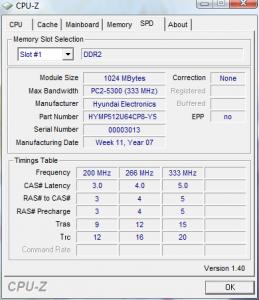
karom
post Jul 8 2007, 03:54 AM

Hello everybody
******
Senior Member
1,262 posts

Joined: Aug 2006
From: Butterworth, Penang


u can try and error to see the result. But it is not recommended.

If you found something not right, it means the setup should be change.
e-fatty
post Jul 11 2007, 12:12 PM

Getting Started
**
Junior Member
202 posts

Joined: May 2005


Great guide man! rclxms.gif rclxms.gif rclxms.gif
karom
post Jul 13 2007, 05:02 AM

Hello everybody
******
Senior Member
1,262 posts

Joined: Aug 2006
From: Butterworth, Penang


Just a suggestion only...maybe could get some expert to help more efficient than my suggestion.
karom
post Jul 18 2007, 03:39 AM

Hello everybody
******
Senior Member
1,262 posts

Joined: Aug 2006
From: Butterworth, Penang


Anyone have suggestion on 4GB ( 2 X 2GB) performance ram models?
SUSadvocado
post Jul 20 2007, 01:36 PM

Look at all my stars!!
*******
Senior Member
2,948 posts

Joined: Jun 2007
Anyone have info on DDR3? Particularly for notebooks.
shinjun
post Jul 21 2007, 12:44 AM

Look at all my stars!!
*******
Senior Member
2,247 posts

Joined: Jan 2007


any of u can tell me is this hynix chipset good ornot??

HY5PS12321C
FP-Y5
epolmuse
post Jul 22 2007, 05:44 PM

Getting Started
**
Junior Member
142 posts

Joined: Dec 2005


kinda noob in comp hardware...wanna ask i put in two 512 rams in my laptop but it shows in the control panel system only 894 in the control panel...why does that happen?
Skylinestar
post Jul 22 2007, 07:17 PM

Mega Duck
********
All Stars
10,475 posts

Joined: Jan 2003
From: Sarawak
QUOTE(epolmuse @ Jul 22 2007, 05:44 PM)
kinda noob in comp hardware...wanna ask i put in two 512 rams in my laptop but it shows in the control panel system only 894 in the control panel...why does that happen?
*
because the onboard video is using some of the main memory.
karom
post Jul 22 2007, 11:32 PM

Hello everybody
******
Senior Member
1,262 posts

Joined: Aug 2006
From: Butterworth, Penang


for notebook, there is shared memory that been use for built in video card. That mean, by default the available storage will be lower than what install.
ronaldjoe
post Jul 22 2007, 11:36 PM

Look at all my stars!!
*******
Senior Member
3,569 posts

Joined: Apr 2007
QUOTE(advocado @ Jul 20 2007, 01:36 PM)
Anyone have info on DDR3? Particularly for notebooks.
*
I doubt there is any hmm.gif


Added on July 22, 2007, 11:38 pm
QUOTE(epolmuse @ Jul 22 2007, 05:44 PM)
kinda noob in comp hardware...wanna ask i put in two 512 rams in my laptop but it shows in the control panel system only 894 in the control panel...why does that happen?
*
1024 -128 = 894?? It's norm smile.gif

This post has been edited by ronaldjoe: Jul 22 2007, 11:38 PM
epolmuse
post Jul 23 2007, 01:11 AM

Getting Started
**
Junior Member
142 posts

Joined: Dec 2005


QUOTE(karom @ Jul 22 2007, 11:32 PM)
for notebook, there is shared memory that been use for built in video card. That mean, by default the available storage will be lower than what install.
*
ok thxs for the reply...how much does the memory is shared for the video card exactly...depends on what?
karom
post Jul 25 2007, 10:26 AM

Hello everybody
******
Senior Member
1,262 posts

Joined: Aug 2006
From: Butterworth, Penang


it depends on shared video memory.
CyrilJ88
post Aug 7 2007, 11:37 AM

Getting Started
**
Junior Member
74 posts

Joined: Nov 2004


today i got a pair of 512 ddr2 for my new mobo...
after chucking in both, my bios doesn't show,

but when i take out the 2nd slot, everything was ok,

then i swapped the first one with the other and using it alone the same problem occured.

could it be that my beeping ram is spoilt?
karom
post Aug 7 2007, 02:57 PM

Hello everybody
******
Senior Member
1,262 posts

Joined: Aug 2006
From: Butterworth, Penang


it might caused by the faulty RAM.
hanissyazwan
post Aug 13 2007, 09:45 AM

DARK ULTIMATE
******
Senior Member
1,180 posts

Joined: Apr 2007
From: Pasir Gudang. Johor


Thx 4 your great information abt RAM
now i know my D43 Ram suxx

Imaizumi
post Aug 16 2007, 08:44 AM

Getting Started
**
Junior Member
266 posts

Joined: Oct 2004
Right now in current time is the right time to get 4gb ram?

Any multiasking pocess that push the ram until 4gb of usage?

One more thing, if let say the pf value is high, will it be lower if I add more rams?


Thanks in advance.

This post has been edited by Imaizumi: Aug 16 2007, 08:47 AM
karom
post Aug 17 2007, 03:27 AM

Hello everybody
******
Senior Member
1,262 posts

Joined: Aug 2006
From: Butterworth, Penang


For 4GB ram, you should know that the OS must be 64bit OS to be able to detect the 4GB capacity. Else, if the OS unable to detect all the available space, OS will not able to utilize the available space fully.

Vista needs more than 2GB ram. Thus, if you use Vista 64, try to use 4GB ram if you afford to do so.

Hope someone can explain more about PF. It seems im forgot some details about page file
toughnut
post Aug 17 2007, 05:28 PM

Look at all my stars!!
*******
Senior Member
3,239 posts

Joined: Jun 2005
2GB even on vista is more than enough unless u work with huge video or image files.
karom
post Aug 18 2007, 03:20 AM

Hello everybody
******
Senior Member
1,262 posts

Joined: Aug 2006
From: Butterworth, Penang


Currently, indeed it quite enough for normal task operation.

But if we look for upcoming games which will available soon this year, 4GB will become more on demand as many games and applications will evolve with the need of more RAM spaces.
isMEheNG
post Aug 20 2007, 03:26 PM

Getting Started
**
Junior Member
98 posts

Joined: Jul 2007
im looking high performance ram~which ram are good value for money??
any recommend? Crucial, OCZ, Team, GSKILL, GEIL, Patriot, Kingston, Corsair???
karom
post Aug 20 2007, 05:13 PM

Hello everybody
******
Senior Member
1,262 posts

Joined: Aug 2006
From: Butterworth, Penang


It depends on your need. Crucial quite good but more heat than other. As for OCZ, you have to pick the right module by do some research in various review website. This is because not all OCZ are able to run in default clock and timing with all setup.

Try to look for SLi ready RAM.
isMEheNG
post Aug 20 2007, 09:40 PM

Getting Started
**
Junior Member
98 posts

Joined: Jul 2007
QUOTE(karom @ Aug 20 2007, 05:13 PM)
It depends on your need. Crucial quite good but more heat than other. As for OCZ, you have to pick the right module by do some research in various review website. This is because not all OCZ are able to run in default clock and timing with all setup.

Try to look for SLi ready RAM.
*
Oic....thanks guy biggrin.gif
kingmax
post Aug 20 2007, 10:26 PM

Enthusiast
*****
Senior Member
751 posts

Joined: Oct 2006


I plan to buy a 1GB DDR1 ram , but I'd like to know how to look at chipset ? what is the difference between KRV and Hynix ?
Can someone kindly update the image for those chipset at first page ? all image does not exist.

Thank you
karom
post Aug 21 2007, 02:35 AM

Hello everybody
******
Senior Member
1,262 posts

Joined: Aug 2006
From: Butterworth, Penang


QUOTE(isMEheNG @ Aug 20 2007, 09:40 PM)
Oic....thanks guy  biggrin.gif
*
You are welcome.
jonuslee
post Aug 21 2007, 07:08 PM

Simple Guy with a Simple Life
******
Senior Member
1,167 posts

Joined: Nov 2006
Hi guys!I have question here.If your laptop FSB is 533MHZ, can it support the RAM with 667MHZ DDR II?
sHawTY
post Aug 21 2007, 07:18 PM

Frequent Reporter
********
All Stars
14,909 posts

Joined: Jul 2005

QUOTE(jonuslee @ Aug 21 2007, 07:08 PM)
Hi guys!I have question here.If your laptop FSB is 533MHZ, can it support the RAM with 667MHZ DDR II?
*
FSB doesn't have anything to do with the support of rams.
Give me the brand and the model of your notebook.
I'll check it for you.
jonuslee
post Aug 21 2007, 08:35 PM

Simple Guy with a Simple Life
******
Senior Member
1,167 posts

Joined: Nov 2006
QUOTE(sHawTY @ Aug 21 2007, 07:18 PM)
FSB doesn't have anything to do with the support of rams.
Give me the brand and the model of your notebook.
I'll check it for you.
*
Hi!!!mY Noebook is Acer Aspire 5504!!!Can ir support the 667 MHZ DDR II RAM?TQ
sHawTY
post Aug 22 2007, 02:58 PM

Frequent Reporter
********
All Stars
14,909 posts

Joined: Jul 2005

QUOTE(jonuslee @ Aug 21 2007, 08:35 PM)
Hi!!!mY Noebook is Acer Aspire 5504!!!Can ir support the 667 MHZ DDR II RAM?TQ
*
This is your notebook right?
http://www.tigerdirect.ca/applications/Sea...3035&CatId=1897

If this is the one, yes your notebook can support DDR2 667MHz. smile.gif
jonuslee
post Aug 22 2007, 03:44 PM

Simple Guy with a Simple Life
******
Senior Member
1,167 posts

Joined: Nov 2006
QUOTE(sHawTY @ Aug 22 2007, 02:58 PM)
This is your notebook right?
http://www.tigerdirect.ca/applications/Sea...3035&CatId=1897

If this is the one, yes your notebook can support DDR2 667MHz. smile.gif
*
nop!my one is acer aspire 5504WXMi!!!Ths is the spec:
Intel Pentium M processor 760 (2.0 GHz, 533Mhz FSB 2MB L2 Cache
14.1" WXGA CrystalBrite TFT LCD
ATI Mobility Radeon X700 PCI Express/64 MB VRAM
80GB HDD
Slot loading DVD dual ( support DVD+R double layer / dvd +- rw)
1GB DDR2 ( support dual channel)
802.11b/g wireless LAN

This post has been edited by jonuslee: Aug 22 2007, 03:51 PM
purda_kurda
post Aug 23 2007, 11:35 PM

New Member
*
Newbie
2 posts

Joined: Oct 2006


Hi guys.. Need help from u guys.. I hv read sumwhere telling that if your mobo only support DDR2 533mhz, u can still use DDR2 667mhz coz the mobo will automaticly downclock your ram to 533mhz.. izzit true?

coz currently i'm using 512mhz ram on my laptop and i wanted to upgrade my laptop ram to 2gb dual-channel (1gb x 2).. but the thing is 1gb ddr2 667 is much more cheaper and easier to find than the 533mhz.. and my laptop only support ddr2 533mhz (read it at intel website <-- dunno true or not)..

so back to question.. can i use the ddr2 667mhz instead of the 533mhz? if 667mhz can be use instead of 533mhz do they have any impact (performance/future defect/problems)? and do 1gb ddr2 667mhz X 2 (2gb dual-channel) with give a same effect as 1gb ddr2 533mhz X 2 (2gb dual channel) on the mobo that support only ddr2 533mhz?

here's my laptop model:

Acer Travelmate 4021NWLMi
Intel Pentium M proc 725 (1.6ghz, 400Mhz FSB, 2MB L2 cache)
Intel 915GM Express chipset

btw izzit relevent if upgrade my laptop to 2gb ram based on my laptop spec blush.gif ? or i should just use 1gb ram (512 x 2) instead?

hope u guys can help explain it to me.. anyway thanx in advance.. icon_rolleyes.gif
karom
post Aug 24 2007, 12:31 AM

Hello everybody
******
Senior Member
1,262 posts

Joined: Aug 2006
From: Butterworth, Penang


QUOTE(purda_kurda @ Aug 23 2007, 11:35 PM)
Hi guys.. Need help from u guys.. I hv read sumwhere telling that if your mobo only support DDR2 533mhz, u can still use DDR2 667mhz coz the mobo will automaticly downclock your ram to 533mhz.. izzit true?

coz currently i'm using 512mhz ram on my laptop and i wanted to upgrade my laptop ram to 2gb dual-channel (1gb x 2).. but the thing is 1gb ddr2 667 is much more cheaper and easier to find than the 533mhz.. and my laptop only support ddr2 533mhz (read it at intel website <-- dunno true or not)..

so back to question.. can i use the ddr2 667mhz instead of the 533mhz? if 667mhz can be use instead of 533mhz do they have any impact (performance/future defect/problems)? and do 1gb ddr2 667mhz X 2 (2gb dual-channel) with give a same effect as 1gb ddr2 533mhz X 2 (2gb dual channel) on the mobo that support only ddr2 533mhz?

here's my laptop model:

Acer Travelmate 4021NWLMi
Intel Pentium M proc 725 (1.6ghz, 400Mhz FSB, 2MB L2 cache)
Intel 915GM Express chipset

btw izzit relevent if upgrade my laptop to 2gb ram based on my laptop spec  blush.gif ? or i should just use 1gb ram (512 x 2) instead?

hope u guys can help explain it to me.. anyway thanx in advance..  icon_rolleyes.gif
*
In my opinion, there is no problem to use the DDR2 667Mhz even though the laptop support up to 533Mhz. Indeed, it will automatically downclock the frequency in the first place.

Hope this will you. Good luck. thumbup.gif


unitron
post Aug 24 2007, 12:41 AM

W1(R)3d
*******
Senior Member
2,730 posts

Joined: Jan 2003
From: In the shadows behind you


QUOTE(karom @ Aug 24 2007, 12:31 AM)
In my opinion, there is no problem to use the DDR2 667Mhz even though the laptop support up to 533Mhz. Indeed, it will automatically downclock the frequency in the first place.

Hope this will you. Good luck. thumbup.gif
*
the freq rating on RAM refers to the MAX freq that the RAM is specified to run stably by the manufacturer. Much like the maximum top speed of a car. If your car has a top speed of 200km/h, you can still drive at 120km/h right ? It's the same for RAMs.

the statement "automatic downclock" is incorrect. What actually happen is that the RAM basically follows the freq as set by the mobo.
karom
post Aug 24 2007, 04:36 PM

Hello everybody
******
Senior Member
1,262 posts

Joined: Aug 2006
From: Butterworth, Penang


Yeah. Sorry for incorrect term.
myxery
post Aug 25 2007, 07:20 PM

Oro?!
*****
Senior Member
904 posts

Joined: Aug 2005
From: Tanjong Golden Ville
hi,

i just want to know which brand should i choose for SODIMM DDR2 RAM, i need high performance ram...

a) Mushkin
b) Corsair
c) TeamData
d) Kingston

Please help~!
karom
post Aug 26 2007, 02:17 AM

Hello everybody
******
Senior Member
1,262 posts

Joined: Aug 2006
From: Butterworth, Penang


Try to look for tight timing spec for Sodimm RAM.
myxery
post Aug 26 2007, 08:34 AM

Oro?!
*****
Senior Member
904 posts

Joined: Aug 2005
From: Tanjong Golden Ville
QUOTE(karom @ Aug 26 2007, 02:17 AM)
Try to look for tight timing spec for Sodimm RAM.
*
what do you mean by tight?
karom
post Aug 27 2007, 12:04 PM

Hello everybody
******
Senior Member
1,262 posts

Joined: Aug 2006
From: Butterworth, Penang


lower timing. such as 4-4-4-12.

Cas Latency 4
teikwing
post Aug 29 2007, 06:21 PM

Dah Macan?
*******
Senior Member
3,239 posts

Joined: Oct 2006
From: Sydney, NSW


hie..i'm looking for 1GB DDR2 667Mhz SODIMM RAM for my laptop. currently has 2 options : Kingston & Corsair. which one will u guys recommend? both price more or less the same. offers lifetime warranty too. how about performance? just wanna boost up my Vista. hardly gaming. more to internet surfing & some Adobe Photoshops. smile.gif

This post has been edited by teikwing: Aug 29 2007, 06:25 PM
karom
post Aug 29 2007, 07:43 PM

Hello everybody
******
Senior Member
1,262 posts

Joined: Aug 2006
From: Butterworth, Penang


Either one will do.

But i would suggest corsair lah.
giasens
post Sep 3 2007, 08:30 AM

On my way
****
Senior Member
625 posts

Joined: Jan 2003


any idea how to verify Kingston valueRAM
other than checking via kingston.com/verify?
coz i just bought this ddr2 ram where the booklet color is black & white, while my the other old ram's a colored booklet.

and btw, how to check if my comp is running on dual channel,
any indication? as i've already put in dual channel slots.
karom
post Sep 3 2007, 02:56 PM

Hello everybody
******
Senior Member
1,262 posts

Joined: Aug 2006
From: Butterworth, Penang


You can check DUal channel mode through CPU-Z.

Value RAM normally do not stated that it is value ram. Only Performance RAM have special name. For e.g Kingston HyperX.
yice
post Sep 13 2007, 01:58 AM

New Member
*
Junior Member
21 posts

Joined: Aug 2007
hi, that's one question i would like to ask.

currently, my dekstop is using 1 512mb ddr2 ram (533mhz), corsair.

i m thinking of upgrade it by either adding one 512 mb or one 1g ram. the problem is, if i add one 1 g ram, it will only add up the capacity and not much on the speed, am i right??since i can't use dual channel, i can only use single channel with total capacity of 1.5g.

if i add 1 more 512mb ram to channel b (3rd slot), then i can use dual channel effect of the ram, theoretically it will boost up the speed more than the previous 1.5g option. am i right???

if the above situations are true, then which option should i take?? add 512 or 1g?? i m cracking my head....!!!ahhhh!!!:wacko:

1 more thing is, let say if i add 1 more 512mb, then should it be the same brand and same model as my previous one?? or it will do even the brand is different but the speed and the capacity are the same?? huh.gif
karom
post Sep 13 2007, 09:32 AM

Hello everybody
******
Senior Member
1,262 posts

Joined: Aug 2006
From: Butterworth, Penang


Make it Dual channel is better.
yice
post Sep 13 2007, 09:59 AM

New Member
*
Junior Member
21 posts

Joined: Aug 2007
QUOTE(karom @ Sep 13 2007, 09:32 AM)
Make it Dual channel is better.
*
thanks...

then should i buy a same brand and same model ram or jz any brand, as long as it is 512mb 533mhz??
icon_question.gif
karom
post Sep 13 2007, 01:21 PM

Hello everybody
******
Senior Member
1,262 posts

Joined: Aug 2006
From: Butterworth, Penang


I would recommend you to look for the same model if possible with the frequency of 533Mhz.
khai84siong
post Sep 15 2007, 03:20 PM

Getting Started
**
Junior Member
249 posts

Joined: Jul 2007
From: ~Some where over the rainbow~


hi every1, newbie here, i wanna buy a pair of ram 2x512MB so that i can run dual channel and overclock (if possible), could any1 suggest me which type of ram is suitable for my mobo to do it? i thought of buying the kingston hyperX 1GB kit or the crucial Ballistix 1GB kit, both of it PC3200 lar, if there is better ram out there for my mobo, could u pls tell me, thx ya

below is my rig:
mobo : Gigabyte GA-8IPE1000-G (Rev 3.x)
proc : Intel P4 3.0E 800FSB
gc : XFX 7600GT AGP 1400Mhz 560Mhz
psu : Icute 450W (normal psu i think, bought it 1 year ago for about rm90)

pc: in the future thought of playing NFS Pro street, BioShocked, ........
karom
post Sep 15 2007, 06:14 PM

Hello everybody
******
Senior Member
1,262 posts

Joined: Aug 2006
From: Butterworth, Penang


Crucial is definitely a good choice for you. It is because Crucial has tools for you to check whether your system will able to run in stable with their product.

Just visit here for checking

http://www.crucial.com


khai84siong
post Sep 15 2007, 07:33 PM

Getting Started
**
Junior Member
249 posts

Joined: Jul 2007
From: ~Some where over the rainbow~


thx man for the info, btw is it possible to find BH5 chipset this days
karom
post Sep 16 2007, 10:35 AM

Hello everybody
******
Senior Member
1,262 posts

Joined: Aug 2006
From: Butterworth, Penang


Good luck for your hunt. Cheers.
khai84siong
post Sep 18 2007, 03:08 AM

Getting Started
**
Junior Member
249 posts

Joined: Jul 2007
From: ~Some where over the rainbow~


btw one noob question, can i use a pc 4000 ram in my pc 3200 mobo? if i were to use pc 4000 ram, meaning that i can oc at a higher freq? for example pc4000 (250Mhz), meaning that i can oc easier for freq >250Mhz?

karom
post Sep 18 2007, 08:55 AM

Hello everybody
******
Senior Member
1,262 posts

Joined: Aug 2006
From: Butterworth, Penang


Sure. You can use it. To get the speed on the hand, you will have to OC the bus.
nickenstein
post Oct 10 2007, 10:38 AM

Getting Started
**
Junior Member
206 posts

Joined: Dec 2004


if my mobo is able to support ddr333 pc2700, will it be able to support ddr400 pc3200?? coz ddr400 seem to be cheaper than ddr33
chs_rachel86
post Oct 11 2007, 11:29 PM

New Member
*
Junior Member
12 posts

Joined: Oct 2007
hi expert here, i am a computer noob here that wanna to ask some quesion regarding to RAM.

I wish to buy 1GB RAM which currently i am using 256mb, I hv two slot 4 Bank and each Bank max is up to 1GB, my question is, is it better to put the ram separately which means bank 0=256mb , bank 2 = 1gb or this bank 0=256mb, bank1=512mb , bank2 = 512mb?? is put double side better or put in single side better??
One more stupid question to ask , how to check whether i using dual channel or not? :sweat

Hope to get info ASAP, thx!


karom
post Oct 12 2007, 02:15 AM

Hello everybody
******
Senior Member
1,262 posts

Joined: Aug 2006
From: Butterworth, Penang


QUOTE(nickenstein @ Oct 10 2007, 10:38 AM)
if my mobo is able to support ddr333 pc2700, will it be able to support ddr400 pc3200?? coz ddr400 seem to be cheaper than ddr33
*
You will have to Overclock the bus to make it runs at DDR400.


QUOTE(chs_rachel86 @ Oct 11 2007, 11:29 PM)
hi expert here, i am a computer noob here that wanna to ask some quesion regarding to RAM.

I wish to buy 1GB RAM which currently i am using 256mb, I hv two slot 4 Bank and each Bank max is up to 1GB, my question is, is it better to put the ram separately which means bank 0=256mb , bank 2 = 1gb or this bank 0=256mb, bank1=512mb , bank2 = 512mb?? is put double side better or put in single side better??
One more stupid question to ask , how to check whether i using dual channel or not? :sweat

Hope to get info ASAP, thx!
*
It is depends on mobo. Some mobo can detect dual channel even if the pair place side by side while the other might not. Please refer to mobo manual for more details.

You can check it when you turn on your PC where it will display the memory mode.
chs_rachel86
post Oct 12 2007, 09:50 AM

New Member
*
Junior Member
12 posts

Joined: Oct 2007
oo...thanks for info....i hv another stupid question here, i juz found out my mobo mannual n it stated the memory can support four memory banks using two 184-pin DDR DIMMs, i stil confuse with the 4 bank meaning since i phycially saw that my mobo only can put two memory stick....??? currently i using 256 mb so can i add another 1gb?
karom
post Oct 12 2007, 09:55 AM

Hello everybody
******
Senior Member
1,262 posts

Joined: Aug 2006
From: Butterworth, Penang


If the slot available only 2 slots, only 2 stick can be put to the system.
chs_rachel86
post Oct 12 2007, 10:48 AM

New Member
*
Junior Member
12 posts

Joined: Oct 2007
oic, i thought 1 bank for 1 memory stick...hehe...thanks for info
karom
post Oct 12 2007, 12:25 PM

Hello everybody
******
Senior Member
1,262 posts

Joined: Aug 2006
From: Butterworth, Penang


You are welcome. Just let us know the result. cheers.
arr_jack85
post Oct 13 2007, 02:55 PM

New Member
*
Newbie
1 posts

Joined: Oct 2007
From: PJ/KL/Seremban/Cyber Jaya


Anyone need SDRAM 256 and 128. please email to me! very cheap price hurry
karom
post Oct 14 2007, 01:23 PM

Hello everybody
******
Senior Member
1,262 posts

Joined: Aug 2006
From: Butterworth, Penang


QUOTE(arr_jack85 @ Oct 13 2007, 02:55 PM)
Anyone need SDRAM 256 and 128. please email to me! very cheap price hurry
*
Bro, please edit the post. I think this thread is not offering to people but rather a discussion on RAM matters.

Im concern that Admin will war you if you not edit the post though.

dkcc87
post Oct 17 2007, 08:38 PM

Regular
******
Senior Member
1,251 posts

Joined: Jul 2006
From: Petaling Jaya


QUOTE(karom @ Oct 14 2007, 01:23 PM)
Bro, please edit the post. I think this thread is not offering to people but rather a discussion on RAM matters.

Im concern that Admin will war you if you not edit the post though.
*
Planning to get a ddr800 ram for mid range use..patriot ram is it alright for me? biggrin.gif
karom
post Oct 18 2007, 10:19 AM

Hello everybody
******
Senior Member
1,262 posts

Joined: Aug 2006
From: Butterworth, Penang


I discussed with other forumer and found out that if you are looking for patriot, try to get their performance ram.

Their value RAM seems not very good (based on forumers experience).
LittleLinnet
post Oct 18 2007, 10:43 AM

Iophobia
*******
Senior Member
3,593 posts

Joined: Feb 2005
From: ***Penang***
QUOTE(dkcc87 @ Oct 17 2007, 08:38 PM)
Planning to get a ddr800 ram for mid range use..patriot ram is it alright for me? biggrin.gif
*
define "mid range use"
if you want to use it normally without overclock, any RAM will do.
karom
post Oct 18 2007, 01:21 PM

Hello everybody
******
Senior Member
1,262 posts

Joined: Aug 2006
From: Butterworth, Penang


Kingston is known as the most well known brand for the normal RAM in Malaysia.
jchou87
post Oct 22 2007, 10:16 AM

Getting Started
**
Junior Member
213 posts

Joined: Apr 2006
From: Ampang


Nowadays not all rams, for example PC3200 ram are backward compatible for mobo supporting PC2100. Why is that so? I used to have 2 pieces of 512MB PC3200 ram, one of which when i slot it to my old mobo it wont boot.


here is the screenshot from cpuz for the ram that can be used in my old mobo:
user posted image


And this is the one which cant be used in my old mobo:
user posted image


so the thing is how am i suppose to know if the ram that i want to buy in the shop is backward compatible?


This post has been edited by jchou87: Oct 22 2007, 10:19 AM
karom
post Oct 22 2007, 04:17 PM

Hello everybody
******
Senior Member
1,262 posts

Joined: Aug 2006
From: Butterworth, Penang


Perhaps the answer lie on the mobo itself which in the first unable to support the RAM in the dual channel mode.

The best way is to refer to the motherboard's manual for confirmation.
Skylinestar
post Oct 22 2007, 06:11 PM

Mega Duck
********
All Stars
10,475 posts

Joined: Jan 2003
From: Sarawak
QUOTE(karom @ Oct 22 2007, 04:17 PM)
Perhaps the answer lie on the mobo itself which in the first unable to support the RAM in the dual channel mode.

The best way is to refer to the motherboard's manual for confirmation.
*
jchou87's case is not about dual channel. it's the mobo that doesn't accept that piece of ram.
eijazz
post Oct 23 2007, 05:04 AM

Getting Started
**
Junior Member
82 posts

Joined: Oct 2006
From: Kuala Lumpur


maybe this is nob question, but i want to clear my doubt.

izzit ram for imac same with normal PC? blush.gif blush.gif
karom
post Oct 23 2007, 09:22 AM

Hello everybody
******
Senior Member
1,262 posts

Joined: Aug 2006
From: Butterworth, Penang


QUOTE(eijazz @ Oct 23 2007, 05:04 AM)
maybe this is nob question, but i want to clear my doubt.

izzit ram for imac same with normal PC? blush.gif  blush.gif
*
There is special RAM for Imac as compare to normal PC. I will try to find it out for you because previously there is a user mention about IMac RAM as well.

eijazz
post Oct 23 2007, 01:41 PM

Getting Started
**
Junior Member
82 posts

Joined: Oct 2006
From: Kuala Lumpur


QUOTE(karom @ Oct 23 2007, 09:22 AM)
There is special RAM for Imac as compare to normal PC. I will try to find it out for you because previously there is a user mention about IMac RAM as well.
*
thankss bro notworthy.gif notworthy.gif .i looking around but not get answer sweat.gif sweat.gif
karom
post Oct 25 2007, 04:50 AM

Hello everybody
******
Senior Member
1,262 posts

Joined: Aug 2006
From: Butterworth, Penang


Unable to find the source so far. Anyone here can help this person?
theskems
post Oct 25 2007, 01:06 PM

Casual
***
Junior Member
376 posts

Joined: Oct 2007
From: KL
how much does kingston DDR 1GB ram for notebook cost?

This post has been edited by theskems: Oct 25 2007, 01:15 PM
Jonus
post Oct 26 2007, 10:09 AM

New Member
*
Junior Member
10 posts

Joined: Aug 2005


Hi guys,

I have a question regarding RAM Dual channeling.

My computer has 4 RAM slots, 2 blue and 2 red. I have 2x256mb RAMs in the blue slot. But I also have a single 1 GB RAM slotted in one of the red slots (the other red slot empty)

Once I load up my PC however, CPU-Z states that they are running in Single channels.

Do I need another 1GB slotted in the other red slot to make it run dual channels?

Thanks
Skylinestar
post Oct 26 2007, 06:06 PM

Mega Duck
********
All Stars
10,475 posts

Joined: Jan 2003
From: Sarawak
QUOTE(Jonus @ Oct 26 2007, 10:09 AM)
Hi guys,

I have a question regarding RAM Dual channeling.

My computer has 4 RAM slots, 2 blue and 2 red. I have 2x256mb RAMs in the blue slot. But I also have a single 1 GB RAM slotted in one of the red slots (the other red slot empty)

Once I load up my PC however, CPU-Z states that they are running in Single channels.

Do I need another 1GB slotted in the other red slot to make it run dual channels?

Thanks
*
dual channel runs in either 2 or 4 sticks
karom
post Oct 27 2007, 10:04 AM

Hello everybody
******
Senior Member
1,262 posts

Joined: Aug 2006
From: Butterworth, Penang


You have to check with manufacturer manuals provided. Some older mobo does not support Dual Channel when running 4 sticks altogether.
Zicron
post Nov 1 2007, 01:59 PM

Come to the Dark Side
*****
Senior Member
899 posts

Joined: Mar 2005
From: Klang


Will there be any update about the chip used in ddr2 ram?
karom
post Nov 3 2007, 03:34 PM

Hello everybody
******
Senior Member
1,262 posts

Joined: Aug 2006
From: Butterworth, Penang


What kind of update? Care to let me know what do you mean by that?
Zicron
post Nov 3 2007, 09:59 PM

Come to the Dark Side
*****
Senior Member
899 posts

Joined: Mar 2005
From: Klang


Maybe like type of chip they use for ddr2 or ddr3
qiyi
post Nov 8 2007, 11:06 PM

Getting Started
**
Junior Member
148 posts

Joined: Jan 2003
From: Malacca
Is the vista ram meter reliable(the gadget on the sidebar)? It seems like I'm constantly on 50%(needle pointing top) memory usage although in idle mode. Does this mean I have to add more rams and after adding it, the ram meter will be lower? unsure.gif
ensure
post Nov 10 2007, 11:18 PM

New Member
*
Junior Member
33 posts

Joined: Oct 2007
From: Serembam, NS and JB, johor


Hey, any 1 can tell me about ram 5-5-5-13 and 5-5-5-15 what is difference???
My mobo intel dq35joe and cpu e6750 may know which type of ram can make it better performance ????
wdy5180x2
post Nov 11 2007, 01:32 AM

New Member
*
Junior Member
21 posts

Joined: Nov 2007
From: Skudai


the 4 series number is refer to the ram timing,..TCL-Trcd-Trp-Tras

TCL = CAS Latency Time

Trcd = DRAM RAS# to CAS# Delay

Trp = DRAM RAS# Precharge

Tras = Precharge delay

http://www.x86-secret.com/articles/ram/ddr...ddr2667-9en.htm
furthermore,..
try ask uncle Google la,..
someone_stupid
post Nov 14 2007, 08:23 PM

Regular
******
Senior Member
1,205 posts

Joined: May 2007


-Umm found the answer to the question thanx doh.gif -

This post has been edited by someone_stupid: Nov 15 2007, 01:55 PM
JinBeng
post Nov 20 2007, 11:36 PM

Getting Started
**
Junior Member
170 posts

Joined: Dec 2005
From: SP, Kedah and Penang Island


if i got 2 pair of ram, 1st pair is G.Skill 1G 2-3-2-5 400mhz and 2nd pair is OCZ 512mb 2-2-2-5 400mhz. which pair is faster? can i mix this 2 pair ram? in BIOS how to configure?

thx.
kmarc
post Nov 22 2007, 06:03 AM

The future is here - Cryptocurrencies!
Group Icon
Elite
14,576 posts

Joined: May 2006
From: Sarawak


QUOTE(JinBeng @ Nov 20 2007, 11:36 PM)
if i got 2 pair of ram, 1st pair is G.Skill 1G 2-3-2-5 400mhz and 2nd pair is OCZ 512mb 2-2-2-5 400mhz. which pair is faster? can i mix this 2 pair ram? in BIOS how to configure?

thx.
*
Tighter timings will be faster i.e. 2-2-2-5. However, the difference between 2-3-2-5 and 2-2-2-5 would be negligible.

In your case, you can probably mix them but the timings would have to be 2-3-2-5 in BIOS...... unless your G.Skill can run at 2-2-2-5 at higher vdimm....
JinBeng
post Nov 22 2007, 06:06 AM

Getting Started
**
Junior Member
170 posts

Joined: Dec 2005
From: SP, Kedah and Penang Island


QUOTE(kmarc @ Nov 22 2007, 06:03 AM)
Tighter timings will be faster i.e. 2-2-2-5. However, the difference between 2-3-2-5 and 2-2-2-5 would be negligible.

In your case, you can probably mix them but the timings would have to be 2-3-2-5 in BIOS...... unless your G.Skill can run at 2-2-2-5 at higher vdimm....
*
thanks for reply... i will try and see my G.skill can run at 2-2-2-5 setting or not. normaly use wat software to test wheter the ram mix perfectly or not?
kmarc
post Nov 22 2007, 06:19 AM

The future is here - Cryptocurrencies!
Group Icon
Elite
14,576 posts

Joined: May 2006
From: Sarawak


QUOTE(JinBeng @ Nov 22 2007, 06:06 AM)
thanks for reply... i will try and see my G.skill can run at 2-2-2-5 setting or not. normaly use wat software to test wheter the ram mix perfectly or not?
*
Wah, wake up so early aaa? laugh.gif

Anyway, there's no software that specifically test whether the mixed rams are compatible or not. You just have to try out your rig and see whether there is any problems/BSOD.

Alternatively, you can use memtest or orthos/prime95 (blend test) to test the rams/rig stability.....
JinBeng
post Nov 22 2007, 06:40 AM

Getting Started
**
Junior Member
170 posts

Joined: Dec 2005
From: SP, Kedah and Penang Island


QUOTE(kmarc @ Nov 22 2007, 06:19 AM)
Wah, wake up so early aaa?  laugh.gif

Anyway, there's no software that specifically test whether the mixed rams are compatible or not. You just have to try out your rig and see whether there is any problems/BSOD.

Alternatively, you can use memtest or orthos/prime95 (blend test) to test the rams/rig stability.....
*
oh...ok i will try and see. Thanks for the info.
wctan83
post Nov 23 2007, 02:49 PM

Getting Started
**
Junior Member
92 posts

Joined: Nov 2007
what is the price of DDR1 notebook 512, 1 G ram right now? any brand will do
sogoatticus
post Nov 29 2007, 02:38 PM

On my way
****
Senior Member
672 posts

Joined: Jan 2005


planning to get 2x1Gb DDR2 667Mhz sodimm for my laptop..but which brand is better?kingston or corsair?or got better brand?how big is the different between those RAMs?
zexynova
post Nov 29 2007, 05:02 PM

Getting Started
**
Junior Member
292 posts

Joined: Sep 2006
From: Petaling Jaya


kingston and corsair also gud enuf d. but mukhsin is a becoming quite popular.
eprince
post Dec 3 2007, 11:06 AM

Getting Started
**
Junior Member
260 posts

Joined: Oct 2007


do u guys got any review on Aeneon (Qimonda chipset) DDR2 ram?

izzit ok for oc as well?
zexynova
post Dec 3 2007, 12:13 PM

Getting Started
**
Junior Member
292 posts

Joined: Sep 2006
From: Petaling Jaya


google it. u might find ur answer
kingmax
post Dec 3 2007, 06:43 PM

Enthusiast
*****
Senior Member
751 posts

Joined: Oct 2006


Any mod here ? There is no Image/picture on the first page BH-5 and others.Can mod update those picture ?
Thank you
kazalan_kamitake
post Dec 9 2007, 04:45 PM

This Star Nothing For Me
******
Senior Member
1,114 posts

Joined: Sep 2006
From: C.S.W Kembang


ya..should upload the picture easy to see it..can make it so clear to understand.
sogoatticus
post Dec 10 2007, 03:04 PM

On my way
****
Senior Member
672 posts

Joined: Jan 2005


anyone got the link for ram benchmark?i mean benchmark/review for different brand! i tried google it but cant find any!
nabelon
post Dec 11 2007, 02:38 AM

Walk of Life
******
Senior Member
1,714 posts

Joined: Aug 2005
From: Taman Pekaka, Sg. Dua, Gelugor, Penang


guys, if i am to sell my ram, kingston value ram ddr400 512x2, what should i wrap it with to deliver to the person buying ? thanks
Zicron
post Dec 11 2007, 10:42 AM

Come to the Dark Side
*****
Senior Member
899 posts

Joined: Mar 2005
From: Klang


RAM's brand doesnt makes any diffrence, only the chip in the RAM does effect its overclockability
sogoatticus
post Dec 12 2007, 08:38 AM

On my way
****
Senior Member
672 posts

Joined: Jan 2005


QUOTE(Zicron @ Dec 11 2007, 10:42 AM)
RAM's brand doesnt makes any diffrence, only the chip in the RAM does effect its overclockability
*
i've read MaxIt megazine..they test n compare for ddr2 ram..different brand diff perfomance..but lost that megazine..need a link cry.gif
akachester
post Dec 13 2007, 09:42 AM

Its Life. Live with it!
*******
Senior Member
7,689 posts

Joined: Jul 2005
From: The Land of No Return


Question here :

When i check out Asus website (or maybe any other motherboard brand in particular), they have a statement called DDR2 800Mhz Support and [B]Native DDR2 1066 support[/].

Now, whats the difference between the 2? This is because the same spec is listed for the same mobo using P35 chipset. Would having a DDR2 1066 ram would automatically be running at that speed if paired with the mobo?

Or it is like what DDR1 is..Listed to run at DDR500 but you will need to OC the ram into that speed. In this case, i needed to know a few situation :

- Would DDR2 1066 ram be running at the rated speed (1066) without any OCing in a mobo that was rated as "DDR2 1066 Native Support" or it will actually run at the max speed for DDR2 which is DDR2 800?

- I do not want to spend too much money in getting a DDR2 1066 ram which will not run at default speed when plug in. Thanks..

3 Pages  1 2 3 >Top
 

Change to:
| Lo-Fi Version
0.2547sec    0.43    6 queries    GZIP Disabled
Time is now: 7th December 2025 - 02:03 AM