Welcome Guest ( Log In | Register )

3 Pages  1 2 3 >Bottom

Outline · [ Standard ] · Linear+

 RAM Handbook, updating ... zlol 23/12/07

views
     
akachester
post Mar 8 2007, 09:25 AM

Its Life. Live with it!
*******
Senior Member
7,689 posts

Joined: Jul 2005
From: The Land of No Return


I would like to know, what difference does it make for having 1T or 2T timing?Which one is better and why?

And does having a tight timing ram (2-2-2-5) is better or having a ram like 3-3-3-8 is better in term of overclocking ability?If i wanted to overclock, what timing should i be looking at and choosing?
akachester
post Mar 10 2007, 02:23 PM

Its Life. Live with it!
*******
Senior Member
7,689 posts

Joined: Jul 2005
From: The Land of No Return


QUOTE(akachester @ Mar 8 2007, 09:25 AM)
I would like to know, what difference does it make for having 1T or 2T timing?Which one is better and why?

And does having a tight timing ram (2-2-2-5) is better or having a ram like 3-3-3-8 is better in term of overclocking ability?If i wanted to overclock, what timing should i be looking at and choosing?
*
Could anyone help me here?
akachester
post Mar 10 2007, 07:47 PM

Its Life. Live with it!
*******
Senior Member
7,689 posts

Joined: Jul 2005
From: The Land of No Return


QUOTE(sniper69 @ Mar 10 2007, 02:36 PM)
hmm.gif... from my XP ok, 1T is better than 2T, it is noticeable i must say, when in gaming session, there is a lag between shot fire (mouse click) and actual shot fire, i'm talking bout FPS game though (i'm FPS fan sleep.gif). this isn't occur on 1T and didn't try on any benchmarking tools though...add to the point, performance affected by this 2T command...
tight timing is good, loose timing also good if the memory is fast enough, i've tested two of RAM module, BH-5 and TCCD (both chip are the best whistling.gif), BH-5 really likes tight timing at high voltage unlike TCCD, can go way much higher even DDR660 at loosest timing, 3-4-4-8, performance? almost same as 2-2-2-5 or lower in SuperPI calculation...
i actually also run test my TCCD at 2-2-2-5 @2.8VDIMM, work 100% without any problem and 3-4-4-8 @2.8VDIMM also no issue (both run at DDR400 though), but it is better at tight timing. FYI, the looser timing, the more headroom you can get for overclocking...
*
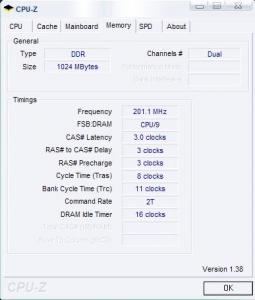
IC, thanks for the much needed info there even though i need some time to digest it..lol..Not really a pro in term of Rams.One more question, is there any Rams that automatically runs on 1T timing?This is because, all of the ram that i had used before are running on 2T timing(as far as i can see from CPU-Z) and i always thought that 2T is always better than 1T...lol..

akachester
post Mar 11 2007, 09:12 AM

Its Life. Live with it!
*******
Senior Member
7,689 posts

Joined: Jul 2005
From: The Land of No Return


QUOTE(sniper69 @ Mar 10 2007, 09:19 PM)
hmm.gif, actually it'll by default 1T, and only in 2T when you filled all RAM slot, or you run 4GB of RAM. you can always change it back to 1T via BIOS smile.gif
*
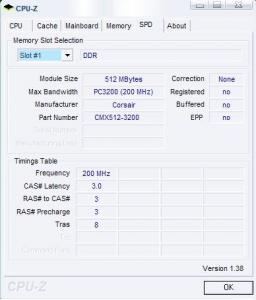
Then this is very very weird with me...Gosh...

Attached Image

Attached Image

To be honest with you, every Ram that i had run before is always on 2T Timing and dual channel.OCZ, GEIL and even Kingston value ram all had given me 2T timing as well.Besides that, assuming its my Gigabyte board that is causing the trouble, even my cousin's DFI Venus is detecting his OCZ in 2T timing.Its all running on 1GB ram (2 * 512 only). I had always been told that 2T timing and Dual Channel is better than 1T and Single Channel. rclxub.gif
akachester
post Mar 11 2007, 10:29 AM

Its Life. Live with it!
*******
Senior Member
7,689 posts

Joined: Jul 2005
From: The Land of No Return


QUOTE(sniper69 @ Mar 11 2007, 10:13 AM)
huh? 2T is better than 1T? AFAIK, 1T is better than 2T, hmm.gif, can you change the Command Rate @BIOS to 1T?i also used to face this, my Asus A8N-SLI Premium, 2T all the time...but i managed to overcome, change it at the BIOS, save it...and stay 1T...
*
QUOTE(J-Slade @ Mar 11 2007, 10:17 AM)
I can confirm with you that 1T is better than 2T. It shows in benchmark results.
*
Ok.Thanks for the answer there..The thing that confused me previously was all the time, its on 2T.I never did reach 1T timing before and default ram and bios setting, not even on different motherboards.I will try it out and see whether it will work later as well as try it on my new mobo when i get it...How can i test whether it makes any difference or not?In gaming?
akachester
post Mar 11 2007, 01:46 PM

Its Life. Live with it!
*******
Senior Member
7,689 posts

Joined: Jul 2005
From: The Land of No Return


Not sure its been posted before or not but i found this in the net just now.Will be helpful for people especially me who dont know about Ram and how they work..

http://www.corsairmemory.com/corsair/produ...3707/index.html

And for a confirmation regarding the Command Rate (1T/2T), this is what i got from the net as well :

It is recommended that you try the 1T command delay for better memory performance. But if you face stability issues, increase the command delay to 2T.


Source : TechARP

This post has been edited by akachester: Mar 11 2007, 01:49 PM
akachester
post Mar 15 2007, 10:56 AM

Its Life. Live with it!
*******
Senior Member
7,689 posts

Joined: Jul 2005
From: The Land of No Return


Need some guide here..

How do i know what is the chipset that my ram is using?I know opening the heatsink will be the best way but i dont think i can/will be opening the heatsink of my TwinX pro led.Is there any other way or related links to help..

My ram is :
CMX3200Pro Rev1.2
XMS3200B1.2
0428057-7

This is what written on the ram itself.Thanks...
akachester
post Mar 16 2007, 06:47 PM

Its Life. Live with it!
*******
Senior Member
7,689 posts

Joined: Jul 2005
From: The Land of No Return


QUOTE(sniper69 @ Mar 15 2007, 10:48 PM)
IIANM, you can check with RAM Guru @Corsair site, not sure exactly what URL is though... smile.gif
*
I already emailled ramguy about it.Hopefully i could get a reply soon..Anyway, does all performance ram come with good chips?
akachester
post Mar 17 2007, 10:16 PM

Its Life. Live with it!
*******
Senior Member
7,689 posts

Joined: Jul 2005
From: The Land of No Return


Need to ask a few more questions here as a confirmation..

I know mixing and matching ram would not be a good idea.Many people including Ram Guy himself does not encourage mixing different ram especially all of them have different chipset, timing, revision etc. I had just done so with another 2 piece of Corsair ram.I just wanted to know, what will be to best way to test whether the 2 pair of ram is working perfectly fine or there will be problem?Currently, i am running well, no BSOD or crashes happening but is there any other way to test them?

Besides that, Corsair had been giving information such as rating the C2PT ram as 2336 in timing.Even the sticker of the ram is rated as CL2.Reading from their site, they are saying those ram are known as CL2 performance ram.However, when running those ram, it will display as 3338 on default.Does this means that the CL2 is only workable if you OC?

EDITED:

1 more thing, when OCing a ram, is it better to get higher Mhz or better timing?Which one will see more difference in term of performance?

This post has been edited by akachester: Mar 17 2007, 10:26 PM
akachester
post Mar 18 2007, 02:50 PM

Its Life. Live with it!
*******
Senior Member
7,689 posts

Joined: Jul 2005
From: The Land of No Return


QUOTE(sniper69 @ Mar 17 2007, 10:39 PM)
Tight Timings vs High Clock Frequencies by Tom's Hardware - nice article i must say smile.gif

you can check stability RAM either using MemTest (DOS mode) or OCCT/Prime/SP2004 (windows environtment), AFAIK, as long you can run flawlessly, should be ok your RAM smile.gif

regarding 2-3-3-6, 3-3-3-8...yess, your RAM will boot/detected as 3-3-3-8 @DDR400 according to JEDEC spec, and you can always set it to 2-3-3-6 @DDR400. i'd say this is because, i used to have this issue when using C2PT Corsair not too long ago, rated as 2-3-3-6, but detected at BIOS (stock) at 3-3-3-8, i was like...doh.gif, wtf...so, just tweak the timing, should be able to boot to windows...
*
Ok.Thanks for the great info there...

I have 1 more thing.Regarding Notebook Ram, if i wanted to add another piece of ram (current one is DDR266), must i add the same version as in DDR266 or if i add DDR400, it will still work but in lower speed?I know Desktop ram will but not sure about Notebook ram...
akachester
post Mar 19 2007, 07:24 PM

Its Life. Live with it!
*******
Senior Member
7,689 posts

Joined: Jul 2005
From: The Land of No Return


QUOTE(OlgaC4 @ Mar 19 2007, 05:11 PM)
I am newbie here asking stupid question.

i plans to buy 2pcs of 1g (pc3200)kingston ram for upgrade.
can i still use my  existing samsung  2 pcs 256 ram (pc3200) for the remaning slots. I am runing at single channel or dual?

My mb is Asus P4800-E Deluxe
Thanks
*
AFAIK, you would not be able to run dual channel as the 4 piece are not of the same size..You will run dual channel if its 2 * 1G (if the ram is able to).The suggestion like what sniper69 said is the way to go..

This post has been edited by akachester: Mar 19 2007, 07:25 PM
akachester
post Mar 24 2007, 09:41 AM

Its Life. Live with it!
*******
Senior Member
7,689 posts

Joined: Jul 2005
From: The Land of No Return


QUOTE(ckyee88 @ Mar 22 2007, 12:52 PM)
noob here.
I use DDR2 533 dual channel and P4 630 3.0G 800FSB

Q1. I hear FSB and ram frequency better in same frequency, so do i need to set my 533mhz to 400mhz??
IF set to 400mhz, it will slow down the performance of CPU?

Q2. 4-4-4-12 or 3-3-3-9 is faster and best for performance?
*
QUOTE(sniper69 @ Mar 17 2007, 10:39 PM)
Tight Timings vs High Clock Frequencies by Tom's Hardware - nice article i must say smile.gif
*
That is a very good link regarding frequency and timing posted by Sniper69 thumbup.gif ..Take a look at it and you will understand more.I learn mine from there as well..About OCing, i have no idea at all as i am still noob in learning about OCing ram.

This post has been edited by akachester: Mar 24 2007, 09:42 AM
akachester
post Apr 2 2007, 12:36 AM

Its Life. Live with it!
*******
Senior Member
7,689 posts

Joined: Jul 2005
From: The Land of No Return


QUOTE(ahsia80 @ Apr 1 2007, 11:47 PM)
i got 2 sticks Kingston 512MB DDR667 in dual mode....
If i upgrade with additional sticks of different brand (total 4 sticks)..i would lost all dual channel capability? sweat.gif
*
That really depends.Some can, some cannot..Currently, i am using 4piece of Corsair ram (different model for each pair) and still be able to run dual channel.Tested the same pair of corsair with other brand as well such as GEIL, OCZ and Kingston before and still be able to run dual channel.

Note: The ram that i had tested are able to run Dual Channel as a pair which means all of the ram i test are able to run dual channel by themselves(a pair).Not sure whether they will work for you or not cause there are plenty of problems that are related to match and mixing different ram which might have different chipset, revision, timing etc...

This post has been edited by akachester: Apr 2 2007, 12:37 AM
akachester
post Apr 2 2007, 08:35 AM

Its Life. Live with it!
*******
Senior Member
7,689 posts

Joined: Jul 2005
From: The Land of No Return


QUOTE(karom @ Apr 2 2007, 02:22 AM)
It is depends on the RAM module you had been used. but one thing for sure is that for 4 module running all at once, you cant get the max frequency of the ram slot. By default the frequency will get lower one step.

Based on my reading sometime ago, there is not necessarily bad thing to run at lower frequency as well as it it not necessarily good as well.

I hope you can Google a little bit to find your best solution. Good luck.
*
Agree with you here.But this is caused by having rams with different chipset, timing, brand, revision, etc.I guess if we are having the same pairs of ram should be fine.Last time when i tested the GEIL and OCZ, my frequency was pushed all the way down to 100Mhz but with a very good timing of 2.5-2-2-5 (originally at 3-3-3-8).But, a slight tweaking in the bios can easily help me get back up to the original frequency of 200Mhz (of course with a looser timing)..Therefore, my best guess is that the problem in frequency might be caused by mixing rams..

This post has been edited by akachester: Apr 2 2007, 08:36 AM
akachester
post Apr 18 2007, 05:02 PM

Its Life. Live with it!
*******
Senior Member
7,689 posts

Joined: Jul 2005
From: The Land of No Return


Question here:

Assuming that i were NOT to OC any rams in my coming future, would it be the same to get any type of Value Ram?I mean, is there any difference between any of these brands (corsair, kingston, crucial, mushkin, etc) when it comes to stock speed and NO OC at all in there future?And is there a need to add ram cooler into it?
akachester
post Apr 19 2007, 05:39 PM

Its Life. Live with it!
*******
Senior Member
7,689 posts

Joined: Jul 2005
From: The Land of No Return


QUOTE(nelss @ Apr 19 2007, 05:02 PM)
ask a noob question..CL4 mean wat ? the number behind CL, the bigger the better or the smaller the better?
*
CL - Cas Latency

Should be the lower, the better...

like CL2 better than CL3..
akachester
post Apr 24 2007, 10:10 AM

Its Life. Live with it!
*******
Senior Member
7,689 posts

Joined: Jul 2005
From: The Land of No Return


QUOTE(yosiDa @ Apr 23 2007, 02:40 AM)
my RAM is Corsair TWIN2X1024A-6400 which is DDR2 in pair 800Mhz. i have checked the CPU-Z, it stats tat my ram frequency is 400Mhz. Is it on the right speed?
*
It should be fine. My DDR400 is showing as 200Mhz as well. I think it got something to do with DDR which means * 2 for the Mhz..
akachester
post Apr 25 2007, 12:57 AM

Its Life. Live with it!
*******
Senior Member
7,689 posts

Joined: Jul 2005
From: The Land of No Return


QUOTE(karom @ Apr 24 2007, 06:22 PM)
You can manually set to to its default factory setup to 5-5-5-12. If not stable, try to set to default Voltage. If im not mistaken, corsair model that you mentioned is well stable at 1.9V with 5-5-5-12 2T. Same like mine in my system.

Go to bios to change to this setting.
*
Yea i agree. My Corsair ram previously stated at everywhere is 2.5-3-3-6 as well but when i plug it into my system, it ran at 3-3-3-8. However, you could just manually change the timing at the bios without the need to change any other thing and it will still run smoothly as well...
akachester
post Apr 25 2007, 10:31 AM

Its Life. Live with it!
*******
Senior Member
7,689 posts

Joined: Jul 2005
From: The Land of No Return


QUOTE(yosiDa @ Apr 25 2007, 01:51 AM)
Actually if i don change it back what will happen?
*
Nothing will happen.Actually those timing are going to affect the speed of the system but to be honest, whether you notice them or not is going to be different.I personally tested the Corsair Ram (running at 3-3-3-8) and OCZ ram (running at 2-2-2-5) with both of them running at different timing and i couldnt feel any different in it.Other people might but i certainly dont...

Anyway, anyone knows a way to check the temperature of my ram?I just bought the Dominator Airflow Fan and would like to see how much it helps to cool my rams though..
akachester
post Apr 27 2007, 06:17 PM

Its Life. Live with it!
*******
Senior Member
7,689 posts

Joined: Jul 2005
From: The Land of No Return


QUOTE(lala_cai @ Apr 27 2007, 02:16 PM)
Hi,
Got noob question here
I have 2x512 kingston DDR2 667,
wanna ask, how to determine whether this is what chipset (hynix)?
See at the RAM itself or the box label?
Cos i'm planning to upgrade my RAM.
Thanks
*
You can check at the chipset of the ram itself.It will be stated there.However, sometimes, in high performance ram, you might not be able to check because the heatspreader is blocking it.Therefore, you might need to look for it via online method (aka google) to find out what chips its using..

Example of how to find out the chipset of the ram by looking at the ram chips itself:

user posted image

3 Pages  1 2 3 >Top
 

Change to:
| Lo-Fi Version
0.0230sec    0.30    7 queries    GZIP Disabled
Time is now: 7th December 2025 - 12:35 PM