

Hi, i am currently using Huawei HG8240 and Thomson TG784N. is the config still the same, please advise.
Maxis Connect to Maxis using Custom Router!, Guidelines
Maxis Connect to Maxis using Custom Router!, Guidelines
|
|
 Feb 13 2013, 05:49 PM Feb 13 2013, 05:49 PM
|
 
Newbie
0 posts Joined: Apr 2006 From: PJ  
|
Hi, i am currently using Huawei HG8240 and Thomson TG784N. is the config still the same, please advise.
|
|
|
|
|
|
Feb 13 2013, 06:59 PM
|

Senior Member
1,458 posts Joined: Nov 2006 From: Selangor
|
QUOTE(ywkwy @ Feb 13 2013, 05:03 PM) good to hear that you've changed it successful Btw can your setup work with HG665a..? Most people here still using thompson for VOIP... btw here is my current setup.. I configured the VoIP to the HG850a instead of the TG784n v3 then replace the TG784n v3 with my DD-WRT loaded DIR825.. way better than the TG784n v3.. I cant miss the features that provided by DD-WRT..  [attachmentid=3305348]  |
|
|
Feb 13 2013, 08:14 PM
|

Senior Member
868 posts Joined: Dec 2005
|
QUOTE(Atsutane-Shirane @ Feb 13 2013, 06:59 PM) Btw can your setup work with HG665a..? Most people here still using thompson for VOIP... Im not sure coz I dont have HG655a.. but u may refer to my config to setup ur ONT..1st u need to create the VoIP WAN with vlan 822, connection type: DHCP 
Go to VoIP setup and setup as follow: 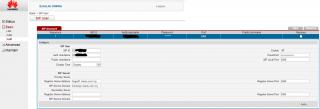
Finish. You can check the status of the VoIP WAN and the SIP: If successful, VoIP WAN will get "connected" and the ip as well. 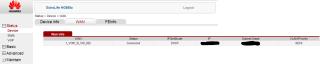
VoIP Status need to get "registered" then you are good to go.. 
the voip led shoud lid up and plug in the tel line to the ONT |
|
|
Feb 14 2013, 12:35 AM
|
|
Junior Member
125 posts Joined: Jul 2006
|
QUOTE(ywkwy @ Feb 13 2013, 05:03 PM) good to hear that you've changed it successful VoIP can connect to Alcatel Lucent I-240G-P?btw here is my current setup.. I configured the VoIP to the HG850a instead of the TG784n v3 then replace the TG784n v3 with my DD-WRT loaded DIR825.. way better than the TG784n v3.. I cant miss the features that provided by DD-WRT.. [attachmentid=3305348] |
|
|
Feb 14 2013, 02:08 PM
|

Senior Member
3,657 posts Joined: May 2005
|
We can't connect to Alcatel Lucent BTU because we don't have access to it like the Huawei BTU
|
|
|
Feb 23 2013, 09:22 PM
|

Junior Member
88 posts Joined: Dec 2009 From: Kl,Wangsa Maju
|
 anyone know how to setting Maxis with this router? i tried everything still cant get Voip Working but i tried with SIPdroid and Express Talk no problem connecting |
|
|
|
|
|
Feb 23 2013, 09:31 PM
|
|
Senior Member
1,314 posts Joined: Aug 2007
|
Hey i was given a HG850A, i can`t seem to access the admin page ? i did google and saw some thread that it is auto configured by maxis.
i cannot ditch the thomson modem ?? |
|
|
Feb 25 2013, 02:07 PM
|
|
Senior Member
868 posts Joined: Dec 2005
|
QUOTE(onthefly @ Feb 23 2013, 11:31 PM) Hey i was given a HG850A, i can`t seem to access the admin page ? i did google and saw some thread that it is auto configured by maxis. Obviously u did not search through the forum.. i cannot ditch the thomson modem ?? http://forum.lowyat.net/topic/2710206 |
|
|
Feb 25 2013, 02:10 PM
|
|
All Stars
10,429 posts Joined: Jan 2003 
|
maxis fibre uses vlan 621. You can replace the thompson with any router that can support vlan 621. Like mikrotik or tplink.
|
|
|
Feb 25 2013, 02:18 PM
|
|
Senior Member
868 posts Joined: Dec 2005
|
QUOTE(abubin @ Feb 25 2013, 04:10 PM) maxis fibre uses vlan 621. You can replace the thompson with any router that can support vlan 621. Like mikrotik or tplink. Yup, true. But still need to keep the Thompson for the VoIP, that's mean need to power on 3 devices. If access into hg850a, can setup VoIP on it and totally throw away the Thompson, just need to power on 2 devices..This post has been edited by ywkwy: Feb 25 2013, 02:19 PM |
|
|
Feb 25 2013, 02:21 PM
|

Senior Member
612 posts Joined: Feb 2008
|
QUOTE(ywkwy @ Feb 25 2013, 02:18 PM) Yup, true. But still need to keep the Thompson for the damn VoIP, that's mean need to power on 3 devices. If access into hg850a, can setup VoIP on it and totally throw away the Thompson, just need to power on 2 devices.. i wish we just need to power on 1 device only to connect all cables there, be it fiber optic, phone, computer network cable + have wifi feature too  |
|
|
Feb 25 2013, 02:25 PM
|

Junior Member
315 posts Joined: Jan 2003 From: KL
|
QUOTE(ywkwy @ Feb 25 2013, 02:18 PM) Yup, true. But still need to keep the Thompson for the VoIP, that's mean need to power on 3 devices. If access into hg850a, can setup VoIP on it and totally throw away the Thompson, just need to power on 2 devices.. Thanks for your guide.I tried yesterday and it work for me. Suggest thread starter merged the guide from you to make it a complete guide to ditch Thomson router. |
|
|
Feb 26 2013, 01:16 AM
|
|
Senior Member
1,314 posts Joined: Aug 2007
|
QUOTE(ywkwy @ Feb 25 2013, 02:07 PM) thanks dude. realise it already. wasted my time. |
|
|
|
|
|
Mar 6 2013, 05:31 PM
|

Junior Member
405 posts Joined: Sep 2004
|
QUOTE(ywkwy @ Feb 13 2013, 05:03 PM) good to hear that you've changed it successful Bro... my TM modem is ZTE ZXDSL931DII... how can I configure it so that I can connect my phone to the ZTE modem...??? I wanted to use a custom router and don't want to use the Technicolor just coz I need to use the phone...btw here is my current setup.. I configured the VoIP to the HG850a instead of the TG784n v3 then replace the TG784n v3 with my DD-WRT loaded DIR825.. way better than the TG784n v3.. I cant miss the features that provided by DD-WRT.. This post has been edited by Spootid: Mar 6 2013, 05:35 PM |
|
|
Mar 6 2013, 06:07 PM
|

Senior Member
1,258 posts Joined: Jan 2003
|
Anybody do any work on the TM Fibrehome ONU and TG784n combination?
|
|
|
Mar 6 2013, 10:38 PM
|
|
Junior Member
405 posts Joined: Sep 2004
|
QUOTE(frozzbyte @ Feb 12 2013, 02:02 PM) How I did it Bro... why I cannot see the Backup current configuration in my router...??? Using same Technicolor TG784nv3...1. go to 192.168.1.254 2. Technicolor gateway -> Configuration -> Backup current configuration 3. Save user.ini to desktop 4. Edit user.ini using notepad with the new string 5. Save user.ini 6. Technicolor gateway -> Configuration -> Restore configuration now with the new user.ini 7. Router rebooted and redownload back the user.ini to check if the new config sticks but no it did not. I've done all this using Wifi |
|
|
Mar 7 2013, 10:37 AM
|
|
Senior Member
3,657 posts Joined: May 2005
|
QUOTE(Spootid @ Mar 6 2013, 10:38 PM) Bro... why I cannot see the Backup current configuration in my router...??? Using same Technicolor TG784nv3... Need to login as Administrator. If use MaxisBB sure don't have. |
|
|
Mar 7 2013, 05:49 PM
|
|
Junior Member
405 posts Joined: Sep 2004
|
QUOTE(frozzbyte @ Mar 7 2013, 10:37 AM) Need to login as Administrator. If use MaxisBB sure don't have. How to do that...??? |
|
|
Mar 7 2013, 06:09 PM
|
|
Junior Member
405 posts Joined: Sep 2004
|
Bro... got it already. Thanx...!!!
|
|
|
Mar 7 2013, 10:46 PM
|
|
Junior Member
315 posts Joined: Jan 2003 From: KL
|
Switch to OpenWRT TP-Link now.

|
| Change to: |  0.0200sec 0.0200sec
 0.80 0.80
 6 queries 6 queries
 GZIP Disabled GZIP Disabled
Time is now: 2nd December 2025 - 11:17 PM |
 Quote
Quote