

anyone tried pfsense?
Maxis Connect to Maxis using Custom Router!, Guidelines
Maxis Connect to Maxis using Custom Router!, Guidelines
|
|
 Jul 13 2012, 11:08 AM Jul 13 2012, 11:08 AM
Return to original view | Post
#1
|
 
Senior Member
868 posts Joined: Dec 2005 
|
anyone tried pfsense?
|
|
|
|
|
|
Jul 17 2012, 10:01 AM
Return to original view | Post
#2
|
|
Senior Member
868 posts Joined: Dec 2005
|
Those who using Maxis FTTH with custom router, do you think of using VoIP adapter and totally throw away the thomson router?
adapter like this http://www.voipsupply.com/grandstream-gs-286 http://www.voipsupply.com/m-ata setup maybe like plugin this adapter to one of the port of custom router and setup vlan to the port and setup sip in the router? not sure if it works that way.. Anyone willing to try it out? I dont have Maxis FTTH so cant test it out.. This post has been edited by ywkwy: Jul 17 2012, 10:14 AM |
|
|
Feb 9 2013, 06:05 PM
Return to original view | Post
#3
|
|
Senior Member
868 posts Joined: Dec 2005
|
Those who still using Thompson router but want to change the DNS, can backup a copy of the setting [user.ini] open with notepad and find
CODE pool config name=LAN_private state=enabled allocation=dynamic intf=LocalNetwork poolstart=192.168.1.64 poolend=192.168.1.253 netmask=24 gateway=192.168.1.254 server=192.168.1.254 leasetime=86400 lockouttime=180 change to CODE pool config name=LAN_private state=enabled allocation=dynamic intf=LocalNetwork poolstart=192.168.1.64 poolend=192.168.1.253 netmask=24 gateway=192.168.1.254 server=192.168.1.254 primdns=8.8.8.8 secdns=8.8.4.4 leasetime=86400 lockouttime=180 localdns=disabled save it and restore back to the router.. in this way the comp will auto get 8.8.8.8 and 8.8.4.4 as DNS through DHCP.. |
|
|
Feb 11 2013, 11:48 PM
Return to original view | Post
#4
|
|
Senior Member
868 posts Joined: Dec 2005
|
QUOTE(frozzbyte @ Feb 11 2013, 01:40 AM) Tested and it's not working on Thomson V3 It works for me.. I'm using TG784n v3 too.. Attached thumbnail(s) 
|
|
|
Feb 12 2013, 12:47 PM
Return to original view | Post
#5
|
|
Senior Member
868 posts Joined: Dec 2005
|
QUOTE(frozzbyte @ Feb 12 2013, 12:05 PM) But when I save back the user.ini in the router, the dns was gone and back to normal user.ini. how u know it back to normal user.ini? u download the user.ini from the router again to check it?I save the user.ini again and check that 8.8.8.8 still in the user.ini o.. |
|
|
Feb 13 2013, 05:03 PM
Return to original view | Post
#6
|
|
Senior Member
868 posts Joined: Dec 2005
|
QUOTE(frozzbyte @ Feb 13 2013, 01:01 AM) Aaaaa now I know why it was not working. I left out the "localdns=disabled" part at the back. Now ok already good to hear that you've changed it successful Thanks ywkwy  btw here is my current setup.. I configured the VoIP to the HG850a instead of the TG784n v3 then replace the TG784n v3 with my DD-WRT loaded DIR825.. way better than the TG784n v3.. I cant miss the features that provided by DD-WRT..  
|
|
|
|
|
|
Feb 13 2013, 08:14 PM
Return to original view | Post
#7
|
|
Senior Member
868 posts Joined: Dec 2005
|
QUOTE(Atsutane-Shirane @ Feb 13 2013, 06:59 PM) Btw can your setup work with HG665a..? Most people here still using thompson for VOIP... Im not sure coz I dont have HG655a.. but u may refer to my config to setup ur ONT..1st u need to create the VoIP WAN with vlan 822, connection type: DHCP 
Go to VoIP setup and setup as follow: 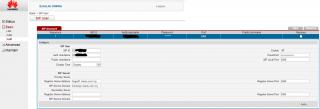
Finish. You can check the status of the VoIP WAN and the SIP: If successful, VoIP WAN will get "connected" and the ip as well. 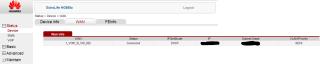
VoIP Status need to get "registered" then you are good to go.. 
the voip led shoud lid up and plug in the tel line to the ONT |
|
|
Feb 25 2013, 02:07 PM
Return to original view | Post
#8
|
|
Senior Member
868 posts Joined: Dec 2005
|
QUOTE(onthefly @ Feb 23 2013, 11:31 PM) Hey i was given a HG850A, i can`t seem to access the admin page ? i did google and saw some thread that it is auto configured by maxis. Obviously u did not search through the forum.. i cannot ditch the thomson modem ?? http://forum.lowyat.net/topic/2710206 |
|
|
Feb 25 2013, 02:18 PM
Return to original view | Post
#9
|
|
Senior Member
868 posts Joined: Dec 2005
|
QUOTE(abubin @ Feb 25 2013, 04:10 PM) maxis fibre uses vlan 621. You can replace the thompson with any router that can support vlan 621. Like mikrotik or tplink. Yup, true. But still need to keep the Thompson for the VoIP, that's mean need to power on 3 devices. If access into hg850a, can setup VoIP on it and totally throw away the Thompson, just need to power on 2 devices..This post has been edited by ywkwy: Feb 25 2013, 02:19 PM |
|
|
Jun 9 2013, 10:17 PM
Return to original view | Post
#10
|
|
Senior Member
868 posts Joined: Dec 2005
|
QUOTE(jackylbh @ Jun 9 2013, 08:40 PM) A very good day to all here...just wanna ask if anyone attempt to use custom router for maxis astro iptv. ...i managed to connect to maxis via vlan id 621....but wanna ask if anyonr knows vlan for the astro iptv..... backup the config from thompson, open with notepad, under [ vlan_res.ini ] u should see a list of vlan id.if not sure, copy the list under [ vlan_res.ini ] and paste it here.. |
|
|
May 12 2014, 09:32 AM
Return to original view | Post
#11
|
|
Senior Member
868 posts Joined: Dec 2005
|
QUOTE(3536837 @ May 11 2014, 05:22 AM) thanks for the great sharing.....it's work ! with free minutes, not free callbut i doesn't understand about the free call.... assuming my hse maxis home fibre number is 0399887766 and the password is +1 then i register the 0399887766 on my android/ios SIP apps and successfully registered and able to make call but , all the call tat i makes via the android/ios SIP apps will be counted in to my maxis VOIP bills ?......which is mean during bills cycle date , maxis will trace back all the outgoing call from 0399887766 and charge me ?... looking forward sifu reply , thanks again... free minutes came with the package |
|
|
Jun 12 2014, 09:31 AM
Return to original view | Post
#12
|
|
Senior Member
868 posts Joined: Dec 2005
|
QUOTE(xfuture @ Jun 11 2014, 07:49 PM) Does anyone using SME maxis plan? your password correct or not?My current setup is WDR4300 + echolife hg8240. But i've lost the VOIP function. I've been trying all the methods listed in this thread, but none was working, even tried to setup SIPdroid in my phone, i'm unable to connect too. Maybe someone could enlighten me on this. |
|
|
Jul 3 2015, 11:26 AM
Return to original view | Post
#13
|
|
Senior Member
868 posts Joined: Dec 2005
|
Hi, anyone know how to configure draytek for voip in Thompson to work?
The configuration now is bridge mode in thompson to get voip and let Draytek to connect Alcatel Lucent > Thompson > phone & Draytek However, I found instability in the connection where some times it will lost connection for around 1 minute and get back to work again. I do not know the instability is caused by the thompson or the problem from ISP. I want to try configure it as follow Alcatel Lucent > draytek > Thompson > phone I already configure the vlan as follow for the internet which is working » Click to show Spoiler - click again to hide... « Then I configure the Multi VLAN for the WAN » Click to show Spoiler - click again to hide... « I connect Draytek LAN port 2 to Thompson WAN port but the voip of the thompson is not working. I go into it's web interface, I see that it's ip address under voice is 127.0.0.1, it cant get ip address from isp. Refer to https://forum.lowyat.net/index.php?showtopi...post&p=53813946 , seems it can be done in mikrotik. but how about draytek? I'm using Draytek 2912n, anyone can access the demo web interface from http://eu.draytek.com:12912/ |
| Change to: |  0.0448sec 0.0448sec
 0.59 0.59
 7 queries 7 queries
 GZIP Disabled GZIP Disabled
Time is now: 2nd December 2025 - 08:24 PM |
 Quote
Quote

