

Pretty easy to configure and so far so good, ill update this post if its not stable.


Maxis Connect to Maxis using Custom Router!, Guidelines
|
|
 Jun 22 2013, 03:17 AM Jun 22 2013, 03:17 AM
|
 
Senior Member
4,547 posts Joined: Dec 2004 From: Metro Prima, Kuala Lumpur, Malaysia, Earth, Sol  
|
Just want to report that i have successfully connected to maxis fiber using Asus RTN-16 router with AsusWRT custom firmware.
Pretty easy to configure and so far so good, ill update this post if its not stable. |
|
|
|
|
|
Jun 22 2013, 06:12 AM
|

Junior Member
33 posts Joined: Jul 2005 From: Six Feet Under
|
Hello sifu out there,
If i use Maxis Fibre with custom router, will it solve the high ping rate/latency that i've been reading around at other thread? Please advice if anyone did a pingtest to other location.....thanks. |
|
|
Jun 22 2013, 08:29 AM
|

Junior Member
32 posts Joined: Oct 2010
|
QUOTE(hchoox @ Jun 22 2013, 06:12 AM) Hello sifu out there, Nope, problem is not at last mile, but international routingIf i use Maxis Fibre with custom router, will it solve the high ping rate/latency that i've been reading around at other thread? Please advice if anyone did a pingtest to other location.....thanks.  |
|
|
Jun 30 2013, 04:43 PM
|

Junior Member
25 posts Joined: Jun 2009
|
hi, all i wish to replace a router for my thomson 784
my budget is below RM 400.00, can anyone recommend with model better ? i have ask computer shop, they say that asus RT-n16u is good performance. thank you~ |
|
|
Jul 20 2013, 11:30 AM
|
|
Junior Member
220 posts Joined: Jan 2012
|
QUOTE(ywkwy @ Feb 9 2013, 06:05 PM) Those who still using Thompson router but want to change the DNS, can backup a copy of the setting [user.ini] open with notepad and find I need help on how to do this. Please explain to me. Thank you.CODE pool config name=LAN_private state=enabled allocation=dynamic intf=LocalNetwork poolstart=192.168.1.64 poolend=192.168.1.253 netmask=24 gateway=192.168.1.254 server=192.168.1.254 leasetime=86400 lockouttime=180 change to CODE pool config name=LAN_private state=enabled allocation=dynamic intf=LocalNetwork poolstart=192.168.1.64 poolend=192.168.1.253 netmask=24 gateway=192.168.1.254 server=192.168.1.254 primdns=8.8.8.8 secdns=8.8.4.4 leasetime=86400 lockouttime=180 localdns=disabled save it and restore back to the router.. in this way the comp will auto get 8.8.8.8 and 8.8.4.4 as DNS through DHCP.. |
|
|
Jul 24 2013, 03:29 PM
|
|
Newbie
0 posts Joined: Jul 2013
|
QUOTE(syk @ Mar 28 2013, 05:48 PM) TPLink with stock firmware doesn't have VLAN tagging. (621 for Maxis) hiii...can i have ur fb or whatsapp num? im having alot of problem for my maxis...i cant even configure the TM modemSo, you need to flash TPLink 1043 into custom firmware to get VLAN tagging. I am using OpenWRT now and it works. Check your hardware revision of TPLink. (Refer to sticker on your box) Read the table from below link carefully for correct firmware to download. http://wiki.openwrt.org/toh/tp-link/tl-wr1043nd If you are on revision V1.10, you can download the firmware from this link : http://downloads.openwrt.org/attitude_adju...hfs-factory.bin The rest just follow instruction from klseet http://www.klseet.com/index.php/tl-wr1043nd-ver18 Step is the same, klseet is using unifi and we are using maxis with different vlan. |
|
|
|
|
|
Jul 24 2013, 03:38 PM
|

Junior Member
315 posts Joined: Jan 2003 From: KL
|
QUOTE(wad3lee @ Jul 24 2013, 03:29 PM) hiii...can i have ur fb or whatsapp num? im having alot of problem for my maxis...i cant even configure the TM modem what problems you having on maxis?The TM modem is blocked by firewall, you cannot access the modem directly. |
|
|
Jul 24 2013, 04:56 PM
|
|
Newbie
0 posts Joined: Jul 2013
|
QUOTE(syk @ Jul 24 2013, 03:38 PM) what problems you having on maxis? then what should i do?? if i couldnt access 192.168.1.1 i cant change the lousy thompson router... anyway to contact u?The TM modem is blocked by firewall, you cannot access the modem directly. |
|
|
Jul 25 2013, 04:06 PM
|
|
Newbie
0 posts Joined: Jul 2013
|
QUOTE(narf03 @ Jun 22 2013, 03:17 AM) Just want to report that i have successfully connected to maxis fiber using Asus RTN-16 router with AsusWRT custom firmware. i can connect but my astro iptv cannot access other channel dy... what it is happen?Pretty easy to configure and so far so good, ill update this post if its not stable. |
|
|
Jul 27 2013, 01:40 AM
|

Senior Member
551 posts Joined: Nov 2004 From: ポンテイアン、 ジョホル。 
|
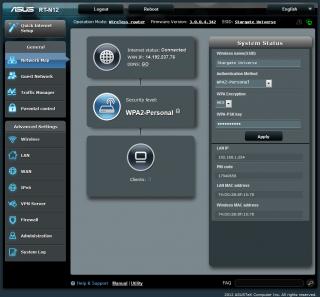
i also change the router using asus rt-n12.. cheaper than rt-n19
|
|
|
Jul 27 2013, 11:15 AM
|

Junior Member
32 posts Joined: Oct 2007
|
QUOTE(brucesss @ Jun 20 2013, 11:13 PM) Anyone here knows how to use 3rd party router with maxis iptv? Hi All... Bumping question. I'm also interested to know how to replace the router for Maxis Astro IPTV. Appreciate advise from anyone who has done it before. |
|
|
Jul 27 2013, 06:42 PM
|
|
Senior Member
4,547 posts Joined: Dec 2004 From: Metro Prima, Kuala Lumpur, Malaysia, Earth, Sol
|
QUOTE(wad3lee @ Jul 25 2013, 04:06 PM) i can connect but my astro iptv cannot access other channel dy... what it is happen? i think i have stated that i didnt use their iptv, but u should be able to configure iptv with this router, but im not sure it will work or not. |
|
|
Jul 28 2013, 01:50 AM
|

Junior Member
481 posts Joined: Jan 2007
|
just flashed my tp-link to openwrt, the wifi signal is terrible. how can i boost my wifi signal by setting?
|
|
|
|
|
|
Aug 2 2013, 06:22 PM
|
|
Junior Member
46 posts Joined: Nov 2009
|
I am landed property and i changed the router to asus. Should i need thomson router for the phone?
|
|
|
Aug 13 2013, 01:06 AM
|
|
Junior Member
9 posts Joined: May 2012
|
QUOTE(Why^Me @ Jul 27 2013, 01:40 AM) i also change the router using asus rt-n12.. cheaper than rt-n19 Hi there I am using the same router as u.asus rt-n12.how to u configure to make this a second router?can teach me pls.
|
|
|
Aug 13 2013, 10:59 AM
|

Junior Member
55 posts Joined: Oct 2011
|
QUOTE(sirqueza @ Oct 1 2012, 12:00 PM) Just replacing my Thompson router with Cisco linksys E2500. Was facing problem at first caused the reseller flash the firmware to unifi custom firmware with vlan tagging 500, 600. I upgraded the firmware make it untagged and configured zte modem as according to previous post then all set Bro, did you upgrade to default firmware? And can you guide how you did the untagged?? . Just a reference for all the bro here, linksys router e1200, 1500 and 2500 is usable for maxis home fibre. . Just a reference for all the bro here, linksys router e1200, 1500 and 2500 is usable for maxis home fibre.  Added on October 1, 2012, 12:08 pm Hi there, Firstly, is your airport express supports PPPoE, PPPoE is required to setup up your maxis fibre username and password and send them to maxis Internet authentication gateway during startup. HTH Thanks, |
|
|
Aug 20 2013, 04:45 PM
|
|
Junior Member
25 posts Joined: Oct 2010 From: Bukit Mertajam
|
QUOTE(Why^Me @ Jul 27 2013, 01:40 AM) i also change the router using asus rt-n12.. cheaper than rt-n19 how do u do it with old version firmware??? that drove me crazy for setting up my rt-n12, but finally i got it just upgrade the firmware and let the machine do the work.
QUOTE(Almondbox @ Aug 13 2013, 01:06 AM) Hi there I am using the same router as u.asus rt-n12.how to u configure to make this a second router?can teach me pls. go to quick internet setup, choose what stated below, and thn key-in ur account & password, DONE~ 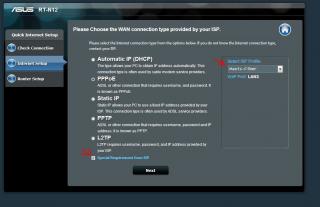
hopefully this help u~ |
|
|
Aug 20 2013, 09:47 PM
|
|
Senior Member
551 posts Joined: Nov 2004 From: ポンテイアン、 ジョホル。
|
QUOTE(Almondbox @ Aug 13 2013, 01:06 AM) Hi there I am using the same router as u.asus rt-n12.how to u configure to make this a second router?can teach me pls. QUOTE(fishhy @ Aug 20 2013, 04:45 PM) how do u do it with old version firmware??? that drove me crazy for setting up my rt-n12, but finally i got it just upgrade the firmware and let the machine do the work. go to quick internet setup, choose what stated below, and thn key-in ur account & password, DONE~
hopefully this help u~ QUOTE(Almondbox @ Aug 13 2013, 01:06 AM) Hi there I am using the same router as u.asus rt-n12.how to u configure to make this a second router?can teach me pls. 1st, you might need same firmware as mine. i dunno where to get coz it there when im buy it.2nd, as fishhy said. need to select maxis fibre from that menu, then you have to wait until connected. |
|
|
Sep 3 2013, 05:34 PM
|

Junior Member
171 posts Joined: Nov 2010
|
Do anyone know how to doing 2 VLAN tagging ID on ddwrt?
|
|
|
Sep 5 2013, 03:15 AM
|

Senior Member
4,816 posts Joined: Apr 2007 
|
Anyone here on landed property and manages to change to custom router; including VOIP on custom router - which totally eliminates the Thomson Router?
After reallocation I was given new units of modem (ONU terminal) + router setup: Huawei EchoLife HG8240w + Thomson Technicolor TG784n v3. Just replaced the Thomson Router due to it's constant problem previously (and I hope it's solved now, else I'll be only left with the option of custom router). I read that some manages to access their ONU terminal and configure VOIP directly on there; but too bad I could not access the ONU at all (even with direct LAN connection). That ONU's gateway is either disabled or something (can't even access the web configuration page even if I allocate myself with a fixed IP on the same subnet mask). So my final hope only lies on custom router which can access both FTTH + VOIP (I don't use IPTV so it doesn't matter) |
| Change to: |  0.0322sec 0.0322sec
 0.42 0.42
 6 queries 6 queries
 GZIP Disabled GZIP Disabled
Time is now: 3rd December 2025 - 01:31 PM |
 Quote
Quote