Welcome Guest ( Log In | Register )

Bump Topic Topic Closed RSS Feed
126 Pages « < 9 10 11 12 13 > » Bottom

Outline · [ Standard ] · Linear+

 Ivy Bridge Overclocking V1 | 3770K/3570K | Z77, Torture Your CPU, Post It Here!

views
     
ALeUNe
post May 12 2012, 02:00 AM

I'm the purebred with aristocratic pedigree
Group Icon
VIP
9,692 posts

Joined: Jan 2003
From: Mongrel Isle
QUOTE(dma0991 @ May 12 2012, 01:01 AM)
Neither, mATX isn't suitable for overclocking unless you're paying for a ROG board. But if you're going for a mild OC, I'll choose the Asus.
*
I have to use mATX because my HTPC system is using Lian Li PC-V350.
I owned wide range of motherboards, from premium to budget mobo.
I never had problem to overclock with mATX.
I managed to achieve the same overclocked result with budget mobo (i.e 4.4-4.6GHz with Nahalem and Sandy Bridge).

I just wonder how is the "overclockability" for current Z77 mobo, particularly Asus and Gigabyte.
I heard Asus has slow boot up (it takes a long time to detect hardware at bios boot up).
So Asus users, do you encounter slow boot up with your Z77 mobo?

This post has been edited by ALeUNe: May 12 2012, 02:09 AM
dma0991
post May 12 2012, 02:12 AM

nyoron~
*******
Senior Member
3,333 posts

Joined: Dec 2009


QUOTE(ALeUNe @ May 12 2012, 02:00 AM)
I have to use mATX because my HTPC system is using Lian Li PC-V350.
I owned wide range of motherboards, from premium to budget mobo.
I never had problem to overclock with mATX.

I just wonder how is the "overclockability" for current Z77 mobo, particularly Asus and Gigabyte.
I heard Asus has slow boot up (it takes a long time to detect hardware at bios boot up).
So Asus users, do you encounter slow boot up with your Z77 mobo?
*
Not to say that mATX isn't overclockable. It can but usually not as good as a full sized ATX with space for more components for power delivery. As for overclockability, I have to guess that it will be a little bit worse than the previous because manufacturers skimp a little on fewer power delivery components as IB is not as demanding as SB, but this is outside of the range that most would be able to go. You'll probably hit a wall with the IB processor before you are held back by the Z77 motherboard.

Asus doesn't have slower boot times, it is just that it has more parts to check before it completes its POST. If you disable some of the features, it will POST just as fast as the other boards and these features will eventually be loaded when the OS is running.


TSowikh84
post May 12 2012, 08:08 AM

i7 Clan
Group Icon
Elite
8,711 posts

Joined: Nov 2007
From: Butterworth, PG / Machang, Kelantan


QUOTE(ALeUNe @ May 12 2012, 02:00 AM)
I have to use mATX because my HTPC system is using Lian Li PC-V350.
I owned wide range of motherboards, from premium to budget mobo.
I never had problem to overclock with mATX.
I managed to achieve the same overclocked result with budget mobo (i.e 4.4-4.6GHz with Nahalem and Sandy Bridge).
*
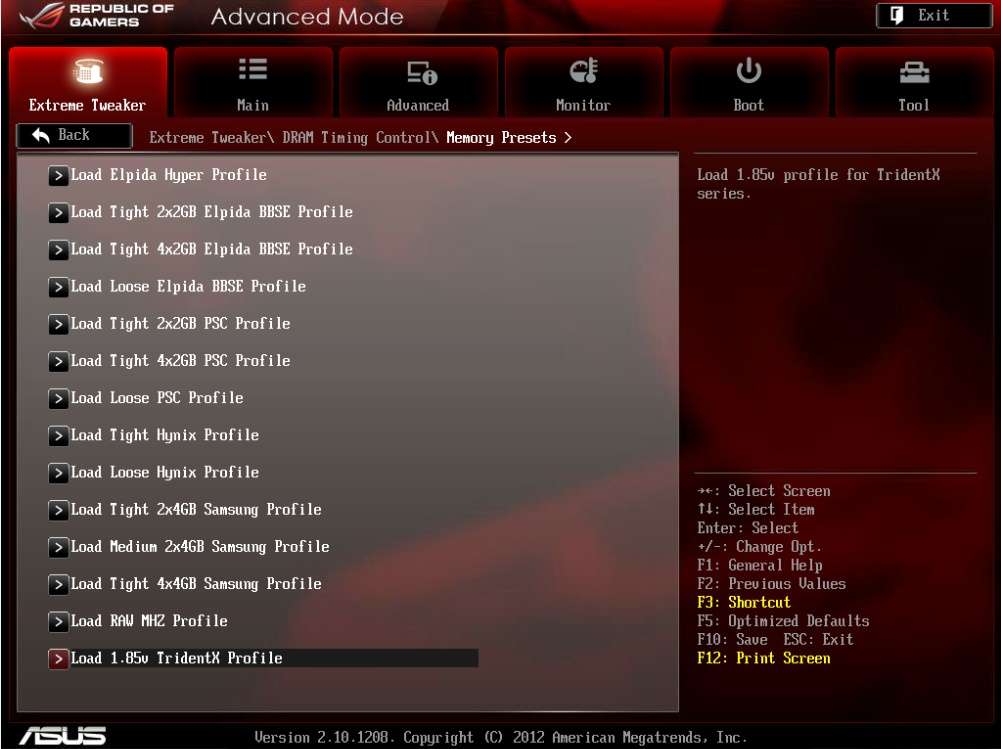
OCbility for sure Asus is top atm, especially with their mATX ROG MVG.
RAM lovers would love these mem profiles.

user posted image

Basically you could just play with any RAM powered by any IC, it's an awesome board man.

QUOTE(ALeUNe @ May 12 2012, 02:00 AM)
I heard Asus has slow boot up (it takes a long time to detect hardware at bios boot up).
So Asus users, do you encounter slow boot up with your Z77 mobo?
*

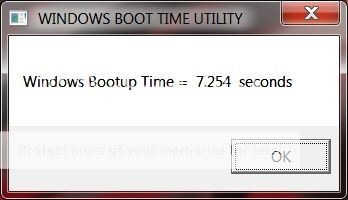
No, my MVG boots very2 fast. Press POWER button & wait for 7 seconds then straightaway can use PC.

user posted image
* taken on Intel X18-M G2 160GB SATA2

but like any other mobo, it will boot slower when you turn on raid, 3rd party SATA ports, etc.
All these extra features have bootrom that you could disable or enable in the BIOS.

This post has been edited by owikh84: May 12 2012, 08:09 AM
OH-
post May 12 2012, 08:33 AM

Regular
******
Senior Member
1,010 posts

Joined: Jan 2011
From: Stranded
Just wondering if my Acer Aspire V3 ivy bridge can be overclocked...safely... XD
TSowikh84
post May 12 2012, 08:43 AM

i7 Clan
Group Icon
Elite
8,711 posts

Joined: Nov 2007
From: Butterworth, PG / Machang, Kelantan


QUOTE(OH- @ May 12 2012, 08:33 AM)
Just wondering if my Acer Aspire V3 ivy bridge can be overclocked...safely... XD
*

No you can't & mobile CPU is not meant to OC or you will end up toasting your chip.
On Alienware laptops MIGHT be possible, like kelvin_hata OCed his mighty Alienware lappy powered by i7 2920XM (SB though)

This post has been edited by owikh84: May 12 2012, 09:11 AM
OH-
post May 12 2012, 08:47 AM

Regular
******
Senior Member
1,010 posts

Joined: Jan 2011
From: Stranded
QUOTE(owikh84 @ May 12 2012, 08:43 AM)
No you can't & mobile CPU is not meant to OC or you will end up toasting your chip.
On Alienware laptops MIGHT be possible, like kelvin_hata OCed his mighty Alienware lappy powered by i7 2920XM (SB though)
*
I was thinking so. Thanks tho icon_rolleyes.gif
TSowikh84
post May 12 2012, 09:36 AM

i7 Clan
Group Icon
Elite
8,711 posts

Joined: Nov 2007
From: Butterworth, PG / Machang, Kelantan


QUOTE(_707027_ @ May 11 2012, 07:16 PM)
Guys, just playing with my i5 3570K and P8Z77V-Pro, still new to this Z77 after jumping from X58  sweat.gif

[attachmentid=2836010]

100 x 41, Priming for 2.5 hours and counting.
BTW, can someone clarify me the differences between manually set and offset Vcore?
*

Welcome to IB club & congratz on stability rclxms.gif

All offset voltage does is change the voltage under load. So, if your stock voltage is 1.30v and you offset it +0.05v, you will get 1.35v under load. It allows your computer to idle at a very low voltage. Basically the offset is how much voltage you want to add to your CPU under load.

Manual = voltage is always that unless affected by load line calibration LLC.
Offset = whatever the Intel set VID voltage is + your offset

So if your VID for 1.6GHz is 0.900v, with +0.050 offset you will make it 0.950v
VID at 2.5GHz is 0.950v, you will make it 1.000v
VID at 3.2GHz is 1.050v, you will make it 1.100v
VID at 3.7GHz is 1.100v, you will make it 1.15v
etc....

You might wanna go through this guide completely written for offset clockings:
Overclocking Using Offset Mode for CPU Core Voltage

btw, I always use manual OC.
_707027_
post May 12 2012, 10:09 AM

Regular
******
Senior Member
1,104 posts

Joined: Sep 2007
From: Malaysia Boleh Land


QUOTE(owikh84 @ May 12 2012, 09:36 AM)
Welcome to IB club & congratz on stability  rclxms.gif

All offset voltage does is change the voltage under load. So, if your stock voltage is 1.30v and you offset it +0.05v, you will get 1.35v under load. It allows your computer to idle at a very low voltage. Basically the offset is how much voltage you want to add to your CPU under load.

Manual = voltage is always that unless affected by load line calibration LLC.
Offset = whatever the Intel set VID voltage is + your offset

So if your VID for 1.6GHz is 0.900v, with +0.050 offset you will make it 0.950v
VID at 2.5GHz is 0.950v, you will make it 1.000v
VID at 3.2GHz is 1.050v, you will make it 1.100v
VID at 3.7GHz is 1.100v, you will make it 1.15v
etc....

You might wanna go through this guide completely written for offset clockings:
Overclocking Using Offset Mode for CPU Core Voltage

btw, I always use manual OC.
*
Thanks abe Owikh for the simple explanation and the link notworthy.gif
So far me too just fiddling with manual Vcore.

louislkw
post May 12 2012, 03:42 PM

Casual
***
Junior Member
434 posts

Joined: Jul 2010
From: ^Newbie^


Attached Image

Gigabyte z77 ud5
JunJoe
post May 12 2012, 04:18 PM

Getting Started
**
Junior Member
149 posts

Joined: Sep 2011
QUOTE(owikh84 @ May 12 2012, 08:08 AM)
OCbility for sure Asus is top atm, especially with their mATX ROG MVG.
RAM lovers would love these mem profiles.

user posted image

Basically you could just play with any RAM powered by any IC, it's an awesome board man.
No, my MVG boots very2 fast. Press POWER button & wait for 7 seconds then straightaway can use PC.

user posted image
* taken on Intel X18-M G2 160GB SATA2

but like any other mobo, it will boot slower when you turn on raid, 3rd party SATA ports, etc.
All these extra features have bootrom that you could disable or enable in the BIOS.
*
what is the different from sandy bridge? can i3 ivy bridge beat the performance i5 sandy bridge?

Intel core i3 2120
liteon/lg sata 22x
Gigabyte Powerock 500W
Gigabyte B75M-D3V
4gb value ram x 2
Wd caviar blue 1tb
Cooler master casing 311 plus
PALIT GeForce® GTX 560 Sonic Platinum

this is my pc spec.can it run intel core i3 ivy bridge? im not planning to oc .
asm@m
post May 12 2012, 05:37 PM

Getting Started
**
Junior Member
80 posts

Joined: Dec 2008
From: Malaysia
What mobo do you rec to OC? not extreme OC just ~4.5Ghz
ASRock extreme4/extreme4, Asus -v/-v pro or Gigabytes ud5h?

I dun really need al the latest feature ( i dun even understand some of them yet) but i want it future proof at least...

Edit: I'm thinking of using 3570k with GTX670.

This post has been edited by asm@m: May 12 2012, 05:42 PM
dma0991
post May 12 2012, 05:52 PM

nyoron~
*******
Senior Member
3,333 posts

Joined: Dec 2009


QUOTE(asm@m @ May 12 2012, 05:37 PM)
What mobo  do you rec to OC? not extreme OC just ~4.5Ghz
ASRock extreme4/extreme4, Asus -v/-v pro or Gigabytes ud5h?

I dun really need al the latest feature ( i dun even understand some of them yet) but i want it future proof at least...

Edit: I'm thinking of using 3570k with GTX670.
*
Almost any Z77 board RM400 onwards will get you to 4.5GHz provided that you have a decent heatsink. If on a budget, the ASRock Z77 Extreme4 has almost all the features that you'll need. Every other board after it will give more features and also more expensive.
Boldnut
post May 12 2012, 06:26 PM

Look at all my stars!!
*******
Senior Member
2,209 posts

Joined: Nov 2010
QUOTE(JunJoe @ May 12 2012, 04:18 PM)
what is the different from sandy bridge? can i3 ivy bridge beat the performance i5 sandy bridge?

Intel core i3 2120
liteon/lg sata 22x
Gigabyte Powerock 500W
Gigabyte B75M-D3V
4gb value ram x 2
Wd caviar blue 1tb
Cooler master casing 311 plus
PALIT GeForce® GTX 560 Sonic Platinum

this is my pc spec.can it run intel core i3 ivy bridge? im not planning to oc .
*

i3 ivy wont be beating i5 sandy. i5 sandy have 2 extra cores. I suggest u go for 3570 or 3770. Ivy i3 is not worth upgrading from i3 sandy

asm@m
post May 12 2012, 07:15 PM

Getting Started
**
Junior Member
80 posts

Joined: Dec 2008
From: Malaysia
QUOTE(dma0991 @ May 12 2012, 05:52 PM)
Almost any Z77 board RM400 onwards will get you to 4.5GHz provided that you have a decent heatsink. If on a budget, the ASRock Z77 Extreme4 has almost all the features that you'll need. Every other board after it will give more features and also more expensive.
*
Yeah. ASRock is cheaper. But people said ASUS is more reliable? or just rumours?
JeffreyYap
post May 12 2012, 07:43 PM

Anti lowballers & noob drivers since 2010
******
Senior Member
1,232 posts

Joined: Jun 2008
From: ¯\(º_o)/¯


QUOTE(asm@m @ May 12 2012, 07:15 PM)
Yeah. ASRock is cheaper.  But people said ASUS is more reliable?  or just rumours?
*
Don't play play with Asrock 555's technology thumbup.gif
ketapang
post May 12 2012, 08:09 PM

GG
******
Senior Member
1,115 posts

Joined: Nov 2006
From: .......


3570k @ 4.2Ghz.

user posted image

Using MSI Z77A-G43 & its not really a good mobo for overclock. Very little control on vcore. Highest vcore i could get is 1.26v but due to vdroop, i cant even make mine stable @ 4.5Ghz. No LLC option, PLL voltage only avail to enable & disable it. sweat.gif
90Boyz
post May 12 2012, 08:53 PM

UTMB !!
*******
Senior Member
3,730 posts

Joined: Dec 2004
From: Wangsa Maju


QUOTE(ketapang @ May 12 2012, 08:09 PM)
3570k @ 4.2Ghz.

user posted image

Using MSI Z77A-G43 & its not really a good mobo for overclock. Very little control on vcore. Highest vcore i could get is 1.26v but due to vdroop, i cant even make mine stable @ 4.5Ghz. No LLC option, PLL voltage only avail to enable & disable it. sweat.gif
*
True .. kinda limit on the OC for the VCore to play around .. But i try to max out i can get over 4.7Ghz ...
dma0991
post May 12 2012, 08:57 PM

nyoron~
*******
Senior Member
3,333 posts

Joined: Dec 2009


QUOTE(asm@m @ May 12 2012, 07:15 PM)
Yeah. ASRock is cheaper.  But people said ASUS is more reliable?  or just rumours?
*
Not quite as I do have an ASRock board that goes back to the days of P4 and still running good. As for now, ASRock can be as good or nearly as good as Asus, Gigabyte and MSI. ASRock now can't be grouped in the same category as ECS or Biostar, which does make decent motherboards but still needs a little improvement.

QUOTE(ketapang @ May 12 2012, 08:09 PM)
3570k @ 4.2Ghz.
Using MSI Z77A-G43 & its not really a good mobo for overclock. Very little control on vcore. Highest vcore i could get is 1.26v but due to vdroop, i cant even make mine stable @ 4.5Ghz. No LLC option, PLL voltage only avail to enable & disable it. sweat.gif
*
If there is an updated BIOS, it might improve some of the options available.
myroy
post May 12 2012, 09:07 PM

BIG BOSS
******
Senior Member
1,202 posts

Joined: Dec 2010
From: HELL


What ivy?


Added on May 12, 2012, 9:09 pmcan someone xplain to me what is ivy in word that easy to understand/...

This post has been edited by myroy: May 12 2012, 09:09 PM
ketapang
post May 12 2012, 10:43 PM

GG
******
Senior Member
1,115 posts

Joined: Nov 2006
From: .......


QUOTE(90Boyz @ May 12 2012, 08:53 PM)
True .. kinda limit on the OC for the VCore to play around .. But i try to max out i can get over 4.7Ghz ...
*
Same processor as mine? What cooler are you using?

126 Pages « < 9 10 11 12 13 > » Top
Topic ClosedOptions
 

Change to:
| Lo-Fi Version
0.0367sec    0.56    6 queries    GZIP Disabled
Time is now: 4th December 2025 - 05:05 PM