Welcome Guest ( Log In | Register )

110 Pages « < 21 22 23 24 25 > » Bottom

Outline · [ Standard ] · Linear+

 SΛMSUNG Galaxy W (I8150) Official Thread V5, Wonderful things coming to you Worldwide

views
     
cyc85
post Apr 7 2012, 03:49 PM

sob~sob~
******
Senior Member
1,202 posts

Joined: Nov 2006
From: Kuching->Cyberjaya->KL->Kuching


QUOTE(wemglucas3 @ Apr 7 2012, 12:25 PM)
Actually what is the "Flashing to cm9" ? Newbie to android OS here  tongue.gif
Then any method to solve the keyboard language switching issue ?
*
Try Sogou... http://www.androidzoom.com/android_applica...ols/21_olz.html
Best keyboard for android so far, u can swap ENG and CHI keyboard in 1 click....even type symbol in 1 click....
masterelr
post Apr 7 2012, 04:11 PM

Regular
******
Senior Member
1,003 posts

Joined: Jan 2003
From: KL


Is it normal for the camera to snap the picture one or two seconds after you press the button? Any way to make it snap immediately or faster?
IwanAGP
post Apr 7 2012, 06:35 PM

Nothing is Possible!
*******
Senior Member
9,590 posts

Joined: Jan 2008
From: S'wak||KL||SG


QUOTE(whiteface @ Apr 7 2012, 11:54 AM)
any idea on estimated release date ?
btw feels suck galaxy w wont be having ICS update , lagging behind
all my friends htc one x , sensation , galaxy note ,nexus
*
Erm... W is not even close to be on par with One X (Pentacore), Sensation, Note, Nexus(Dual core)...
All those single core won't get update so soon. (But W is never get update yawn.gif )
afif900
post Apr 7 2012, 07:58 PM

New Member
*
Junior Member
9 posts

Joined: Jul 2011


hello..just wondering...if i'm about to do memory swap...which memory card is better? 16gb class 10 or 32gb class 6? 32gb class 10 is quite pricey that's why i'm trying to use class 6..and one more..how to deodex my galaxy w...any simple tutorial because i dont want to flash to custom rom yet..thank you...

This post has been edited by afif900: Apr 7 2012, 08:00 PM
~@Sharks@~
post Apr 7 2012, 10:55 PM

Casual
***
Junior Member
498 posts

Joined: Apr 2009
Hey guys, I still can't seem to update my firmware. It keeps getting Operation fail or Unknown error has occurred.

Is there anyway i can revert my CWM recovery to Stock Recovery so i can update using the phone itself? Thanks alot.
Kenzany
post Apr 8 2012, 04:38 AM

Casual
***
Junior Member
435 posts

Joined: Oct 2011
QUOTE(IwanAGP @ Apr 7 2012, 06:35 PM)
Erm... W is not even close to be on par with One X (Pentacore), Sensation, Note, Nexus(Dual core)...
All those single core won't get update so soon. (But W is never get update  yawn.gif )
*
actually IINM, ICS is designed with dual-core phones in mind. ICS will be fully utilizing the dual-ore (or even more) advantage so single-core maybe, need to tweak here and there xD. So don't be disappointed if your single-core phone is not getting ICS, as technology moves along very fast and soon SGW will become another legacy.
masterelr
post Apr 8 2012, 05:12 AM

Regular
******
Senior Member
1,003 posts

Joined: Jan 2003
From: KL


How do I transfer mp3s, images, and videos to the phone? After I've connected the phone to my PC, I get a message saying the disk drive is full when I tried to transfer some files into the phone.

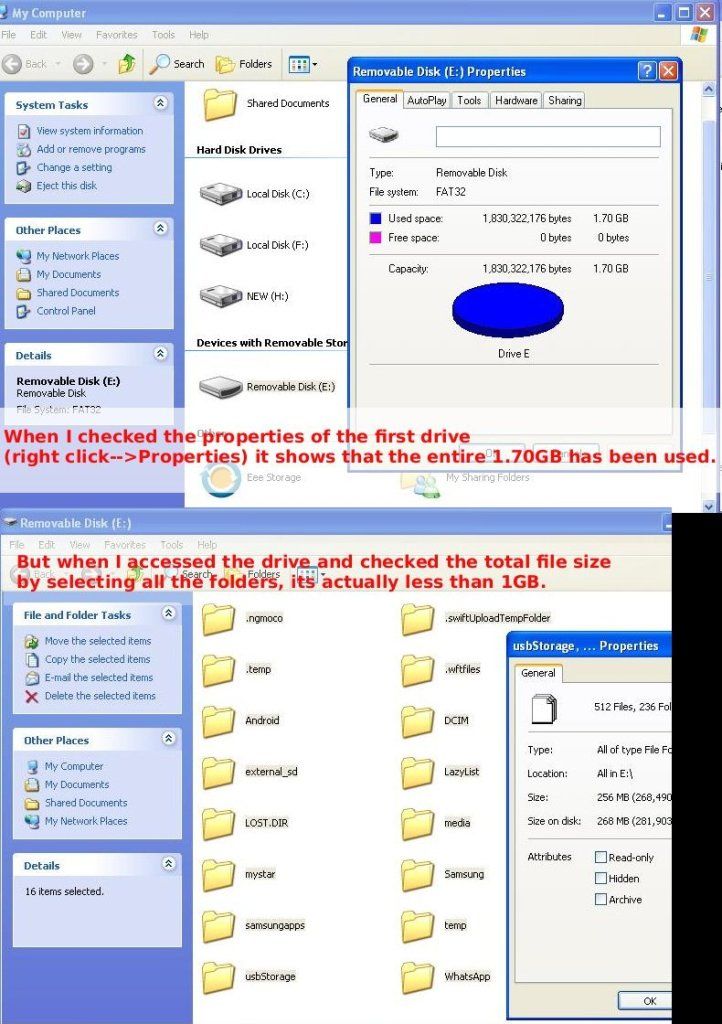
When I checked the USB storage space (is this what I'm supposed to check?) on my phone, it says the total space is 1.70GB and the available space is 1.52GB. But when I checked on my PC, it says the whole 1.70GB has been used.

Is there some special software needed? Or do I need an SD card?

This post has been edited by masterelr: Apr 8 2012, 05:32 AM
emkay
post Apr 8 2012, 08:41 AM

Casual
***
Junior Member
420 posts

Joined: Nov 2005
QUOTE(masterelr @ Apr 8 2012, 05:12 AM)
How do I transfer mp3s, images, and videos to the phone? After I've connected the phone to my PC, I get a message saying the disk drive is full when I tried to transfer some files into the phone.

When I checked the USB storage space (is this what I'm supposed to check?) on my phone, it says the total space is 1.70GB and the available space is 1.52GB. But when I checked on my PC, it says the whole 1.70GB has been used.

Is there some special software needed? Or do I need an SD card?
*
Don't transfer files using Kies coz it will take ages. Go to Settings> wireless and network> USB utilities. usb cable should be not connected to the phone first.
masterelr
post Apr 8 2012, 11:31 AM

Regular
******
Senior Member
1,003 posts

Joined: Jan 2003
From: KL


QUOTE(emkay @ Apr 8 2012, 08:41 AM)
Don't transfer files using Kies coz it will take ages. Go to Settings> wireless and network> USB utilities. usb cable should be not connected to the phone first.
*
Yup, thats how I did it. And it says the disk drive is full when I try to transfer the files in the phone. Two drives pop up when I connect my phone to my PC. One drive is 1.70GB and the other one can't be accessed. When I checked the properties of the first drive (right click-->Properties) it shows that the entire 1.70GB has been used. But when I accessed the drive and checked the total file size by selecting all the folders, its actually less than 1GB.
IwanAGP
post Apr 8 2012, 08:57 PM

Nothing is Possible!
*******
Senior Member
9,590 posts

Joined: Jan 2008
From: S'wak||KL||SG


QUOTE(masterelr @ Apr 8 2012, 11:31 AM)
Yup, thats how I did it. And it says the disk drive is full when I try to transfer the files in the phone. Two drives pop up when I connect my phone to my PC. One drive is 1.70GB and the other one can't be accessed. When I checked the properties of the first drive (right click-->Properties) it shows that the entire 1.70GB has been used. But when I accessed the drive and checked the total file size by selecting all the folders, its actually less than 1GB.
*
is your usb debugging ticked? Check under settings-> applications-> development->tick USB debugging
Then connect your usb cable. You'll get to see USB is connected in the pull down screen(whatever it's called). Press the notification and press connect usb storage. Then you can access both disks.
masterelr
post Apr 8 2012, 11:38 PM

Regular
******
Senior Member
1,003 posts

Joined: Jan 2003
From: KL


QUOTE(IwanAGP @ Apr 8 2012, 08:57 PM)
is your usb debugging ticked? Check under settings-> applications-> development->tick USB debugging
Then connect your usb cable. You'll get to see USB is connected in the pull down screen(whatever it's called). Press the notification and press connect usb storage. Then you can access both disks.
*
Tried that and I'm still getting the same thing. Below is a screen shot.
When I plug in the USB I do get a message saying "Welcome to the Found New Hardware Wizard. Can Windows connect to Windows Update to search for software?". I cancelled that part, dont think that could be the problem.
I have no problems transferring files from and to my phone using Kies though. But yeah its kinda slow because its through wifi.

user posted image
IwanAGP
post Apr 9 2012, 02:48 AM

Nothing is Possible!
*******
Senior Member
9,590 posts

Joined: Jan 2008
From: S'wak||KL||SG


QUOTE(masterelr @ Apr 8 2012, 11:38 PM)
Tried that and I'm still getting the same thing. Below is a screen shot.
When I plug in the USB I do get a message saying "Welcome to the Found New Hardware Wizard. Can Windows connect to Windows Update to search for software?". I cancelled that part, dont think that could be the problem.
I have no problems transferring files from and to my phone using Kies though. But yeah its kinda slow because its through wifi.

» Click to show Spoiler - click again to hide... «

*
Got no idea
Mooneyes
post Apr 9 2012, 07:30 AM

Time heals
*******
Senior Member
2,730 posts

Joined: Dec 2005
From: Hell


QUOTE(~@Sharks@~ @ Apr 7 2012, 10:55 PM)
Hey guys, I still can't seem to update my firmware. It keeps getting Operation fail or Unknown error has occurred.

Is there anyway i can revert my CWM recovery to Stock Recovery so i can update using the phone itself? Thanks alot.
*
i'm having the same problem too..can't update due to CWM
lokety
post Apr 9 2012, 09:19 AM

Getting Started
**
Junior Member
51 posts

Joined: May 2005


QUOTE(Mooneyes @ Apr 9 2012, 07:30 AM)
i'm having the same problem too..can't update due to CWM
*
I just did it recently on my rooted stock ROM. There seems to be 2 ways to get that I8150DXLC1 update, so try the first before the second.

Short Way:

1. Go to http://forum.xda-developers.com/showpost.p...835&postcount=3 and download the Odin Multi Downloader, Ancora.ops and Stock Recovery links.
2. Go to http://forum.xda-developers.com/showthread.php?t=1317394 and download the unroot.zip file. Place it in your SD card root path.
3. Boot to download mode in your phone and flash the stock recovery, replacing CWM recovery.
4. Reboot to stock recovery and flash the unroot.zip file. Your phone should now be unrooted with stock recovery.
5. Reboot normal and download the new firmware update.
6. The update process will reboot the phone and flash the update. It may fail at around 22% in a blue screen and give an error "phone verify fail", and if so, try the next steps.

Long Way:

1. Make a nandroid backup using CWM recovery.
2. Go to http://samsung-updates.com/device/?id=GT-I8150 and download the firmware update, preferably the XME region, which is Malaysia.
3. Boot to download mode and flash the above update using Odin.
4. Reboot normal and check that phone is updated to I8150DXLC1.
5. Reboot to CWM recovery and do advanced restore of data only.
6. Reboot normal and check that your data and apps are restored.

Hope this helps.

This post has been edited by lokety: Apr 9 2012, 09:20 AM

annoymous1234
post Apr 9 2012, 09:48 AM

Look at all my stars!!
*******
Senior Member
7,616 posts

Joined: Mar 2009

QUOTE(Kenzany @ Apr 8 2012, 04:38 AM)
actually IINM, ICS is designed with dual-core phones in mind. ICS will be fully utilizing the dual-ore (or even more) advantage so single-core maybe, need to tweak here and there xD. So don't be disappointed if your single-core phone is not getting ICS, as technology moves along very fast and soon SGW will become another legacy.
*
Wrong. There's a lot of single core phone is getting ics. Sony ericsson is giving all their phone which release in 2011 ics. Even their play which is single core is getting it. And look at htc, they giving incredible s which is also single core. Samsung just sucks at customer loyalty
emkay
post Apr 9 2012, 11:44 AM

Casual
***
Junior Member
420 posts

Joined: Nov 2005
QUOTE(IwanAGP @ Apr 8 2012, 08:57 PM)
is your usb debugging ticked? Check under settings-> applications-> development->tick USB debugging
Then connect your usb cable. You'll get to see USB is connected in the pull down screen(whatever it's called). Press the notification and press connect usb storage. Then you can access both disks.
*
If u nid to have access to external sdcard only, no nid to tick the usb debbugging tickbox. I think it is much safer to have access to external sdcard only coz u dont want to accidently delete something on internal memory.

ekudz
post Apr 9 2012, 01:34 PM

Vaper Enthusiast
*****
Senior Member
736 posts

Joined: Nov 2009
From: Shah Alam - Damansara Perdana - Bukit Beruntung


just update firmware... and got google+ .. is it that only after update?
Maxieos
post Apr 9 2012, 02:13 PM

Look at all my stars!!
*******
Senior Member
3,758 posts

Joined: May 2008
QUOTE(masterelr @ Apr 7 2012, 04:11 PM)
Is it normal for the camera to snap the picture one or two seconds after you press the button? Any way to make it snap immediately or faster?
*
icon_question.gif icon_question.gif
No one able to increase the speed ? snapping a good quality picture ?
ekudz
post Apr 9 2012, 04:14 PM

Vaper Enthusiast
*****
Senior Member
736 posts

Joined: Nov 2009
From: Shah Alam - Damansara Perdana - Bukit Beruntung


QUOTE(Maxieos @ Apr 9 2012, 02:13 PM)
icon_question.gif  icon_question.gif
No one able to increase the speed ? snapping a good quality picture ?
*
i think the reason why it need 1 or 2 sec because to auto focus... i think if u disable auto focus the camera can snap immediately.
emkay
post Apr 9 2012, 04:14 PM

Casual
***
Junior Member
420 posts

Joined: Nov 2005
QUOTE(Maxieos @ Apr 9 2012, 02:13 PM)
icon_question.gif  icon_question.gif
No one able to increase the speed ? snapping a good quality picture ?
*
It takes few milisecond for camera to focus. if you want faster shot, you have to let the camera to focus first (holding/touching without releasing the button), the release the button when the desired scene/action come into the screen.

second technique is to do away with autofocus. set the focus to infinity.

110 Pages « < 21 22 23 24 25 > » Top
 

Change to:
| Lo-Fi Version
0.0354sec    0.56    6 queries    GZIP Disabled
Time is now: 5th December 2025 - 05:15 AM