

thanks for all the help. i think im going for the caviar green. i cant afford raid setup, so i think i will just keep changing hdd every few years. surely the price will go down then
All About Harddisk Thread V4
All About Harddisk Thread V4
|
|
 Jun 26 2012, 07:59 PM Jun 26 2012, 07:59 PM
|
 
Senior Member
1,680 posts Joined: Nov 2004  
|
thanks for all the help. i think im going for the caviar green. i cant afford raid setup, so i think i will just keep changing hdd every few years. surely the price will go down then
|
|
|
|
|
|
Jun 26 2012, 08:05 PM
|
 
VIP
18,182 posts Joined: Jan 2005 From: Dagobah
|
QUOTE(-kytz- @ Jun 26 2012, 06:39 PM) HDD including the HDD cage, the empty floor of the casing between the HDD cage and the PSU You could try putting a heavy weight on it (e.g. a thick heavy book, stone brick, etc), and see if the vibration is still there. Is that PSU touching the bottom plate of that casing?  Is this normal? p/s: I did remove off the fan, but it's still vibrating The most severe part is between the HDD cage and the space between hdd and psu)» Click to show Spoiler - click again to hide... «  |
|
|
Jun 26 2012, 09:27 PM
|
 
Elite
11,400 posts Joined: Jan 2003
|
QUOTE(everling @ Jun 26 2012, 02:49 PM) Off-site doesn't mean it is on the cloud. It means that the backup copy is not located in the same building or site. It may be stored offline (not powered) or online (powered and accessible to a computer), but doesn't say if the backup may be accessible over the internet or not. My off-site backup is in my house.  It's a very good location. It's a very good location.There's a couple of km separating the two locations. It is far enough apart that a fire could not destroy both locations (other than airplanes bombing us). It's close enough to easily make copies of the backup and bring it to the office. Our country do not suffer from building-destroying earthquakes. And the location of my house is such that it is impossible for it to be flooded. |
|
|
Jun 27 2012, 08:13 AM
|

Senior Member
2,215 posts Joined: Jul 2005 
|
QUOTE(-kytz- @ Jun 26 2012, 06:39 PM) HDD including the HDD cage, the empty floor of the casing between the HDD cage and the PSU Judging from that photo is quite hard, perhaps video to show the sounds, etc. Well if you can do that.Is this normal? p/s: I did remove off the fan, but it's still vibrating The most severe part is between the HDD cage and the space between hdd and psu)» Click to show Spoiler - click again to hide... «  Now I would like to know if your chassis is at your desk or floor? You may change the plastic feet to a better one to reduce vibration if you're putting it on your desk or you can could put some rubber in between PSU and the chassis where they touched. Else you can just put some foam in between the HDD cage and the PSU, just enough foam to cover the space. Packaging foam is nice, special acoustic foam is quite expensive IMO.  Note: Rubber can be taken from motorcycle tyres inner tube, those soft rubber are good enough, purchase pre-made one is quite expensive IMO, but you get those cut-out holes for easy screws through. Good luck in making your anti-vibration kits, I made some out from those as well, not so good cut-out but they works quite well.  This post has been edited by wildwestgoh: Jun 27 2012, 08:20 AM |
|
|
Jun 27 2012, 09:41 AM
|

Junior Member
400 posts Joined: May 2011 From: ArdhiLLah
|
Last year (in May) I had buy a WD Caviar Green 1TB hadisk, it just corrupt before 2 months of using, so I claim warranty and they replace with new one but the same model. Now today, almost a year after, it start to give me the same symptom like the 1st one which had problem before.
So I thinks its time for me to do a backup... Guys, do you have any suggestion what brand of hdisk I should grab now, thanks in advance |
|
|
Jun 27 2012, 09:50 AM
|
|
Senior Member
2,215 posts Joined: Jul 2005
|
QUOTE(AnNamir @ Jun 27 2012, 09:41 AM) Last year (in May) I had buy a WD Caviar Green 1TB hadisk, it just corrupt before 2 months of using, so I claim warranty and they replace with new one but the same model. Now today, almost a year after, it start to give me the same symptom like the 1st one which had problem before. Seagate or Hitachi now, Samsung's tech already bought over by Seagate otherwise I would suggest that.So I thinks its time for me to do a backup... Guys, do you have any suggestion what brand of hdisk I should grab now, thanks in advance My 1TB WDC Green also having some bad sectors but solved by LLF (Low Level Format) it, got a permanent bad sector now, although can't warranty but seems fine, for now anyway. Just watch the SMART to see which attribute is causing the corruption, mostly is the "Pending Sector Count" of which part file is unreadable thus corrupted the file. You can RMA again, if the warranty already out, backup all to external HDD and LLF it, you can use clone software such as Acronis for ease of backup and restore of all the files. Hiren's bootCD (3rd party edition) has those Acronis boot (can't give links here) and also Mini XP which has the LLF software, convenient enough and can be done within few hours, with a few reboots of course. This post has been edited by wildwestgoh: Jun 27 2012, 09:51 AM |
|
|
|
|
|
Jun 27 2012, 10:21 AM
|
|
Junior Member
400 posts Joined: May 2011 From: ArdhiLLah
|
QUOTE(wildwestgoh @ Jun 27 2012, 09:50 AM) Seagate or Hitachi now, Samsung's tech already bought over by Seagate otherwise I would suggest that. Oh thanks a lot for the given tips, surely will backup it and do LLF after this. Thanks again My 1TB WDC Green also having some bad sectors but solved by LLF (Low Level Format) it, got a permanent bad sector now, although can't warranty but seems fine, for now anyway. Just watch the SMART to see which attribute is causing the corruption, mostly is the "Pending Sector Count" of which part file is unreadable thus corrupted the file. You can RMA again, if the warranty already out, backup all to external HDD and LLF it, you can use clone software such as Acronis for ease of backup and restore of all the files. Hiren's bootCD (3rd party edition) has those Acronis boot (can't give links here) and also Mini XP which has the LLF software, convenient enough and can be done within few hours, with a few reboots of course.  |
|
|
Jun 28 2012, 03:02 AM
|

All Stars
12,573 posts Joined: Nov 2008
|
QUOTE(lex @ Jun 26 2012, 08:05 PM) You could try putting a heavy weight on it (e.g. a thick heavy book, stone brick, etc), and see if the vibration is still there. Is that PSU touching the bottom plate of that casing? Thanks Lex. I'll try that. Btw, HDD vibrating is normal right? I'm just wondering whether my HDD is normal or not. Vibrating until hdd cage and casing floor also vibrate.My table can feel the vibrations and its slightly annoying Btw, my HDD is screwed on to the hdd cage by 2 screws on the left side of the cage. Right side (facing the front fan) there's nothing This post has been edited by -kytz-: Jun 28 2012, 03:07 AM |
|
|
 Jun 28 2012, 04:02 AM Jun 28 2012, 04:02 AM
|
|
VIP
18,182 posts Joined: Jan 2005 From: Dagobah
|
QUOTE(-kytz- @ Jun 28 2012, 03:02 AM) Thanks Lex. I'll try that. Btw, HDD vibrating is normal right? I'm just wondering whether my HDD is normal or not. Vibrating until hdd cage and casing floor also vibrate. Vibrations are not good for the HDD generally. My table can feel the vibrations and its slightly annoying  QUOTE(-kytz- @ Jun 28 2012, 03:02 AM) Btw, my HDD is screwed on to the hdd cage by 2 screws on the left side of the cage. Right side (facing the front fan) there's nothing There should be another 1 or 2 screws on the other side as well, to properly secure the HDD. Try putting some padding on the unsecured side (e.g. a strip of thick cardboard between the HDD and the HDD cage). Is that HDD cage removeable? |
|
|
Jun 28 2012, 05:44 AM
|
|
All Stars
12,573 posts Joined: Nov 2008
|
QUOTE(lex @ Jun 28 2012, 04:02 AM) Vibrations are not good for the HDD generally. I'm pretty scared now. What if my HDD is dying? There should be another 1 or 2 screws on the other side as well, to properly secure the HDD. Try putting some padding on the unsecured side (e.g. a strip of thick cardboard between the HDD and the HDD cage). Is that HDD cage removeable?  Btw, is it safe to place a deck of cards underneath or on top the HDD?  Update: I placed 2 deck of cards on top of the hdd which fit in tightly which is good. Managed to absorb some of the vibrations. Casing floor has a lot less vibrations and my table has less of it too  I'll be monitoring my HDD temperatures to see is there any change in idle/load temperatures This post has been edited by -kytz-: Jun 28 2012, 05:52 AM |
|
|
Jun 28 2012, 07:18 AM
|
|
Senior Member
2,215 posts Joined: Jul 2005
|
QUOTE(-kytz- @ Jun 28 2012, 05:44 AM) I'm pretty scared now. What if my HDD is dying? Preferable not to put anything above the HDD cause HDD does has "breathing holes" to intake and exhaust air to maintain pressure inside. Btw, is it safe to place a deck of cards underneath or on top the HDD? Update: I placed 2 deck of cards on top of the hdd which fit in tightly which is good. Managed to absorb some of the vibrations. Casing floor has a lot less vibrations and my table has less of it too I'll be monitoring my HDD temperatures to see is there any change in idle/load temperatures Your HDD vibration is very normal, spinning at 7,200rpm is very fast, if you try your car engine at that speed and you should know why.  You can put two soft padding on both side of the HDD before screw it to the cage, from the looks the HDD cage should be removable. that should help absorb some vibration directly from the HDD to your chassis, and as I stated before, replace the chassis "leg" with a better one or just put some more padding in between. Extra note: If you can, try to screw on both side (with extra padding). This post has been edited by wildwestgoh: Jun 28 2012, 07:27 AM |
|
|
Jun 29 2012, 05:50 AM
|
|
All Stars
12,573 posts Joined: Nov 2008
|
QUOTE(wildwestgoh @ Jun 28 2012, 07:18 AM) Preferable not to put anything above the HDD cause HDD does has "breathing holes" to intake and exhaust air to maintain pressure inside. Thanks. I'll see what I can do.Your HDD vibration is very normal, spinning at 7,200rpm is very fast, if you try your car engine at that speed and you should know why. You can put two soft padding on both side of the HDD before screw it to the cage, from the looks the HDD cage should be removable. that should help absorb some vibration directly from the HDD to your chassis, and as I stated before, replace the chassis "leg" with a better one or just put some more padding in between. Extra note: If you can, try to screw on both side (with extra padding). Btw guys, I've had my HDD being unresponsive when transfering files between my HDD and my external HDD on 2 occasions. It was totally unresponsive and I tried to use task manager to end task it but to no avail. The latest one (right now) made my entire screen blank except the opened programmes. So I restarted my computer and it took me like 30 minutes+ to reboot because it was stuck at the shutting down page where it says "logging off". Now, I'm still stuck at the same page. It's almost 30 minutes now and probably might take an hour. (transfering file not responding again, so attempted to force reboot) Just wondering whether this is a sign of HDD damage or anything? I did download a HDD health software or smth and it stated my HDD is 98% healthy A bit scared now to be honest. Slowdowns like this never happened before |
|
|
Jun 29 2012, 07:04 AM
|
|
Senior Member
2,215 posts Joined: Jul 2005
|
QUOTE(-kytz- @ Jun 29 2012, 05:50 AM) Thanks. I'll see what I can do. Umm... that certainly could be sign of bad sector(s), either affected by "Pending Sector Count" or "Uncorrectable Sector Count", it means the sector were not able to read (timed out) due to some reason, you should perform full disk backup (Disk clone) such as Acronis.Btw guys, I've had my HDD being unresponsive when transfering files between my HDD and my external HDD on 2 occasions. It was totally unresponsive and I tried to use task manager to end task it but to no avail. The latest one (right now) made my entire screen blank except the opened programmes. So I restarted my computer and it took me like 30 minutes+ to reboot because it was stuck at the shutting down page where it says "logging off". Now, I'm still stuck at the same page. It's almost 30 minutes now and probably might take an hour. (transfering file not responding again, so attempted to force reboot) Just wondering whether this is a sign of HDD damage or anything? I did download a HDD health software or smth and it stated my HDD is 98% healthy A bit scared now to be honest. Slowdowns like this never happened before Then perform LLF (Low Level Format) to rectify the bad sectors, it could be saved or worst, translate it to "Reallocated Sector Count" means the sector(s) is(are) now permanently damaged and get replaced by spare sector(s), every HDD has it. If the SMART after LLF has "Reallocated Sector Count" then if you have time, perform another time, if the attribute not increasing means others sectors still in good condition, if it's increasing then send for RMA. I am recently have 2 cases of my own, the Seagate 500GB and my Western Digital 320GB, both has "Pending Sector Count", and yes it crashed my PC, for no apparent reason it'll BSOD, I tried LLF and it seems fine for now, keep an eye on such HDD, if it does happen again, try to convince the manufacturer to give you a RMA, that drive is not in good working condition any more, well, if the warranty still valid. |
|
|
|
|
|
Jun 29 2012, 05:55 PM
|
|
All Stars
12,573 posts Joined: Nov 2008
|
I downloaded and ran the WD Diagnostic Tool but it found nothing
Any other program to check for bad sectors? |
|
|
Jun 29 2012, 05:56 PM
|

Junior Member
111 posts Joined: Jan 2003
|
I am getting no reading on HDtune also? Is it becos of Motherboard problem? or I use IDE to SATA controller?
Attached thumbnail(s) 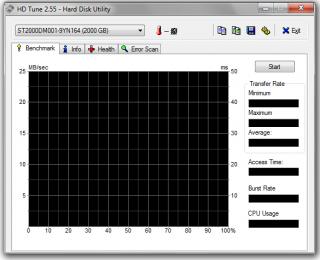
|
|
|
Jun 29 2012, 09:30 PM
|

Newbie
6 posts Joined: Dec 2009
|
i just check out this thread to find some info on what hdd to buy..but after reading the discussion make me a bit scared about the reliabiliity concern..as far as i know none of my freind having problem with hard disk before..so is the vibrating and the corrupt thing is normal or rare case?
|
|
|
Jun 29 2012, 09:39 PM
|
|
Senior Member
3,333 posts Joined: Dec 2009 
|
QUOTE(hafni_matt @ Jun 29 2012, 09:30 PM) i just check out this thread to find some info on what hdd to buy..but after reading the discussion make me a bit scared about the reliabiliity concern..as far as i know none of my freind having problem with hard disk before..so is the vibrating and the corrupt thing is normal or rare case? Normal vibrations hardly ever matter to a HDD. The HDD itself vibrates to a certain extent and it is definitely within its operating specs. What matters is a sudden shock or strong blow to a HDD. Let's just say that you throw a laptop with a running HDD on the ground, it is very likely that you'll have a dead HDD from the impact when it falls. Corruption happens but it doesn't happen to each and every HDD, even if it did, only a small portion will be corrupted and will outlive the usable lifespan of the HDD.No HDD is ever that reliable, even SSDs which are marketed as very reliable compared to HDDs are showing some reliability issues. What matters most is that if you want your data to be safe, make backups. If you want it very safe, make backups of backups and keep that copy of the backup elsewhere. |
|
|
Jun 29 2012, 11:38 PM
|
|
VIP
18,182 posts Joined: Jan 2005 From: Dagobah
|
QUOTE(wildwestgoh @ Jun 29 2012, 07:04 AM) Then perform LLF (Low Level Format) to rectify the bad sectors, it could be saved or worst, translate it to "Reallocated Sector Count" means the sector(s) is(are) now permanently damaged and get replaced by spare sector(s), every HDD has it. Actually, nowadays you cannot really "LLF" (low level format) the HDD anymore. The HDD internal controller simply remaps the bad/weak sector to a an available spare sector. Very often this happens automatically (whenever the sector is being accessed or verified, usually the controller will try to "recover" the sector first and if fails then remaps that sector to a spare one). True low level format is actually done in the factory itself where the platters are evaluated and defects mapped out. If the SMART after LLF has "Reallocated Sector Count" then if you have time, perform another time, if the attribute not increasing means others sectors still in good condition, if it's increasing then send for RMA. I am recently have 2 cases of my own, the Seagate 500GB and my Western Digital 320GB, both has "Pending Sector Count", and yes it crashed my PC, for no apparent reason it'll BSOD, I tried LLF and it seems fine for now, keep an eye on such HDD, if it does happen again, try to convince the manufacturer to give you a RMA, that drive is not in good working condition any more, well, if the warranty still valid.  QUOTE(-kytz- @ Jun 29 2012, 05:55 PM) Any other program to check for bad sectors? Try HDTune... QUOTE(hafni_matt @ Jun 29 2012, 09:30 PM) i just check out this thread to find some info on what hdd to buy..but after reading the discussion make me a bit scared about the reliabiliity concern..as far as i know none of my freind having problem with hard disk before..so is the vibrating and the corrupt thing is normal or rare case? Its not a rare case actually, in fact its very common. Other sources of HDD problems are power supply issues and heat.  QUOTE(dma0991 @ Jun 29 2012, 09:39 PM) Normal vibrations hardly ever matter to a HDD. The HDD itself vibrates to a certain extent and it is definitely within its operating specs. What matters is a sudden shock or strong blow to a HDD. Let's just say that you throw a laptop with a running HDD on the ground, it is very likely that you'll have a dead HDD from the impact when it falls. Corruption happens but it doesn't happen to each and every HDD, even if it did, only a small portion will be corrupted and will outlive the usable lifespan of the HDD. Actually vibrations do matter to the HDD. That's because the read/write head is actually floating on a cushion of air, and the armature are not 100% rigid. If ever the vibrations (or knocks) is strong enough to cause the head to touch, scrape and/or crash onto the delicate platter surface spinning at high speeds (nowadays 7200rpm is pretty normal for majority of desktop HDDs), then that could create many problems including bad sectors and drive failure (due to read/write head damage). QUOTE(dma0991 @ Jun 29 2012, 09:39 PM) No HDD is ever that reliable, even SSDs which are marketed as very reliable compared to HDDs are showing some reliability issues. What matters most is that if you want your data to be safe, make backups. If you want it very safe, make backups of backups and keep that copy of the backup elsewhere. Its a common fallacy for many to think that external HDDs and/or HDDs as a backup device. As HDDs can fail anytime and suddenly (without warning), the practice of redundancy is required to keep the data safe (the likelihood of two drives failing at the same time is far less). Another backup method would be to burn them to high quality CDR and/or DVDR (as mentioned earlier).  This post has been edited by lex: Jun 29 2012, 11:39 PM |
|
|
Jun 29 2012, 11:50 PM
|
|
Senior Member
3,333 posts Joined: Dec 2009
|
QUOTE(lex @ Jun 29 2012, 11:38 PM) Actually vibrations do matter to the HDD. That's because the read/write head is actually floating on a cushion of air, and the armature are not 100% rigid. If ever the vibrations (or knocks) is strong enough to cause the head to touch, scrape and/or crash onto the delicate platter surface spinning at high speeds (nowadays 7200rpm is pretty normal for majority of desktop HDDs), then that could create many problems including bad sectors and drive failure (due to read/write head damage). It certainly does but I'm quite certain modern HDDs are able to park the read/write head in case of regular vibrations, minimizing the damage if any exists. This isn't the case if a stronger impact happens and the HDD can't react just as fast. I just think that many are just worried that their HDDs would die even at the slightest vibration. |
|
|
Jun 30 2012, 03:19 AM
|
|
VIP
18,182 posts Joined: Jan 2005 From: Dagobah
|
QUOTE(dma0991 @ Jun 29 2012, 11:50 PM) It certainly does but I'm quite certain modern HDDs are able to park the read/write head in case of regular vibrations, minimizing the damage if any exists. This isn't the case if a stronger impact happens and the HDD can't react just as fast. I just think that many are just worried that their HDDs would die even at the slightest vibration. Nope, most HDDs do not simply park the head in case of vibrations. Otherwise the HDD would be parking the head so often that it slows down the HDD totally. Do you realize that without that cushion of air, the read/write head would simply touch/scrape/crash into the platter surface? That cushion of air is created by the platter spinning at high speeds. The air cushion gap between the read/write head and the platter surface is microscopic. If ever the spin speed slows down (due to bad/failing motor, insufficient/inconsistent power supply, etc) and could not maintain that cushion of air then a head crash can occur (scraping the delicate platter surface as a result). Anyway, any additional vibrations are not good for the HDD especially when the HDD is running. |
| Change to: |  0.0200sec 0.0200sec
 0.32 0.32
 6 queries 6 queries
 GZIP Disabled GZIP Disabled
Time is now: 2nd December 2025 - 01:50 AM |
 Quote
Quote
