

icic, if they being bought by WD, means next time warranty will go back to WD, arrr... hate WD
tq for your answer
All About Harddisk Thread V4
All About Harddisk Thread V4
|
|
 Jun 19 2012, 03:48 PM Jun 19 2012, 03:48 PM
|
 
Junior Member
433 posts Joined: Apr 2012 
|
icic, if they being bought by WD, means next time warranty will go back to WD, arrr... hate WD
tq for your answer |
|
|
|
|
|
Jun 20 2012, 12:08 AM
|

Senior Member
2,250 posts Joined: Jan 2003 From: Penang / Bentong, Pahang / Genting  
|
QUOTE(Mac Man @ LYF @ Jun 19 2012, 03:48 PM) icic, if they being bought by WD, means next time warranty will go back to WD, arrr... hate WD believe me u'll hate seagate's one even more, espec if u rma a samsung drive! tq for your answer   |
|
|
Jun 20 2012, 07:13 AM
|

Senior Member
2,215 posts Joined: Jul 2005
|
QUOTE(SnoWFisH @ Jun 20 2012, 12:08 AM) believe me u'll hate seagate's one even more, espec if u rma a samsung drive! Please elaborate more on this, you have experienced this?  I just RMA one of my Samsung drive bought last year, my other 2 older drive still OK though.  Since I ask one of the shop that I bought it from to do all the RAM for me (pay like RM30+) so I don't know how's the procedure like cause I'm afraid I might mess up and end up costing more than I have to pay him to do the better job. |
|
|
Jun 20 2012, 09:07 AM
|
|
Senior Member
2,250 posts Joined: Jan 2003 From: Penang / Bentong, Pahang / Genting
|
my colleague rma his samsung 640GB HDD (external).
Seagate took 3 weeks to return a refurbished one. Which is full of scratches and got a few cracks on the case. So he returned this one back to seagate, and seagate took another 2 weeks to return back to him. the process is quite simple actually...u submit an online rma report...u get ur rma number...u pack ur hdd and post it to them with ur rma number attached...and wait... |
|
|
Jun 20 2012, 06:22 PM
|

Senior Member
1,680 posts Joined: Nov 2004 
|
any good internal 1 gb/1.5 tb recommendation guys?
|
|
|
 Jun 21 2012, 06:54 AM Jun 21 2012, 06:54 AM
|
 
VIP
18,182 posts Joined: Jan 2005 From: Dagobah
|
QUOTE(sotong168 @ Jun 14 2012, 08:05 PM) tape is the most reliable method since we r talking about reliability over here. dvd/blu-ray media is another option too for data safekeeping rather than hdd. Tape isn't that all reliable. Very prone to moisture, fungus, tape wear and degradation over time. Anyone who used those VHS tapes before knows what I meant. The DAT tapes aren't that much different from video tape recording technology. As for DVD and BD media, those pretty much depends on the quality of the disc itself (usually based on manufacturer). Have used certain CD and DVD media that already lasts very long (e.g. the original real Kodak Gold Utima, not the later batch with greenish dye). Also have encountered those CD and DVD media that degrades over time (plenty of them, mostly el-cheapo brands).  QUOTE(,Jun 17 2012, 05:08 AM) Guys, having multiple times copying files over and over will cause some data loses? Besides this...Some of my movie files are corrupted or having some glitch during scenes time and also not to mentions mp3. QUOTE(everling @ Jun 17 2012, 02:38 PM) Copying files over and over will normally not cause data loss. It could be bad RAM as sotong168 suggested, or it could be that you have bad sectors, or that your HDD is dying. I would recommend doing a full HDD scan and checking the SMART attributes. You can use the HDDScan software that is linked in the first post. @Kr0ll3R, do you use any 3rd party copy utilities? You may want to check your cables as well. Also some old chipsets (on ancient machines) such as the VIA 686B southbridge have data corruption issues with UDMA enabled (also becomes more significant if a SoundBlaster Live! soundcard is present). Certain NVIDIA chipsets also have this issue (with SoundBlaster Live! also)...  QUOTE(SnoWFisH @ Jun 20 2012, 09:07 AM) my colleague rma his samsung 640GB HDD (external). Not sure about Seagate's externals. For Seagate internal ones, mine took surprisingly less than a week. And that was very recently. Just submit the online RMA order, print the RMA order and then pass together with the HDDs directly to their RMA center (somewhere in Shah Alam, refer to Hardware Dsitributor / RMA Claim Addressess, if u don't know where to claim warranty). No need to pack nor post to them... Seagate took 3 weeks to return a refurbished one. Which is full of scratches and got a few cracks on the case. So he returned this one back to seagate, and seagate took another 2 weeks to return back to him. the process is quite simple actually...u submit an online rma report...u get ur rma number...u pack ur hdd and post it to them with ur rma number attached...and wait...  QUOTE(matt_rix @ Jun 20 2012, 06:22 PM) any good internal 1 gb/1.5 tb recommendation guys? Plenty, there's the performance ones like Western Caviar Black or Enterprise level drives such as the Raid Editions. Of course, most people (including myself) would recommend the Caviar Black model (if you can afford). Do state your budget...  This post has been edited by lex: Jun 21 2012, 06:59 AM |
|
|
|
|
|
Jun 21 2012, 08:04 AM
|

Junior Member
223 posts Joined: Jan 2005
|
Anyone have seagate ST2000DM001, can detect the temperature??
I tried to use HDDTemp and Everest also cant detect the temperature |
|
|
Jun 21 2012, 11:29 AM
|
|
Senior Member
2,215 posts Joined: Jul 2005
|
QUOTE(okboy @ Jun 21 2012, 08:04 AM) Anyone have seagate ST2000DM001, can detect the temperature?? What version of HDDTemp are you using? and Everest? That's old, search for Aida64.I tried to use HDDTemp and Everest also cant detect the temperature I use Speedfan by the way, great way to detect all temperature sensors for almost all types of CPU, mainboard, GPU, HDD. http://almico.com/speedfan.php |
|
|
Jun 21 2012, 09:41 PM
|
|
Junior Member
223 posts Joined: Jan 2005
|
QUOTE(wildwestgoh @ Jun 21 2012, 11:29 AM) What version of HDDTemp are you using? and Everest? That's old, search for Aida64. i use the speedfan to check the temperature, it show 0c for this hardisk... I use Speedfan by the way, great way to detect all temperature sensors for almost all types of CPU, mainboard, GPU, HDD. http://almico.com/speedfan.php  |
|
|
Jun 21 2012, 10:55 PM
|
 
Elite
8,711 posts Joined: Nov 2007 From: Butterworth, PG / Machang, Kelantan
|
QUOTE(okboy @ Jun 21 2012, 09:41 PM) i use the speedfan to check the temperature, it show 0c for this hardisk... use HD Tune it shows 41C for mine  
|
|
|
Jun 21 2012, 11:13 PM
|
|
Junior Member
223 posts Joined: Jan 2005
|
QUOTE(owikh84 @ Jun 21 2012, 10:55 PM) use HD Tune it shows 41C for mine 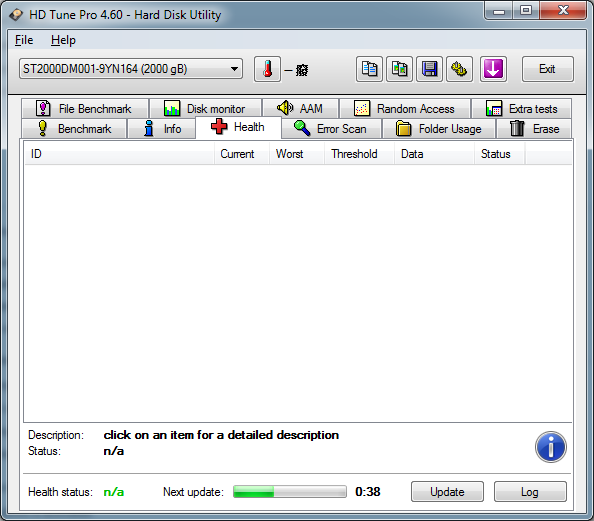 so weird... |
|
|
Jun 21 2012, 11:19 PM
|
|
Elite
8,711 posts Joined: Nov 2007 From: Butterworth, PG / Machang, Kelantan
|
QUOTE(okboy @ Jun 21 2012, 11:13 PM) so weird... I'm using SATA2 port |
|
|
Jun 22 2012, 12:08 AM
|
|
Junior Member
223 posts Joined: Jan 2005
|
QUOTE(owikh84 @ Jun 21 2012, 11:19 PM) Try other SATA port. i update my bios, now can detect alreadyI'm using SATA2 port and using SATA3 port  |
|
|
|
|
|
Jun 22 2012, 07:40 AM
|
|
Senior Member
2,215 posts Joined: Jul 2005
|
QUOTE(okboy @ Jun 22 2012, 12:08 AM) i update my bios, now can detect already Seems like Samsung old "firmware-disease", can't be detect or use on some mainboard and require mainboard vendor to update their BIOS instead. and using SATA3 port Glad that you found your problem and solved it.  |
|
|
Jun 22 2012, 09:09 AM
|

Senior Member
1,127 posts Joined: Feb 2008
|
Hi All Need some input.
My secondary internal HDD today morning got CDC trying to copy from it. THen, I disconnect the primary HDD and boot up with the secondary. After that, I tried to copy the file again okay can copy, can delete and read but noticed there is pause in slight between. To copy a 1g File about 1 minute Speed fan test - short test no errors. Extended test 90% then -> 80% -> have to go to work. My smart is » Click to show Spoiler - click again to hide... « Just move house so PC may goten abit of bump .Thanks for input.  This post has been edited by alvinfks78: Jun 22 2012, 11:04 AM |
|
|
Jun 22 2012, 04:09 PM
|
|
Senior Member
2,215 posts Joined: Jul 2005
|
QUOTE(alvinfks78 @ Jun 22 2012, 09:09 AM) » Click to show Spoiler - click again to hide... « Then use Low Level Format software to runs through once, and check the SMART again. Download the program here. If your SMART of the "Pending Sector Count" is 0 after LLF (low level format) then it's good, then check "Reallocated Sector Count", if there's 0 then your drive is still working fine, but keep an eye on it. If somehow your SMART indicate 1 or more on attribute "Reallocated Sector Count" then you should be watching it, if you can perform another LLF and see if that attribute is increasing, if it's then send for RMA immediately (if your warranty still valid), it's an indication of internal hardware failure. Check your Samsung drive warranty here. This post has been edited by wildwestgoh: Jun 22 2012, 04:10 PM |
|
|
Jun 22 2012, 05:24 PM
|
|
Senior Member
1,127 posts Joined: Feb 2008
|
QUOTE(wildwestgoh @ Jun 22 2012, 05:09 PM) Hi, according to the attributes, I assume the drive can be save provided you quickly backup the data while you at it, be it another drive or external. Thanks for reply. Then use Low Level Format software to runs through once, and check the SMART again. Download the program here. If your SMART of the "Pending Sector Count" is 0 after LLF (low level format) then it's good, then check "Reallocated Sector Count", if there's 0 then your drive is still working fine, but keep an eye on it. If somehow your SMART indicate 1 or more on attribute "Reallocated Sector Count" then you should be watching it, if you can perform another LLF and see if that attribute is increasing, if it's then send for RMA immediately (if your warranty still valid), it's an indication of internal hardware failure. Check your Samsung drive warranty here. . will try to I think HDD still got warranty bought may 2011. |
|
|
Jun 22 2012, 07:36 PM
|
|
Senior Member
2,215 posts Joined: Jul 2005
|
QUOTE(alvinfks78 @ Jun 22 2012, 05:24 PM) Thanks for reply. And oh, before you go on with warranty, Seagate enforced that you must run their SeaTools and get the code to confirm the drive failure for RMA, otherwise Seagate will only ship it back to you at your cost. . will try to I think HDD still got warranty bought may 2011. |
|
|
Jun 22 2012, 11:31 PM
|

Senior Member
1,677 posts Joined: Sep 2007 From: Pills & Thrills
|
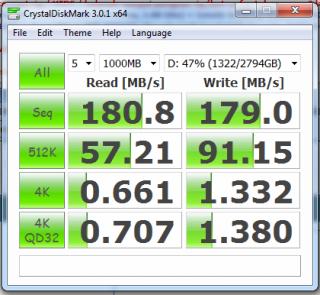
my Seagate ST3000DM001...
|
|
|
Jun 23 2012, 09:05 AM
|
|
Senior Member
1,127 posts Joined: Feb 2008
|
QUOTE(wildwestgoh @ Jun 22 2012, 08:36 PM) And oh, before you go on with warranty, Seagate enforced that you must run their SeaTools and get the code to confirm the drive failure for RMA, otherwise Seagate will only ship it back to you at your cost. Yes I realised that when trying to fill up the form Thanks for tip |
| Change to: |  0.0317sec 0.0317sec
 0.76 0.76
 6 queries 6 queries
 GZIP Disabled GZIP Disabled
Time is now: 2nd December 2025 - 07:38 PM |
 Quote
Quote