Welcome Guest ( Log In | Register )

Bump Topic Topic Closed RSS Feed
115 Pages « < 57 58 59 60 61 > » Bottom

Outline · [ Standard ] · Linear+

Unifi Official TM UniFi High Speed Broadband Thread V13, FREE Installation & 1-month subscription

views
     
iipohbee
post Dec 18 2011, 09:37 PM

On my way
****
Senior Member
603 posts

Joined: Dec 2008
QUOTE(khalpowers @ Dec 18 2011, 09:22 PM)
true...myb I got "ong".... biggrin.gif ...TM people sure surprised bcoz I never faced any problem.at all...the best thing is the wifi signal is damn gud yoo....btw router not a big problem .....if someday get failure then just buy a new one loo....hehe
*
If like that better ask TM don't supply and allow 3rd party Unifi certified RG to be sold in market then charge cheaper monthly rates.

This is better than to source unknown OEM models from backlane China factories and stamp own brand on it.

How come you don't see this sort of crap offers from Singtel, HK PCCW, or even China. Only the worst of 3rd world countries do things like these. It indirectly tarnish company reputation only. Even in China, they stamp China Telecom logo on the casing but retain the brand name on it like ZTE or Huawei on the box.

This thread got comments on it:

http://forum.lowyat.net/topic/1958199/all

This post has been edited by iipohbee: Dec 18 2011, 09:44 PM
SUSkhalpowers
post Dec 18 2011, 09:50 PM

Regular
******
Senior Member
1,966 posts

Joined: Dec 2009
QUOTE(iipohbee @ Dec 18 2011, 10:37 PM)
If like that better ask TM don't supply and allow 3rd party Unifi certified RG to be sold in market then charge cheaper monthly rates.

This is better than to source unknown OEM models from backlane China factories and stamp own brand on it.

How come you don't see this sort of crap offers from Singtel, HK PCCW, or even China. Only the worst of 3rd world countries do things like these. It indirectly tarnish company reputation only. Even in China, they stamp China Telecom logo on the casing but retain the brand name on it like ZTE or Huawei on the box.

This thread got comments on it:

http://forum.lowyat.net/topic/1958199/all
*
wat to do mang....here is bolehland......did u hear something about "songlap"...
debbierowe
post Dec 18 2011, 09:53 PM

so fast 6 stars di...
******
Senior Member
1,107 posts

Joined: May 2009
QUOTE(khalpowers @ Dec 18 2011, 09:50 PM)
wat to do mang....here is bolehland......did u hear something about "songlap"...
*
yes, dun mean to start, but so many IT contractors out there, am sure they r able to get... more "neat" ones blush.gif
wongsf
post Dec 18 2011, 11:13 PM

Getting Started
**
Junior Member
187 posts

Joined: Sep 2010
QUOTE(wongsf @ Dec 17 2011, 11:36 PM)
BTU got lifetime warranty.
*
I very seldom ón' the STB so I don't have to worry about the one year warranty, but I may get a TP link router.
HeavensGift
post Dec 19 2011, 12:27 AM

Getting Started
**
Junior Member
57 posts

Joined: Mar 2009
hey guys. i just got my Unifi. is it possible to set the setting to limit the bandwidth speed on WiFi? using the default modem.

This post has been edited by HeavensGift: Dec 19 2011, 12:27 AM
IwanAGP
post Dec 19 2011, 12:35 AM

Nothing is Possible!
*******
Senior Member
9,590 posts

Joined: Jan 2008
From: S'wak||KL||SG


QUOTE(wongsf @ Dec 18 2011, 11:13 PM)
I very seldom ón' the STB so I don't have to worry about the one year warranty, but I may get a TP link router.
*
TP-link got 2 years biggrin.gif
Kaput claim. Kaput after warranty get another unit. All TP-link bloody cheap blush.gif
1282009
post Dec 19 2011, 01:28 AM

Look at all my stars!!
*******
Senior Member
4,229 posts

Joined: Jan 2009
Hi guys, can I use my existing router (ASUS RT-N12) with Unifi which I plan to subscribe soon?


soonwai
post Dec 19 2011, 01:39 AM


********
All Stars
11,458 posts

Joined: Oct 2007
From: KL


You can if it's ASUS RT-N12 hardware vB1. Check here for info:

http://unifi.athena.my/
http://klseet.com/
sohlican
post Dec 19 2011, 07:22 AM

Casual
***
Junior Member
340 posts

Joined: Jan 2003
From: Malaysia


I have been using my Linksys WRT54GL with Unifi for the past 2 years. smile.gif
debbierowe
post Dec 19 2011, 08:13 AM

so fast 6 stars di...
******
Senior Member
1,107 posts

Joined: May 2009
QUOTE(soonwai @ Dec 19 2011, 01:39 AM)
You can if it's ASUS RT-N12 hardware vB1. Check here for info:

http://unifi.athena.my/
http://klseet.com/
*
both the sifus website, read out like aliens language for me... sweat.gif

its ok la.. i'll worry later, after my unifi white-orange modem kaputed. laugh.gif
IwanAGP
post Dec 19 2011, 11:53 AM

Nothing is Possible!
*******
Senior Member
9,590 posts

Joined: Jan 2008
From: S'wak||KL||SG


QUOTE(debbierowe @ Dec 19 2011, 08:13 AM)
both the sifus website, read out like aliens language for me...  sweat.gif

its ok la.. i'll worry later, after my unifi white-orange modem kaputed.  laugh.gif
*
Alien??? doh.gif

http://klseet.com/index.php?option=com_con...=122&Itemid=110
Now, refer this, picture No. 7 from top. See there written "H/W ver. B1". Go take your N12 and see if the exactly same wording appear on the label underneath your N12. Flip it over to find it. Else, simpler way, how long is the antenna of your router? A finger long or more than two fingers long. (Thumbs up for nice description yo icon_rolleyes.gif ) Because the older hardware version has short antenna about the length of a finger while newer one has gigantic antenna. I think around 15cm, not very sure. Lazy to measure my tp-link's antenna length. They should have the same length. For this comparison, refer last 3rd pic. The one on the left is the UniFi-compatible one.
pizza0502
post Dec 19 2011, 01:02 PM

Getting Started
**
Junior Member
213 posts

Joined: Mar 2007
I've subscribe unifi tru online...
but my 1st bill is what I've still stated RM130+...
Is this suppose to be the 1st month free?
soonwai
post Dec 19 2011, 01:43 PM


********
All Stars
11,458 posts

Joined: Oct 2007
From: KL


QUOTE(pizza0502 @ Dec 19 2011, 01:02 PM)
I've subscribe unifi tru online...
but my 1st bill is what I've still stated RM130+...
Is this suppose to be the 1st month free?
*
I think your first bill is suppose to include 1 month advance payment. So would have been RM300 for VIP5. So i guess yours is correct. Info from unify.my FAQ page under "When will I get my first bill after I subscribe to the UniFi package?"
kimyee73
post Dec 19 2011, 01:54 PM

Regular
******
Senior Member
1,007 posts

Joined: Oct 2006
From: island up north


My installation were supposed to be on Jan 2nd but was happy that it get pull-in to Dec 16. The installers are TM employees and came in TM car at about 10am. He is very polite and friendly. However their contractor would pull the cable from DP to the pit in my house thru several manholes. They started by inserting the black fiber into a hard protective sleeving and cut the cable to length. After that they pull the cable from DP to 1st manhole at the main road and would pull it to another manhold for my row of houses. Lo and behold..the manhole is locked with padlock. The TM installer went back to their exchange somewhere to look for keys. After a long wait, they came back with a bunch of keys at around 12pm but none of the keys work. Thats it...installation aborted and need to reschedule. TM contractor pull out the cables and closed all manholes. That was last Friday and until now TM has yet to reschedule my installation. Maybe they are still looking for the key...
Dark Lord
post Dec 19 2011, 02:16 PM

Getting Started
**
Junior Member
288 posts

Joined: Dec 2005
From: Heaven and Hell


My dad just went to TMpoint to change the preferred email to the correct one. (They seriously type wrong email...)
But, I still can't get my password for myunifi... #$*#*&%#)(#$*
debbierowe
post Dec 19 2011, 02:18 PM

so fast 6 stars di...
******
Senior Member
1,107 posts

Joined: May 2009
QUOTE(IwanAGP @ Dec 19 2011, 11:53 AM)
Alien???  doh.gif

http://klseet.com/index.php?option=com_con...=122&Itemid=110
Now, refer this, picture No. 7 from top. See there written "H/W ver. B1". Go take your N12 and see if the exactly same wording appear on the label underneath your N12. Flip it over to find it. Else, simpler way, how long is the antenna of your router? A finger long or more than two fingers long. (Thumbs up for nice description yo  icon_rolleyes.gif ) Because the older hardware version has short antenna about the length of a finger while newer one has gigantic antenna. I think around 15cm, not very sure. Lazy to measure my tp-link's antenna length. They should have the same length. For this comparison, refer last 3rd pic. The one on the left is the UniFi-compatible one.
*
is not like buying any new hardware
plug-in>click install>next >next> next > next> finish> "retart now?" or "i will restart later"

why so many manual configurations la... and then wat is firmware rclxub.gif and seemed like need to do something extra to be able to get IPTV ?

its really tough for ppl "end user" like me

==
by the way back to the unifi discussion... when will HIPTV get more channels like Astro, Wah Lai Toi, HBO, Star Movies, Star World ...??? their channels now are crappy... tongue.gif
SnoWFisH
post Dec 19 2011, 02:19 PM

Look at all my stars!!
*******
Senior Member
2,250 posts

Joined: Jan 2003
From: Penang / Bentong, Pahang / Genting


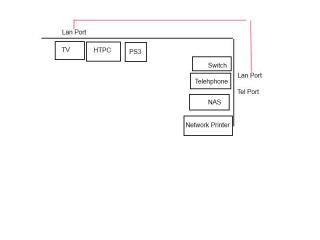
I got a question to regarding Unifi networking system now. Can you use the IPTV port for internet later? Currently my network for my house is like the attached

» Click to show Spoiler - click again to hide... «


I am currently using streamyx, which is actually the all in one wireless Modem/router/switch. The switch connects to the NAS and printer directly which are near the each other, and further connects to the HTPC at the TV Hall via a pair of LAN Ports (which I installed during renovation of the house, so the ports are in the wall).

I understand that the STB of unifi have to use the IPTV port of the switch. Problem is that port at the TV hall now has to be shared by both the HTPC and IPTV. I don't mind getting another switch at the TV Hall, but is it possible to do so?

Homeplug doesnt work as the power ports are no different phase, I tried before and they will not pair up.

This post has been edited by SnoWFisH: Dec 19 2011, 02:20 PM
debbierowe
post Dec 19 2011, 02:23 PM

so fast 6 stars di...
******
Senior Member
1,107 posts

Joined: May 2009
QUOTE(kimyee73 @ Dec 19 2011, 01:54 PM)
My installation were supposed to be on Jan 2nd but was happy that it get pull-in to Dec 16. The installers are TM employees and came in TM car at about 10am. He is very polite and friendly. However their contractor would pull the cable from DP to the pit in my house thru several manholes. They started by inserting the black fiber into a hard protective sleeving and cut the cable to length. After that they pull the cable from DP to 1st manhole  at the main road and would pull it to another manhold for my row of houses. Lo and behold..the manhole is locked with padlock. The TM installer went back to their exchange somewhere to look for keys. After a long wait, they came back with a bunch of keys at around 12pm but none of the keys work. Thats it...installation aborted and need to reschedule. TM contractor pull out the cables and closed all manholes. That was last Friday and until now TM has yet to reschedule my installation. Maybe they are still looking for the key...
*
very big padlock? wat if they cant find the key? break the lock?

hope u resolve the issue soon

by the way, try call the 1300 number, and lodge a report on this case, this way they will have to work on your report until it is resolve, atleast u can have something to track , there'll be a report number after u file the complain
rattan
post Dec 19 2011, 02:47 PM

Droid
Group Icon
Trade Dispute
3,379 posts

Joined: Apr 2006
From: KL


QUOTE(kimyee73 @ Dec 19 2011, 01:54 PM)
My installation were supposed to be on Jan 2nd but was happy that it get pull-in to Dec 16. The installers are TM employees and came in TM car at about 10am. He is very polite and friendly. However their contractor would pull the cable from DP to the pit in my house thru several manholes. They started by inserting the black fiber into a hard protective sleeving and cut the cable to length. After that they pull the cable from DP to 1st manhole  at the main road and would pull it to another manhold for my row of houses. Lo and behold..the manhole is locked with padlock. The TM installer went back to their exchange somewhere to look for keys. After a long wait, they came back with a bunch of keys at around 12pm but none of the keys work. Thats it...installation aborted and need to reschedule. TM contractor pull out the cables and closed all manholes. That was last Friday and until now TM has yet to reschedule my installation. Maybe they are still looking for the key...
*
Its going to take then very long time to re-schedule or probably they wont even bother. Best you start pushing them, make complaints to CS and make sure you get a report number.
IwanAGP
post Dec 19 2011, 03:04 PM

Nothing is Possible!
*******
Senior Member
9,590 posts

Joined: Jan 2008
From: S'wak||KL||SG


QUOTE(debbierowe @ Dec 19 2011, 02:18 PM)
is not like buying any new hardware
plug-in>click install>next >next> next > next> finish>  "retart now?" or "i will restart later"

why so many manual configurations la... and then wat is firmware  rclxub.gif and seemed like need to do something extra to be able to get IPTV ?

its really tough for ppl "end user" like me

==
by the way back to the unifi discussion... when will HIPTV get more channels like Astro, Wah Lai Toi, HBO, Star Movies, Star World ...??? their channels now are crappy...  tongue.gif
*
It isn't too hard either doh.gif
Step by step guide is already provided. Follow closely and you're good to go.

Anyway, why don't you answer my question first. That is, to find out your hardware revision. It's something you no need to get your hands dirty to look for in on your computer. It's just right on the router. The appearance and the label. The thing is that. If your N12 is the old one, it can't even be used with the provided firmware (for use with UniFi and IPTV) and that means you can never replace it with the provided router.

Those channels you mentioned, license for malaysia is held by Astro. Unless TM does something with Astro, else it's impossible for IPTV to have those channels.

QUOTE(SnoWFisH @ Dec 19 2011, 02:19 PM)
I got a question to regarding Unifi networking system now. Can you use the IPTV port for internet later? Currently my network for my house is like the attached

» Click to show Spoiler - click again to hide... «


I am currently using streamyx, which is actually the all in one wireless Modem/router/switch. The switch connects to the NAS and printer directly which are near the each other, and further connects to the HTPC at the TV Hall via a pair of LAN Ports (which I installed during renovation of the house, so the ports are in the wall).

I understand that the STB of unifi have to use the IPTV port of the switch. Problem is that port at the TV hall now has to be shared by both the HTPC and IPTV. I don't mind getting another switch at the TV Hall, but is it possible to do so?

Homeplug doesnt work as the power ports are no different phase, I tried before and they will not pair up.
*
Seeing your configuration, I suggest you to place your BTU, STB and the very FIRST ROUTER(either dir615 or tm RND) at the location where your TV is. Since the phone is wireless, I think you won't mind it to be place differently. When your BTU is installed there, ROUTER after BTU and STB after ROUTER. From there, your router still has 3 LAN Port for Internet while LAN Port 4 is solely for IPTV. Your HTPC and PS3 takes up 2 of the remaining LAN Ports and the 3rd remaining LAN Port, connect to your Wall Socket(Your lan port on the wall) and the other end connect to your switch. It would work. Disable DHCP in your switch and you're good to go.

115 Pages « < 57 58 59 60 61 > » Top
Topic ClosedOptions
 

Change to:
| Lo-Fi Version
0.0332sec    0.18    6 queries    GZIP Disabled
Time is now: 7th December 2025 - 03:13 AM