Welcome Guest ( Log In | Register )

Outline · [ Standard ] · Linear+

Enterprise Networking Mikrotik Routers (RouterBoard & RouterOS), User and owner discussion group

views
     
NovaPrime
post May 11 2023, 08:58 PM

New Member
*
Newbie
45 posts

Joined: Apr 2015
QUOTE(hasmidzul_jojo @ May 11 2023, 08:09 PM)
Actually,i do like gl-inet flint,but since I just used to mikrotik GUI..I just wait for them to introduce new hardware on mikrotik line up.

Maybe try spoofing MAC address on the TIME stock router and put it on your new router.
*
the gl.inet router not with me anymore haha.... i dont think is the MAC address issue... as for now im using the Mercusys MR80x so far so good on torrent can get max speed easily
hasmidzul_jojo
post May 11 2023, 09:18 PM

Getting Started
**
Junior Member
203 posts

Joined: Feb 2008
Since your problem solve,it is ok then.No need to chase another router if current router not giving any problem.
soonwai
post May 11 2023, 09:38 PM


********
All Stars
11,459 posts

Joined: Oct 2007
From: KL


QUOTE(NovaPrime @ May 11 2023, 03:44 PM)
Hi , I'm complete newbie here for Mikrotik Routers. Does hap ax3 easy to setup just like those consumer router like TPlink and asus? Just type in PPPOE account and password then setup WIFI SSID and PW you are good to go?
*
Quite easy. Here got guide for UniFi: https://forum.lowyat.net/topic/5295840
tng55
post May 11 2023, 11:37 PM

Regular
******
Senior Member
1,457 posts

Joined: Sep 2021


QUOTE(go626201 @ May 11 2023, 05:32 PM)
Normally no need to do extra settings for internet access,but if you not going to tinkering with it,better buy other consumer grade router.
Normal RM300+ router should be enough for most 90% people. And need bigger coverage just buy another one to pair mesh network.
*
https://forum.lowyat.net/index.php?showtopi...ost&p=107227314
@go626201 you not yet reply back
hasmidzul_jojo
post May 12 2023, 07:06 AM

Getting Started
**
Junior Member
203 posts

Joined: Feb 2008
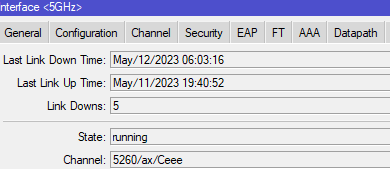
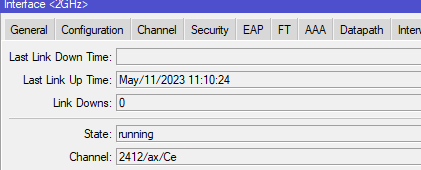
@soonwai,hap ax3 wifi 6 indeed have some problem.It is the "key handshake timeout thing",although the signal strengh is good.
On the 5GHz channel,the physical wifi indicate "down" several time but not on the 2GHz channel,but still rejecting clients on both band and on 2GHz client(running non AX devices) able to reconnect without intervention.
Sadly thou,on the 5Ghz ax device,i still need to scroll to setting and wifi,initiate wifi search and select the given AP,( client is not connected automatically after disconnected.)But,it only occur once(manual reconnecting) during 20hrs of test.

TWT problem introduce in the drivers?

user posted image

user posted image


OlgaC4
post May 12 2023, 08:33 AM

Look at all my stars!!
*******
Senior Member
5,296 posts

Joined: Nov 2006
Set the wifi country setting to Taiwan ada power lebih sikit. Ada tapi tak banyak. Superchannel over heat later.

This post has been edited by OlgaC4: May 12 2023, 08:35 AM
mamakap
post May 12 2023, 08:41 AM

Casual
***
Junior Member
403 posts

Joined: Jan 2005
Two days ago facing WiFi issue with my hAP AX3 when updated to 7.9 I have to downgrade to 7.8 then the WiFi is stable, the 7.10 beta didn't resolve the WiFi issue.
hasmidzul_jojo
post May 12 2023, 09:03 AM

Getting Started
**
Junior Member
203 posts

Joined: Feb 2008
QUOTE(OlgaC4 @ May 12 2023, 08:33 AM)
Set the wifi country setting to Taiwan ada power lebih sikit. Ada tapi tak banyak. Superchannel over heat later.
*
Thanks for the suggestion.

Mine were set to Malaysia,channel manually selected based on unoccupied bandwidth.
I dont need range for my application,our house is small(i catch fish for a living,not wealthy la).
I basically need 5Ghz only,since i have guest at the house at the moment,i switched on the 2.4GHz(for mobile phones).
Laptops and desktop pc all hardwired.

Later may need switch for a couple of cctv cameras.

All i need are stable responsive network,wireguard access and thats about it.wifi speed is not a concern,most of my time only at desktop pc.


OlgaC4
post May 12 2023, 10:27 AM

Look at all my stars!!
*******
Senior Member
5,296 posts

Joined: Nov 2006
QUOTE(hasmidzul_jojo @ May 12 2023, 09:03 AM)
Thanks for the suggestion.

Mine were set to Malaysia,channel manually selected based on unoccupied bandwidth.
I dont need range for my application,our house is small(i catch fish for a living,not wealthy la).
I basically need 5Ghz only,since i have guest at the house at the moment,i switched on the 2.4GHz(for mobile phones).
Laptops and desktop pc all hardwired.

Later may need switch for a couple of cctv cameras.

All i need are stable responsive network,wireguard access and thats about it.wifi speed is not a concern,most of my time only at desktop pc.
*
Catch fish lol. I love fishing. Ada port ke bang.
hasmidzul_jojo
post May 12 2023, 10:53 AM

Getting Started
**
Junior Member
203 posts

Joined: Feb 2008
QUOTE(OlgaC4 @ May 12 2023, 10:27 AM)
Catch fish lol. I love fishing. Ada port ke bang.
*
I catch fish using net drifting technique.Mostly small threadfins and gonjeng.During low tide season,i went for giant river prawns using reels and hooks(baiting).

If time permits,i do occationally catch hampala using small fishing outfits,baitfinness fishing.Old normal lure technique doesnt be as effective like before since they were easily spooked.

Mostly eaten or sold if any surplus.

On networking, moving from smoothwall to ipfire to m0nowall to pfsense and now...mikrotik,is the new home for last 5 years.Kipas susah mati.😂

zenix
post May 12 2023, 03:16 PM

Pirate Captain
*******
Senior Member
6,249 posts

Joined: Jul 2006
wow install onto old pc?
go626201
post May 12 2023, 03:21 PM

Regular
******
Senior Member
1,882 posts

Joined: Sep 2017
QUOTE(tng55 @ May 11 2023, 11:37 PM)
Most business or enterprise grade managed switch should be okay.
For brand i cant give any recommendation,since i never get used to any managed switch.

My suggestion is get a managed switch(IF Not using enterprise grade switch ),
And split your network to multiple switch,
All CCTV use 1 switch,PC use 1 switch, Wifi AP use 1 switch,others device use 1 switch or just connect to PC or Wifi switch.

Concept 1:
BTU <Ethernet> Enterprise grade router <Ethernet / SFP+> Multiple Switch <>end device
This way u just setup switch on the router size,should be isolate different switch.(Example setup Router Lan Port 2 and 4 cant communicate directly)

Concept 2:
BTU <Ethernet> mid-high Consumer grade router <Ethernet> Managed Switch <Ethernet / SFP+> managed/unmanaged Switch <>end device
This way the router is not powerful,but the traffic exchange task given to Managed switch chip to manage. (But the total uplink bandwidth is low ,unless the router and switch support LACP or LAN aggregation OR 10G router + switch)

Example: (With Mikrotik) RB5009 As router. (CCR router should be better,If you have VPN tunnel usage,get better grade router)
BTU <LAN 1 --- LAN 2> RB5009 For Unifi Access

RB5009 <LAN 3 --- LAN1> Switch A - 1G POE switch For CCTV
RB5009 <LAN 4 --- LAN1> Switch B - 1G POE or non-POE switch For AP/Mesh
RB5009 <LAN 5/6 --- LAN1/2> Switch C - 1G managed switch For PC (2Port with LACP/Link Aggregation)
RB5009 <LAN 7 --- LAN1> Switch D - 1G switch for other device

RB5009 <LAN 1 --- LAN 1> 2.5G LAN device / 2.5G switch or 2.5G Fiber optic converter(with GPON Stick to Replace BTU/ONR)

RB5009 <SFP+> 10G Server or switch or something else or GPON Stick(to Replace BTU/ONR)


Keep in mind: RB5009 Switch only have total 10G link to Router CPU.

hasmidzul_jojo
post May 12 2023, 03:31 PM

Getting Started
**
Junior Member
203 posts

Joined: Feb 2008
QUOTE(zenix @ May 12 2023, 03:16 PM)
wow install onto old pc?
*
repurpose intel 478.Cant afford pc engines board 😁
zenix
post May 12 2023, 05:32 PM

Pirate Captain
*******
Senior Member
6,249 posts

Joined: Jul 2006
QUOTE(hasmidzul_jojo @ May 12 2023, 03:31 PM)
repurpose intel 478.Cant afford pc engines board 😁
*
i got an old i7 acer lappy
monitor kaput
can use for this project hehe

but mikrotik router look sexy
simple
unlike asus punya mcm alien facehugger or spider
soonwai
post May 12 2023, 06:15 PM


********
All Stars
11,459 posts

Joined: Oct 2007
From: KL


QUOTE(hasmidzul_jojo @ May 12 2023, 07:06 AM)
@soonwai,hap ax3 wifi 6 indeed have some problem.It is the "key handshake timeout thing",although the signal strengh is good.
On the 5GHz channel,the physical wifi indicate "down" several time but not on the 2GHz channel,but still rejecting clients on both band and on 2GHz client(running non AX devices) able to reconnect without intervention.
Sadly thou,on the 5Ghz ax device,i still need to scroll to setting and wifi,initiate wifi search and select the given AP,( client is not connected automatically after disconnected.)But,it only occur once(manual reconnecting) during 20hrs of test.
...
*

mamakap
Mine ok so far. Latest config below.

ax3 7.9 wifi uptime 6 days 17 hours and counting. Last reboot 6 May.

May 2: key handshake timeout: 0, can't find PMKSA: 54
May 3: key handshake timeout: 371, can't find PMKSA: 2
May 4: key handshake timeout: 4, can't find PMKSA: 0
May 5: key handshake timeout: 0, can't find PMKSA: 0
May 6: key handshake timeout: 2, can't find PMKSA: 1
May 7: key handshake timeout: 1, can't find PMKSA: 0
May 8: key handshake timeout: 0, can't find PMKSA: 2
May 9: key handshake timeout: 0, can't find PMKSA: 1
May 10: key handshake timeout: 8, can't find PMKSA: 0
May 11: key handshake timeout: 5, can't find PMKSA: 2
May 12: key handshake timeout: 10, can't find PMKSA: 1

CODE
# may/09/2023 04:15:47 by RouterOS 7.9
# model = C53UiG+5HPaxD2HPaxD
/interface wifiwave2
set [ find default-name=wifi1 ] channel.band=5ghz-ax .skip-dfs-channels=disabled .width=20/40/80mhz \
   configuration.country=Malaysia .mode=ap .ssid=mtk disabled=no security.authentication-types=wpa2-psk,wpa3-psk \
   .disable-pmkid=no .encryption=ccmp,gcmp,ccmp-256,gcmp-256 .wps=push-button
set [ find default-name=wifi2 ] channel.band=2ghz-ax .skip-dfs-channels=disabled .width=20mhz configuration.country=\
   Malaysia .mode=ap .ssid=mtk disabled=no mtu=1500 security.authentication-types=wpa-psk,wpa2-psk .disable-pmkid=no \
   .encryption=ccmp,gcmp,ccmp-256,gcmp-256 .wps=push-button

The most notable changes from previous configs are:
1. .disable-pmkid=no (I've had this at yes or no previously. Didn't seem to make a difference.)
2. .wps=push-button (This is the first time I've enabled it. Before this, I always had WPS disabled.)

From here: https://forum.mikrotik.com/viewtopic.php?t=191304#p1001014

This post has been edited by soonwai: May 12 2023, 06:47 PM

syahpian
post May 12 2023, 08:13 PM

Enthusiast
*****
Junior Member
818 posts

Joined: Jul 2008
From: Kota Kinabalu <-> Kuala Lumpur


-edited-

This post has been edited by syahpian: May 12 2023, 08:14 PM
soonwai
post May 13 2023, 03:55 AM


********
All Stars
11,459 posts

Joined: Oct 2007
From: KL


Update: 13 May 3:50am
Finally ax3 7.9 wifi died. Total wifi uptime: 7 days 2hrs. Time to try 7.10beta.
May 12: key handshake timeout: 11, can't find PMKSA: 1
May 13: key handshake timeout: 297, can't find PMKSA: 1

hasmidzul_jojo
post May 13 2023, 08:39 AM

Getting Started
**
Junior Member
203 posts

Joined: Feb 2008
I have never have this "cant find PMKSA" on my log.

This is my wifi config

CODE
/interface/wifiwave2> print detail
Flags: M - master; D - dynamic; B - bound; X - disabled, I - inactive, R - running
0 M BR default-name="wifi2" name="2GHz" mac-address=XX:XX:XX:XX:XX:XX arp-timeout=auto radio-mac=XX:XX:XX:XX:XX:XX
       configuration.mode=ap .ssid="2GHzAX" .country=Malaysia .hide-ssid=yes
       security.authentication-types=wpa2-psk,wpa3-psk .passphrase="XX:XX:XX:XX:XX:XX"
       channel.frequency=2412 .band=2ghz-ax .width=20/40mhz .skip-dfs-channels=disabled

1 M BR default-name="wifi1" name="5GHz" mac-address=XX:XX:XX:XX:XX:XX arp-timeout=auto radio-mac=XX:XX:XX:XX:XX:XX
       configuration.mode=ap .ssid="5GHzAX" .country=Malaysia .hide-ssid=yes
       security.authentication-types=wpa2-psk,wpa3-psk .passphrase="XX:XX:XX:XX:XX:XX"
       channel.frequency=5260 .band=5ghz-ax .width=20/40/80mhz .skip-dfs-channels=disabled

2    X name="wifi3" mac-address=XX:XX:XX:XX:XX:XX arp-timeout=auto master-interface=5GHz
       configuration.mode=ap .ssid="Guests"
       security.passphrase="XX:XX:XX:XX:XX:XX"

3    X name="wifi4" mac-address=XX:XX:XX:XX:XX:XX arp-timeout=auto master-interface=2GHz
       configuration.mode=ap .ssid="Guests"
       security.passphrase="XX:XX:XX:XX:XX:XX"


What do you mean "wifi died"?Do you need to restart the router to get the wifi back on?Or just toggle reenabling wifi interface?
soonwai
post May 13 2023, 09:42 AM


********
All Stars
11,459 posts

Joined: Oct 2007
From: KL


QUOTE(hasmidzul_jojo @ May 13 2023, 08:39 AM)
I have never have this "cant find PMKSA" on my log.

This is my wifi config

CODE
/interface/wifiwave2> print detail
Flags: M - master; D - dynamic; B - bound; X - disabled, I - inactive, R - running
0 M BR default-name="wifi2" name="2GHz" mac-address=XX:XX:XX:XX:XX:XX arp-timeout=auto radio-mac=XX:XX:XX:XX:XX:XX
       configuration.mode=ap .ssid="2GHzAX" .country=Malaysia .hide-ssid=yes
       security.authentication-types=wpa2-psk,wpa3-psk .passphrase="XX:XX:XX:XX:XX:XX"
       channel.frequency=2412 .band=2ghz-ax .width=20/40mhz .skip-dfs-channels=disabled

1 M BR default-name="wifi1" name="5GHz" mac-address=XX:XX:XX:XX:XX:XX arp-timeout=auto radio-mac=XX:XX:XX:XX:XX:XX
       configuration.mode=ap .ssid="5GHzAX" .country=Malaysia .hide-ssid=yes
       security.authentication-types=wpa2-psk,wpa3-psk .passphrase="XX:XX:XX:XX:XX:XX"
       channel.frequency=5260 .band=5ghz-ax .width=20/40/80mhz .skip-dfs-channels=disabled

2    X name="wifi3" mac-address=XX:XX:XX:XX:XX:XX arp-timeout=auto master-interface=5GHz
       configuration.mode=ap .ssid="Guests"
       security.passphrase="XX:XX:XX:XX:XX:XX"

3    X name="wifi4" mac-address=XX:XX:XX:XX:XX:XX arp-timeout=auto master-interface=2GHz
       configuration.mode=ap .ssid="Guests"
       security.passphrase="XX:XX:XX:XX:XX:XX"


What do you mean "wifi died"?Do you need to restart the router to get the wifi back on?Or just toggle reenabling wifi interface?
*
Totally dead. All devices not able to connect. Toggling the wifi interfaces doesn't work. Have to reboot.

PMKSA is not really a problem. I think I have that because my 2.4Ghz is wpa & wpa2 while my 5Ghz is wpa2 & wpa3.

When the wifi dies, I have tons of "key handshake timeout." Supposedly fixed in 7.10beta5.

This post has been edited by soonwai: May 13 2023, 09:44 AM
soonwai
post May 13 2023, 05:39 PM


********
All Stars
11,459 posts

Joined: Oct 2007
From: KL


ax3 7.10beta5
It's only been 12 hours but so far 1 x "can't find PMKSA" on the 2.4Ghz. No "key handshake timeout."
2.4Ghz is wpa & wpa2. 5Ghz is wpa2 & wpa3.

Looking good.

Update:
14 May 5:00pm. ax3 7.10beta5 wifi died again. Total wifi uptime: 1 days 12hrs.
15 May 12:20pm. ax3 7.10beta5 wifi died again. Total wifi uptime: 7 hrs 20 mins.

May 14: key handshake timeout: 117 (in a space of 40mins), can't find PMKSA: 0
May 15: key handshake timeout: 64 (in a space of 2hrs), can't find PMKSA: 0

As usual, had to reboot.

This post has been edited by soonwai: May 15 2023, 02:29 AM


Change to:
| Lo-Fi Version
0.0206sec    0.76    6 queries    GZIP Disabled
Time is now: 23rd December 2025 - 08:44 AM