

we waiting RB5009 upgrade more i think coming soon i not sure
Enterprise Networking Mikrotik Routers (RouterBoard & RouterOS), User and owner discussion group
Enterprise Networking Mikrotik Routers (RouterBoard & RouterOS), User and owner discussion group
|
|
 May 10 2023, 12:24 AM May 10 2023, 12:24 AM
|
 
Senior Member
1,457 posts Joined: Sep 2021  
|
RB2011 They upgrade new but RJ45 ALL Port 1G not 2.5G
we waiting RB5009 upgrade more i think coming soon i not sure |
|
|
|
|
|
May 10 2023, 01:34 AM
|
|
Senior Member
1,882 posts Joined: Sep 2017
|
QUOTE(tng55 @ May 10 2023, 12:24 AM) we waiting RB5009 upgrade more i think coming soon i not sure  RB5009 just release 1 years plus only. (I was one of the first who getting RB5009 in Malaysia) |
|
|
May 10 2023, 01:48 AM
Show posts by this member only | IPv6 | Post
#2773
|

All Stars
11,459 posts Joined: Oct 2007 From: KL
|
QUOTE(Jjuggler @ May 9 2023, 02:38 PM) Are you planning to upgrade to higher package like 1/2Gbps? Do you think investing in MT 10GbE switch for home lab project, good? Have you used their switches before? Not at current pricing, hope got another round of turbo upgrade.10GbE mahal. About RM650 for the 5 x SFP+ model then still need to get the SFP+ modules. Myself, maybe just get cheapo 2.5GbE switch from China or TPLink. This post has been edited by soonwai: May 10 2023, 01:49 AM |
|
|
May 10 2023, 02:47 AM
|
|
Senior Member
1,457 posts Joined: Sep 2021
|
QUOTE(go626201 @ May 10 2023, 01:34 AM) I dont think so ,i estimate next RB5009 full/big upgrade model will be release ’1+’ - ‘3’ years later. RB5009 just release 1 years plus only. (I was one of the first who getting RB5009 in Malaysia) QUOTE(soonwai @ May 10 2023, 01:48 AM) Not at current pricing, hope got another round of turbo upgrade. i looking switch 48 Ports 1GBPS enough10GbE mahal. About RM650 for the 5 x SFP+ model then still need to get the SFP+ modules. Myself, maybe just get cheapo 2.5GbE switch from China or TPLink. because i have HP Switch 16 Ports 1GBPS but fully Port for my office CCTV+PC+photostat printing machine+Other thing weight machine barcode scan for counter PC using cari pos HP Switch bad quality due sometime slow and my office many pc always use local file sharing networks + internet too sometime slow and dc its was using unifi line good router is ac68u no problem its 4 port not enough that why i need more add Ports that why i take 48 ports future proof 1GBPS enough i need stable switch faster i don't know how is quality TPLink i saw 48 Ports i scared will slow file sharing network local pc and photostat printing machine that why don't want trouble for office |
|
|
May 10 2023, 07:46 AM
|

Senior Member
1,343 posts Joined: Dec 2016
|
QUOTE(tng55 @ May 10 2023, 12:24 AM) RB2011 They upgrade new but RJ45 ALL Port 1G not 2.5G That's.... just a repainted RB5009 with extra antenna attached to it. I thought kamen rider series having these repainted issue. we waiting RB5009 upgrade more i think coming soon i not sure  QUOTE(soonwai @ May 10 2023, 01:48 AM) Not at current pricing, hope got another round of turbo upgrade. From your pov, is it worth to invest on 10GbE switch from Mikrotik? I haven't use their switches.10GbE mahal. About RM650 for the 5 x SFP+ model then still need to get the SFP+ modules. Myself, maybe just get cheapo 2.5GbE switch from China or TPLink. |
|
|
May 10 2023, 08:38 AM
Show posts by this member only | IPv6 | Post
#2776
|
|
Senior Member
5,296 posts Joined: Nov 2006
|
10GB mahal gila go for 2.5gb le
|
|
|
|
|
|
May 10 2023, 08:56 AM
Show posts by this member only | IPv6 | Post
#2777
|
|
Senior Member
5,296 posts Joined: Nov 2006
|
QUOTE(tng55 @ May 10 2023, 12:24 AM) RB2011 They upgrade new but RJ45 ALL Port 1G not 2.5G All port 2.5g except port 1 which is 1G.we waiting RB5009 upgrade more i think coming soon i not sure |
|
|
May 10 2023, 11:46 AM
Show posts by this member only | IPv6 | Post
#2778
|
|
Junior Member
203 posts Joined: Feb 2008
|
QUOTE(soonwai @ Apr 18 2023, 05:27 PM) Will do once I figure out how to backup the ax3 and its containers & data. Just tested Hap AX3, testing pppoe connected to unifi 300Mbps.Cpu still have a lot of room,clock at 1300Mhz approx @ 20% load on all cores without any SQM.But I only Unifi 800/200 so that's the max I can test. The only pppoe server I have is on a tiny mAP Lite. For the queue side,i use cake simple queue,diff 4 on inbound/outbound,best effort on total queue with fasttrack off, @ 285Mbps/48Mbps.The hap ax3 easily handle cake queue very well. This will bring the cpu clock to max with plenty room to play with. Just feel very happy with my purchase. 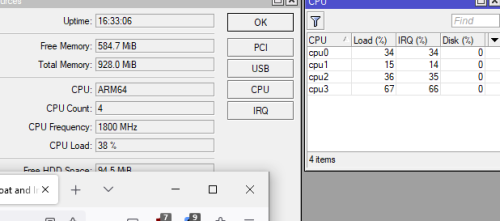 |
|
|
May 10 2023, 02:04 PM
|
|
Senior Member
1,882 posts Joined: Sep 2017
|
My suggestion:
If u do not need 10G managed switch,then just get a cheapo 10G unmanaged switch from somewhere else. Mikrotik device is mainly use for managed network usage. Mikrotik 4 SFP+ port 10G managed switch (CRS305-1G-4S+IN) cost RM729. TP-Link CN 8 SFP+ port 10G unmanaged switch (TL-ST1008F) cost CNY609-749 (Around RM450+-) 4port vs 8 port Almost RM 150-300 price difference. And if 10G not a must for you at current stage,just wait for another 1-2 years,the price will be lower,as the hardware is cheaper and more cheaper soon with higher stability. (I estimate at least 20% more cheaper) 2.5G is a sweet spot for current stage,the price had came down from few months ago,As realtek release new chip for 2.5G switch. Previously 5port 2.5G unmanaged switch cost around RM300-400,but now 8port 2.5G switch is cheaper than that. I just bought one unmanaged switch with 8x 2.5G port + 1x 10G SFP+,and it cost me only RM250+ This post has been edited by go626201: May 10 2023, 02:06 PM |
|
|
May 10 2023, 02:14 PM
|
|
Senior Member
1,882 posts Joined: Sep 2017
|
QUOTE(tng55 @ May 10 2023, 02:47 AM) i looking switch 48 Ports 1GBPS enough Your usage better get a managed switch to separate your CCTV and PC network and other device.because i have HP Switch 16 Ports 1GBPS but fully Port for my office CCTV+PC+photostat printing machine+Other thing weight machine barcode scan for counter PC using cari pos HP Switch bad quality due sometime slow and my office many pc always use local file sharing networks + internet too sometime slow and dc its was using unifi line good router is ac68u no problem its 4 port not enough that why i need more add Ports that why i take 48 ports future proof 1GBPS enough i need stable switch faster i don't know how is quality TPLink i saw 48 Ports i scared will slow file sharing network local pc and photostat printing machine that why don't want trouble for office And router upgrade might be needed,since AC68U is not for business usage,it might only use for lower concurrent device number with non-high concurrent usage. |
|
|
May 10 2023, 02:24 PM
|
|
Senior Member
1,457 posts Joined: Sep 2021
|
QUOTE(go626201 @ May 10 2023, 02:14 PM) Your usage better get a managed switch to separate your CCTV and PC network and other device. will do upgrade router and you say better get a managed switch to separate your CCTV and PC network and other device.And router upgrade might be needed,since AC68U is not for business usage,it might only use for lower concurrent device number with non-high concurrent usage. what brand recommended for switch need stable |
|
|
May 11 2023, 01:25 AM
Show posts by this member only | IPv6 | Post
#2782
|
|
All Stars
11,459 posts Joined: Oct 2007 From: KL
|
QUOTE(hasmidzul_jojo @ May 10 2023, 11:46 AM) Just tested Hap AX3, testing pppoe connected to unifi 300Mbps.Cpu still have a lot of room,clock at 1300Mhz approx @ 20% load on all cores without any SQM. How's your ax3 wifi? I'm having so many probs with it on 7.9.For the queue side,i use cake simple queue,diff 4 on inbound/outbound,best effort on total queue with fasttrack off, @ 285Mbps/48Mbps.The hap ax3 easily handle cake queue very well. This will bring the cpu clock to max with plenty room to play with. Just feel very happy with my purchase. ... |
|
|
May 11 2023, 07:16 AM
Show posts by this member only | IPv6 | Post
#2783
|
|
Junior Member
203 posts Joined: Feb 2008
|
QUOTE(soonwai @ May 11 2023, 01:25 AM) How's your ax3 wifi? I'm having so many probs with it on 7.9. My hap ax3 running on 7.9 stable.The wifi is working fine on both bands,only one time the 5GHz down. I also actively ask my clients(sister and mother in law running 2,4GHz devices) weather they have disconnection or not.As per logged,no disconnection on 2GHz at this moment. I am running default firewalls,only disable the ipsec parts and adding wireguard part to allow the traffic to the router. DOH is cloudflare. CAKE is configured and currently disable. No docker what so over. Wifi 5 is manually set @ 5260Mhz(channel 52 ) AX mode @ 20/40/80Mhz width , wifi 2 is manually set at 2412Mhz(channel 1) AX mode @ 20/40Mhz width. It basically default config,running dual stack ipv4/ipv6. I only have two 5GHz AX clients,Mi 10t and my desktop computer (raptor lake) (win 10) (intel ax210),both could connect @ 1200Mbps. On 2GHz,all of them connected @ 72Mbps.(endavourOS laptop,win10 laptop,2 android phones) The only problem i have is the constant messese log of radvd invalid mtu 1492 on pppoe-out1 from fe80::200:xxxx:xxxx:xxxx,but all website could be access using ipv6. But this problem occur on both hap ac2 and hap ax3 since upgrading from 7.8 to 7.9( if not mistaken) or on unifi side of things. Any abnormality,i will update again. |
|
|
|
|
|
May 11 2023, 03:44 PM
|

Newbie
45 posts Joined: Apr 2015
|
Hi , I'm complete newbie here for Mikrotik Routers. Does hap ax3 easy to setup just like those consumer router like TPlink and asus? Just type in PPPOE account and password then setup WIFI SSID and PW you are good to go?
|
|
|
May 11 2023, 04:26 PM
Show posts by this member only | IPv6 | Post
#2785
|
|
Junior Member
203 posts Joined: Feb 2008
|
QUOTE(NovaPrime @ May 11 2023, 03:44 PM) Hi , I'm complete newbie here for Mikrotik Routers. Does hap ax3 easy to setup just like those consumer router like TPlink and asus? Just type in PPPOE account and password then setup WIFI SSID and PW you are good to go? Yes and no.Mikrotik has quick set template that you could fill in your WAN credential and wifi SSID and PWD. If you are willing to tinker,it is for you then. The wifi6 still having some issue but if you running on N or AC,most probably doesnt have some weird disconnection issue.Still monitoring on the wifi6. |
|
|
May 11 2023, 05:27 PM
|
|
Newbie
45 posts Joined: Apr 2015
|
QUOTE(hasmidzul_jojo @ May 11 2023, 04:26 PM) Yes and no. After using the quick set template I fill in my WAN credential and wifi SSID and PWD then i can connect to the internet flawlessly already or i still need to tinker the SQM and firewall thing?Mikrotik has quick set template that you could fill in your WAN credential and wifi SSID and PWD. If you are willing to tinker,it is for you then. The wifi6 still having some issue but if you running on N or AC,most probably doesnt have some weird disconnection issue.Still monitoring on the wifi6. SQM is a must to setup to get full download speed at torrent? as previously i have tried on a openwrt router without setup the SQM i only manage to get half of the download speed of my internet bandwidth This post has been edited by NovaPrime: May 11 2023, 05:33 PM |
|
|
May 11 2023, 05:32 PM
|
|
Senior Member
1,882 posts Joined: Sep 2017
|
QUOTE(NovaPrime @ May 11 2023, 05:27 PM) After using the quick set template that you could fill in my WAN credential and wifi SSID and PWD then i can connect to the internet flawlessly already or i still need to tinker the SQM and firewall thing? Normally no need to do extra settings for internet access,but if you not going to tinkering with it,better buy other consumer grade router. Normal RM300+ router should be enough for most 90% people. And need bigger coverage just buy another one to pair mesh network. |
|
|
May 11 2023, 06:16 PM
Show posts by this member only | IPv6 | Post
#2788
|
|
Junior Member
203 posts Joined: Feb 2008
|
QUOTE(NovaPrime @ May 11 2023, 05:27 PM) After using the quick set template I fill in my WAN credential and wifi SSID and PWD then i can connect to the internet flawlessly already or i still need to tinker the SQM and firewall thing? You will need to setup some parameters for the SQM to work for mikrotik,the most queue i use if i have below 1Ghz of cpu speed,is fqcodel.On Cake,i just capped the speed to 100Mbps,just slightly below my hap ac2 cpu can handle.SQM is a must to setup to get full download speed at torrent? as previously i have tried on a openwrt router without setup the SQM i only manage to get half of the download speed of my internet bandwidth You can refer my test on my 300/50 unifi on CAKE SQM.Hap ax3 have some more cpu left to use. SQM is an intensive cpu usage.Maybe it could handle 500Mbps on Cake diff3. You dont need sqm to get full speed at torrent.SQM is needed for better network response(like video call,gaming) if you internet is under full load.SQM also implimented if you under very low broadband speed like 30Mbps with many clients,like 20 devices constantly hogging your internet. Most openwrt router wifi (all in one) like to name a few totolink,xiaomi (Mediatek based chip) doesnt have the cpu capability to handle 500Mbps in sqm,maybe try get desktop grade cpu and start building your router to handle it(openwrt x86). |
|
|
May 11 2023, 07:47 PM
|
|
Newbie
45 posts Joined: Apr 2015
|
QUOTE(hasmidzul_jojo @ May 11 2023, 06:16 PM) You will need to setup some parameters for the SQM to work for mikrotik,the most queue i use if i have below 1Ghz of cpu speed,is fqcodel.On Cake,i just capped the speed to 100Mbps,just slightly below my hap ac2 cpu can handle. i see i see.... previously the openwrt router i use is gl.inet GL-AX1800 (Flint) WiFi 6 on speedtest it can hit 500mbps....You can refer my test on my 300/50 unifi on CAKE SQM.Hap ax3 have some more cpu left to use. SQM is an intensive cpu usage.Maybe it could handle 500Mbps on Cake diff3. You dont need sqm to get full speed at torrent.SQM is needed for better network response(like video call,gaming) if you internet is under full load.SQM also implimented if you under very low broadband speed like 30Mbps with many clients,like 20 devices constantly hogging your internet. Most openwrt router wifi (all in one) like to name a few totolink,xiaomi (Mediatek based chip) doesnt have the cpu capability to handle 500Mbps in sqm,maybe try get desktop grade cpu and start building your router to handle it(openwrt x86). i dont know why when torrent it just wont hit max speed. tried to torrent with TIME internet's stock router can hit max speed easily |
|
|
May 11 2023, 08:09 PM
Show posts by this member only | IPv6 | Post
#2790
|
|
Junior Member
203 posts Joined: Feb 2008
|
QUOTE(NovaPrime @ May 11 2023, 07:47 PM) i see i see.... previously the openwrt router i use is gl.inet GL-AX1800 (Flint) WiFi 6 on speedtest it can hit 500mbps.... Actually,i do like gl-inet flint,but since I just used to mikrotik GUI..I just wait for them to introduce new hardware on mikrotik line up.i dont know why when torrent it just wont hit max speed. tried to torrent with TIME internet's stock router can hit max speed easily Maybe try spoofing MAC address on the TIME stock router and put it on your new router. |
| Change to: |  0.0319sec 0.0319sec
 1.30 1.30
 6 queries 6 queries
 GZIP Disabled GZIP Disabled
Time is now: 23rd December 2025 - 03:20 AM |
 Quote
Quote