

RB 5009 very hot when operating. Is this normal?
This post has been edited by OlgaC4: Apr 24 2022, 04:50 PM
Enterprise Networking Mikrotik Routers (RouterBoard & RouterOS), User and owner discussion group
Enterprise Networking Mikrotik Routers (RouterBoard & RouterOS), User and owner discussion group
|
|
 Apr 24 2022, 04:50 PM Apr 24 2022, 04:50 PM
|
 
Senior Member
5,296 posts Joined: Nov 2006 
|
RB 5009 very hot when operating. Is this normal?
This post has been edited by OlgaC4: Apr 24 2022, 04:50 PM |
|
|
|
|
|
Apr 24 2022, 07:56 PM
Show posts by this member only | IPv6 | Post
#2532
|
|
Senior Member
1,882 posts Joined: Sep 2017
|
QUOTE(OlgaC4 @ Apr 24 2022, 04:50 PM) RB 5009 very hot when operating. Is this normal? Can u check the temp showing on the Winbox-System-Health? Mine is showing 40°C CPU temp with a 2x12cm usb fan under RB5009. (Normally should between 45-55°C) I didn't use the 2.5Gb and SFP+ port. This post has been edited by go626201: Apr 24 2022, 07:57 PM |
|
|
Apr 24 2022, 09:15 PM
|
|
Senior Member
5,296 posts Joined: Nov 2006
|
QUOTE(go626201 @ Apr 24 2022, 07:56 PM) Can u check the temp showing on the Winbox-System-Health? no fan is about 50°C with no activity.Mine is showing 40°C CPU temp with a 2x12cm usb fan under RB5009. (Normally should between 45-55°C) I didn't use the 2.5Gb and SFP+ port. |
|
|
Apr 24 2022, 10:23 PM
|

Junior Member
199 posts Joined: May 2008 From: Selayang Mall/Hosp. Selayang  
|
 Hi... im using Hap ac2, dun have any idea to apply ipv6 public and private ip? no idea to setting...but still stuck at ipv4 public.. and didnt found to fast track ipv6 This post has been edited by machai_world: Apr 24 2022, 10:25 PM |
|
|
Apr 24 2022, 11:08 PM
Show posts by this member only | IPv6 | Post
#2535
|
|
Senior Member
1,882 posts Joined: Sep 2017
|
QUOTE(machai_world @ Apr 24 2022, 10:23 PM) Hi... im using Hap ac2, dun have any idea to apply ipv6 public and private ip? no idea to setting...but still stuck at ipv4 public.. and didnt found to fast track ipv6 If not strongly needed for ipv6,better do not enable ipv6 on unifi now.(maybe next year or next 2 year better,now still not stable enough to use) Mikrotik IPv6 does not support fasttrack now,it will be implement in ROS7 future version but still does not have timeframe for it,so i think next year or next 2 year should be getting IPv6 fasttrack on mikrotik. Currently,for RB5009 without ipv6 fasttrack,the cpu usage to use full 800mbps unifi is around 25-35% for 800mbps download,and around 6-12% for 200mbps upload. 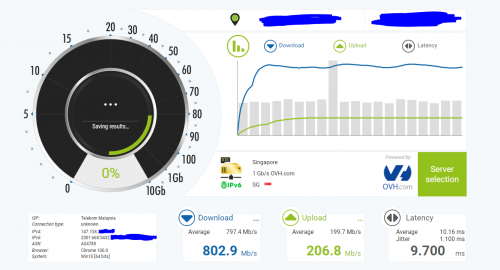 |
|
|
Apr 25 2022, 05:54 AM
Show posts by this member only | IPv6 | Post
#2536
|

Senior Member
2,466 posts Joined: Nov 2004
|
QUOTE(go626201 @ Apr 24 2022, 07:56 PM) Can u check the temp showing on the Winbox-System-Health? My unifi dream machine 82 after reboot and reaching 85 after a while, still working fine without any external fan.. Dunno how correct this is.. But than can feel the heat when touching the router. Sell it already. Now waiting for RB5009. Mine is showing 40°C CPU temp with a 2x12cm usb fan under RB5009. (Normally should between 45-55°C) I didn't use the 2.5Gb and SFP+ port. I believe the 45-55 should be fine. They even tested the router for 60 ambient.. For me under 70 is still ok.. 80 maybe need cooling. |
|
|
|
|
|
Apr 25 2022, 09:02 AM
Show posts by this member only | IPv6 | Post
#2537
|
|
Junior Member
199 posts Joined: May 2008 From: Selayang Mall/Hosp. Selayang
|
QUOTE(go626201 @ Apr 24 2022, 11:08 PM) For malaysia vlan ipv6,u can follow this guide- https://forum.lowyat.net/index.php?showtopi...&#entry63945436 Noted, thanks for ur opinionIf not strongly needed for ipv6,better do not enable ipv6 on unifi now.(maybe next year or next 2 year better,now still not stable enough to use) Mikrotik IPv6 does not support fasttrack now,it will be implement in ROS7 future version but still does not have timeframe for it,so i think next year or next 2 year should be getting IPv6 fasttrack on mikrotik. Currently,for RB5009 without ipv6 fasttrack,the cpu usage to use full 800mbps unifi is around 25-35% for 800mbps download,and around 6-12% for 200mbps upload. |
|
|
May 2 2022, 08:37 PM
|
|
Senior Member
5,296 posts Joined: Nov 2006
|
Disable anything you are not using can reduce the temperature up to 5degree on RB5009
|
|
|
May 3 2022, 10:10 AM
Show posts by this member only | IPv6 | Post
#2539
|
|
Newbie
20 posts Joined: Feb 2019
|
QUOTE(go626201 @ Apr 24 2022, 11:08 PM) If not strongly needed for ipv6,better do not enable ipv6 on unifi now.(maybe next year or next 2 year better,now still not stable enough to use) I have to differ.I don't recall having much issues with IPv6 on UniFi previously (since 5Mbps days, then 10Mbps)  No issues on TIME now too. All my supported end devices have global IPv6 addresses, been running this for many years. I usually use this to test IPv6 connectivity, unless there's any major issues, it's 10/10. https://test-ipv6.com/ On Tests Run tab, Test with IPv4 DNS record ok (1.032s) using ipv4 Test with IPv6 DNS record ok (0.820s) using ipv6 Test with Dual Stack DNS record ok (0.813s) using ipv6 Test for Dual Stack DNS and large packet ok (0.333s) using ipv6 Test IPv6 large packet ok (2.110s) using ipv6 Test if your ISP's DNS server uses IPv6 ok (1.390s) using ipv6 Find IPv4 Service Provider ok (1.091s) using ipv4 ASN 9930 Find IPv6 Service Provider ok (0.929s) using ipv6 ASN 9930 Other IPv6 test sites, https://ipv6-test.com/ <- I get 19/20 on this, because there's no reverse DNS record. https://ipv6test.google.com/ This post has been edited by 1zx: May 3 2022, 10:33 AM |
|
|
May 3 2022, 10:36 AM
Show posts by this member only | IPv6 | Post
#2540
|
|
Newbie
20 posts Joined: Feb 2019
|
QUOTE(OlgaC4 @ May 2 2022, 08:37 PM) Disable anything you are not using can reduce the temperature up to 5degree on RB5009 I actually don't install packages that i don't use. Less potential exploit surface too.  For those interested, i only run these. advanced-tools dhcp ipv6 ntp ppp routing security system This post has been edited by 1zx: May 3 2022, 10:37 AM |
|
|
May 3 2022, 10:43 AM
Show posts by this member only | IPv6 | Post
#2541
|
|
Senior Member
1,882 posts Joined: Sep 2017
|
QUOTE(1zx @ May 3 2022, 10:10 AM) I have to differ. I mean the unifi ipv6 routing is crap,for local service is okay,but for service that hosted outside of SG/MY then the routing might be quite not stable and causing the speed is lower than ipv4 to the same server(compare with ipv4/ipv6).I don't recall having much issues with IPv6 on UniFi previously (since 5Mbps days, then 10Mbps) No issues on TIME now too. All my supported end devices have global IPv6 addresses, been running this for many years. I usually use this to test IPv6 connectivity, unless there's any major issues, it's 10/10. https://test-ipv6.com/ On Tests Run tab, Test with IPv4 DNS record ok (1.032s) using ipv4 Test with IPv6 DNS record ok (0.820s) using ipv6 Test with Dual Stack DNS record ok (0.813s) using ipv6 Test for Dual Stack DNS and large packet ok (0.333s) using ipv6 Test IPv6 large packet ok (2.110s) using ipv6 Test if your ISP's DNS server uses IPv6 ok (1.390s) using ipv6 Find IPv4 Service Provider ok (1.091s) using ipv4 ASN 9930 Find IPv6 Service Provider ok (0.929s) using ipv6 ASN 9930 Other IPv6 test sites, https://ipv6-test.com/ <- I get 19/20 on this, because there's no reverse DNS record. https://ipv6test.google.com/ And of course even to Cloudflare, Unifi ipv4 and ipv6 also not having good everday,sometimes will reroute to HK area(TM- routing faults),so in this situation for important site,using self-choosing cloudflare ip entering to hosts file is better. |
|
|
May 3 2022, 10:48 AM
Show posts by this member only | IPv6 | Post
#2542
|
|
Newbie
20 posts Joined: Feb 2019
|
QUOTE(aneip @ Apr 25 2022, 05:54 AM) My unifi dream machine 82 after reboot and reaching 85 after a while, still working fine without any external fan.. Dunno how correct this is.. But than can feel the heat when touching the router. Sell it already. Now waiting for RB5009. I personally don't really like UniFi running temperatures.I believe the 45-55 should be fine. They even tested the router for 60 ambient.. For me under 70 is still ok.. 80 maybe need cooling. All the products I've encountered seems to be running their codes without "HLT (x86) opcode" (i know it's not a x86 inside, not sure what's the equivalent opcode).  |
|
|
May 4 2022, 05:06 PM
Show posts by this member only | IPv6 | Post
#2543
|
|
Junior Member
199 posts Joined: May 2008 From: Selayang Mall/Hosp. Selayang
|
QUOTE(1zx @ May 3 2022, 10:10 AM) I have to differ. mind to share guideline to enable ipv6 address for both public and private?I don't recall having much issues with IPv6 on UniFi previously (since 5Mbps days, then 10Mbps) No issues on TIME now too. All my supported end devices have global IPv6 addresses, been running this for many years. I usually use this to test IPv6 connectivity, unless there's any major issues, it's 10/10. https://test-ipv6.com/ On Tests Run tab, Test with IPv4 DNS record ok (1.032s) using ipv4 Test with IPv6 DNS record ok (0.820s) using ipv6 Test with Dual Stack DNS record ok (0.813s) using ipv6 Test for Dual Stack DNS and large packet ok (0.333s) using ipv6 Test IPv6 large packet ok (2.110s) using ipv6 Test if your ISP's DNS server uses IPv6 ok (1.390s) using ipv6 Find IPv4 Service Provider ok (1.091s) using ipv4 ASN 9930 Find IPv6 Service Provider ok (0.929s) using ipv6 ASN 9930 Other IPv6 test sites, https://ipv6-test.com/ <- I get 19/20 on this, because there's no reverse DNS record. https://ipv6test.google.com/ |
|
|
|
|
|
May 6 2022, 01:21 AM
|

Junior Member
612 posts Joined: Apr 2005 From: http://127.0.0.1:80/announce 
|
are unifi ipv6's down in certain area? everything bound but no ipv6 when doing test
btw, just upgrade to 7.2.3 |
|
|
May 6 2022, 10:35 AM
Show posts by this member only | IPv6 | Post
#2545
|
|
Senior Member
1,882 posts Joined: Sep 2017
|
QUOTE(ahlong @ May 6 2022, 01:21 AM) are unifi ipv6's down in certain area? everything bound but no ipv6 when doing test no problem on my end-Johor.btw, just upgrade to 7.2.3 http://smokeping.mywebping.com/smokeping/?target=IPv6 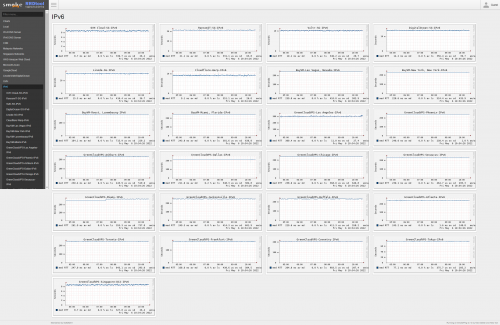 |
|
|
May 6 2022, 12:02 PM
|
|
Junior Member
612 posts Joined: Apr 2005 From: http://127.0.0.1:80/announce
|
QUOTE(go626201 @ May 6 2022, 10:35 AM) Weird.. im at Gombak Setia. Before balik kampung everything ok. Turn On everything, all bound but no IPv6 while doing all test.Heres some screenshot.. hope someone could help if my setup are wrong.. 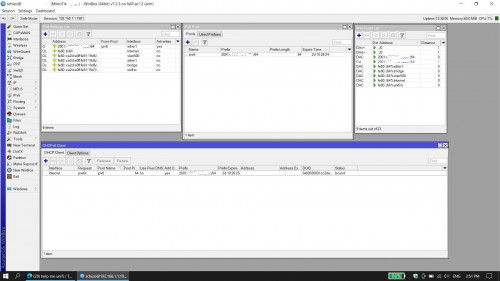 This post has been edited by ahlong: May 6 2022, 03:51 PM |
|
|
May 7 2022, 12:53 PM
Show posts by this member only | IPv6 | Post
#2547
|
|
Junior Member
203 posts Joined: Feb 2008
|
QUOTE(ahlong @ May 6 2022, 12:02 PM) Weird.. im at Gombak Setia. Before balik kampung everything ok. Turn On everything, all bound but no IPv6 while doing all test. Did you set anything on the MTU? If not,set the MTU to 1480 on the ND.Im running the same hardware/software as yours,minus the only snapshot missing there is the neighbor discovery.Heres some screenshot.. hope someone could help if my setup are wrong.. |
|
|
May 7 2022, 09:07 PM
|
|
Junior Member
612 posts Joined: Apr 2005 From: http://127.0.0.1:80/announce
|
QUOTE(hasmidzul_jojo @ May 7 2022, 12:53 PM) Did you set anything on the MTU? If not,set the MTU to 1480 on the ND.Im running the same hardware/software as yours,minus the only snapshot missing there is the neighbor discovery. Previous working setup is no MTU setup. Already set to 1480 and 1280 and not working also. Asking TM (socmed/livechat) still no answer given. |
|
|
May 7 2022, 09:55 PM
Show posts by this member only | IPv6 | Post
#2549
|
|
Junior Member
203 posts Joined: Feb 2008
|
QUOTE(ahlong @ May 7 2022, 09:07 PM) Previous working setup is no MTU setup. Already set to 1480 and 1280 and not working also. Asking TM (socmed/livechat) still no answer given. Set the MTU to 1480 on ND and on the DHCP client,add default route option to NO. ahlong liked this post
|
|
|
May 7 2022, 10:03 PM
Show posts by this member only | IPv6 | Post
#2550
|
|
Junior Member
612 posts Joined: Apr 2005 From: http://127.0.0.1:80/announce
|
QUOTE(hasmidzul_jojo @ May 7 2022, 09:55 PM) Set the MTU to 1480 on ND and on the DHCP client,add default route option to NO. Yes thank you so much! Solved! YOU the man. Thank you so much again.Selamat Hari Raya Aidilfitri, Maaf Zahir & Batin. hasmidzul_jojo liked this post
|
| Change to: |  0.0302sec 0.0302sec
 0.77 0.77
 6 queries 6 queries
 GZIP Disabled GZIP Disabled
Time is now: 20th December 2025 - 06:56 AM |
 Quote
Quote