Welcome Guest ( Log In | Register )

176 Pages « < 126 127 128 129 130 > » Bottom

Outline · [ Standard ] · Linear+

Enterprise Networking Mikrotik Routers (RouterBoard & RouterOS), User and owner discussion group

views
     
go626201
post May 3 2022, 10:43 AM

Regular
******
Senior Member
1,882 posts

Joined: Sep 2017
QUOTE(1zx @ May 3 2022, 10:10 AM)
I have to differ.
I don't recall having much issues with IPv6 on UniFi previously (since 5Mbps days, then 10Mbps)  smile.gif
No issues on TIME now too.

All my supported end devices have global IPv6 addresses, been running this for many years.

I usually use this to test IPv6 connectivity, unless there's any major issues, it's 10/10.
https://test-ipv6.com/

On Tests Run tab,
Test with IPv4 DNS record   
ok (1.032s) using ipv4
Test with IPv6 DNS record   
ok (0.820s) using ipv6
Test with Dual Stack DNS record   
ok (0.813s) using ipv6
Test for Dual Stack DNS and large packet   
ok (0.333s) using ipv6
Test IPv6 large packet   
ok (2.110s) using ipv6
Test if your ISP's DNS server uses IPv6   
ok (1.390s) using ipv6
Find IPv4 Service Provider   
ok (1.091s) using ipv4 ASN 9930
Find IPv6 Service Provider   
ok (0.929s) using ipv6 ASN 9930
Other IPv6 test sites,
https://ipv6-test.com/    <- I get 19/20 on this, because there's no reverse DNS record.
https://ipv6test.google.com/
*
I mean the unifi ipv6 routing is crap,for local service is okay,but for service that hosted outside of SG/MY then the routing might be quite not stable and causing the speed is lower than ipv4 to the same server(compare with ipv4/ipv6).

And of course even to Cloudflare, Unifi ipv4 and ipv6 also not having good everday,sometimes will reroute to HK area(TM- routing faults),so in this situation for important site,using self-choosing cloudflare ip entering to hosts file is better.
1zx
post May 3 2022, 10:48 AM

New Member
*
Newbie
20 posts

Joined: Feb 2019
QUOTE(aneip @ Apr 25 2022, 05:54 AM)
My unifi dream machine 82 after reboot and reaching 85 after a while, still working fine without any external fan.. Dunno how correct this is.. But than can feel the heat when touching the router. Sell it already. Now waiting for RB5009.

I believe the 45-55 should be fine. They even tested the router for 60 ambient.. For me under 70 is still ok.. 80 maybe need cooling.
*
I personally don't really like UniFi running temperatures.
All the products I've encountered seems to be running their codes without "HLT (x86) opcode" (i know it's not a x86 inside, not sure what's the equivalent opcode). unsure.gif

machai_world
post May 4 2022, 05:06 PM

Getting Started
**
Junior Member
199 posts

Joined: May 2008
From: Selayang Mall/Hosp. Selayang


QUOTE(1zx @ May 3 2022, 10:10 AM)
I have to differ.
I don't recall having much issues with IPv6 on UniFi previously (since 5Mbps days, then 10Mbps)  smile.gif
No issues on TIME now too.

All my supported end devices have global IPv6 addresses, been running this for many years.

I usually use this to test IPv6 connectivity, unless there's any major issues, it's 10/10.
https://test-ipv6.com/

On Tests Run tab,
Test with IPv4 DNS record   
ok (1.032s) using ipv4
Test with IPv6 DNS record   
ok (0.820s) using ipv6
Test with Dual Stack DNS record   
ok (0.813s) using ipv6
Test for Dual Stack DNS and large packet   
ok (0.333s) using ipv6
Test IPv6 large packet   
ok (2.110s) using ipv6
Test if your ISP's DNS server uses IPv6   
ok (1.390s) using ipv6
Find IPv4 Service Provider   
ok (1.091s) using ipv4 ASN 9930
Find IPv6 Service Provider   
ok (0.929s) using ipv6 ASN 9930
Other IPv6 test sites,
https://ipv6-test.com/    <- I get 19/20 on this, because there's no reverse DNS record.
https://ipv6test.google.com/
*
mind to share guideline to enable ipv6 address for both public and private?
ahlong
post May 6 2022, 01:21 AM

not a debt collector
****
Junior Member
612 posts

Joined: Apr 2005
From: http://127.0.0.1:80/announce


are unifi ipv6's down in certain area? everything bound but no ipv6 when doing test

btw, just upgrade to 7.2.3
go626201
post May 6 2022, 10:35 AM

Regular
******
Senior Member
1,882 posts

Joined: Sep 2017
QUOTE(ahlong @ May 6 2022, 01:21 AM)
are unifi ipv6's down in certain area? everything bound but no ipv6 when doing test

btw, just upgrade to 7.2.3
*
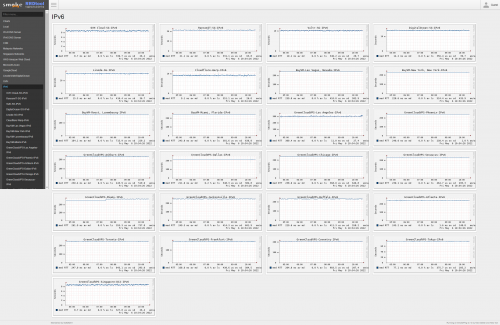
no problem on my end-Johor.
http://smokeping.mywebping.com/smokeping/?target=IPv6
user posted image
ahlong
post May 6 2022, 12:02 PM

not a debt collector
****
Junior Member
612 posts

Joined: Apr 2005
From: http://127.0.0.1:80/announce


QUOTE(go626201 @ May 6 2022, 10:35 AM)
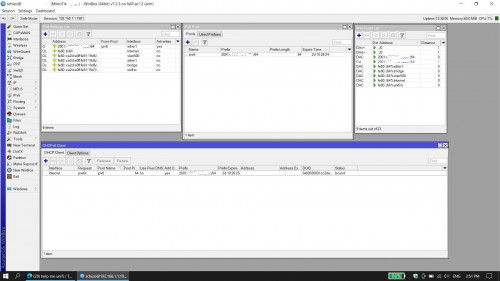
Weird.. im at Gombak Setia. Before balik kampung everything ok. Turn On everything, all bound but no IPv6 while doing all test.

Heres some screenshot.. hope someone could help if my setup are wrong..

user posted image

This post has been edited by ahlong: May 6 2022, 03:51 PM
hasmidzul_jojo
post May 7 2022, 12:53 PM

Getting Started
**
Junior Member
203 posts

Joined: Feb 2008
QUOTE(ahlong @ May 6 2022, 12:02 PM)
Weird.. im at Gombak Setia. Before balik kampung everything ok. Turn On everything, all bound but no IPv6 while doing all test.

Heres some screenshot.. hope someone could help if my setup are wrong..

user posted image
*
Did you set anything on the MTU? If not,set the MTU to 1480 on the ND.Im running the same hardware/software as yours,minus the only snapshot missing there is the neighbor discovery.
ahlong
post May 7 2022, 09:07 PM

not a debt collector
****
Junior Member
612 posts

Joined: Apr 2005
From: http://127.0.0.1:80/announce


QUOTE(hasmidzul_jojo @ May 7 2022, 12:53 PM)
Did you set anything on the MTU? If not,set the MTU to 1480 on the ND.Im running the same hardware/software as yours,minus the only snapshot missing there is the neighbor discovery.
*
Previous working setup is no MTU setup. Already set to 1480 and 1280 and not working also. Asking TM (socmed/livechat) still no answer given.
hasmidzul_jojo
post May 7 2022, 09:55 PM

Getting Started
**
Junior Member
203 posts

Joined: Feb 2008
QUOTE(ahlong @ May 7 2022, 09:07 PM)
Previous working setup is no MTU setup. Already set to 1480 and 1280 and not working also. Asking TM (socmed/livechat) still no answer given.
*
Set the MTU to 1480 on ND and on the DHCP client,add default route option to NO.
ahlong
post May 7 2022, 10:03 PM

not a debt collector
****
Junior Member
612 posts

Joined: Apr 2005
From: http://127.0.0.1:80/announce


QUOTE(hasmidzul_jojo @ May 7 2022, 09:55 PM)
Set the MTU to 1480 on ND and on the DHCP client,add default route option to NO.
*
Yes thank you so much! Solved! YOU the man. Thank you so much again.

Selamat Hari Raya Aidilfitri, Maaf Zahir & Batin.
Gaara92
post May 8 2022, 10:33 PM

Herald
****
Junior Member
612 posts

Joined: Mar 2008


QUOTE(ahlong @ May 7 2022, 10:03 PM)
Yes thank you so much! Solved! YOU the man. Thank you so much again.

Selamat Hari Raya Aidilfitri, Maaf Zahir & Batin.
*
The v7 routeros automatically added default route for pppoe both ipv4 and ipv6. When you tick the default route in ipv6 dhcp client it will confuse which route. Idk this is a bug or feature.
ahlong
post May 9 2022, 10:39 AM

not a debt collector
****
Junior Member
612 posts

Joined: Apr 2005
From: http://127.0.0.1:80/announce


QUOTE(Gaara92 @ May 8 2022, 10:33 PM)
The v7 routeros automatically added default route for pppoe both ipv4 and ipv6. When you tick the default route in ipv6 dhcp client it will confuse which route. Idk this is a bug or feature.
*
I see.. thats why everything (setting-ipv6) bound but connection timeout (while doing ping test on ipv6 site). Thanks for the info!
cmah89
post May 9 2022, 01:47 PM

Getting Started
**
Junior Member
157 posts

Joined: May 2014
Anybody using CRS as access switch and CCR as core?

Thinking instead of using cisco switches , use mikrotik for SME hmm.gif
Gaara92
post May 11 2022, 11:13 AM

Herald
****
Junior Member
612 posts

Joined: Mar 2008


QUOTE(cmah89 @ May 9 2022, 01:47 PM)
Anybody using CRS as access switch and CCR as core?

Thinking instead of using cisco switches , use mikrotik for SME  hmm.gif
*
mikrotik is consider as both enterprise and prosumer solution. just go with it at least it have winbox gui tongue.gif
megablur
post May 12 2022, 10:23 AM

New Member
*
Newbie
7 posts

Joined: Sep 2012
Finally got my RB5009 up and running on Maxis Home Fiber (Telekom Infra). Ipv6 is also working. This is my 1st Mikrotik that I configured from scratch after learning about it at work. It has been educational, and I love the fact that I have the options to control my internal network.
haturaya
post May 12 2022, 02:03 PM

Look at all my stars!!
Group Icon
Elite
2,558 posts

Joined: Jan 2003
QUOTE(megablur @ May 12 2022, 10:23 AM)
Finally got my RB5009 up and running on Maxis Home Fiber (Telekom Infra). Ipv6 is also working. This is my 1st Mikrotik that I configured from scratch after learning about it at work. It has been educational, and I love the fact that I have the options to control my internal network.
*
thumbup.gif

Once you're on Mikrotik, highly unlikely you'll move back to 'normal' branded one. sweat.gif
hasmidzul_jojo
post May 12 2022, 06:02 PM

Getting Started
**
Junior Member
203 posts

Joined: Feb 2008
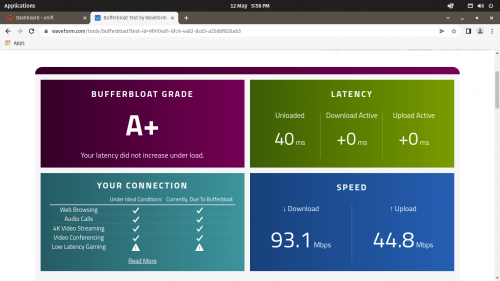
Testing out fq_codel.No more broken on ipv6.Hap ac2 on 7.2.3

user posted image
Anime4000
post May 12 2022, 06:52 PM

Look at all my stars!!
*******
Senior Member
2,400 posts

Joined: Jul 2009
From: /dev/null


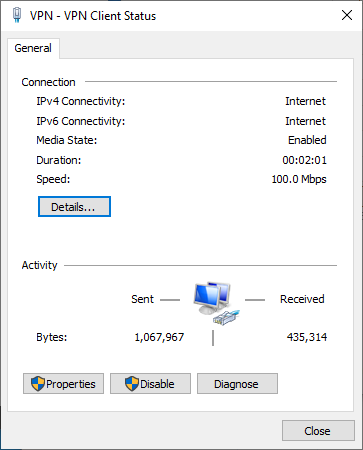
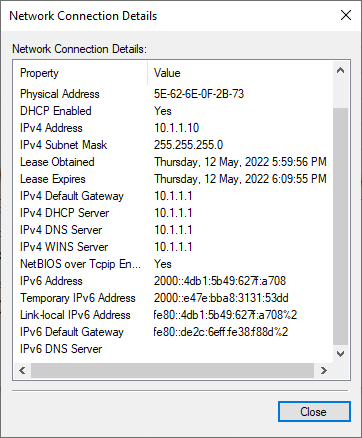
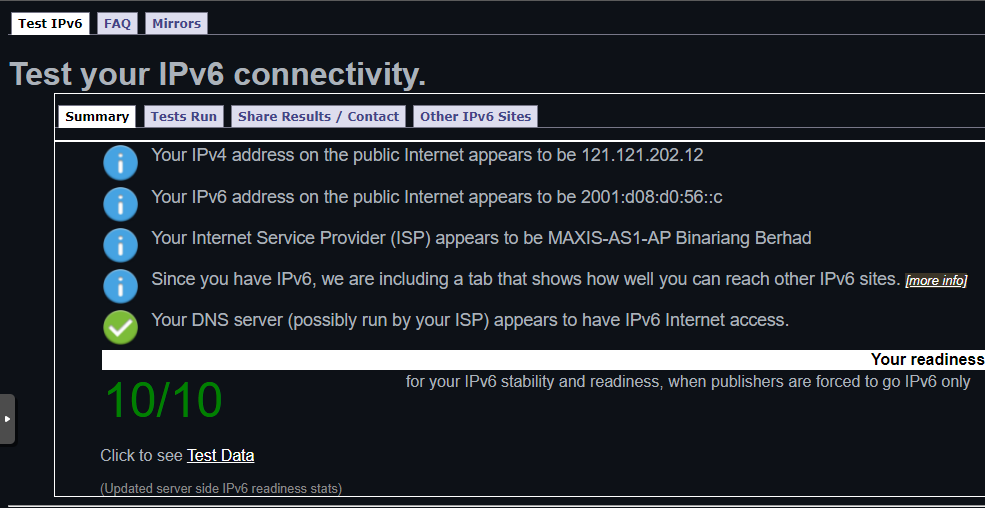
I have successfully adding 2nd IPv6 Subnet, since our ISP refuse to give atleast /60, we do NAT6 in second subnet

user posted image
user posted image
user posted image

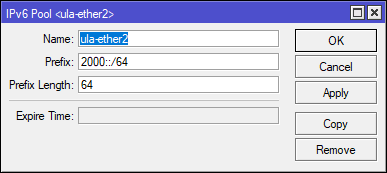
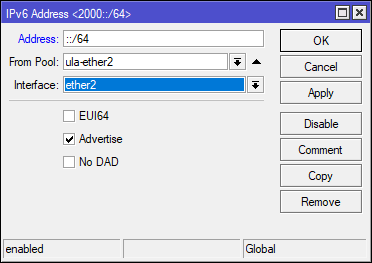
This what I do

IPv6 ➡ Pool
user posted image

IPv6 ➡ Address ➡ ➕
user posted image

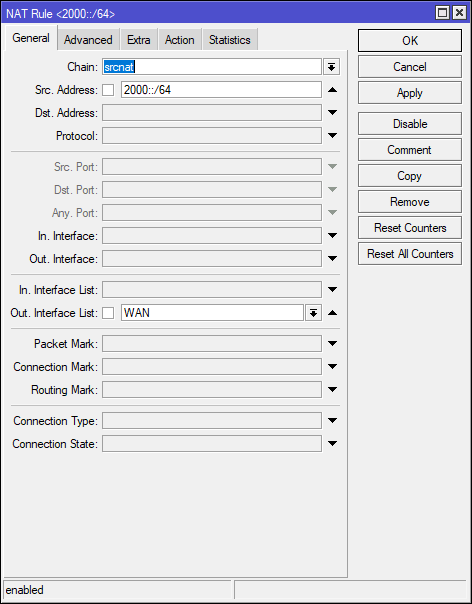
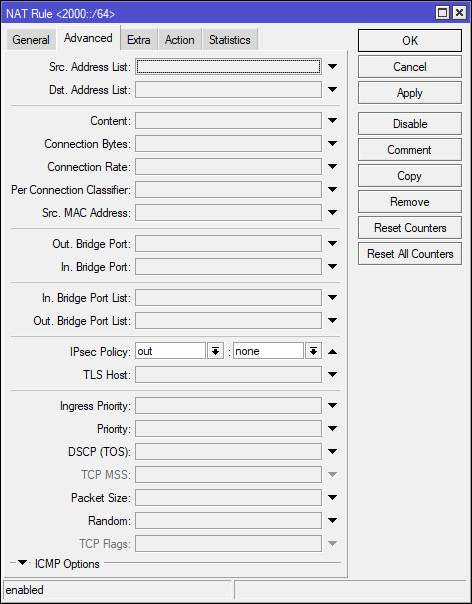
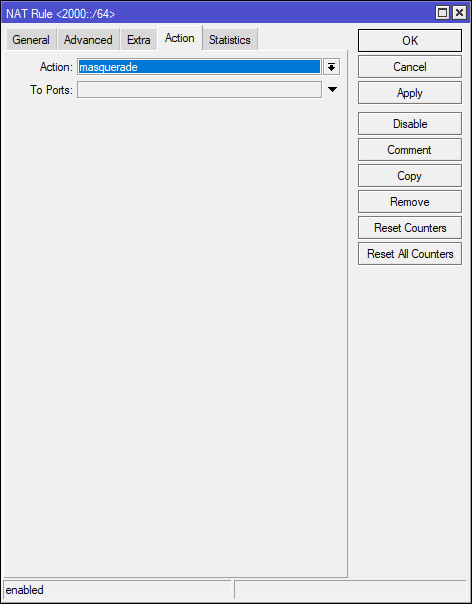
IPv6 ➡ Firewall ➡ NAT ➡ ➕
user posted image
user posted image
user posted image
CODE

[General]
Chain: srcnat
Src. Address: 2000::/64
Out. Interface List: WAN

[Advanced]
IPsec Policy: out : none

[Action]
Action: masquerade


Only works in ROS7+
Windows and browser refuse to using fc00::/7 ULA Space, we had to break IANA IPv6 Assignment because of our ISP mistake, just break it rclxms.gif
IPv6 NAT will break P2P, good firewall layer to protect IoT, VPN Users, etc...

I just found out that, when Metric/Distance same Value, Windows will choose lowest IP Address Number, my plan to use funny address like 2000:dead:cafe:b00b::/64, I choose 2000::/64 because is the lowest value valid

More details I put on my blog here:
https://www.hitoha.moe/second-ipv6-subnet-v...os-7-using-nat/

This post has been edited by Anime4000: May 12 2022, 06:55 PM
soonwai
post May 12 2022, 07:41 PM


********
All Stars
11,459 posts

Joined: Oct 2007
From: KL


QUOTE(Anime4000 @ May 12 2022, 06:52 PM)
I have successfully adding 2nd IPv6 Subnet, since our ISP refuse to give atleast /60, we do NAT6 in second subnet
...
*
Wow, awesome tip. Thanks very much for sharing.
haturaya
post May 13 2022, 09:36 AM

Look at all my stars!!
Group Icon
Elite
2,558 posts

Joined: Jan 2003
QUOTE(Anime4000 @ May 12 2022, 06:52 PM)
I have successfully adding 2nd IPv6 Subnet, since our ISP refuse to give atleast /60, we do NAT6 in second subnet

user posted image
user posted image
user posted image

This what I do

IPv6 ➡ Pool
user posted image

IPv6 ➡ Address ➡ ➕
user posted image

IPv6 ➡ Firewall ➡ NAT ➡ ➕
user posted image
user posted image
user posted image
CODE

[General]
Chain: srcnat
Src. Address: 2000::/64
Out. Interface List: WAN

[Advanced]
IPsec Policy: out : none

[Action]
Action: masquerade


Only works in ROS7+
Windows and browser refuse to using fc00::/7 ULA Space, we had to break IANA IPv6 Assignment because of our ISP mistake, just break it rclxms.gif
IPv6 NAT will break P2P, good firewall layer to protect IoT, VPN Users, etc...

I just found out that, when Metric/Distance same Value, Windows will choose lowest IP Address Number, my plan to use funny address like 2000:dead:cafe:b00b::/64, I choose 2000::/64 because is the lowest value valid

More details I put on my blog here:
https://www.hitoha.moe/second-ipv6-subnet-v...os-7-using-nat/
*
Awsesome.

Thanks for the tips thumbup.gif notworthy.gif

176 Pages « < 126 127 128 129 130 > » Top
 

Change to:
| Lo-Fi Version
0.0320sec    1.00    6 queries    GZIP Disabled
Time is now: 19th December 2025 - 02:16 AM