Outline ·
[ Standard ] ·
Linear+
Enterprise Networking Mikrotik Routers (RouterBoard & RouterOS), User and owner discussion group
|
heidarren
|
 Dec 26 2019, 06:01 PM Dec 26 2019, 06:01 PM
|
Getting Started


|
QUOTE(boxsystem @ Dec 26 2019, 05:41 PM) Double storey house? You put the Audience in the middle of the house and is there an anothet router? Or hardwired? My BTU is located at the middle of my house, beside staircase, so I just plug in the Audience and set it up as router. |
|
|
|
|
|
th3game
|
Dec 30 2019, 01:49 PM
|
Getting Started
|
hi sifus... i have 2 questions.. 1) whats the different by setting up the vlan on etherX and setting vlan on bridge and using switch function to set as tagged/untagged/access only on etherX? both still HW right? ( hardware offloading) example by this link2) can someone explain to me what's the mean by 2Gb/s link between Gigabit switch and CPU as per below pic? What are the "ports/interfaces" that link them together?  thanks in advance |
|
|
|
|
|
boxsystem
|
Dec 30 2019, 07:07 PM
|
|
|
Got my hAp ac2 now. Figured as my maxis on port 1. Going to configure unifi on port 2. I think I got both connection configured but I dont think that the Unifi is working as when I did speedtest I can only get Maxis' speed. 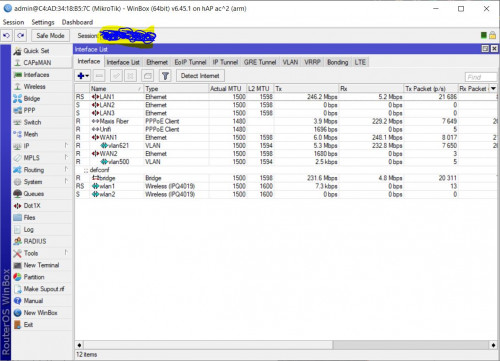 This post has been edited by boxsystem: Mar 22 2020, 12:53 AM This post has been edited by boxsystem: Mar 22 2020, 12:53 AM |
|
|
|
|
|
heidarren
|
Dec 30 2019, 11:46 PM
|
Getting Started
|
Today I try to fine tune my Audience Wi-Fi speed, set the AMSDU limit/threshold to 3839 (according to my Aruba AP's default) and AMPDU Priorities to 0,1,2, my speed went up from 410mbps+ to 480mbps+, you may try it out and see if it works for u. Setting 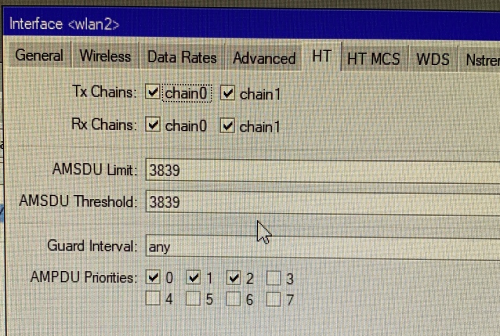 Previously 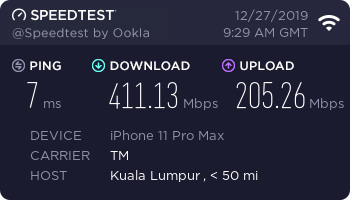 After 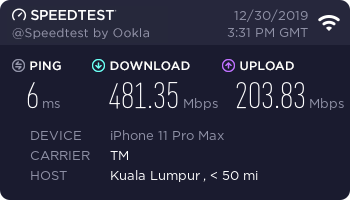 This post has been edited by heidarren: Dec 30 2019, 11:47 PM This post has been edited by heidarren: Dec 30 2019, 11:47 PM |
|
|
|
|
|
boxsystem
|
Dec 31 2019, 10:38 AM
|
|
|
QUOTE(boxsystem @ Dec 30 2019, 07:07 PM) Got my hAp ac2 now. Figured as my maxis on port 1. Going to configure unifi on port 2. I think I got both connection configured but I dont think that the Unifi is working as when I did speedtest I can only get Maxis' speed. Does this work as failover only? What about combining both connections? @soonwai This post has been edited by boxsystem: Mar 22 2020, 12:54 AM |
|
|
|
|
|
izhamsatria
|
Dec 31 2019, 12:48 PM
|
Getting Started
|
QUOTE(boxsystem @ Dec 31 2019, 10:38 AM) Does this work as failover only? What about combining both connections? @soonwai Did you untick Allow Fast Path in IP > Settings? 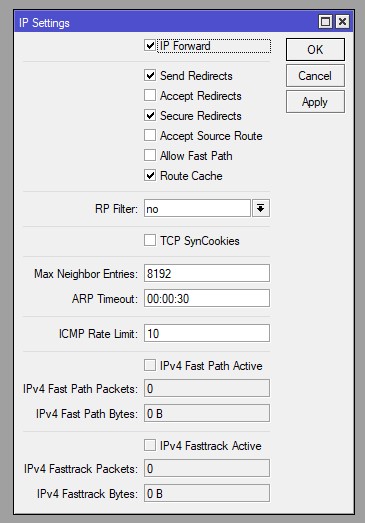 |
|
|
|
|
|
soonwai
|
Dec 31 2019, 01:08 PM
|
|
|
QUOTE(boxsystem @ Dec 31 2019, 10:38 AM) Does this work as failover only? What about combining both connections? @soonwai I used both-addresses-and-ports for pcc. Try that. This is because Speedtest opens multiple connections to different ports to the same server. Same IP address but different ports. That's why you need both-addresses-and-ports. If you test with torrents, I think you'll find your both-addresses pcc is already working. CODE action=mark-connection chain=prerouting dst-address-type=!local in-interface=bridge-vlan50 new-connection-mark=WAN1_conn passthrough=yes per-connection-classifier=both-addresses-and-ports:2/0
add action=mark-connection chain=prerouting dst-address-type=!local in-interface=bridge-vlan50 new-connection-mark=WAN2_conn passthrough=yes per-connection-classifier=both-addresses-and-ports:2/1
My /ip settings ip-forward is enabled. I also had problems with Fasttrack and dual wan pcc. https://forum.lowyat.net/index.php?showtopi...post&p=83915805Had to exclude WAN2 from Fasttrack. But this was a couple of years ago. So not sure if the problem still occurs with recent RouterOS versions. Currently I'm not using dual WAN. This post has been edited by soonwai: Dec 31 2019, 01:18 PM |
|
|
|
|
|
boxsystem
|
Dec 31 2019, 04:03 PM
|
|
|
Still doesn't work for me. Still getting 300mbps only during speedtest.
|
|
|
|
|
|
soonwai
|
Dec 31 2019, 04:31 PM
|
|
|
QUOTE(boxsystem @ Dec 31 2019, 04:03 PM) Still doesn't work for me. Still getting 300mbps only during speedtest. Even for torrents? |
|
|
|
|
|
boxsystem
|
Dec 31 2019, 04:57 PM
|
|
|
QUOTE(soonwai @ Dec 31 2019, 04:31 PM) will try to torrent later on. also, can point me in right direction to add AP to my mikrotik router while disabling the wifi antenna? basically, i wanted to use the asus routers as AP and dhcp is handled by mikrotik and wifi radios are on asus. i can still use the mesh function with asus it seems.. connections seems much more stable with mikrotik at the moment. streaming is much better. |
|
|
|
|
|
limmengsi
|
Jan 6 2020, 01:43 PM
|
|
|
hi,
i want to ask i currently using hAP AC, i plan to extend the range with the Mikrotik Audience. How to set it up?
|
|
|
|
|
|
heidarren
|
Jan 6 2020, 02:27 PM
|
Getting Started
|
QUOTE(limmengsi @ Jan 6 2020, 01:43 PM) hi, i want to ask i currently using hAP AC, i plan to extend the range with the Mikrotik Audience. How to set it up? Plug the LAN cable to LAN2 (LAN1 is used for WAN by default) on Audience, log in then reset configuration with CAPS MODE and DO NOT BACKUP selected, it will auto join your current CAPsMAN after reboot. If you r not planning to use CAPsMAN, you need to add those radios in bridge, then set the IP by using DHCP client or manually, then enable all 3 radios and do the basic wireless setting, that's it. |
|
|
|
|
|
Azusa_San
|
Jan 10 2020, 12:15 AM
|
|
|
any guide to enable ipv6 with unifi on mikrotik?
|
|
|
|
|
|
heidarren
|
Jan 10 2020, 12:23 AM
|
Getting Started
|
QUOTE(Azusa_San @ Jan 10 2020, 12:15 AM) any guide to enable ipv6 with unifi on mikrotik? Conclusion: don’t use |
|
|
|
|
|
Azusa_San
|
Jan 10 2020, 12:45 AM
|
|
|
QUOTE(heidarren @ Jan 10 2020, 12:23 AM) why |
|
|
|
|
|
heidarren
|
Jan 10 2020, 01:22 AM
|
Getting Started
|
QUOTE(Azusa_San @ Jan 10 2020, 12:45 AM) MikroTik’s IPv6 not fully ready yet, it doesn’t have fasttrack enabled yet, my hAP AC2 can run 839mbps with few percent CPU load, but run at much slower with IPv6 on and CPU load 100% Also, Unifi’s IPv6 is still not stable as IPv4, my ping plotter test with Facebook’s IPv6 will have few pings dropped in only 50 pings test, not sure about other ISP. I will leave it off until both of them solved the current problems. |
|
|
|
|
|
ahlong
|
Feb 14 2020, 08:19 PM
|
|
|
QUOTE(heidarren @ Jan 10 2020, 01:22 AM) MikroTik’s IPv6 not fully ready yet, it doesn’t have fasttrack enabled yet, my hAP AC2 can run 839mbps with few percent CPU load, but run at much slower with IPv6 on and CPU load 100% Also, Unifi’s IPv6 is still not stable as IPv4, my ping plotter test with Facebook’s IPv6 will have few pings dropped in only 50 pings test, not sure about other ISP. I will leave it off until both of them solved the current problems. hi heidarren, everyone and soonwaii've change to hap ac2 recently and suprisingly my ipv6 stop working (the same setting from my previous RB951). when i switch back to RB951, the ipv6 worked. any idea/help for this problem please?  |
|
|
|
|
|
MX510
|
Feb 17 2020, 12:13 PM
|
|
|
QUOTE(ahlong @ Feb 14 2020, 08:19 PM) hi heidarren, everyone and soonwaii've change to hap ac2 recently and suprisingly my ipv6 stop working (the same setting from my previous RB951). when i switch back to RB951, the ipv6 worked. any idea/help for this problem please? Did you install the ipv6 package in the routerboard itself? |
|
|
|
|
|
ahlong
|
Feb 17 2020, 04:30 PM
|
|
|
QUOTE(MX510 @ Feb 17 2020, 12:13 PM) Did you install the ipv6 package in the routerboard itself? its back live now.. wrongly interface selected |
|
|
|
|
|
th3game
|
Mar 14 2020, 10:38 PM
|
Getting Started
|
anyone managed to setup IPSec ikev2 on mikrotik router for remote clients?
|
|
|
|
|



 Quote
Quote





 0.0217sec
 0.97
0.97
 6 queries
 GZIP Disabled