Welcome Guest ( Log In | Register )

176 Pages « < 104 105 106 107 108 > » Bottom

Outline · [ Standard ] · Linear+

Enterprise Networking Mikrotik Routers (RouterBoard & RouterOS), User and owner discussion group

views
     
tro11
post Nov 16 2019, 02:12 PM

Getting Started
**
Junior Member
54 posts

Joined: Oct 2007
From: へび


QUOTE(quadcube @ Sep 17 2019, 08:00 AM)
update

managed to switch the Technicolor router to Mikrotik for Astro IPTV (VOD working). no IGMP proxy, no additional settings to default firewall needed biggrin.gif

at default bridge enable both IGMP and DHCP snooping (to prevent flooding of IPTV stream to other interfaces and the latter to prevent Maxis DHCP traffic from giving out IP to private network clients)

add vlan 823 interface to bridge and reboot Astro decoder.
*
Shame I didn't check back on this again after no luck getting the IPTV implementation done. Going to dump IPTV instead. Poor experience from start to finish.
cybercrew
post Dec 12 2019, 02:14 PM

Getting Started
**
Junior Member
183 posts

Joined: Sep 2009
From: Petaling Jaya, Malaysia


QUOTE(soonwai @ Apr 26 2019, 11:50 AM)
I agree with MX510, go for the hAP AC2. Whether you use its wifi or not, it's a really awesome router.

Also the RB750Gr3, no wifi, router only, about RM50 cheaper.
*
hi @soonwai

Need your advise here.

Currently im using Asus RT AC 55UHP, unifi 800MBPS

Im thinking of upgrading as My android TV downstairs sometime buffering when streaming.

So thinking of getting RB750Gr3 and use my current Asus as AP but ill bring it downstairs.

Is it possible to use RB750Gr3 with Asus as AP ?

Also, i m using openvpn server on my Asus router now, can i use the same on RB750Gr3 ?

Another option im think about is , getting a hAP AC2, but need advise to see if a better option in terms of WiFi compare to my current ASUS?

Pleae provide your valuable inputs..
th3game
post Dec 16 2019, 09:08 PM

Getting Started
**
Junior Member
235 posts

Joined: Sep 2014


hi sifus,

finally I got my hands with MikroTik HAP AC2. I tried to setup with Unifi and followed the steps on the web. vlan500 n vlan600 etc. etc...
and the Hypptv works. And the internet was not working when I connect to the wireless AC 5ghz or 2.4Ghz
But when I tried to ping the google.com in the Mikrotik terminal, I got the pinging. weird..
dunno what was wrong during config

from my mac connect wirelessly to the MikroTik, I can ping the gateway (192.168.1.1) and can ping google.com also but when to access the internet using the Safari, there was no internet. try to disconnect and reconnect back, still no luck. pls help

ether 1 - connect to Unifi BTU
ether 5 - connect to Hypptv stb

below is my export config file

» Click to show Spoiler - click again to hide... «

asellus
post Dec 16 2019, 09:57 PM

#gompusas
Group Icon
Elite
4,541 posts

Joined: Jan 2003
From: BSRPPG51 Access Concentrator


QUOTE(th3game @ Dec 16 2019, 09:08 PM)
hi sifus,

finally I got my hands with MikroTik HAP AC2. I tried to setup with Unifi and followed the steps on the web. vlan500 n vlan600 etc. etc...
and the Hypptv works. And the internet was not working when I connect to the wireless AC 5ghz or 2.4Ghz
But when I tried to ping the google.com in the Mikrotik terminal, I got the pinging. weird..
dunno what was wrong during config

from my mac connect wirelessly to the MikroTik, I can ping the gateway (192.168.1.1) and can ping google.com also but when to access the internet using the Safari, there was no internet. try to disconnect and reconnect back, still no luck. pls help

ether 1 - connect to Unifi BTU
ether 5 - connect to Hypptv stb

below is my export config file

» Click to show Spoiler - click again to hide... «

*
CODE
/ip firewall nat
add action=masquerade chain=srcnat comment="defconf: masquerade" \
   ipsec-policy=out,none out-interface-list=WAN


Try changing your NAT masquerade entry to explicitly use ether1?
th3game
post Dec 16 2019, 10:05 PM

Getting Started
**
Junior Member
235 posts

Joined: Sep 2014


QUOTE(asellus @ Dec 16 2019, 09:57 PM)
CODE
/ip firewall nat
add action=masquerade chain=srcnat comment="defconf: masquerade" \
   ipsec-policy=out,none out-interface-list=WAN


Try changing your NAT masquerade entry to explicitly use ether1?
*
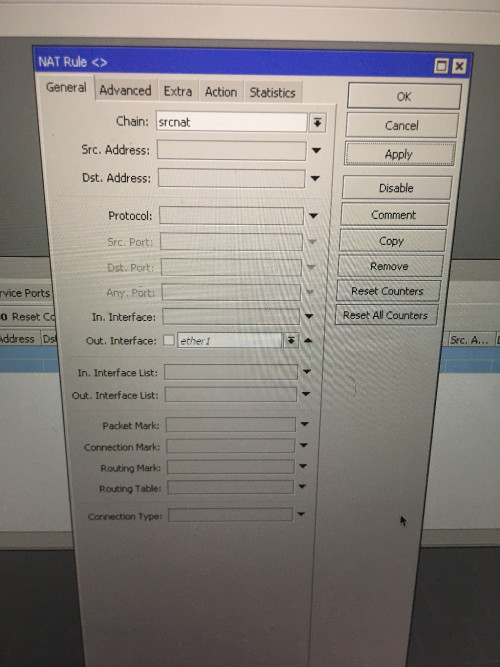
don't have option for ether1


user posted image

u mean this right?...sorry noob here

user posted image

This post has been edited by th3game: Dec 16 2019, 10:09 PM
asellus
post Dec 16 2019, 10:07 PM

#gompusas
Group Icon
Elite
4,541 posts

Joined: Jan 2003
From: BSRPPG51 Access Concentrator


QUOTE(th3game @ Dec 16 2019, 10:05 PM)
don't have option for ether1
user posted image
*
Disable 'Out Interface List' and use 'Out Interface' pulldown menu instead.
asellus
post Dec 16 2019, 10:15 PM

#gompusas
Group Icon
Elite
4,541 posts

Joined: Jan 2003
From: BSRPPG51 Access Concentrator


QUOTE(th3game @ Dec 16 2019, 10:05 PM)


u mean this right?...sorry noob here

user posted image
*
Damn, I forgot, use the pppoe interface name instead.
th3game
post Dec 16 2019, 10:27 PM

Getting Started
**
Junior Member
235 posts

Joined: Sep 2014


QUOTE(asellus @ Dec 16 2019, 10:15 PM)
Damn, I forgot, use the pppoe interface name instead.
*
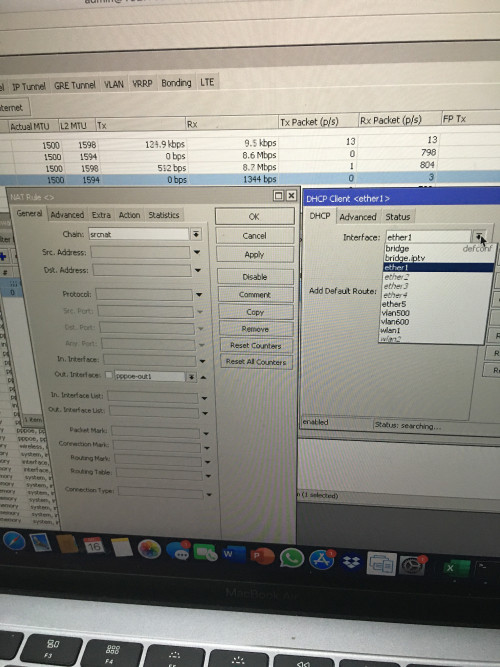
done changeNAT out. interface to to ppoe-out1

but how about DHCP Client..should be ether1?

user posted image
asellus
post Dec 16 2019, 10:34 PM

#gompusas
Group Icon
Elite
4,541 posts

Joined: Jan 2003
From: BSRPPG51 Access Concentrator


QUOTE(th3game @ Dec 16 2019, 10:27 PM)
done changeNAT out. interface to to ppoe-out1

but how about DHCP Client..should be ether1?

user posted image
*
I don't think you need to run a DHCP client on ether1 or the pppoe connection. On the other hand, you should run a DHCPv6 client on the pppoe connection instead.
soonwai
post Dec 16 2019, 11:42 PM


********
All Stars
11,459 posts

Joined: Oct 2007
From: KL


QUOTE(th3game @ Dec 16 2019, 10:27 PM)
done changeNAT out. interface to to ppoe-out1

but how about DHCP Client..should be ether1?

user posted image
*
As asellus said, you can delete or disable the DHCP client.

Your WAN interface list has ether1 and pppoe-out1. You can remove ether1 from the WAN address list. Once you've done that, it's the same as setting the masquerade rule explicitly to pppoe-out1 instead of interface list WAN. The masquerade rule will work either way.
th3game
post Dec 17 2019, 02:23 AM

Getting Started
**
Junior Member
235 posts

Joined: Sep 2014


QUOTE(soonwai @ Dec 16 2019, 11:42 PM)
As asellus said, you can delete or disable the DHCP client.

Your WAN interface list has ether1 and pppoe-out1. You can remove ether1 from the WAN address list. Once you've done that, it's the same as setting the masquerade rule explicitly to pppoe-out1 instead of interface list WAN. The masquerade rule will work either way.
*
thanks for the guide asellus & soonwai..now everything is in order. the internet is up already!
th3game
post Dec 18 2019, 04:42 PM

Getting Started
**
Junior Member
235 posts

Joined: Sep 2014


hi guys..im still exploring my new hap ac2 and got question..

I have the following setup:

Internet ---->HAP AC2 (local ip 192.168.1.1) --->Dlink dgs 1100 switch (static local IP 192.168.1.2)---> asus router as APs static local ip 192.168.1.3 & 192.168.1.4 (not Vlan aware devices)

hap ac2 trunking port 2 (vlan30,vlan40) to the switch port 1 n configured as tagged vlans
asus AP 1 connect to port 3 on switch as untagged vlan30
asue AP 2 connect to port 4 on switch as untagged vlan40

vlan30 - tagged port 1, untagged port 3
vlan40 - tagged port 1, untagged port 4
management vlan - vlan1

router hap ac2
DHCP address space : 192.168.1.0/24
gateway for DHCP network : 192.168.1.1
addresses to give out : 192.168.1.10 - 192.168.1.254

interface : vlan30
DHCP address space : 10.10.30.0/24
gateway for DHCP network : 10.10.30.1
addresses to give out : 10.10.30.2 - 10.10.30.254

interface : vlan40
DHCP address space : 10.10.40.0/24
gateway for DHCP network : 10.10.40.1
addresses to give out : 10.10.40.2 - 10.10.40.254

default config enable for hap ac2

i can access the internet wifi from asus AP 1 and got ip 10.10.30.254
i can access the internet wifi from asus AP 2 and got ip 10.10.40.254

questions..

I am able to connect to the hap ac2 local IP (192.168.1.1) via Winbox when connected to mikrotik wifi

I also want to be able to connect to the switch (192.168.1.2) & Asus APs (192.168.1.3 & 192.168.1.4) via local IP wirelessly.

Aleady tried to use mikrotik wifi to connect to those local IP but cannot sad.gif

Any solutions/suggestions will be highly appreciated..sorry if my question is bit noob
soohoe84
post Dec 19 2019, 05:37 PM

Getting Started
**
Junior Member
265 posts

Joined: Jun 2005
From: Penang


QUOTE(th3game @ Dec 16 2019, 09:08 PM)
hi sifus,

finally I got my hands with MikroTik HAP AC2. I tried to setup with Unifi and followed the steps on the web. vlan500 n vlan600 etc. etc...
and the Hypptv works. And the internet was not working when I connect to the wireless AC 5ghz or 2.4Ghz
But when I tried to ping the google.com in the Mikrotik terminal, I got the pinging. weird..
dunno what was wrong during config

from my mac connect wirelessly to the MikroTik, I can ping the gateway (192.168.1.1) and can ping google.com also but when to access the internet using the Safari, there was no internet. try to disconnect and reconnect back, still no luck. pls help

ether 1 - connect to Unifi BTU
ether 5 - connect to Hypptv stb

below is my export config file

» Click to show Spoiler - click again to hide... «

*
A bit off-topic but only a reminder to add some rules in firewall filter to prevent DNS amplification attack on your router. May refer to sifu soonwai's signature for further details.
I added for both input and forward chains.
CODE
/ip firewall filter
add action=drop chain=input comment="default configuration: prevent DNS amplification attacks" in-interface=pppoe-out1
add action=drop chain=forward comment="default configuration: prevent DNS amplification attacks" in-interface=pppoe-out1


boxsystem
post Dec 22 2019, 03:36 PM

Legend
******
Senior Member
1,573 posts

Joined: Jan 2003
From: Nilai, Negeri Sembilan
Guys HAP AC2 good enough to cover for a double storey terrace?
heidarren
post Dec 22 2019, 04:11 PM

Getting Started
**
Junior Member
248 posts

Joined: Aug 2018
QUOTE(boxsystem @ Dec 22 2019, 03:36 PM)
Guys HAP AC2 good enough to cover for a double storey terrace?
*
If u place it in the middle of the house, 2G can but 5G is slightly challenging
boxsystem
post Dec 26 2019, 09:49 AM

Legend
******
Senior Member
1,573 posts

Joined: Jan 2003
From: Nilai, Negeri Sembilan
QUOTE(heidarren @ Dec 22 2019, 04:11 PM)
If u place it in the middle of the house, 2G can but 5G is slightly challenging
*
Okay, I am looking into Audience now which way cheaper than asus routers and what I am using currently. Audience has MESH capabilities which is one of the criteria that ticks the box.

I believe and I have asked previously that mikrotik routers can do and combine dual WAN, which in this case I am subscribed to both Maxis and TM. Despite the difference in VLAN id both are able to be combined into a load balancing setup.

Correct me if I am wrong?

Asus seems to having issues with dual WAN especially with dual PPPoE connections.
daudKilat
post Dec 26 2019, 11:30 AM

Getting Started
**
Junior Member
103 posts

Joined: Feb 2012
From: Jeonju


Hi all,

Sorry if this already being asked. I'm using Netis provided by TM and noticed that it is a modem router or 2 in 1. Is there Mikrotik products with the same features? Thanks smile.gif
soonwai
post Dec 26 2019, 02:09 PM


********
All Stars
11,459 posts

Joined: Oct 2007
From: KL


QUOTE(boxsystem @ Dec 26 2019, 09:49 AM)
Okay, I am looking into Audience now which way cheaper than asus routers and what I am using currently. Audience has MESH capabilities which is one of the criteria that ticks the box.

I believe and I have asked previously that mikrotik routers can do and combine dual WAN, which in this case I am subscribed to both Maxis and TM. Despite the difference in VLAN id both are able to be combined into a load balancing setup.

Correct me if I am wrong?

Asus seems to having issues with dual WAN especially with dual PPPoE connections.
*
I'm not too confident about the Audience. Does it have anything that helps clients roam? I asked in the Mikrotik forums about 802.11 KVR and no-one answered. As far as I can tell, it only has an extra 5Ghz radio.

Dual WAN with Mikrotik is no problem. It's up to your imagination how to configure the dual WANs and balancing. Dual PPPoE, no problem, or weirder setups like what I did previously - My UniFi's PPPoE and a wifi bridge to my neighbours UniFi.

heidarren
post Dec 26 2019, 04:02 PM

Getting Started
**
Junior Member
248 posts

Joined: Aug 2018
QUOTE(soonwai @ Dec 26 2019, 02:09 PM)
I'm not too confident about the Audience. Does it have anything that helps clients roam? I asked in the Mikrotik forums about 802.11 KVR and no-one answered. As far as I can tell, it only has an extra 5Ghz radio.

Dual WAN with Mikrotik is no problem. It's up to your imagination how to configure the dual WANs and balancing. Dual PPPoE, no problem, or weirder setups like what I did previously - My UniFi's PPPoE and a wifi bridge to my neighbours UniFi.
*
I got an Audience in hand, it has nothing special than any other MikroTik APs, no k/v/r. 2.4G/5G1 has been configured in CAPsMAN by default.

However it does has much bigger coverage, especially 5G2. One of the best I found is it has much better receiving capability, it makes the high tx power usable in real life since now the AP can hear the client better. I tried to put at the middle of my 2 storey house and it does cover it up easily for all 3 bands from it, I can even reach nearly 200mbps at outside of my house, totally different experience from my hAP AC2/cAP AC.
boxsystem
post Dec 26 2019, 05:41 PM

Legend
******
Senior Member
1,573 posts

Joined: Jan 2003
From: Nilai, Negeri Sembilan
QUOTE(heidarren @ Dec 26 2019, 04:02 PM)
I got an Audience in hand, it has nothing special than any other MikroTik APs, no k/v/r. 2.4G/5G1 has been configured in CAPsMAN by default.

However it does has much bigger coverage, especially 5G2. One of the best I found is it has much better receiving capability, it makes the high tx power usable in real life since now the AP can hear the client better. I tried to put at the middle of my 2 storey house and it does cover it up easily for all 3 bands from it, I can even reach nearly 200mbps at outside of my house, totally different experience from my hAP AC2/cAP AC.
*
Double storey house?

You put the Audience in the middle of the house and is there an anothet router? Or hardwired?

176 Pages « < 104 105 106 107 108 > » Top
 

Change to:
| Lo-Fi Version
0.0166sec    0.37    6 queries    GZIP Disabled
Time is now: 21st December 2025 - 04:43 PM