Welcome Guest ( Log In | Register )

Outline · [ Standard ] · Linear+

Enterprise Networking Mikrotik Routers (RouterBoard & RouterOS), User and owner discussion group

views
     
th3game
post Dec 16 2019, 09:08 PM

Getting Started
**
Junior Member
235 posts

Joined: Sep 2014


hi sifus,

finally I got my hands with MikroTik HAP AC2. I tried to setup with Unifi and followed the steps on the web. vlan500 n vlan600 etc. etc...
and the Hypptv works. And the internet was not working when I connect to the wireless AC 5ghz or 2.4Ghz
But when I tried to ping the google.com in the Mikrotik terminal, I got the pinging. weird..
dunno what was wrong during config

from my mac connect wirelessly to the MikroTik, I can ping the gateway (192.168.1.1) and can ping google.com also but when to access the internet using the Safari, there was no internet. try to disconnect and reconnect back, still no luck. pls help

ether 1 - connect to Unifi BTU
ether 5 - connect to Hypptv stb

below is my export config file

» Click to show Spoiler - click again to hide... «

th3game
post Dec 16 2019, 10:05 PM

Getting Started
**
Junior Member
235 posts

Joined: Sep 2014


QUOTE(asellus @ Dec 16 2019, 09:57 PM)
CODE
/ip firewall nat
add action=masquerade chain=srcnat comment="defconf: masquerade" \
   ipsec-policy=out,none out-interface-list=WAN


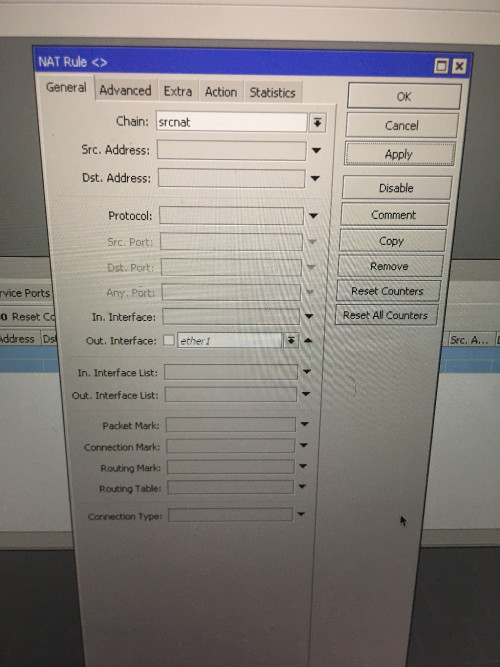
Try changing your NAT masquerade entry to explicitly use ether1?
*
don't have option for ether1


user posted image

u mean this right?...sorry noob here

user posted image

This post has been edited by th3game: Dec 16 2019, 10:09 PM
th3game
post Dec 16 2019, 10:27 PM

Getting Started
**
Junior Member
235 posts

Joined: Sep 2014


QUOTE(asellus @ Dec 16 2019, 10:15 PM)
Damn, I forgot, use the pppoe interface name instead.
*
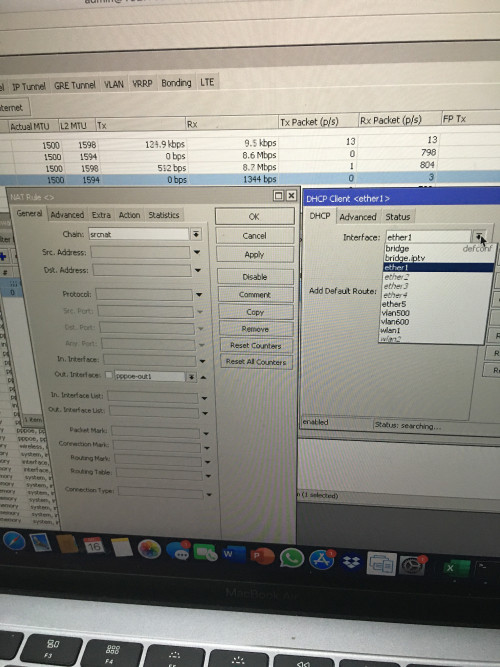
done changeNAT out. interface to to ppoe-out1

but how about DHCP Client..should be ether1?

user posted image
th3game
post Dec 17 2019, 02:23 AM

Getting Started
**
Junior Member
235 posts

Joined: Sep 2014


QUOTE(soonwai @ Dec 16 2019, 11:42 PM)
As asellus said, you can delete or disable the DHCP client.

Your WAN interface list has ether1 and pppoe-out1. You can remove ether1 from the WAN address list. Once you've done that, it's the same as setting the masquerade rule explicitly to pppoe-out1 instead of interface list WAN. The masquerade rule will work either way.
*
thanks for the guide asellus & soonwai..now everything is in order. the internet is up already!
th3game
post Dec 18 2019, 04:42 PM

Getting Started
**
Junior Member
235 posts

Joined: Sep 2014


hi guys..im still exploring my new hap ac2 and got question..

I have the following setup:

Internet ---->HAP AC2 (local ip 192.168.1.1) --->Dlink dgs 1100 switch (static local IP 192.168.1.2)---> asus router as APs static local ip 192.168.1.3 & 192.168.1.4 (not Vlan aware devices)

hap ac2 trunking port 2 (vlan30,vlan40) to the switch port 1 n configured as tagged vlans
asus AP 1 connect to port 3 on switch as untagged vlan30
asue AP 2 connect to port 4 on switch as untagged vlan40

vlan30 - tagged port 1, untagged port 3
vlan40 - tagged port 1, untagged port 4
management vlan - vlan1

router hap ac2
DHCP address space : 192.168.1.0/24
gateway for DHCP network : 192.168.1.1
addresses to give out : 192.168.1.10 - 192.168.1.254

interface : vlan30
DHCP address space : 10.10.30.0/24
gateway for DHCP network : 10.10.30.1
addresses to give out : 10.10.30.2 - 10.10.30.254

interface : vlan40
DHCP address space : 10.10.40.0/24
gateway for DHCP network : 10.10.40.1
addresses to give out : 10.10.40.2 - 10.10.40.254

default config enable for hap ac2

i can access the internet wifi from asus AP 1 and got ip 10.10.30.254
i can access the internet wifi from asus AP 2 and got ip 10.10.40.254

questions..

I am able to connect to the hap ac2 local IP (192.168.1.1) via Winbox when connected to mikrotik wifi

I also want to be able to connect to the switch (192.168.1.2) & Asus APs (192.168.1.3 & 192.168.1.4) via local IP wirelessly.

Aleady tried to use mikrotik wifi to connect to those local IP but cannot sad.gif

Any solutions/suggestions will be highly appreciated..sorry if my question is bit noob

th3game
post Dec 30 2019, 01:49 PM

Getting Started
**
Junior Member
235 posts

Joined: Sep 2014


hi sifus... i have 2 questions..

1) whats the different by setting up the vlan on etherX and setting vlan on bridge and using switch function to set as tagged/untagged/access only on etherX?

both still HW right? (hardware offloading)

example by this link

2) can someone explain to me what's the mean by 2Gb/s link between Gigabit switch and CPU as per below pic? What are the "ports/interfaces" that link them together?

user posted image

thanks in advance


th3game
post Mar 14 2020, 10:38 PM

Getting Started
**
Junior Member
235 posts

Joined: Sep 2014


anyone managed to setup IPSec ikev2 on mikrotik router for remote clients?
th3game
post May 1 2020, 03:04 AM

Getting Started
**
Junior Member
235 posts

Joined: Sep 2014


QUOTE(soonwai @ Apr 30 2020, 12:19 PM)
hAP AC3 with 5Gb ports announced but still 2x2. Nevertheless see what price first.
*
what's the major difference between this hap ac3 n hap ac2? is it only LTE support?

HAP AC3 Catalogue


Change to:
| Lo-Fi Version
0.1022sec    0.83    7 queries    GZIP Disabled
Time is now: 21st December 2025 - 06:32 PM