Welcome Guest ( Log In | Register )

176 Pages « < 78 79 80 81 82 > » Bottom

Outline · [ Standard ] · Linear+

Enterprise Networking Mikrotik Routers (RouterBoard & RouterOS), User and owner discussion group

views
     
charymsylyn
post Apr 10 2018, 10:06 PM

On my way
****
Junior Member
500 posts

Joined: May 2007
From: Kuala Lumpur
QUOTE(rioven @ Apr 6 2018, 05:16 PM)
Great finding, lest complicated than my previous adblock. The list is almost the same. Btw its advisable to increase its cache to large size (let say about 16mb, cant rember default size)
*
I wasn't sure what you meant by cache size so I spent some time looking at the DNS window and noticed there is a Cache Size field in IP > DNS. It was set to 2048KB so I assume this is the default. Changed it to 16384KB and the Cache Used indicator now shows 10061KB used. Thanks.
jio
post Apr 12 2018, 01:04 AM

Casual
***
Junior Member
383 posts

Joined: May 2005
For those looking for hap ac2, you can get it from sublime for 299. I had mine for a couple weeks now (bought from oversea) for use at hometown. The 5GHz performance kinda low probably due to interference, not sure the root cause though (there were couple of dual band routers and other devices next to it). It had 233MB RAM, more than the advertised spec of hap ac2.

edit: doh.gif I just checked mikrotik forum and plenty of ppl complaining about the hap ac2 wifi performance issue. I only use it with Digi LTE which had shitty speed at my hometown. And I thought interference & LTE congestion the cause for the shittier speed. Well, avoid hap ac2 for now.

This post has been edited by jio: Apr 12 2018, 01:24 AM
iXora.ix
post Apr 12 2018, 10:54 AM

scoot scoot
******
Senior Member
1,682 posts

Joined: Jan 2007
From: Kuala Lumpur


Hi guys, I need opinion to setup the hypp tv. I got rb3011(upstair handling pppoe) and spare rd750(downstairs to receive hypp tv). My question is can this two do vlan trunk? So both internet and vlan600 connection can pass-through using single cable, and from 750 i can output to normal internet and also vlan600 for hypp tv.
Need advice, thanks.
soonwai
post Apr 12 2018, 06:45 PM


********
All Stars
11,459 posts

Joined: Oct 2007
From: KL


QUOTE(iXora.ix @ Apr 12 2018, 10:54 AM)
Hi guys, I need opinion to setup the hypp tv. I got rb3011(upstair handling pppoe) and spare rd750(downstairs to receive hypp tv). My question is can this two do vlan trunk? So both internet and vlan600 connection can pass-through using single cable, and from 750 i can output to normal internet and also vlan600 for hypp tv.
Need advice, thanks.
*
In a hurry, so let me know if anything is not clear.

CODE
# apr/12/2018 18:26:28 by RouterOS 6.42rc52
# model = RouterBOARD 750G r3
/interface bridge
add admin-mac=xxxxxxxx auto-mac=no comment=defconf name=bridge1 vlan-filtering=yes
/interface bridge port
add bridge=bridge1 interface=ether2 pvid=50
add bridge=bridge1 interface=ether3-trunk1
add bridge=bridge1 interface=ether5-wan1
add bridge=bridge1 interface=bonding1 pvid=50
/interface bridge vlan
add bridge=bridge1 tagged=ether3-trunk1,bridge1 untagged=ether2,bonding1 vlan-ids=50
add bridge=bridge1 tagged=ether5-wan1,ether3-trunk1,bridge1 vlan-ids=600

This is the bridge config on my main router, where Unifi is coming into.

My VLANs:
vlan600 for HyppTV.
vlan50 for LAN traffic.
There're 2 more vlans but can be ignored so I removed them from the above config. I don't have any untagged traffic.

Most important:
ether3-trunk1 is the trunk to my RB2011UAS downstairs. (trunk for vlan50 and vlan600)
ether5-wan1 is connected to the BTU.
ether2 is connected to a switch. (vlan50)
ether1 and ether4 are bonded to another Mikrotik. Can ignore this. (vlan50)

Downstairs, for the router on the other end of the trunk, you configure something similar to the above.

CODE
# apr/12/2018 18:40:00 by RouterOS 6.42rc52
# model = 2011UAS-2HnD
/interface bridge
add admin-mac=xxxxxxxx auto-mac=no name=bridge1 protocol-mode=none
/interface bridge port
add bridge=bridge1 interface=wlan1
add bridge=bridge1 interface=ether1
add bridge=bridge1 interface=ether6
add bridge=bridge1 interface=ether2
add bridge=bridge1 interface=ether5
add bridge=bridge1 interface=ether7

/interface ethernet switch port
set 1 vlan-header=add-if-missing vlan-mode=secure
set 2 default-vlan-id=50 vlan-header=always-strip vlan-mode=secure
set 3 vlan-mode=secure
set 5 default-vlan-id=600 vlan-header=always-strip vlan-mode=secure
set 11 default-vlan-id=50 vlan-mode=secure
/interface ethernet switch vlan
add independent-learning=no ports=ether1,ether5 switch=switch1 vlan-id=600
add independent-learning=no ports=ether1,ether2,switch1-cpu switch=switch1 vlan-id=50

Mine is like this. For educational purposes, my RB2011 is configured using the switch chip. So may bit a bit confusing. It still is to me. biggrin.gif
Maybe easier if you just configure using bridge and vlans like the first router.

Note: Not sure 100% if all this is the optimal way but it works.

This post has been edited by soonwai: Apr 12 2018, 06:54 PM

iXora.ix
post Apr 12 2018, 10:02 PM

scoot scoot
******
Senior Member
1,682 posts

Joined: Jan 2007
From: Kuala Lumpur


» Click to show Spoiler - click again to hide... «


Thank you so much for the guide. I shall do it and revert back to you if anything. thumbup.gif
Out of curiosity, what is thisfunction for?

CODE
add admin-mac=xxxxxxxx and  

and

/interface ethernet switch port
set 1 vlan-header=add-if-missing vlan-mode=secure
set 2 default-vlan-id=50 vlan-header=always-strip vlan-mode=secure
set 3 vlan-mode=secure
set 5 default-vlan-id=600 vlan-header=always-strip vlan-mode=secure

set 11 default-vlan-id=50 vlan-mode=secure
soonwai
post Apr 12 2018, 10:59 PM


********
All Stars
11,459 posts

Joined: Oct 2007
From: KL


QUOTE(iXora.ix @ Apr 12 2018, 10:02 PM)
» Click to show Spoiler - click again to hide... «


Thank you so much for the guide. I shall do it and revert back to you if anything.  thumbup.gif
Out of curiosity, what is thisfunction for?

CODE
add admin-mac=xxxxxxxx and  

and

/interface ethernet switch port
set 1 vlan-header=add-if-missing vlan-mode=secure
set 2 default-vlan-id=50 vlan-header=always-strip vlan-mode=secure
set 3 vlan-mode=secure
set 5 default-vlan-id=600 vlan-header=always-strip vlan-mode=secure

set 11 default-vlan-id=50 vlan-mode=secure
*
Sorry, /export doesn't show all the info. #11 is switch1-cpu. Here's a /print to give the /export some context.
CODE
[RB2011UAS SL7] /interface ethernet switch port> print
Flags: I - invalid
#   NAME                         SWITCH                        VLAN-MODE VLAN-HEADER    DEFAULT-VLAN-ID
0   sfp1                         switch1                       disabled  leave-as-is               auto
1   ether1                       switch1                       secure    add-if-missing            auto
2   ether2                       switch1                       secure    always-strip                50
3   ether3                       switch1                       secure    leave-as-is               auto
4   ether4                       switch1                       disabled  leave-as-is               auto
5   ether5                       switch1                       secure    always-strip               600
6   ether6                       switch2                       disabled  leave-as-is                  0
7   ether7                       switch2                       disabled  leave-as-is                  0
8   ether8                       switch2                       disabled  leave-as-is                  0
9   ether9                       switch2                       disabled  leave-as-is                  0
10   ether10                      switch2                       disabled  leave-as-is                  0
11   switch1-cpu                  switch1                       secure    leave-as-is                 50
12   switch2-cpu                  switch2                       disabled  leave-as-is                  0

The RB2011 has 2 separate switches hence switch1-cpu & switch2-cpu.

This post has been edited by soonwai: Apr 12 2018, 11:00 PM
iXora.ix
post Apr 13 2018, 11:34 AM

scoot scoot
******
Senior Member
1,682 posts

Joined: Jan 2007
From: Kuala Lumpur


» Click to show Spoiler - click again to hide... «

I see. Same like rb3011. I need to study back the switch as my 3011, I bridge all port from port 2 till 10 (before this use master/slave). Gonna working on it after went home. Thank you icon_rolleyes.gif
MX510
post Apr 15 2018, 08:36 PM

Love Me Sin Hate Me Sinner
*******
Senior Member
4,038 posts

Joined: Aug 2005
From: Earth


Mikrotik CAP AC

Attached Image


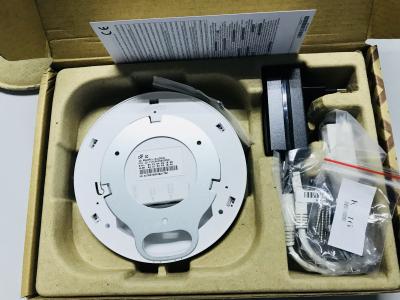
For those who want this router @ access point can place order here

Mikrotik CAP AC

Attached Image

Attached Image

Attached Image


Gigabit Controller Managed AP
Integrated Dual Band & Dual Chain WiFi - 802.11b/g/n 2.4 Ghz and 802.11ac 5GHz
All new ARM 4 Core 716 MHz CPU - IPQ-4018
2 x 1000Base-T Ethernet ports - Gigabit AP
Built in 128MB RAM
Level 4 RouterOS license
802.3at/af POE-in - supported
Passive POE out on second gigabit port
Up-to 26 dBm TX power

The device comes bundled with two enclosures, so you can choose the design you like best. The cAP ac is a very capable and powerful wireless access point that looks beautiful on both walls and ceilings. The concurrent dual band wireless radio supports dual chain 2 GHz and 5 GHz in 802.11ac and legacy standards, and will provide coverage in 360 degrees around it. Even though the radio supports repeater mode, the two Ethernet ports give you the ability to extend your network with cables, even if PoE power is required, since the cAP ac supports 802.3af/at PoE input on the first port, and passive PoE output (up to 57V) on the second port. The cAP ac is a feature packed device with a sleek enclosure, that can become inconspicuous with the push of a button - the customizable mode button in the device center will turn off all lights and sounds at it’s default configuration, but can be reconfigured to launch any RouterOS script. The cAP ac is equipped with two Ethernet ports, allowing you to connect another device, to further extend your network. What’s more, the second Ethernet port supports passive PoE output (up to 57 V), so it can power a wide variety of RouterBOARDs and other devices, like IP cameras. In the following scenario, you can use a central hEX PoE device to power all your cAP ac units, and then have cAP lite units connected to provide even better coverage. The hEX PoE can even be used as a CAPsMAN server, so you can easily manage all your access points, and control all their settings in a single device. We sell cAP ac (International) 2412-2484MHz and 5150MHz-5875MHz range

This post has been edited by MX510: Apr 17 2018, 07:42 AM
hersa_wex
post Apr 18 2018, 04:10 PM

Anim3 [F]r3ak
******
Senior Member
1,708 posts

Joined: Jan 2003
From: Penang

QUOTE(MX510 @ Apr 15 2018, 08:36 PM)
Mikrotik CAP AC

Attached Image
For those who want this router @ access point can place order here

Mikrotik CAP AC

Attached Image

Attached Image

Attached Image
Gigabit Controller Managed AP
Integrated Dual Band & Dual Chain WiFi - 802.11b/g/n 2.4 Ghz and 802.11ac 5GHz
All new ARM 4 Core 716 MHz CPU - IPQ-4018
2 x 1000Base-T Ethernet ports - Gigabit AP
Built in 128MB RAM
Level 4 RouterOS license
802.3at/af POE-in - supported
Passive POE out on second gigabit port
Up-to 26 dBm TX power

The device comes bundled with two enclosures, so you can choose the design you like best. The cAP ac is a very capable and powerful wireless access point that looks beautiful on both walls and ceilings. The concurrent dual band wireless radio supports dual chain 2 GHz and 5 GHz in 802.11ac and legacy standards, and will provide coverage in 360 degrees around it. Even though the radio supports repeater mode, the two Ethernet ports give you the ability to extend your network with cables, even if PoE power is required, since the cAP ac supports 802.3af/at PoE input on the first port, and passive PoE output (up to 57V) on the second port. The cAP ac is a feature packed device with a sleek enclosure, that can become inconspicuous with the push of a button - the customizable mode button in the device center will turn off all lights and sounds at it’s default configuration, but can be reconfigured to launch any RouterOS script. The cAP ac is equipped with two Ethernet ports, allowing you to connect another device, to further extend your network. What’s more, the second Ethernet port supports passive PoE output (up to 57 V), so it can power a wide variety of RouterBOARDs and other devices, like IP cameras. In the following scenario, you can use a central hEX PoE device to power all your cAP ac units, and then have cAP lite units connected to provide even better coverage. The hEX PoE can even be used as a CAPsMAN server, so you can easily manage all your access points, and control all their settings in a single device.  We sell cAP ac (International) 2412-2484MHz and 5150MHz-5875MHz range
*
Compare to wAP AC which has 3 chain, which is better in term of wireless performance?
soonwai
post Apr 23 2018, 07:14 PM


********
All Stars
11,459 posts

Joined: Oct 2007
From: KL


Advisory: Vulnerability exploiting the Winbox port

https://forum.mikrotik.com/viewtopic.php?f=21&t=133533

This is bad. For those who have Winbox open.

Time to switch to Asus.
MX510
post Apr 23 2018, 07:19 PM

Love Me Sin Hate Me Sinner
*******
Senior Member
4,038 posts

Joined: Aug 2005
From: Earth


QUOTE(soonwai @ Apr 23 2018, 07:14 PM)
Advisory: Vulnerability exploiting the Winbox port

https://forum.mikrotik.com/viewtopic.php?f=21&t=133533

This is bad. For those who have Winbox open.

Time to switch to Asus.
*
Actually TM modem and router are alsovulnerable to this new modem comes with different default password with last 4 digit of mac address

There is a lot of attack on port 80

Do secure your router by setting a password on your Mikrotik router

remove admin full access by set with different username and password

In addition you can always

Assign a different port

IP -> Services -> www either disable or set different port


XPS
post Apr 23 2018, 07:29 PM

Casual
***
Junior Member
322 posts

Joined: Jan 2008
QUOTE(soonwai @ Apr 23 2018, 07:14 PM)
Advisory: Vulnerability exploiting the Winbox port

Time to switch to Asus.
*
And lose all your ability to customise on Mikrotik? biggrin.gif

Its all over again RSA then AES if you know the history. Open source in theory is the only safe approach as the codes can be verified, no hidden stuff etc

This post has been edited by XPS: Apr 23 2018, 09:02 PM
XPS
post Apr 23 2018, 07:35 PM

Casual
***
Junior Member
322 posts

Joined: Jan 2008
QUOTE(MX510 @ Apr 23 2018, 07:19 PM)
Actually TM modem and router are alsovulnerable to this new modem comes with different default password with last 4 digit of mac address

There is a lot of attack on port 80

Do secure your router by setting a password on your Mikrotik router

remove admin full access by set with different username and password

In addition you can always

Assign a different port

IP -> Services -> www either disable or set different port
*
The real threat is more than firewall. Its how well protected the vendor firmware is on the download servers, development - test - release software controls, etc. Also how are clients within the internal network protected against an attack originating from an internal client.
soonwai
post Apr 23 2018, 08:16 PM


********
All Stars
11,459 posts

Joined: Oct 2007
From: KL


QUOTE(XPS @ Apr 23 2018, 07:29 PM)
And lose all your ability to customise on Mikrotik?  biggrin.gif
...
*
No lah, kidding of course. Last week flashed Tomato on my old RT-N16. Been meaning to try it out. It looks so pretty.
XPS
post Apr 23 2018, 08:53 PM

Casual
***
Junior Member
322 posts

Joined: Jan 2008
QUOTE(soonwai @ Apr 23 2018, 08:16 PM)
No lah, kidding of course. Last week flashed Tomato on my old RT-N16. Been meaning to try it out. It looks so pretty.
*
biggrin.gif biggrin.gif biggrin.gif

Tomato not LEDE on RT-N16? Would be awesome to get your experiences with a network with LEDE, PiHole ad-blocker, some intrusion detection device. That's a project on the back burner for now until can find some time.

soonwai
post Apr 23 2018, 09:52 PM


********
All Stars
11,459 posts

Joined: Oct 2007
From: KL


QUOTE(soonwai @ Apr 23 2018, 07:14 PM)
Advisory: Vulnerability exploiting the Winbox port

https://forum.mikrotik.com/viewtopic.php?f=21&t=133533

This is bad. For those who have Winbox open.

Time to switch to Asus.
*
Vulnerability fixed (hopefully) in just released v6.42.1 and v6.43rc4.

This post has been edited by soonwai: Apr 23 2018, 10:05 PM
Ebony & Ivory
post Apr 24 2018, 12:59 AM

Enthusiast
*****
Senior Member
962 posts

Joined: Jan 2016
not a big issue, as vulnerability do happen from time to time.

so in order to stay secure, it is vital for us to configure the firewall properly and make sure the device is up to date with the latest patch.

tips from mikrotik, disable any unused ip service, firewall winbox/ssh/telnet or any used ip service port expose to internet, restrict the access of ip service to certain address only, update to 6.42.1.
squall0833
post Apr 24 2018, 10:35 PM

Regular
******
Senior Member
1,473 posts

Joined: Oct 2006
From: Jupiter


Just finish basic setup for my new mikrotik router

Looks complicate, imma start to learn using routerOS from now on :3

Attached Image
squall0833
post May 3 2018, 12:19 AM

Regular
******
Senior Member
1,473 posts

Joined: Oct 2006
From: Jupiter


QUOTE(jio @ Apr 12 2018, 01:04 AM)
For those looking for hap ac2, you can get it from sublime for 299. I had mine for a couple weeks now (bought from oversea) for use at hometown. The 5GHz performance kinda low probably due to interference, not sure the root cause though (there were couple of dual band routers and other devices next to it). It had 233MB RAM, more than the advertised spec of hap ac2.

edit:  doh.gif I just checked mikrotik forum and plenty of ppl complaining about the hap ac2 wifi performance issue. I only use it with Digi LTE which had shitty speed at my hometown. And I thought interference & LTE congestion the cause for the shittier speed. Well, avoid hap ac2 for now.
*
FYI, wifi performance issue is fixed on 6.43rc5 for hap ac2

smile.gif I'm using it, works great


Hello Sifus, some quick question about simple queue and queue tree

Can I use them simultaneously?

for example, currently I'm prioritizing 80,443 traffics as first priority over all others traffic on Queue Tree also can limit speed by what kind of traffics (differentiate traffics by using packet marks)

then use Simple Queue to do priority and speed limit for clients by local ip addresses (assign them static ip on dhcp and set specific ip address to control)

I'm still looking for a way to force clients to use a specified ip address by their mac address, blocking their network access if they manually change to other ip addresses (prevent them from changing their lan ip)


i tried and it works pretty well for what I need

is it alright to use it that way? any conflict?

This post has been edited by squall0833: May 3 2018, 02:27 AM
Gaara92
post May 4 2018, 11:59 AM

Herald
****
Junior Member
612 posts

Joined: Mar 2008


Need help tp configuring IPv6 on TIME internet. I try to follow tutorials for TM Unifi but it didnt work. Can someone assist me how to configre mikrotik to get ipv6 address from TIME internet?

Currently I am using hAP-ac

176 Pages « < 78 79 80 81 82 > » Top
 

Change to:
| Lo-Fi Version
0.0271sec    0.98    6 queries    GZIP Disabled
Time is now: 17th December 2025 - 06:21 AM