

https://www.todayonline.com/singapore/legal...-sim-lim-square
HiMedia Media Player, All about HiMedia
HiMedia Media Player, All about HiMedia
|
|
 Dec 6 2017, 09:48 AM Dec 6 2017, 09:48 AM
|
 
Senior Member
1,787 posts Joined: Jul 2007 
|
|
|
|
|
|
|
Dec 6 2017, 11:53 AM
|

All Stars
24,454 posts Joined: Nov 2010
|
QUOTE(GuyM @ Dec 6 2017, 09:48 AM) nothing new... we already know.hundreds of brands such boxes now... from all corners of the planet. china, hong kong, brazil, south africa, russia... now singapore! a matter of what they can do and price. it mentioned a SGD99 box - that's a low end one. another one at SGD299 - RM900... hmm... this better be good. soon enough maybe some local maker will be selling a model at rm99.  |
|
|
 Dec 6 2017, 12:34 PM Dec 6 2017, 12:34 PM
|

Senior Member
7,118 posts Joined: Oct 2011 From: Wakanda 
|
QUOTE(GuyM @ Dec 6 2017, 09:48 AM) QUOTE(AVFAN @ Dec 6 2017, 11:53 AM) nothing new... we already know. It's sellers like these that keep messing things up for regular folks.. Sucking life out of the ehem apps devs & community. Just recently Terra***** for instance, has taken down the official website and even the github page for obvious reasons. Hinting that it may soon be dead as others before it.hundreds of brands such boxes now... from all corners of the planet. china, hong kong, brazil, south africa, russia... now singapore! a matter of what they can do and price. it mentioned a SGD99 box - that's a low end one. another one at SGD299 - RM900... hmm... this better be good. soon enough maybe some local maker will be selling a model at rm99.  |
|
|
Dec 6 2017, 12:38 PM
|
|
Senior Member
1,787 posts Joined: Jul 2007
|
IPTV will continue to strife due to demand .....
|
|
|
Dec 6 2017, 01:07 PM
|
|
Senior Member
7,118 posts Joined: Oct 2011 From: Wakanda
|
No doubt it shall. Hence the "regular folks" part in my comment. More and more will go private and hidden. At this rate, I actually support such. Hope an update gets pushed out to kill the app. TTV re-branded and released in private circles.. Just like private p2p trackers. Those in the know will always know how to get the good stuff again.
|
|
|
Dec 6 2017, 01:50 PM
|

Senior Member
600 posts Joined: Oct 2004
|
guys,
gotten my hands into kodi past few days, having the 17.6 now, Quasar working fine except for some slight struddles and unable to get 5.1 to work. My settings are as pictures below, did I missed anything on the 5.1 issue? 

|
|
|
|
|
|
Dec 6 2017, 02:07 PM
|
|
All Stars
24,454 posts Joined: Nov 2010
|
QUOTE(arrsoo @ Dec 6 2017, 01:50 PM) guys, looks all good to me.gotten my hands into kodi past few days, having the 17.6 now, Quasar working fine except for some slight struddles and unable to get 5.1 to work. My settings are as pictures below, did I missed anything on the 5.1 issue? should get dd5.1 and dd+5.1, transcoding too. what firmware r u on? what home theater? box->hdmi->avr or box->optical->avr? This post has been edited by AVFAN: Dec 6 2017, 02:14 PM |
|
|
Dec 6 2017, 02:52 PM
|
|
Senior Member
600 posts Joined: Oct 2004
|
QUOTE(AVFAN @ Dec 6 2017, 02:07 PM) looks all good to me. latest 2.0.6 fw. Using a pioneer vsx923 amp. Connection is box ->hdmi ->avr.should get dd5.1 and dd+5.1, transcoding too. what firmware r u on? what home theater? box->hdmi->avr or box->optical->avr? I can get 5.1 using terrarium tv though....funny |
|
|
Dec 6 2017, 02:56 PM
|
|
Senior Member
7,118 posts Joined: Oct 2011 From: Wakanda
|
QUOTE(arrsoo @ Dec 6 2017, 02:52 PM) latest 2.0.6 fw. Using a pioneer vsx923 amp. Connection is box ->hdmi ->avr. revert number of channels to default values.. since you are using pass-through.I can get 5.1 using terrarium tv though....funny |
|
|
Dec 6 2017, 02:58 PM
|
|
Senior Member
600 posts Joined: Oct 2004
|
QUOTE(voncrane @ Dec 6 2017, 02:56 PM) revert number of channels to default values.. since you are using pass-through. okay, will try that tonight. |
|
|
Dec 6 2017, 04:36 PM
|
|
All Stars
24,454 posts Joined: Nov 2010
|
QUOTE(arrsoo @ Dec 6 2017, 02:52 PM) latest 2.0.6 fw. Using a pioneer vsx923 amp. Connection is box ->hdmi ->avr. it should work fine.I can get 5.1 using terrarium tv though....funny of course, u know u can get 5.1 only if the link is dd/dd+/dts51. those files are typically >2gb, some 4-5gb each for tv shows and 6-10gb for movies. is yr box q5pro or q10pro? q5pro with less storage will not be able to do the bigger files on quasar unless u set the path to ext hdd. smaller files are typically aac 2.0. if still cannot, i suggest u do a clean install of kodi17.6, reinstall quasar n burst. This post has been edited by AVFAN: Dec 6 2017, 05:14 PM |
|
|
Dec 6 2017, 05:15 PM
|
|
Senior Member
600 posts Joined: Oct 2004
|
QUOTE(AVFAN @ Dec 6 2017, 04:36 PM) it should work fine. mine is a q10pro, I shall try again tonight and will snap a picture of the link i tried on to verify just in case I blur2.com...lol.of course, u know u can get 5.1 only if the link is dd/dd+/dts51. those files are typically >2gb, some 4-5gb each for tv shows and 6-10gb for movies. is yr box q5pro or q10pro? q5pro with less storage will not be able to do the bigger files unless u set the path to ext hdd. smaller files are typically aac 2.0. if still cannot, i suggest u do a clean install of kodi17.6, reinstall quasar n burst. BTW, another concern using quasar is that movie file will be downloaded and play, do I have to delete the movie file after playing? Or is there any setting where I can set it to auto delete after playing? Certainly would not want it to hog up the storage space |
|
|
Dec 6 2017, 05:55 PM
|
|
All Stars
24,454 posts Joined: Nov 2010
|
QUOTE(arrsoo @ Dec 6 2017, 05:15 PM) mine is a q10pro, I shall try again tonight and will snap a picture of the link i tried on to verify just in case I blur2.com...lol. U can pm me the link, i can verify.BTW, another concern using quasar is that movie file will be downloaded and play, do I have to delete the movie file after playing? Or is there any setting where I can set it to auto delete after playing? Certainly would not want it to hog up the storage space Yes, there are settings to remove or save upon exit, etc. with delete as default. Hard to explain, suggest u test, play with options, decide what is best 4 u. Also, if u hv internal hdd, best to set path to it. That will free the internal card memory from any possible missaves, and that happens. If find things sluggish, chances r it is saving or saved due to wrong setting, wrong clicks, etc. Then, u go to the drives and delete unwantwed files manually, free the space. |
|
|
|
|
|
Dec 6 2017, 08:21 PM
|
|
Senior Member
1,787 posts Joined: Jul 2007
|
This the settings on my Q16
Attached thumbnail(s) 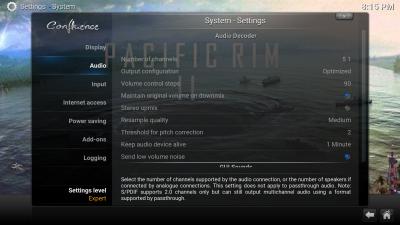
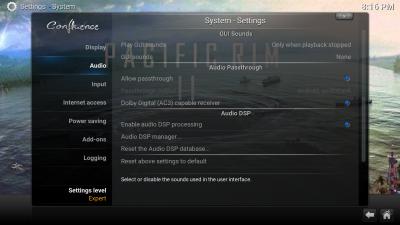
|
|
|
Dec 8 2017, 11:57 AM
|
|
Senior Member
600 posts Joined: Oct 2004
|
QUOTE(voncrane @ Dec 6 2017, 02:56 PM) revert number of channels to default values.. since you are using pass-through. QUOTE(AVFAN @ Dec 6 2017, 04:36 PM) it should work fine. of course, u know u can get 5.1 only if the link is dd/dd+/dts51. those files are typically >2gb, some 4-5gb each for tv shows and 6-10gb for movies. is yr box q5pro or q10pro? q5pro with less storage will not be able to do the bigger files on quasar unless u set the path to ext hdd. smaller files are typically aac 2.0. if still cannot, i suggest u do a clean install of kodi17.6, reinstall quasar n burst. QUOTE(GuyM @ Dec 6 2017, 08:21 PM) This the settings on my Q16 Thanks guys for all your input, I can now get 5.1 in kodi after disabling the "sync playback to display" in video setting
Unfortunately, I still can't solve the video buffering/stuttering issue. Watched some guides in youtube to fix it, seems too complicated to me as it requires some external apps to tweak  better give up and use Terrarium TV instead better give up and use Terrarium TV instead  Simple and easy... Simple and easy... |
|
|
Dec 8 2017, 02:43 PM
|
|
All Stars
24,454 posts Joined: Nov 2010
|
QUOTE(arrsoo @ Dec 8 2017, 11:57 AM) Unfortunately, I still can't solve the video buffering/stuttering issue. Watched some guides in youtube to fix it, seems too complicated to me as it requires some external apps to tweak with your 100 mbps speed, there should be little or no buffering, at least for quasar. better give up and use Terrarium TV instead Simple and easy...in fact, it should be very smooth for up to 20gb videos if the seeds n peers r adequate. dun bother with those tips on youtube, they dun work or r out of date, mostly. try this: go to kodi, player settings, video, hardware acceleration. play around with both options (surface and the other) - on or off for either, both... see which setting works best. |
|
|
Dec 8 2017, 06:44 PM
|
|
Senior Member
600 posts Joined: Oct 2004
|
QUOTE(AVFAN @ Dec 8 2017, 02:43 PM) with your 100 mbps speed, there should be little or no buffering, at least for quasar. ok, noted, I shall try it out. Or cud it be due to TM throttling torrents?in fact, it should be very smooth for up to 20gb videos if the seeds n peers r adequate. dun bother with those tips on youtube, they dun work or r out of date, mostly. try this: go to kodi, player settings, video, hardware acceleration. play around with both options (surface and the other) - on or off for either, both... see which setting works best. This post has been edited by arrsoo: Dec 8 2017, 06:44 PM |
|
|
Dec 8 2017, 06:51 PM
|
|
All Stars
24,454 posts Joined: Nov 2010
|
QUOTE(arrsoo @ Dec 8 2017, 06:44 PM) ok, noted, I shall try it out. Or cud it be due to TM throttling torrents? no, not at all.but... u gotta be mindful about your local issues with ethernet, wifi, lousy routers, lan cables. |
|
|
Dec 8 2017, 07:00 PM
|
|
Senior Member
600 posts Joined: Oct 2004
|
QUOTE(AVFAN @ Dec 8 2017, 06:51 PM) no, not at all. hmm....my q10 is connected to archer c5 router using cat6 cable, can get full speed consistently. Terrarium TV non issue at all, only kodibut... u gotta be mindful about your local issues with ethernet, wifi, lousy routers, lan cables. |
|
|
Dec 8 2017, 08:37 PM
|
|
All Stars
24,454 posts Joined: Nov 2010
|
QUOTE(arrsoo @ Dec 8 2017, 07:00 PM) hmm....my q10 is connected to archer c5 router using cat6 cable, can get full speed consistently. Terrarium TV non issue at all, only kodi cat 6 is good. archer, i dunno, am using asus.i just watched a 10gb video on quasar. can see the DL speed at almost 6MBps, i.e. close to max that my 50mbps can do. that means 6MBps x 60 secs x 60 min x 2 hrs = 43gb video. of course, can't expect that every sec. realistically... it will be something like 4 x 60 x 60 = 14gb. which is why i said yr 1000mbps shud breeze on a 20gb 2hr video. one thing i thought of for u to try on kodi quasar to get dd/dd+5.1... in the system settings, audio, set it to 2.0 and not 5.1. that's my setting - i get dd/dd+5.1... DTS/DSTHDMA will be transcoded to DD5.1 as well. |
|
Topic ClosedOptions
|
| Change to: |  0.0312sec 0.0312sec
 0.55 0.55
 6 queries 6 queries
 GZIP Disabled GZIP Disabled
Time is now: 4th December 2025 - 02:18 PM |
 Quote
Quote