Welcome Guest ( Log In | Register )

Bump Topic Topic Closed RSS Feed
104 Pages « < 35 36 37 38 39 > » Bottom

Outline · [ Standard ] · Linear+

 SAMSUNG GALAXY TAB Official Thread V1, ..best and most portable Android tablet

views
     
sphiroth
post Feb 26 2011, 10:34 PM

Look at all my stars!!
*******
Senior Member
2,804 posts

Joined: Jan 2003
QUOTE(benny888 @ Feb 26 2011, 07:35 PM)
Not surprising, I find 2 cops holding and don't know doing what with it at a kopitiam in my housing estate  3 days ago. Maybe this is part of PDRM'e efforts to improve communication thro email, tweets etc ; I'd think is a good tool for them plus with camera , take a shot and just email over !!
*
Yeah, the big screen is really nice for taking accident picture. Last month when I involved in an accident, the workshop/tow truck owner really interested when seeing my tab and asking a lot of question. When I collect my car, saw him holding one. laugh.gif


Added on February 26, 2011, 10:34 pm
QUOTE(shinzan @ Feb 26 2011, 10:14 PM)
Upgraded to Overcome v1.2.0 today...

user posted image

user posted image
*
Not overclock yet?

This post has been edited by sphiroth: Feb 26 2011, 10:34 PM
shinzan
post Feb 26 2011, 10:41 PM

Born To Support Liverpool All My Life
******
Senior Member
1,360 posts

Joined: Jan 2003
From: Federal Territory of Putrajaya


QUOTE(sphiroth @ Feb 26 2011, 10:34 PM)
Not overclock yet?
*
still considering...need to gather more information about it...
TSbenny888
post Feb 26 2011, 10:49 PM

Gadget Freak
Group Icon
Elite
27,801 posts

Joined: Jun 2007
From: Johor


QUOTE(pjc1947 @ Feb 26 2011, 10:09 PM)
hye benny,can i know what link to get psx4 game?
i have install psx4 app,but inside just got 1 game...
can i put some others game in psx4?
and can u teach me how to put it...
*
Sorry i know nuts about games. Dont even know what is psx4. Don't laugh - True. Hope other users can help you
wiebie26
post Feb 26 2011, 11:11 PM

Getting Started
**
Junior Member
119 posts

Joined: Apr 2010


QUOTE(pjc1947 @ Feb 26 2011, 10:09 PM)
hye benny,can i know what link to get psx4 game?
i have install psx4 app,but inside just got 1 game...
can i put some others game in psx4?
and can u teach me how to put it...
*
to get games u must download roms.. it's illegal so we cant discuss here.. so u better google it.. it's easy to use psx4droid..
TSbenny888
post Feb 26 2011, 11:23 PM

Gadget Freak
Group Icon
Elite
27,801 posts

Joined: Jun 2007
From: Johor


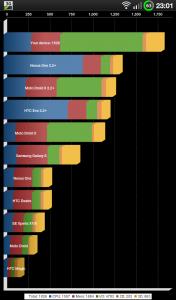
My Quadrant reading on Overcome 1.2 @ default 1 Ghz : 1826
Quadrant is just a CPU, I/O, and graphics benchmark. It’s a way to test the performance of your phone compare to other Android devices.

Attached Image

Just for info, these were my previous best readings:

Stock rom : 927
Rotohammer JME : 1072
Modaco R1 ( ext4 fs ) : 1781

These figures just shows the improvement in changing the roms.

However I'd like to say these scores itself just give one a " feel good factor" - it does not necessary mean another android phone with a lower score is a poorer performer. I always like to quote my ex Galaxy S ( on voodoo lag fix and Froyo ) score an impressive 2250 compared to its stock of 1020. But I do not see double increase in performance ; I'd say the improvement is slight probably 10 % ? Then at same time my Dell Streak and HD2 ( android ) was scoring around 1200 t0 1500 range but practically their performance was way, way ahead of the Galaxy S ( w Voodoo n Froyo)
Performance should truly be measured by your own experience and feel of using the phone . If you are happy with it, just take these scores as guideline only

This post has been edited by benny888: Feb 26 2011, 11:27 PM
klwong99
post Feb 26 2011, 11:41 PM

Getting Started
**
Junior Member
224 posts

Joined: Sep 2010
From: Shah Alam


Anyone here encounter problem at ClockworkMod Recovery before?
Just want to flash with the Overcome new ROM and reboot TAB by pressing power button and select "Recovery".
After reboot to CWM and want to select "install zip from sdcard", it just show the CWM logo behind (hat with the circle arrow below) and stop.
Although press other selections, same thing happen, logo of CWM display and nothing happen.
I just stop at this CWM screen whenever want to reboot back to OS.
Anyone here know how to reboot with bypass the CWM as i stop now?
dave18
post Feb 26 2011, 11:54 PM

Getting Started
**
Junior Member
102 posts

Joined: Dec 2008
QUOTE(klwong99 @ Feb 26 2011, 11:41 PM)
Anyone here encounter problem at ClockworkMod Recovery before?
Just want to flash with the Overcome new ROM and reboot TAB by pressing power button and select "Recovery".
After reboot to CWM and want to select "install zip from sdcard", it just show the CWM logo behind (hat with the circle arrow below) and stop.
Although press other selections, same thing happen, logo of CWM display and nothing happen.
I just stop at this CWM screen whenever want to reboot back to OS.
Anyone here know how to reboot with bypass the CWM as i stop now?
*
Press and hold power key until reboot.
TSbenny888
post Feb 27 2011, 12:00 AM

Gadget Freak
Group Icon
Elite
27,801 posts

Joined: Jun 2007
From: Johor


QUOTE(klwong99 @ Feb 26 2011, 11:41 PM)
Anyone here encounter problem at ClockworkMod Recovery before?
Just want to flash with the Overcome new ROM and reboot TAB by pressing power button and select "Recovery".
After reboot to CWM and want to select "install zip from sdcard", it just show the CWM logo behind (hat with the circle arrow below) and stop.
Although press other selections, same thing happen, logo of CWM display and nothing happen.
I just stop at this CWM screen whenever want to reboot back to OS.
Anyone here know how to reboot with bypass the CWM as i stop now?
*
Your recovery has been modified when you flash the Richard OC kernels - see his post , he mentioned some modifications. Just press Home button to select instead of the power button
When you reflash this Overcome 1.2 you will see the hat logo but your keys back to normal

This post has been edited by benny888: Feb 27 2011, 12:01 AM
klwong99
post Feb 27 2011, 12:01 AM

Getting Started
**
Junior Member
224 posts

Joined: Sep 2010
From: Shah Alam


QUOTE(dave18 @ Feb 26 2011, 11:54 PM)
Press and hold power key until reboot.
*
Hi bro dave18, everytime i hold the power button to shut down, hold again the button to restart, it still boot to CWM.
Or at CWM Recovery, I hold the power button and not release it until it reboot to Samsung logo, it still boot back to CWM.
What should i do beside re-flash the ROM. I want go back to OS and Backup my apps first. cry.gif


Added on February 27, 2011, 12:04 am
QUOTE(benny888 @ Feb 27 2011, 12:00 AM)
Your recovery has been modified when you flash the Richard OC kernels - see his post , he mentioned some modifications. Just press Home button to select instead of the power button
When you reflash this Overcome 1.2 you will see the hat logo but your keys back to normal
*
Yes benny, you are right. I almost forgot also. Thx.
Rebooting successful now. rclxms.gif

This post has been edited by klwong99: Feb 27 2011, 12:04 AM
dave18
post Feb 27 2011, 12:15 AM

Getting Started
**
Junior Member
102 posts

Joined: Dec 2008
@klwong99 : Haha. Gave you a scare i'm sure. Fortunately Uncle Benny remembers everything.

klwong99
post Feb 27 2011, 12:22 AM

Getting Started
**
Junior Member
224 posts

Joined: Sep 2010
From: Shah Alam


QUOTE(dave18 @ Feb 27 2011, 12:15 AM)
@klwong99 : Haha. Gave you a scare i'm sure. Fortunately Uncle Benny remembers everything.
*
You know what, uncle benny qualify and certify the title of Android 'Professor'. rclxms.gif
TSbenny888
post Feb 27 2011, 12:30 AM

Gadget Freak
Group Icon
Elite
27,801 posts

Joined: Jun 2007
From: Johor


QUOTE(klwong99 @ Feb 27 2011, 12:22 AM)
You know what, uncle benny qualify and certify the title of Android 'Professor'.  rclxms.gif
*
TQ for the nice words. I am still learning everyday. I am not an expert and still have to learn from others. It is amazing what you can learn just by reading all the posts of users comments on XDA. I have more time on my hand to read as I am a retiree and what I have is time now
klwong99
post Feb 27 2011, 01:10 AM

Getting Started
**
Junior Member
224 posts

Joined: Sep 2010
From: Shah Alam


QUOTE(benny888 @ Feb 27 2011, 12:30 AM)
TQ for the nice words. I am still learning everyday. I am not an expert and still have to learn from others. It is amazing what you can learn just by reading all the posts of users comments on XDA. I have more time on my hand to read as I am a retiree and what I have is time now
*
You deserve it actually. Not every retiree willing spend their time on learning like you.
BTW, what all guys which trying on Overcome 1.2 ROM regarding battery life time?
I just realise it drop quite rapidly compare with Richardtrip's Kernel without overclock.
muffdiver
post Feb 27 2011, 03:48 AM

Getting Started
**
Junior Member
160 posts

Joined: Jan 2011


Hi everyone. I just bought myself a new SGT. Hope to learn all the good tricks from all of your Sifus here.

Now, first things first is to secure this pretty thing with an Idefence skin. Then learn all about rooting and enhancements. smile.gif
sphiroth
post Feb 27 2011, 08:40 AM

Look at all my stars!!
*******
Senior Member
2,804 posts

Joined: Jan 2003
QUOTE(benny888 @ Feb 26 2011, 11:23 PM)
My Quadrant reading on Overcome 1.2 @ default 1 Ghz : 1826
Quadrant is just a CPU, I/O, and graphics benchmark. It’s a way to test the performance of your phone compare to other Android devices.

Attached Image

Just for info,  these were my previous best readings:

Stock rom : 927
Rotohammer JME : 1072
Modaco R1 ( ext4 fs ) : 1781

These figures just shows the improvement in changing the roms.

However I'd like to say these scores itself just give one a " feel good factor" - it does not necessary mean another android phone with a lower score is a poorer performer. I always like to quote my ex Galaxy S ( on voodoo lag fix and Froyo ) score an impressive 2250 compared to its stock of 1020. But I do not see double increase in performance ; I'd say the improvement is slight probably 10 % ? Then at same time my Dell Streak and HD2 ( android ) was scoring around 1200 t0 1500 range but practically their performance was way, way  ahead of the Galaxy S ( w Voodoo n Froyo)
Performance should truly be measured by your own experience and feel of using the phone . If you are happy with it, just take these scores as guideline only
*
After changing to ext4, the most significant improvement is when loading games such as nfs:shift, asphalt, hawkx which requires some loading time.
TSbenny888
post Feb 27 2011, 10:12 AM

Gadget Freak
Group Icon
Elite
27,801 posts

Joined: Jun 2007
From: Johor


QUOTE(sphiroth @ Feb 27 2011, 08:40 AM)
After changing to ext4, the most significant improvement is when loading games such as nfs:shift, asphalt, hawkx which requires some loading time.
*
I'd then recommend you to try Overcome 1.2 . You have option to use 1.2 or 1.4 Ghz O/C if you plan to paly these games. Tune it down for normal use. I'd say Overocome has now given a all in one solution with his already stable rom plus hos own customized kernel with OC features. So theoretically should have less 3rd party issues. I am not a gamer but i just tested briefly for academic purposes at 1.2 and 1.4 Ghz OC - if is of any interest quadrant scores up to 2080 and 2232 respectively

This post has been edited by benny888: Feb 27 2011, 10:13 AM
rahuldave
post Feb 27 2011, 10:24 AM

FAFC 'Forever Android Fan Club'
******
Senior Member
1,241 posts

Joined: Nov 2004
From: Georgetown Penang


Hi

Out of curiousity, I have flashed Overcome v1.2.0. After successfully flashing it, i went into recovery and it format the internal SD to EXT4 but IT says that MicroSD is not detected and its not formatted nor backup. My question is do I have to format my 16gb MicroSD to EXT4 after flashing to OC 1.2?

I have not unclocked it to 1.2ghz

My Quadrant test is getting 1660 and I saw that some of the user is achieving 18++. Any tweak to get this figure achieved.?

klwong99
post Feb 27 2011, 10:29 AM

Getting Started
**
Junior Member
224 posts

Joined: Sep 2010
From: Shah Alam


Is it normal or bug when plug in the power cable to charge the TAB, the screen won't turn blank totally?
This also happen while i used Richardtrip's Kernel before.
The problem of this is, TAB take much longer charging time.
twokick
post Feb 27 2011, 12:03 PM

New Member
*
Junior Member
8 posts

Joined: Apr 2008


Hi

I just got my TAB few days ago. Bought it from Digital Mall, the sales guy told me the device came in from Saudi Arabia.

Anyway, my TAB does not come with the market app. Would like to ask if there are any of you with the same situation?
How do i install the market app?

Grateful for any assistance. Thanks!
dave18
post Feb 27 2011, 12:08 PM

Getting Started
**
Junior Member
102 posts

Joined: Dec 2008
QUOTE(rahuldave @ Feb 27 2011, 10:24 AM)
Hi

Out of curiousity, I have flashed Overcome v1.2.0. After successfully flashing it, i went into recovery and it format the internal SD to EXT4 but IT says that MicroSD is not detected and its not formatted nor backup. My question is do I have to format my 16gb MicroSD to EXT4 after flashing to OC 1.2?

I have not unclocked it to 1.2ghz

My Quadrant test is getting 1660 and I saw that some of the user is achieving 18++. Any tweak to get this figure achieved.?
*
Some encountered your prblem so it was advised to format the microsd first using the tab b4 flashing the kernel- so i did.Actually they say you are suppose to run guadrant test three times to get the high scores. I dont bother. Maybe you can go into cwm recovrry to wipe cache partition then advance to wipe dalvik cache,then reboot. It will take a while to reboot since it's rebuilding cache. Maybe faster after that??.


104 Pages « < 35 36 37 38 39 > » Top
Topic ClosedOptions
 

Change to:
| Lo-Fi Version
0.0311sec    1.26    6 queries    GZIP Disabled
Time is now: 19th December 2025 - 06:20 AM