tmpin points to nb also but vary with diff mobo...
warranty dont cover burned chipset...dont know bout g-byte tho...juz got my msi burned n no warranty gonna cover tht
AMD® Socket AM2&AM3 Overclocking V24, Thuban or Bulldozer!? Its 6-Season
AMD® Socket AM2&AM3 Overclocking V24, Thuban or Bulldozer!? Its 6-Season
|
|
 Apr 9 2011, 03:10 PM Apr 9 2011, 03:10 PM
|
 
Senior Member
872 posts Joined: Jun 2007 From: Kuala Lumpur(juz my body,LOl)  
|
tmpin points to nb also but vary with diff mobo...
warranty dont cover burned chipset...dont know bout g-byte tho...juz got my msi burned n no warranty gonna cover tht |
|
|
|
|
|
Apr 9 2011, 03:17 PM
|

Senior Member
8,686 posts Joined: Mar 2009 
|
QUOTE(Thrust @ Apr 9 2011, 10:39 AM) I am new to AMD platform & I would like to know how you guys overclock? Same like Intel? Raise the FSB & make sure the CPU core clock & RAM MHz can take it? another guide here:   http://www.overclockers.com/forums/showthread.php?t=596023 |
|
|
Apr 9 2011, 03:21 PM
|

Senior Member
947 posts Joined: Nov 2005 From: Penang
|
QUOTE(cllee86 @ Apr 9 2011, 02:30 PM) Hehe. HAF 912 not big enough. I actually like 922 alot of the design is a bit outdated, interior is not black and the side transparency is not big enough. Waiting for a replacement for it if you want to use CnQ then leave it on lor... Haiz..I don't think I can runt my 955BE at 4.0Ghz. At 3.74Ghz the temp at full load is nearing 55c, almost hit the heat wall edi. Btw, 1 noob question, did you guys enable or disable AMD Cool n Quiet while OC or Priming? I always leave it on.. if ur oc stable v CnQ on then shud be no issue... If ur oc can't get stable oni can off it... |
|
|
Apr 9 2011, 04:19 PM
|

Senior Member
540 posts Joined: Aug 2007
|
QUOTE(shajack @ Apr 9 2011, 03:10 PM) tmpin points to nb also but vary with diff mobo... Nvm. I still got my old mobo, just in case warranty dont cover burned chipset...dont know bout g-byte tho...juz got my msi burned n no warranty gonna cover tht  QUOTE(byfc2010 @ Apr 9 2011, 03:21 PM) if you want to use CnQ then leave it on lor... I see. On is better cause I'll leave my PC on sometimes to DL.if ur oc stable v CnQ on then shud be no issue... If ur oc can't get stable oni can off it... |
|
|
Apr 9 2011, 04:21 PM
|

Junior Member
103 posts Joined: Jun 2007 From: Bkt Bintang
|
QUOTE(angah_as @ Apr 9 2011, 07:59 AM) later i will change 212+ oredi good enuf for oc instead using stock hsf ade bajet trus sapu 212+  Added on April 9, 2011, 4:27 pm QUOTE(cllee86 @ Apr 9 2011, 02:30 PM) Btw, 1 noob question, did you guys enable or disable AMD Cool n Quiet while OC or Priming? I always leave it on.. certain mobo once u manual setting the voltage and multiplier,AMD Cool n Quiet will auto offThis post has been edited by GAT-X105: Apr 9 2011, 04:27 PM |
|
|
Apr 9 2011, 08:48 PM
|
|
Senior Member
947 posts Joined: Nov 2005 From: Penang
|
QUOTE(cllee86 @ Apr 9 2011, 04:19 PM) Nvm. I still got my old mobo, just in case i put them to off but i use phenommsrtweaker... I see. On is better cause I'll leave my PC on sometimes to DL. it's like CnQ using software... |
|
|
|
|
|
Apr 9 2011, 09:35 PM
|
|
Senior Member
540 posts Joined: Aug 2007
|
QUOTE(GAT-X105 @ Apr 9 2011, 04:21 PM) certain mobo once u manual setting the voltage and multiplier,AMD Cool n Quiet will auto off QUOTE(byfc2010 @ Apr 9 2011, 08:48 PM) i put them to off but i use phenommsrtweaker... I see. But since its not giving me any problems I'll just leave it on for now. Only if it kacau me then I'll turn it off it's like CnQ using software... |
|
|
Apr 9 2011, 10:52 PM
|
|
Senior Member
947 posts Joined: Nov 2005 From: Penang
|
QUOTE(cllee86 @ Apr 9 2011, 09:35 PM) I see. But since its not giving me any problems I'll just leave it on for now. Only if it kacau me then I'll turn it off I install it for setting more p-states...I got 5 p-states... Balance profile gives me stock 3.2 Ghz ~ 8xx Mhz... Performance profile gives me 3.6 Ghz only... Power save profiles gives me 2.1xxGhz ~ 8xx Mhz only... Newest OC... Tweaked RAM and using 8GB...  Added on April 9, 2011, 11:17 pmoh no prime wil faill.... need to tweak more... Added on April 10, 2011, 12:30 pmoh ya guys, yday i read some where that when oc, the guide pump the Vimc to 1.45v... how much is the range of safe Vimc? is it from stock-1.45v? This post has been edited by byfc2010: Apr 10 2011, 12:33 PM |
|
|
Apr 10 2011, 02:36 PM
|
|
Senior Member
872 posts Joined: Jun 2007 From: Kuala Lumpur(juz my body,LOl)
|
Vimc?
wht is tht?nb? sos plz This post has been edited by shajack: Apr 10 2011, 02:36 PM |
|
|
Apr 10 2011, 02:48 PM
|

Senior Member
1,064 posts Joined: Jul 2008 From: Star Stuff
|
QUOTE(shajack @ Apr 10 2011, 02:36 PM) Vimc? vIMC maybe labelled differently for different manufacturers in the bios...my gaygay board shows as CPU NB Voltwht is tht?nb? sos plz |
|
|
Apr 10 2011, 04:37 PM
|
|
Senior Member
947 posts Joined: Nov 2005 From: Penang
|
QUOTE(shajack @ Apr 10 2011, 02:36 PM) Vimc? it's not... i lazy to type CPU-NB Volt thus Vimc...wht is tht?nb? sos plz http://www.tomshardware.com/reviews/overcl...ium,2366-8.html first few lines... CODE 1.45 volts for the memory controller. QUOTE(dafreak @ Apr 10 2011, 02:48 PM) vIMC maybe labelled differently for different manufacturers in the bios...my gaygay board shows as CPU NB Volt yeah... i lazy to type CPU-NB Volt thus Vimc...This post has been edited by byfc2010: Apr 10 2011, 04:37 PM |
|
|
Apr 10 2011, 05:09 PM
|
|
Senior Member
872 posts Joined: Jun 2007 From: Kuala Lumpur(juz my body,LOl)
|
what i read,max is 1.5...
http://www.techreaction.net/2010/10/14/phe...clocking-guide/ ram instability,increase cpu-nb volt imc instability,increase cpu-nb volt...unless i read it wrong... telltale of ram n imc instability...bsod...correct? |
|
|
Apr 10 2011, 05:21 PM
|
|
Senior Member
947 posts Joined: Nov 2005 From: Penang
|
QUOTE(shajack @ Apr 10 2011, 05:09 PM) what i read,max is 1.5... http://www.techreaction.net/2009/05/28/phe...ing-essentials/http://www.techreaction.net/2010/10/14/phe...clocking-guide/ ram instability,increase cpu-nb volt imc instability,increase cpu-nb volt...unless i read it wrong... telltale of ram n imc instability...bsod...correct? Part 4) Troubleshooting/Stability: When running cinebench, CODE blue screen is NB vid/IMC memory related, the black screen is core clocks/cpu voltage related and the just crash/dissapear from desktop is temp related………….” so yeah BSOD is related to ram n IMC This post has been edited by byfc2010: Apr 10 2011, 05:23 PM |
|
|
|
|
|
Apr 11 2011, 02:57 PM
|

Senior Member
8,524 posts Joined: Jan 2003 From: The Jungle Of Pahang
|
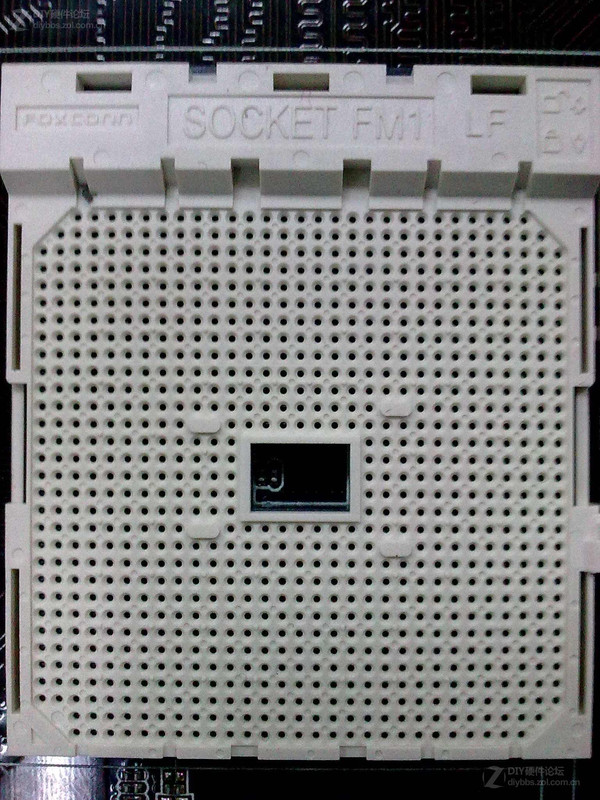
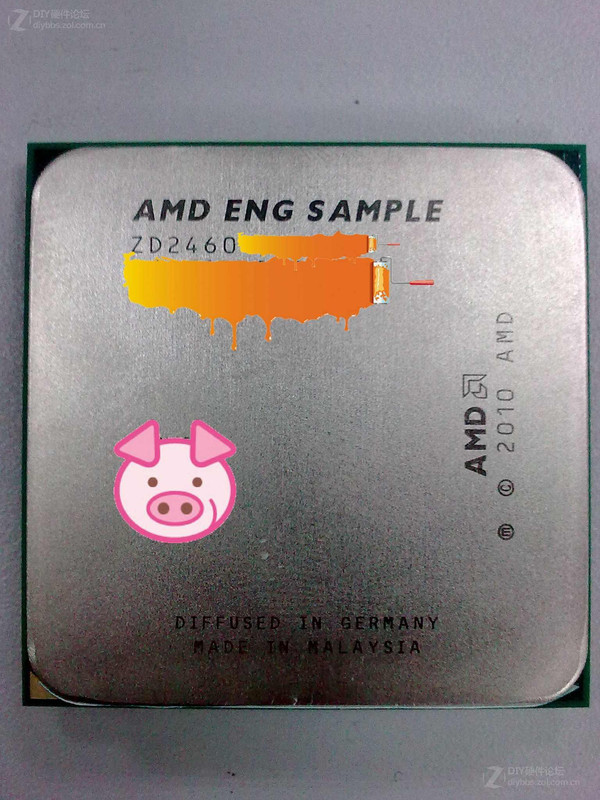
Some unrelated news to AMD oc'ing but related to AMD
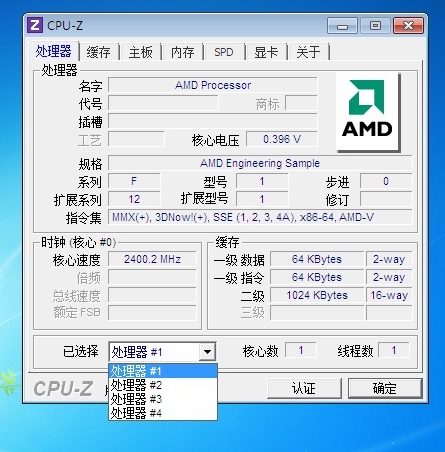
QUOTE AMD FM1 Socket, Package Pictured Here are some of the first pictures of AMD's new socket FM1. FM1 will be the platform for AMD's upcoming "Llano" A-Series accelerated processing units (APUs), in the desktop and notebook platforms. With it, AMD will compete with Intel's LGA1155/LGA1156 processors in consumer and business desktop markets that simply rely on the processor's embedded graphics. The Llano APU integrates a quad-core x86-64 processor with a DirectX 11 compliant AMD Radeon HD 6000 series graphics core (with 400+ stream processors, last we heard); a dual-channel DDR3 memory controller, and a PCI-Express 2.0 hub. FM1 is a pin-grid array, but its exact pin count isn't known. Purely by the looks of it, FM1 package looks smaller than AM3+. Clearly the version of CPU-Z used in the screenshot doesn't fully support the APU, but it does reveal some information. It's reading the quad-core chip as four single core processors with 1 MB L2 cache each. The processor is clocked at 2.4 GHz. Llano APUs are expected to make landfall in May/June. » Click to show Spoiler - click again to hide... « Sauce  I donno if its cpuz bug but 0.39v for quad?  How i just can't wait for May/June How i just can't wait for May/June   |
|
|
Apr 11 2011, 06:26 PM
|

Junior Member
279 posts Joined: Sep 2009 From: raincity 
|
my FIRST OC attempt
CPU=athlon X4 635 FSB=214 multiplier=14.5 FSB:DRAM=3:8 CPU vid=1.275 v tested 1 hour with Prime95 with no error » Click to show Spoiler - click again to hide... « now i dont know how to adjust/tighten the ram |
|
|
Apr 11 2011, 09:24 PM
|
|
Senior Member
872 posts Joined: Jun 2007 From: Kuala Lumpur(juz my body,LOl)
|
QUOTE(angah_as @ Apr 11 2011, 07:26 PM) my FIRST OC attempt http://www.techreaction.net/2010/10/14/phe...clocking-guide/ CPU=athlon X4 635 FSB=214 multiplier=14.5 FSB:DRAM=3:8 CPU vid=1.275 v tested 1 hour with Prime95 with no error » Click to show Spoiler - click again to hide... « now i dont know how to adjust/tighten the ram a guide i usually use...read few pages back,bro kunta showed how to test whether the ram is stable or not...  |
|
|
Apr 11 2011, 09:54 PM
|
|
Junior Member
279 posts Joined: Sep 2009 From: raincity
|
QUOTE(shajack @ Apr 11 2011, 09:24 PM) http://www.techreaction.net/2010/10/14/phe...clocking-guide/ thanks ! a guide i usually use...read few pages back,bro kunta showed how to test whether the ram is stable or not...  |
|
|
Apr 12 2011, 12:24 AM
|
|
Senior Member
947 posts Joined: Nov 2005 From: Penang
|
Just tried to fine tune my ram...
Currently @ 1.7vdimm... but feel a bit high for my settings... 
Comment and critics please...  This post has been edited by byfc2010: Apr 12 2011, 12:33 AM |
|
|
Apr 12 2011, 12:40 AM
|
|
Senior Member
872 posts Joined: Jun 2007 From: Kuala Lumpur(juz my body,LOl)
|
thts the higher nb?
lots of timing change from stock Added on April 12, 2011, 12:45 amjuz updated my bios to fix memory instabilities,as say from a support forum....didnt change squat except for making the cpu multiplier to whole number...no more 12.5,13.5...just 12,13,14....biggest facepalm.jpg This post has been edited by shajack: Apr 12 2011, 12:45 AM |
|
|
Apr 12 2011, 12:46 AM
|
|
Senior Member
947 posts Joined: Nov 2005 From: Penang
|
QUOTE(shajack @ Apr 12 2011, 12:40 AM) thts the higher nb? yeah... cannot run @ 2.8Ghz.. BSOD...lots of timing change from stock actually i just change 3 of them... didn't alter any subtimings... |
|
Topic ClosedOptions
|
| Change to: |  0.0279sec 0.0279sec
 0.35 0.35
 6 queries 6 queries
 GZIP Disabled GZIP Disabled
Time is now: 2nd December 2025 - 07:20 AM |
 Quote
Quote