Welcome Guest ( Log In | Register )

113 Pages « < 48 49 50 51 52 > » Bottom

Outline · [ Standard ] · Linear+

Home Networking N Router By Asus RTN-66U / Asus RTN-16 / RT-N56U, Asus RT-N Series Supported Unifi

views
     
prasys
post Oct 5 2012, 07:50 PM

Heros Never Die
Group Icon
VIP
12,925 posts

Joined: Mar 2005
From: Kuala Lumpur
Those who are using RT-13U , can you describe how you use it

The router acts normal if no heavy connection is involved. Are you guys torrenting or doing any 'heavy' tasks ? Just explain if so , I think I might just know the problem and can point out the fix

Describe the pattern please
vergas
post Oct 5 2012, 09:44 PM

Regular
******
Senior Member
1,488 posts

Joined: Oct 2004


QUOTE(prasys @ Oct 5 2012, 07:50 PM)
Those who are using RT-13U , can you describe how you use it

The router acts normal if no heavy connection is involved. Are you guys torrenting or doing any 'heavy' tasks ? Just explain if so , I think I might just know the problem and can point out the fix

Describe the pattern please
*
I normally use it for torrenting (wifi), most of the time just seeding, i don't download much, but I will leave to seed for long time. I also use IPTV for my kids to watch. That's my pattern. You can also read my posts in this thread, maybe that can point to something.

This post has been edited by vergas: Oct 5 2012, 09:48 PM
prasys
post Oct 8 2012, 09:38 PM

Heros Never Die
Group Icon
VIP
12,925 posts

Joined: Mar 2005
From: Kuala Lumpur
QUOTE(vergas @ Oct 5 2012, 09:44 PM)
I normally use it for torrenting (wifi), most of the time just seeding, i don't download much, but I will leave to seed for long time. I also use IPTV for my kids to watch. That's my pattern. You can also read my posts in this thread, maybe that can point to something.
*
Later help me to collect some logs

Does it hang after few days for no reason ?


berjaya-mazda
post Oct 8 2012, 10:14 PM

New Member
*
Newbie
3 posts

Joined: Jan 2010
Anyone use Asus RTN-16 with Unifi and used the latest firmware (Version 3.0.0.4.220 ) ? It is working for Unifi Home ? Right now i am using the custom firmware ( 3.0.0.3.102) from KLSeet and never upgrade since then.
peter32
post Oct 9 2012, 01:29 AM

心旷神怡
******
Senior Member
1,162 posts

Joined: Sep 2008
From: PJ


QUOTE(prasys @ Oct 5 2012, 07:50 PM)
Those who are using RT-13U , can you describe how you use it

The router acts normal if no heavy connection is involved. Are you guys torrenting or doing any 'heavy' tasks ? Just explain if so , I think I might just know the problem and can point out the fix

Describe the pattern please
*
I leave the 13U on almost all the time. Allowing CCTV viewing from a distance. After occasional torrenting, at times left torrenting for overnight, after finished torrenting, the PC connected to the router may experience disconnection. And those PC are connected with network cable.

This at times may not affect the wifi connection at all. But in most cases, both wired and wireless connections experienced dc.

It will invariably resolved once we switched off the router for a few minutes.
3shen
post Oct 9 2012, 02:04 AM

New Member
*
Junior Member
31 posts

Joined: Sep 2008
From: Subang Jaya, KL


QUOTE(3shen @ Oct 4 2012, 01:46 AM)
ASUSmy, please i beg you find a proper solution for the N13U users. I paid good money for this product believing in reliability of the company. 

Please either upgrade us to a different model or return our money back if the last attempt from prasys still doesn't work. We consumers shouldnt be suffering for a mistake made by the company. Its really destroying our hopes in Asus budget product lines.
*
QUOTE(ASUSmy @ Oct 5 2012, 09:20 AM)
Hi email2one, we got newer version which is just uploaded yesterday. Below is the link

http://support.asus.com/Download.aspx?SLan..._N56U_1018m.zip

Have a try on this version.

Thank you
*
Wah ASUSmy, you easily and snappily reply others but nicely ignore my polite plea on page 49 eh.... fantastic PR you have Sir ! Way to go in restoring my faith in Asus.

QUOTE(prasys @ Oct 5 2012, 07:50 PM)
Those who are using RT-13U , can you describe how you use it

The router acts normal if no heavy connection is involved. Are you guys torrenting or doing any 'heavy' tasks ? Just explain if so , I think I might just know the problem and can point out the fix

Describe the pattern please
*
I use it as a repeater to repeat the signal of the Unifi D-Link DIR 615.... it works great for two days and then hangs like how the other users here experience with it as their primary router. The internet usage is just web browsing and light downloading like mp3 and all.

This post has been edited by 3shen: Oct 9 2012, 02:05 AM
vergas
post Oct 9 2012, 08:09 AM

Regular
******
Senior Member
1,488 posts

Joined: Oct 2004


QUOTE(prasys @ Oct 8 2012, 09:38 PM)
Later help me to collect some logs

Does it hang after few days for no reason ?
*
I can't collect the logs since when it hangs I can no longer access the router. Unless there is other ways you can suggest. Yes it hangs for no reason.
ASUSmy
post Oct 9 2012, 10:17 AM

Look at all my stars!!
*******
Senior Member
2,319 posts

Joined: Mar 2010
QUOTE(3shen @ Oct 9 2012, 02:04 AM)
Wah ASUSmy, you easily and snappily reply others but nicely ignore my polite plea on page 49 eh.... fantastic PR you have Sir ! Way to go in restoring my faith in Asus.
I use it as a repeater to repeat the signal of the Unifi D-Link DIR 615.... it works great for two days and then hangs like how the other users here experience with it as their primary router. The internet usage is just web browsing and light downloading like mp3 and all.
*
Hi 3shen, we notice that there are many people having problem with the RT-N13. We are collecting information and log file for our RD. We will update the result ASAP. We are sorry for the waiting.

Thank you
ASUSmy
post Oct 9 2012, 11:00 AM

Look at all my stars!!
*******
Senior Member
2,319 posts

Joined: Mar 2010
QUOTE(berjaya-mazda @ Oct 8 2012, 10:14 PM)
Anyone use  Asus RTN-16 with Unifi and used the latest firmware (Version  3.0.0.4.220 ) ? It is working for Unifi Home ? Right now i am using the custom firmware ( 3.0.0.3.102) from KLSeet and never upgrade since then.
*
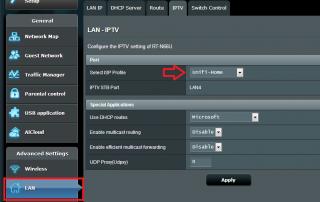
Hi berjaya-mazda, yes the new firmware can support Unifi Home.

If you miss the out when selecting the connection type, you still can do it from the Lan section. Please refer the picture below.

Thank you

This post has been edited by ASUSmy: Oct 9 2012, 11:01 AM


Attached thumbnail(s)
Attached Image
aleluya
post Oct 9 2012, 11:12 AM

I'm Teh Powah!
******
Senior Member
1,134 posts

Joined: Apr 2005
From: kay eel


QUOTE(prasys @ Oct 8 2012, 09:38 PM)
Later help me to collect some logs

Does it hang after few days for no reason ?
*
I am 100% confirm that the firmware that supports Unifi is having issue, I have reverted back to the firmware that supports Streamyx and it hasn't hang or anything even 24/7 on.

My setup has changed to this:
TPlink then ASUS as wireless point.

At first I am still using ASUS Unifi firmware as wireless point, but the wireless keeps disconnect and I have to reset the ASUS RTN13U and the wireless is back. It hangs for no reason, no connection or any streaming.

Then I revert back to firmware from Asus site which only supports Streamyx, it works 24/7 now even with heavy wireless usage connection including PPS, Torrent, downloads.

Hope it helps in your troubleshooting
thenjne
post Oct 9 2012, 02:34 PM

New Member
*
Newbie
0 posts

Joined: Aug 2011
QUOTE(prasys @ Oct 5 2012, 07:50 PM)
Those who are using RT-13U , can you describe how you use it

The router acts normal if no heavy connection is involved. Are you guys torrenting or doing any 'heavy' tasks ? Just explain if so , I think I might just know the problem and can point out the fix

Describe the pattern please
*
My RT-13U doesn't hang or dc ( sometime it does, maybe 1 or 2 times a week). It has a different problem. My unifi is 5mb, testing by speedtest when using RT-13 is 0.9~1.3 (which is very slow). The speed is back to normal (4.3 ~5.0) when i use a different router like Dlink DIR-615.
shadowblack
post Oct 9 2012, 03:37 PM

Enthusiast
*****
Senior Member
857 posts

Joined: Mar 2009


Can someone tell me the wireless range of Asus RT-N66U router?
prasys
post Oct 9 2012, 04:56 PM

Heros Never Die
Group Icon
VIP
12,925 posts

Joined: Mar 2005
From: Kuala Lumpur
QUOTE(vergas @ Oct 9 2012, 08:09 AM)
I can't collect the logs since when it hangs I can no longer access the router. Unless there is other ways you can suggest. Yes it hangs for no reason.
*
PM me and I'll help you out !


QUOTE(aleluya @ Oct 9 2012, 11:12 AM)
I am 100% confirm that the firmware that supports Unifi is having issue, I have reverted back to the firmware that supports Streamyx and it hasn't hang or anything even 24/7 on.

My setup has changed to this:
TPlink then ASUS as wireless point.

At first I am still using ASUS Unifi firmware as wireless point, but the wireless keeps disconnect and I have to reset the ASUS RTN13U and the wireless is back. It hangs for no reason, no connection or any streaming.

Then I revert back to firmware from Asus site which only supports Streamyx, it works 24/7 now even with heavy wireless usage connection including PPS, Torrent, downloads.

Hope it helps in your troubleshooting
*
This looks like an issue with the VLAN patch , by default that Broadcom chip may not support higher lvl of VLAN and its emulated through software. Its strange if thats the case

DD-WRT fixes this problem but I am not sure how. Its like they use some sort of patch (maybe a better implementation of it)

The other asus router are using ralink chipset which supports VLAN 500/600 OOB (Out of the Box)

ASUSmy
post Oct 10 2012, 04:42 PM

Look at all my stars!!
*******
Senior Member
2,319 posts

Joined: Mar 2010
QUOTE(shadowblack @ Oct 9 2012, 03:37 PM)
Can someone tell me the wireless range of Asus RT-N66U router?
*
Hi shadowblack, I have seen your post "Need help with wifi range" regarding the wifi range. From the image that you have provided from your house to your sister house, an outdoor antenna will have better advantage on the wifi sharing. And at your sister can use a repeater to receive the signal and rebroadcast to whole house.

Thank you.

This post has been edited by ASUSmy: Oct 10 2012, 04:43 PM
shadowblack
post Oct 10 2012, 04:53 PM

Enthusiast
*****
Senior Member
857 posts

Joined: Mar 2009


QUOTE(ASUSmy @ Oct 10 2012, 04:42 PM)
Hi shadowblack, I have seen your post "Need help with wifi range" regarding the wifi range. From the image that you have provided from your house to your sister house, an outdoor antenna will have better advantage on the wifi sharing. And at your sister can use a repeater to receive the signal and rebroadcast to whole house.

Thank you.
*
Thank you so much for your reply.Really appreciate it
Hudd
post Oct 12 2012, 05:22 PM

Getting Started
**
Junior Member
196 posts

Joined: Jul 2010


Guys,
Bought RT-N15U last month and no issue with the internet or Wifi..the only problem I got is with the Unifi TV. Change channel and it give slow response with the x satellite picture..same goes if you press 100 to view all the channels..might take 10-15 sec before the picture loaded..no issue with the Dlink Unifi router..updated with the current ASUS firware..

Anybody have this problem? or maybe I should try to use beta firmware from klstreet..
ASUSmy
post Oct 12 2012, 06:52 PM

Look at all my stars!!
*******
Senior Member
2,319 posts

Joined: Mar 2010
QUOTE(Hudd @ Oct 12 2012, 05:22 PM)
Guys,
Bought RT-N15U last month and no issue with the internet or Wifi..the only problem I got is with the Unifi TV. Change channel and it give slow response with the x satellite picture..same goes if you press 100 to view all the channels..might take 10-15 sec before the picture loaded..no issue with the Dlink Unifi router..updated with the current ASUS firware..

Anybody have this problem? or maybe I should try to use beta firmware from klstreet..
*
Hi Hudd, would you be able to provide the firmware version and send me the system log and the configuration file of the router?

Thank you
Hudd
post Oct 12 2012, 08:43 PM

Getting Started
**
Junior Member
196 posts

Joined: Jul 2010


QUOTE(ASUSmy @ Oct 12 2012, 06:52 PM)
Hi Hudd, would you be able to provide the firmware version and send me the system log and the configuration file of the router?

Thank you
*
latest firmware 2.1.1.1.67. How to send the log? your email? and where to get the config file?
Thanks..

This post has been edited by Hudd: Oct 12 2012, 08:44 PM
ASUSmy
post Oct 15 2012, 10:43 AM

Look at all my stars!!
*******
Senior Member
2,319 posts

Joined: Mar 2010
QUOTE(Hudd @ Oct 12 2012, 08:43 PM)
latest firmware 2.1.1.1.67. How to send the log? your email? and where to get the config file?
Thanks..
*
Hi Hudd, I have PM my e-mail to you already, you use that mail to send the log and configuration files to me. And how to get the configuration, you can refer to the image below. You can download it under Administration.

Thank you


Attached thumbnail(s)
Attached Image
-ahtiang-
post Oct 15 2012, 02:53 PM

Casual
***
Junior Member
435 posts

Joined: Oct 2006


QUOTE(prasys @ Oct 5 2012, 07:50 PM)
Those who are using RT-13U , can you describe how you use it

The router acts normal if no heavy connection is involved. Are you guys torrenting or doing any 'heavy' tasks ? Just explain if so , I think I might just know the problem and can point out the fix

Describe the pattern please
*
My RT-N13U B1 doesn't have any specific trend, it just like to 'hung' once in awhile after long hours of operation. When it 'hung', all WiFi and LAN will no longer work so can't even go into the admin site of 192.168.1.1 to view or check the log. All I can do is to restart the router and it goes on again until the next crash re-occurs.

I don't do much torrent download, just YouTube, movie streaming, and online MMORPG games.


113 Pages « < 48 49 50 51 52 > » Top
 

Change to:
| Lo-Fi Version
0.0331sec    0.48    6 queries    GZIP Disabled
Time is now: 1st December 2025 - 06:41 PM