Welcome Guest ( Log In | Register )

20 Pages  1 2 3 > » Bottom

Outline · [ Standard ] · Linear+

Home Networking N Router By Asus RTN-66U / Asus RTN-16 / RT-N56U, Asus RT-N Series Supported Unifi

views
     
ASUSmy
post Jul 13 2012, 09:53 AM

Look at all my stars!!
*******
Senior Member
2,319 posts

Joined: Mar 2010
Hi guys,
It seems like some of you here is facing problem with RT-N13U. I guess it's our responsibility to look into this problem and rectify it at the 'end-user' level at this point of time. We are looking at various possibilities to solve this problem. One of the solution we are considering is replacing it to a different model. We are calculating the cost. At the mean time, i would appreciate those who are facing problem kindly PM me your details as per below. I'll get our Networking Product Manager to contact those who are facing problems with RT-N13U for solution ASAP.

Name:
Lowyat.NET Nickname:
Model: RT-N13U
Date of Purchase:
Reseller: C-Zone/Viewnet
Issue:
Solution tried:
Location:
Suggestion:
Email Address:
Contact Number:
ASUSmy
post Jul 16 2012, 10:30 AM

Look at all my stars!!
*******
Senior Member
2,319 posts

Joined: Mar 2010
Update: collected 5 PMs on RT-N13U issue. Hopefully could revert back by today.
ASUSmy
post Jul 18 2012, 10:48 AM

Look at all my stars!!
*******
Senior Member
2,319 posts

Joined: Mar 2010
We have given an BETA firmware to those who have PMed me on their RT-N13U issue. Let's see if it helps.
ASUSmy
post Jul 24 2012, 03:19 PM

Look at all my stars!!
*******
Senior Member
2,319 posts

Joined: Mar 2010
Dear Lowyat.NET users,
In regards to the RT-N13U sage, here is the update. We have forwarded all the feedback gathered to HQ. Therefore a debug device will be sent to ASUS Malaysia office to test run on RT-N13U. We are glad engage prasys to have it tested first. After that we are hoping a volunteer would help us to test it as well. We are truly sorry for a concrete solution. Hopefully after this test, we would be able to come out with one.
ASUSmy
post Jul 26 2012, 06:36 PM

Look at all my stars!!
*******
Senior Member
2,319 posts

Joined: Mar 2010
Dear Lowyat.NET users,
Here is some of the info needed, hopefully it's not too much to ask. And we deeply appreciate the patience from you guys. Thank you for giving us another chance.

For those who are facing 'hang' problem
1. Are you using USB Storage at the same time? If yes could you provide us the disk format (NTFS/FAT32/EXT3 or others) ?
2. Referring To STC post: “One thing I noticed that while DC the LAN lights flickers steadly but slightly...You have to really watch carefully for the difference while connected and not connected.” - Is everyone facing this same syndrome as well?


PS: After prysys test the debug device, i'll pass it to STC to test it out. ETA of the device to arrive is tomorrow.

ASUSmy
post Aug 8 2012, 03:38 PM

Look at all my stars!!
*******
Senior Member
2,319 posts

Joined: Mar 2010
Hi all,
Sorry for the delay of update. Currently our disti, AVF is conducting a internal test on it. Perhaps next week i'll be able to pass it to prysys for his testing. Then STC.
ASUSmy
post Aug 13 2012, 06:16 PM

Look at all my stars!!
*******
Senior Member
2,319 posts

Joined: Mar 2010
Hi Guys, especially zapster,
Thank you for your feedback. We appreciate it and though i have repeated myself for quite a few times, we are still trying our best to rectify this issue. Perhaps it's really too much to ask for end-user to help us but we are glad that there are some coming forward offering help. So here is the update. We have acquire the debug tool any i'm going to pass it to prasys hopefully by tonight.

Feedback Session with ASUS Engineer from HQ
We would like to take this opportunity to organize a feedback session with our Engineer coming all the way from Taiwan. The reason we still need some on-ground feedback is that there's no UniFi in Taiwan. Therefore such feedback would give our Engineer a better picture of the issue. For those who are interested to help us, and come to this Feedback Session, kindly fill in the list below. Only limited to 10 participants.

Feedback Session with ASUS Engineer
Venue: Zouk Cafe, The Gardens
Time: 6PM - 8PM
Date: 16th August, 2012

Participants:
1. ASUSmy
2.
3.
4.
5.
6.
7.
8.
9.
10.

This post has been edited by ASUSmy: Aug 13 2012, 06:18 PM
ASUSmy
post Aug 14 2012, 10:39 AM

Look at all my stars!!
*******
Senior Member
2,319 posts

Joined: Mar 2010
Hi zapster,
Once again, thanks for your respond. I personally appreciate it. Browsing through this thread starting from page 20, just to refresh my memory and it seems that most (or almost all) users here is using N13 with UniFi. Since i'm just a rep for ASUS Malaysia, i guess my focus is mainly with the local issues.

Hi STC,
Really appreciate your patience with us. I'll try to get back to on this you asap.
ASUSmy
post Aug 14 2012, 03:17 PM

Look at all my stars!!
*******
Senior Member
2,319 posts

Joined: Mar 2010
Just a short teaser on the upcoming plan for Lowyat.NET users who had problem with RT-N13U. Looks like the feedback session may not be taking place, therefore an "announcement" here. The debug tool we have is actually a tool to capture an error log file of the RT-N13U. So this tool need to be switched on for a long period for random freeze/hang cases. Whoever who are facing problem with RT-N13U will be provided this tool to generate the log file. Then our engineer will produce a specific firmware in reference to your error log file just for your usage. So this will be one-on-one basis solution.


Attached thumbnail(s)
Attached Image
ASUSmy
post Aug 16 2012, 11:22 AM

Look at all my stars!!
*******
Senior Member
2,319 posts

Joined: Mar 2010
flowerhorn,
Could you PM me your details and contact number. Thanks.
ASUSmy
post Aug 22 2012, 11:37 PM

Look at all my stars!!
*******
Senior Member
2,319 posts

Joined: Mar 2010
I'm trying to contact prysys but failed. Anyway, since i got to know one of my colleague stay very near to him, i have place the tools with my colleague. waiting for prysys to test it out. I'm really sorry for all the delay. I really feel bad about it.
ASUSmy
post Sep 18 2012, 11:36 AM

Look at all my stars!!
*******
Senior Member
2,319 posts

Joined: Mar 2010
i'm sorry for such a long hiatus. Been busy with Power User Gathering and Formula X Tour. Currently prysys is working closely with our engineer and we would really like to thank him for that.

flowerhorn, i'll remind the person incharge to contact you asap. if i'm not mistaken, he contacted you once or twice before.
ASUSmy
post Sep 20 2012, 09:55 AM

Look at all my stars!!
*******
Senior Member
2,319 posts

Joined: Mar 2010
QUOTE(syong888 @ Sep 20 2012, 12:04 AM)
Dear Gurus,

I managed to get RT-N12 C1 ( Repeater Mode ) connected to RT-N56U, but some how unable to get internet connection through RT-N12 C1. ( Internet Connection via RT-N56U is fine ).

Any idea?

Thank you.
*
Hi syong888,

Can I know what is the current firmware on the RT-N12 C1?

The latest firmware is Version 2.1.1.1.67. You can download it from the link below.

http://support.asus.com/Download.aspx?SLan...12C1_211167.zip

After you updated the firmware, please do a factory default on the RT-N12 C1 by pressing the reset button next to the DCIN for 5 sec then release.

Thank you.


ASUSmy
post Sep 20 2012, 03:33 PM

Look at all my stars!!
*******
Senior Member
2,319 posts

Joined: Mar 2010
QUOTE(han2nd @ Sep 20 2012, 12:11 PM)
Hi I'm new here, just buy RTN66U  rclxms.gif
can any sifu teach how to setup the rtn66u as a repeater? icon_question.gif
*
Hi han2nd, here is the link that can help you set up the WDS(which may also considered as a repeater mode) for your router.

http://support.asus.com/faq/detail.aspx?SL...&p=11&m=RT-N66U (VER.B1)&s=2&hashedid=n/a&os=&no=1862EC3A-F59E-6A44-9182-C513B58F5B89

Thank you
ASUSmy
post Sep 20 2012, 05:56 PM

Look at all my stars!!
*******
Senior Member
2,319 posts

Joined: Mar 2010
QUOTE(han2nd @ Sep 20 2012, 04:08 PM)
Thanks ASUSmy for your info. is that what you mean i need both router also asus brand?
*
Other brands also can as long as it support wireless bridge or WDS function. But we cannot confirm the it will provide the best result due to different manufacturer and design and in worst cases it may be working at all.

Thank you
ASUSmy
post Sep 24 2012, 10:25 AM

Look at all my stars!!
*******
Senior Member
2,319 posts

Joined: Mar 2010
QUOTE(guanchung @ Sep 23 2012, 02:47 PM)
ASUS RT-N66U and ASUS RT-AC66U

both what different compare
*
Hi guanchung, the main different will be the 802.11 standard as RT-N66U is come with 802.11n and for RT-AC66U it is come with 802.11ac. You can refer to below to see the different in data rate.

Data Rate:
802.11a : 6,9,12,18,24,36,48,54Mbps
802.11b : 1, 2, 5.5, 11Mbps
802.11g : 6,9,12,18,24,36,48,54Mbps
802.11n : up to 450Mbps
802.11ac: up to 1300Mbps

For more information you can visit the following link to understand more about our RT-AC66U.

http://www.asus.com/Networks/Wireless_Routers/RTAC66U/
ASUSmy
post Sep 24 2012, 04:07 PM

Look at all my stars!!
*******
Senior Member
2,319 posts

Joined: Mar 2010
QUOTE(skymade @ Sep 24 2012, 02:28 PM)
Hi all, could anyone please advice or recommend which Asus router is the least bugs with UNIFI?

I read NT13 is buggy, what about NT16, NT56, NT66?
*
Hi skymade, I unable to tell you which one is the best because 3 of the router you mention RT-N16, RT-N56U and RT-N66U are come with different specification and price.

You can have a look of the following link which will direct you to one of the user that has been doing review on our products. And the user are using unifi for the testing. And the review are for your reference only for deciding which model suitable for you.

RT-N16
http://www.klseet.com/index.php/asus/asus-.../rt-n16-3003102

RT-N56U
http://www.klseet.com/index.php/asus/asus-...m-firmware-test

RT-N66U
http://www.klseet.com/index.php/asus/asus-...u-b1-fw-3003162

Thank you

This post has been edited by ASUSmy: Sep 24 2012, 04:11 PM
ASUSmy
post Sep 24 2012, 06:47 PM

Look at all my stars!!
*******
Senior Member
2,319 posts

Joined: Mar 2010
QUOTE(skymade @ Sep 24 2012, 05:10 PM)
Hi ASUSmy, thanks for your response.

Basically, i would like to replace the "cacak" DLINK UNIFI router with a good router.

No offence, but the reason i asked so was i have bad experience with ASUS products specially firmware issue, years ago and wish this time it was improve.

I seen quite a number of reports here mentioned the bugs of an N13 thus turn out better look for other model.

But it lack of either good or bad feedback on N16 & N56 in this thread.
Seems the most stable product is N66 which cost a bomb comparing with my existing "almost perfect" Buffalo G300NH.

If still buggy in other ASUS model, i think i will better go for a Linksys E2500 or wait till a robust router appear in the market...
*
Hi skymade, may I ask what is the ASUS products that you have firmware problems with? So that we can help on the issue. And news are always a good news. biggrin.gif

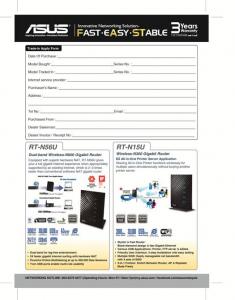
If you are looking for a stable router, you can have a look on the RT-N16. And we currently are doing offer for buying RT-N15U or RT-N56U. You can refer to below image.

Hi skymade sorry for the wrong attachment, I have corrected it.

This post has been edited by ASUSmy: Sep 25 2012, 05:23 PM


Attached thumbnail(s)
Attached Image Attached Image
ASUSmy
post Sep 25 2012, 04:58 PM

Look at all my stars!!
*******
Senior Member
2,319 posts

Joined: Mar 2010
QUOTE(skymade @ Sep 24 2012, 11:02 PM)
Hi ASUSmy, it was a pretty good promotion and my 1st time to saw a trade-in offer.  rclxms.gif  Unfortunately, i didn't own any ASUS networking product, dxmn!
Thanks for your recommendation and I might spend times on ASUS support forum on firmware performance/feedback of N16/N56/N66.

To name a few terrible firmware of ASUS products, bought 2 x O!Play series, hardware spec is great but ended up to install an awesome 3rd-party firmware which provide stability, rich features + FTP + SAMBA... etc.
Well, ASUS engineer might busy in patching bugs but those russian/croatia (?) fellow was the winner, causing ASUS O!Play a truly great player!  notworthy.gif

Lat but not least, my Buffalo soon be retire (after the end of ADSL) and I hope my next router could be an ASUS (with the new era of Fiber).
*
Hi skymade, the best part of this offer is you can trade in any router even it is not from ASUS icon_rolleyes.gif .


Added on September 25, 2012, 5:01 pm
QUOTE(soulknight @ Sep 25 2012, 01:47 AM)
Hi ASUSmy, do you accept my faulty RTN13U for the rebate? I'm interested to get RTN56U as replacement for RTN13U.
*
Hi soulknight, you can trade in any router with any condition as we will rebate you RM50 when you buy RT-N56U.

Thank you


Added on September 25, 2012, 5:03 pm
QUOTE(vergas @ Sep 25 2012, 08:23 AM)
Didn't the promotion mention "any networking product" not "ASUS networking product"? And any condition, means faulty as well?
*
Hi vergas, you are correct.

Thank you


Added on September 25, 2012, 5:24 pm
QUOTE(bladegun @ Sep 25 2012, 01:28 PM)
The promotion's end date is different in Asus Malaysia's facebook.
In their facebook page a post at 4th Sept, the picture shows that the promotion ends on 28th Oct 2012.

Link added: https://www.facebook.com/photo.php?fbid=101...&type=1&theater
*
Hi bladegun, you are correct, facebook will be the correct one.

Thank you

This post has been edited by ASUSmy: Sep 25 2012, 05:24 PM

ASUSmy
post Sep 26 2012, 04:02 PM

Look at all my stars!!
*******
Senior Member
2,319 posts

Joined: Mar 2010
QUOTE(han2nd @ Sep 26 2012, 03:11 PM)
Hi ASUSmy is me again, i had a new problem. after i switch off the RT66N over night switch on again i can't find my SSID why? i then reset the router and setup again. this problem repeat and repeat. pls help?  icon_question.gif
*
Hi han2nd, can I know what is the firmware version of your router? Our latest firmware is 3.0.0.4.220.

You can download it from our website, below is the link that will direct you to the file.

http://support.asus.com/Download.aspx?SLan..._B1_3004220.zip


IMPORTANT, DUE TO THE NVRAM SIZE UPGRADE, CHANGE TO THIS VERSION FIRMWARE WILL WIPE ALL YOUR SETTING!
AFTER UPGRADED FIRMWARE, PLEASE PRESS THE RESET BUTTON AND HOLD OVER 5 SECONDS TO RESET THE ROUTER TO DEFAULT.

After the upgrade, see the problem still persist or not.

Thank you

This post has been edited by ASUSmy: Sep 26 2012, 04:03 PM

20 Pages  1 2 3 > » Top
 

Change to:
| Lo-Fi Version
0.0601sec    0.69    7 queries    GZIP Disabled
Time is now: 1st December 2025 - 04:15 PM