


Home Networking N Router By Asus RTN-66U / Asus RTN-16 / RT-N56U, Asus RT-N Series Supported Unifi
Home Networking N Router By Asus RTN-66U / Asus RTN-16 / RT-N56U, Asus RT-N Series Supported Unifi
|
|
 Sep 26 2012, 03:11 PM Sep 26 2012, 03:11 PM
|
 
Junior Member
21 posts Joined: Aug 2008 
|
Hi ASUSmy is me again, i had a new problem. after i switch off the RT66N over night switch on again i can't find my SSID why? i then reset the router and setup again. this problem repeat and repeat. pls help?
|
|
|
|
 |
Sep 26 2012, 04:02 PM
|

Senior Member
2,319 posts Joined: Mar 2010
|
QUOTE(han2nd @ Sep 26 2012, 03:11 PM) Hi ASUSmy is me again, i had a new problem. after i switch off the RT66N over night switch on again i can't find my SSID why? i then reset the router and setup again. this problem repeat and repeat. pls help? Hi han2nd, can I know what is the firmware version of your router? Our latest firmware is 3.0.0.4.220.  You can download it from our website, below is the link that will direct you to the file. http://support.asus.com/Download.aspx?SLan..._B1_3004220.zip IMPORTANT, DUE TO THE NVRAM SIZE UPGRADE, CHANGE TO THIS VERSION FIRMWARE WILL WIPE ALL YOUR SETTING! AFTER UPGRADED FIRMWARE, PLEASE PRESS THE RESET BUTTON AND HOLD OVER 5 SECONDS TO RESET THE ROUTER TO DEFAULT. After the upgrade, see the problem still persist or not. Thank you This post has been edited by ASUSmy: Sep 26 2012, 04:03 PM |
|
|
Sep 26 2012, 04:20 PM
|
|
Junior Member
21 posts Joined: Aug 2008
|
QUOTE(ASUSmy @ Sep 26 2012, 04:02 PM) Hi han2nd, can I know what is the firmware version of your router? Our latest firmware is 3.0.0.4.220. Thanks for the reply i already update once, the problem came after the update. You can download it from our website, below is the link that will direct you to the file. http://support.asus.com/Download.aspx?SLan..._B1_3004220.zip IMPORTANT, DUE TO THE NVRAM SIZE UPGRADE, CHANGE TO THIS VERSION FIRMWARE WILL WIPE ALL YOUR SETTING! AFTER UPGRADED FIRMWARE, PLEASE PRESS THE RESET BUTTON AND HOLD OVER 5 SECONDS TO RESET THE ROUTER TO DEFAULT. After the upgrade, see the problem still persist or not. Thank you |
|
|
Sep 26 2012, 04:40 PM
|
|
Senior Member
2,319 posts Joined: Mar 2010
|
QUOTE(han2nd @ Sep 26 2012, 04:20 PM) Thanks for the reply i already update once, the problem came after the update. Hi han2nd, has you do a factory default after you do the update?Thank you |
|
|
Sep 26 2012, 04:47 PM
|
|
Junior Member
21 posts Joined: Aug 2008
|
QUOTE(ASUSmy @ Sep 26 2012, 04:40 PM) Hi han2nd, has you do a factory default after you do the update? Sorry what is factory default? how do i set it?Thank you |
|
|
Sep 26 2012, 05:04 PM
|
|
Senior Member
2,319 posts Joined: Mar 2010
|
QUOTE(han2nd @ Sep 26 2012, 04:47 PM) Sorry what is factory default? how do i set it? Hi han2nd, you can refer to the image below. You can see there is a button in the red rectangular, press it with a pin for 5sec then release. That is our reset button. After that please redo the setting for your internet and have a try.Attached thumbnail(s) 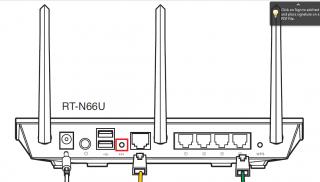
|
|
|
|
|
|
Sep 26 2012, 05:07 PM
|
|
Junior Member
21 posts Joined: Aug 2008
|
QUOTE(ASUSmy @ Sep 26 2012, 05:04 PM) Hi han2nd, you can refer to the image below. You can see there is a button in the red rectangular, press it with a pin for 5sec then release. That is our reset button. After that please redo the setting for your internet and have a try. Yes i done that step also. i will try this week end and redo everything again see what is the result, will update you again. |
|
|
Sep 26 2012, 05:24 PM
|
|
Senior Member
2,319 posts Joined: Mar 2010
|
QUOTE(flowerhorn @ Sep 25 2012, 01:31 PM) Hi he contacted me once before raya and no news after that. Thanks Hi flowerforn, sorry for the late reply. For the repeater problems, our RD is currently testing the problem and hoping by this Friday will get the firmware, latest will be by next week Monday.Once we got the firmware already, we will let you know. Thank you |
|
|
Sep 26 2012, 08:12 PM
|
 
VIP
12,925 posts Joined: Mar 2005 From: Kuala Lumpur
|
Anyway I notice RT-13 seems fine under normal loads , however on torrent , with wifi , it acts funny in sense that it loses all form of connectivity. I think it can't handle a lot of connections or there is something wrong with it not terminating idle connection
ASUSMy , hope you can update it. I'll be returning it to you by end of the month |
|
|
Sep 28 2012, 12:04 AM
|
 
Elite
3,142 posts Joined: Nov 2010 
|
any update on n13u?
mine seem dead =='' |
|
|
Sep 28 2012, 09:38 AM
|
|
Senior Member
2,319 posts Joined: Mar 2010
|
QUOTE(Neo|ofGeo @ Sep 28 2012, 12:04 AM) any update on n13u? Hi Neo|ofGeo, can you elaborate more on the problem of your router? mine seem dead =='' Thank you This post has been edited by ASUSmy: Sep 28 2012, 11:26 AM |
|
|
Sep 28 2012, 04:49 PM
|

Senior Member
1,162 posts Joined: Sep 2008 From: PJ
|
I agree that after prolonged usage with torrent etc on N13U, after that it seems to stop connectivity, have to restart to resume connection.
|
|
|
Sep 28 2012, 07:24 PM
|
|
Elite
3,142 posts Joined: Nov 2010
|
QUOTE(ASUSmy @ Sep 28 2012, 09:38 AM) Hi Neo|ofGeo, can you elaborate more on the problem of your router? It seem after awhile,Thank you it start to ''bricked'' after reboot too many times, at first it doesn't give any response for a couple of minute but fine after that but then second time i reboot it via WebGUI, no longer access the router, i never encounter this kinda problem before so after googling around, its call as bricked, N15U is strong and stable but N13U is used as Repeater |
|
|
|
|
|
Sep 29 2012, 01:26 AM
|

Junior Member
549 posts Joined: Mar 2007
|
QUOTE(Neo|ofGeo @ Sep 28 2012, 07:24 PM) It seem after awhile, I think we might having similar issue with N13U.it start to ''bricked'' after reboot too many times, at first it doesn't give any response for a couple of minute but fine after that but then second time i reboot it via WebGUI, no longer access the router, i never encounter this kinda problem before so after googling around, its call as bricked, N15U is strong and stable but N13U is used as Repeater |
|
|
Sep 29 2012, 11:13 AM
|

Junior Member
273 posts Joined: Feb 2007
|
My N13u has a hang problem. It only occurs when i startup a PC with Windows7. Other OS like XP seems fine. Have tested it on 2.0.2.5F & G firmwares.
I have to power-off and ON the unit to get back the internet. When this happens, the IPTV goes 'dead' for hours (sometimes upto 1 whole day). Called telekom, and they said they will need to send a technician to check (RM50!!) Anyone facing this problem ? |
|
|
Sep 30 2012, 11:46 AM
|

Senior Member
1,885 posts Joined: Jan 2003 From: Bangsar,Kuala Lumpur 
|
I am trying to install the Padavan firmware on my Asus RT56u but it seems that there are real no instructions on how to install it online.Is it just a normal firmware upgrade through the web interface?Thanks
This post has been edited by knuxed: Sep 30 2012, 11:46 AM |
|
|
Sep 30 2012, 01:23 PM
|

Junior Member
130 posts Joined: Mar 2008
|
For RT-N56U newer Padavan custom FW with newer kernel, you need to setup UniFi vlans like this:


This post has been edited by klseet: Sep 30 2012, 01:24 PM |
|
|
Sep 30 2012, 04:44 PM
|
|
Senior Member
1,885 posts Joined: Jan 2003 From: Bangsar,Kuala Lumpur
|
QUOTE(klseet @ Sep 30 2012, 01:23 PM) For RT-N56U newer Padavan custom FW with newer kernel, you need to setup UniFi vlans like this: an absolute lifesaver.upgraded to the newest firmware and was trying to find where was the custom internet connection settings.
 |
|
|
Oct 1 2012, 11:33 AM
|
|
Newbie
3 posts Joined: Nov 2006
|
Hi,
I have the RT-N56U but my HyppTV was always lag/stop (1/2 second) when watching the TV programme. But with the original Unifi router is fine. Why? Also i have just purchase the NAS and attached as LAN to the RT-N56U router and that the nightmare begin when i do multitask on BT/NAS/Internet Surfing. As mentioned by someone above, i think the asus router cannot handle LOAD. To my supprise that it stated "•Powerful Online Multitasking at up to 300,000 Data Sessions"!? |
|
|
Oct 1 2012, 11:54 AM
|

Senior Member
1,066 posts Joined: Jan 2003 From: Petaling Jaya
|
More like HW problem than anything. Have the same model, currently have 2 NAS attached to it, slingbox for my brother oversea, sonos wireless sound and 6 PCs connected also, not to mention my Apple TV and 2 HTPC for torrent and media server. So far, RT-N56U haven't yet disappoint me.
|
| Change to: |  0.0293sec 0.0293sec
 0.94 0.94
 6 queries 6 queries
 GZIP Disabled GZIP Disabled
Time is now: 3rd December 2025 - 03:26 PM |
 Quote
Quote