Welcome Guest ( Log In | Register )

113 Pages « < 37 38 39 40 41 > » Bottom

Outline · [ Standard ] · Linear+

Home Networking N Router By Asus RTN-66U / Asus RTN-16 / RT-N56U, Asus RT-N Series Supported Unifi

views
     
ipvoice
post Jul 26 2012, 05:25 PM

New Member
*
Newbie
0 posts

Joined: Jun 2006


QUOTE(flowerhorn @ Jul 26 2012, 12:43 PM)
Haha I just bought the 841nd @ rm79 to replace my n56u as my n56u will not work with my rtn12 properly as a repeater.  Happy with it so far smile.gif. Cheap and works!
*
Bought it months ago, now the price have drop. Good to know that you're happy over the purchase


QUOTE(STC @ Jul 26 2012, 01:47 PM)
Thanks guys. I believe they will work with Unifi (No IPTV) correct?
*
The TP-Link TL-WR841ND with it's original firmware works on IPTV too. Don't works on TL-WR941ND (DD-WRT).


ASUSmy
post Jul 26 2012, 06:36 PM

Look at all my stars!!
*******
Senior Member
2,319 posts

Joined: Mar 2010
Dear Lowyat.NET users,
Here is some of the info needed, hopefully it's not too much to ask. And we deeply appreciate the patience from you guys. Thank you for giving us another chance.

For those who are facing 'hang' problem
1. Are you using USB Storage at the same time? If yes could you provide us the disk format (NTFS/FAT32/EXT3 or others) ?
2. Referring To STC post: “One thing I noticed that while DC the LAN lights flickers steadly but slightly...You have to really watch carefully for the difference while connected and not connected.” - Is everyone facing this same syndrome as well?


PS: After prysys test the debug device, i'll pass it to STC to test it out. ETA of the device to arrive is tomorrow.

STC
post Jul 26 2012, 07:42 PM

Getting Started
**
Junior Member
69 posts

Joined: Sep 2010


» Click to show Spoiler - click again to hide... «


My book live is in NTFS format. Both were both bought almost the same time and the router was functioning okay. I will experiment with disconnecting the MBL.
3shen
post Jul 27 2012, 12:10 AM

New Member
*
Junior Member
31 posts

Joined: Sep 2008
From: Subang Jaya, KL


QUOTE(ASUSmy @ Jul 26 2012, 06:36 PM)
Dear Lowyat.NET users,
Here is some of the info needed, hopefully it's not too much to ask. And we deeply appreciate the patience from you guys. Thank you for giving us another chance.

For those who are facing 'hang' problem
1. Are you using USB Storage at the same time? If yes could you provide us the disk format (NTFS/FAT32/EXT3 or others) ?
2. Referring To STC post: “One thing I noticed that while DC the LAN lights flickers steadly but slightly...You have to really watch carefully for the difference while connected and not connected.”  - Is everyone facing this same syndrome as well?
PS: After prysys test the debug device, i'll pass it to STC to test it out. ETA of the device to arrive is tomorrow.
*
1. i dont have any USB device connected to it.

2. i use it as a repeater so theres no LAN lights to observe
ipvoice
post Jul 27 2012, 09:27 AM

New Member
*
Newbie
0 posts

Joined: Jun 2006


QUOTE(ASUSmy @ Jul 26 2012, 06:36 PM)
Dear Lowyat.NET users,
Here is some of the info needed, hopefully it's not too much to ask. And we deeply appreciate the patience from you guys. Thank you for giving us another chance.

For those who are facing 'hang' problem
1. Are you using USB Storage at the same time? If yes could you provide us the disk format (NTFS/FAT32/EXT3 or others) ?
2. Referring To STC post: “One thing I noticed that while DC the LAN lights flickers steadly but slightly...You have to really watch carefully for the difference while connected and not connected.”  - Is everyone facing this same syndrome as well?
PS: After prysys test the debug device, i'll pass it to STC to test it out. ETA of the device to arrive is tomorrow.
*
1. No USB storage.

2. No much activity within LAN port and CPE (fiber modem) due the ASUS has hang. Normal operation it's flickers due to data transmission within the both equipments.


You could simulate the modem to hang by have many wireless devices doing log in and out or doing heavy downloading files through torrent.
STC
post Jul 27 2012, 09:56 AM

Getting Started
**
Junior Member
69 posts

Joined: Sep 2010


QUOTE(ipvoice @ Jul 27 2012, 09:27 AM)
1. No USB storage.

2. No much activity  within LAN port and CPE (fiber modem) due the ASUS has hang. Normal operation it's flickers due to data transmission within the both equipments.
You could simulate the modem to hang by have many wireless devices doing log in and out or doing heavy downloading files through torrent.
*
IMPORTANT[SIZE=7] When the router hangs - the LAN lights appears to be steady. But if you observe closely it actually flickers faintly and at constant interval, maybe twice every second.

For ordinary eyes it may appear to be a steady signal but you have to observe very closely to see the faint flickering. It doesn't OFF completely but as if the power to the led reduced by 25 or 30 percent so the brightness reduces giving the effect of flickering at regular interval.

I have taken a video under normal circumstance and waiting for the router to DC again to record the "flickering" lights. Will post it when I have them recorded.

This post has been edited by STC: Jul 27 2012, 09:57 AM
fookyuan
post Jul 27 2012, 11:03 AM

Getting Started
**
Junior Member
57 posts

Joined: Sep 2006
QUOTE(ASUSmy @ Jul 26 2012, 06:36 PM)
Dear Lowyat.NET users,
Here is some of the info needed, hopefully it's not too much to ask. And we deeply appreciate the patience from you guys. Thank you for giving us another chance.

For those who are facing 'hang' problem
1. Are you using USB Storage at the same time? If yes could you provide us the disk format (NTFS/FAT32/EXT3 or others) ?
2. Referring To STC post: “One thing I noticed that while DC the LAN lights flickers steadly but slightly...You have to really watch carefully for the difference while connected and not connected.”  - Is everyone facing this same syndrome as well?
PS: After prysys test the debug device, i'll pass it to STC to test it out. ETA of the device to arrive is tomorrow.
*
1.) No, I have used the USB storage function at all since day 1. But still face the hang issue
2.) Yes, STC is correct. The lights still blinks/flickers (as if it is running, slight diff). But all connection would not be working. You can't even ping gateway IP/192.168.1.1 (which is the router IP)

This post has been edited by fookyuan: Jul 27 2012, 11:03 AM
vergas
post Jul 27 2012, 12:21 PM

Regular
******
Senior Member
1,488 posts

Joined: Oct 2004


QUOTE(ASUSmy @ Jul 26 2012, 06:36 PM)
Dear Lowyat.NET users,
Here is some of the info needed, hopefully it's not too much to ask. And we deeply appreciate the patience from you guys. Thank you for giving us another chance.

For those who are facing 'hang' problem
1. Are you using USB Storage at the same time? If yes could you provide us the disk format (NTFS/FAT32/EXT3 or others) ?
2. Referring To STC post: “One thing I noticed that while DC the LAN lights flickers steadly but slightly...You have to really watch carefully for the difference while connected and not connected.”  - Is everyone facing this same syndrome as well?
PS: After prysys test the debug device, i'll pass it to STC to test it out. ETA of the device to arrive is tomorrow.
*
1. Are you using USB Storage at the same time? If yes could you provide us the disk format (NTFS/FAT32/EXT3 or others) ?

None connected.

2. Referring To STC post: “One thing I noticed that while DC the LAN lights flickers steadly but slightly...You have to really watch carefully for the difference while connected and not connected.” - Is everyone facing this same syndrome as well?

Sorry, never actually watch the thing that carefully.

This post has been edited by vergas: Jul 27 2012, 12:21 PM
vickyrao
post Jul 27 2012, 02:09 PM

Regular
******
Senior Member
1,531 posts

Joined: Mar 2005
From: Bandar Sunway


QUOTE(ASUSmy @ Jul 26 2012, 06:36 PM)
Dear Lowyat.NET users,
Here is some of the info needed, hopefully it's not too much to ask. And we deeply appreciate the patience from you guys. Thank you for giving us another chance.

For those who are facing 'hang' problem
1. Are you using USB Storage at the same time? If yes could you provide us the disk format (NTFS/FAT32/EXT3 or others) ?
2. Referring To STC post: “One thing I noticed that while DC the LAN lights flickers steadly but slightly...You have to really watch carefully for the difference while connected and not connected.”  - Is everyone facing this same syndrome as well?
PS: After prysys test the debug device, i'll pass it to STC to test it out. ETA of the device to arrive is tomorrow.
*
No i am not using any devices on it. Only 2 computers connected by cable and iptv on cable. the rest are on Wifi. USB is not in use.

Yes the LAN lights will flicker slightly and WIFI lights are stagnant. that is how i know it has HUNG.
3010517
post Jul 27 2012, 10:33 PM

Getting Started
**
Junior Member
221 posts

Joined: Feb 2010

QUOTE(tHeRiDdLeR @ Jul 8 2012, 10:26 PM)
my rt56u
» Click to show Spoiler - click again to hide... «
Bro, are u using unifi? If u do, can u pls share/show me the settings for it. Can't get it to work with my unifi. Tq in advance
tHeRiDdLeR
post Jul 28 2012, 03:43 AM

Getting Started
**
Junior Member
247 posts

Joined: Jan 2003
From: Sri Serdang


QUOTE(3010517 @ Jul 27 2012, 10:33 PM)
Bro, are u using unifi? If u do, can u pls share/show me the settings for it. Can't get it to work with my unifi. Tq in advance
*
yes, i'm using unifi. configure it in WAN

» Click to show Spoiler - click again to hide... «


plz read here to get more idea how to configure it

CODE
http://code.google.com/p/rt-n56u/issues/detail?id=321


This post has been edited by tHeRiDdLeR: Jul 28 2012, 03:49 AM
Neo|ofGeo
post Jul 28 2012, 10:43 AM

Stop Complaining and Read
Group Icon
Elite
3,142 posts

Joined: Nov 2010


Hi

I have asus RTN13U B Rev 1
i use unifi default router as medium to IPTV/Internet

the question
will flashing my n13u into DD-WRT make the default unifi router unstable?

Optic cable > BTU >
Unifi Default Router > Asus RT-N13U
|
IPTV Set up box

This post has been edited by Neo|ofGeo: Jul 28 2012, 10:43 AM
3010517
post Jul 28 2012, 11:38 AM

Getting Started
**
Junior Member
221 posts

Joined: Feb 2010

QUOTE(tHeRiDdLeR @ Jul 28 2012, 03:43 AM)
yes, i'm using unifi. configure it in WAN

» Click to show Spoiler - click again to hide... «


plz read here to get more idea how to configure it

CODE
http://code.google.com/p/rt-n56u/issues/detail?id=321

*
From the link just enable vlan tagging and and key-in values in the cpu and lan4, right?

_______________________________________________________________________

Finally got it working again with the new firmware. Many thanks tHeRiDdLeR!

This post has been edited by 3010517: Jul 28 2012, 11:40 AM
prasys
post Jul 28 2012, 01:59 PM

Heros Never Die
Group Icon
VIP
12,925 posts

Joined: Mar 2005
From: Kuala Lumpur
QUOTE(STC @ Jul 26 2012, 01:47 PM)
Thanks guys. I believe they will work with Unifi (No IPTV) correct?
*
QUOTE(vickyrao @ Jul 26 2012, 03:15 PM)
bro.. i tried ddwrt but failed to get unifi to connect. is there a specific firmware to flash or method to flash?
let me know if you want me to do testing. i dont mind. im kinda at my limit of of using this rt-n13u.
*
PM Me

You'll need to do custom , aka do it manually VLAN tagging. It can't be done using firemware. Scroll down , you need to check if your Broadcom supports > VLAN 500. There is a special patch which does this via software to allow 3 digit VLAN ID and it can be obtained from

http://wingloon.com/2012/01/22/how-to-setu...54gs-v4-dd-wrt/

Add this to startup script (this is my modified version , I tried with VLAN 600 it failed)

CODE
rmmod switch-robo
insmod /jffs/switch-robo.o
sleep 10
vconfig add eth0 500 #internet
vconfig add eth0 592  # your LAN ports

ifconfig vlan500 up
ifconfig vlan592 up

brctl addif br0 vlan592
sleep 5
echo “0 8t” > /proc/switch/eth0/vlan/500/ports #internet
sleep 5
echo “1 2 3 8t” > /proc/switch/eth0/vlan/592/ports #lan


0 refers to Internet , this works with 13N , I'll post the full guide later , just be sure to grab the patch or alternatively get the nightly build from DD-WRT's site

This post has been edited by prasys: Jul 28 2012, 02:35 PM

STC
post Jul 29 2012, 07:54 AM

Getting Started
**
Junior Member
69 posts

Joined: Sep 2010


» Click to show Spoiler - click again to hide... «


Thank you Prasys. Been busy lately with no time to experiment. Will see if I have the time to DD- WRT today.
cyberfly
post Jul 29 2012, 11:16 AM

Web Dev Zero to Hero
*****
Senior Member
706 posts

Joined: Dec 2006


hi guys can suggest good modem to pair with Asus RTN-16? I am using streamyx 4mb and planning to buy ASUS RTN-16 and a new modem to pair with the router.

Been to digital mall and they sell only wireless router + modem nowdays. No stand alone modem.
vergas
post Jul 30 2012, 01:57 PM

Regular
******
Senior Member
1,488 posts

Joined: Oct 2004


QUOTE(Neo|ofGeo @ Jul 28 2012, 10:43 AM)
Hi

I have asus RTN13U B Rev 1
i use unifi default router as medium to IPTV/Internet

the question
will flashing my n13u into DD-WRT make the default unifi router unstable?

Optic cable > BTU >
Unifi Default Router > Asus RT-N13U
             |
   IPTV Set up box
*
I've use this setup before. I do not think it make it unstable.

This post has been edited by vergas: Jul 30 2012, 01:57 PM
prasys
post Jul 30 2012, 03:52 PM

Heros Never Die
Group Icon
VIP
12,925 posts

Joined: Mar 2005
From: Kuala Lumpur
QUOTE(STC @ Jul 29 2012, 07:54 AM)
» Click to show Spoiler - click again to hide... «

Thank you Prasys. Been busy lately with no time to experiment. Will see if I have the time to DD- WRT today.
*
If you can't find the .so from that site let me know I have another compiled version. It should work with WRT54G or ASUS routers like RT-12 which uses 10/100Mbps

I have not tested but it should work
InSplre
post Jul 30 2012, 08:01 PM

Look at all my stars!!
*******
Senior Member
2,816 posts

Joined: Jan 2003
From: kat situ kat sana


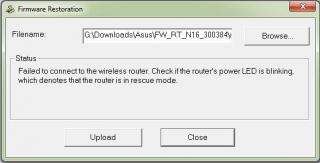
I am not able to restore firmware back to RT-N16, can still ping the router , go into rescue mode, upload firmware, then failed to connect,any advise?

Router power led keep on blinking

This post has been edited by InSplre: Jul 30 2012, 08:01 PM


Attached thumbnail(s)
Attached Image Attached Image
stan001
post Jul 30 2012, 11:46 PM

On my way
****
Senior Member
623 posts

Joined: Jan 2003
From: Kuala Lumpur


My Unifi DIR-615 running DD-WRT died just before my 2 years Unifi contract was up... this DIR-615 router must be using bad quality components...

I'was thinking of getting the Asus RT-N16 to continue running DD-WRT on it as it meet a few of my requirements :-

1. Lots of ram & flash
2. All GigabitEthernet ports - nice feature so that I can switch off my 5-port GigabitEthernet switch ( less equipments, less power needed )

Does anyone know which shops sells this RT-N16 around PJ area/Digital Mall ?

Last option would be to buy it via online e-retailer...

Any issues of this running DD-WRT ?


Thanks


113 Pages « < 37 38 39 40 41 > » Top
 

Change to:
| Lo-Fi Version
0.0328sec    0.42    6 queries    GZIP Disabled
Time is now: 5th December 2025 - 11:20 AM