Welcome Guest ( Log In | Register )

113 Pages « < 12 13 14 15 16 > » Bottom

Outline · [ Standard ] · Linear+

Home Networking N Router By Asus RTN-66U / Asus RTN-16 / RT-N56U, Asus RT-N Series Supported Unifi

views
     
ipvoice
post Oct 16 2011, 05:42 PM

New Member
*
Newbie
0 posts

Joined: Jun 2006


Recurring gone dead after in operation every 3 ~ 4 days on two units at different location. I have encountered twice after a power outage the router could not log on to unifi, have to power off/on to get it to work.
yaya1899
post Oct 18 2011, 12:39 PM

Getting Started
**
Junior Member
70 posts

Joined: Jan 2003
QUOTE(klseet @ Oct 16 2011, 01:06 AM)
@unifiwish

Er, I no longer use IE, almost forgot how to spell it  tongue.gif
Anywhere, I just check my current Win7Pro 32 & 64 bit computer, I only have IE8,  no problem loading my site  smile.gif

@vergas

Roughly how many days it hang?
Btw, did you use the QoS function?

Guess I have to pull out and find time to test again ....  sweat.gif
*
Hi klseet,

First of all, thanks for your guidelines on N13U Setup. rclxms.gif

I noticed that whenever I start downloading using wireless connection (desktop with N150, ASUS N10 wireless adapter), the ping to router become very high. But this doesn't happen when i use wired connection. Is the ASUS N10 wireless adapter not powerful enough to handle the bandwidth? Would it be better if i replace it with a N300 adapter?

For the hang issue, mine just hang randomly within a day or few hours, not using QoS function, everything is just by default.

Thanks. biggrin.gif
whateva2k
post Oct 18 2011, 02:15 PM

Getting Started
**
Junior Member
88 posts

Joined: May 2005
From: Setia Alam


Ok guys, I'm planning to get the Asus RT-N56U together with Cisco Linksys AE1000 dual band wireless adapter for my desktop by end of this week.

Can't wait anymore.

I hope its a good pair. Anyone has any other suggestions please do let me know.

Thank you.
RageWeaver
post Oct 19 2011, 01:34 AM

Getting Started
**
Junior Member
131 posts

Joined: Apr 2008


QUOTE(MX510 @ Jul 31 2010, 07:05 PM)
RT-N16 use Gigabit LAN but Asus RT-N13U use normal 100Mbps LAN but the RT-N13U can use 3G Modem like E220 by huawei to make it work with 3G USB Modem as gateway for WAN
*
Whats the difference between gigabit and 100mbps,anything worth mentioning such as better ping on games?I guess no diff in Malaysia right,since I am gona use VIP5 which is 5mbps anyway(max also just 20mbps..).
However about the WAN thingy,don't understand this one lol.


In my home we have 2 person using internet, wired(me,gaming) and wireless( sister, web browsing and normal 320p youtube).

So what model u guys suggest for me ya? and the price diff for the 2 model is quite big.

one more,can I use the modem right away after purchase (unifi), no need to update firmware etc right?

So bro klseet, which one u reco for me? 1 wired and 1 wireless most of the time(sometimes 2 wireless,mobile phone).
Will RT-13U be the most suitable for me?
Might wana check this thread as well
http://forum.lowyat.net/index.php?act=ST&f...0#entry46096567

Thanks in advance

This post has been edited by RageWeaver: Oct 19 2011, 02:13 AM
whateva2k
post Oct 21 2011, 06:48 AM

Getting Started
**
Junior Member
88 posts

Joined: May 2005
From: Setia Alam


QUOTE(whateva2k @ Oct 18 2011, 02:15 PM)
Ok guys, I'm planning to get the Asus RT-N56U together with Cisco Linksys AE1000 dual band wireless adapter for my desktop by end of this week.

Can't wait anymore.

I hope its a good pair. Anyone has any other suggestions please do let me know.

Thank you.
*
Just though I share.

I just bought Asus N56U and Linksys AE1000 yesterday. Both working great as it should. Many thanks to klseet for the Asus N56U setup instructions.

My router is installed in the living hall, while my desktop, which I bought the AE1000 for, is upstairs in one of the room.

When everything has been setup, I can connect to the Asus 2.4GHz wifi without any problem, however I can't seems to connect to the 5GHz wifi. When I search for wifi networks in range, sometimes the 5GHz wifi appears, and sometimes it will disappears, and when it appears, there's no signal bar at all.

Something must be wrong with the AE1000, so I started searching online for AE1000's problems. And I found this from some random forum:

"Note that with 5GHz you will see significant performance drop off as distance grows and the number of physical barriers increases, 2.4 isn't as prone to LOS needs but is more susceptible to interference from neighbors and other wireless devices."

I have completely no knowledge of the above. I decided to connect the AE1000 on my laptop and bring it downstairs, true enough, my laptop found the 5GHz wifi and connects to it fine.

I have a small house, double storey 20x70 linked. But looks like the 5GHz signal is not strong enough to travel between 1 floor.

So I can't use the 5GHz, the one and only reason why I bought N56U. blink.gif rclxub.gif cry.gif doh.gif smile.gif tongue.gif

And so looks like I should have gotten the N16 instead. Would have better 2.4Ghz signal strength.

Anyone wants to buy my N56U? biggrin.gif

Oh, one more thing, the N56U looks even more sexy when installed horizontally.

Attached Image
-ahtiang-
post Oct 22 2011, 05:30 AM

Casual
***
Junior Member
435 posts

Joined: Oct 2006


I just got myself the RT-N13U to replace my useless DIR-615 and I'm so happy with the stability and connectivity of it... biggrin.gif
klseet
post Oct 22 2011, 11:22 AM

Getting Started
**
Junior Member
130 posts

Joined: Mar 2008
RT-N13U-B1 users

Ok, I tried few rounds and I managed to get a "hang" tongue.gif

Mostly I use PC wired for torrenting, after going through those emails complaints, I noticed some common hang situation on torrenting through wifi.

So I tested torrenting on an old laptop (with LinuxMint) wirelessly, day 1 was ok, but day 2 it hang, IPTV also won't work, LED still lights-on when insert cat cable, but router inaccessible even on wired.

I'm not technical engineer, not really sure what went wrong, looks the WAN interface could be broken when torrent intensively through wifi, something goes wrong between WAN-->wifi interfaces on heavy traffic.

Since I can't get any System Log, I've explained the situation to ASUS team, still waiting for response, hopefully they can simulate the hang and perhaps another fix sweat.gif

Will update further once I get reply.


RT-N56U users

Fyi, there is another firmware release version 1.0.1.7c :
http://my.asus.com/Networks/Wireless_Route...TN56U/#download

I've tested, UI is even more responsive now, seem stable built version now. smile.gif

I've also uploaded the default UniFi setup config file HERE

Always remember clean flash:
- Factory Restore both BEFORE & AFTER flashing the firmware
- only connect LAN 2/3 wired during flashing & setup process, NO WAN cable !

Please note there is also a new utility (at the bottom section of the same page) for this version.
Again, don't expect the current Download Manager to behave like BT client, hopefully the new UI and DM will settle this once and for all !


QUOTE(whateva2k @ Oct 21 2011, 06:48 AM)
... I just bought Asus N56U and Linksys AE1000 yesterday. ...
I have a small house, double storey 20x70 linked. But looks like the 5GHz signal is not strong enough to travel between 1 floor...
So I can't use the 5GHz, the one and only reason why I bought N56U.  blink.gif  rclxub.gif  cry.gif  doh.gif  smile.gif  tongue.gif ....
What's your setup?

The 5GHz might not be strong enough to transmit far distance, but definitely it's good enough to handle a double storey house, I have no problem on my laptop built-in Intel AGN5100, even upstairs into the room into the washroom with 2 layer of wall, still got 2~3 bars.

I'm really sure about the AE1000, please find out whether it's pure-N. Try to play around with this settings first:
Wireless mode=N
Channel bandwidth=20MHz
Channel=(start with the lowest 36 first)
For Authentication & Encryption:
- start with WPA-Auto-Personal with AES+TKIP first
- if works, then WPA2+AES for pure-N

You may also try the latest firmware (above mentioned), also can consider the default config file.


QUOTE(RageWeaver @ Oct 19 2011, 01:34 AM)
..So bro klseet, which one u reco for me? 1 wired and 1 wireless most of the time(sometimes 2 wireless,mobile phone).
Will RT-13U be the most suitable for me?
Might wana check this thread as well
http://forum.lowyat.net/index.php?act=ST&f...0#entry46096567
..
I was reading both your PMs and those links, walioa, it seem lots of posts and I really have hard time to read through all ler .... sweat.gif

If I read you correctly, your main concern is QoS, then you may consider the TL-WR841ND since it offer better QoS function at very affordable price.


SUSlogit85
post Oct 22 2011, 04:27 PM

Regular
******
Senior Member
1,814 posts

Joined: Dec 2008


QUOTE(whateva2k @ Oct 21 2011, 06:48 AM)
Just though I share.

I just bought Asus N56U and Linksys AE1000 yesterday. Both working great as it should. Many thanks to klseet for the Asus N56U setup instructions.

My router is installed in the living hall, while my desktop, which I bought the AE1000 for, is upstairs in one of the room.

When everything has been setup, I can connect to the Asus 2.4GHz wifi without any problem, however I can't seems to connect to the 5GHz wifi. When I search for wifi networks in range, sometimes the 5GHz wifi appears, and sometimes it will disappears, and when it appears, there's no signal bar at all.

Something must be wrong with the AE1000, so I started searching online for AE1000's problems. And I found this from some random forum:

"Note that with 5GHz you will see significant performance drop off as distance grows and the number of physical barriers increases, 2.4 isn't as prone to LOS needs but is more susceptible to interference from neighbors and other wireless devices."

I have completely no knowledge of the above. I decided to connect the AE1000 on my laptop and bring it downstairs, true enough, my laptop found the 5GHz wifi and connects to it fine.

I have a small house, double storey 20x70 linked. But looks like the 5GHz signal is not strong enough to travel between 1 floor.

So I can't use the 5GHz, the one and only reason why I bought N56U.  blink.gif  rclxub.gif  cry.gif  doh.gif  smile.gif  tongue.gif

And so looks like I should have gotten the N16 instead. Would have better 2.4Ghz signal strength.

Anyone wants to buy my N56U?  biggrin.gif

Oh, one more thing, the N56U looks even more sexy when installed horizontally.

Attached Image
*
wow u got unifi sigh
vergas
post Oct 22 2011, 07:07 PM

Regular
******
Senior Member
1,488 posts

Joined: Oct 2004


QUOTE(klseet @ Oct 22 2011, 11:22 AM)
RT-N13U-B1 users

Ok, I tried few rounds and I managed to get a "hang"  tongue.gif

Mostly I use PC wired for torrenting, after going through those emails complaints, I noticed some common hang situation on torrenting through wifi.

So I tested torrenting on an old laptop (with LinuxMint) wirelessly, day 1 was ok, but day 2 it hang, IPTV also won't work, LED still lights-on when insert cat cable, but router inaccessible even on wired.

I'm not technical engineer, not really sure what went wrong, looks the WAN interface could be broken when torrent intensively through wifi, something goes wrong between WAN-->wifi interfaces on heavy traffic.

Since I can't get any System Log, I've explained the situation to ASUS team, still waiting for response, hopefully they can simulate the hang and perhaps another fix  sweat.gif

Will update further once I get reply.
Great to hear. I've downgrade to older firmware the RT-N13U.RB_2.0.2.0_0531w, now close to 5 days without hang.
RageWeaver
post Oct 23 2011, 12:00 AM

Getting Started
**
Junior Member
131 posts

Joined: Apr 2008


QUOTE(klseet @ Oct 22 2011, 11:22 AM)
I was reading both your PMs and those links, walioa, it seem lots of posts and I really have hard time to read through all ler .... sweat.gif

If I read you correctly, your main concern is QoS, then you may consider the TL-WR841ND since it offer better QoS function at very affordable price.

*
And still manage to find the time to reply ya,,,wow...thanks a lot man u are a good person biggrin.gif.

Ya u got it right, my main concern is QoS. I was about to get the TPLink,its just that I heard cheaper router's QoS isn't good,but since u make it clear that this one is good,I will go with it.

And,I can buy different antenna for this router(if wifi signal is not strong enuf) since it is detachable,right?
whateva2k
post Oct 23 2011, 08:23 AM

Getting Started
**
Junior Member
88 posts

Joined: May 2005
From: Setia Alam


QUOTE(klseet @ Oct 22 2011, 11:22 AM)
What's your setup?

The 5GHz might not be strong enough to transmit far distance, but definitely it's good enough to handle a double storey house, I have no problem on my laptop built-in Intel AGN5100, even upstairs into the room into the washroom with 2 layer of wall, still got 2~3 bars.

I'm really sure about the AE1000, please find out whether it's pure-N. Try to play around with this settings first:
Wireless mode=N
Channel bandwidth=20MHz
Channel=(start with the lowest 36 first)
For Authentication & Encryption:
- start with WPA-Auto-Personal with AES+TKIP first
- if works, then WPA2+AES for pure-N

You may also try the latest firmware (above mentioned), also can consider the default config file.
I was reading both your PMs and those links, walioa, it seem lots of posts and I really have hard time to read through all ler .... sweat.gif
I used your setup file downloaded from your website.

I think AE1000 is fine, because its the same thing with my Playbook and iPad. I go downstairs with clear LOS, I connect to the 5GHz connection with full bar. With the 5GHz connected, as I walk upstairs, the connection bar drops until I lose the connection when I reach my desktop.

I tried playing around with the settings as you mentioned above, and its still always either I can't find the 5GHz wifi, or found the 5GHz wifi with no bar and can't connect.

So now the culprit is either my N56U is faulty or there's something wrong with my house's wall and ceiling.

For the sake of ruling our my N56U being faulty, I went a little further to find how far is my AE1000 from N56U, and how many layers of bricks and concretes it has to pass through.

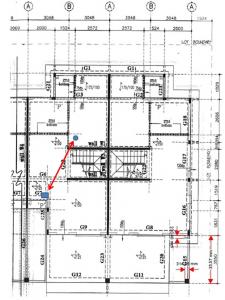
Here's the picture of my house's plan:

Attached Image

The picture shows my ground floor's plan, and my N56U is on a table. My AE1000 is upstairs where my desktop is and I've place my AE1000 on the floor just to get it as close to my N56U as possible.

From the straight arrow, the signal has to pass through only 1 wall, 1 layer of plaster ceiling and 1 layer of concrete ceiling.

And the straight line of sight distance between my AE1000 and N56U is around 5.5 meter (this is pretty accurate as I used a laser rangefinder)

So, with the information above, do any of you think I should be getting some signal from my N56U's 5GHz connection?

If yes, I will be contacting Asus customer service. laugh.gif tongue.gif


Added on October 23, 2011, 8:43 am
QUOTE(klseet @ Oct 22 2011, 11:22 AM)
RT-N56U users

Fyi, there is another firmware release version 1.0.1.7c :
http://my.asus.com/Networks/Wireless_Route...TN56U/#download

I've tested, UI is even more responsive now, seem stable built version now. smile.gif

I've also uploaded the default UniFi setup config file HERE

Always remember clean flash:
- Factory Restore both BEFORE & AFTER flashing the firmware
- only connect LAN 2/3 wired during flashing & setup process, NO WAN cable !

Please note there is also a new utility (at the bottom section of the same page) for this version.
Again, don't expect the current Download Manager to behave like BT client, hopefully the new UI and DM will settle this once and for all !
Isn't Beta version 8.1.1.4 newer than 1.0.1.7c? And unlike 8.1.1.4, 1.0.1.7c's description doesn't say it supports unifi.

If it does, do you think 1.0.1.7c is better, even if its an older version? (by about 1/2 month only actually).


Added on October 23, 2011, 8:45 am
QUOTE(logit85 @ Oct 22 2011, 04:27 PM)
wow u got unifi sigh
*
You can always get one too! rclxms.gif

This post has been edited by whateva2k: Oct 23 2011, 08:45 AM
klseet
post Oct 23 2011, 01:11 PM

Getting Started
**
Junior Member
130 posts

Joined: Mar 2008
QUOTE(vergas @ Oct 22 2011, 07:07 PM)
... downgrade to older firmware the RT-N13U.RB_2.0.2.0_0531w, now close to 5 days without hang.
Did you try torrenting over wifi with the older firmware?
If ok, then ASUS might have added something on WAN/wifi interface on the 8x version ......

QUOTE(RageWeaver @ Oct 23 2011, 12:00 AM)
...And,I can buy different antenna for this router(if wifi signal is not strong enuf) since it is detachable,right?
You mean like THIS ! tongue.gif

Unless you have big house and tick wall, otherwise I think the stock antenna is good enough la ....

Ooops, out of topic liao, hope Mod/TS don't mind ... sweat.gif


QUOTE(whateva2k @ Oct 23 2011, 08:23 AM)
... I think AE1000 is fine, because its the same thing with my Playbook and iPad....
....as I walk upstairs, the connection bar drops ....

.... straight line of sight distance between my AE1000 and N56U is around 5.5 meter (this is pretty accurate as I used a laser rangefinder) ....
Try test to put the device upwards (stand), away from any electrical items, on higher level (say on top of a cabinet) free of metal/wall blocking, see whether the 5GHz signal improve or not.

Also try to use Xirrus to check other wifi around you, always keep 5 channels away from those few closest to you.

If result still the same even with other 5GHz adapter, then you might need to call or RMA with ASUS. smile.gif


QUOTE(whateva2k @ Oct 23 2011, 08:23 AM)
Isn't Beta version 8.1.1.4 newer than 1.0.1.7c?
Yes, I've tested it on UniFi and it's working fine ! nod.gif

Actually I was Googling & read some Singapore forum HERE and notice the latest is 1.0.1.7c

Also I remember I didn't see this the last time I visited ASUS official site, not sure why the date is different ... unsure.gif
SUSnatzakaria
post Oct 23 2011, 01:58 PM

Regular
******
Senior Member
1,022 posts

Joined: Jan 2003
QUOTE(vergas @ Oct 22 2011, 07:07 PM)
Great to hear. I've downgrade to older firmware the RT-N13U.RB_2.0.2.0_0531w, now close to 5 days without hang.
*
Reverted to RT-N13U.RB_2.0.2.0_0531w and IPTV is working fine.
So far no hangs yet
RageWeaver
post Oct 23 2011, 02:42 PM

Getting Started
**
Junior Member
131 posts

Joined: Apr 2008


QUOTE(klseet @ Oct 23 2011, 01:11 PM)
You mean like THIStongue.gif

Unless you have big house and tick wall, otherwise I think the stock antenna is good enough la ....

Ooops, out of topic liao, hope Mod/TS don't mind ... sweat.gif
Try test to put the device upwards (stand), away from any electrical items, on higher level (say on top of a cabinet) free of metal/wall blocking, see whether the 5GHz signal improve or not.


YEAH! ...like that lol...wow that is one BIG and LONG antenna lol sweat.gif ...I think I will get that if the stock one isn't good enuf...again...that is one big atenna lol shocking.gif ,how much does the antenna cost?

Hmm,kinda off topic,hope they don't mind. sweat.gif
SUSlogit85
post Oct 23 2011, 04:49 PM

Regular
******
Senior Member
1,814 posts

Joined: Dec 2008


QUOTE(whateva2k @ Oct 23 2011, 08:23 AM)
I used your setup file downloaded from your website.

I think AE1000 is fine, because its the same thing with my Playbook and iPad. I go downstairs with clear LOS, I connect to the 5GHz connection with full bar. With the 5GHz connected, as I walk upstairs, the connection bar drops until I lose the connection when I reach my desktop.

I tried playing around with the settings as you mentioned above, and its still always either I can't find the 5GHz wifi, or found the 5GHz wifi with no bar and can't connect.

So now the culprit is either my N56U is faulty or there's something wrong with my house's wall and ceiling.

For the sake of ruling our my N56U being faulty, I went a little further to find how far is my AE1000 from N56U, and how many layers of bricks and concretes it has to pass through.

Here's the picture of my house's plan:

Attached Image

The picture shows my ground floor's plan, and my N56U is on a table. My AE1000 is upstairs where my desktop is and I've place my AE1000 on the floor just to get it as close to my N56U as possible.

From the straight arrow, the signal has to pass through only 1 wall, 1 layer of plaster ceiling and 1 layer of concrete ceiling.

And the straight line of sight distance between my AE1000 and N56U is around 5.5 meter (this is pretty accurate as I used a laser rangefinder)

So, with the information above, do any of you think I should be getting some signal from my N56U's 5GHz connection?

If yes, I will be contacting Asus customer service.  laugh.gif  tongue.gif


Added on October 23, 2011, 8:43 am
Isn't Beta version 8.1.1.4 newer than 1.0.1.7c? And unlike 8.1.1.4, 1.0.1.7c's description doesn't say it supports unifi.

If it does, do you think 1.0.1.7c is better, even if its an older version? (by about 1/2 month only actually).


Added on October 23, 2011, 8:45 am
You can always get one too!  rclxms.gif
*
yes i want unifi but my areal not available i at Penang Georgetown cry.gif

rayfoo
post Oct 23 2011, 05:39 PM

Look at all my stars!!
*******
Senior Member
2,562 posts

Joined: Jan 2003


hi if u download both firmware files,1.0.1.7c has a newer date than 8.1.1.4 firmware, i tried updating from 8.1.1.4, all my configuration still working, can online immediately after that wink.gif


QUOTE(whateva2k @ Oct 23 2011, 08:23 AM)


Added on October 23, 2011, 8:43 am
Isn't Beta version 8.1.1.4 newer than 1.0.1.7c? And unlike 8.1.1.4, 1.0.1.7c's description doesn't say it supports unifi.

If it does, do you think 1.0.1.7c is better, even if its an older version? (by about 1/2 month only actually).


Added on October 23, 2011, 8:45 am
You can always get one too!  rclxms.gif
*
vergas
post Oct 23 2011, 10:16 PM

Regular
******
Senior Member
1,488 posts

Joined: Oct 2004


QUOTE(klseet @ Oct 23 2011, 01:11 PM)
Did you try torrenting over wifi with the older firmware?
If ok, then ASUS might have added something on WAN/wifi interface on the 8x version ......
Yes I did. No problem at all. Full speed. Testing again tonight.

» Click to show Spoiler - click again to hide... «


Added on October 24, 2011, 8:23 amAdded : Four hours torrent full speed, no problem.

This post has been edited by vergas: Oct 24 2011, 08:23 AM
yaya1899
post Oct 24 2011, 03:23 PM

Getting Started
**
Junior Member
70 posts

Joined: Jan 2003
QUOTE(klseet @ Oct 22 2011, 11:22 AM)
RT-N13U-B1 users

Ok, I tried few rounds and I managed to get a "hang"  tongue.gif

Mostly I use PC wired for torrenting, after going through those emails complaints, I noticed some common hang situation on torrenting through wifi.

So I tested torrenting on an old laptop (with LinuxMint) wirelessly, day 1 was ok, but day 2 it hang, IPTV also won't work, LED still lights-on when insert cat cable, but router inaccessible even on wired.

I'm not technical engineer, not really sure what went wrong, looks the WAN interface could be broken when torrent intensively through wifi, something goes wrong between WAN-->wifi interfaces on heavy traffic.

Since I can't get any System Log, I've explained the situation to ASUS team, still waiting for response, hopefully they can simulate the hang and perhaps another fix  sweat.gif

Will update further once I get reply.
Thanks for the update. rclxms.gif

For my case, i used my desktop for Direct Download (MU, FS and etc.). Perhaps the transfer is too heavy and the router can't handle? hmm.gif

vergas
post Oct 25 2011, 07:46 AM

Regular
******
Senior Member
1,488 posts

Joined: Oct 2004


QUOTE(yaya1899 @ Oct 24 2011, 03:23 PM)
Thanks for the update.  rclxms.gif

For my case, i used my desktop for Direct Download (MU, FS and etc.). Perhaps the transfer is too heavy and the router can't handle?  hmm.gif
*
You might want to change to older firmware then.


Added on October 27, 2011, 11:26 amMore than 9 days with RT-N13U.RB_2.0.2.0_0531w and no hang....

This post has been edited by vergas: Oct 27 2011, 11:26 AM
yaya1899
post Nov 1 2011, 12:00 AM

Getting Started
**
Junior Member
70 posts

Joined: Jan 2003
QUOTE(vergas @ Oct 25 2011, 07:46 AM)
You might want to change to older firmware then.


Added on October 27, 2011, 11:26 amMore than 9 days with RT-N13U.RB_2.0.2.0_0531w and no hang....
*
Just updated with RT-N13U.RB_2.0.2.0_0531w, see how long can it last ~ hmm.gif

113 Pages « < 12 13 14 15 16 > » Top
 

Change to:
| Lo-Fi Version
0.0311sec    1.16    6 queries    GZIP Disabled
Time is now: 4th December 2025 - 02:22 AM