QUOTE(klseet @ Oct 22 2011, 11:22 AM)
What's your setup?
The 5GHz might not be strong enough to transmit far distance, but definitely it's good enough to handle a double storey house, I have no problem on my laptop built-in Intel AGN5100, even upstairs into the room into the washroom with 2 layer of wall, still got 2~3 bars.
I'm really sure about the AE1000, please find out whether it's pure-N. Try to play around with this settings first:
Wireless mode=N
Channel bandwidth=20MHz
Channel=(start with the lowest 36 first)
For Authentication & Encryption:
- start with WPA-Auto-Personal with AES+TKIP first
- if works, then WPA2+AES for pure-N
You may also try the latest firmware (above mentioned), also can consider the default config file.
I was reading both your PMs and those links, walioa, it seem lots of posts and I really have hard time to read through all ler ....

I used your setup file downloaded from your website.
I think AE1000 is fine, because its the same thing with my Playbook and iPad. I go downstairs with clear LOS, I connect to the 5GHz connection with full bar. With the 5GHz connected, as I walk upstairs, the connection bar drops until I lose the connection when I reach my desktop.
I tried playing around with the settings as you mentioned above, and its still always either I can't find the 5GHz wifi, or found the 5GHz wifi with no bar and can't connect.
So now the culprit is either my N56U is faulty or there's something wrong with my house's wall and ceiling.
For the sake of ruling our my N56U being faulty, I went a little further to find how far is my AE1000 from N56U, and how many layers of bricks and concretes it has to pass through.
Here's the picture of my house's plan:
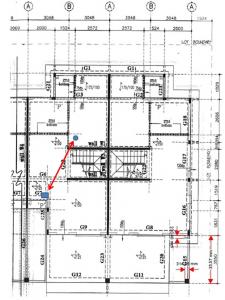
The picture shows my ground floor's plan, and my N56U is on a table. My AE1000 is upstairs where my desktop is and I've place my AE1000 on the floor just to get it as close to my N56U as possible.
From the straight arrow, the signal has to pass through only 1 wall, 1 layer of plaster ceiling and 1 layer of concrete ceiling.
And the straight line of sight distance between my AE1000 and N56U is around 5.5 meter (this is pretty accurate as I used a laser rangefinder)
So, with the information above, do any of you think I should be getting some signal from my N56U's 5GHz connection?
If yes, I will be contacting Asus customer service.


Added on October 23, 2011, 8:43 amQUOTE(klseet @ Oct 22 2011, 11:22 AM)
RT-N56U usersFyi, there is another firmware release version 1.0.1.7c :
http://my.asus.com/Networks/Wireless_Route...TN56U/#downloadI've tested, UI is even more responsive now, seem stable built version now.

I've also uploaded the default UniFi setup config file
HERE Always remember clean flash:
- Factory Restore both BEFORE & AFTER flashing the firmware
- only connect LAN 2/3 wired during flashing & setup process, NO WAN cable !
Please note there is also a new utility (at the bottom section of the same page) for this version.
Again, don't expect the current Download Manager to behave like BT client, hopefully the new UI and DM will settle this once and for all !
Isn't Beta version 8.1.1.4 newer than 1.0.1.7c? And unlike 8.1.1.4, 1.0.1.7c's description doesn't say it supports unifi.
If it does, do you think 1.0.1.7c is better, even if its an older version? (by about 1/2 month only actually).
Added on October 23, 2011, 8:45 amQUOTE(logit85 @ Oct 22 2011, 04:27 PM)
You can always get one too!
 This post has been edited by whateva2k: Oct 23 2011, 08:45 AM

 Oct 14 2011, 02:21 PM


 Quote
Quote


 0.0490sec
 0.31
0.31
 7 queries
 GZIP Disabled