


thank you again for your help :thumbs up:
This post has been edited by -ahtiang-: Nov 10 2011, 06:53 AM
Home Networking N Router By Asus RTN-66U / Asus RTN-16 / RT-N56U, Asus RT-N Series Supported Unifi
|
|
 Nov 10 2011, 06:48 AM Nov 10 2011, 06:48 AM
|
 
Junior Member
435 posts Joined: Oct 2006  
|
thanks a lot klseet, i left it overnight and i just finished upgrading the firmware (RT-N13U.RB_2.0.2.5g) without any issue... let's see how it goes...
thank you again for your help :thumbs up: This post has been edited by -ahtiang-: Nov 10 2011, 06:53 AM |
|
|
|
|
|
Nov 10 2011, 08:03 AM
|

Senior Member
1,488 posts Joined: Oct 2004
|
QUOTE(-ahtiang- @ Nov 10 2011, 06:48 AM) thanks a lot klseet, i left it overnight and i just finished upgrading the firmware (RT-N13U.RB_2.0.2.5g) without any issue... let's see how it goes... More than 24 hours for me now, looking good!thank you again for your help :thumbs up:  Added on November 10, 2011, 8:29 pm QUOTE(vergas @ Nov 10 2011, 08:03 AM) More than 24 hours for me now, looking good! Oppsss... Its hang this morning ie after 1 day plus a bit.... I'll do more test soon.This post has been edited by vergas: Nov 10 2011, 08:29 PM |
|
|
Nov 11 2011, 08:23 PM
|
|
Junior Member
435 posts Joined: Oct 2006
|
so far mine is good, has been up for the past 1 day 19 hours...
3 days and 1 hours (13 Nov 7:48am) 5 days and 14 hours (15 Nov 9:15pm) This post has been edited by -ahtiang-: Nov 15 2011, 09:15 PM |
|
|
Nov 11 2011, 10:14 PM
|

Senior Member
4,038 posts Joined: Aug 2005 From: Earth 
|
Kindly pls flash to latest build firmware release
As Asus team is improvising the latest build with much more stable features |
|
|
Nov 14 2011, 11:13 AM
|

Senior Member
1,022 posts Joined: Jan 2003
|
Gurus
I have flashed the N13 to DD-WRT but I seem to get intermittent internet access. What is the procedure to revert back to ASUS firmware? Can anyone suggest a router with VPN support as that was the reason why I flashed to DD-WRT in the first place |
|
|
Nov 14 2011, 11:23 AM
|
|
Senior Member
1,488 posts Joined: Oct 2004
|
QUOTE(natzakaria @ Nov 14 2011, 11:13 AM) Gurus Use firmware restoration tools to flash back to asus firmware. http://klseet.com/index.php?option=com_con...id=79&Itemid=75I have flashed the N13 to DD-WRT but I seem to get intermittent internet access. What is the procedure to revert back to ASUS firmware? Can anyone suggest a router with VPN support as that was the reason why I flashed to DD-WRT in the first place DD-WRT works great when I tried it last time, but I never use VPN. This post has been edited by vergas: Nov 14 2011, 11:26 AM |
|
|
|
|
|
Nov 16 2011, 10:15 PM
|

Newbie
1 posts Joined: Nov 2010
|
hi guys, seriously im getting mad with d link 615 tm router.. thingking of buying other router.. my question with this asus router what is different with N16 vs N13? it's suitable for unifi iptv? easy to port forward (i have bad experiance with dlink615 unifi router)? seriously im heavy with my on9 gaming than surfing or streaming... other info - using vip20... 1 more question.. what is dd-wrt? sory guys, im newbie in networking since my unifi have problem with my on9 gaming,not aware of thinking with this matter before with my streamx since no problem with disconnected accept lag only..
Added on November 17, 2011, 8:35 pmfirmware 9.22.2.37 RT16N 1. my iptv cant use... it show no connection ethernet.. my lan port 1 for iptv... any solution?  2. plug off my modem then later i need to resetting my dns again... why? The best thing MY PS3 NO DC ANYMORE...  This post has been edited by zack8373: Nov 17 2011, 09:59 PM |
|
|
Nov 18 2011, 12:08 AM
|
|
Senior Member
1,488 posts Joined: Oct 2004
|
RT-N13U.RB_2.0.2.5g, more than 5 days already, so I guess confirm its working properly now.
|
|
|
Nov 18 2011, 12:15 AM
|
|
Senior Member
4,038 posts Joined: Aug 2005 From: Earth
|
The DDNS is kinda FAKAP at this moment got certain flaw in the Asustek firmware . I think they already fix it
|
|
|
Nov 18 2011, 03:09 PM
|
|
Newbie
1 posts Joined: Nov 2010
|
ok.. suddently my iptv work great today...
|
|
|
Nov 18 2011, 07:56 PM
|

Junior Member
130 posts Joined: Mar 2008
|
QUOTE(vergas @ Nov 18 2011, 12:08 AM) RT-N13U.RB_2.0.2.5g, more than 5 days already, so I guess confirm its working properly now. Mine also more than 5 days until nothing to download .....  |
|
|
Nov 18 2011, 08:07 PM
|
|
Junior Member
130 posts Joined: Mar 2008
|
QUOTE(natzakaria @ Nov 14 2011, 11:13 AM) Gurus If you want a DD-WRT router on UniFi with the capability of 3rd party VPN loaded, you may try OverPlay:I have flashed the N13 to DD-WRT but I seem to get intermittent internet access. What is the procedure to revert back to ASUS firmware? Can anyone suggest a router with VPN support as that was the reason why I flashed to DD-WRT in the first place https://overplay.net/ They have a package for DD-WRT routers, quite easy to setup though: https://overplay.net/setup.php Sometime ago I tested on a <RM50 Atheros router, didn't publish as it's prototype, you may refer to: http://klseet.com/index.php?option=com_con...=article&id=105 I remembered there were some kind of memory leak issue after few days, I'm not sure whether it's the DD-WRT builds and/or the OP package, no time to check also ..... Test at your own risk ! This post has been edited by klseet: Nov 18 2011, 08:08 PM |
|
|
Nov 19 2011, 03:07 PM
|
|
Newbie
1 posts Joined: Nov 2010
|
Firmware 9.22.2.37 - rt n16
After 3 day using my router keep disconnecting.. Can't connect wireless asus router page through laptop. Then I need to resetting my router again.. |
|
|
|
|
|
Nov 21 2011, 06:48 PM
|
|
Senior Member
1,488 posts Joined: Oct 2004
|
QUOTE(klseet @ Nov 18 2011, 07:56 PM) Mine also more than 5 days until nothing to download ..... Did you use the IPTV as well? Last 2 days when I was not home, the internet was down, so my wife switch on /off the router and it was ok after that. I don't really know what happen. |
|
|
Nov 21 2011, 10:45 PM
|
|
Junior Member
130 posts Joined: Mar 2008
|
QUOTE(zack8373 @ Nov 19 2011, 03:07 PM) Firmware 9.22.2.37 - rt n16 I didn't have such issues on my last test, please read through the following detail to clean flash again:After 3 day using my router keep disconnecting.. Can't connect wireless asus router page through laptop. .. http://klseet.com/index.php?option=com_con...id=84&Itemid=79 Setup may refer to the RT-N12-B1: http://klseet.com/index.php?option=com_con...=125&Itemid=112 (Try not to use QoS on RT-N16) Anywhere, I'm pulling out my RT-N16 again will find some time to test further  QUOTE(vergas @ Nov 21 2011, 06:48 PM) Did you use the IPTV as well? ... Yes, I did, my IPTV is setup at dining area, mostly watching news, always on it whenever if we have meal & drinks.  I do notice of lately occasionally the IPTV will break-off a while then comes back, or sometime it will freeze for few seconds (especially 122 & 123 news) while other channels are ok, really not sure what's wrong .... Anywhere the router didn't hang even there was some glitch on the IPTV. This post has been edited by klseet: Nov 22 2011, 01:32 AM |
|
|
Nov 22 2011, 03:27 PM
|

Newbie
0 posts Joined: Nov 2011 From: Bandar Mahkota Cheras, Selangor, Malaysia
|
QUOTE(zack8373 @ Nov 19 2011, 03:07 PM) Firmware 9.22.2.37 - rt n16 I am facing the same problem as well. My Asus RT-N16 keep on disconnect, and the only way to make it work is to reboot it. Now I put back the D-Link DIR-615. After 3 day using my router keep disconnecting.. Can't connect wireless asus router page through laptop. Then I need to resetting my router again..  Anyone have a solution to this?  |
|
|
Nov 22 2011, 07:50 PM
|
|
Junior Member
76 posts Joined: Dec 2007
|
QUOTE(klseet @ Nov 18 2011, 07:56 PM) Mine also more than 5 days until nothing to download ..... I upgraded my firmware to RT-N13U.RB_2.0.2.5g. After 1 1/2 day. The router is not responding and have to power on off. There was no big file download activity for the last half day but somehow the router still die on its own. |
|
|
Nov 22 2011, 09:00 PM
|
|
Junior Member
130 posts Joined: Mar 2008
|
RT-N16
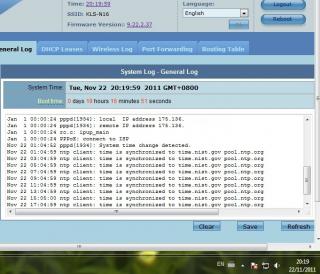

Started last night, just came back, so far so good, moderate wifi torrenting total down/up about 17/25 GB, just threw in another single file 13GB torrent .... QUOTE(ericngai @ Nov 22 2011, 03:27 PM) I am facing the same problem as well. My Asus RT-N16 keep on disconnect, and the only way to make it work is to reboot .... QUOTE(soonsian @ Nov 22 2011, 07:50 PM) I upgraded my firmware to RT-N13U.RB_2.0.2.5g. After 1 1/2 day. The router is not responding and have to power on off.... I really not sure what's wrong with you guys device, try to:- check your downloaded beta firmware MD5 - refer & follow below detail steps to clean flash again: http://klseet.com/index.php?option=com_con...id=84&Itemid=79 - setup may refer to: http://klseet.com/index.php?option=com_con...=125&Itemid=112 - don't use the stock EzQoS or manual QoS - try not to change or mess around the settings (if corrupt or become unstable, always perform Factory Restore again, then restore your last good setting) - try not to keep the router logon session constantly on (login only when necessary, always clear browser cache, close & re-open new to login, avoid IE) It should work just fine, good luck! |
|
|
Nov 23 2011, 05:35 PM
|
|
Senior Member
1,577 posts Joined: May 2005 From: USJ
|
my RT-N13U asus router with RT-N13U.RB_2.0.2.5g is freaking unstable. Every couple hours it will hang and have to do unplug and plug back to work. Can't even access webui.
I think i have a lemon set and will take it back to the shop for warranty. Can they 1 to 1 exchange it or do i have to wait few months for them to change? |
|
|
Nov 23 2011, 09:41 PM
|
|
Newbie
0 posts Joined: Nov 2011 From: Bandar Mahkota Cheras, Selangor, Malaysia
|
I restored my RT-16 to factory setting, and reconfigure it for UniFi again, it is now working fine without the disconnection issue for hours. I guess the issue is not to keep logging into the console and play keep on messing with it.
|
| Change to: |  0.0339sec 0.0339sec
 1.18 1.18
 6 queries 6 queries
 GZIP Disabled GZIP Disabled
Time is now: 4th December 2025 - 12:19 AM |
 Quote
Quote