


Unifi Official TM UniFi High Speed Broadbrand Thread V5, Still, NO cap 4 all unifi packages 4 now
Unifi Official TM UniFi High Speed Broadbrand Thread V5, Still, NO cap 4 all unifi packages 4 now
|
|
 May 26 2010, 11:09 AM May 26 2010, 11:09 AM
|
 
Senior Member
2,811 posts Joined: Jan 2003 From: Selayang   
|
last night i saw rows of new cable hanging on those poles at my house back alley..wonder if thats for unifi
|
|
|
|
|
|
May 26 2010, 11:58 AM
|

Senior Member
974 posts Joined: Jan 2009
|
QUOTE(rizvanrp @ May 26 2010, 02:29 AM) I'm sick of TM reading what I post here and making changes without even giving any acknowledgment. What sort of changes? Changes that improves the service or changes that block the use of what you discover and share here? |
|
|
May 26 2010, 01:48 PM
|
 
Trade Dispute
3,379 posts Joined: Apr 2006 From: KL 
|
QUOTE(mylinear @ May 26 2010, 11:58 AM) What sort of changes? Changes that improves the service or changes that block the use of what you discover and share here? For TM's end its definitely improving their service, for users its blocking.  |
|
|
May 26 2010, 02:56 PM
|

Senior Member
5,135 posts Joined: Jan 2003 
|
Gah this is ridiculous, TM called to say they can't find my house in their system. /facepalm.jpg
|
|
|
May 26 2010, 05:14 PM
|
 
Elite
195 posts Joined: Sep 2006
|
QUOTE(mylinear @ May 26 2010, 11:58 AM) What sort of changes? Changes that improves the service or changes that block the use of what you discover and share here? Changes that have 0 effect on the quality of their service but discourage power users from straying away from using their crap hardware.. therefore putting those users at a disadvantage.QUOTE(palmjack @ May 26 2010, 09:15 AM) Hmm. I guess it might be safer if I connect the Link sys to the Dlink in bridge mode for now, disable DHCP and let the DHCP come from the Dlink? That's not really bridge mode, its just using the Linksys as a wireless AP/switch. The routing is still performed by the Dlink using TM's DIR-615 firmware and is limited by it. I only recommend this if you're happy with the DIR-615 routing performance (no lockups, a lot of connections per second, etc.) but you're dissatisfied with the wireless access point performance (weak signal). Proper bridge mode involves a direct connection between Fiberhome <--> Linksys with the DIR-615 back in its own box.I have preset static IPs in Tomato for QOS - I guess I have to change these now? Tomato? Are you on Tomato or dd-wrt? This post has been edited by rizvanrp: May 26 2010, 05:15 PM |
|
|
May 26 2010, 05:48 PM
|

Junior Member
84 posts Joined: Feb 2005
|
@Riz I am on Tomato - have not flashed to DD-WRT since the thread here suggests there might be performance issues. Yeah I am mainly concerned about the weak Wifi of the Dlink. Thanks for your explanation. So may use the LInksys as the wireless AP and additional ports if the need arises.
|
|
|
|
|
|
May 26 2010, 07:35 PM
|

Senior Member
4,470 posts Joined: Jan 2003
|
QUOTE(Kclee2002 @ May 26 2010, 02:56 PM) Gah this is ridiculous, TM called to say they can't find my house in their system. /facepalm.jpg How are you able to subscribe to 5mb business for home  QUOTE Changes that have 0 effect on the quality of their service but discourage power users from straying away from using their crap hardware.. therefore putting those users at a disadvantage. Riv, so can we use alternate router instead of the dir-615 ??? |
|
|
May 26 2010, 08:23 PM
|

Senior Member
868 posts Joined: Dec 2005
|
y unifi don make a guide or giving information to public that wish to use their own hardware? DIR615 is more than enough for many users but still some users who own a better router than DIR615, y unifi wanna "force" us to use their dlink? what is their purpose? im not understand
|
|
|
May 26 2010, 08:47 PM
|
|
Senior Member
4,470 posts Joined: Jan 2003
|
QUOTE(ywkwy @ May 26 2010, 08:23 PM) y unifi don make a guide or giving information to public that wish to use their own hardware? DIR615 is more than enough for many users but still some users who own a better router than DIR615, y unifi wanna "force" us to use their dlink? what is their purpose? im not understand The router is not that good for p2p  I am a bit flabbergasted when people say it is lulz... I am a bit flabbergasted when people say it is lulz...Router performance chart ( shows wan to lan, lan to wan, max throughput, and maximum simultaneous connections ) for a wide range of routers. This is real time performance so you know what you are getting. Keep in mind some router models have different revisions which may lead to different performances, for example i have a DIR-655 A2, but it doesn't have as many connections as the DIR-655 A4 http://www.smallnetbuilder.com/index.php?o...emid=&chart=119 D-Link DIR-615 Wireless N Router review http://www.smallnetbuilder.com/content/view/30349/187/ QUOTE But, more significantly, the 615 could reliably sustain only 32 connections in the maximum simultaneous connections test. Ubicom questioned these results when they first posted in the charts and said its tests (also done with IxChariot) produced results more like the 625's. D-Link had no comment on the results. QUOTE With all due respect to the writer of this review, I feel I must disagree with their assessment of this router. While cheap, in use this router reveals exactly why it does not cost much: the hardware is extremely weak, only supporting 32 simultaneous connections, with many other N routers supporting in excess of 200. This means that this router is extremely weak with regards to peer-to-peer technologies such as BitTorrent. I have also found this router will crash if you keep it at that 32 connection limit for long enough. It may be fine if you have a smaller connection (I have 50Mbit) or don't use peer-to-peer technology, but otherwise I would recommend getting a better router. You still want to p2p when the router only can do 32 max simultaneous connections ?? No gigabyte ethernet ports neither (who in this day and age still use 100mb ethernet ports max?). It is no wonder tmnut want to give us free router, because the router is so bad, you can't p2p at all even if you do find software methods to circumvent any throttling they do This post has been edited by Moogle Stiltzkin: May 26 2010, 08:50 PM |
|
|
May 26 2010, 08:55 PM
|
|
Junior Member
232 posts Joined: Jan 2006
|
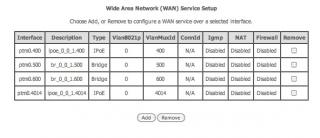
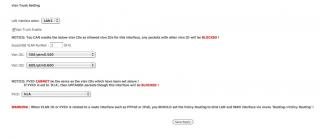
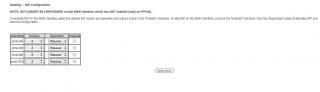
QUOTE(rizvanrp @ May 26 2010, 06:14 PM) Changes that have 0 effect on the quality of their service but discourage power users from straying away from using their crap hardware.. therefore putting those users at a disadvantage. Yeah, RizvanrpThat's not really bridge mode, its just using the Linksys as a wireless AP/switch. The routing is still performed by the Dlink using TM's DIR-615 firmware and is limited by it. I only recommend this if you're happy with the DIR-615 routing performance (no lockups, a lot of connections per second, etc.) but you're dissatisfied with the wireless access point performance (weak signal). Proper bridge mode involves a direct connection between Fiberhome <--> Linksys with the DIR-615 back in its own box. Tomato? Are you on Tomato or dd-wrt? I'm the Buffalo Router (WHR-HP-G300N) with DD-WRT user you're talking about. Hehe No, no successful even though the router with DD-WRT is Vlan capable. I only managed to surf google-related-websites, others like loading forever. BTW, I am on the VDSL modem provided by them. Going to get the smart/managed switch from Cisco tomorrow. Hope it would helps. I managed to access their VDSL modem and here are the screenshot : 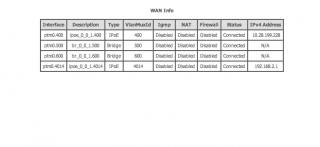
This post has been edited by 76radius: May 26 2010, 09:03 PM |
|
|
May 26 2010, 09:46 PM
|

Junior Member
358 posts Joined: Sep 2009
|
there should be special page for unifi subscibers guide to ,odify the routers.
|
|
|
May 26 2010, 09:58 PM
|
|
Junior Member
232 posts Joined: Jan 2006
|
QUOTE(azwan92 @ May 26 2010, 10:46 PM) there should be special page for unifi subscibers guide to ,odify the routers. Yeah, I agree. Normal user not familiar about this Vlan thingy. I bought the Vlan capable router Linksys RVS4000 but still not successful. Hahaha.. too complicated. |
|
|
May 26 2010, 10:29 PM
|
|
Elite
195 posts Joined: Sep 2006
|
@azwan92
I was thinking about that, maybe the next Unifi thread can compile all our info about it on the front page or something. Or I could just put it up on my webserver when I have the time so everyone has access to it easily. I've also already programmed an easy tool to VLAN tag Windows PPPoE packets so you can connect your PC directly to the Fiberhome if you're ever having issues with you're Unifi (or DIR-615). It lets you check the PPPoE error message code like back with Streamyx.. would like to upload it soon  @76radius I didn't know you were on VDSL Unifi till you sent me that last PM  It shouldn't have any effect on the VLAN tagging however.. looking at the VLAN trunking page it looks like you're only using VLAN 500 and 600 like the DIR-615. No idea why yours is performing that way >< It shouldn't have any effect on the VLAN tagging however.. looking at the VLAN trunking page it looks like you're only using VLAN 500 and 600 like the DIR-615. No idea why yours is performing that way >< |
|
|
|
|
|
May 26 2010, 10:51 PM
|
|
Senior Member
1,027 posts Joined: May 2008
|
y puchong still no r ???
|
|
|
May 26 2010, 11:23 PM
|
|
Junior Member
190 posts Joined: Oct 2006
|
dear all,
any unifi users here? I just got the unifi installed in my house here is sect 9 shah alam. VIP 5 I felt that it is faster than streamyx abit only.....I dont felt like really 5mbps. anyone mind to share? i m planning to upgrade to VIP 10. got differences ma? thx |
|
|
May 26 2010, 11:23 PM
|

Junior Member
8 posts Joined: May 2010 From: Kuala Lumpur
|
Hey guys. I can't forward ports for some reason.
What's Public IP and Private IP at the d-link dir-615 port forwarding page? |
|
|
May 26 2010, 11:25 PM
|

Senior Member
810 posts Joined: Feb 2008 From: 127.0.0.1
|
anyone solved the problems with port forwarding problems on the d-link?
tried a few tricks already, even putting on DMZ |
|
|
May 27 2010, 12:13 AM
|
|
Senior Member
4,470 posts Joined: Jan 2003
|
QUOTE(rebirth @ May 26 2010, 11:23 PM) dear all, Your upload speed should be better in 5 vips unifi vs 4mb screamyx.any unifi users here? I just got the unifi installed in my house here is sect 9 shah alam. VIP 5 I felt that it is faster than streamyx abit only.....I dont felt like really 5mbps. anyone mind to share? i m planning to upgrade to VIP 10. got differences ma? thx also since your using fiber, the latency should be faster, you'd have to test ingame such as World of Warcraft us server to check on that. @riv So you got a tool so can connect directly to fiber modem without having to unplug router, and plug modem directly to pc ??? That is awesome This post has been edited by Moogle Stiltzkin: May 27 2010, 12:19 AM |
|
|
May 27 2010, 12:34 AM
|
|
Elite
195 posts Joined: Sep 2006
|
riz*
Yeap, works on any network card on Windows as long as you install winpcap. Problem is it works at the user level so its very unstable in terms of latency. However, its very useful when your router dies/Unifi has connection problems and you just want to go online or debug the issue with a direct connection using Windows. I used it a lot on my Win 7 netbook when my DIR-615 got fried and I needed to go online using Unifi. You have to unplug the DIR-615 though, the Fiberhome only allows 1 port to be used at a time. |
|
|
May 27 2010, 05:56 AM
|
|
Senior Member
4,470 posts Joined: Jan 2003
|
Just curious, but is everyone using the default dir-615, or are they able to use any better alternatives o_O; ??
Because i am planning to upgrade my router, but not sure what can work with the Unifi :/ Think it would be ok to complain to CFM why we cannot use other routers for Unifi ???@riv You mentioned about unifi being tied to registered mac address, this i don't think is a problem. DD-WRT firmware has an option to clone mac address. Can find out the dir-655 mac from under it or is it missing ? QUOTE Help! My Internet still does not work! A problem for which there is no single common fix. Understanding some basics about networking, subnets, NAT, etc. would be in your best interest to troubleshoot this issue. You may need to call your Internet Service Provider (ISP) for settings that are particular to your connection. Some ISPs not using PPPoE expect the MAC address (hardware address) of to router to match that of your computer, especially when you used your computer without the router to setup everything initially. You may need to use the "Clone MAC Address" feature. If using PPPoE, make sure you use the correct username and password. For cable and satellite users, generally DHCP is the correct setting. For Comcast Cable users, be sure to disable STP. For users trying to share a dial-up connection, you'll need to read the Wiki article Sharing Dialup. At any rate, it's a near 99% chance that the problem is not your DD-WRT firmware, but instead a lack of understanding with networking. http://www.dd-wrt.com/wiki/index.php/Index:FAQ This post has been edited by Moogle Stiltzkin: May 27 2010, 06:17 AM |
|
Topic ClosedOptions
|
| Change to: |  0.0638sec 0.0638sec
 0.86 0.86
 7 queries 7 queries
 GZIP Disabled GZIP Disabled
Time is now: 12th December 2025 - 03:48 AM |
 Quote
Quote