

just oced mine as well...but the temp reach up to 85'C while gaming just for 30mins...
Lenovo ideapad Y460/Y560 Thread, Gaming nerd in a business package
Lenovo ideapad Y460/Y560 Thread, Gaming nerd in a business package
|
|
 May 9 2010, 03:24 PM May 9 2010, 03:24 PM
|
 
Senior Member
521 posts Joined: Aug 2006 
|
just oced mine as well...but the temp reach up to 85'C while gaming just for 30mins...
|
|
|
|
|
|
May 9 2010, 04:48 PM
|

Senior Member
541 posts Joined: Apr 2008
|
@wztech
You're using the HD 5730 clock or others? Maybe let us know which game you're playing and did you use gstoh's method to lower CPU clock? |
|
|
May 9 2010, 05:23 PM
|
|
Senior Member
521 posts Joined: Aug 2006
|
QUOTE(jotaro12 @ May 9 2010, 04:48 PM) @wztech im using the hd5730 clock and was only playing codmw...i didnt tried lowering the cpu clock yet..You're using the HD 5730 clock or others? Maybe let us know which game you're playing and did you use gstoh's method to lower CPU clock?  |
|
|
May 9 2010, 11:14 PM
|
|
Senior Member
541 posts Joined: Apr 2008
|
QUOTE(wztech @ May 9 2010, 05:23 PM) im using the hd5730 clock and was only playing codmw...i didnt tried lowering the cpu clock yet.. MW2 is not a graphic intensive game. Mind letting us know your idle/load temp for both GPU? |
|
|
May 9 2010, 11:43 PM
|
|
Senior Member
521 posts Joined: Aug 2006
|
QUOTE(jotaro12 @ May 9 2010, 11:14 PM) MW2 is not a graphic intensive game. Mind letting us know your idle/load temp for both GPU? nvm...i just stick with the stock clock...dun wan to take the risk..  |
|
|
May 10 2010, 12:28 AM
|

Junior Member
336 posts Joined: Apr 2010
|
hi, reading the part on OC i guess it wont void the warranty.
1) i just want to confirm it? 2) is any one planning to OC his GPU to higher frequencies than 5730 ( > 650/800 frequency) ? 3) i haven't OC'd a GPU before but do you think its recommend at least on 5730 frequency? 4) last question how about CPU overclocking i am sure this will void the warranty, but i would like to know if anyone did it on other type of laptop and was it effective? Thx in advance |
|
|
|
|
|
May 10 2010, 10:02 AM
|

Junior Member
399 posts Joined: Aug 2008 From: Hell 
|
Hmm~~~
Anybody having issue with this machine? Tonight gonna hardcore gaming with this machine. The screen back side a bit 'lembik' compare to current Y530. lolz |
|
|
May 10 2010, 02:29 PM
|

Senior Member
1,132 posts Joined: Jan 2010 From: shit island 
|
tis lappy good for decent gaming??
|
|
|
May 10 2010, 02:35 PM
|

Senior Member
7,558 posts Joined: Mar 2008 From: HornBill Borneo 
|
Yup, its perfect for decent gaming
|
|
|
May 10 2010, 02:38 PM
|
|
Senior Member
521 posts Joined: Aug 2006
|
QUOTE(unknownhammie @ May 10 2010, 10:02 AM) Hmm~~~ yeah...the screen back side is kinda lembik and looks very fragile..Anybody having issue with this machine? Tonight gonna hardcore gaming with this machine. The screen back side a bit 'lembik' compare to current Y530. lolz |
|
|
May 10 2010, 03:19 PM
|

Junior Member
136 posts Joined: Apr 2010 From: Melaka <-- -> Kuala Lumpur
|
QUOTE(unknownhammie @ May 10 2010, 10:02 AM) Hmm~~~ yes, it can support most of games today..Anybody having issue with this machine? Tonight gonna hardcore gaming with this machine. The screen back side a bit 'lembik' compare to current Y530. lolz try to read previous post on this thread, regarding on heat.. u need to make sure that ur laptop have been configured based on what user suggested.. based on what Jotaro12 said: QUOTE I believed that most of the heat problems which generated by users are found to be the software's fault, which is the default OS where bloatwares came with it in the 1st place. I've checked the task manager and found more than 80 processes running and while I was just browsing the features, the heat just generated, in a rather fast manner. With the new OS that I have now, having the same drivers and getting some software which I needed, I'm only getting normal laptop heat, 60-65 processes running(and I haven't go to msconfig to shut off the useless ones) and switching between ATI/Intel doesn't make a lot of difference. Lowest temp I got on it was 33C, normal usage using Intel GMA was 36-38C with browsing net and installing software. I hope this should clear out some of your minds and I'll continue my testing tomorrow. Thank you for reading this can be done by checking ur startup setting (on msconfig, and disabled some other non-useful program) and also please take alook at this (my previous post) » Click to show Spoiler - click again to hide... « hope it'l help  This post has been edited by Mie131085: May 10 2010, 03:20 PM |
|
|
May 10 2010, 03:28 PM
|
|
Junior Member
399 posts Joined: Aug 2008 From: Hell
|
QUOTE(wztech @ May 10 2010, 02:38 PM) yeah...the screen back side is kinda lembik and looks very fragile.. Yup its fragile alright. The best would be Y530, kinda hard...Something like Think series case. lolzQUOTE(Mie131085 @ May 10 2010, 03:19 PM) yes, it can support most of games today.. Normal, heat issue on GPU or CPU?try to read previous post on this thread, regarding on heat.. u need to make sure that ur laptop have been configured based on what user suggested.. based on what Jotaro12 said: this can be done by checking ur startup setting (on msconfig, and disabled some other non-useful program) and also please take alook at this (my previous post) » Click to show Spoiler - click again to hide... « hope it'l help I tried Y550 & Y530, both also high temperature for the GPU. The Y530 temp for GPU max was 89C and 90C for Y550. Sighs. |
|
|
May 10 2010, 03:40 PM
|
|
Junior Member
136 posts Joined: Apr 2010 From: Melaka <-- -> Kuala Lumpur
|
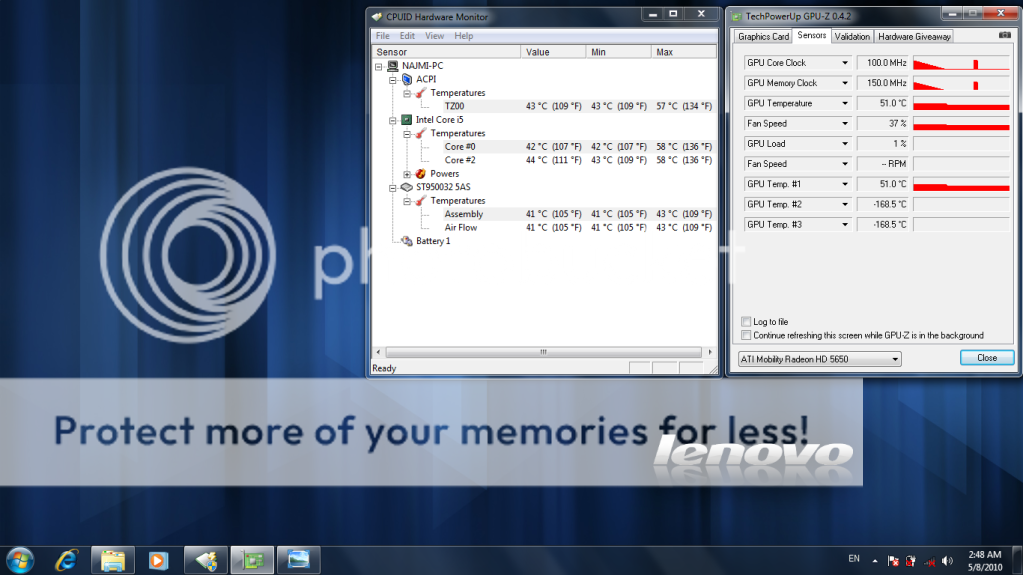
QUOTE(unknownhammie @ May 10 2010, 03:28 PM) Yup its fragile alright. The best would be Y530, kinda hard...Something like Think series case. lolz Normal, heat issue on GPU or CPU? I tried Y550 & Y530, both also high temperature for the GPU. The Y530 temp for GPU max was 89C and 90C for Y550. Sighs.  sorry, forgot to tell you all, that post actually for customized power plan setting based on my previous screenshot (on that post) - GPU clock - 300MHz (actual performance - 500MHz) GPU clock - 300MHz (actual performance - 799MHz) so, for better performance - during playing game, you need to do the following (based on previous post - choose Maximize Performance) : My Previous Post and also do as what we've suggested (remove unused bloatware/startup) NOTE: during playing the CODMW2 (based on that setting - test for 2 hour) i can get the GPU temp max out around 70c This post has been edited by Mie131085: May 10 2010, 03:45 PM |
|
|
|
|
|
May 10 2010, 05:04 PM
|

Senior Member
1,547 posts Joined: May 2007 From: Selangor
|
Err~~ i have some question... If i want to format y460 laptop~~ can i download back all the driver from website? Does lenovo provide any win7 cd key ?
This post has been edited by bananalow: May 10 2010, 05:04 PM |
|
|
May 10 2010, 05:09 PM
|

Junior Member
59 posts Joined: Sep 2007
|
hv anyone tested gta iv on lenovo y460 yet? how the result?
|
|
|
May 10 2010, 05:13 PM
|
|
Junior Member
136 posts Joined: Apr 2010 From: Melaka <-- -> Kuala Lumpur
|
QUOTE(bananalow @ May 10 2010, 05:04 PM) Err~~ i have some question... If i want to format y460 laptop~~ can i download back all the driver from website? Does lenovo provide any win7 cd key ? yes you can,the win 7 cd key is below ur laptop, on serial number... iinm  ..and for drivers you can go here: Lenovo Y460 Driver NOTE: better use ur One Key Recovery Feature instead... because One Key Recovery does comes with win 7 in it.... iinm... This post has been edited by Mie131085: May 10 2010, 05:17 PM |
|
|
May 10 2010, 05:21 PM
|

Senior Member
4,631 posts Joined: Oct 2005
|
QUOTE(maolnorlexu @ May 10 2010, 05:09 PM) hv anyone tested gta iv on lenovo y460 yet? how the result? tested and I can only say I will not ply gta4 on my y460when I use benchmark test on default setting, I get 27fps when I play. Alot of time especially when driving will lag, don't like it. Put at medium to low setting also same case  |
|
|
May 10 2010, 05:40 PM
|
|
Junior Member
399 posts Joined: Aug 2008 From: Hell
|
QUOTE(Mie131085 @ May 10 2010, 05:13 PM) yes you can, That will return your settings / windows to Original when you first receive / boot up.the win 7 cd key is below ur laptop, on serial number... iinm ..and for drivers you can go here: Lenovo Y460 Driver NOTE: better use ur One Key Recovery Feature instead... because One Key Recovery does comes with win 7 in it.... iinm... good function thou, I love to do it when finish using the machine. This post has been edited by unknownhammie: May 10 2010, 05:48 PM |
|
|
May 10 2010, 07:56 PM
|

Senior Member
2,642 posts Joined: Apr 2006
|
just play game for a while cpu temp went up to 70++ C
|
|
|
May 10 2010, 08:29 PM
|
|
Senior Member
541 posts Joined: Apr 2008
|
QUOTE(synz @ May 10 2010, 07:56 PM) just play game for a while cpu temp went up to 70++ C Did you use gstoh's method? Do you use cooler pad? My method is use a block of polystyrene which is put underneath the back of my Y460 and create a space where I can get better air-flow on my vent below. This is what I did 
|
| Change to: |  0.0264sec 0.0264sec
 0.34 0.34
 6 queries 6 queries
 GZIP Disabled GZIP Disabled
Time is now: 11th December 2025 - 07:19 PM |
 Quote
Quote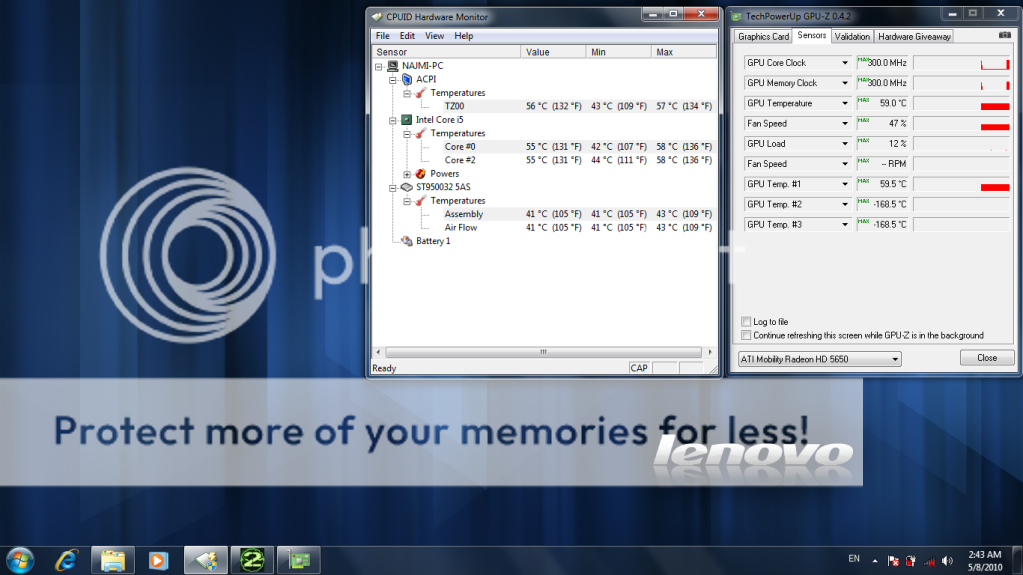
 in the future, will test it out on Supreme Commander 2, Dirt 2 ..