

Hmm~~~
Anybody having issue with this machine?
Tonight gonna hardcore gaming with this machine. The screen back side a bit 'lembik' compare to current Y530. lolz
Lenovo ideapad Y460/Y560 Thread, Gaming nerd in a business package
Lenovo ideapad Y460/Y560 Thread, Gaming nerd in a business package
|
|
 May 10 2010, 10:02 AM May 10 2010, 10:02 AM
Return to original view | Post
#1
|
 
Junior Member
399 posts Joined: Aug 2008 From: Hell  
|
Hmm~~~
Anybody having issue with this machine? Tonight gonna hardcore gaming with this machine. The screen back side a bit 'lembik' compare to current Y530. lolz |
|
|
|
|
|
May 10 2010, 03:28 PM
Return to original view | Post
#2
|
|
Junior Member
399 posts Joined: Aug 2008 From: Hell
|
QUOTE(wztech @ May 10 2010, 02:38 PM) yeah...the screen back side is kinda lembik and looks very fragile.. Yup its fragile alright. The best would be Y530, kinda hard...Something like Think series case. lolz QUOTE(Mie131085 @ May 10 2010, 03:19 PM) yes, it can support most of games today.. Normal, heat issue on GPU or CPU?try to read previous post on this thread, regarding on heat.. u need to make sure that ur laptop have been configured based on what user suggested.. based on what Jotaro12 said: this can be done by checking ur startup setting (on msconfig, and disabled some other non-useful program) and also please take alook at this (my previous post) » Click to show Spoiler - click again to hide... « hope it'l help  I tried Y550 & Y530, both also high temperature for the GPU. The Y530 temp for GPU max was 89C and 90C for Y550. Sighs. |
|
|
May 10 2010, 05:40 PM
Return to original view | Post
#3
|
|
Junior Member
399 posts Joined: Aug 2008 From: Hell
|
QUOTE(Mie131085 @ May 10 2010, 05:13 PM) yes you can, That will return your settings / windows to Original when you first receive / boot up.the win 7 cd key is below ur laptop, on serial number... iinm  ..and for drivers you can go here: Lenovo Y460 Driver NOTE: better use ur One Key Recovery Feature instead... because One Key Recovery does comes with win 7 in it.... iinm... good function thou, I love to do it when finish using the machine. This post has been edited by unknownhammie: May 10 2010, 05:48 PM |
|
|
May 11 2010, 06:57 AM
Return to original view | Post
#4
|
|
Junior Member
399 posts Joined: Aug 2008 From: Hell
|
Not bad for this spec...Today will test new arrived Z460. Integrated graphic, sighs.
|
|
|
May 11 2010, 09:12 AM
Return to original view | Post
#5
|
|
Junior Member
399 posts Joined: Aug 2008 From: Hell
|
QUOTE(miahahaha @ May 11 2010, 08:10 AM) Well, can give a simple review for it later..not on this thread lol, received V460 instead...maybe can create another for it, though comes with Integrated GC, still some people prefer it over Dedicated because of battery life  Any recommended software to hardcore test benchmark + etc? Recommend lai lai want test. Newly opened This post has been edited by unknownhammie: May 11 2010, 09:22 AM |
|
|
May 11 2010, 09:25 AM
Return to original view | Post
#6
|
|
Junior Member
399 posts Joined: Aug 2008 From: Hell
|
QUOTE(Mie131085 @ May 11 2010, 09:23 AM) sorry, what is the spec for this model? see this attachment for z460... Now only having V460. Don't know the performance. Need good software to try.This post has been edited by unknownhammie: May 11 2010, 09:29 AM Attached thumbnail(s) 
|
|
|
|
|
|
May 11 2010, 10:00 AM
Return to original view | Post
#7
|
|
Junior Member
399 posts Joined: Aug 2008 From: Hell
|
QUOTE(Mie131085 @ May 11 2010, 09:49 AM) does it have a GC inside it? It depends on the model which will be release thou. The spec that I'm having is for Singapore under Singtel promotion.because from the spec that ur give just now doesnt come with GC... but other site stated that Z460 comes with ATi Radeon HD 5145... as what stated on this site: Lenovo Z460 NOTE: HD 5145 is lower than the HD 5650... for Lenovo V460, IINM it cames with NVIDIA GeForce 310M 512MB and Intel HD intgrated GPU.. Lol, the V460 is running i3 M330 processor, switchable graphic button available. hmm. Any software can test the benchmark & etc? |
|
|
May 11 2010, 03:35 PM
Return to original view | Post
#8
|
|
Junior Member
399 posts Joined: Aug 2008 From: Hell
|
QUOTE(rashad @ May 11 2010, 03:17 PM) hi, i just want to check is the default clock 400 because i reinstalled my graphic card driver and i remember before it was 550 .....is this right.... or i need to do something. Doesnt seem to be wrong. My current Y460 machine also showing same thing.[attachmentid=1570455] GPU Clock - 550 MHz Default Clock - 400 MHz |
|
|
May 11 2010, 06:40 PM
Return to original view | Post
#9
|
|
Junior Member
399 posts Joined: Aug 2008 From: Hell
|
QUOTE(fishysjj @ May 11 2010, 06:03 PM) I have a question.. Is there any stock still in lowyat?? Cos i may go and buy after a few days.. I am not live in KL so i hv to confirm be4 i go.. Should i have to pre-order or something?? Any contact person?? FCC Technology Sdn Bhd603-2282 6043 Lenovo Exclusive Store, You could look for Mr.Hamry. This store have most of the Range for consumer and kinda have more stock compared to lowyat Lenovo Exclusive Store |
|
|
May 11 2010, 09:44 PM
Return to original view | Post
#10
|
|
Junior Member
399 posts Joined: Aug 2008 From: Hell
|
|
|
|
May 12 2010, 06:20 AM
Return to original view | Post
#11
|
|
Junior Member
399 posts Joined: Aug 2008 From: Hell
|
QUOTE(fishysjj @ May 12 2010, 01:49 AM) The shop in located in lowyat?? Cos i am not familiar with KL street.. Lenovo Exclusive Store ada 2 :Did i hv to book for it?? Cos i am not going KL that soon.. I think would be 15/16.. Mid Valley Megamall level 2, IT World lot 5&6 or Lowyat Plaza Lot 4-1, 4th Floor This post has been edited by unknownhammie: May 12 2010, 07:01 AM |
|
|
May 13 2010, 10:50 AM
Return to original view | Post
#12
|
|
Junior Member
399 posts Joined: Aug 2008 From: Hell
|
QUOTE(fishysjj @ May 13 2010, 10:39 AM) Worry about cant get my lappy this coming Sunday~~ hope still hv stock~ >< Call them to check for stock before go le, |
|
|
May 19 2010, 03:48 PM
Return to original view | Post
#13
|
|
Junior Member
399 posts Joined: Aug 2008 From: Hell
|
|
|
|
|
|
|
May 19 2010, 09:29 PM
Return to original view | Post
#14
|
|
Junior Member
399 posts Joined: Aug 2008 From: Hell
|
QUOTE(Mie131085 @ May 19 2010, 07:33 PM) Good.. new BIOS already? Which BIOS problem are you referring to? Sign of the issue? hope they've overcome the previous one (previous BIOS update problem) .. |
|
|
May 20 2010, 11:10 AM
Return to original view | Post
#15
|
|
Junior Member
399 posts Joined: Aug 2008 From: Hell
|
Mandatory to update BIOS for now thou. Can't force you guys but if you called and enquire, they will tell you to update your BIOS eventually.
So update now and try to play your games see whether it will face any issue or not. Else you could wait for other Forumer which already update to give feedback regarding this. |
|
|
May 20 2010, 11:30 AM
Return to original view | Post
#16
|
|
Junior Member
399 posts Joined: Aug 2008 From: Hell
|
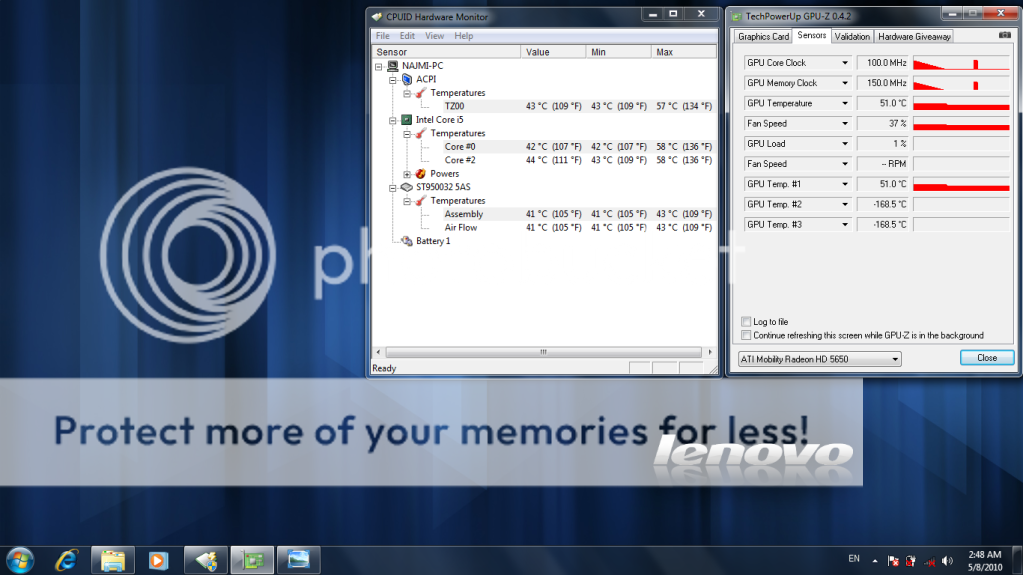
QUOTE(Mie131085 @ May 20 2010, 11:24 AM)  yup, i will update the BIOS today... yup, i will update the BIOS today...sorry, my bad, didnt read jotaro previous post, i think what he said is on idle GC 300/300 while gaming maybe around 450-550/800...  LOL LOLi think that's a good approach.. by doing so can make the GC temp lower... will try to test it out... |
|
|
May 20 2010, 12:19 PM
Return to original view | Post
#17
|
|
Junior Member
399 posts Joined: Aug 2008 From: Hell
|
QUOTE(jotaro12 @ May 20 2010, 12:15 PM) I've played game for >2 hours after I flashed. 300/300 because you want to lower your GPU load hence less heat. It'll switch to 450/800 if you're accessing browser and video/movies iirc then when you stop, it just falls back to 300/300. The game part is a bit skeptical as I only did once, the game lag or rather stop during gaming in 1st few minutes, then amazingly it went really smooth after that. Max temp recorded 73C, Ave 68.5C on GPU-Z. So, no issue after flashed the BIOS right? Everything going smooth with the machine?Did it affect the performance? |
|
|
May 20 2010, 12:58 PM
Return to original view | Post
#18
|
|
Junior Member
399 posts Joined: Aug 2008 From: Hell
|
QUOTE(synz @ May 20 2010, 12:42 PM) flashing bios was a nightmare to me so now i wont simply flash and wait for more review first.. haha I see, when you want to flash bios. Just plug in your AC Adapter with battery to the machine.It takes 1 or 2 minutes only. Well, what you can do is, wait for others to reply on this first then only decide whether to update it or not. As I were told it is update / installation in windows more like you installing a program. Then restart and it will be updated. Before running/update it, unplug LAN cable and close all other applications. Then as mentioned leave battery and ac adapter on. |
|
|
May 20 2010, 01:22 PM
Return to original view | Post
#19
|
|
Junior Member
399 posts Joined: Aug 2008 From: Hell
|
Good luck and enjoy your machine. Hopefully it won't cause any issue (especially temperature)
|
|
|
May 20 2010, 01:46 PM
Return to original view | Post
#20
|
|
Junior Member
399 posts Joined: Aug 2008 From: Hell
|
QUOTE(jotaro12 @ May 20 2010, 01:23 PM) If you guys are not confident to do the BIOS flash, go to Lenovo SC and let the technician do it as it'll be safe + it won't void your warranty. Try it and do let me know if it happens all the time.@Mie131085 If it happens all the time when you wanna play a game, I can say it won't be a good experience. I rather use back the old version instead if can  . . |
| Change to: |  0.0221sec 0.0221sec
 0.36 0.36
 7 queries 7 queries
 GZIP Disabled GZIP Disabled
Time is now: 2nd December 2025 - 04:20 AM |
 Quote
Quote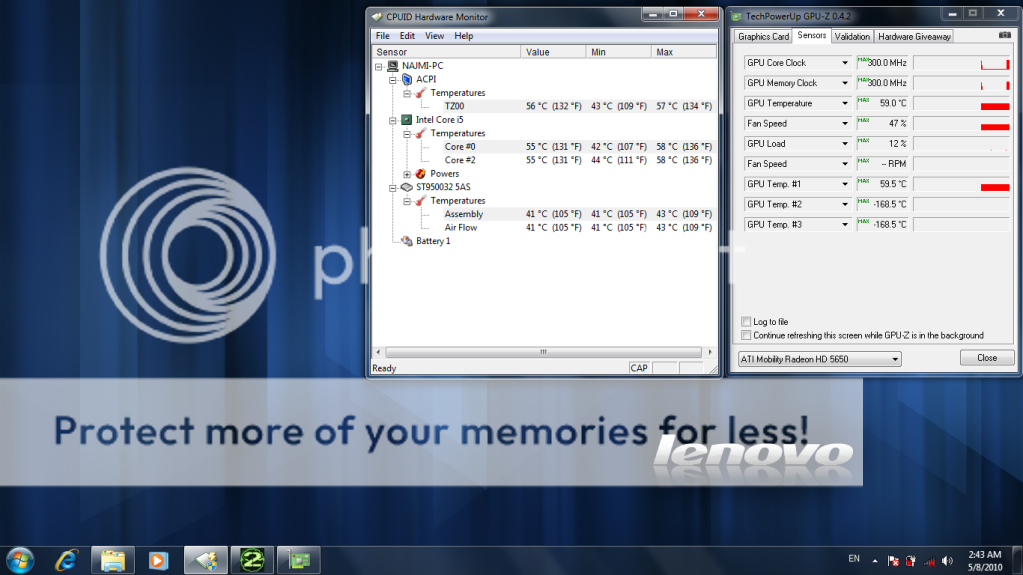
 in the future, will test it out on Supreme Commander 2, Dirt 2 ..